Home · Blogs · Check Point → Palo Alto
The ticket
Friday 18:40. Finance cannot reach ERP. The Check Point gateway still has the old policy. The new Palo Alto pair is in path. Traffic log shows interzone-default deny from Trust to DMZ. Someone already “converted” 150 rules. Someone else says “it worked on Check Point, so NAT is fine.”
The dummy lab for this lesson: gateway cp-gw-01, Finance 10.20.30.0/24, DMZ web/ERP host 10.10.5.20 published as 203.0.113.50, Hide NAT for 10.10.0.0/16. About 150 Access Control rules and 40 NAT rules. Nobody has a zone map on paper.
Check Point often allows traffic with topology + anti-spoofing + implied rules + layered blades. PAN-OS allows nothing between zones until an explicit Security rule matches, and dest-NAT security still uses the original IP with the post-NAT dest zone. Mechanical port conversion is the starting XML, not the migration.

Mental model: layers vs one policy
Learn four words before you touch XML.
Zone. Every PAN-OS interface (or group of interfaces) belongs to a security zone. Every Security rule must name source zone and destination zone. Traffic between different zones is denied by the predefined interzone-default rule until you allow it. Check Point usually infers “inside vs outside” from topology and anti-spoofing, not from a required zone column on every rule.
App-ID. PAN-OS identifies the application (for example ssl, web-browsing, ms-rdp) instead of trusting the port. A converted service-https rule is still a port hole. The upgrade is naming the apps and setting Service to application-default.
Pre-NAT IP, post-NAT dest zone. On PAN-OS the firewall does a route lookup on the original destination, matches a NAT rule, then matches Security using the original addresses but the zone of the translated destination. Translation itself happens on egress. That is official PAN-OS NAT policy logic — not “security uses the private IP.”
Implied rules. Check Point pre-creates hidden accepts for control connections and, depending on Global Properties, DNS / ICMP / DHCP. PAN-OS has none of those extras. If you do not write them, management, monitoring, or name resolution dies at cutover.
Do not map “one Check Point layer = one PAN-OS rulebase.” Collapse intent into one Security rule, then attach Threat Prevention / URL / WildFire profiles.
Zones first. Original IP in Security. Dest zone after NAT. Implied rules become real rules. Ports become App-ID after the logs exist.
The only safe order
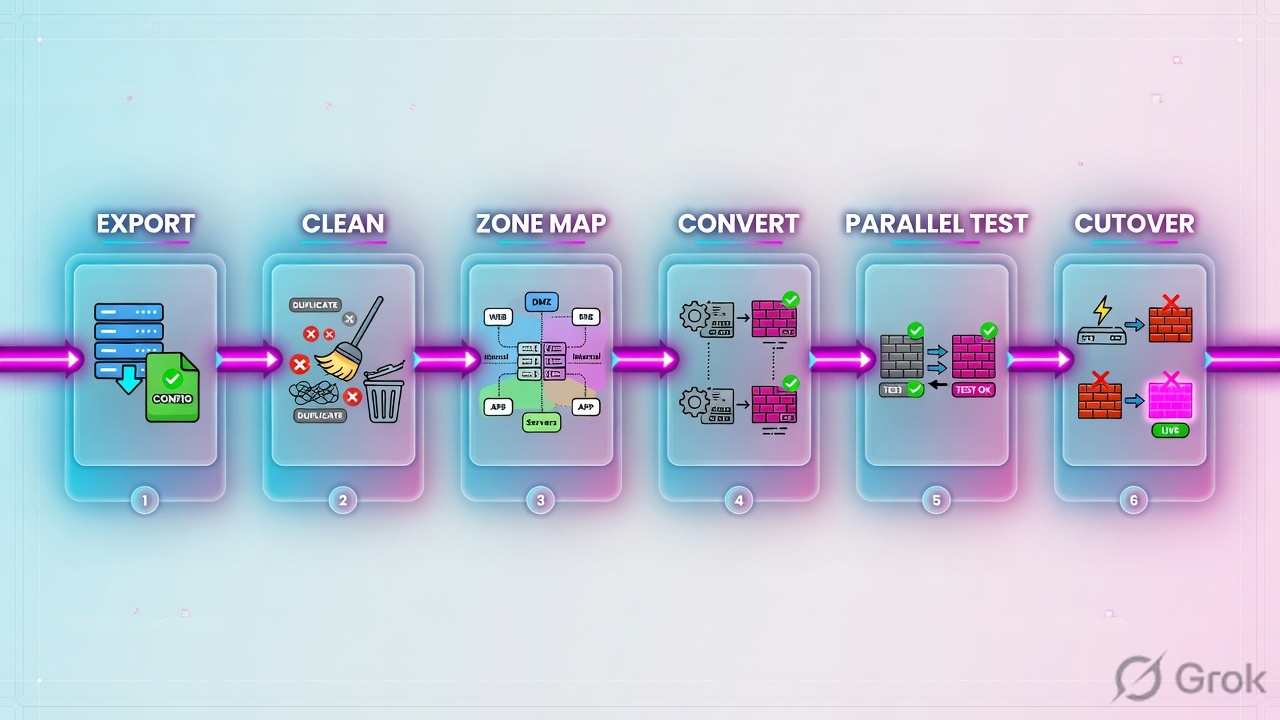
Diamond: more than a few hundred messy rules, heavy VPN, overlapping NAT, or no rollback window → do not solo this. Rectangle path is a small clean site.
| Phase | Typical time | Beginner goal |
|---|---|---|
| 0. Learn PAN-OS words | 1–3 weeks if you are new | Zones, Security, NAT, App-ID, User-ID make sense on a lab VM. |
| 1. Discovery + cleanup | 1–3 weeks | Full export. Delete unused/shadowed rules. Name a business owner per remaining rule. |
| 2. Design | 1–2 weeks | Zone map, HA, licenses, cutover vs parallel, rollback. |
| 3. Convert + manual fix | 2–6 weeks | Objects + ports + NAT, then implied rules, VPN, profiles. |
| 4. Lab / TAP / vwire | 1–4 weeks | Logs match Check Point for the flows that matter. |
| 5. Cutover + hypercare | 1–2 weeks | Keep Check Point powered for 48–72 hours. |
| 6. Optimize | Ongoing | Policy Optimizer clones port rules to App-ID. |
A mid-size rulebase (hundreds to a couple of thousand rules) commonly takes 8–14 weeks if you actually clean and prove it. A “weekend cutover” is how you inherit a PAN-OS box that still allows TCP/443 to any.
What you need before starting
| Category | What to collect | Why it matters |
|---|---|---|
| Policy export | Check Point ShowPolicyPackage v2.0.6+ .tar.gz (HTML + JSON). R80+ Jumbo: $MDS_FWDIR/scripts/web_api_show_package.sh. Plus a gateway route file (netstat -nr or show route all). | That pair is the conversion baseline. The route file is what used to feed zone calculations. |
| Network inventory | Interfaces, VLANs, IPs, static/dynamic routes, ClusterXL vs standalone, anti-spoofing topology. | This becomes the zone map and Virtual Router. |
| Implied + Global Properties | SmartConsole → Security Policies → Access Control → Policy → Actions → Implied Rules, plus Menu → Global Properties → Firewall. | Those accepts will not exist on PAN-OS unless you write them. |
| Feature map | Which blades are actually licensed and used (Application Control, URL Filtering, IPS, SandBlast, Identity Awareness, HTTPS Inspection, Mobile Access). | Prevents “we bought an NGFW and left Threat Prevention off.” |
| Target platform | PA-Series or VM-Series, PAN-OS version, Panorama vs local, HA pair, throughput with inspection on. | Size for App-ID + Threat + decrypt, not for simple stateful pps. |
| Licenses | Threat Prevention, URL Filtering, WildFire, DNS Security, GlobalProtect if remote access moves. | Profiles without subscriptions do not inspect. |
| Conversion method | Professional Services / Migration Factory / a partner tool / careful manual work. Expedition 1 and 2 are unsupported since January 2025 (parser questions: fwmigrate@paloaltonetworks.com). | Do not plan the project around an EOL converter. Check Point VPN was never in the official matrix. |
| Parallel proof | Lab, TAP interface, or Virtual Wire (bump-in-the-wire with no IPs on those two ports). | You need logs before the production default route moves. |
$MDS_FWDIR/scripts/web_api_show_package.sh -v
$MDS_FWDIR/scripts/web_api_show_package.sh -k STANDARD
# MDS / Multi-Domain: domain name or CMA IP — not the CMA name
$MDS_FWDIR/scripts/web_api_show_package.sh -k STANDARD -d "Techclick-Lab-Domain"
Also save the gateway route table (netstat -nr or show route all) and ClusterXL state (cphaprob state). Expedition used the route file to guess zones. You still need it to design the zone map even if a human does the typing.
Blade → PAN-OS feature map
| Check Point | Palo Alto | Manual? |
|---|---|---|
| Access Control + Application Control | Security policy + App-ID | Yes — ports do not become App-ID by themselves |
| URL Filtering | URL Filtering profile (licensed) | Rebuild categories and site exceptions |
| IPS / Anti-Bot / Anti-Virus | Vulnerability Protection, Anti-Spyware, Antivirus | Rebuild Security Profiles and attach to rules |
| SandBlast / Threat Emulation | WildFire | License + forwarding profile |
| Identity Awareness | User-ID / Cloud Identity Engine | Redesign; do not expect a 1:1 Access Role dump |
| HTTPS Inspection | Decryption policy + forward-trust cert | Always redesign |
| Anti-spoofing / topology | Zones + Zone Protection | Zone map is the replacement |
| VPN communities / proxy IDs | IKE/IPsec crypto profiles + Proxy IDs | Expedition’s vendor matrix left VPN blank for Check Point |
| Mobile Access / remote access | GlobalProtect portal + gateway | Rebuild |
| ClusterXL | HA active/passive (or A/A + HA3) | Different failover and session-owner model |
What tools convert vs what you do by hand
Palo Alto’s old converter was Expedition (the fifth generation of their Migration Tool). Its job was mechanical: turn a Check Point / Cisco / Fortinet / Juniper config into a PAN-OS starting XML so you had time to improve it. Expedition 1.x also added a machine-learning pass from traffic logs and a Best Practices Assessment. Expedition 2.0 added containers, an API, and automation around that same parser.
That product is gone as a supported path. The official notice: from January 2025 Palo Alto no longer supports Expedition, including all Expedition 1 and Expedition 2 branches. Core ideas (cleanup, App-ID from real logs, best-practice checks) were meant to land in newer products — for a PAN-OS box you already manage, that is Policy Optimizer plus Strata Cloud Manager cleanup, not a new Expedition VM. Vendor-specific questions still go to fwmigrate@paloaltonetworks.com.
Read the official parser matrix before anyone says “the tool will do VPN.” Check Point VPN was never ticked. Cisco ASA VPN was. App-ID and User-ID were never a checkbox on this table — they were later improvement work.
| Vendor / OS (Expedition 2 beta matrix) | Addr / groups | Serv / groups | Sec. pol | NAT | L3 int + static routes | VPN |
|---|---|---|---|---|---|---|
| Check Point R75, R77 | Yes | Yes | Yes | Yes | Yes | No |
| Check Point >R80 | Yes | Yes | Yes | Yes | Yes | No |
| Cisco ASA 8.2–9.6 | Yes | Yes | Yes | Yes | Yes | Yes |
| Firepower (ASA syntax only) | Yes | Yes | Yes | Yes | Yes | No |
| FortiGate 4.0 / 5.0 / 6.0 | Yes | Yes | Yes | Yes | Yes | No |
| Juniper ScreenOS / Junos 11.4–12.3 | Yes | Yes | Yes | Yes | Yes | No |
Source: pan.dev/expedition “Supported Vendor Matrix” (beta). A blank VPN cell is a rebuild, not a surprise failure. Anything outside this list (Mobile Access, Identity Awareness, HTTPS Inspection, ClusterXL, implied rules) was never claimed.
Tools can reasonably draft
Address / service objects and groups. Basic source–dest–port–action Security rows. Most static and Hide/DIPP NAT. Interface names and static routes (you still rename and zone them). Unused-object reports.
Humans always finish
Zone design. Dest-NAT IP/zone split. Implied rules. App-ID + dependencies. VPN and GlobalProtect. Threat / URL / WildFire profiles. User-ID. Decryption. HA, logging, and management access.
| Item | Why a human still owns it | Example |
|---|---|---|
| App-ID | Converters keep the port. Policy Optimizer later shows which apps actually hit that port. | service-https → clone to ssl + web-browsing + needed SaaS, Service = application-default. |
| Zones | Check Point has no required zone column. PAN-OS denies inter-zone by default. | Internal → Trust, DMZ → DMZ, Internet → Untrust. Then every rule names both. |
| NAT addresses vs zones | Check Point Automatic NAT (client-side dest translate, often default) can make the Access rule show the internal IP. PAN-OS Security still wants the original IP. | Published ERP: Security dest = 203.0.113.50, dest zone = DMZ. NAT dest zone = Untrust. |
| Implied rules | They are not in the visible rulebase export the way you think. | Explicit allows for SMS/SmartConsole, DNS, NTP, ICMP if you still need it, SNMP, syslog. |
| VPN | Crypto, proxy-IDs, and communities do not land cleanly. | Rebuild IKE/IPsec profiles; recreate each tunnel; prove Phase-1/2 before cutover. |
From January 2025 Palo Alto no longer supports Expedition 1 or Expedition 2. TAC will not take an Expedition ticket. Named replacements: Strata Cloud Manager cleanup/optimization for configs already in SCM, plus Professional Services / Migration Factory. If a leftover VM still emits XML, keep it offline (the old stack was PHP/Laravel + MariaDB — not something to put on the internet) and treat the file as an unsupported draft. Vendor parser questions: fwmigrate@paloaltonetworks.com. Live Community EoL note + pan.dev/expedition.
Runbook: export → convert → prove
Primary sources for these steps: Check Point ShowPolicyPackage README, R81 Implied Rules and NAT Policy topics, PAN-OS NAT policy rules, Virtual Wire, and Policy Optimizer.
Side A — Check Point (source of truth)
-
Export the package, not a screenshot
Palo Alto’s Expedition export guide still documents the right inputs even though the converter is EOL. For Check Point R80+: ShowPolicyPackage v2.0.6 (or newer). On Jumbo management servers the wrapper is already there. Use the domain name or CMA IP on MDS — CMA name is not supported.
R80+ — Expedition export guide$MDS_FWDIR/scripts/web_api_show_package.sh $MDS_FWDIR/scripts/web_api_show_package.sh -k STANDARD $MDS_FWDIR/scripts/web_api_show_package.sh -k STANDARD -d "Techclick-Lab-Domain"
Output is a
.tar.gz(HTML + JSON). Confirm NAT and HTTPS layers are inside. Then take a route file from the gateway — Expedition used it for zone calculations; you still need it to design zones:Gateway — route file for zone mathnetstat -nr # or show route all
Pre-R80 files (if the management server is still R77 or older)
Expedition’s export guide asks for four things from
$FWDIR/conf(or the CMA/confafter switching context):objects_5_0.C(orobjects.Con 4.x),<package>.W/rulebases_5_0.fws, and the same route file. On Provider-1/MDS, global objects come from$MDSDIR/confon the master MDS. You still convert those objects by hand or through a current partner/PS path — Expedition will not ingest them as a supported tool. -
Dump implied rules and NAT style
Actions → Implied Rules. Note First / Before Last / Last. In Global Properties → Firewall, record which implied accepts are enabled. On each host/network object, note Automatic Static vs Hide NAT. Manual NAT rows override automatic ones — export those too.
-
Clean before you convert
Hit-count zero, shadowed, and “temp allow” rules do not deserve a PAN-OS life. A dirty 2,000-rule base becomes a dirtier 2,000-rule PAN-OS base.
-
Inventory VPNs and identity
List every community, encryption domain, and remote-access blade. List Identity Awareness sources (AD, Identity Collector, captive portal). Expedition’s official matrix left Check Point VPN blank — rebuild IKE/IPsec and GlobalProtect from this list, do not wait for a parser.
Security Policies → Access Control → Policy → Actions → Implied Rules
Implied Rules · package STANDARD
Source: Check Point R81 Quantum Security Management — Implied Rules (Actions → Implied Rules; Global Properties → Firewall). Every enabled row becomes an explicit PAN-OS Security rule.
Side B — PAN-OS (target)
-
Build interfaces and zones with no policy yet
Network → Interfaces, then Zones. Dummy map:
ethernet1/1Untrust,ethernet1/2Trust,ethernet1/3DMZ, HA on dedicated links. Put a Virtual Router on the L3 interfaces. Do not paste 150 rules onto unnamed zones. -
Load a like-for-like draft
Import converted objects and port-based rules. Rename interfaces to match Side B. Fix dest-NAT using the official split (next section). Add explicit management / DNS / NTP / monitoring rules that replaced implied rules.
-
Attach profiles, do not invent decrypt on day 0
Objects → Security Profiles: one “standard” Vulnerability + Anti-Spyware + Antivirus + WildFire + URL profile. Attach to internet-bound allows. Leave SSL decryption off until the like-for-like path is proven — decryption is its own project.
-
Log the default deny
Override
interzone-defaultto log at session end. That log is how you find the next missing rule instead of guessing.
Side C — Parallel proof, then cutover
-
Insert without changing routing
TAP: copy traffic, policy logs only. Virtual Wire: two interfaces bound as a bump-in-the-wire, no MAC/IP on those ports, Security/App-ID/NAT still apply. Official Virtual Wire doc: you can drop a firewall into an existing segment without redesigning neighbors. Use this beside the live Check Point.
-
Compare logs for days, not hours
Monitor → Logs → Traffic on PAN-OS vs SmartLog on Check Point for Finance→ERP, internet Hide NAT, and one VPN. Mismatches now are cheaper than mismatches after the default route moves.
-
Move traffic by zone or site
Change a routing instance or a VLAN, not the whole campus. Keep Check Point powered with a written rollback (swap cables / restore the old next hop).
-
Only then App-ID
Policies → Security → Policy Optimizer → No App Specified. Sort by traffic. Clone a few port rules, keep dependencies (
ssl,web-browsing), set Service toapplication-default, leave the port rule underneath until it is quiet.
Policies → Security → Policy Optimizer → No App Specified
Port-based rules (Apps Allowed = any)
Source: Palo Alto “Migrate Port-Based to App-ID Based Security Policy Rules.” Clone is the safe path; Match Usage is only for a tiny well-known port (SSH on 22).
Dest-NAT example (the care part)
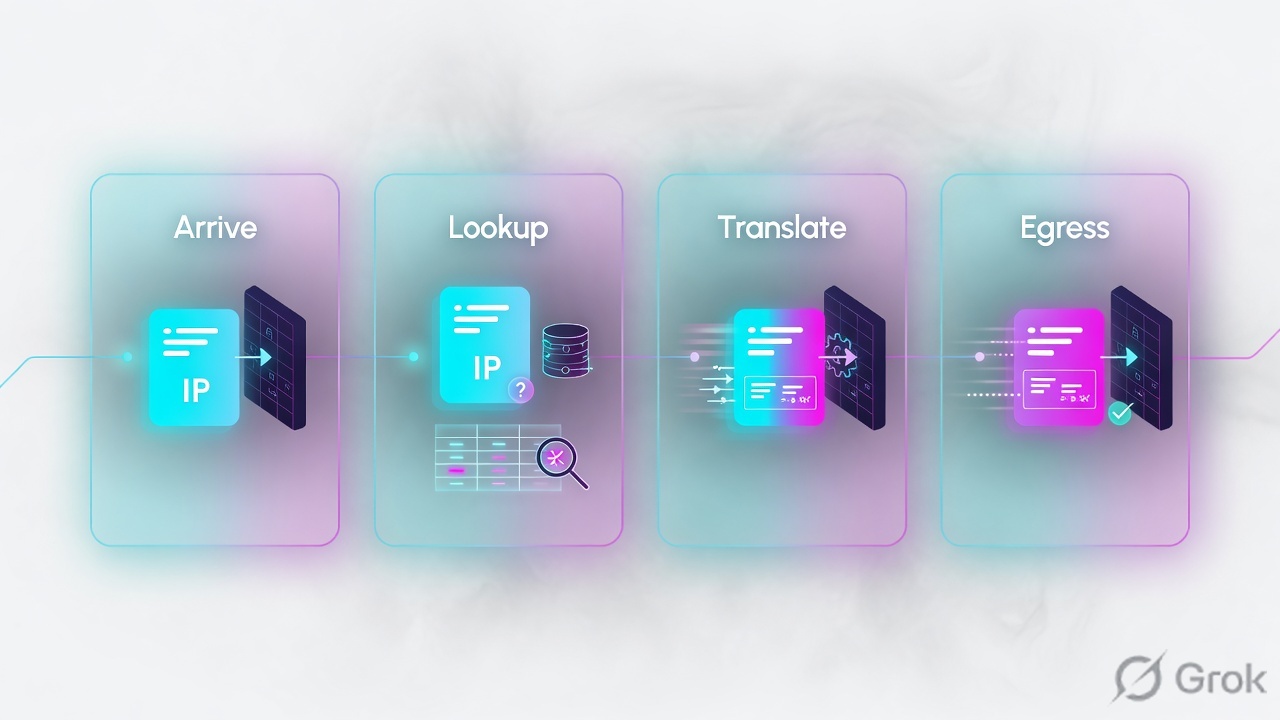
Internet host 192.0.2.250 opens https://203.0.113.50. Dest NAT on the firewall sends that to ERP 10.10.5.20 in DMZ. This is the official one-to-one dest-NAT pattern.
NAT rule direction follows the route lookup of the original dest (public IP lives in Untrust). Security dest zone follows the route lookup of the translated dest (server in DMZ).
| Object | NAT rule (Policies → NAT) | Security rule (Policies → Security) |
|---|---|---|
| Source zone | Untrust | Untrust |
| Dest zone | Untrust (pre-NAT) | DMZ (post-NAT) |
| Dest address | Webserver-public 203.0.113.50 | Same public object — not 10.10.5.20 |
| Translated dest | webserver-private 10.10.5.20 | — |
| App / service after optimize | — | App-ID ssl + deps, Service application-default |
You will hear “Check Point used the public IP, so Palo Alto must use the private IP.” Official dest-NAT example says both NAT and Security address columns use the original IP; only the Security dest zone changes to DMZ. If Check Point Automatic NAT used client-side destination translate, the Check Point Access rule may already show 10.10.5.20 — that is the row you must change to 203.0.113.50 on PAN-OS, not copy.
Hide NAT for Finance to the internet is simpler: Security Trust → Untrust, source 10.20.30.0/24, dest any, then a source-NAT (usually Dynamic IP and Port) to the Untrust interface. U-turn (internal user hitting the public ERP IP) is a third rule pair — do not assume the inbound dest-NAT covers it.
First 72 hours: troubleshooting order

When someone says “it worked on Check Point,” walk this order. Do not start with a reboot.
| Symptom | Most likely | Prove with |
|---|---|---|
| Published server dead after cutover | Security dest IP/zone swapped (private IP or Untrust dest zone) | Traffic log: from/to zones, dest IP, NAT xlate. Session browser. Official dest-NAT example. |
| Everything inter-zone dies | Missing zone-to-zone allow; hitting interzone-default | Log at session end on the default deny. Override is under Policies → Security. |
| Mgmt, DNS, NTP, SNMP gone | Implied rules never rewritten | Compare implied-rule screenshot to explicit PAN-OS rules. |
| One app fails (ERP, RDP, custom) | Port converted too early, or missing App-ID dependency | Policy Optimizer Apps Seen; allow ssl/web-browsing dependencies; clone, do not Match Usage on a busy 443 rule. |
| Intermittent | Asymmetric return path, or HA session owner | Both directions of session; routing; HA state. |
| VPN down | Crypto / proxy-ID mismatch (never auto-clean) | IKE/IPsec logs, Phase-1/2 status, Proxy ID list vs old encryption domain. |
| Slow after “turning on inspection” | Decrypt or heavy profiles on bulk traffic | Resource monitor, decrypt exclusions, threat logs — not more any-any. |
| New flows work, old UDP dies | Idle timeout differences | Compare UDP timeouts per service; do not quote a universal number — check this PAN-OS version and the Check Point service object. |
test security-policy-match from Untrust to DMZ source 192.0.2.250 destination 203.0.113.50 destination-port 443 protocol 6
test nat-policy-match from Untrust to Untrust source 192.0.2.250 destination 203.0.113.50 destination-port 443 protocol 6
show session all filter source 192.0.2.250 destination 203.0.113.50
show session id <ID>
show counter global filter delta yes
test security-policy-match does not walk the full packet path — it tells you which rule matches the fields you typed. Confirm the live session and the Traffic log before you declare victory. Device → Troubleshooting can run the same NAT/security tests from the GUI.
- Zone map exists as a table (interface → zone → subnet) and matches the running config.
- One inbound dest-NAT: Traffic log dest IP is the public address; dest zone is DMZ; xlate shows the private host.
- One outbound Hide NAT: session shows natsrc; return packets arrive.
- Firewall management, DNS, NTP, and the monitoring collector still work — implied-rule replacements exist.
interzone-defaultis logging. You can name the last unexpected deny.- Check Point is still a valid rollback for 48–72 hours.
Traps and when not to go alone
| Trap | What it looks like | Fix |
|---|---|---|
| Zone map after XML | Hundreds of rules with wrong from/to, days of rework | Paper map before import. |
| Port copy as “done” | NGFW still allows any app on 443 | Like-for-like, then Policy Optimizer clones. |
| Private IP in dest-NAT Security | Ticket: “worked on Check Point” | Pre-NAT dest IP, post-NAT dest zone. |
| Forgotten implied rules | SMS, logs, DNS, pings die at cutover | Explicit rules from the Implied Rules view. |
| App-ID without dependencies | SaaS/ERP incomplete handshake | Leave listed dependencies checked on the clone dialog. |
| Decrypt on day 0 | Broken apps blamed on “Palo Alto” | Prove allow path first; decryption is a second change window. |
| No parallel run | Production is the lab | TAP or Virtual Wire until logs agree. |
| Expedition as supported tool | EOL since January 2025; VPN never converted anyway | PS / Migration Factory / partner / manual + Optimizer. |
More than a few hundred messy rules, multiple clusters, overlapping NAT, heavy site-to-site plus remote access, or an uptime window measured in minutes. A bad conversion is worse than staying on Check Point for one more quarter. Hire someone who has cut over dest-NAT and GlobalProtect before, and still do the zone map yourself so you can operate it.
If you have never touched PAN-OS: lab VM → convert 10 Check Point rules by hand (including one dest-NAT) → learn test security-policy-match → only then schedule a real window. That sequence is slower on the calendar and faster in production.
Knowledge check
Six judgment items. Pick one option per question, then Check answers. Reasons point you back to the section to re-read.
Sources
- PAN-OS 11.1 NAT Policy Rules — route lookup, NAT match, Security on pre-NAT addresses / post-NAT zones, translate on egress.
- Destination NAT Example — One-to-One Mapping — public dest IP in Security, DMZ dest zone.
- Migrate Port-Based to App-ID Based Security Policy Rules — Policy Optimizer, clone vs Match Usage, application-default.
- Virtual Wire Interfaces — bump-in-the-wire parallel insert.
- Create a Security Policy Rule — intrazone-default allow, interzone-default deny.
- Expedition 2.0 docs — EOL January 2025; Supported Vendor Matrix (Check Point VPN blank; Cisco ASA VPN ticked); contact fwmigrate@paloaltonetworks.com.
- Expedition Export — Check Point — ShowPolicyPackage v2.0.6,
$MDS_FWDIR/scripts/web_api_show_package.sh, route file for zone calculations, MDS domain name or CMA IP. - Expedition end-of-life announcement — support ends January 2025 for Expedition 1 and 2; functionality moving into newer products.
- Check Point R81 Implied Rules — Actions → Implied Rules; Global Properties → Firewall.
- Check Point R81 Configuring the NAT Policy — Automatic vs Manual NAT; Hide vs Static.
- CheckPointSW/ShowPolicyPackage —
.tar.gzHTML+JSON export; R80+ wrapper script.
Related: PAN-OS NAT deep dive · Zones, interfaces, VR · Security policy fundamentals · Check Point / ASA / FortiGate overview · Check Point policy layers · Check Point Hide vs Static NAT · GlobalProtect · PAN-OS HA modes · Troubleshooting command center