The ticket
Outbound internet works (Hide behind gateway 203.0.113.25). Partner curl to https://203.0.113.40 times out. Access rule to host_hr_web exists. Nobody created Static NAT, so the gateway never owns 203.0.113.40.
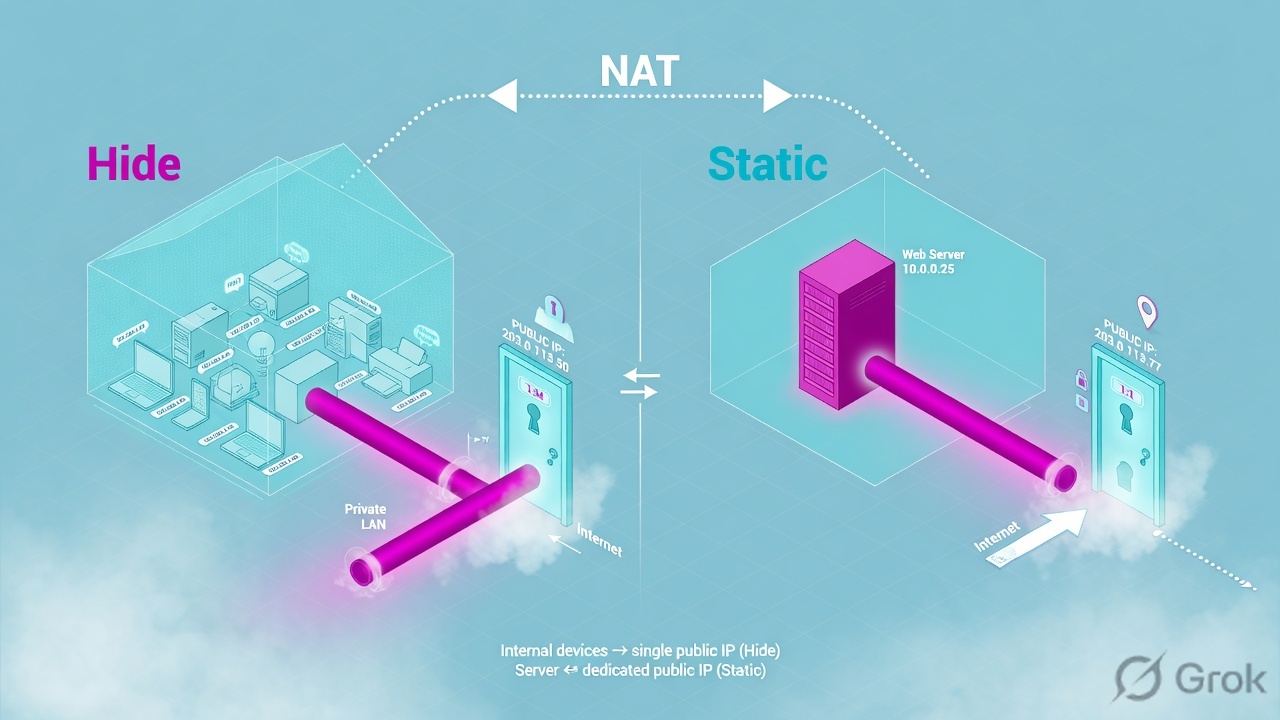
Hide NAT translates many sources to one IP (usually the gateway external). Return traffic must come back to that IP and port. Static NAT maps one internal IP to one public IP in both directions so the internet can initiate. Official automatic rules: Static creates source and destination rules; Hide creates a source rule only — inbound to hidden hosts is not allowed by those automatic rules.
SMS sms-lab 10.10.10.5 · cluster VIP 10.10.10.1 (cp-gw-01 10.10.10.2 / cp-gw-02 10.10.10.3) · external 203.0.113.25 · internal LAN 10.20.30.0/24 · HR PC 10.20.30.80 TECHCLICK\priya.hr · HR app 10.20.30.41 hr.techclick-lab.in. Not a live customer.
Hide vs Static
Hide (PAT): 10.20.30.80:53122 → 203.0.113.25:someport toward the internet. The server on the internet replies to 203.0.113.25. The gateway un-hides to Priya. There is no inbound “please connect to Priya.”
Static: 10.20.30.50 ↔ 203.0.113.40. Partner SYN to .40 becomes SYN to .50. Reply source .50 becomes .40. Return path is the same mapping.
Access policy is evaluated with NAT in the documented order: destination NAT is considered so you write destination as the object you intend (often the real server or the valid-address object for manual NAT). Do not mix those object types blindly.
If the partner hits .25 hoping for the web server, they hit Hide, not Static.
Automatic vs manual
Official Security Management NAT topic:
- Automatic Static — two rules (source out, destination in). Intranet for a network object is not translated.
- Automatic Hide — one source-hide rule. Intranet not translated. No inbound.
- Manual — first matching manual rule wins. Use for port translation, one direction only, or dest+source in one packet. Often needs Proxy ARP for the public IP.
- Automatic rule order: Static host/GW → Hide host/GW → Static network → Hide network. Two automatic rules can apply (src + dst).
Automatic address translation
How you configure it
Side A — Hide the LAN
Network object
net_lan→ NAT → Add automatic rules → Hide → Hide behind Gateway. Or gateway object “Hide internal networks behind the Gateway's external IP.”Side B — Static the server
Host
host_hr_web10.20.30.50 → NAT → Static → 203.0.113.40. Access rule destination = that host (automatic) or the valid-address clone (manual).Side C — ARP + install + prove
If manual public IP is not on the interface, add Proxy ARP (official NAT/ARP topic). Install. Partner curl .40. Log Xlate dest = 10.20.30.50.
# Log fields (names vary slightly by blade):
# XlateSrc  203.0.113.25     ← Hide outbound
# XlateDst  10.20.30.50      ← Static inbound

fw tab -t connections -u | grep 10.20.30.50
# Expect a connection with the public .40 on the other side
Four NAT failures
1 · Hide used for an inbound server
Automatic Hide does not create inbound. Partner SYN dies. Fix: Static.
2 · Access written to the wrong object
Manual NAT wants the valid-address object in the Access rule. Automatic usually uses the real host. Mixing them = cleanup drop with NAT “looking fine.”
3 · No Proxy ARP
Upstream router ARPs for .40. Gateway never answers. tcpdump shows ARP who-has, no reply.
4 · Manual rule below a wider automatic
Manual is first-match among manuals, but a connection can still hit automatic pairs. A too-wide manual hide can steal Static. Put specific manuals where the guide says (often above automatics for special cases — verify in your train’s NAT chapter).
How to prove it
1) Hide: Priya’s outbound log shows Xlate to 203.0.113.25. 2) Static: partner hit on .40 xlates to .50 and Access accepts. 3) ARP for .40 answered. 4) Return traffic is not a new outbound Hide session.
Traps
| Symptom | NAT story | First proof | Wrong fix |
|---|---|---|---|
| Outbound ok, inbound dead | Hide only | Object NAT method | Any-Any Access |
| SYN on wire, no ARP reply | Proxy ARP | tcpdump ARP | Disable SecureXL only |
| Xlate missing in log | No NAT rule matched | NAT policy vs 5-tuple | Reset SIC |
Knowledge check
Judgment items. One best answer. Reasons send you back to the matching section.
Check Point class series: Architecture · Gaia first day · SIC reset · Objects + first match · Policy layers · Hide vs Static NAT · Identity Awareness · HTTPS Inspection · Threat Prevention · Find the drop · fw monitor · SecureXL · ClusterXL · VPN Community · Policy install lock · vs PA vs Forti · CCSA / CCSE interview
Sources
- Security Management — NAT Rules (automatic vs manual, Hide vs Static, enforcement order, Proxy ARP note).
- Same guide — Enabling Automatic NAT; Hide internal networks behind the Gateway's external IP.
Related: Check Point evidence desk · session factory · next lesson in the series above.