An interface is how the packet enters. A zone is the Security-policy door on that interface. A virtual router is how Layer 3 traffic finds the egress interface — and the destination zone is the zone of that egress interface. L3 needs an IP + VR + zone and becomes the gateway. Virtual wire binds two ports with no MAC or IP and still enforces policy (factory default is ethernet1/1–1/2). Tap is a SPAN copy: you can log and alert, you cannot block. Write the Security rule with the same zone names you put on the interfaces. Use PBF only when destination-IP lookup in the VR is the wrong answer — and only on Layer 3 interfaces, not loopbacks.
1. Why the skeleton comes first
A Security rule cannot invent a door. If ethernet1/15 sits in zone Users and you write Source Zone trust, the packet never matches your rule. It falls to interzone-default (deny, logging off). The operator then “fixes policy” for an hour.
The same packet can also die one step later: the interface has an IP and a zone, but no virtual router. PAN-OS lets you commit that. The VR column in show interface all is empty. Layer 3 traffic black-holes with no Security hit to argue about.
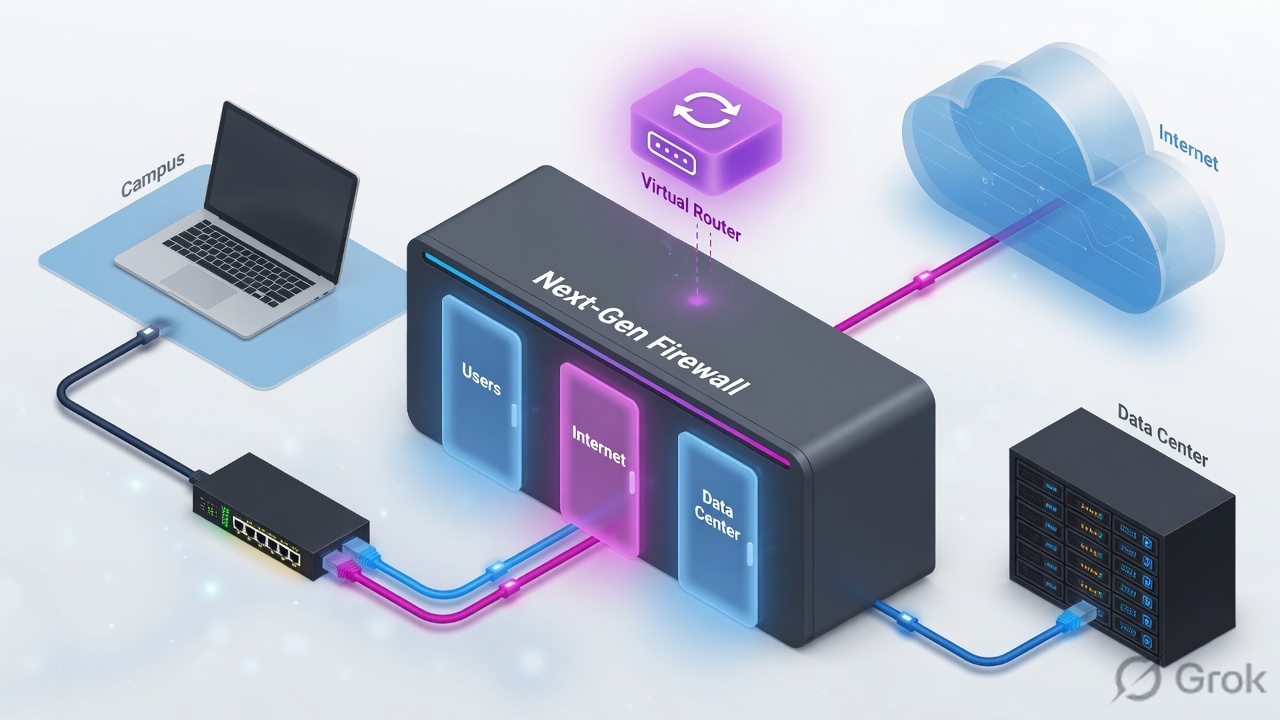
Three more reasons this is not “just ports”:
- Zone type must match interface type. A Layer 3 interface goes in a Layer 3 zone. A vwire interface goes in a virtual-wire zone. Mixing them will not commit the way you think.
- Defaults are opposite by zone relationship. Same-zone traffic is allowed by
intrazone-default. Different-zone traffic is denied byinterzone-default. Put two sensitive subnets in one zone and they can talk with logging off. - Destination zone is post-forwarding. Official VR docs: the destination zone is derived from the outgoing interface after the route (or PBF) lookup. Get the egress wrong and the Security dest-zone is wrong too.
Interface type — Layer3, Layer2, Virtual Wire, Tap, HA, plus logical types (VLAN, loopback, tunnel, aggregate). Set on Network → Interfaces.
Security zone — a label on one or more interfaces. Security, NAT, and PBF match zones, not ethernet names.
Virtual router (VR) — the Layer 3 routing instance. RIB holds learned/static routes; the best route is installed in the FIB. Each L3 Ethernet, VLAN, loopback, and tunnel interface belongs to exactly one VR.
PBF — Policy-Based Forwarding. Overrides the VR’s destination-IP lookup and pins an egress interface using source zone/interface, address, user, dest, app, or service.
Virtual wire (vwire) — two ports bound together. No MAC, no IP, no switching, no routing. Policy still runs. Factory ships ethernet1/1 and ethernet1/2 this way.
2. Mental model · interface → zone → VR
Hold three parts. Interviews fail when people treat “zone” as a Cisco ACL interface or treat the VR as optional decoration.
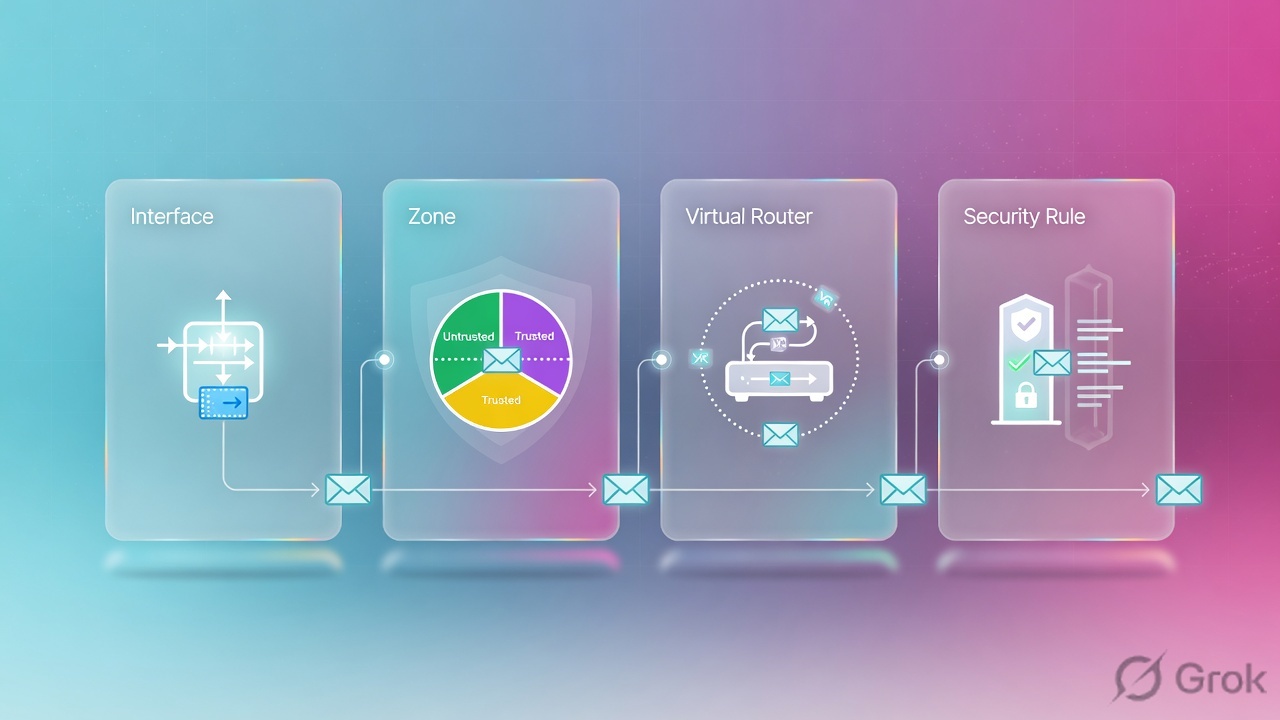
1. Interface
How the frame arrives. Mode decides whether you are a gateway (L3), a bump in the wire (vwire), a switch (L2), or a passive SPAN listener (tap).
2. Zone
The Security match field. Source zone = zone of the ingress interface. Destination zone = zone of the egress interface after forwarding. Tap rules use the same tap zone on both sides.
3. Virtual router
L3 only. Builds RIB from static + OSPF/BGP/RIP, installs the lowest administrative-distance route in the FIB, forwards. No VR = no L3 next hop.
Override: PBF
If dest-IP in the VR is the wrong key (guest to cheap ISP, finance to MPLS), a PBF rule picks the egress first. Security still uses the zone of whatever egress you chose.
The cable is the interface. The door is the zone. The map is the virtual router. The Security rule names two doors, not two cables. PBF rewrites the map; it does not invent a door.
Read left → right, then down. Diamond = “does this interface route?” Green box is L3 only. The blue Security box still applies to vwire and tap.
3. Decision flow · L3 vs vwire vs tap
Do not start in Network → Interfaces until you can answer two questions: must I become the gateway, and must I be able to drop?
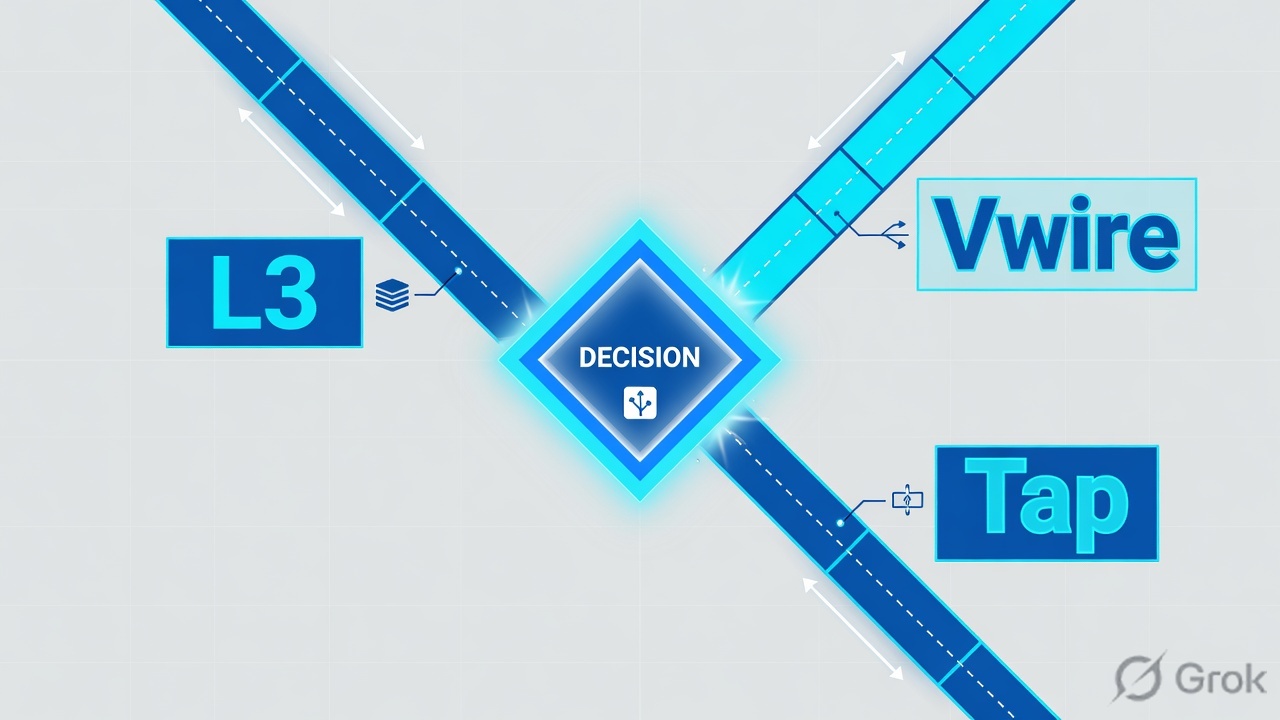
Diamond 1 = can we drop. Diamond 2 = will we own IPs. Tap is never an enforcement design. Vwire is the insert-without-re-IP design. L3 is the production gateway design.
Do not pick tap “to be safe” on a production internet edge and then write Deny rules. Official tap help: the firewall is not in the flow, so it cannot block threats or apply QoS. Profile actions on tap must be alert. Source zone and destination zone on the tap Security rule must be the same tap zone.
4. How to choose mode, zone, VR vs PBF
Use the mode table first, then the forwarding table. Mixing them is how dual-ISP tickets become “sometimes works.”
| You need | Interface type | Zone | VR? | What you get |
|---|---|---|---|---|
| Firewall is the default gateway / NAT / IPsec / PBF | Layer3 (+ optional sub-IF) | Layer 3 zone (Users, Internet, Data Center Applications) | Required — one VR per IF | Routing, NAT, VPN, PBF, Interface Management profile (ping) |
| Insert between two existing devices with no re-IP, still drop | Virtual Wire (pair two ports) | Virtual-wire zones on each side (or one zone if you want intrazone-allow) | No | Bump-in-the-wire. Policy, App-ID, decryption, NAT, HA. No MAC/IP. VLAN tags optional (0 = untagged). |
| SPAN / mirror visibility only | Tap | One tap zone (example TapZone) |
No | Logs + ACC + alert profiles. Cannot block. Security rule is same-zone allow. |
| Switch VLANs on the firewall | Layer2 + VLAN interface | Layer 2 zone on the L2 ports; L3 zone on the VLAN IF | On the VLAN interface only | Switching inside the VLAN; routing only when the VLAN IF is in a VR |
Source for the L3 click path: Configure Interfaces and Zones. Vwire: Virtual Wire Interfaces. Tap: Tap Interfaces.
VR versus PBF
Normally the firewall uses the destination IP against the routing table of the VR attached to the ingress interface. That lookup returns the egress interface — and therefore the destination zone.
| Use | When | Do not use when |
|---|---|---|
| Virtual router (static / OSPF / BGP) | Every host to a prefix should take the same next hop. Default AD: static 10, EBGP 20, OSPF internal 30, OSPF external 110, RIP 120, IBGP 200. Lowest AD wins. | You need different exits for the same dest IP based on who or what app. |
| Second VR + next-vr static | You need a separate RIB (second BGP Local AS, overlapping RFC1918, vsys isolation). Official note: one hop only (A→C, not A→B→C). | You only wanted “guest uses ISP2.” That is PBF or a more-specific static, not a second AS. |
| PBF | Override dest-IP lookup using source zone or interface, source address, source user, dest, application, or service. Dual-ISP “this subnet / this app out ISP2.” | Tap or vwire (PBF is Layer 3 only). Loopback is explicitly unsupported. You wanted a zone — write the Security rule instead. |
Source: Policy-Based Forwarding and Configure Virtual Routers. Symmetric return on PBF requires the Source Interface (not only a zone) so the firewall can pin the return path.
5. Runbook · Side A interface+zone, Side B VR, Side C rule+proof
Lab story (official getting-started numbers, RFC 5737): ethernet1/15 is users at 192.168.1.4/24 zone Users. ethernet1/8 is internet at 203.0.113.23/24 zone Internet, default route next hop 203.0.113.1. Both in VR default. You will delete the factory vwire if those ports are in the way, build the two L3 interfaces, add the default route, write one Security allow, and prove zone names in the Traffic log.
Primary source for clicks: Configure Interfaces and Zones (PAN-OS).
Side A — interface and zone
-
Clear the factory virtual wire if you need those ports
New hardware ships ethernet1/1 and ethernet1/2 as a vwire that allows untagged traffic, plus a matching default Security rule. If you will reuse those ports as L3, delete the vwire, its zones, and that default rule, then Commit. Official getting-started text: leave it and it interferes with later settings.
-
Build the internet interface
Network → Interfaces → Ethernet → ethernet1/8. Interface Type = Layer3. Config tab: Security Zone → New Zone → Name
Internet. Virtual Router =default. IPv4 → Add203.0.113.23/24. Advanced → Other Info → Management Profile → New → enable Ping only if you want to ICMP the IF. OK. -
Build the users interface
Network → Interfaces → ethernet1/15. Interface Type = Layer3. New Zone
Users. Same Virtual Routerdefault. IPv4192.168.1.4/24. Same management profile if you want ping. OK. -
Optional DC segment
Official third interface: ethernet1/1 Layer3, new zone
Data Center Applications, same VR,10.1.1.1/24. Granular zones stop lateral movement that a singletrustzone would allow viaintrazone-default.
Network → Interfaces → Ethernet → ethernet1/15
Ethernet Interface
Placeholder from official getting-started. Zone type follows Interface Type. Leaving Virtual Router empty commits — and black-holes L3.
Click next: IPv4 tab → Add the address → Advanced → Management Profile if you need ping → OK → repeat for ethernet1/8 zone Internet → Commit. Source: Configure Interfaces and Zones (PAN-OS).
Side B — virtual router and default route
-
Confirm both interfaces are in VR default
Network → Virtual Routers → default → Router Settings → General → Interfaces. Add ethernet1/8 and ethernet1/15 if the interface screen did not already attach them. Each Layer 3 Ethernet, loopback, VLAN, and tunnel interface must belong to exactly one VR.
-
Add the default route
Network → Virtual Routers → default → Static Routes → Add. Name
to-internet. Destination0.0.0.0/0. Next Hop = IP Address203.0.113.1. Interface ethernet1/8. Official getting-started does this first so the internet IF has a way out. -
Leave PBF empty unless dest-IP is the wrong key
If guest must exit a second ISP while corp uses this default route, that is Policies → Policy Based Forwarding, not a second default static. PBF Source Type = Zone or Interface; for Symmetric Return you must choose an interface. Forwarding tab: egress interface + next hop. Only Layer 3 interfaces — not loopback.
Policies → Security → Add
Security Policy Rule
Source Zone must be the zone on ethernet1/15. Destination Zone must be the zone on the egress IF the VR (or PBF) chose — here ethernet1/8 / Internet. A rule written trust → untrust will never see this session.
Click next: Actions → Allow + Security profile group + Log at Session End → OK → Commit. Then prove in Monitor → Logs → Traffic. Source: Set Up a Basic Security Policy + this lesson’s zone rule.
Side C — Security rule and proof
-
Write the allow with the real zone names
Policies → Security → Add. Source Zone
Users. Destination ZoneInternet. Application dns / ssl / web-browsing. Serviceapplication-default. Action Allow. Log at Session End. Commit. Deep rule craft is the Security policy lesson — this page only owns the zone match. -
Cable and check the Interfaces widget
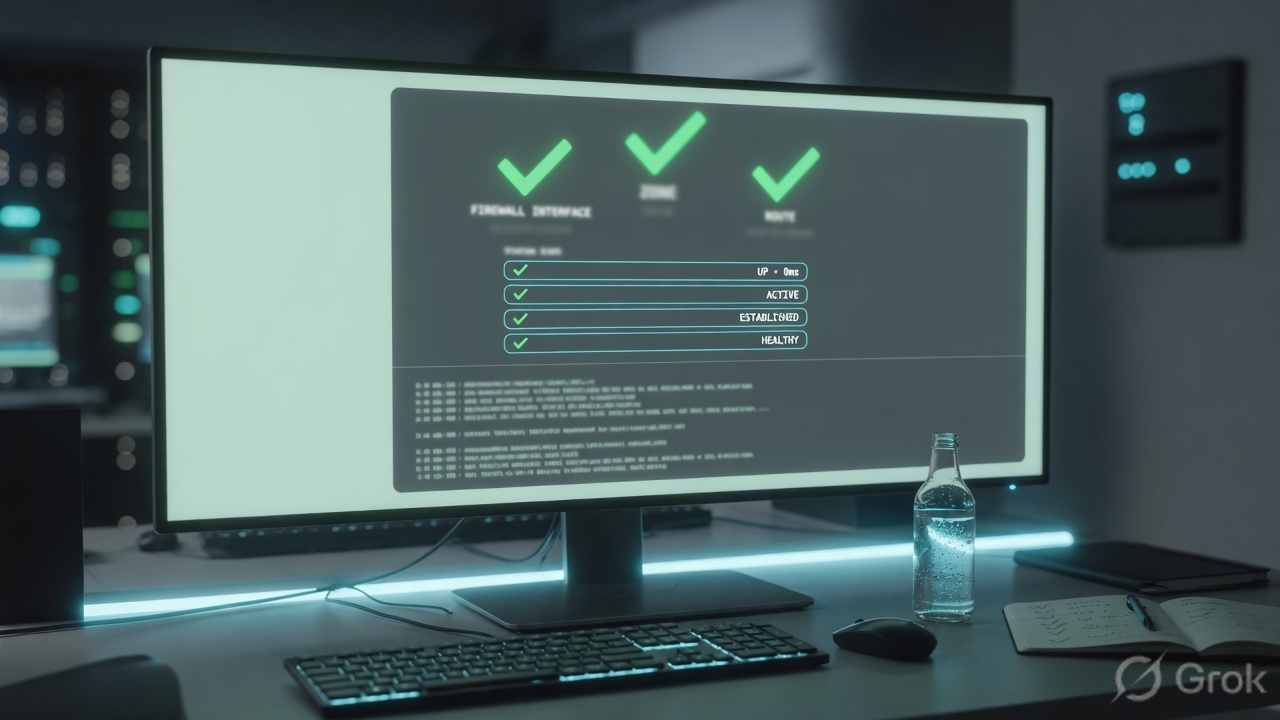
Official last steps: attach straight-through cables, then Dashboard → Interfaces widget is green. Then CLI:
show interface all
show routing route
show running security-policy
show interface all lists ethernet1/15 with zone Users and vr default (not blank). show routing route shows 0.0.0.0/0 via 203.0.113.1 on ethernet1/8. A user DNS query writes Monitor → Logs → Traffic with From Zone = Users, To Zone = Internet, inbound_if = ethernet1/15, outbound_if = ethernet1/8, Rule Name = allow-users-web-dns. If Rule Name is interzone-default, the zone pair on the rule is wrong — do not start by changing App-ID.
6. Runtime path after commit
After go-live the packet does not “find the best rule.” It walks this path once.
- Frame arrives on an interface. Interface type decides whether the chassis will switch, route, pair, or only listen.
- Source zone is the zone configured on that ingress interface. If the IF has no zone, you do not have a Security match field.
- If the interface is Layer 3, the ingress VR runs a dest-IP lookup unless a PBF rule matched first. The result is an egress interface. Destination zone = zone on that egress interface.
- If the interface is vwire, the pair is the only legal exit. Destination zone is the zone on the other vwire port (or the same zone if you put both ports in one zone).
- If the interface is tap, there is no other side. Official tap rule: Source Zone = Destination Zone = the tap zone. Action Allow, profiles = alert.
- Security policy walks top-down. First rule whose zones (and other fields) match wins. No match →
intrazone-defaultallow orinterzone-defaultdeny. - Traffic log records From/To zone and inbound/outbound IF. Those four fields are the skeleton evidence.
7. Traps + proof checklist
| Symptom | Likely miss | Prove / fix |
|---|---|---|
New allow never hits; log shows interzone-default |
Rule Source/Dest zone names ≠ zones on the ingress/egress interfaces | Compare Traffic log From/To Zone to Network → Interfaces. Rename the rule zones or the IF zones so they are the same string. |
| L3 IF is up, ping to the IF works, transit black-holes | Virtual Router left empty | show interface all — vr column blank. Network → Virtual Routers → default → Interfaces → Add. |
| SOC expected blocks on a SPAN feed; malware still flows | Tap cannot take action | Official tap help: not in the flow. Move to vwire or L3 if you must drop. On tap, profiles = alert, same-zone allow only. |
| Commit of new L3 on ethernet1/1 fails or traffic is hairpinned oddly | Factory vwire still owns ethernet1/1–1/2 | Delete the default vwire, its zones, and its default Security rule, then Commit before rebuilding as L3. |
| Guest and corp share dest 0.0.0.0/0; guest still uses ISP1 | You added a static on the same VR instead of PBF | Dest-IP lookup cannot split by source. Policies → Policy Based Forwarding on the guest L3 ingress IF. Loopback cannot be a PBF source. |
| HR VLAN can reach finance with no rule you wrote | Both interfaces in the same zone → intrazone-default allow, logging off |
Split zones. Override intrazone-default to enable Log at Session End if you must keep one zone temporarily. |
| Dual-WAN return drops / unexpected dest zone | Outbound IF ≠ return IF; dest zone followed the unexpected egress | Same zone on both WAN IFs, or PBF + Symmetric Return (source interface). Then re-check To Zone in the Traffic log. |
- Interface Type matches the zone type (Layer3 / Virtual Wire / Tap / Layer2).
- Every L3 Ethernet, VLAN, loopback, tunnel IF has a VR;
show interface allvr column is filled. - Security rule Source Zone = ingress IF zone; Dest Zone = egress IF zone (tap: both = tap zone).
- Factory vwire deleted if those ports were reused.
- Dashboard Interfaces widget green; Traffic log From/To + inbound_if/outbound_if match the design.
- PBF used only on L3, and only when dest-IP in the VR is the wrong key. Symmetric Return set from a source interface if return must pin.
Knowledge check
Six judgment items. Pick one answer each, then Check. Reasons name the section to re-read.
Sources
- Configure Interfaces and Zones — Network → Interfaces; Interface Type Layer3; Config tab New Zone + Virtual Router
default; official example IPs; delete factory vwire first; Dashboard Interfaces widget. - Configure Layer 3 Interfaces — Layer3 type, VR attachment, then static/dynamic routing.
- Virtual Wire Interfaces — bind two ports, no MAC/IP, bump in the wire, still policy; factory ethernet1/1–1/2; VLAN tag 0 = untagged; no Interface Management profile.
- Tap Interfaces — SPAN/mirror; cannot block or QoS; New Zone; Security rule same tap zone both sides; profile action alert.
- Configure Virtual Routers — RIB → FIB; dest zone from outgoing IF; each L3 Ethernet/VLAN/loopback/tunnel in exactly one VR; default AD values; next-vr is one hop.
- Policy-Based Forwarding — overrides dest-IP VR lookup; L3 only; loopback unsupported; Symmetric Return needs a source interface.
- Policies → Policy Based Forwarding — ingress VR normally picks outgoing IF and dest zone; PBF can use source zone, address, user, dest, app, service.
- Traffic Log Fields — Source/Destination Zone, inbound_if, outbound_if, Rule Name.
Related: PAN-OS Security policy — first match, then prove it · PBF and multi-VR · Static, OSPF, BGP · NAT deep dive · Session factory · Traffic not passing · Palo Alto interview hub · Palo Alto course