The app always talks to the Portal first. The portal authenticates the user, then returns the agent config: gateway list, Connect Method, Internal Host Detection, HIP collection. The Gateway is the data plane — IPsec/SSL tunnel (external) or User-ID + HIP without a tunnel (typical internal). HIP is collected after the tunnel is up. Official Palo Alto: a failed HIP check never disconnects GlobalProtect. The user stays connected; Security policy with a HIP profile simply does not match, so apps look dead. Prove it in Monitor → Logs → HIP Match plus Traffic, not from the tray icon.
1. Why portal ≠ gateway
Mixing the two roles is the first conceptual miss on every PCNSE whiteboard and every Monday outage. One chassis can host both. They still do different jobs.
The portal is the management function: it distributes agent configuration, the list of available gateways, optional client certificates, and (on Windows/macOS) the app software. No user application traffic flows through the portal. The gateway is where security is enforced. If HIP is enabled, the gateway builds a HIP report from the raw host data the app submitted and uses that report in policy.
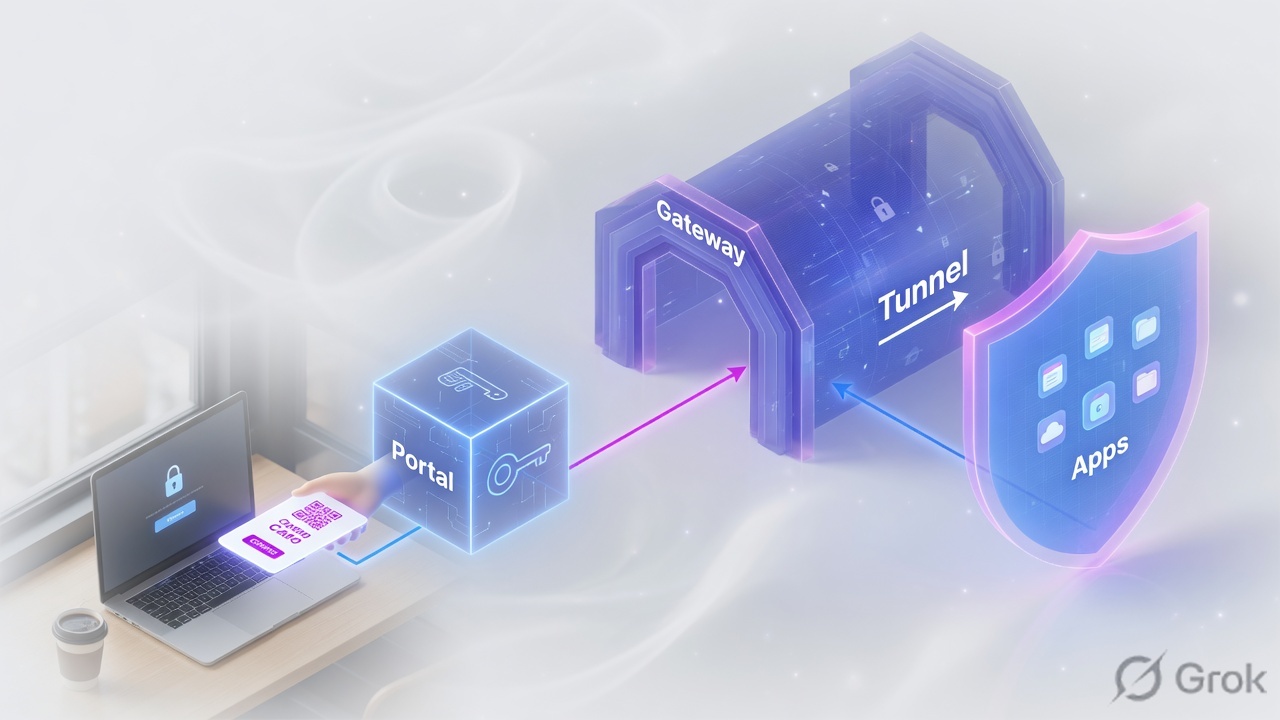
Three gateway types, from the Administrator’s Guide:
- Internal — an interface on the corporate LAN configured as a gateway. Used with User-ID and/or HIP so office traffic is identified and posture-checked. Tunnel mode or non-tunnel mode. The app reaches it after Internal Host Detection succeeds.
- External (auto discovery) — outside the LAN. The app picks Best Available from priority, source region, and response time.
- External (manual) — also outside, but the user must initiate that gateway. You mark it Manual in the portal agent config. Different authentication is allowed.
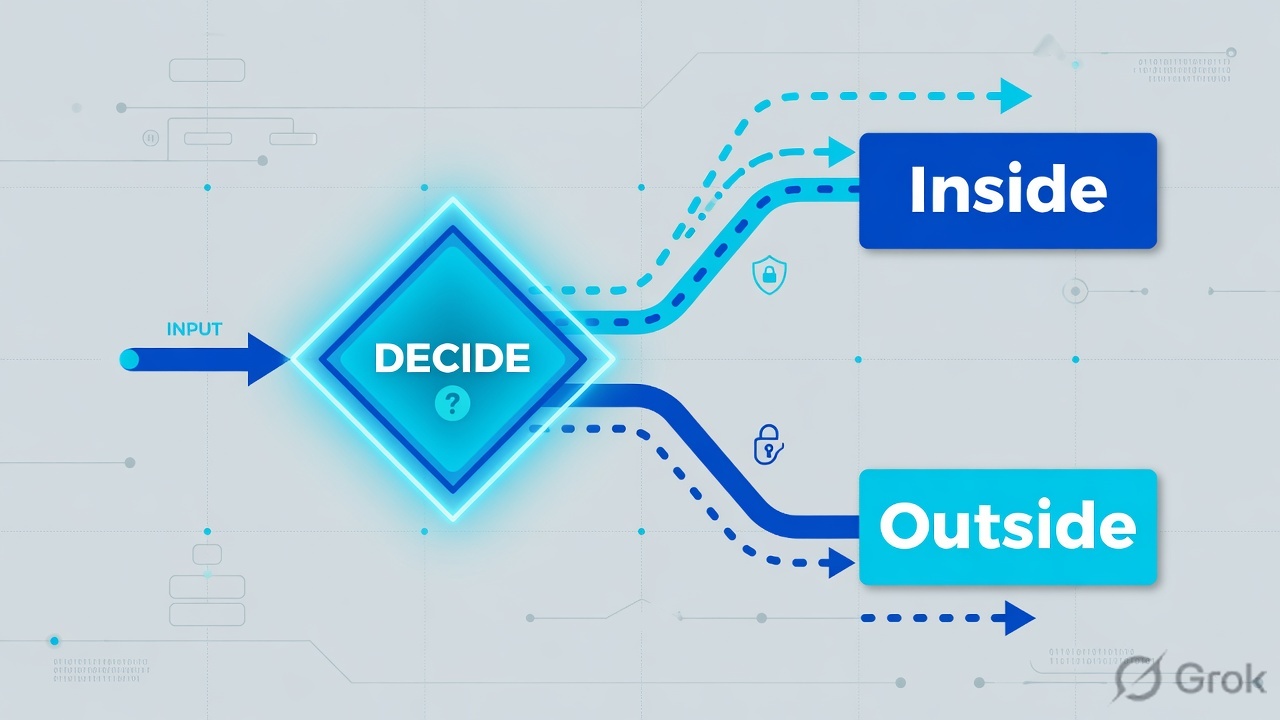
Internal Host Detection (IHD) — the app does a reverse DNS lookup of an IP that only exists inside. If the answer equals the configured hostname, the endpoint is “inside.” That decision is on the client, not the firewall.
HIP Object — one filter on raw host data (BitLocker on, CrowdStrike running, domain joined). HIP Profile — Boolean combo of objects used as Source Device on a Security rule.
Pre-logon — a connect method that brings a tunnel up with a machine certificate before any user signs in. The username on the firewall is pre-logon until the user authenticates and the tunnel is reassigned.
Access Route — include/exclude prefixes the gateway pushes to the virtual adapter. Empty include and exclude = everything through the tunnel.
2. Mental model
Memorize two planes. The portal plane answers “who is this, and what config do they get?” The gateway plane answers “may this session use this app, given user + HIP?”
Read left → right, then the two IHD boxes. Orange is the trap interviewers want named.
Portal certificate
What the app trusts on first connect to gp.example.com. Public CA recommended so unmanaged laptops do not throw a cert warning.
Gateway certificate
What authenticates the tunnel endpoint. Same file is fine when portal and gateway share an interface. Different lifetime is a Monday outage if you only calendar one.
3. Login + HIP flowchart
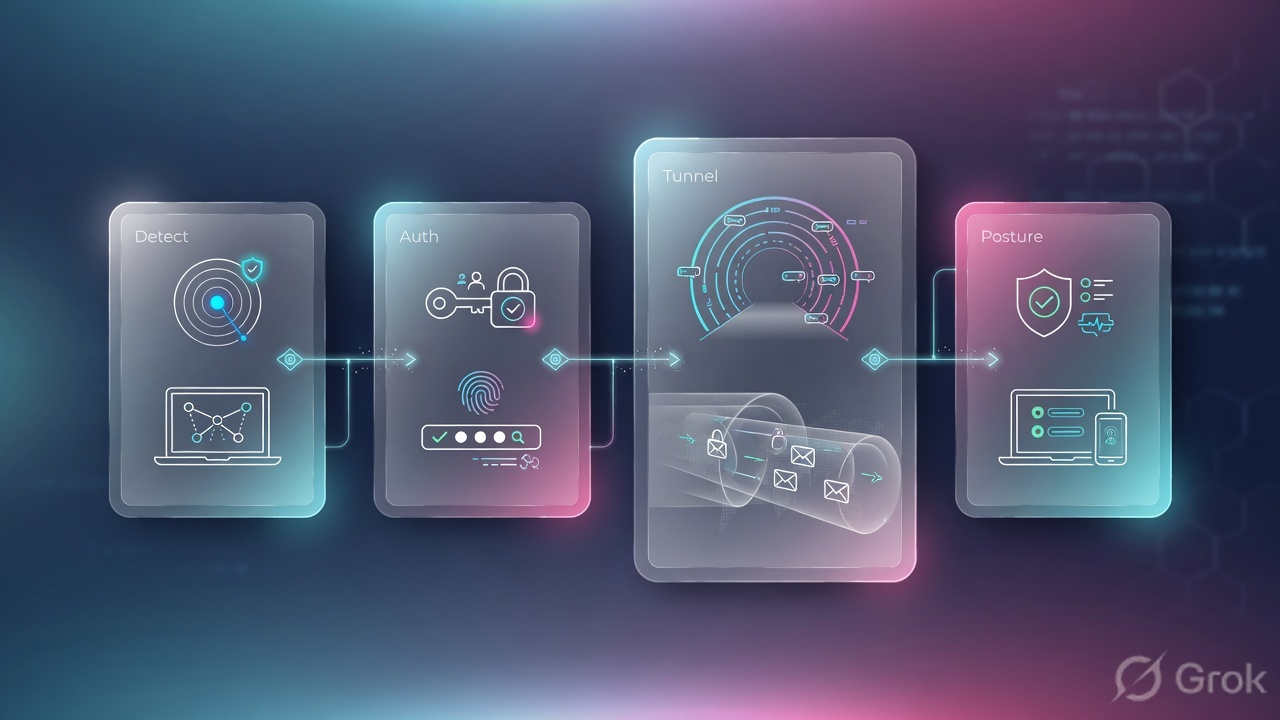
From café Wi-Fi to “apps work,” seven stages fire. Each fails in a recognisable log. Flow first, then words.
HIP generation cutoff is about 20 seconds on the client. A partial report can go up first; a later full report replaces it. That is why the tray goes green, then apps die a few seconds later.
4. How to choose connect method and tunnel
Connect Method lives on the portal agent, not the gateway: Network → GlobalProtect → Portals → (portal) → Agent → (config) → App.
| You need | Connect Method | Gateway type | Why |
|---|---|---|---|
| Helpdesk / contractors who click Connect | On-demand (Manual user initiated connection) | External | User starts the session. Do not use this if you also need an Internal Gateway — IHD + HIP on LAN will not run unless the app is up. |
| Corporate laptops, always inspected | User-logon (Always On) | External + optional Internal | App connects to the portal at user login, then to the gateway in the pushed config. Required for Internal Gateway. |
| GPO / SCCM / Intune on first boot, before Windows logon | Pre-logon (Always On) | External (machine cert) | Tunnel authenticates the endpoint. Username is pre-logon. Restrict that user to DC, DNS, DHCP, AV, OS update only. |
| Office HIP + User-ID, no extra tunnel on LAN | User-logon (Always On) | Internal, usually non-tunnel | Administrator’s Guide: an internal-gateway design must always be on. On-Demand will not fire when users assume they “don’t need VPN.” |
| Internet local, corp prefixes only through VPN | Any of the above | External + Access Route Include | Gateway → Agent → Client Settings → Split Tunnel → Access Route. Missing Include = internal apps hairpin out the physical NIC. |
| Full inspect, including local subnet | Always On or Pre-logon | External, no include/exclude | Empty split-tunnel lists send everything through the tunnel. Optionally enable No direct access to local network on untrusted Wi-Fi. |
Source: Always On VPN Configuration, Remote Access VPN with Pre-Logon, Internal HIP checking.
Do not put the same prefix in both Include and Exclude. Official split-tunnel doc: that is a misconfiguration. Exclude routes must be more specific than include routes, or you exclude more than you meant.
5. Runbook · Side A Entra, Side B PAN-OS, Side C HIP
Lab story (placeholder only): portal and external gateway share gp.example.com on untrust. Users live in Entra. Corp prefixes are 10.0.0.0/8. You want Always-On, Entra MFA, HIP = disk encryption + anti-malware, and split-tunnel Include for the corp range.
Primary sources: Microsoft Entra — GlobalProtect tutorial and Set Up SAML Authentication.
Side A — Microsoft Entra ID (IdP)
-
Add the gallery app
Entra admin center → Enterprise applications → New application → search Palo Alto Networks - GlobalProtect → Create. Open Single sign-on → SAML.
-
Basic SAML Configuration — include
:443Microsoft’s pattern (and the Palo Alto KB) requires the port on Entity ID and ACS:
Entra Basic SAML (replace the FQDN)Identifier (Entity ID): https://gp.example.com:443/SAML20/SP Reply URL (ACS): https://gp.example.com:443/SAML20/SP/ACS Sign-on URL: https://gp.example.com
If portal and gateway use different FQDNs, add both Entity IDs and both ACS URLs. Prisma Access docs say the same: every gateway name in
https://<name>:443/SAML20/SPplus the matching/ACS. -
Assign users and download metadata
Users and groups → assign the pilot group. Then download the Federation Metadata XML (and note the current signing certificate). You will re-import this XML when Entra rotates the cert — that is the “signature could not be verified” ticket.
Enterprise applications → Palo Alto Networks - GlobalProtect → Single sign-on → SAML
Basic SAML Configuration
Click next: Save, download Federation Metadata XML, then on the firewall Device → Server Profiles → SAML Identity Provider → Import. Source: Microsoft Learn GlobalProtect tutorial + PAN-OS SAML setup.
Side B — PAN-OS portal and gateway
-
Import the IdP
Device → Server Profiles → SAML Identity Provider → Import. Profile Name e.g.
entra-gp. Browse the metadata XML. Leave Validate Identity Provider Certificate checked. Maximum Clock Skew default is 60 seconds (range 1–900). Fix NTP; do not “solve” drift by opening the replay window to 900. -
Authentication Profile
Device → Authentication Profile → Add. Type = SAML. IdP Server Profile =
entra-gp. Set Username Attribute (usuallyusernameor the claim Entra sends). Advanced → Allow List: add the users/groups, orall. An empty Allow List means nobody can authenticate — that is a documented default, not a UI bug. -
Portal
Network → GlobalProtect → Portals → Add. Interface + IPv4 of the untrust address. SSL/TLS Service Profile with a server cert whose CN/SAN is
gp.example.com. Authentication → Client Authentication → Add → Authentication Profile = the SAML profile. Then Agent → Add:- App tab: Connect Method = User-logon (Always On).
- Internal tab: enable Internal Host Detection (IPv4 IP + hostname that only internal DNS can reverse-resolve). Add the Internal Gateway if you have one.
- External tab: add the external gateway FQDN, priority Highest for the local region.
- HIP Data Collection: Collect HIP Data = enabled.
-
Gateway
Network → GlobalProtect → Gateways → Add. Same interface/cert is fine on a single box. Authentication Profile = same SAML profile (portal and gateway both need it). Agent → Tunnel Settings: Tunnel Mode on, Tunnel Interface =
tunnel.2in acorp-vpnzone with Enable User Identification. Agent → Client Settings → Add → Config Selection Criteria (user/group any for the lab) → IP Pools → Split Tunnel → Access Route → Include10.0.0.0/8(or an address object of type IP Netmask). Commit.
Network → GlobalProtect → Portals → gp-portal → Agent → corp-laptops → App
Agent configuration · App
Click next: OK the agent, OK the portal, then Network → GlobalProtect → Gateways → Agent → Client Settings → Split Tunnel → Access Route. Source: Network → GlobalProtect → Portals Agent App tab.
Network → GlobalProtect → Gateways → gp-gw-ext → Agent → Client Settings → split-corp → Split Tunnel → Access Route
Split Tunnel · Access Route
Click next: Commit, connect a pilot laptop, then check the virtual adapter routes. Empty Include + empty Exclude = full tunnel. Source: Configure a Split Tunnel Based on the Access Route.
Side C — HIP objects, profile, policy, proof
HIP needs a GlobalProtect subscription on every gateway that will evaluate HIP. Check Device → Licenses before you debug empty HIP Match logs.
-
HIP Objects
Objects → GlobalProtect → HIP Objects → Add. Keep objects simple. Example:
hip-disk-encon the Disk Encryption tab (encrypted = yes). Example:hip-av-rtpon Anti-Malware (Real Time Protection = yes, virus def age ≤ 5 days). Official guidance: one concern per object so profiles stay composable. -
HIP Profile
Objects → GlobalProtect → HIP Profiles → Add. Name
hip-corp-compliant. Add Match Criteria:hip-disk-encANDhip-av-rtp. Parentheses if you mix AND/OR. Max 2048 characters. -
User-ID on the source zone
Network → Zones → corp-vpn → Enable User Identification. Palo Alto is explicit: you must enable User-ID on the source zone of HIP-controlled traffic, even if you are not using user-based rules, or the firewall cannot generate HIP Match log entries.
-
Security rule
Write and test the allow on zones/addresses first (see the Security policy lesson). Then Policies → Security → (rule) → Source → Source Device → Add the HIP profile (up to 63 per rule). Add a lower quarantine allow (remediation VLAN / update sites only) whose HIP profile is NOT
hip-corp-compliant, plus a HIP Notification on the gateway: Network → GlobalProtect → Gateways → Agent → HIP Notification. -
Prove it
Pilot laptop connects. Monitor → Logs → GlobalProtect shows portal then gateway success. Monitor → Logs → HIP Match lists every object/profile that matched — it does not list misses. If
hip-corp-compliantis absent, the endpoint did not match. Monitor → Logs → Traffic Rule Name must be the HIP-tagged allow, notinterzone-default.
GlobalProtect log: event portal-auth-ok / gateway-connected, user = Entra UPN. HIP Match: hip-corp-compliant present. Traffic: Rule Name = your HIP allow, Source User = that UPN, Source Zone = corp-vpn, Action = allow. On the laptop, route print (Windows) shows 10.0.0.0/8 via the GP adapter.
6. Runtime path after commit
Always-On at user login: IHD first. Miss → portal TLS → Entra challenge (embedded or default browser) → assertion to /SAML20/SP/ACS → portal validates signature and NotBefore / NotOnOrAfter against firewall time ± Maximum Clock Skew → config XML → gateway selection → tunnel + IP pool → HIP report (≈20 s cutoff, partial allowed) → Security policy with user + HIP → Access Routes installed.
Pre-logon changes only the first identity. The machine certificate (Local Computer store on Windows, System Keychain on macOS) brings the tunnel up as user pre-logon. After interactive login, Windows renames the tunnel to the user; macOS tears it down and builds a new one. Your pre-logon Security rules must stay tiny — DHCP, DNS, specific AD, antivirus, OS updates — and a deny must sit under them. Put the pre-logon agent config first in the portal list (User/User Group = pre-logon) if that population should use a different gateway before login.
7. Traps + proof checklist

| Symptom | What it is not | First evidence | Fix |
|---|---|---|---|
| Connected, then “dropped” in ~20–30 s; apps dead; tray still Connected or flaps | HIP tearing IPsec (official: HIP never disconnects the VPN) | Monitor → Logs → HIP Match missing hip-corp-compliant; Traffic hits a rule without that HIP or interzone-default |
Read the raw HIP report on the gateway. Fix the endpoint (AV/encryption) or add a quarantine HIP rule + notification. Do not “disable HIP” as the production fix. |
| SAML “authentication failed” intermittent | Wrong password (that fails at Entra, not on NotBefore) | Firewall clock vs Entra; Maximum Clock Skew = 60 s default | NTP on the NGFW. Raising skew to 900 hides replay risk. |
| SAML “signature could not be verified” | Clock skew (different log string) | Device → Server Profiles → SAML Identity Provider cert vs Entra signing cert | Re-import Federation Metadata XML after Entra cert rotation. Add both portal and gateway Entity IDs. |
| Tunnel up, internet works, 10.x pings fail | HIP or SAML | Client routing table missing 10.0.0.0/8 via GP adapter | Gateway → Agent → Client Settings → Split Tunnel → Access Route Include, or empty lists for full tunnel. |
| Office laptop builds an external tunnel on the LAN | Gateway priority | IHD hostname resolves on public DNS, or IHD left blank | Internal-only hostname + IP. Optional Advanced Internal Host Detection (validates internal-gateway cert too). |
| HIP Match log empty for everyone | “HIP is broken” | Network → Zones → corp-vpn → User-ID off; or no GP subscription; or Collect HIP Data off | Enable User-ID on the source zone. Confirm Device → Licenses. Portal Agent → HIP Data Collection. |
| Internal Gateway never seen | Missing tunnel interface | Connect Method = On-demand | Set User-logon (Always On). Internal gateway can be non-tunnel; it still needs the app running. |
| First-boot laptop cannot reach a DC | User SAML (user has not logged on) | No machine cert / Connect Method not Pre-logon | Pre-logon + machine cert in the computer store. Security rules for user pre-logon only. |
Teach this sentence in interviews: HIP is collected after the tunnel is up. A HIP miss does not take the tunnel down. It takes the Security rule away. The ~20 second client cutoff explains the delay. A partial HIP report can match nothing you care about; the full report arrives later. Users call that a drop. Your evidence is HIP Match (presence/absence of the profile) plus Traffic Rule Name — not the tray animation.
- Portal and each gateway Entity ID + ACS exist in Entra, with
:443. - SAML Authentication Profile Allow List is not empty. NTP is sane. Clock skew left at 60 unless you have a measured reason.
- Connect Method matches the design (Always On if Internal Gateway exists).
- IHD hostname fails to resolve on public DNS.
- Access Route Include contains every corp prefix you expect, or lists are empty (full tunnel).
corp-vpn(or internal zone) has User-ID on. HIP subscription present.- HIP rollout is monitor-then-enforce: log non-match for a window, then attach the profile to the allow.
- One pilot: GlobalProtect log + HIP Match + Traffic Rule Name + client route table.
Knowledge check
Six judgment items. Same facts as the runbook. Check answers, then reset if you still think HIP tears the tunnel.
Sources
- GlobalProtect Portals — portal distributes agent config, gateway list, client certs; not the data plane.
- GlobalProtect Gateways — internal / external auto / external manual; HIP report generated on the gateway.
- Portals Agent App tab — Connect Method: On-demand, User-logon (Always On), Pre-logon.
- Always On VPN Configuration — Network → GlobalProtect → Portals → Agent → App → User-logon (Always On).
- Remote Access VPN with Pre-Logon — machine cert, user
pre-logon, tight Security rules, Windows rename vs macOS rebuild. - Internal HIP checking and user-based access — Internal Gateway requires Always On.
- Set Up SAML Authentication — Device → Server Profiles → SAML Identity Provider; Maximum Clock Skew default 60 s (1–900); Authentication Profile Allow List.
- Microsoft Entra — Palo Alto Networks GlobalProtect — Entity ID
https://<FQDN>:443/SAML20/SP, ACS…/SAML20/SP/ACS. - How to setup Azure SAML authentication with GlobalProtect — same URL pattern; include
:443. - Configure HIP-Based Policy Enforcement — HIP Objects / Profiles paths; User-ID required on the zone; Source Device HIP; HIP Notification; HIP Match logs.
- Would GlobalProtect VPN be disconnected if HIP check failed? — HIP never disconnects the VPN.
- How Does the HIP Mechanism Work in GlobalProtect? — ~20 s client cutoff; partial report; HIP Match shows matches only.
- Configure a Split Tunnel Based on the Access Route — Include / Exclude; empty = full tunnel; No direct access to local network.
Related: PAN-OS Security policy · PAN-OS session factory · IPSec site-to-site · Azure ↔ Palo Alto IPsec · Palo Alto interview hub · Palo Alto course