Lessons · F5 LTM series · Module 5
Full explanation — same as the Techclick PDF
This section is the workbook explanation, rewritten from F5-BIG-IP-LTM-Module-5.pdf. Read it like class notes. Diagrams above are only a map — the teaching is here.
Read the PDF-order sections below. Then do the runbook. Then take the quiz. If a sentence is in the PDF, it is in this page.
PDF · page 1 — F5 BIG-IP LTM — Module 5
Health Monitors, iRules & Local Traffic Policies
Application Health Detection and Layer-7 Traffic Decisions Health Monitoring
- ICMP · TCP · HTTP · HTTPS iRules Events · Routing · Redirects · Headers — LTM Policies Conditions · Actions · Declarative Routing
- Troubleshooting Monitors · iRules · Policies
PDF · page 2 — Why Health Monitors Matter
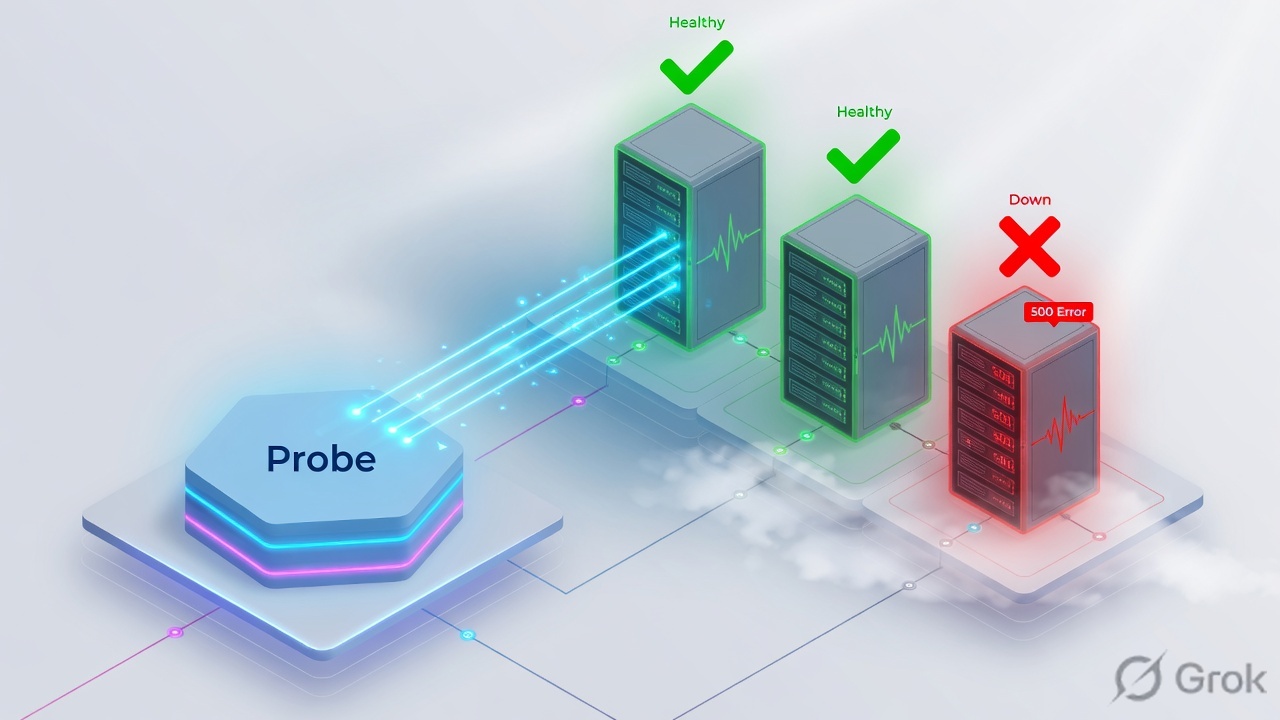
Network reachability does not guarantee application health. A server can be fully reachable at the IP and TCP level while the application itself is broken, overloaded, or returning errors. BIG-IP health monitors exist to detect exactly this gap — ensuring traffic is only forwarded to members that are genuinely serving application requests correctly.
🟢 ICMP Success. Ping responds — host is reachable at network layer. Does NOT confirm application health.
🟡 TCP 443 Open. Port is listening — service process is running. Does NOT confirm correct application behavior.
🔴 Application: HTTP 500 Web application is throwing errors.
Backend is broken despite network and TCP success.
The deeper the monitor, the more accurately it reflects real application health. Always choose the monitor type that validates the actual service requirement.
PDF · page 4 — How the Health Monitor Process Works
BIG-IP TMM periodically generates health probes to each configured pool member. The probe content and protocol depend on the monitor type. TMM evaluates the response against expected criteria and marks the member as Available or Unavailable accordingly. This process runs independently of client traffic.
Evaluate Result
Receive Response
Send to Member
Generate Probe
Correct Response → AVAILABLE. Member receives traffic from active pool. Load balancing includes this member in its selection algorithm.
❌ Incorrect / No Response → UNAVAILABLE. Member is removed from active rotation. No new connections are forwarded until the monitor succeeds again.
Health-monitor traffic is generated by BIG-IP, not by clients. Monitor probes travel on the server-side network path from BIG-IP to each pool member.
PDF · page 6 — Object Health Relationships: Node, Pool Member & Pool
Health monitors in BIG-IP can be associated at three distinct levels — Node, Pool Member, or Pool — and each scope covers different aspects of availability. Understanding this hierarchy prevents misconfiguration where a node appears healthy while the actual service port remains unmonitored.
Node Monitor
Monitors the IP address only. Suitable for basic host-level reachability checks (e.g., ICMP). Does not validate service ports.
Pool Member Monitor Monitors a specific IP:port combination.
Most appropriate for validating that a specific service is available and responding correctly.
Pool Monitor. Applied to all members of a pool. Efficient for uniform application health checks when all members expose the same health endpoint.
Best practice: Use service-level monitoring (pool or pool-member) when the service port and application correctness matter — which is almost always in production.
PDF · page 7 — Monitor Types Overview
BIG-IP LTM provides several built-in monitor types that cover different layers of the network and application stack. Choosing the correct type is critical — a monitor that is too shallow may allow broken application traffic to reach users, while an overly complex monitor may create unnecessary overhead or false positives.
Monitor Type What It Tests App Awareness Common Use
ICMP IP reachability Low Basic host/network check
Gateway ICMP Gateway reachability Low Gateway/route availability
TCP TCP connection Medium-Low Service-port availability
TCP Half Open TCP SYN/SYN-ACK behavior Medium-Low Lightweight port check
HTTP HTTP application response High Web applications
- HTTPS TLS + HTTP response High Secure web applications — Always choose the monitor type that validates the actual service requirement — not simply the most convenient option.
PDF · page 8 — ICMP Monitor
The ICMP monitor sends an ICMP Echo Request to the target host and expects an ICMP Echo Reply. It is the simplest and lowest-overhead monitor type available on BIG-IP, suitable for basic infrastructure reachability checks where application-layer validation is not required.
- How It Works BIG-IP → ICMP Echo Request → Server
- Server → Echo Reply → BIG-IP — Reply received within timeout → Member AVAILABLE Advantages
Extremely simple to configure Very low overhead on server and network
Fast failure detection for host-level outages ⚠ Application May Still Be
Broken. ICMP success only proves the host OS is responding — the application may be completely non-functional.
⚠ Firewall May Block ICMP. Some firewall policies block ICMP even when the application is healthy, causing false-negative monitor results.
Valid Use Cases
Infrastructure reachability checks, simple node-level monitoring, gateway probing.
PDF · page 9 — Gateway ICMP Monitor
The Gateway ICMP monitor is a specialized variant of the ICMP monitor used to probe a specific gateway or next-hop router. Rather than monitoring a backend application server, it validates that the network path through a gateway remains reachable. This supports network availability decisions in certain BIG-IP architectures.
- Pool Remains
Mark Reachable
Gateway ReplySend Echo
Typical Use Case
Monitor the default gateway or a critical next-hop router to detect upstream routing failures. When the gateway becomes unreachable, BIG-IP can take action based on the monitor result.
Important Distinction
Gateway ICMP monitors the network path, not the backend application. Never use Gateway ICMP as a substitute for applicationlevel health monitoring of backend servers.
Do not confuse gateway monitoring with backend application monitoring. A successful Gateway ICMP result does not imply that any backend pool member is healthy.
PDF · page 10 — TCP Monitor
The TCP monitor attempts to establish a full TCP connection to the monitored pool member's IP address and port. A successful three-way handshake confirms that the service port is open and accepting connections — but it does not validate anything about the application running on that port.
Handshake Complete
- SYN‑ACK ReplyBIG‑IP SYN — What TCP Monitor DOES Confirm Service port is open
Server OS TCP stack is responding Network path to port is reachable
What TCP Monitor Does NOT Confirm Web page loads correctly
Database queries work Application dependencies are healthy
- HTTP status codes are correct (e.g., 503 may still pass) — TCP 443 OPEN + Application returning HTTP 503 — the TCP monitor may still mark the member as AVAILABLE. Use HTTP/HTTPS monitors for application-layer validation.
PDF · page 11 — TCP Half Open Monitor
The TCP Half Open monitor sends a TCP SYN packet and evaluates whether the server responds with a SYN-ACK. Unlike a full TCP monitor, BIG-IP does not complete the three-way handshake — it only checks that the TCP listener acknowledged the SYN. This can reduce overhead in some designs.
How It Works BIG-IP sends TCP SYN to target port1.
Server responds with SYN-ACK2.
BIG-IP detects SYN-ACK → listener is available3.
BIG-IP does NOT complete handshake (RST or no ACK)4.
Benefits vs Limitations
Benefits: Lower per-probe overhead in certain scenarios; faster lightweight port availability checks.
Limitations: Still not application-aware. Only confirms TCP listener is responding. Behavior may vary by BIG-IP version and configuration.
TCP Half Open is useful when full connection establishment is undesirable or creates unnecessary load on backend systems, but it should never substitute for HTTP-level application health validation.
PDF · page 12 — HTTP Monitor — Application-Layer Validation
The HTTP monitor performs a real HTTP transaction to the pool member. BIG-IP sends a configurable HTTP request and evaluates the response against an expected string. This provides genuine application-layer health validation, making it the preferred monitor type for web applications.
Mark Available Evaluate
Return 200 Send GET
- Example Monitor Request GET /health HTTP/1.1
- Host: app.example.com Connection: close — Example Expected Response HTTP/1.1 200 OK
...
APP_STATUS=READY. BIG-IP checks whether the configured Receive String appears in the response body or headers.
HTTP monitors provide the highest application visibility without TLS overhead. Use them for all plaintext web application pools.
PDF · page 13 — Send String — What BIG-IP Sends to the Server
The Send String defines the exact content BIG-IP transmits to the monitored service during each health probe. For HTTP monitors, this must be a syntactically valid HTTP request. Poorly constructed Send Strings are one of the most common causes of false-negative monitor results in production.
- Correct HTTP/1.1 Send String GET /health HTTP/1.1 — Host: app.example.com Connection: close
. Includes method, URI, HTTP version, Host header, Connection header, and CRLF termination.
- ❌ Common Mistake — Incomplete Request GET /health — This bare GET is NOT a valid HTTP/1.1 request. Many virtual-hosted servers require a properly formatted request including a Host header. The monitor may hang or receive an error response.
Method. GET — retrieves the health endpoint without modifying server state URI
- /health — dedicated lightweight health check path HTTP Version — HTTP/1.1 — required for modern virtual-hosted applications Host Header
- Required by HTTP/1.1 spec and most modern web servers CRLF Termination — signals end of HTTP request headers to server
PDF · page 14 — Receive String — What BIG-IP Expects Back
The Receive String is the pattern BIG-IP searches for in the server's response. If the string is found, the monitor considers the check successful and the member is marked Available. Choosing the right Receive String is just as important as the Send String — a string that is too generic can produce false positives.
Good Receive String Examples
- APP_STATUS=READY — Application explicitly provides this value — HEALTHY — Clear, deterministic application signal 200 OK — HTTP status line match
- Poor Receive String Examples html — Far too broad; any HTML page would match, even error pages — OK — Could match unrelated content in error responses
Empty string — BIG-IP marks member UP if any TCP response is received
The Receive String should identify a stable, deterministic response that your application explicitly generates when it and its critical dependencies are operating correctly. Coordinate with application developers to define a meaningful health signal.
PDF · page 15 — Health Endpoint Design Best Practices
A health endpoint is a purpose-built URL on the application server that BIG-IP probes during health monitoring. The design of this endpoint significantly affects both the accuracy of health monitoring and the stability of the backend systems being monitored.
Lightweight & Fast
Returns a response quickly without expensive processing, database queries, or session creation.
Deterministic Result
Returns a predictable response when healthy. Does not modify application state or data on each probe.
Reflects Key Dependencies
Checks that critical application dependencies (e.g., database connectivity) are available — not just that the process is running.
No Sensitive Data Exposed
Does not return credentials, internal configuration, or information that could aid an attacker.
Shallow Health Check
Verifies only that the application process is running. Fast and lowoverhead but may miss dependency failures.
Deep Health Check
Validates application + critical dependencies (DB, cache, auth service). More accurate but must be designed carefully to avoid overloading dependencies with probe traffic.
PDF · page 16 — HTTPS Monitor
The HTTPS monitor extends HTTP application-layer validation through a TLS-encrypted connection. BIG-IP establishes a TLS session with the backend server, then sends the configured HTTP request and evaluates the response. This is the correct monitor type for HTTPS-only backend servers.
Response & Match Send GET /health
Establish Session Initiate TLS
TLS Compatibility
Monitor must negotiate a compatible TLS version and cipher suite with the backend server.
Certificate Behavior
By default, HTTPS monitors may not validate backend certificates. Review configuration to match security requirements.
SNI Support
Some backends require SNI to select the correct virtual host. Configure SNI appropriately for the backend.
HTTP Request Content Same Send String and
Receive String principles as HTTP monitor apply inside the TLS session.
Exact HTTPS monitor capabilities, certificate validation behavior, and TLS version support vary by BIG-IP version and SSL profile configuration. Always validate monitor behavior in your specific environment.
PDF · page 17 — Interval & Timeout — Monitor Timing
Every BIG-IP health monitor has two core timing parameters: Interval and Timeout. These control how frequently probes are sent and how long BIG-IP waits before considering a member unavailable. Balancing these values is an important production design decision.
Interval. How frequently BIG-IP sends a health probe to the monitored member. Shorter interval = faster failure detection but more monitor traffic. Longer interval = less overhead but slower detection of failures.
Timeout. Controls how long BIG-IP tolerates failed or no-response probes before marking a member unavailable. A member is generally considered down after sufficient missed probes within the timeout window, depending on BIG-IP version and configuration.
Production design should balance failure detection speed, application stability, monitor traffic overhead, and false-positive risk. No single formula applies to every environment — tune values based on application SLA requirements.
PDF · page 18 — Monitor Association Scopes
A health monitor can be associated at three different scopes on BIG-IP. Each scope determines which objects are health-checked and at what granularity. Understanding these scopes prevents common misconfiguration where a node is marked healthy while its service port goes unmonitored.
Node Monitor
Checks IP-level reachability. Best for basic infrastructure checks. Does not validate service port or application.
Pool Monitor. Applied to all members in a pool. Efficient for uniform application health checks. All members share the same monitor.
Pool Member Monitor Applied to a single member (IP:port).
Allows different monitors per member in the same pool for specialized health checks.
Use service-level monitoring (pool or pool-member scope) when service availability on a specific port is what matters — which is the case for virtually all application pools.
PDF · page 19 — Using Multiple Monitors on a Pool
BIG-IP allows more than one monitor to be assigned to a pool. This enables layered health validation — for example, combining a gateway availability check with an application-level HTTP monitor. The pool uses the combination of monitor results to determine whether a member is eligible to receive traffic.
Example: Dual Monitor Configuration
- Monitor 1: HTTP monitor → validates application response — Monitor 2: Gateway ICMP → validates network path Both must succeed for member to be AVAILABLE
Monitor Availability Logic
BIG-IP can be configured to require that all assigned monitors report healthy, or that a configured minimum number of monitors report healthy, before a member is considered available. The exact behavior depends on monitor configuration and the BIG-IP release in use.
Multiple monitors increase confidence in health status but also increase probe traffic. Design monitor combinations purposefully — each monitor should add meaningful validation that a single monitor cannot provide alone.
PDF · page 20 — Creating a Custom HTTP Monitor
Custom HTTP monitors allow you to define precise health validation logic tailored to your application's specific health endpoint, expected response, and timing requirements. The following example demonstrates both GUI and CLI configuration approaches.
- GUI Path Local Traffic → Monitors → Create
- Field Value Name mon_web_health
Type HTTP Interval 5
- Timeout 16 Send String GET /health HTTP/1.1 Host: — app.example.com Connect ion: close Receive String APP_STATUS=READY
TMSH CLI Example tmsh create ltm monitor http \ mon_web_health \ defaults-from http \ interval 5 \ timeout 16 \ send "GET /health HTTP/1.1
\
- Host: app.example.com \ — Connection: close " \ recv "APP_STATUS=READY"
Validate exact TMSH syntax against your deployed BIG-IP software release. Values shown are examples for lab use and must be adapted to your application's requirements.
PDF · page 21 — Health Monitor Troubleshooting
A pool member showing DOWN despite the backend appearing to work is one of the most common BIG-IP support scenarios. Systematic investigation of the monitor configuration, network path, and application response is required to identify the root cause.
Diagnostic Tools tmsh show ltm pool WEB_POOL detail tcpdump -ni internal host 10.20.20.101 curl -v http://10.20.20.101/health openssl s_client -connect \
- 10.20.20.101:443 -servername \ app.example.com Common Root Causes — Wrong monitor type for service Incorrect or missing Host header
- Receive String does not match actual response Firewall blocking monitor probe traffic — TLS/SNI mismatch on HTTPS monitors Timeout too short for application response time
Application health endpoint returning error
PDF · page 22 — What Is an iRule?
An iRule is an event-driven, Tcl-based traffic script executed by BIG-IP TMM. iRules allow network engineers to implement custom traffic decisions based on connection attributes, HTTP headers, URIs, hostnames, and other traffic characteristics — far beyond what static load balancing configuration can express.
URI / Host Routing
Route requests to different pools based on HTTP URI path or Host header value.
HTTP Redirects
Issue HTTP 301/302 redirects — e.g., redirect all HTTP traffic to HTTPS automatically.
Header Manipulation
Insert, replace, or remove HTTP request and response headers for application integration.
Logging & Debugging
Write traffic details to /var/log/ltm for troubleshooting and traffic analysis.
iRules are attached to Virtual Servers and executed by TMM — not the Linux OS shell. They are not general-purpose Linux scripts.
iRule Tcl commands operate within the BIG-IP traffic management environment.
PDF · page 23 — The iRule Event-Driven Model iRules do not execute as a single continuous script for every
The iRule Event-Driven Model iRules do not execute as a single continuous script for every packet. Instead, TMM fires specific code blocks only when the corresponding traffic event occurs. This event-driven architecture allows precise, efficient traffic processing at exactly the right point in the connection lifecycle.
Key Principle
Each when EVENT_NAME { } block executes only at the moment that event fires. A single iRule can contain multiple event handlers covering different phases of the connection.
Important Dependency
The events that fire depend on which profiles are attached to the
Virtual Server. For example, HTTP_REQUEST only fires if an HTTP profile is present. CLIENTSSL_HANDSHAKE only fires if a Client SSL profile is attached.
PDF · page 24 — Common iRule Events Reference
The following events are the most frequently used in production iRules for HTTP and HTTPS applications. Understanding when each event fires and what traffic information is available at that point is essential for writing correct iRules.
Event When It Fires Common Use
- CLIENT_ACCEPTED Client-side TCP connection accepted by VIP IP/connection-level logic, rate limiting — CLIENTSSL_HANDSHAKE Client TLS handshake completed SNI inspection, cert-based decisions
- HTTP_REQUEST HTTP request parsed and available to TMM Host/URI/header routing, redirects — LB_SELECTED Load balancing has selected a pool member Member selection override or logging
- SERVER_CONNECTED Server-side TCP connection established Backend connection logic — HTTP_RESPONSE HTTP response from server available Response header manipulation, logging
HTTP_REQUEST requires an HTTP profile attached to the Virtual Server. For HTTPS, BIG-IP must terminate TLS (Client SSL profile) before HTTP_REQUEST can inspect HTTP content.
PDF · page 25 — Basic iRule Structure
Every iRule follows the same foundational structure: a when block declares the event, followed by Tcl commands that execute when that event fires. The example below demonstrates host-based pool selection — one of the most common iRule use cases — with a line-by-line explanation.
iRule Example when HTTP_REQUEST { if { [HTTP::host] eq \ "app.example.com" } { pool APP_POOL
- } }
Line-by-Line Explanation
- Line Meaning when HTTP_REQUEST Execute when an HTTP request is available — [HTTP::host] Read the HTTP Host header value eq "app.example.com" String equality comparison pool APP_POOL Select APP_POOL as the target for this request
Keep iRules as simple as possible. Every Tcl command adds processing overhead per request. Complex logic that can be expressed in an LTM Policy should be expressed there instead.
PDF · page 26 — HTTP to HTTPS Redirect iRule
One of the most common iRule use cases is redirecting all incoming HTTP (port 80) requests to HTTPS. This requires a dedicated Virtual Server on port 80 with an HTTP profile attached. The iRule intercepts each HTTP request and issues a 302 redirect that preserves the original hostname and URI path.
- iRule when HTTP_REQUEST { HTTP::redirect \
- "https://[HTTP::host][HTTP::uri]" } — Traffic Flow Client requests: http://www.example.com/app1.
BIG-IP VIP (port 80) receives request2.
iRule fires HTTP_REQUEST event3.
BIG-IP returns HTTP 302 Redirect4.
Client redirected to: https://www.example.com/app5.
Preserves Hostname
[HTTP::host] carries the original Host header value into the redirect URL
Preserves URI Path
- [HTTP::uri] carries the full URI path and query string Security Note — In security-sensitive applications, validate or normalize the host value before using it in redirect responses to prevent open redirect vulnerabilities
PDF · page 27 — Host-Based Routing with iRules
Host-based routing allows a single BIG-IP Virtual IP address to serve multiple applications simultaneously — each distinguished by the HTTP Host header. The iRule reads the Host header from each request and forwards it to the appropriate backend pool.
iRule — Host-Based Routing when HTTP_REQUEST { switch -glob \ [string tolower [HTTP::host]] {
- "shop.example.com" { pool SHOP_POOL } — "portal.example.com" { pool PORTAL_POOL }
- "api.example.com" { pool API_POOL }
} }. Routing Logic string tolower normalizes the Host header to lowercase before comparison, preventing case-sensitivity mismatches. Consistent normalization avoids routing failures caused by client header variations.
PDF · page 28 — URI-Based Routing with iRules
URI-based routing allows a single Virtual Server to distribute requests to different backend pools based on the HTTP URI path. This is a common pattern in microservice and API architectures where different URL namespaces are served by different backend services.
iRule — URI-Based Routing when HTTP_REQUEST { if { [HTTP::uri] starts_with \
"/api/" } { pool API_POOL. } elseif { [HTTP::uri] \ starts_with "/images/" } { pool IMAGE_POOL } else { pool WEB_POOL
- } }
Routing Table URI Pattern Target Pool
- /api/* API_POOL /images/* IMAGE_POOL
All other URIs WEB_POOL. The else branch provides a safe default pool for requests that do not match any explicit condition — always include a default to prevent unhandled traffic.
URI-based routing is one of the most common reverse-proxy patterns. Evaluate whether an LTM Policy can handle the same routing logic before writing an iRule — policies are often easier to maintain for straightforward path-based rules.
PDF · page 29 — HTTP Header Manipulation with iRules iRules can insert, replace, or remove HTTP headers on
HTTP Header Manipulation with iRules iRules can insert, replace, or remove HTTP headers on both requests (before forwarding to backend) and responses (before returning to client).
Header manipulation is commonly used for application metadata tagging, migration tracking, backend routing signals, and proxy identification.
Insert / Replace Header — Request when HTTP_REQUEST { HTTP::header replace \
X-Environment "Production" }. Inserts or replaces the X-Environment header with value Production on every request forwarded to the backend.
Common Use Cases
- Application environment tagging (Production / Staging) Migration routing signals to backend — Proxy identification headers Backend routing hints
Custom session or tracing headers
Security Warning: Do not blindly trust or forward security-sensitive headers received from clients (e.g., X-Forwarded-For, custom auth headers). Normalize or explicitly replace security-relevant headers rather than allowing clients to set them freely. Passing clientsupplied values to backends without validation can enable header injection attacks.
PDF · page 30 — iRule Logging iRules can write log messages to /var/log/ltm using the log command. This is
iRule Logging iRules can write log messages to /var/log/ltm using the log command. This is valuable during development, testing, and troubleshooting — allowing engineers to observe exactly which traffic conditions are being matched and what decisions the iRule is making.
Logging iRule Example when HTTP_REQUEST { log local0. \ "Host=[HTTP::host] \
URI=[HTTP::uri]" }. Writes host and URI information to the local0 logging facility at the default log level. View logs with:
tail -f /var/log/ltm Logging Guidelines. Use for troubleshooting and initial testing Log routing decisions and matched conditions
- ❌ Remove or reduce logging before production deployment — ❌ Never log credentials, session tokens, or authentication headers
- ❌ Never log personally identifiable information (PII) — ❌ Avoid logging on every request at high traffic volumes
Excessive iRule logging at high request rates can significantly impact BIG-IP TMM performance and generate very large log volumes that consume disk space rapidly. Always limit logging scope and verbosity in production iRules.
PDF · page 32 — iRule Troubleshooting
iRule Troubleshooting. When an iRule does not behave as expected, a structured checklist helps identify the root cause quickly. Most iRule problems fall into one of five categories: attachment, event, profile dependency, logic, or pool availability.
Troubleshooting Checklist
- Is the iRule attached to the correct Virtual Server? Is the correct event being used? — Is an HTTP profile attached? (required for HTTP_REQUEST)
- Is TLS terminated before HTTP inspection? (HTTPS VIPs) Is the pool name spelled correctly? — Is the pool healthy and available? Is the Host header matching the expected value?
Is the URI matching the expected pattern? Is iRule syntax valid?
- Are logs appearing in /var/log/ltm? Diagnostic Commands — # List iRule configuration tmsh list ltm rule RULE_NAME
List Virtual Server iRule
- # attachments tmsh list ltm virtual VS_NAME — # Tail BIG-IP LTM log tail -f /var/log/ltm
- # Verify pool member status tmsh show ltm pool \ POOL_NAME detail — Add temporary log statements to your iRule to confirm which event is firing and what header/URI values are being evaluated. Remove logging after confirming correct behavior.
PDF · page 33 — Local Traffic Policies
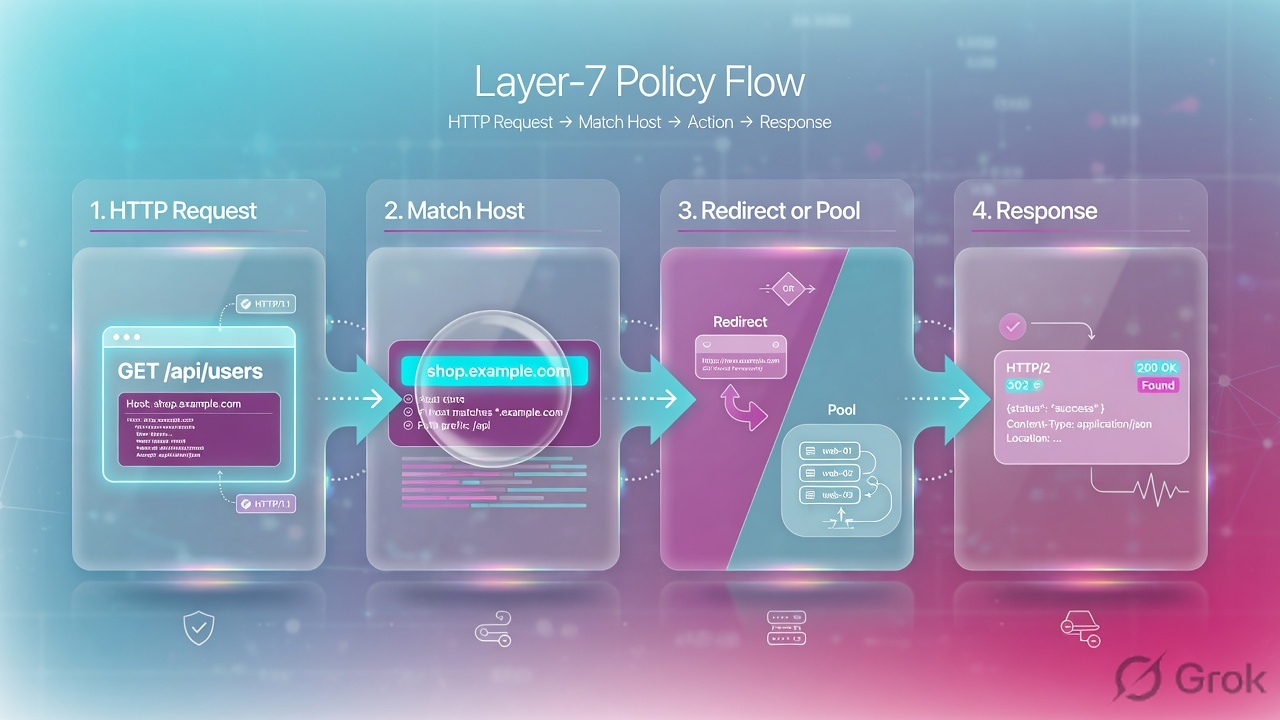
Local Traffic Policies (LTM Policies) provide a declarative approach to traffic routing, allowing engineers to define matching conditions and corresponding actions without writing Tcl code. For common routing tasks like host-based or URI-based forwarding, LTM Policies are often simpler to configure, review, and maintain than equivalent iRules.
Trigger Action Evaluate Conditions
Incoming Request Conditions
HTTP Host · URI path · HTTP header value · Client address · HTTP method
Actions. Forward to pool · Redirect · Modify headers · Reject traffic · Enable/disable processing
Advantages
No Tcl knowledge required · GUIconfigurable · Easier peer review · Structured rule ordering
PDF · page 34 — LTM Policy Components: Rules, Conditions & Actions
An LTM Policy is organized as a hierarchy: a Policy contains one or more Rules, each Rule contains one or more Conditions, and each Rule triggers one or more Actions when all its conditions match. Rules are evaluated in order, and the first matching rule's actions are applied.
Policy Structure
Policy — the top-level container, attached to a Virtual Server1.
Rule — a named condition+action pair within the policy2.
Condition — the matching criteria (e.g., Host equals, URI starts with) 3.
Action — what BIG-IP does when the condition matches (e.g., forward to pool) 4.
Rule Evaluation Order
Rules are evaluated from top to bottom. The first matching rule is applied and evaluation stops. Order matters — place more specific conditions before broader ones. A default rule (no condition) at the bottom acts as a catch-all fallback.
PDF · page 35 — LTM Policy Example — Multi-Host Routing
The following example demonstrates a complete LTM Policy that routes four different traffic patterns from a single VIP to separate backend pools — without a single line of Tcl code. This is typical of production deployments where multiple applications share one public IP address.
- Policy: web_routing_policy Rule Condition Action
- Rule 1 Host =
- shop.example.co m → SHOP_POOL
- Rule 2 Host =
- portal.example.co m → PORTAL_POOL
Rule 3 URI starts with /api
- → API_POOL Default (no condition) → WEB_POOL
Why Policy Over iRule Here?
This same routing logic could be written as an iRule, but the policy version is easier to read, review, and update without Tcl knowledge.
For straightforward declarative routing like this, LTM Policies are the preferred tool.
PDF · page 36 — iRule vs. LTM Policy — Detailed Comparison
iRule vs. LTM Policy — Detailed Comparison. Choosing between an iRule and an LTM Policy is a common design decision. Both can handle many of the same use cases, but each has distinct strengths. Apply the correct tool based on what the requirement actually demands — not habit or familiarity.
Attribute iRule LTM Policy
Authoring Style Tcl scripting — code Declarative rules — GUI/CLI
Flexibility Very high — full Tcl logic High — within supported conditions/actions
- Complex Custom Logic Yes — loops, variables, custom algorithms Limited to policy framework capabilities — Simple Host Routing Possible but more code Often preferred — simpler to maintain
URI-Based Routing Possible Often preferred
Custom Logging Very flexible with log command Limited logging capability
Maintainability Depends on code quality Typically easier for simple routing
Advanced Variables Strong Tcl variable support More limited
Key Design Rule: Use the simplest supported mechanism that clearly satisfies the requirement. Do not replace a simple LTM Policy with a complex iRule unnecessarily — simpler is more maintainable and less error-prone.
PDF · page 37 — Complete Layer-7 Decision Flow
This end-to-end flow illustrates how a client request traverses all the components covered in Module 5 — from TLS termination and HTTP processing through policy or iRule evaluation, health-monitored pool selection, and load balancing to the backend server.
- Pool Selection
Policy Evaluation
HTTP Parsing
TLS Termination
Client Request
Health Monitor Role
Determines whether each pool member is eligible to receive traffic. Members failing health checks are excluded from load balancing regardless of iRule or policy decisions.
Policy / iRule Role
Determines which pool matching traffic should be forwarded to. Operates on application-layer attributes like Host, URI, and headers.
Load Balancing Role
Selects a specific eligible member from the chosen pool using the configured load balancing algorithm (e.g., Round Robin, Least Connections).
PDF · page 38 — Hands-On Lab Topology
All labs in Module 5 use the following VMware-based environment. Ensure you can reach all pool members from the BIG-IP management interface before beginning. Verify that health endpoints are responding on backend servers as documented below.
Lab Health Endpoints Server Endpoint Expected
- Response Web01, Web02 GET /health APP_STATUS=RE
- ADY API01 GET /api/health API_STATUS=REA
- DY Shop01 GET /health APP_STATUS=RE
ADY Pre-Lab Verification
# Verify health endpoints respond curl -v http://10.20.20.101/health curl -v http://10.20.20.102/health curl -v http://10.20.20.111/api/health curl -v http://10.20.20.121/health
- # Verify VIP reachability curl -v http://192.0.2.100/
PDF · page 39 — Lab 1 — Health Monitors
In this lab you will create and test multiple monitor types, attach a custom HTTP monitor to WEB_POOL, and practice observing monitor state changes in response to backend health endpoint manipulation.
01 Create ICMP Monitor. Create a basic ICMP monitor and attach to Node 10.20.20.101. Verify node status in GUI.
- 02 Create TCP Monitor
Create a TCP monitor targeting port 80.
Observe that it marks the port available regardless of HTTP application state.
- 03 Create Custom HTTP Monitor — Name: mon_web_health. Send: GET /health HTTP/1.1 Host:
- app.example.com Connection: — close . Receive: APP_STATUS=READY.
Interval: 5. Timeout: 16.
04 Attach to WEB_POOL & Verify. Attach mon_web_health to WEB_POOL. Confirm both Web01 and Web02 show Available in pool member status.
05 Break & Restore Health Endpoint. Stop the health endpoint on Web01. Observe member transitions to
Down. Restore endpoint. Observe member returns to Available.
Lab Task: Document the time between breaking the health endpoint and observing the member status change. Relate this to your Interval and Timeout configuration values.
PDF · page 40 — Lab 2 — iRules
In this lab you will create four iRules covering the most common production use cases: HTTP-to-HTTPS redirect, host-based routing, URI-based routing, and request header insertion. Test each using curl and verify behavior in backend logs.
1 iRule 1 — HTTP to HTTPS Redirect. Attach to port-80 VIP. Verify curl -v http://192.0.2.100/ returns HTTP 302 to https://.
2 iRule 2 — Host-Based Routing. Route shop.example.com → SHOP_POOL. Route api.example.com → API_POOL. Test with: curl -H "Host:
- shop.example.com" http://192.0.2.100/ 3 iRule 3 — URI-Based Routing — Route /api/* → API_POOL. All other URIs → WEB_POOL. Test with: curl -v http://192.0.2.100/api/test and curl -v http://192.0.2.100/app
- 4 iRule 4 — Header Insertion — Insert header X-Lab-Environment: Module5 on each request.
Verify header is received on backend by inspecting web server access logs.
Validation: Use curl -v for HTTP and curl -vk for HTTPS. Monitor tail -f /var/log/ltm while testing logging iRules. Check backend server logs to confirm headers are received.
PDF · page 41 — Lab 3 — Local Traffic Policy
In this lab you will re-implement the host-based routing logic from Lab 2 using an LTM Policy instead of an iRule. After validating traffic behavior, you will compare both approaches and develop an informed preference for each use case.
Policy Configuration Rule Condition Action
- Rule 1 HTTP Host equals shop.example.co m Forward → — SHOP_POOL Rule 2 HTTP Host equals api.example.com
- Forward → API_POOL — Default (no condition) Forward → WEB_POOL
Lab Steps
Create policy web_routing_policy via GUI: Local Traffic → Policies → Create 1.
Add Rule 1 with host condition and SHOP_POOL action2.
Add Rule 2 with host condition and API_POOL action3.
Add default rule forwarding to WEB_POOL4.
Attach policy to Virtual Server (remove iRule if present)5.
Test with curl -H "Host: shop.example.com" and curl -H "Host:
api.example.com" 6.
Compare maintainability vs. Lab 2 iRule approach7.
Discussion Question: For this specific routing requirement, which is easier to maintain — the iRule from Lab 2 or the LTM Policy from
Lab 3? When would you choose each approach in production?
PDF · page 42 — Lab 4 — Monitor Failure Scenarios
This lab systematically introduces monitor misconfigurations to build troubleshooting skills. For each scenario, observe the resulting member status, identify the root cause, and apply the correct fix. Document your evidence for each failure.
1 Wrong URI. Change monitor URI to /wrongpath. Observe member goes Down. Fix: restore correct URI.
2 Wrong Host Header. Set Host to invalid.host.local. Backend rejects request. Observe monitor failure. Fix: correct Host value.
3 Wrong Receive String. Change Receive String to DOES_NOT_EXIST. Application responds 200 but string not found. Member goes Down.
4 Wrong Backend Port. Set monitor destination to port 9999. TCP connection fails. Observe immediate Down status.
5 HTTPS Mismatch. Configure HTTPS monitor against HTTP-only backend. TLS handshake fails. Observe Down status.
Diagnostic Commands tmsh show ltm pool WEB_POOL detail tcpdump -ni internal host 10.20.20.101 curl -v http://10.20.20.101/health openssl s_client -connect \
10.20.20.101:443 Documentation Requirement. For each failure scenario: record the symptom observed in tmsh show ltm pool, the packet-capture evidence (if applicable), the identified root cause, and the corrective action applied.
PDF · page 43 — Production Troubleshooting Scenarios
The following real-world scenarios cover the most frequently encountered issues with health monitors, iRules, and LTM Policies in production BIG-IP environments. Each scenario includes the symptom, likely causes, and recommended diagnostic approach.
🔴 Scenario 1: Member DOWN, Browser Works. Pool member shows Down but browser can open the server directly. Check: Monitor Send String, Host header, Receive
String, monitor destination port. The monitor request may not match what the application expects.
- 🟡 Scenario 2: TCP Green, App Fails — TCP monitor marks member Available but users receive HTTP
500. Resolution: Replace TCP monitor with HTTP or HTTPS monitor. TCP only validates port reachability — not application correctness.
- 🟡 Scenario 3: HTTP Monitor Works by IP, Fails via Monitor — Manually curling the IP succeeds but monitor fails. Check: Host header in monitor Send String. Virtual-hosted applications may return errors if Host header is missing or incorrect.
🔴 Scenario 4: Host-Routing iRule Does Nothing iRule attached but traffic ignores routing logic. Check: HTTP profile attached to VIP? TLS terminated for HTTPS? iRule actually attached to the correct Virtual Server? Pool healthy?
🟡 Scenario 5: URI Routing Selects Wrong Pool. Traffic goes to wrong pool despite URI match. Check: URI normalization (trailing slash, encoding), rule evaluation order, case sensitivity, logic errors in if/elseif chain.
- ⚠ Scenario 6: Latency After iRule Logging Enabled — Application response time increases after adding verbose log statements. Resolution: Reduce logging frequency and scope.
Remove logging from hot paths with high request volume.
Scenario 7 — Policy + iRule Conflict: If both an LTM Policy and an iRule are attached to the same Virtual Server and both attempt to select a pool, the processing order and which action takes effect depends on configuration. Avoid implementing conflicting poolselection logic in both mechanisms simultaneously.
PDF · page 44 — Interview Questions — Module 5
The following 30 questions cover all key concepts from Module 5. Practice answering each concisely and accurately. These questions reflect common BIG-IP LTM interview and certification exam topics.
1 Why are health monitors required?
To ensure BIG-IP only forwards client traffic to pool members that are genuinely able to serve the application correctly. Network reachability alone does not guarantee application health.
2 Does successful ping prove application health?
No. ICMP success only proves that the host OS is responding to network packets. The application may be completely non-functional.
3 TCP monitor vs. HTTP monitor?
TCP confirms the service port accepts connections. HTTP validates actual application-layer response content. HTTP monitors are far more application-aware.
4 What does an HTTPS monitor test?
TLS handshake success plus HTTP application-layer response validation inside the encrypted session.
5 What is a Send String?
The content BIG-IP sends to the monitored service during each health probe. For HTTP monitors, this is a properly formatted HTTP request.
6 What is a Receive String?
The pattern BIG-IP searches for in the server's response. If found, the monitor considers the check successful.
7 Why is the Host header important in an HTTP monitor?
HTTP/1.1 requires a Host header. Virtual-hosted servers use it to select the correct application. Missing or incorrect Host headers cause monitor failures on virtual-hosted backends.
8 What is Interval?
How frequently BIG-IP sends a health probe to each monitored member.
9 What is Timeout?
How long BIG-IP tolerates failed or no-response probes before marking a member unavailable, based on monitor behavior and configuration.
10 What is a health endpoint?
A purpose-built URL on an application server that returns a deterministic response indicating the application's health status.
PDF · page 45 — Interview Questions — Module 5 (Continued) 1 11. What makes a good health endpoint?
- Interview Questions — Module 5 (Continued) 1 11. What makes a good health endpoint? — Lightweight, fast, deterministic, reflects critical dependencies, does not expose sensitive data, does not modify application state.
2 12. What is an iRule?
An event-driven, Tcl-based traffic script executed by BIG-IP TMM that enables custom traffic decisions based on connection or application attributes.
3 13. Which language is used by iRules?
Tcl (Tool Command Language), within the BIG-IP TMM traffic management environment.
4 14. Where are iRules executed?
Inside BIG-IP TMM (Traffic Management Microkernel). iRules are not Linux shell scripts.
5 15. What is an iRule event?
A specific point in the traffic lifecycle when TMM fires the corresponding iRule code block, such as HTTP_REQUEST or CLIENT_ACCEPTED.
6 16. What is HTTP_REQUEST?
An iRule event that fires when a complete HTTP request is parsed and available for inspection. Requires an HTTP profile on the Virtual Server.
7 17. How would you route /api to another pool?
- when HTTP_REQUEST { if { [HTTP::uri] starts_with "/api/" } { pool API_POOL } } — 8 18. How would you route based on hostname?
Use [HTTP::host] in HTTP_REQUEST and compare with eq or switch to select pools per hostname.
9 19. How would you redirect HTTP to HTTPS?
when HTTP_REQUEST { HTTP::redirect "https://[HTTP::host][HTTP::uri]" } — on a port-80 VIP with HTTP profile.
10 20. Where are iRule logs commonly written?
/var/log/ltm using the log local0. command in the iRule.
PDF · page 46 — Interview Questions — Module 5 (Final Set)
- Interview Questions — Module 5 (Final Set) — 1 21. Why should iRule logging be limited in production?
Excessive logging increases TMM processing overhead per request and can generate very large log volumes that consume disk space and degrade performance.
2 22. What is an LTM Policy?
A declarative traffic control mechanism that matches defined conditions and applies configured actions, without requiring Tcl scripting.
3 23. iRule vs. LTM Policy?
iRules offer full Tcl flexibility for complex logic. LTM Policies provide declarative, GUI-configurable rules for common routing tasks. Prefer policies for simple routing; iRules for logic policies cannot express.
4 24. When should you prefer an LTM Policy?
For straightforward, declarative host-based or URI-based routing where conditions and actions can be clearly expressed in the policy framework without custom scripting.
5 25. Can HTTP_REQUEST inspect HTTPS without TLS termination?
No. BIG-IP must terminate TLS (via a Client SSL profile) before TMM can parse the HTTP content and fire HTTP_REQUEST.
6 26. Pool member is down but application appears up — what do you check?
Monitor Send String, Host header, URI, Receive String, monitor type, TLS configuration, firewall rules blocking monitor probes, and backend logs.
7 27. TCP monitor is green but users receive HTTP 500 — why?
TCP monitor only validates port reachability, not application correctness. The application is failing internally. Replace with an HTTP/HTTPS application-aware monitor.
8 28. How does health status affect load balancing?
Only pool members with an Available health status are eligible for load balancing selection. Down members are excluded from the active rotation.
9 29. Can a policy select a different pool?
Yes. An LTM Policy action can forward matching traffic to a specified pool, overriding the pool configured on the Virtual Server.
10 30. What to check if an iRule references an unavailable pool?
Verify pool exists and is correctly named, check pool member health status, confirm monitor results, and review BIG-IP logs for pool-notfound or unavailable errors.
PDF · page 47 — Module 5 — Summary & Revision Checklist
Module 5 covered how BIG-IP determines application health through health monitors and how Layer-7 traffic decisions are implemented using iRules and Local Traffic Policies. These three capabilities work together to build intelligent, resilient application delivery on BIG-IP LTM.
- Client → Virtual Server
- SSL/HTTP → LTM Policy
- Pool → Health → Backend
- Health Monitors ✓ ICMP · Gateway ICMP
- TCP · TCP Half Open HTTP · HTTPS — Send String · Receive String Interval · Timeout
- Health Endpoint Design Custom Monitor · Multi-Monitor — Monitor Association Scopes iRules ✓ Event-Driven Model
- HTTP_REQUEST · Common Events Host Routing · URI Routing — HTTP→HTTPS Redirect Header Manipulation · Logging
LTM Policies ✓. Conditions · Actions · Rules iRule vs Policy Decision Troubleshooting
Next Module: Module 6 — High Availability, Device Trust, ConfigSync & Failover. You will apply your Module 5 knowledge in a dualdevice HA environment.
Same lab numbers on every page: client 198.51.100.50, VIP 192.0.2.100, Self IPs 192.0.2.10 / 10.20.20.10, members 10.20.20.101–103.
- Hub · Course map
- M1 · Fundamentals & admin
- M2 · Networking & traffic flow
- M3 · Virtual Servers & pools
- M4 · Profiles, SNAT, SSL
- M5 · Monitors, iRules, policies ← you are here
- M6 · High availability
- M7 · Troubleshooting
Recorded course + workbooks: My Courses · syllabus F5 LTM / GTM / ASM
Green pool, broken app
ICMP replies. TCP 443 is open. HTTP is 500. A TCP monitor still paints the member green. That is the Module 5 lesson: monitor the thing the user needs, then use LTM Policies before iRules for simple L7 steering.
Use an HTTP/HTTPS monitor with a real GET, a Host header, and a recv string. Prefer an LTM Policy for host/URI routing. Write an iRule when you need events the policy cannot express. Never log cookies or passwords in iRules.
Monitor scope and iRule events
Timeout is usually 3× interval + 1 (interval 5 → timeout 16). Mark down only after failed probes, not after one blip.
| Scope | Checks | Misses |
|---|---|---|
| Node monitor | Host (often ICMP) | Service port / app |
| Member monitor | That IP:port | Other ports on the same node |
| Pool monitor | All members the same way | Special snowflake members — override per member |
| Gateway ICMP | Path to a gateway | Any application |
HTTP_REQUEST only fires if an HTTP profile is on the VS. CLIENTSSL_HANDSHAKE only fires if Client SSL is attached. Events are not a continuous script.
Policy vs iRule
| Need | Use | Why |
|---|---|---|
| If Host is app.example.com → pool X | LTM Policy | Draft → publish; readable; fast |
| HTTP→HTTPS redirect | iRule or policy redirect | Common iRule; still keep it tiny |
| Header inject / strip XFF safely | iRule | Replace client-supplied XFF; do not trust it |
| Complex Tcl branching | iRule | Last resort — every line is a future outage |
Runbook — HTTP monitor then a tiny iRule
Side A · monitor
Local Traffic > Monitors > Create
New HTTP Monitor
Incomplete Send (missing Host or final blank line) is the classic false-down. Source: Module 5 PDF.
tmsh create ltm monitor http mon_web_health defaults-from http interval 5 timeout 16 \
  send "GET /health HTTP/1.1\r\nHost: app.example.com\r\nConnection: close\r\n\r\n" \
  recv "APP_STATUS=READY"
tmsh modify ltm pool WEB_POOL monitor mon_web_health
tmsh show ltm pool WEB_POOL detail
Side B · iRule (only if policy cannot)
Local Traffic > iRules > iRule List > Create
New iRule
Attach the iRule on the Virtual Server Resources tab. HTTP profile required.
when HTTP_REQUEST {
  if { [HTTP::host] eq "app.example.com" } {
    pool APP_POOL
  }
}
Events cheat-sheet: CLIENT_ACCEPTED (TCP accepted), CLIENTSSL_HANDSHAKE (TLS done, SNI available), HTTP_REQUEST (headers parsed), LB_SELECTED (member chosen), SERVER_CONNECTED (server TCP up).
Side C · prove the monitor, not the ping
Break the recv string in lab
Member goes down in
tmsh show ltm pool WEB_POOL detail.Restore it
Member returns; Slow Ramp (Module 3) should protect it.
tcpdump the probe
You will see BIG-IP's Self IP as source — not the client.

Runtime
Probes keep using the server-side path even when no user is connected.
Traps + proof
| Failure | Symptom | Fix |
|---|---|---|
| ICMP/TCP monitor only | Green pool, HTTP 500 | HTTP recv string |
| Missing Host | All members down on vhosts | Send String includes Host |
| Gateway ICMP as app health | Path up, app dead | Never substitute |
| iRule without HTTP profile | Nothing fires | Attach http + (for HTTPS) Client SSL |
| Log HTTP cookies or tokens | Secret in /var/log/ltm | Log host/URI only |
- A wrong recv string marks the member down.
- You can name four iRule events and when they fire.
- You default to an LTM Policy for simple host routing.
Knowledge check
Health and L7 — green is not a personality trait.
Sources
- Techclick PDF:
F5-BIG-IP-LTM-Module-5.pdf(from OneDrive_1_8-26-2026.zip, 26 Aug 2026) - Companion deck:
F5-Ltm-Training-Ppt (1).pptx.pdf - LTM policy TMSH: ltm policy
- Official lab paths: F5 cert Lab 1 — VLANs, Self IPs, pools, virtual servers
- TMSH virtual server reference: ltm virtual
- Related deep dives on this site: SSL modes · SNAT · Persistence · VS/pools · VIP down / tcpdump
Related: Course hub · Syllabus · My Courses · F5 LTM interview