Lessons · F5 LTM series · Module 1
Full explanation — same as the Techclick PDF
This section is the workbook explanation, rewritten from F5 ltm module 1.pdf. Read it like class notes. Diagrams above are only a map — the teaching is here.
Read the PDF-order sections below. Then do the runbook. Then take the quiz. If a sentence is in the PDF, it is in this page.
PDF · page 1 — F5 BIG-IP LTM — Module 1 Fundamentals & Device Administration
Understanding BIG-IP, TMOS, TMM, Management, Licensing, Provisioning, and
Basic Administration Target Audience
Network & cybersecurity engineers with TCP/IP fundamentals, new to F5 BIG-IP
Module Scope
Architecture, access methods, licensing, provisioning, TMSH, and basic device administration
Outcome. A solid BIG-IP foundation before configuring VLANs, Self IPs, Virtual Servers, and HA
PDF · page 2 — Learning Outcomes By the end of this module, you will be able to:
- 1 Explain what F5 BIG-IP and BIG-IP LTM are, and why organizations deploy Application Delivery — Controllers 2 Understand BIG-IP architecture — including
TMOS, TMM, MCPD, management plane, control plane, and data plane 3 Differentiate Management IP from Self IP and
Virtual IP, and access BIG-IP via GUI, SSH, TMSH, and Bash
4 Perform licensing, resource provisioning, basic device administration, configuration save, and
UCS backup
PDF · page 3 — Why Do We Need a Load Balancer?
Traditional application architectures rely on a single web server to handle all client requests. This creates several critical problems in production environments:
Single Point of Failure
If the server crashes, the entire application goes offline. There is no fallback path for users.
Limited Capacity
A single server has finite CPU, memory, and bandwidth. Under heavy load, response times degrade and connections are dropped.
Maintenance Downtime
Patching, rebooting, or upgrading the server requires taking the entire application offline — unacceptable for 24/7 services.
Difficult Horizontal Scaling
Adding more servers is meaningless without a mechanism to distribute traffic across them intelligently.
PDF · page 4 — The Load Balancer Solution
Introducing a load balancer in front of multiple application servers resolves each of these challenges simultaneously. Traffic is distributed intelligently, and no single server represents a risk to availability.
Traffic Flow
Overview Web01
Handles application requests Web03
Handles application requests Web02
Handles application requests Load Balancer
Distributes traffic intelligently Users
Send incoming requests Availability
Failed servers are automatically removed from rotation Scalability
Add new servers without application downtime Resilience
Traffic continues even during partial failures Performance
Optimal distribution prevents server overload Maintenance
Drain individual servers for patching without outages
PDF · page 5 — What Is an Application Delivery Controller (ADC)?
An Application Delivery Controller (ADC) is a network device or software platform that goes far beyond simple Layer-4 load balancing. A traditional Layer-4 load balancer makes forwarding decisions based purely on IP addresses and TCP/UDP ports. An ADC operates at Layers 4–7, meaning it understands application protocols like HTTP and HTTPS, can inspect and modify traffic, enforce security policies, and optimize application delivery end-to-end.
Load Balancing
Intelligent traffic distribution across server pools using multiple algorithms
Health Monitoring
Continuous active and passive checks to detect and remove failed servers
SSL/TLS Termination
Offload CPU-intensive encryption from backend servers to the ADC TCP Optimization
Connection multiplexing, buffering, and keepalive management Persistence
Session stickiness ensures users are consistently routed to the same server
High Availability
Active/Standby clustering for zero-downtime failover between ADC devices
F5 BIG-IP is one of the most widely deployed ADC platforms in enterprise environments worldwide.
PDF · page 7 — What Is F5 BIG-IP?
F5 BIG-IP is an enterprise-grade application delivery and security platform used to control, optimize, distribute, and secure application traffic between clients and backend servers. It is not merely a load balancer — it is a full-featured programmable traffic management system capable of deep application-layer inspection, manipulation, and enforcement.
Physical Appliance
Dedicated hardware (e.g., BIG-IP i-series, r-series) deployed in on-premises data centers for maximum throughput and performance
BIG-IP Virtual Edition (VE). A software-based BIG-IP instance running on hypervisors such as VMware ESXi, Microsoft Hyper-V, or KVM
Public Cloud
Available in AWS, Microsoft Azure, and Google Cloud Platform as marketplace virtual machine deployments
Private Cloud / Container
Deployable in private cloud infrastructure and container-native environments using BIG-IP Next or F5 CIS
PDF · page 8 — F5 BIG-IP Enterprise Use Cases
BIG-IP is deployed across virtually every major industry to solve application delivery, security, and availability challenges. The following are representative production use cases you will encounter as an engineer:
Banking & Finance
Load balance core banking portals, offload SSL, enforce session persistence for authenticated users
E-Commerce
Handle peak traffic surges, maintain shopping cart sessions, and protect checkout flows
Healthcare
Deliver HIPAA-compliant application access with SSL inspection and role-based traffic policies
API Gateway
Manage API traffic with rate limiting, header manipulation, URI routing, and backend pool distribution
PDF · page 9 — What Is BIG-IP LTM?
LTM — Local Traffic Manager — is the foundational module of the BIG-IP platform and the focus of this course. LTM is responsible for managing all local application traffic between clients and backend servers. It operates at both Layer 4 and Layer 7, giving it the ability to make traffic decisions based on IP/port information as well as full HTTP/HTTPS application content.
Core LTM Functions
- Layer 4 (TCP/UDP) and Layer 7 (HTTP/HTTPS) load balancing Health monitoring of pool members — SSL/TLS termination and re-encryption Source NAT (SNAT) for return-path traffic
Session persistence (cookie, source IP, SSL). Traffic profiles (TCP, HTTP, SSL, compression) iRules for custom programmatic traffic control
Local Traffic Policies for rule-based routing Active/Standby High Availability
- LTM Traffic Flow Client sends request to a Virtual IP (VIP)
- ↓ — Virtual Server matches and classifies the connection ↓
- Traffic Processing — profiles, iRules, policies applied ↓
- Pool selects a healthy backend member ↓ — App01 / App02 / App03 receive the processed request
Virtual Servers, Pools, Nodes, Profiles, and iRules are introduced here for context and will be configured in depth in later modules.
PDF · page 11 — BIG-IP Product Family — Module Overview
BIG-IP is a modular platform. Each module is licensed and provisioned separately, allowing organizations to enable only the capabilities they need. Understanding the module landscape helps you position LTM correctly within the broader BIG-IP ecosystem.
Module Full Name & Purpose Typical Use Case
- LTM Local Traffic Manager — load balancing, SSL offload, health monitoring, persistence — Application delivery for web, API, and database tiers
- DNS DNS — global server load balancing (GSLB) and intelligent DNS resolution — Geolocation-based traffic steering, disaster recovery DNS
APM Access Policy Manager — identity-aware SSL VPN, SSO, and MFA enforcement
Remote access, Zero Trust application access
- Advanced WAF Web Application Firewall — Layer-7 attack protection, bot mitigation, API security — OWASP Top 10 protection, PCI-DSS compliance
- AFM Advanced Firewall Manager — high-performance network firewall and DDoS mitigation — Data center perimeter protection, volumetric DDoS defense
⚠ This course focuses exclusively on BIG-IP LTM. Other modules will be referenced only where they provide necessary context.
PDF · page 12 — BIG-IP Architecture Overview
BIG-IP is organized into three functional planes. Each plane has a distinct role, uses different interfaces, and carries different types of traffic.
Confusing these planes is one of the most common mistakes made by engineers new to BIG-IP.
Management Plane
Administrative access only. Uses a dedicated Management Interface with its own IP address. Carries GUI, SSH, API, and licensing traffic. Never carries application traffic.
Control / Config Plane
MCPD reads and writes BIG-IP configuration. Propagates changes to runtime components. Manages device state and synchronization in HA environments.
Data Plane
TMM (Traffic Management Microkernel) processes all client application traffic at high speed. Handles Virtual Servers, pools, SSL, persistence, SNAT, and iRules.
PDF · page 14 — TMOS — The BIG-IP Software Architecture
TMOS (Traffic Management Operating System) is the proprietary software architecture and platform that underlies the entire BIG-IP system. It is important to understand that TMOS is not simply a Linux distribution. While BIG-IP does run a Linux host layer, TMOS integrates the Linux host, the Traffic Management Microkernel (TMM), MCPD, the configuration subsystem, and the management interfaces into a unified, trafficoptimized platform.
TMM Apply Config DB
MCPD Control Admin Input
Linux Host Layer
Provides the underlying OS services, file system, process management, and standard utilities. Engineers can access this layer via Bash.
TMOS Integration Layer
TMOS abstracts and integrates all BIG-IP components — TMM,
MCPD, GUI, TMSH — into a cohesive, manageable platform with consistent behavior.
Think of TMOS as the "glue" that makes BIG-IP a unified application delivery platform rather than just a Linux machine with networking tools.
PDF · page 15 — TMM — Traffic Management Microkernel
The Traffic Management Microkernel (TMM) is the core data-plane engine of BIG-IP. TMM is a specialized, high-performance software component that processes all application traffic. It does not use the standard Linux networking stack for application traffic — instead, TMM operates in a separate, optimized execution environment that provides far greater throughput and latency performance.
Apply Profiles & iRules Match Virtual Server
Enter TMM Engine Network Interface
Connection Handling
TCP/UDP session setup, teardown, and state tracking for millions of concurrent connections
Virtual Server Matching
Matches incoming connections to configured
Virtual Servers based on destination IP, port, and protocol Load Balancing
- Applies the configured algorithm (Round Robin, Least — Connections, Ratio, etc.) to select a pool member SSL/TLS Processing
- Hardware-accelerated SSL termination, certificate management, and reencryption to backends iRules & Policies — Executes custom Tcl-based iRules and traffic policies to manipulate, redirect, or log traffic
SNAT & Persistence
- Translates source addresses and maintains session stickiness for stateful application protocols — 📌 Key Concept: Application traffic is handled by TMM, not by the standard Linux kernel networking stack. This distinction is critical for troubleshooting and performance analysis.
PDF · page 16 — MCPD — Master Control Program Daemon
The Master Control Program Daemon (MCPD) is the central configuration management process on BIG-IP. It is responsible for reading and writing the BIG-IP configuration database, processing changes submitted via the GUI or TMSH, and propagating updated configuration to runtime components such as TMM.
MCPD Interaction Flow Administrator makes a change
- ↓ GUI / TMSH ↓ MCPD receives and validates the change — ↓ BIG-IP Configuration Database is updated ↓ Runtime components (TMM) are updated
- ↓ Traffic processing reflects the new config What MCPD Does — Manages the BIG-IP configuration store (bigip.conf, bigip_base.conf) Validates and commits configuration changes
Propagates configuration to TMM and other daemons
Manages device state in High Availability environments Handles synchronization between HA peers
What MCPD Does NOT Do
MCPD does not process client application traffic MCPD does not perform load balancing decisions
MCPD is not in the data plane path
Interview Question: "What processes application traffic on BIG-IP — TMM or MCPD?" Answer: TMM processes application traffic.
MCPD manages configuration and system state. This distinction is frequently tested.
PDF · page 17 — The Management Plane
The BIG-IP Management Interface (labeled mgmt on the device) is a dedicated out-of-band network interface used exclusively for administrative access. It has its own IP address — the Management IP — and connects to a separate management network that is completely isolated from the production application traffic network.
BIG-IP Manageme nt Plane
Admin Laptop Initiates administrative sessions
REST API & Licensing
- Programmatic and license services GUI (HTTPS)
Web-based management access BIG-IP mgmt
Interface Dedicated management IP
Management Network
Out-of-band, isolated network SSH Terminal
Command-line administration GUI (HTTPS). Web-based Configuration Utility accessed at https://<Management-IP>
SSH Secure shell access for
TMSH commands, Bash shell, and file management
REST API iControl REST API for automation, scripting, and integration with orchestration tools
Licensing & Admin
License activation, system registration, and device administration tasks
Example: Management IP 192.168.100.10/24 — Admin Laptop at 192.168.100.50 reaches the BIG-IP GUI via https://192.168.100.10. No application traffic ever crosses this interface.
PDF · page 18 — Management IP vs. Self IP
Management IP vs. Self IP. One of the most important conceptual distinctions for a BIG-IP engineer is understanding the difference between the Management IP and the
Self IP. These are different addresses with different purposes, residing on different planes of the device. Confusing them is a very common mistake that leads to misconfigured access control and routing errors.
Attribute Management IP Self IP
Primary Purpose Administrative connectivity to the device Data-plane address representing BIG-IP on a
VLAN. Associated Network Dedicated out-of-band management network Production VLANs (client-side or server-side)
- Carries App Traffic? No — administrative only Yes — production and data-plane traffic — Configured In System > Platform (or setup utility) Network > Self IPs
- HA Relevance Not used for HA synchronization Used for HA communication and failover — TMM Involvement Not handled by TMM Managed and processed by TMM
📌 Self IP configuration, VLAN association, and port lockdown are covered in depth in Module 2. This table is provided here for conceptual clarity only.
PDF · page 19 — Accessing BIG-IP — Management Methods
BIG-IP provides four standard methods for administrative access. Each serves a distinct purpose, and experienced engineers routinely use all four depending on the task at hand. Understanding when to use each method is a practical skill you will develop throughout this course.
Method Purpose Typical User Common Use
- GUI (HTTPS) Web-based configuration and monitoring — All engineers, administrators Initial setup, day-to-day management, health monitoring
- SSH Secure remote terminal access Network and system engineers TMSH commands, troubleshooting, file access — TMSH F5 CLI for BIG-IP configuration Engineers, automation scripts Configuration changes, status checks, scripted automation
Bash / Linux Shell Underlying Linux OS access Advanced engineers, F5 support Log analysis, file management, process inspection ⚠ Production Tip: Always prefer TMSH over raw Bash for BIG-IP configuration changes. Direct manipulation of configuration files via Bash can result in unsupported or inconsistent configurations that MCPD cannot track correctly.
PDF · page 21 — The Configuration Utility (GUI)
The Configuration Utility (GUI). The BIG-IP Configuration Utility is the web-based management interface accessed via a browser at https://<Management-IP>. It is organized into top-level navigation sections, each covering a distinct area of device configuration. As you progress through this course, you will use each of these sections extensively.
Local Traffic
- Virtual Servers — define VIPs and traffic entry points Pools — groups of backend application servers — Nodes — individual server IP addresses Profiles — TCP, HTTP, SSL, compression settings
Monitors — health check definitions iRules — custom traffic manipulation scripts
Network. VLANs — layer-2 segmentation for client/server networks Self IPs — BIG-IP data-plane addresses per VLAN
Routes — static routing for traffic return paths
Trunks — link aggregation for physical interfaces System & Device Mgmt
- System > Platform — hostname, Management IP, DNS, NTP — System > License — registration and license management
- System > Resource Provisioning — module resource allocation — Device Management > Devices — HA peer configuration Device Management > Device Groups
- — sync group setup Device Management > Traffic Groups
- — floating IP ownership
PDF · page 22 — Initial Device Configuration
When BIG-IP is first powered on or reset to factory defaults, it must be configured with a minimum set of parameters before it can be managed or deployed. This initial configuration is typically performed through the Setup Utility (GUI) or directly via the serial console. Getting this right the first time avoids unnecessary connectivity issues.
01 Hostname. Set a meaningful hostname that identifies the device, site, and role (e.g., bigip-dc1-ltm-01).
- Navigate to: System > Platform 02
Management IP & Route
Configure the Management IP address, subnet mask, and default management gateway.
Required for GUI and SSH access.
- 03 DNS & NTP
Configure DNS resolvers and NTP servers.
NTP is critical for log correlation, SSL certificate validation, HA failover timing, and license checks.
04 Time Zone. Set the correct time zone to ensure log timestamps are accurate and correlate with other infrastructure systems.
05 Admin Account. Change the default admin password immediately. Optionally create role-specific accounts for auditing and least-privilege access.
⚠ Common Mistake: Skipping NTP configuration is one of the most frequent first-day oversights. Incorrect time causes SSL certificate errors, HA sync failures, and log timestamps that are impossible to correlate during incident response.
PDF · page 24 — BIG-IP Licensing
BIG-IP requires a valid license to activate its features. Licensing is tied to a Registration Key — a unique alphanumeric string provided by F5 when a BIG-IP product is purchased. The Registration Key is entered during initial setup and activates the features and modules defined in the license agreement.
Licensing Concepts
- Registration Key — unique key provided by F5 (format: XXXXX- XXXXX-XXXXX-XXXXX-XXXXXXX) — License Activation — automatic (internet) or manual (offline) activation via F5 license server
- Licensed Modules — only modules included in the license can be provisioned and used — Reactivation — required when adding modules or after a grace period
Grace Period — BIG-IP may continue operating briefly after license expiry, then features degrade
- GUI Path System > License — TMSH Command tmsh show sys license Production Symptom
- If a BIG-IP license becomes invalid or expires without renewal, you may observe: — Virtual Servers becoming unavailable Licensed modules becoming inactive
System alerts and log messages indicating license failure
- HA synchronization issues if license states differ between peers ⚠ Important — Never attempt to bypass or modify BIG-IP licensing through unauthorized means. This violates the F5 license agreement and may result in immediate system failure or legal consequences.
PDF · page 25 — Resource Provisioning
After licensing, BIG-IP modules must be provisioned before they can be used. Provisioning allocates CPU, memory, and system resources to each module based on the selected provisioning level. Because BIG-IP runs on shared hardware resources, provisioning unused modules wastes system capacity and can degrade overall performance.
Level Description When to Use
- None Module is not active; no resources allocated When the module is licensed but not needed on this device — Minimum Minimal resource allocation for low-utilization workloads
Lab environments or lightly used auxiliary modules
Nominal Balanced resource allocation for typical production workloads Standard production deployments (most common)
- Dedicated Maximum resources allocated; other modules may be deprovisioned — When a single module requires maximum performance GUI Path
- System > Resource Provisioning
TMSH Command tmsh show sys provision
⚠ Common Mistake: Provisioning modules that are not required (e.g., APM, AFM, WAF) on a device intended only for LTM will consume CPU and memory that should be available for traffic processing. Always provision only what the solution requires.
PDF · page 26 — TMSH — Traffic Management Shell
TMSH — Traffic Management Shell
The Traffic Management Shell (TMSH) is the F5 command-line interface for managing and monitoring BIG-IP. TMSH provides full configuration capability equivalent to the GUI, making it the preferred tool for automation, scripting, and rapid troubleshooting. It uses a hierarchical, modulebased syntax that is consistent and predictable across all BIG-IP object types.
- General TMSH Syntax tmsh [command] [module] [object-type] [object-name] [options] — You can enter TMSH interactively by typing tmsh at the Bash prompt, or execute individual commands inline by prefixing with tmsh:
tmsh show ltm virtual tmsh show ltm pool tmsh show sys license tmsh show net self
- Useful TMSH Examples ## Enter interactive TMSH tmsh — ## Show all Virtual Servers show ltm virtual
- ## Show pool member status show ltm pool my-pool members ## Show system license show sys license — ## Show provisioned modules show sys provision
Common TMSH Command Categories show — display current status and statistics list — display configuration of objects modify — change an existing configuration object create — create a new configuration object delete — remove a configuration object save sys config — persist configuration to disk ## Check CPU and memory show sys performance all-stats ## Save configuration save sys config
Tab Completion
TMSH supports tab completion. Press Tab to auto-complete commands, object types, and object names.
PDF · page 27 — Saving Configuration
On BIG-IP, configuration changes made in the GUI or TMSH are immediately active in memory but are not automatically saved to disk. If the device reboots before the configuration is saved, all unsaved changes will be lost. Saving configuration is therefore a critical operational habit that must be performed after every significant change.
Make Configuration Changes
Create, modify, or delete BIG-IP objects via GUI or TMSH. Changes are active immediately in the running configuration.
Save Configuration to Disk Run tmsh save sys config or use GUI:
System > Archives (UCS) to persist the running config to /config/bigip.conf.
Verify the Save Completed
Confirm with tmsh list sys config or check that the GUI shows no unsaved change indicator. Review /var/log/ltm for save events.
TMSH Save Commands
- ## Save full running configuration tmsh save sys config — ## Save and compress (useful before changes) tmsh save sys config partitions all
- ⚠ Production Tip: Save configuration immediately before — AND after significant changes. Before: to create a clean restore point. After: to ensure your changes survive a reboot.
PDF · page 28 — UCS Backup — User Configuration Set
A UCS (User Configuration Set) is a complete backup of the BIG-IP configuration stored as a compressed archive file (.ucs). A UCS file captures everything needed to restore a BIG-IP device to a known state, including configuration files, SSL certificates and keys, user accounts, and license information. UCS backups are a critical component of any BIG-IP change management and disaster recovery process.
What a UCS Contains
BIG-IP configuration files, SSL certificates and private keys, user database, license files, and iFiles
When to Create a UCS. Before any significant change, before and after software upgrades, as part of a daily scheduled backup routine
UCS Restore Considerations
Restoring a UCS to a different hardware platform may require the --no-license flag.
Always test restore procedures in a lab first.
Create a UCS via TMSH. ## Create UCS backup tmsh save sys ucs /var/local/ucs/backup-$(date +%Y%m%d).ucs
## List existing UCS files tmsh list sys ucs. ## Restore a UCS (use with caution) tmsh load sys ucs /var/local/ucs/backup-20240101.ucs
GUI Path System > Archives. Click Create to generate a new UCS file. UCS files can be downloaded to a remote host for offsite storage — always store backups off the device.
PDF · page 29 — First-Level Device Troubleshooting
Before escalating issues or engaging F5 support, engineers should perform a structured first-level assessment of BIG-IP device health. The following commands and checks provide a rapid baseline for identifying common problems.
- System Health tmsh show sys performance all-stats tmsh show sys memory tmsh show sys cpu — Check CPU utilization, memory usage, and TMM blade performance. High CPU sustained above 80% warrants investigation.
License & Provisioning tmsh show sys license tmsh show sys provision
Confirm the license is valid and modules are provisioned at the expected level. License issues cause silent feature failures.
- Traffic & Virtual Servers tmsh show ltm virtual tmsh show ltm pool tmsh show ltm node — Verify Virtual Server status is Available (Enabled). Check pool member availability and node state.
- Log Analysis tail -f /var/log/ltm tail -f /var/log/apm grep "err" /var/log/ltm | tail -50 — The /var/log/ltm file is the primary log for LTM events. Filter for err or crit severity messages first.
🔍 Trainer Note: Develop a personal troubleshooting checklist using these commands. Consistent methodology — not guesswork — is what separates experienced BIG-IP engineers from novices.
PDF · page 30 — Module 1 — Key Takeaways
You have completed the foundational module of this BIG-IP LTM course. Use this summary to confirm your understanding before advancing to Module 2, where you will configure VLANs, Self IPs, and begin building your first Virtual Server.
BIG-IP is an ADC — not just a load balancer
It operates at Layers 4–7, providing SSL offload, health monitoring, persistence, SNAT, iRules, and high availability
TMOS integrates TMM, MCPD, and the Linux host into a unified platform
TMM processes application traffic; MCPD manages configuration — never confuse the two
Management IP ≠ Self IP ≠ Virtual IP. Each address type has a distinct purpose, plane, and configuration location — always keep them clearly separated
Always save configuration and take UCS backups
Changes are active in memory immediately but must be explicitly saved to disk to survive a reboot
Provision only what you need
- Unnecessary module provisioning wastes system resources and can degrade LTM performance — Lab Task: Using a BIG-IP VE lab instance, complete the following: (1) Log in to the GUI and CLI. (2) Verify licensing and provisioning.
(3) Configure hostname, DNS, and NTP. (4) Run the TMSH show commands covered in this module. (5) Create and download a UCS backup.
Same lab numbers on every page: client 198.51.100.50, VIP 192.0.2.100, Self IPs 192.0.2.10 / 10.20.20.10, members 10.20.20.101–103.
- Hub · Course map
- M1 · Fundamentals & admin ← you are here
- M2 · Networking & traffic flow
- M3 · Virtual Servers & pools
- M4 · Profiles, SNAT, SSL
- M5 · Monitors, iRules, policies
- M6 · High availability
- M7 · Troubleshooting
Next → M2 · Networking & traffic flow
Recorded course + workbooks: My Courses · syllabus F5 LTM / GTM / ASM
The ticket that starts every F5 career
Night shift: “The new BIG-IP is licensed. GUI opens. Nobody can publish an application.” The trap is treating BIG-IP like a Linux router with a pretty web UI. It is not. Application traffic never uses the Linux kernel stack. It uses TMM.
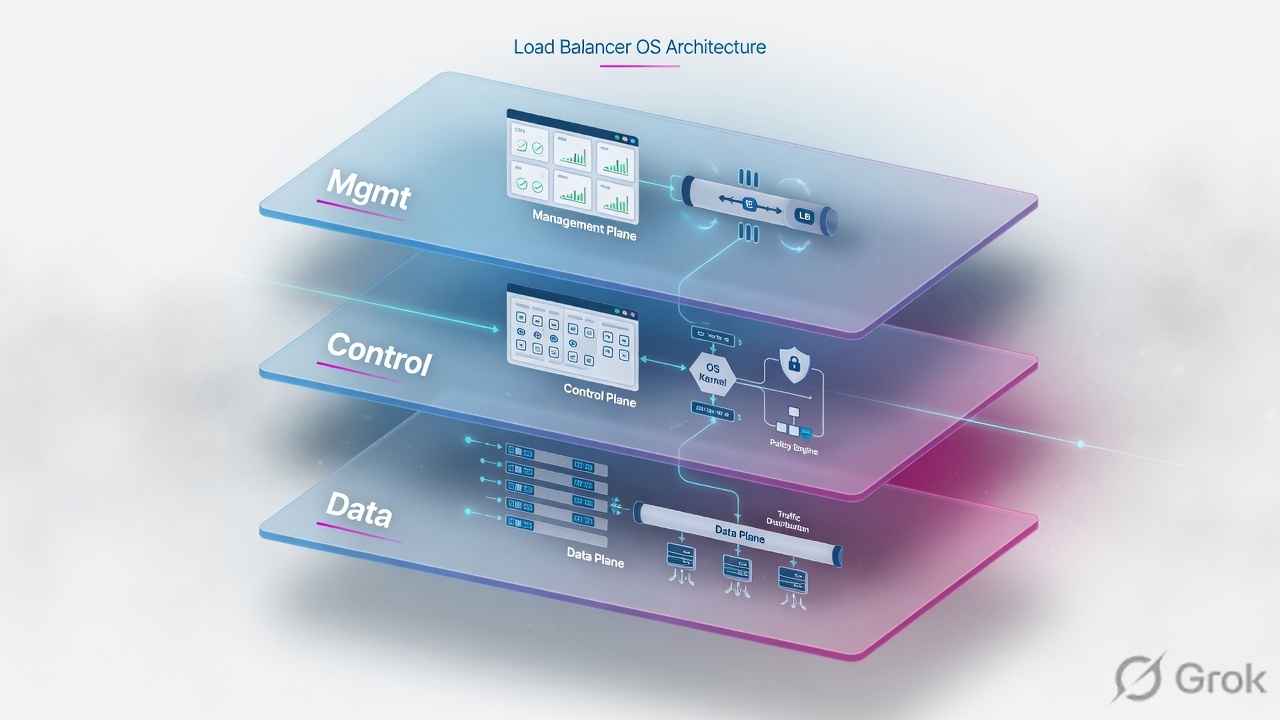
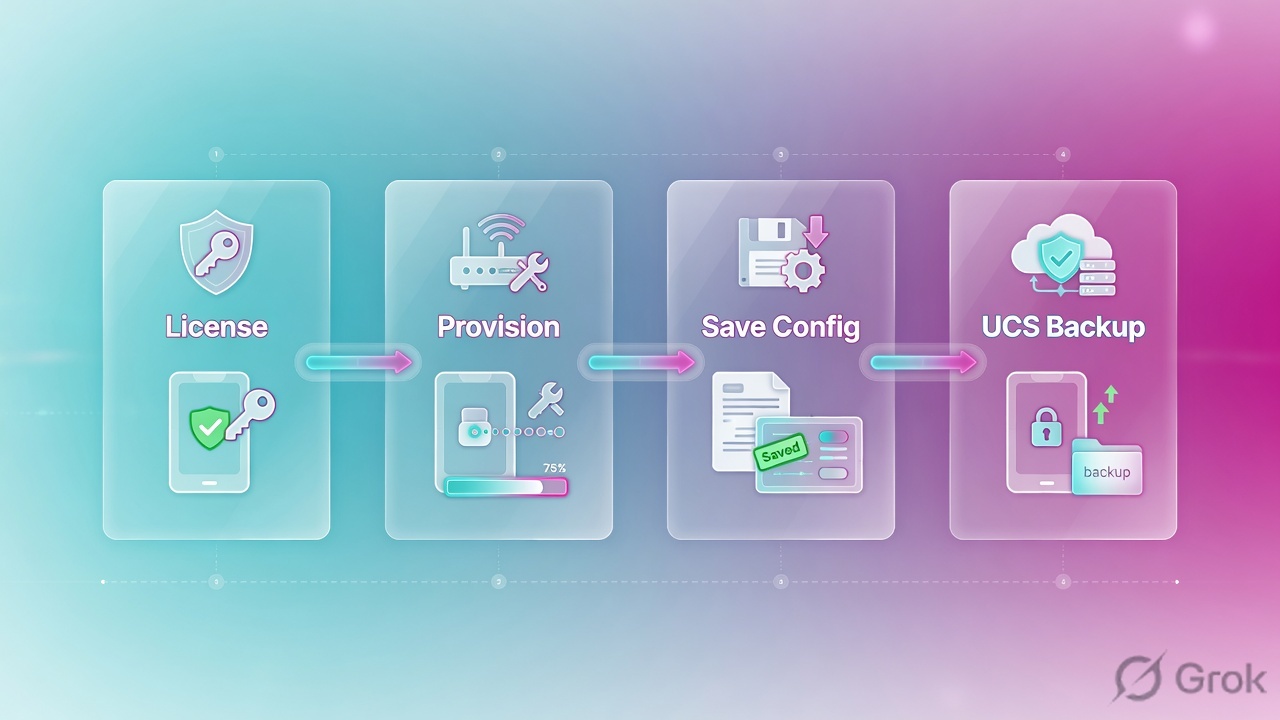
TMM processes application traffic. MCPD validates and pushes configuration. The Management IP is out-of-band admin only. License, then provision LTM, then save to disk, then take a UCS. Config in memory is not a backup.
Provision puts CPU and RAM on a licensed module. Licensing without provisioning leaves LTM dark. Saving config writes memory to disk. UCS is the restore image — including keys.
Mental model: ADC, TMOS, TMM, MCPD
A traditional Layer-4 load balancer forwards on IP and port. An Application Delivery Controller (ADC) works at Layers 4–7: SSL, HTTP, persistence, health, iRules. F5 BIG-IP LTM is that ADC. Physical appliances, Virtual Edition on ESXi/KVM/Hyper-V, and public-cloud images all run the same TMOS idea.
Admin input never becomes a packet. MCPD writes the config DB; TMM applies it to live traffic.
TMOS (Traffic Management Operating System) is the glue: Linux host + TMM + MCPD + GUI + TMSH. The Linux host gives you Bash and files. It does not load-balance HTTPS. Interview line from the PDF: “What processes application traffic — TMM or MCPD?” Answer: TMM.
| Plane | Interface / IP | Carries |
|---|---|---|
| Management | mgmt NIC · Management IP e.g. 192.168.100.10 | HTTPS GUI, SSH, iControl REST, licensing |
| Control / config | MCPD + config DB | Object create/modify, HA sync of config |
| Data | Self IPs + VIPs on VLANs | Client ↔ TMM ↔ pool member |
Management IP vs Self IP vs VIP
| Management IP | Self IP | Virtual IP | |
|---|---|---|---|
| Purpose | Admin the box | BIG-IP's own address on a VLAN | Client-facing listener |
| GUI path | System > Platform | Network > Self IPs | Local Traffic > Virtual Servers |
| App traffic? | No | Yes (TMM) | Yes (VS match) |
| HA | Not the floating app IP | Floating Self IP moves with traffic group | VIP floats with the same group |
Never use a Self IP as the client-facing application address. Never route production traffic through mgmt. Module 2 builds the VLANs; this module only locks the names.
Runbook — first-day device
Side A · platform
Hostname, DNS, NTP, time zone
GUI: System > Platform. Skip NTP and SSL certificates, HA timers, and log correlation all lie. This is the number-one first-day miss in the Module 1 PDF.
Management IP + route
Set mgmt address, mask, and management default route so https://192.168.100.10 and SSH work from the admin laptop. This path is out-of-band.
Admin password
Change default admin immediately. Prefer TMSH over raw Bash for config — MCPD must own the files.
System > License
License
Source: F5 ltm module 1.pdf · GUI path System > License. Never bypass licensing.
Side B · license then provision
A Registration Key activates modules. After license, you still must provision. Provisioning allocates CPU, memory, and disk among licensed modules.
| Level | Meaning | When |
|---|---|---|
| None | No resources | Licensed but not needed on this box |
| Minimum | Small allocation | Lab / light auxiliary module |
| Nominal | Balanced | Typical production LTM |
| Dedicated | Maximum; other modules squeezed | One module must win |
System > Resource Provisioning
Resource Provisioning
PDF trap: provisioning APM/AFM/WAF on an LTM-only box steals TMM memory.
Side C · save and UCS
GUI and TMSH changes are live in memory. Reboot without save and they vanish. UCS is the disaster-recovery archive: config, certs/keys, users, license.
tmsh save sys config
tmsh save sys ucs /var/local/ucs/backup-$(date +%Y%m%d).ucs
tmsh list sys ucs
# restore is destructive — lab first
# tmsh load sys ucs /var/local/ucs/backup-20240101.ucs
GUI: System > Archives → Create. Store the file off-box. Restoring onto different hardware may need platform-migrate / no-license flags — test in lab. Source: BIG-IP Archives.
Access methods
| Method | Use | Avoid |
|---|---|---|
| GUI HTTPS | Day-to-day objects, first setup | Using it as the only skill in an outage |
| SSH + TMSH | Show/list/modify, scripts | Editing bigip.conf in vi |
| Bash | Logs, tcpdump, files | Unsupported config file edits that MCPD cannot track |
tmsh show sys license
tmsh show sys provision
tmsh show sys performance all-stats
tmsh show sys memory
tmsh show ltm virtual
tmsh show net self

Traps + proof
| Failure | Symptom | Proof |
|---|---|---|
| No NTP | HA oddness, SSL time errors, unusable logs | System > Platform time vs NTP peer |
| Licensed but not provisioned | LTM objects missing or module inactive | tmsh show sys provision |
| Unsaved config | Changes gone after reboot | tmsh save sys config after every real change |
| UCS only on the box | Disk dies, backup dies | Copy UCS off-box the same day |
| Bash-edited conf | MCPD / TMM disagree | Use TMSH/GUI; reload from known UCS |
- You can draw mgmt vs Self IP vs VIP on a whiteboard.
tmsh show sys licenseandtmsh show sys provisionboth look sane.- A dated UCS file exists off the device.
Knowledge check
Judgment items from Module 1 — planes, license, save, UCS.
Sources
- Techclick PDF:
F5 ltm module 1.pdf(from OneDrive_1_8-26-2026.zip, 26 Aug 2026) - Companion deck:
F5-Ltm-Training-Ppt (1).pptx.pdf - Archives: BIG-IP UCS archives
- Official lab paths: F5 cert Lab 1 — VLANs, Self IPs, pools, virtual servers
- TMSH virtual server reference: ltm virtual
- Related deep dives on this site: SSL modes · SNAT · Persistence · VS/pools · VIP down / tcpdump
Related: Course hub · Syllabus · My Courses · F5 LTM interview