Lessons · F5 LTM series · Module 4
Full explanation — same as the Techclick PDF
This section is the workbook explanation, rewritten from F5-BIG-IP-LTM-Module-4.pdf. Read it like class notes. Diagrams above are only a map — the teaching is here.
Read the PDF-order sections below. Then do the runbook. Then take the quiz. If a sentence is in the PDF, it is in this page.
PDF · page 1 — F5 BIG-IP LTM — Module 4 Profiles, SNAT, Persistence & SSL/TLS
How BIG-IP Controls, Translates, Persists, and Encrypts Application Traffic
Traffic Profiles TCP, HTTP, OneConnect
SNAT Automap, Pool, No-SNAT
Persistence Affinity & Session Stickiness
SSL/TLS Offload, Bridging, Passthrough
01 Learning Outcomes. Understand how profiles define per-protocol traffic-processing behavior on BIG-IP Virtual
Servers 02
SNAT Mastery
Explain when and why SNAT is used, and configure Automap, SNAT Pool, and No-SNAT designs
- 03 Persistence & SSL/TLS — Configure session affinity methods and deploy
Client/Server SSL profiles for offload and bridging
PDF · page 2 — Where Module 4 Fits in LTM Processing
Modules 1–3 established the networking foundation and application objects. Module 4 explains how BIG-IP processes the traffic after a Virtual Server match occurs.
A Virtual Server identifies which traffic BIG-IP should intercept. Profiles and traffic settings define how that traffic is handled — this is the core of Module 4.
PDF · page 4 — What Is a BIG-IP Profile?
A BIG-IP profile is a reusable configuration object that controls protocol-specific traffic-processing behavior. Profiles are associated with Virtual Servers and define how BIG-IP handles each connection at each protocol layer. Multiple profiles can be attached to a single Virtual Server simultaneously.
Profile Types TCP Profile
HTTP Profile UDP Profile
FastL4 Profile Client SSL Profile
Server SSL Profile OneConnect Profile
Persistence Profile Virtual Server Profile Stack
A typical HTTPS Virtual Server may attach all of the following simultaneously:
Client TCP Profile → optimizes client connection. Server TCP Profile → optimizes backend connection HTTP Profile → enables HTTP processing
- Client SSL Profile → terminates client TLS Server SSL Profile → establishes backend TLS — Persistence Profile → maintains session affinity OneConnect Profile → enables connection reuse
Profiles support parent-profile inheritance — custom profiles inherit settings from a parent (e.g., tcp) and override only specific parameters.
PDF · page 5 — Client-Side vs. Server-Side Processing
Client-Side vs. Server-Side Processing. BIG-IP's full-proxy architecture creates two independent connection legs — one toward the client and one toward the backend. Each leg can be configured with its own profiles, giving operators granular control over how each side of the connection behaves.
- Client Side Client: 198.51.100.50 — → Connection A → BIG-IP VIP: 192.0.2.100:443
- Client TCP Profile (WAN-optimized) Client SSL Profile (TLS server role) — HTTP Profile (request parsing) Server Side
- BIG-IP → Connection B → — Web01: 10.20.20.101:443 Server TCP Profile (LAN-optimized)
- Server SSL Profile (TLS client role) SNAT translation applied — Independent per-side control is one of the most powerful advantages of the BIG-IP full-proxy architecture. Client-side and server-side
TLS, TCP behavior, and timeouts are all independently configurable.
PDF · page 6 — TCP Profiles
TCP profiles control how BIG-IP manages TCP connections on each side of the full-proxy. Rather than passing TCP behavior through unmodified, BIG-IP independently manages both the client-side and server-side TCP stacks, allowing per-side optimization.
Timeouts & Keep-Alive
Control idle timeouts, keep-alive intervals, and connection aging to match application behavior and network conditions.
Window & Buffering
Configure receive/send buffer sizes and TCP window scaling to improve throughput on high-latency or high-bandwidth links.
Retransmission
Tune retransmission behavior and related parameters for resilience on lossy or highlatency WAN paths.
Common Built-in TCP Profiles
Profile Intended Use tcp Default baseline — suitable for most LAN environments tcp-wan-optimized Tuned for higher-latency WAN client connections tcp-lan-optimized Tuned for low-latency data-center server connections
- Custom Profile Inherits from parent; overrides specific parameters only — Custom TCP tuning should always be based on measured application and network requirements — not applied arbitrarily. Profile availability and recommended settings depend on BIG-IP version.
PDF · page 8 — Client TCP vs. Server TCP Profile
Client TCP vs. Server TCP Profile. One of the key advantages of BIG-IP's full-proxy model is that the client-side and server-side TCP stacks are completely independent. This allows BIG-IP to apply WAN-appropriate optimizations toward the client while using LAN-appropriate settings toward the backend — simultaneously.
- Client Side (WAN) Higher latency expected — Variable bandwidth Larger buffers may help throughput
- Use: tcp-wan-optimized Server Side (LAN / Data Center) — Low-latency, high-bandwidth path Predictable link characteristics
Aggressive timeouts acceptable Use: tcp-lan-optimized
Production tip: Always baseline actual RTT and bandwidth before choosing TCP profile settings. Measured data beats assumptions.
PDF · page 9 — HTTP Profile
An HTTP Profile enables BIG-IP to understand and process the HTTP protocol at Layer 7. Without an HTTP Profile, BIG-IP treats traffic as raw TCP bytes and cannot inspect, modify, or act on HTTP-level content — even if the traffic is plaintext HTTP.
HTTP Request Parsing
BIG-IP inspects method, URI, headers, and HTTP version — enabling routing decisions, iRule events, and policy integration based on application-layer content.
Header Manipulation
- Insert, remove, or rewrite HTTP headers. Common use: inserting — X-Forwarded-For to carry the client IP into an application-layer header.
Layer-7 Processing Enabler
Required for cookie persistence,
XFF insertion, HTTP-based iRule events, redirect policies, and compression. Without this profile, none of these are available.
If BIG-IP does not terminate TLS first, it cannot inspect the encrypted HTTP payload. An HTTP Profile alone does not decrypt traffic — a Client SSL Profile is required before HTTP processing is possible on HTTPS flows.
PDF · page 10 — X-Forwarded-For (XFF)
X-Forwarded-For (XFF). When SNAT is configured, backend servers see BIG-IP's translation address as the Layer-3 source IP — not the original client address. X-
Forwarded-For is an HTTP header that BIG-IP can insert to carry the original client IP address through the HTTP request, making it visible to the backend application.
Backend reads XFF BIG-IP SNAT
+ XFFClient → VIP What XFF Does. Inserts client IP into an HTTP application header Useful for application logging and analytics
- Used by WAF/security policies for client identification Requires HTTP Profile to be attached — What XFF Does NOT Do Does not restore the original Layer-3 source IP
The network packet still carries SNAT address at L3
- Cannot function if TLS is not terminated (encrypted payload) — Backend applications should only trust X-Forwarded-For from known, trusted proxy infrastructure. Untrusted XFF headers can be spoofed by clients.
PDF · page 11 — OneConnect
OneConnect is a BIG-IP profile that enables server-side TCP connection reuse across multiple independent client HTTP requests. Instead of creating a new backend connection for every client request, BIG-IP can multiplex HTTP requests from different clients onto existing, idle serverside connections.
OneConne ct Multiplexin g
Client C Independent HTTP request
Web01 Single backend connection
BIG-IP Multiplexer
Reuses server-side connection Client B
Independent HTTP request Client A
Independent HTTP request Potential Benefits
- Reduced connection creation overhead on backend Lower server resource consumption at scale — Efficient HTTP/1.1 keep-alive management Design Considerations
Requires HTTP Profile — works at Layer 7
Mask configuration must match application design
- Can interact with persistence and load balancing Not always required — evaluate per application — OneConnect mask configuration must be appropriate for the application. Incorrect mask settings can cause unexpected connectionsharing behavior. Do not enable without understanding the application's session model.
PDF · page 12 — What Is SNAT?
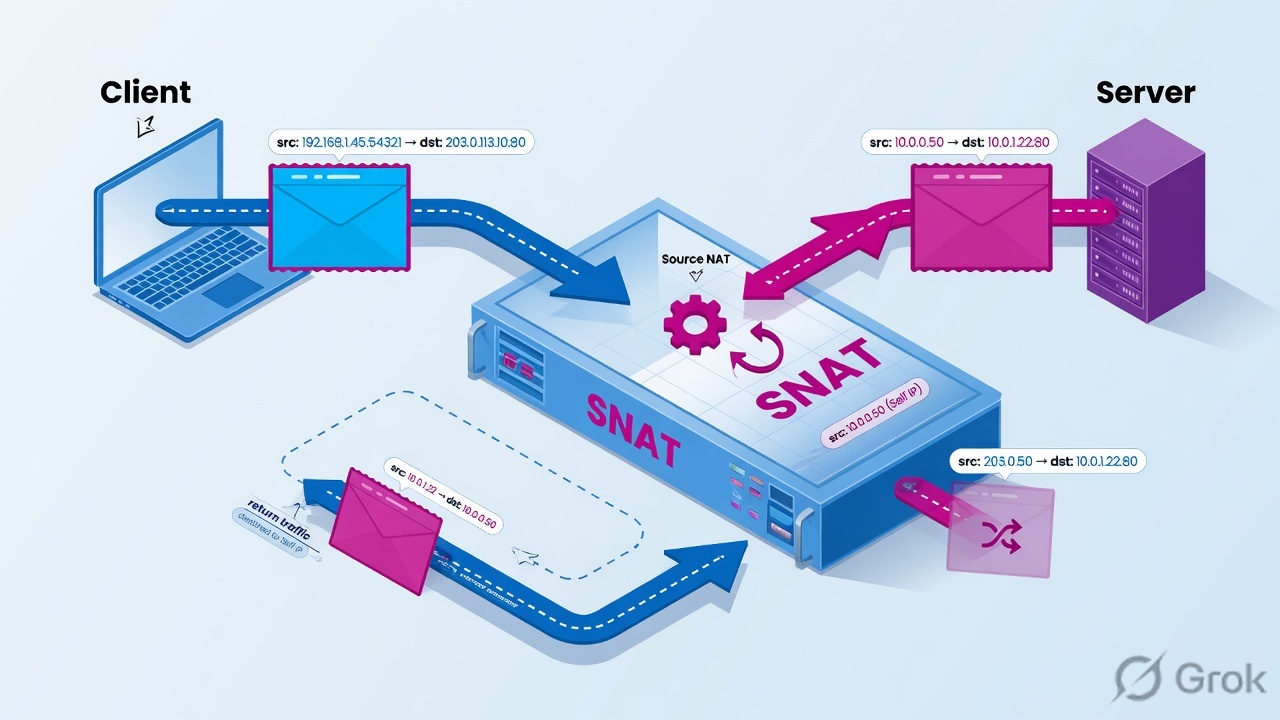
SNAT — Source Network Address Translation — is BIG-IP's mechanism for changing the source IP address on the server-side connection.
When a client connects to a Virtual Server, BIG-IP terminates that connection and creates a new server-side flow. SNAT controls what source address BIG-IP uses on that new outbound connection toward the backend.
Without SNAT Client source: 198.51.100.50. BIG-IP forwards traffic toward backend. Depending on design, backend may see the original client source address.
Return path depends entirely on backend routing.
- With SNAT Client source: 198.51.100.50 — BIG-IP translates source to: 10.20.20.10:<ephemeral-port>
Backend responds to BIG-IP's SNAT address — ensuring return traffic traverses BIG-IP.
SNAT is commonly used to ensure the backend returns traffic through BIG-IP. It is not always required — the right design depends on backend routing topology.
PDF · page 13 — Why SNAT Is Used — Return Path Problem
The most common reason to use SNAT is to solve the asymmetric return-path problem. When a backend server's default gateway bypasses BIG-IP, the server returns packets directly to the client — without passing through BIG-IP. This breaks the full-proxy model and disrupts the connection.
Without SNAT — Asymmetric
Server's default gateway routes response directly to client, bypassing BIG-IP entirely. Connection state mismatch breaks the session.
With SNAT — Symmetric
Server sees BIG-IP's SNAT address as the source. Response returns to BIG-IP. Full-proxy model is preserved end-to-end.
REMEMBER: SNAT is one solution — not the only solution. Backend routing can also be designed so that return traffic naturally traverses BIG-IP, making SNAT unnecessary in some topologies.
PDF · page 14 — SNAT Automap
SNAT Automap instructs BIG-IP to automatically select an appropriate Self IP address for source translation on the server-side flow, based on the traffic context. The administrator does not need to specify individual translation addresses — BIG-IP selects dynamically from available Self IPs on the egress VLAN.
Response Flow Backend replies via BIG-IP to client
- Server Sees Source Backend sees 10.20.20.10 as source — BIG-IP Translates Automap picks Self IP 10.20.20.10
- Client Connects Client 198.51.100.50 → VIP 192.0.2.100 — How Automap Works BIG-IP selects a Self IP on the egress VLAN
Source-port translation differentiates flows
In HA, floating Self IPs may be used (configuration-dependent) No administrator-defined address pool needed
GUI Configuration Path
- Local Traffic → Virtual Servers → [Virtual Server Name] — Under Source Address Translation, select Auto Map.
In active/standby HA deployments, confirm whether floating or non-floating Self IPs are used for SNAT translation — behavior depends on your configuration.
PDF · page 15 — SNAT Pool
A SNAT Pool is an administrator-defined group of IP addresses that BIG-IP uses as translation addresses on server-side flows. Unlike Automap, you explicitly control which addresses are used, providing better operational visibility, firewall-policy integration, and capacity planning at scale.
- Example SNAT Pool Pool Name: SNAT_POOL_APP
- 10.20.20.50 10.20.20.51
10.20.20.52. BIG-IP selects one of these addresses as the server-side source, depending on flow and configuration.
SNAT Pool Use Cases Dedicated translation addresses per application
Better address separation between application tiers
Large-scale source-port capacity across multiple addresses
- Firewall rule integration using known SNAT addresses Operational log correlation and visibility — Automap vs. SNAT Pool Comparison Attribute Automap SNAT Pool
- Address selection Automatic (BIG-IP Self IP) Administrator-defined Operational visibility Lower Higher — Firewall policy integration More complex Easier (known addresses)
Configuration effort Minimal Requires address planning
PDF · page 16 — No-SNAT Design
In some network topologies, SNAT is unnecessary. When backend routing is designed so that all return traffic from servers naturally traverses BIG-IP — for example, when BIG-IP is the default gateway for the backend VLAN — the server will return packets to BIG-IP without requiring source address translation.
No-SNAT Topology
Backend server receives Sees real client IP
Symmetric return path Responses back via
BIG-IP BIG-IP as gateway
Server default route to BIG-IP BIG-IP forwards packet
Preserves original client source Client sends to
- VIP Client -> BIG-IP virtual IP
Benefits of No-SNAT
- Backend server sees the actual client source IP at Layer 3 No translation addresses to manage — No source-port translation considerations
- Simpler logging — client IP is native in server logs Requirements & Considerations — Backend routing must guarantee return path through BIG-IP Routing design must be validated end-to-end
Incorrect routing causes asymmetric flows — hard to troubleshoot
Do not choose No-SNAT simply because preserving the client IP sounds desirable. Validate the complete return path before deploying without SNAT.
PDF · page 17 — SNAT Method Comparison
Choosing the right SNAT method depends on routing topology, operational requirements, scale, and firewall policy needs. Use this reference table to select the appropriate approach for a given deployment scenario.
Attribute No SNAT Automap SNAT Pool
- L3 source seen by backend Original client IP BIG-IP Self IP (auto-selected) Admin-defined pool address — Return-path requirement Must route through BIG-IP natively Backend returns to Self IP →
- BIG-IP Backend returns to pool IP →
BIG-IP. Configuration complexity Low (routing must be correct) Very low Moderate (pool planning required)
- Scale considerations No port translation limits Limited by Self IP port space Scales by adding pool members — Address control None (client IP preserved) Automatic Full administrator control
Typical use case BIG-IP is default GW for backend
Standard deployments Large scale, firewall integration
PDF · page 18 — SNAT Port Translation & Scale
BIG-IP differentiates thousands of concurrent flows sharing a single SNAT translation address by using source-port translation. Each unique combination of SNAT address + translated source port represents one connection toward the backend — enabling massive connection multiplexing from a single IP.
SNAT Port Translatio n
- Client C 198.51.100.12:52003
- Backend 10.20.20.101:443
- BIG-IP SNAT 10.20.20.10:30001-
- 30003 Client B
- 198.51.100.11:51002 Client A
198.51.100.10:50001 Port Exhaustion Risk. The available translated source-port range on a single SNAT address is finite. Under very high connection volumes:
- Port space on a single address may deplete New connections may be rejected or fail — Symptoms: intermittent connection failures at scale Mitigation Strategies
Use a SNAT Pool with multiple translation addresses
- Enable connection reuse via OneConnect where applicable Monitor active connection counts proactively — Tune idle timeouts to release stale connections promptly
Exact port-exhaustion thresholds vary by BIG-IP version,
TCP profile settings, and connection timeout configuration.
Always test at expected scale.
PDF · page 19 — What Is Persistence?
Persistence — also called session affinity or stickiness — is a BIG-IP mechanism that maintains an ongoing association between a specific client or session and a specific pool member. Once a persistence record is established, subsequent matching requests are directed to the same backend server, overriding the load-balancing algorithm for those flows.
First Request
- Client 198.51.100.50 → BIG-IP applies load balancing → Web02 selected Persistence Record Created — BIG-IP stores: 198.51.100.50 → Web02 in persistence table Subsequent Requests
- Client 198.51.100.50 → BIG-IP matches persistence → Web02 (same server) — Persistence does not mean a server is permanently reserved. It is time-limited by the persistence timeout and depends on poolmember availability, profile type, and application/client behavior.
PDF · page 20 — Why Persistence Is Required
Persistence is necessary when a backend application stores session state locally on a specific server. If a subsequent request from the same user reaches a different server, that server has no knowledge of the user's session — resulting in errors, authentication failures, or data loss.
- When Persistence Is Needed — Application uses local server-side session storage
Shopping carts, login sessions, multi-step forms
- Legacy applications not designed for stateless operation When Persistence May Not Be Needed — Application uses shared session store (Redis, DB)
Stateless REST API — each request is independent
JWT/token-based authentication with no server state
PDF · page 21 — Source Address Affinity
Source Address Affinity is the simplest persistence method. BIG-IP uses the client's source IP address as the persistence key. Once a persistence record is created for a given source IP, all subsequent connections from that address are directed to the same pool member until the record expires.
How It Works Persistence Key: 198.51.100.50. Persistence Record: 198.51.100.50 → Web02 Works with non-HTTP applications (TCP/UDP)
No application-layer visibility required Simple to configure and understand
NAT/Proxy Problem
- When many users share a single public IP (corporate NAT, ISP — CGNAT), BIG-IP sees one persistence key for all of them:
1,000 office users share: 203.0.113.10. All 1,000 users persist to the same backend server Load distribution becomes severely skewed
One server may be overwhelmed while others are idle
Common mistake: Source Address Affinity behind large
NAT environments causes very uneven load distribution.
Use Cookie Persistence for HTTP applications where possible.
PDF · page 22 — Cookie Persistence
Cookie Persistence uses an HTTP cookie as the persistence key. BIG-IP inserts a cookie into the HTTP response, and the client browser sends that cookie with every subsequent request. BIG-IP reads the cookie to identify the correct backend server — providing per-session granularity rather than per-IP granularity.
Read CookieSubsequent Request
Insert Cookie
Load Balance
Client Request
Advantages Per-session granularity — not per-IP
- Works correctly behind NAT/proxy (each user has own cookie) — Application-aware — most accurate for HTTP applications
Does not skew load distribution like Source IP persistence Requirements
HTTP Profile must be attached to Virtual Server
- For HTTPS traffic, BIG-IP must terminate TLS first (Client SSL Profile required) so HTTP is visible — Client must accept and return cookies (browsers do by default)
PDF · page 24 — Other Persistence Methods
Beyond Source Address and Cookie Persistence, BIG-IP supports additional methods for specialized scenarios. Each uses a different persistence key and carries its own applicability conditions and limitations.
Destination Address Affinity
Uses the destination IP as the persistence key. Less commonly used in standard load-balancing scenarios — more applicable in transparent proxy and firewall load-balancing designs.
SSL Persistence
Uses TLS/SSL session-related information as the persistence key.
Important limitation: Modern TLS versions, session tickets, and client/application behavior significantly affect whether session information is reused. Practical effectiveness varies — do not rely on this as a primary method for modern applications.
Universal Persistence
Uses a custom iRule-defined persistence key — such as a user ID, custom header value, or application token extracted from the payload. This provides maximum flexibility for applications with unique session identification requirements. Advanced iRule knowledge required.
Interview question: When would you choose Universal Persistence over Cookie Persistence? Answer: When the application uses a custom session identifier that is not a standard HTTP cookie — e.g., a token in a custom header or URI parameter.
PDF · page 25 — Default vs. Fallback Persistence
Default vs. Fallback Persistence. BIG-IP supports two persistence profile slots on a Virtual Server: a default persistence profile and an optional fallback persistence profile. This two-layer model provides resilience when the primary method cannot establish affinity for a given request.
Default Persistence Profile
The primary persistence method BIG-IP attempts first. For HTTP applications, Cookie Persistence is typical — it provides per-session accuracy using HTTP cookie inspection.
- Cookie Persistence (HTTP applications) Source Address Affinity (TCP/UDP apps) — Universal Persistence (custom requirements) Fallback Persistence Profile
Used when the default method cannot establish a record — for example, a non-browser client that does not send cookies. BIG-IP falls back to the secondary profile automatically.
- Source Address Affinity (common fallback) Activates only when primary key is unavailable — Configured independently of default profile Example Design
Profile Slot Method Trigger
Default Cookie Persistence Always attempted first
Fallback Source Address Affinity When cookie cannot be inspected/established
PDF · page 26 — Persistence Records
BIG-IP maintains a persistence table that maps each persistence key to a specific pool member. These records are time-limited by the persistence timeout configured in the profile. Understanding persistence records is essential for troubleshooting unexpected affinity behavior.
- Record Structure Key: 198.51.100.50 (Source IP)
- Maps to: 10.20.20.102:443 — Timeout: 180 seconds (default varies by profile)
The record is refreshed each time a matching request arrives, resetting the timeout clock.
Useful tmsh Commands tmsh show ltm persistence persist-records tmsh show ltm persistence persist-records all-properties tmsh delete ltm persistence persist-records Command output and available options vary by BIG-IP version and persistence profile type. Always verify syntax against your installed version.
Troubleshooting Checklist 01
Check Profile
- Is the correct persistence profile attached to the Virtual Server? 02
Check Key
Is the expected persistence key (cookie, IP, etc.) present in the request?
03 Check Records. Does a current persistence record exist? Is the timeout still active? 04
Check Member
Is the persisted pool member currently up and available?
PDF · page 27 — Load Balancing vs. Persistence
Load Balancing vs. Persistence. Load balancing and persistence serve different purposes and operate at different stages of connection handling. Load balancing selects a backend member for a new, unmatched connection. Persistence overrides that selection for subsequent requests that match an existing affinity record.
Load Balancing Role
Selects the initial eligible pool member for a new connection or session. Applies the configured algorithm (Round Robin, Least Connections, etc.).
Persistence Role
Overrides subsequent load-balancing selections for related requests. Directs traffic to a previously selected member based on an affinity record.
Observed Distribution
With persistence enabled, Round Robin may appear not to work — this is expected. Persistence can also be affected by connection reuse and browser keep-alive behavior.
PDF · page 28 — TLS Fundamentals
TLS (Transport Layer Security) protects application traffic in transit through three primary security properties: encryption (confidentiality), integrity (tamper detection), and authentication (server/client identity verification). Understanding TLS is foundational to deploying BIG-IP SSL profiles correctly.
Encryption
Data is encrypted between endpoints using negotiated cipher suites. Prevents eavesdropping on network paths.
Integrity
Message authentication codes (MAC) detect if data was modified in transit. Prevents tampering attacks.
Authentication
Digital certificates verify server (and optionally client) identity. Prevents impersonation and man-in-the-middle attacks.
- TLS Handshake Overview (Simplified) ClientHello — Client proposes TLS versions and ciphers.
ServerHello & Certificate
Server selects cipher and presents identity.
Key Establishment Client and server exchange key material.
Encrypted Traffic
Application data flows encrypted and authenticated.
PDF · page 29 — Certificate, Private Key & Chain
TLS requires three cryptographic components working together: the server certificate (public identity), the private key (secret decryption material), and the certificate chain (trust path to a recognized root CA). All three must be correctly configured in BIG-IP's Client SSL Profile for TLS termination to succeed.
1 Root CA. The trust anchor — pre-installed in client browsers and operating systems. Signs the Intermediate CA.
2 Intermediate CA. Issued by the Root CA. Signs the server certificate. Must be included in the certificate chain sent to clients.
3 Server Certificate. Issued by the Intermediate CA. Contains the server's public key and identity
(Subject/SAN). Presented during TLS handshake.
4 Private Key. Matches the server certificate's public key. Used to prove ownership during handshake. Must never be shared or exported unnecessarily.
Security warning: Never share or export private keys unnecessarily. BIG-IP UCS (configuration backup) files may contain sensitive cryptographic material — protect them with the same controls as the private keys themselves.
PDF · page 30 — Client SSL Profile
The Client SSL Profile controls TLS behavior between the connecting client and BIG-IP. When this profile is attached to a Virtual Server, BIG-IP acts as the TLS server toward the client — it presents the certificate, performs the handshake, and terminates (decrypts) the client TLS session.
The decrypted plaintext is then available for HTTP processing.
BIG-IP Role: TLS Server → Client. Client connects with HTTPS → BIG-IP presents its certificate →
Client validates → TLS session established → BIG-IP decrypts traffic.
- Key Configuration Items Certificate (must include full chain)
Matching Private Key
- TLS version restrictions (disable obsolete versions) Cipher suite configuration — SNI handling (multiple certs per VIP) GUI Navigation
- Local Traffic → Profiles → SSL → Client — Note: Exact menu path may vary by BIG-IP release version.
Profile Attachment
- Local Traffic → Virtual Servers → [VS Name] → SSL Profile (Client) — Supported TLS versions and recommended cipher suites depend on your BIG-IP software version. Always follow current F5 security guidance and disable TLS 1.0 and 1.1 in production.
PDF · page 31 — Server SSL Profile
The Server SSL Profile controls TLS behavior between BIG-IP and the backend server. When this profile is attached, BIG-IP acts as the TLS client toward the backend — it initiates the TLS handshake, optionally validates the backend certificate, and establishes an encrypted session toward the server. This is required for SSL Bridging / Re-encryption deployments.
BIG-IP Role: TLS Client → Backend. BIG-IP initiates connection to backend → presents optional client certificate → validates backend certificate (if configured) → establishes TLS session toward server.
- Key Configuration Items Backend certificate validation (CA bundle) — SNI value sent toward backend TLS version and cipher compatibility
Backend hostname / certificate identity check Common Deployment Scenarios
SSL Bridging — both Client and Server SSL Profiles attached
Compliance requirements mandating end-to-end encryption
PCI DSS environments requiring encrypted backend segment
A Server SSL Profile is not required for SSL Offload — in offload mode, BIG-IP sends unencrypted HTTP to the backend, so no server-side TLS profile is needed. Attaching one accidentally will cause connection failures.
PDF · page 32 — SSL/TLS Offload (Termination)
SSL/TLS Offload (Termination). SSL Offload — also called SSL Termination — is the most common BIG-IP TLS deployment pattern. BIG-IP terminates the client's TLS session, decrypts the traffic, and forwards plaintext HTTP to the backend server. The backend does not handle TLS at all, reducing its cryptographic workload and enabling full Layer-7 inspection on BIG-IP.
SSL Offload
Flow BIG-IP Client
SSL Profile Terminates TLS, decrypts
- Backend Server HTTP (decrypted)
- Client HTTPS (encrypted) — Benefits Centralized certificate management on BIG-IP
- Full HTTP visibility — cookie persistence, XFF, iRules Layer-7 inspection and WAF integration — Backend servers handle only HTTP — simpler config Certificate renewals in one place
Risk / Consideration
Backend network segment carries unencrypted HTTP
- Must be protected by network controls (VLAN isolation, firewall) — Not appropriate where end-to-end encryption is mandated Profile Requirements
Client SSL Profile HTTP Profile
- ❌ Server SSL Profile (not required)
PDF · page 33 — SSL Bridging / Re-Encryption
SSL Bridging (Re-encryption) deploys both a Client SSL Profile and a Server SSL Profile on the same Virtual Server. BIG-IP terminates the clientside TLS session, gains full HTTP visibility in the middle, then establishes a new, independent TLS session toward the backend. This provides end-to-end encrypted transport while retaining Layer-7 processing capability on BIG-IP.
Re-encrypt TLS Session Process HTTP
Terminate & Decrypt Client TLS Session
Two Independent TLS Sessions
- TLS Session 1: Client ↔ BIG-IP (Client SSL Profile) — TLS Session 2: BIG-IP ↔ Backend (Server SSL Profile)
Each session can have different TLS versions and cipher suites
BIG-IP inspects decrypted HTTP between the two sessions Benefits vs. Offload
End-to-end encrypted network transport
- Meets compliance requirements for encrypted backend Retains full Layer-7 processing on BIG-IP — Independent client/server TLS policy (different cipher suites)
Client-side TLS success does not guarantee server-side
TLS success. These are two independent sessions — troubleshoot each side separately.
PDF · page 34 — SSL Passthrough
In SSL Passthrough, BIG-IP does not terminate or decrypt the client's TLS session. The encrypted TLS stream passes through BIG-IP at Layer 4 and is delivered directly to the backend server, which performs TLS termination. The TLS certificate lives on the backend — not on BIG-IP.
TLS TerminationBackend TLSBIG-IP L4Client
- What BIG-IP Can Still Do Layer-4 load balancing (TCP/UDP) — Virtual Server matching by destination IP and port
- Source Address persistence (based on IP — no HTTP visibility) Basic connection-level health monitoring — What BIG-IP Cannot Do Inspect or modify encrypted HTTP payload
- Insert X-Forwarded-For (requires HTTP processing) Use HTTP cookie persistence — Apply Layer-7 iRules to HTTP content WAF inspection of application payload
If BIG-IP does not decrypt HTTPS, Layer-7 HTTP inspection of encrypted content is unavailable. All HTTP-dependent features (XFF, cookie persistence, HTTP iRules, WAF) require TLS termination first.
PDF · page 35 — SSL Offload vs. Bridging vs. Passthrough
SSL Offload vs. Bridging vs. Passthrough. Understanding the differences between these three TLS deployment models is essential for selecting the right architecture and for troubleshooting certificate and inspection issues in production.
Attribute Offload Bridging Passthrough Client → BIG-IP HTTPS (TLS terminated on
- BIG-IP) HTTPS (TLS terminated on
BIG-IP) TLS (not terminated — forwarded). BIG-IP → Server HTTP (plaintext) HTTPS (new TLS session) TLS (unchanged — passed through)
Certificate on BIG-IP Yes Yes No
- Certificate on Backend Not required for TLS Required Required HTTP visibility on BIG-IP Full Full None — Cookie Persistence Yes Yes No XFF Insertion Yes Yes No
- End-to-end encryption No (HTTP to backend) Yes Yes (unchanged)
PDF · page 36 — Server Name Indication (SNI)
Server Name Indication (SNI). SNI — Server Name Indication — is a TLS extension that allows a client to include the target hostname in the TLS ClientHello message, before the TLS session is established. This enables a single BIG-IP Virtual Server (one IP and port) to serve multiple HTTPS applications, each with its own certificate, by selecting the correct certificate based on the hostname the client requests.
How SNI Works
- Client sends: ClientHello → SNI = www.example.com — BIG-IP reads the SNI hostname before TLS is established and selects the matching certificate from the Client SSL Profile configuration.
www.example.com → Certificate A api.example.com → Certificate B portal.example.com → Certificate C
Use Cases
- Multiple HTTPS applications sharing one VIP (IP:port) Virtual hosting for multiple domains — Server-side SNI: BIG-IP sends correct hostname to backend Troubleshooting SNI
- Client must send SNI (all modern clients do) — Verify correct certificate is selected per hostname
- Check: openssl s_client -connect IP:443 -servername hostname — SNI troubleshooting is critical in environments where multiple HTTPS applications share infrastructure.
PDF · page 37 — Complete HTTPS Processing Flow
This end-to-end example traces a full HTTPS request through BIG-IP using SSL Bridging. Client: 198.51.100.50 | Application:
www.example.com | VIP: 192.0.2.100:443 | Pool: WEB_POOL | Backend: 10.20.20.101:443
01 DNS & TCP Connect. Client resolves www.example.com → 192.0.2.100. Client initiates TCP connection to VIP:443.
02 Virtual Server Match. BIG-IP matches the incoming connection to the configured Virtual
Server. Client TCP Profile processes the client-side TCP connection.
03 Client TLS Termination. Client SSL Profile handles TLS ClientHello, SNI matching, certificate presentation, and key exchange. Client TLS session terminates on BIG-
IP.
04 HTTP & Persistence Processing. HTTP Profile parses the decrypted request. Persistence profile checks for existing affinity record. XFF header inserted if configured.
05 Load Balancing & SNAT. If no persistence record exists, load-balancing algorithm selects a pool member. SNAT Automap translates source to 10.20.20.10.
- 06 Server TLS & Response — Server SSL Profile establishes new TLS session toward
10.20.20.101:443. Backend processes request and returns response.
BIG-IP re-encrypts response toward client using Client SSL Profile.
PDF · page 38 — Troubleshooting SNAT & Persistence
Most SNAT and persistence issues follow predictable patterns. Use these structured scenarios to systematically identify and resolve problems in production and lab environments.
Scenario 1: Backend Never Returns Traffic Through BIG-IP
Symptom: Sessions hang or reset after BIG-IP forwards to backend.
Check: Backend default gateway | Backend routing table | SNAT configuration on Virtual Server | Packet capture on server-side interface | Firewall between BIG-IP and backend.
Scenario 2: Backend Logs Show BIG-IP Address, Not Client IP
Symptom: Application logs only show 10.20.20.10 — client identity lost.
Explanation: SNAT is active (expected behavior). For HTTP applications, enable X-Forwarded-For insertion in the HTTP Profile.
Scenario 3: All Users Going to One Server
Symptom: One pool member receives all traffic despite Round Robin.
- Check: Persistence profile attached | Source IP behind shared — NAT | Existing persistence records | OneConnect mask | Poolmember status | Load-balancing method.
Scenario 4: Persistence Appears Inconsistent
Symptom: Users occasionally land on wrong server despite persistence configured.
- Check: Persistence timeout too short | Pool member went down — (persistence record invalidated) | Cookie not being sent by client
| Profile not attached to correct Virtual Server.
PDF · page 39 — SSL/TLS Troubleshooting
TLS issues on BIG-IP often manifest as handshake failures, certificate warnings, or backend connection errors. Use this structured approach and these tools to isolate whether the problem is on the client side, server side, or BIG-IP configuration.
- Key Commands curl -vk https://www.example.com openssl s_client \ -connect 192.0.2.100:443 \ — -servername www.example.com tcpdump -nni 0.0 port 443 What to Check
- Certificate Subject / SAN — correct hostname? Certificate expiration date — Full certificate chain (Root + Intermediate) TLS version negotiated (TLS 1.2 / 1.3 expected)
Cipher suite selected SNI value in ClientHello
Client SSL Profile configuration on Virtual Server Server SSL Profile — backend TLS compatibility
Backend TLS version/cipher support
Critical distinction (SSL Bridging): Client-side TLS success does NOT prove server-side TLS success. These are two independent TLS sessions. Client-side curl showing 200 OK while backend reports TLS errors is a common scenario — always capture both sides independently.
PDF · page 40 — Hands-On Lab Topology
All labs in Module 4 use the following VMware-based topology. Configure your lab environment to match before beginning any lab task. Web servers must display the server name and received connection attributes to validate each exercise.
- Component Address / VLAN Role Client 198.51.100.50 Test client (external) — External VLAN 10 192.0.2.0/24 Client-facing network
- BIG-IP External Self IP 192.0.2.10 BIG-IP external interface — BIG-IP VIP 192.0.2.100 (HTTP :80, HTTPS :443) Virtual Server address
- BIG-IP Internal Self IP 10.20.20.10 SNAT Automap address — Internal VLAN 20 10.20.20.0/24 Backend server network
- Web01 10.20.20.101 (HTTP :80, HTTPS :443) Pool member 1 — Web02 10.20.20.102 (HTTP :80, HTTPS :443) Pool member 2
Lab tip: Configure each web server to display: SERVER = WEB01 / WEB02, plus the received Source IP, X-Forwarded-For header, and Cookie value where applicable. This makes each lab task's validation objective and observable.
PDF · page 41 — Lab 1: HTTP Profile & X-Forwarded-For
In this lab you will create an HTTP Virtual Server, attach an HTTP Profile with X-Forwarded-For insertion, configure SNAT Automap, and then verify that the backend receives both the SNAT-translated Layer-3 source and the original client IP in the XFF header.
1 Create HTTP Virtual Server. Destination: 192.0.2.100:80 | Pool: WEB_POOL | Attach: tcpwan-optimized Client TCP Profile and http HTTP Profile.
2 Enable X-Forwarded-For. In the HTTP Profile settings, enable X-Forwarded-For insertion.
BIG-IP will insert the original client IP into the HTTP request header before forwarding to the backend.
- 3 Configure SNAT Automap — On the Virtual Server, set Source Address Translation → Auto
Map. This ensures backend returns traffic through BIG-IP via the internal Self IP.
- 4 Validate Results — From the client, send an HTTP GET. Observe on the backend:
• Layer-3 source IP = 10.20.20.10 (SNAT address). • HTTP header X-Forwarded-For: 198.51.100.50 (original client)
Lab task: Compare the server access log (Layer-3 source) against the application log (XFF header value). These will differ — understanding why is the objective of this lab.
PDF · page 43 — Lab 2: SNAT Methods
This lab explores the three SNAT methods side-by-side. You will observe the different Layer-3 source addresses seen by the backend under each method and validate the return-path behavior using packet captures and connection tables.
A — No SNAT
Remove SNAT from Virtual Server. Test connectivity. Check backend sees original client IP. Observe whether return traffic reaches client correctly (routingdependent).
Command: tmsh show sys connection B — SNAT Automap
Set Source Address Translation → Auto Map. Generate traffic. Capture on internal VLAN.
Observe: Backend sees 10.20.20.10 as source.
Command: tcpdump -nni internal port 80 C — SNAT Pool
Create SNAT Pool SNAT_POOL_LAB with address 10.20.20.50. Assign to Virtual Server. Generate traffic.
Observe: Backend sees 10.20.20.50 as source — the pool address.
Discussion: In this lab environment, does No-SNAT work? Why or why not? Which BIG-IP Self IP is the internal default gateway for the backend VMs? This determines whether symmetric return is possible without SNAT.
PDF · page 44 — Lab 3: Persistence
This lab demonstrates how persistence methods affect backend selection and how enabling persistence can override the Round Robin algorithm's expected distribution. Use separate browser sessions or curl to generate independent connections.
Test Without Persistence
Configure Round Robin. Send multiple independent requests from separate curl sessions. Observe that requests distribute across Web01 and Web02 alternately.
Enable Source Address Affinity
Attach Source Address Affinity persistence profile to the Virtual
Server. From the same client IP, send multiple requests.
Observe all requests persist to the first-selected server.
Switch to Cookie Persistence
Replace Source Address Affinity with Cookie Persistence. Use two separate browser incognito sessions simultaneously. Each should persist to its own server independently.
View Persistence Records Run: tmsh show ltm persistence persist-records
Observe key, mapped member, and remaining TTL for each record.
Common mistake: Simply pressing F5 (browser refresh) is not a valid load-balancing test. The browser reuses the existing TCP connection and cookie — always use new sessions or curl without cookie persistence to generate independent connections.
PDF · page 45 — Lab 4: SSL Offload
In this lab you will configure an HTTPS Virtual Server where BIG-IP terminates client TLS and forwards plaintext HTTP to the backend pool. The backend servers do not need HTTPS configured for this lab — they receive standard HTTP from BIG-IP.
Configuration Steps
Import training certificate and private key into BIG-IP certificate store
1.
Create a Client SSL Profile referencing the imported certificate and key 2.
Create HTTPS Virtual Server: 192.0.2.100:4433.
Attach: Client SSL Profile + HTTP Profile + SNAT Automap4.
Pool: WEB_POOL (HTTP :80 on backends)5.
Validation
From client browser: Navigate to https://192.0.2.100. Accept training cert. Verify web server page loads.
Using openssl:
- openssl s_client \ -connect 192.0.2.100:443 \
-servername www.lab.local. Packet capture (internal VLAN): Verify backend traffic is unencrypted HTTP — not TLS.
tcpdump -nni internal \ -A port 80
Key observation: The packet capture on the internal (backend) VLAN shows plaintext HTTP — the request is visible. This confirms SSL Offload is working. The client connection remains HTTPS throughout.
PDF · page 46 — Lab 5: SSL Bridging
This lab extends Lab 4 by enabling HTTPS on the backend servers and adding a Server SSL Profile to BIG-IP. You will observe two independent TLS sessions and deliberately introduce a server-side TLS failure to understand how each session is isolated.
Additional Configuration Enable HTTPS on Web01 and Web02 (:443)1.
Create a Server SSL Profile on BIG-IP (default settings for lab)2.
Attach Server SSL Profile to the Virtual Server3.
Update Pool to use port 443 for pool members4.
- Validation & Experiments Capture on external VLAN — TLS (encrypted) — Capture on internal VLAN — also TLS (encrypted) Confirm two independent TLS sessions exist
Deliberately misconfigure Server SSL Profile (wrong cipher) and observe server-side failure while client-side remains healthy
Lab task: While client-side TLS is healthy, break server-side
TLS. What does the client see? What do BIG-IP logs show?
This exercise demonstrates why each TLS session must be validated independently.
PDF · page 47 — Lab 6: SSL Passthrough Comparison
This final SSL lab creates a simple Layer-4 passthrough Virtual Server and compares its capabilities against the Offload and Bridging configurations built in Labs 4 and 5. The objective is to concretely understand what is possible — and what is not — in each SSL deployment model.
Configure L4 Passthrough
- Create a FastL4 or Standard Virtual Server without Client SSL Profile or — HTTP Profile. Traffic passes through as raw TLS bytes to backend TLS server.
Test Each Design
Send the same request through each of the three Virtual Servers.
Compare what the backend receives and what BIG-IP can process.
Student Discussion Questions Question Offload Bridging Passthrough
- Where is TLS certificate? BIG-IP BIG-IP + Backend Backend only Can BIG-IP inspect HTTP? Yes Yes No — Can BIG-IP insert XFF? Yes Yes No HTTP Cookie Persistence? Yes Yes No
- Client TLS terminates on? BIG-IP BIG-IP Backend server
PDF · page 48 — Production Troubleshooting Scenarios
These scenarios represent real-world issues encountered in BIG-IP production deployments. Work through each systematically using the structured check lists provided.
- 1 Scenario A: VIP Works over HTTP but HTTPS Fails — Check: Client SSL Profile attached? Certificate/key imported correctly? Certificate chain complete? TLS versions compatible? SNI value matches certificate SAN? Use: openssl s_client -connect VIP:443 -servername hostname
- 2 — Scenario B: Client SSL OK but Backend Application Fails
Check: Server SSL Profile configuration | Backend TLS version/cipher support | SNI value sent toward backend | Backend certificate validity | Correct backend port (80 vs 443). Capture both sides — don't assume client-side success means end-to-end success.
3 Scenario C: Backend Sees F5 Source Address. SNAT is active — this is expected behavior when Automap or SNAT Pool is configured. Determine if application requires client IP: if yes, enable XFF for HTTP applications. If No-SNAT is required, validate the complete return-path routing.
4 Scenario D: Users Randomly Losing Sessions. Check: Persistence profile attached? Timeout sufficient? Pool member went down (invalidating record)? Cookie being returned by client? Application session architecture (shared store vs. local state)?
5 Scenario E: Traffic Not Evenly Balanced. Persistence is the #1 cause. Check persistence records. Also check: connection reuse (OneConnect), browser keep-alive (reusing
TCP), long-lived connections, member status, configured ratio weights.
6. Scenario F: Works Direct to Server, Fails Through SSL Bridging
Compare client-side TLS vs server-side TLS independently. Check: Host header passing correctly? SNI sent toward backend?
Backend certificate hostname match? Backend TLS cipher compatibility with BIG-IP Server SSL Profile?
PDF · page 49 — Interview Questions — Part 1 PROFILES, SNAT & HTTP
These 30 questions reflect real interview and certification exam topics for BIG-IP LTM. Review all answers and be prepared to explain the reasoning — not just the answer.
Q1: What is a BIG-IP profile?
A reusable configuration object that controls protocol-specific traffic-processing behavior. Profiles are attached to Virtual Servers and define how BIG-IP handles connections at each protocol layer.
Q2: What does a TCP Profile control?
TCP connection behavior: timeouts, keep-alive, window sizing, buffering, and retransmission parameters. Different profiles can be applied to client-side and server-side connections independently.
Q3: Why can BIG-IP use different TCP profiles on each side?
Because BIG-IP is a full proxy — it independently terminates and originates TCP on each side. This allows WAN-optimized settings toward the client and LAN-optimized settings toward the backend simultaneously.
Q4: What does an HTTP Profile provide?
Layer-7 HTTP processing: request/response parsing, header manipulation, XFF insertion, HTTP iRule events, cookie persistence, and compression integration. Required for any HTTP-level feature.
Q5: What is X-Forwarded-For?
An HTTP application header that BIG-IP inserts to carry the original client IP address through a proxy/load-balancer chain. It operates at Layer 7 and does not modify Layer-3 packet headers.
Q6: Does XFF preserve the original Layer-3 source IP?
No. XFF inserts the client address into an HTTP header — it does not change the Layer-3 source IP, which remains the SNAT translation address. Backend TCP stack still sees the SNAT address at L3.
Q7: What is OneConnect?
A BIG-IP profile that enables reuse of server-side TCP connections across multiple client HTTP requests. Reduces backend connection overhead. Requires HTTP Profile and must be carefully configured to match application design.
Q8: What is SNAT?
Source Network Address Translation — BIG-IP changes the source
IP (and port) on server-side connections. Commonly used to ensure backend servers return traffic through BIG-IP rather than directly to the client.
Q9: Why is SNAT commonly used on BIG-IP?
To solve the asymmetric return-path problem: when a backend's default gateway bypasses BIG-IP, the response would go directly to the client, breaking the full-proxy session. SNAT makes BIG-IP the return-path destination.
Q10: Is SNAT always required?
No. If the backend routing is designed so that return traffic naturally traverses BIG-IP (e.g., BIG-IP is the default gateway for the backend VLAN), SNAT is unnecessary and No-SNAT is a valid design choice.
PDF · page 50 — Interview Questions — Part 2 SNAT, PERSISTENCE & SSL
Q11: SNAT Automap vs. SNAT Pool — what's the difference?
Automap: BIG-IP automatically selects an available Self IP on the egress VLAN. SNAT Pool: administrator defines a specific group of translation addresses, providing greater control, visibility, and scalability for high-connection environments.
Q12: When would No-SNAT work correctly?
- When the backend routing guarantees symmetric return through — BIG-IP — for example, BIG-IP is the default gateway for the backend
VLAN. The complete return path must be validated before removing SNAT.
Q13: What is source-port translation in SNAT?
BIG-IP also translates the source port on server-side connections, enabling many simultaneous client flows to share a single SNAT translation IP address. Each flow is differentiated by a unique translated source port.
Q14: What is persistence?
A BIG-IP mechanism that maintains session affinity — directing subsequent requests from the same client/session to the same previously selected pool member, overriding the load-balancing algorithm for related connections.
Q15: How does persistence differ from load balancing?
Load balancing selects the initial pool member for a new, unmatched connection. Persistence overrides subsequent loadbalancing decisions for related requests that match an existing affinity record.
Q16: What is Source Address Affinity?
A persistence method that uses the client's source IP address as the persistence key. Simple and works for non-HTTP applications, but problematic when many clients share a single NAT IP.
Q17: What's the problem with Source IP persistence behind NAT?
All users sharing a single NAT/proxy IP appear as one persistence key. All of them persist to the same pool member, skewing load distribution and potentially overloading one server while others are idle.
Q18: What is Cookie Persistence?
BIG-IP inserts an HTTP cookie into the response; the client returns the cookie on subsequent requests; BIG-IP reads it to select the correct backend. Provides per-session granularity — not per-IP — and works correctly behind NAT.
Q19: What is Universal Persistence?
Persistence using a custom key defined by an iRule — such as a user ID, custom header, or application token. Provides maximum flexibility for applications that use non-standard session identifiers.
Q20: What is a persistence record?
An entry in BIG-IP's persistence table that maps a persistence key
(source IP, cookie value, etc.) to a specific pool member. Records are time-limited by the profile's timeout setting and refreshed on matching activity.
PDF · page 51 — Interview Questions — Part 3 SSL/TLS ARCHITECTURE & TROUBLESHOOTING
Q21: What is a Client SSL Profile?
A BIG-IP profile that controls TLS between the client and BIG-IP.
When attached, BIG-IP acts as the TLS server toward the client — it presents the certificate, performs the handshake, and terminates (decrypts) the client TLS session.
Q22: What is a Server SSL Profile?
Controls TLS between BIG-IP and the backend server. When attached, BIG-IP acts as the TLS client — it initiates the TLS handshake toward the backend and optionally validates the backend certificate.
Q23: What's the difference between SSL Offload and SSL Bridging?
Offload: BIG-IP terminates client TLS and forwards plaintext HTTP to the backend (no Server SSL Profile). Bridging: BIG-IP terminates client TLS AND creates a new TLS session toward the backend (both Client and Server SSL Profiles attached).
Q24: What is SSL Passthrough?
BIG-IP does not terminate or decrypt the client TLS session. The encrypted stream passes through at Layer 4 to the backend, which performs TLS termination. BIG-IP has no HTTP visibility in this mode.
Q25: Can BIG-IP inspect HTTP content during TLS Passthrough?
No. Without TLS termination, BIG-IP cannot decrypt or inspect the encrypted payload. Layer-7 features — XFF, cookie persistence, HTTP iRules, WAF — are unavailable unless TLS is terminated first.
Q26: What is SNI and why does it matter?
Server Name Indication is a TLS extension where the client includes the target hostname in the ClientHello. BIG-IP uses the SNI value to select the correct certificate and Client SSL Profile — enabling multiple HTTPS applications on one VIP.
Q27: How do you troubleshoot a TLS handshake failure?
Use: openssl s_client -connect IP:443 -servername hostname — check certificate, SAN, expiry, chain, TLS version, cipher. Use tcpdump to capture handshake. Check BIG-IP Client SSL Profile configuration and version compatibility.
Q28: Why can SSL Bridging fail when client-side HTTPS appears healthy?
Client-side and server-side TLS are two independent sessions.
Client-side success only means BIG-IP's Client SSL Profile is working. The Server SSL Profile may still fail due to backend TLS incompatibility, certificate issues, or SNI mismatch — independent of the client-side session.
Q29: How do you preserve client identity when SNAT is required for HTTP?
Enable X-Forwarded-For insertion in the HTTP Profile. BIG-IP inserts the original client IP into the XFF HTTP header. The application reads XFF rather than the Layer-3 source. Requires HTTP Profile and (for HTTPS) TLS termination first.
Q30: Why might Round Robin appear not to work after enabling persistence?
Persistence overrides load-balancing selections for existing affinity records. Once a client is persisted to a server, all subsequent matching requests go to that server — regardless of Round Robin order. This is expected behavior, not a bug.
PDF · page 52 — Module 4 — Complete Processing Flow
This diagram shows the full sequence of processing stages that apply to a typical HTTPS request traversing BIG-IP with SSL Bridging, Persistence, and SNAT all configured. Use this as your revision reference for the module.
PDF · page 53 — Module 4 — Revision Checklist
Use this checklist to confirm your understanding before moving to Module 5. Every item below represents an examinable concept from this module. Mark each item only when you can explain it to a colleague without referring to notes.
Profiles & HTTP
Explain what a BIG-IP profile is and how it differs from a policy
Distinguish client-side vs. server-side profiles. Describe TCP Profile purpose and parent inheritance Explain what an HTTP Profile enables
- Configure X-Forwarded-For and explain its Layer-7 nature Describe OneConnect purpose and caveats — SNAT Explain why SNAT is used (return-path problem)
Configure SNAT Automap on a Virtual Server Create and assign a SNAT Pool
Describe No-SNAT topology requirements
Explain source-port translation and scale considerations Persistence
Explain persistence vs. load balancing. Configure Source Address Affinity and state its NAT limitation
Configure Cookie Persistence and state its requirements
- Describe Universal Persistence at a conceptual level View and interpret persistence records via tmsh — Configure default and fallback persistence profiles SSL/TLS
- Import certificate, key, and chain into BIG-IP Create and attach Client SSL Profile (Offload) — Create and attach Server SSL Profile (Bridging) Explain SSL Passthrough limitations
Explain SNI and its role in multi-site HTTPS
Troubleshoot TLS issues using openssl and tcpdump
PDF · page 54 — What's Next — Module 5
Health Monitors, iRules & Local Traffic Policies
Module 4 has given you the complete picture of how BIG-IP controls, translates, persists, and encrypts application traffic after a Virtual Server match. Module 5 builds on this foundation by exploring how BIG-IP actively monitors backend health and how administrators use iRules and Local Traffic Policies to programmatically control traffic flow.
Health Monitors Active and passive monitoring — HTTP,
HTTPS, TCP, ICMP monitors. Custom monitor scripting and monitor chaining for complex application health verification.
iRules. Tcl-based event-driven scripting on the data plane. Manipulate traffic, headers, persistence, and routing decisions in real time using standard BIG-IP events.
Local Traffic Policies
GUI-driven policy framework for common traffic decisions — routing, header manipulation, and forwarding — without requiring iRule coding skills.
Preparation for Module 5: Ensure your lab topology from Module 4 is saved. Module 5 labs extend the same environment with health monitors and iRule-based traffic manipulation.
Same lab numbers on every page: client 198.51.100.50, VIP 192.0.2.100, Self IPs 192.0.2.10 / 10.20.20.10, members 10.20.20.101–103.
- Hub · Course map
- M1 · Fundamentals & admin
- M2 · Networking & traffic flow
- M3 · Virtual Servers & pools
- M4 · Profiles, SNAT, SSL ← you are here
- M5 · Monitors, iRules, policies
- M6 · High availability
- M7 · Troubleshooting
Next → M5 · Monitors, iRules, policies
Recorded course + workbooks: My Courses · syllabus F5 LTM / GTM / ASM
The Virtual Server matched. Now what?
Module 3 intercepts traffic. Module 4 decides how each side of the full proxy behaves: TCP, HTTP, SNAT, persistence, TLS. Ticket: “Cookie persistence does nothing.” The VS is FastL4 or SSL passthrough — BIG-IP never saw HTTP.
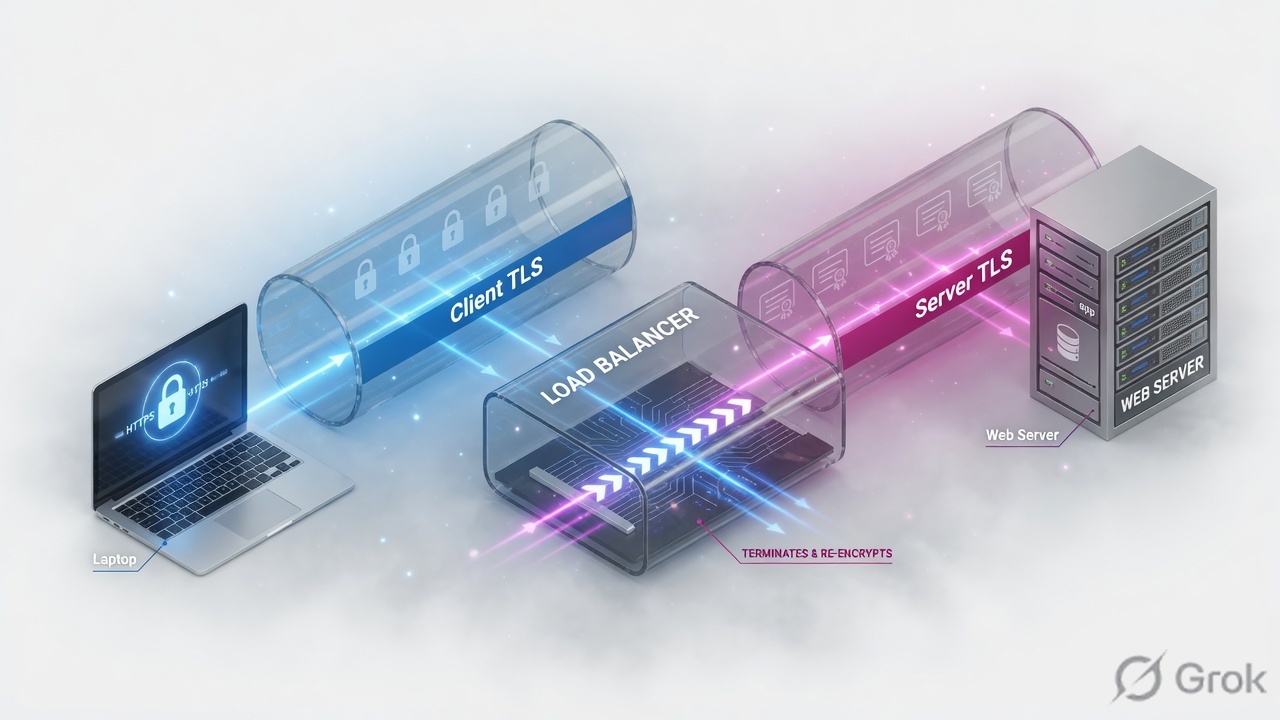
Offload: Client SSL only, HTTP to the pool. Re-encrypt / bridge: Client SSL + Server SSL. Passthrough: no HTTP profile, no cookie persist, no HTTP iRules. SNAT Automap rewrites the server-side source to a Self IP so the return path cannot skip BIG-IP.
Full proxy = two stacks
Profiles attach per side. tcp-wan-optimized toward clients, tcp-lan-optimized toward servers is the usual starting pair.
An HTTP profile does not decrypt TLS. Client SSL must terminate first. Attaching Server SSL on an offload design will break the backend HTTP port.
SNAT and SSL — pick on purpose
| SNAT | Backend sees | When |
|---|---|---|
| No-SNAT | Real client IP | Servers default-gateway through BIG-IP (or policy route back) |
| Automap | Self IP on egress VLAN | Default when you cannot control server routing |
| SNAT Pool | Addresses you listed | Need many ephemeral ports / dedicated NAT range |
| SSL mode | Profiles | HTTP / cookie persist |
|---|---|---|
| Offload | Client SSL | Yes — HTTP to pool |
| Re-encrypt | Client SSL + Server SSL | Yes — still decrypted on BIG-IP |
| Passthrough | none of those | No — TMM never sees HTTP |
Deeper SSL lesson: Offload vs re-encrypt vs passthrough. Deeper SNAT: SNAT concept and issues. Persistence: cookie vs source address.
Runbook — HTTPS offload with Automap
Side A · profiles
TCP pair
Client side: tcp-wan-optimized. Server side: tcp-lan-optimized. Custom profiles inherit a parent — change one knob, not a clone of everything.
HTTP profile
Required for cookie persistence, X-Forwarded-For, HTTP iRules, redirects.
Client SSL profile
Local Traffic > Profiles > SSL > Client. Cert/key for the VIP hostname. SNI if multiple certs on one IP.
Local Traffic > Profiles > SSL > Client > Create
New Client SSL Profile
Never export private keys casually. UCS files contain keys — treat backups as secret.
Side B · Virtual Server attachments
Local Traffic > Virtual Servers > vs_web_https
HTTPS Virtual Server resources
If you need TLS to the pool, add a Server SSL profile (bridge). Do not add it 'just in case'.
Side C · persistence + proof
| Method | Needs | Weakness |
|---|---|---|
| Cookie | HTTP + (usually) Client SSL | Fails on passthrough / FastL4 |
| Source address | L4 is enough | NAT/CGNAT makes a whole office one persistence record |
| SSL session | Client SSL | Not a substitute for HTTP cookie on apps that need URI affinity |
curl -vk https://www.example.com/ --resolve www.example.com:443:192.0.2.100
tmsh show ltm profile client-ssl clientssl_www
tmsh show ltm persistence persist-records
# offload: server-side capture is HTTP, not TLS

Runtime
OneConnect reuses server-side TCP. Do not enable it on apps that assume one client per server connection (legacy NTLM without the NTLM profile).
Traps + proof
| Failure | Symptom | Fix |
|---|---|---|
| Server SSL on offload | Backend HTTP port gets TLS | Remove Server SSL |
| Cookie persist + passthrough | User bounces servers | Terminate TLS or use source-addr |
| No-SNAT, wrong gw | SYN out, no SYN-ACK | Automap or fix server gateway |
| F5 browser refresh as LB test | Always one member | New TCP each time |
| UCS emailed | Private keys leaked | Off-box backup with access control |
- You can choose offload vs re-encrypt vs passthrough for a given app.
- You can explain why Automap exists without saying “NAT is faster.”
curl -vkshows the cert you installed, not a default dummy.
Knowledge check
SSL and SNAT judgment — these are interview gold.
Sources
- Techclick PDF:
F5-BIG-IP-LTM-Module-4.pdf(from OneDrive_1_8-26-2026.zip, 26 Aug 2026) - Companion deck:
F5-Ltm-Training-Ppt (1).pptx.pdf - Official lab paths: F5 cert Lab 1 — VLANs, Self IPs, pools, virtual servers
- TMSH virtual server reference: ltm virtual
- Related deep dives on this site: SSL modes · SNAT · Persistence · VS/pools · VIP down / tcpdump
Related: Course hub · Syllabus · My Courses · F5 LTM interview