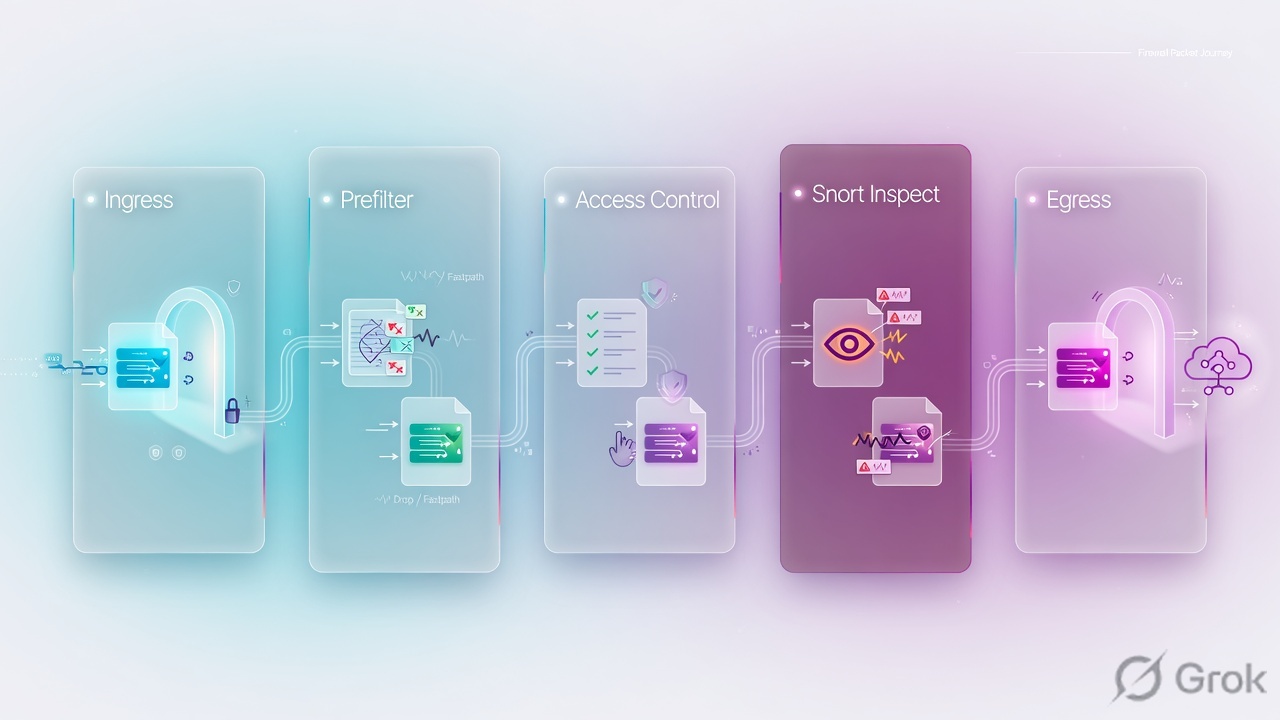
FTD is one unified image with two engines. A packet hits LINA first. Prefilter can Fastpath or Block before Snort. An ACP Allow hands the flow to Snort for IPS and file. ACP matches real (pre-NAT) IPs. NAT is Section 1 manual, Section 2 auto, Section 3 after-auto. FMC HA is Active/Standby — only the active deploys. For VPN I run packet-tracer twice because the first try brings the tunnel up.
1. Ticket hook — which engine dropped it
Night shift: branch users cannot reach the head-office subnet over the new site-to-site VPN. Internet PAT still works. The ACP Allow looks correct. The first packet-tracer on the 5-tuple shows VPN encrypt → DROP. A junior engineer wants to disable Snort “to see if inspection is the problem.”
That is the interview. The first tracer is not the verdict. Cisco’s NAT verification note is explicit: run packet-tracer for tunnel traffic twice, because the first try brings the VPN tunnel up. The second run should hit identity NAT in Section 1 and VPN encrypt → ALLOW. If it still PATs out the outside interface, you are in the wrong NAT section — not in Snort.

LINA — the ASA-derived data plane on FTD (interfaces, routing, NAT, VPN, stateful L3/L4 ACL, connection table). Snort — the inspection engine (IPS, AVC, URL, file/malware). Prefilter — first access-control pass in LINA; actions Fastpath, Block, Analyze. ACP — Access Control Policy; first-match after prefilter, SI, and optional decrypt. Trust — ACP permit that skips deep inspection. Fastpath — prefilter permit that skips Snort entirely. Identity NAT / exemption — translate source to itself so VPN selectors still match. FMC HA — Active/Standby managers, not device failover.
2. Mental model: LINA then Snort
Official TAC wording: FTD is a unified image with two engines. A packet enters the ingress interface and LINA handles it. If policy requires it, LINA sends the packet to Snort. Snort returns a permit-list or block-list verdict. LINA drops or forwards on that verdict.
LINA owns
Interfaces, routing, NAT, VPN termination, the global ACL CSM_FW_ACL_, the connection table, and prefilter ACEs. An L3/L4 Block is an early LINA deny — the SYN never reaches Snort.
Snort owns
Application, URL, geolocation, intrusion, and file verdicts. An L7 Block is deployed on LINA as a permit so the packet can reach Snort. A few packets may pass until AppID is known.
That last sentence is the L2 trap. A rule with URL, App, or Geo looks like permit any any in show access-list. That is not an open firewall. Snort still walks its ngfw.rules file and can blacklist the flow. Packet-tracer’s ACCESS-LIST phase can show the first L7 permit, not the Geo rule that actually dropped it (Cisco bug CSCwd00446). Quote the SNORT phase rule-id.
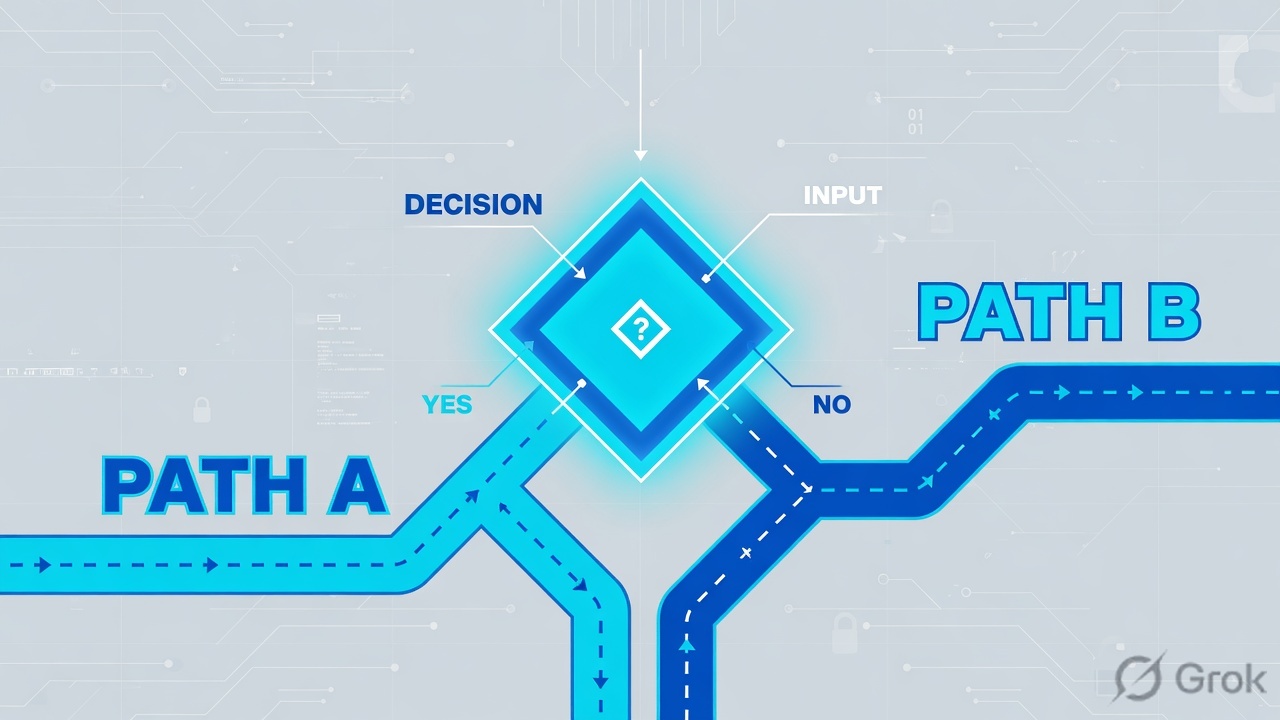
Read the diamond first. Fastpath never asks Snort. Allow always does. Trust is the middle verb — do not call it Fastpath.
3. Prefilter versus ACP
Flowchart first. Official comparison: prefilter and ACP can both block and “trust,” but prefilter’s trust is called Fastpath because it skips more inspection. Prefilter is first. If you never built a custom prefilter, early ACP Block/Trust only approximates it — it does not replicate Fastpath.
| Prefilter policy | Access Control policy | |
|---|---|---|
| When | First. Assigned under the ACP. Default tunnel/priority policy already exists. | After prefilter, optional TLS decrypt, and Security Intelligence. |
| Headers | Outer header on tunnels (GRE, IP-in-IP, IPv6-in-IP, Teredo 3544). Tunnel rules can tag inner traffic. | Inner session. App, URL, user, geo, file, intrusion. |
| Actions | Fastpath, Block, Analyze | Allow, Trust, Monitor, Block, Block with Reset, Interactive Block |
| Snort | Fastpath / Block never send the flow. Analyze continues into ACP. | Allow sends every packet (typical). Trust fast-forwards after a few packets. L3/L4 Block dies in LINA. |
| Direction | Unidirectional. Return path often needs its own Fastpath or the ACP default deny eats the reply. | Stateful after the first packet creates a LINA connection. |
| Choose when | Elephant flows, ASA-migration ACEs, outer-header tunnels. | The actual security decision and any L7 inspection. |
Calling ACP Trust “the same as Prefilter Fastpath.” Fastpath is early LINA and skips SI, identity, decrypt, ACP, and Snort. Trust still lives in the ACP. With SI / identity / QoS enabled, Trust still hands a few packets to Snort, then PERMITLIST / fast-forward. On 4100/9300, a LINA trust ACE (SI off) can offload with no Snort packets at all — that is a different deploy, not a different word.
4. How to choose NAT, FMC HA, tracer
Interviewers stack these on purpose. Keep the verbs separate: translate, manage, prove.
NAT sections
Auto NAT and manual (twice) NAT live in one table with three sections. Section 1 first, then 2, then 3, stop at first match. There is also a hidden Section 0 for system rules. You cannot edit it.
Section 1 is where identity NAT lives. Auto PAT in Section 2 is the usual “VPN leaked to the internet” cause.
FMC HA is not FTD failover
FMC high availability is Active/Standby. One appliance manages devices. The standby does not. Event data streams to both, so monitoring survives a manager failure. You must promote the standby — it is not an automatic data-plane failover. Peers can sit in different sites. Port 8305 must be open between them. Same model, same major/minor/maintenance, same SRU, VDB, and LSP.
Split-brain: both peers think they are active (usually after you promoted the standby and the original active comes back). Resolving it wipes device registrations and unique policies on the intended standby. Export first. Degraded sync is not split-brain — do not switch roles in that state.
| FMC HA | FTD device HA / cluster | |
|---|---|---|
| Job | Keep a manager. Deploy and events. | Keep forwarding. Stateful sessions. |
| Roles | Primary/secondary at setup; Active/Standby at runtime. | Active/Standby pair, or a cluster of units. |
| Who deploys | Active FMC only. Standby GUI hides config. | The pair/cluster is the target of that deploy. |
| Failover | Manual promote (disaster recovery). | Device failover / cluster redistribution. |
| Path | Integration → Other Integrations → High Availability | Devices → Device Management → High Availability / Cluster |
5. Do: packet-tracer twice + NAT proof
Side A is the FMC Packet Tracer the interviewer expects you to open. Side B is the CLI the TAC note uses. Side C is how you close the window without clearing every xlate.
Primary source: Configure and Verify NAT on FTD (Doc ID 212702) — Task 3 NAT exemption and the “run it twice” note.
Side A — FMC Packet Tracer (training mock)
Path: Devices → Troubleshoot → Packet Tracer. Use the real (pre-NAT) inside host and the remote protected network, not the PAT address.
Devices / Troubleshoot / Packet Tracer
Packet Tracer
Training mock · path from Configure and Verify NAT on FTD (Devices → Troubleshoot → Packet Tracer). RFC 5737 addresses only. Run the same 5-tuple twice on VPN.
Side B — CLI: exemption, then tracer twice
-
Confirm the three NAT sections
show natprints Manual (Section 1), Auto (Section 2), Manual after-auto (Section 3). The exemption must be the Section 1 identity rule, not a later PAT.FTD LINA · NAT tableshow nat show run nat
-
Place identity NAT in Section 1
FMC path: Devices → NAT → Threat Defense NAT → Add Rule. Type Manual, Static, Insert in Section 1. Original source = inside net, translated source = same object. Original destination = remote protected net, translated destination = same. That is the exemption.
-
Trace internet PAT (once) and VPN (twice)
FTD · Cisco NAT verification (Doc ID 212702)packet-tracer input inside tcp 192.0.2.14 1111 203.0.113.80 80 packet-tracer input inside tcp 192.0.2.14 1111 198.51.100.10 80 packet-tracer input inside tcp 192.0.2.14 1111 198.51.100.10 80
First internet trace should hit dynamic interface PAT. First VPN trace often shows Type: VPN / Subtype: encrypt / Result: DROP while the SA comes up. Second VPN trace should show identity NAT and VPN encrypt ALLOW.
-
If the drop is not NAT/VPN, read the engine
ACCESS-LIST DROP with no “sent to snort” = LINA. SNORT Result DROP / “Blocked by the firewall preprocessor” = Snort. Then confirm in Analysis → Connections and Analysis → Intrusions. Live L7 rules:
system support trace(filter it; do not leave it running).
Devices / NAT / Threat Defense NAT / Add Rule
Manual NAT · identity exemption
Training mock · field names from Configure and Verify NAT on FTD, Task 3. Same object on original and translated = identity NAT. Deploy, then tracer twice.
clear xlate / clear conn on the whole box “so NAT takes.” That drops every translated session. Clear the matching conn, or wait for timeout. Do not disable Snort to prove a VPN leak. Do not Fastpath the inside subnet “temporarily.”
Side C — Close the change window
Say this: Section 1 identity NAT is first in show nat. Internet still hits interface PAT. First VPN tracer brought the SA up; second tracer is ALLOW on VPN encrypt. I did not clear the global xlate table. Connection events show the pre-NAT addresses.
6. Runtime path after go-live
Once the LINA connection exists, later packets follow the flow. That is why a new ACP rule “does nothing” until the conn ages out — and why the second packet-tracer looks different from the first.
- Next packet of the same 5-tuple hits FLOW-LOOKUP, not a full first-packet walk.
- Prefilter Fastpath flows never visit Snort. Trust flows may already be PERMITLIST / offloaded.
- Allow + IPS still sends packets to Snort. An L7 Block can blacklist after AppID on packet 3–10.
- NAT stays the xlate created on the first packet. Editing Section 1 does not rewrite an existing PAT.
- FMC HA: if the active manager dies, devices keep forwarding. You promote the standby to deploy again. Events were already landing on both.
- Do not switch FMC roles during a deploy or while HA sync is degraded.

7. Eight interview scenarios
Each one is a production ticket. Answer with the direct line, then the evidence. Weak answers reboot, Fastpath the whole inside, or treat FMC HA as device failover.
Q1 · Scenario — LINA allowed it, the user still fails
ACP Block uses application HTTP. show access-list shows a permit for those hosts. The SYN is forwarded. The GET dies. Who dropped it?
Strong framing (say this)
I quote the SNORT phase rule-id, not the first permit in CSM_FW_ACL_.
Evidence to name
show capture … trace SNORT phase; system support trace; Analysis → Connections / Intrusions. Doc 212321 Scenario 2 and Doc 218196.
Q2 · Compare — Fastpath versus Trust versus Allow
Nightly backup is 8 Gbps between two known subnets. You do not want IPS or file policy on it. Which action, and why not the other two?
Strong framing (say this)
Fastpath is early and blind. Trust is ACP-cheap. Allow is inspect. I write the return Fastpath too — prefilter is unidirectional.
Evidence to name
Policies → Access Control → Prefilter; show access-list PREFILTER remarks above ACP; Doc 212700 Task 3; Doc 212321 Fastpath section.
Q3 · Architecture — L7 permit-any on LINA
Geo and URL Block rules sit above a specific L4 Allow. show access-list shows those L7 rules as permit any any. Does traffic stop at the first Geo ACE?
ngfw.rules until the Geo/URL/App rule matches. Packet-tracer’s ACCESS-LIST phase may name the first L7 permit, not the Geo rule that blacklisted the flow.Strong framing (say this)
LINA ACE vs Snort rule-id. I prove with live traffic or system support trace, not with packet-tracer alone on Geo.
Evidence to name
Doc 218196; SNORT phase Firewall: block rule, id …; CSCwd00446.
Q4 · Compare — NAT sections on a leaking VPN
Inside 192.0.2.0/24 PATs to the outside interface (auto NAT). New site-to-site protected net is 198.51.100.0/24. Branch users reach the internet, not the tunnel. Where does the exemption go?
Strong framing (say this)
Section 1 specific identity, Section 2 object NAT, Section 3 general after-auto. First match stops the walk.
Evidence to name
show nat section headings; Devices → NAT Insert In Section 1; Doc 212702 Task 3; FDM NAT rule-order table.
Q5 · Troubleshoot — packet-tracer twice
You added the Section 1 exemption. First packet-tracer input inside tcp 192.0.2.14 1111 198.51.100.10 80 shows VPN encrypt DROP. The change-control manager says the tunnel is broken. First move?
Strong framing (say this)
Same 5-tuple, twice. I quote both VPN phases before I touch IKE.
Evidence to name
Doc 212702 “run it twice since the first try brings the VPN tunnel up”; show crypto ipsec sa encrypt counter; second tracer Action: allow.
Q6 · Evidence — prove LINA versus Snort
User: “HTTPS is dropped.” You must say which engine, with a field, not a feeling. What do you open first?
packet-tracer (or capture with trace) on the real 5-tuple. LINA: ACCESS-LIST / NAT / ROUTE-LOOKUP / VPN DROP and no “sent to snort.” Snort: Type SNORT Result DROP, Verdict BLOCKLIST, drop-reason firewall preprocessor or IPS. Then FMC Connection Events and Intrusion Events.Strong framing (say this)
Phase name, then rule-id, then the FMC event. Tracer first, captures to confirm.
Evidence to name
Devices → Troubleshoot → Packet Tracer; show capture CAPI packet-number 1 trace; Analysis → Connections. Doc 212321.
Q7 · Architecture — FMC HA after a manager failure
The active FMC is dark. Sensors still pass traffic. The standby GUI is read-only. How do you get a deployable manager back, and what must you not confuse this with?
Strong framing (say this)
Same model, same version/SRU/VDB/LSP, port 8305, only active deploys, events on both, promote by hand.
Evidence to name
FMC Administration Guide 7.6 High availability; Integration → Other Integrations → High Availability; health of HA sync.
Q8 · Unsafe shortcut — Fastpath one way
You Fastpath 192.0.2.0/24 → 198.51.100.0/24 so backups skip Snort. Echo-request leaves. Echo-reply dies. ACP default is Block all. What did you miss?
Strong framing (say this)
Two Fastpath rules, tight subnets, then capture-trace the reply ACCESS-LIST remark PREFILTER.
Evidence to name
Doc 212700 return-packet trace (flow found, then ACL DROP on default); second Fastpath ACE in show access-list.
8. Traps and proof checklist
| Trap | What you actually do | Proof |
|---|---|---|
| “FTD is ASA plus a FirePOWER module.” | One unified image, two engines: LINA + Snort. | Doc 212321 background figure. |
| Trust = Fastpath | Fastpath is prefilter/LINA. Trust is ACP. | Prefilter vs ACP table; show access-list remarks. |
| L7 permit-any means allow | LINA redirect; Snort still decides. | SNORT phase rule-id; Doc 218196. |
| VPN exemption in Section 2/3 | Identity manual NAT in Section 1. | show nat; first NAT phase in tracer. |
| First VPN tracer DROP = broken IKE | Run the same 5-tuple again. | Doc 212702 twice note; second Action allow. |
| FMC HA fails over FTD | Promote the manager. Device HA is separate. | Integration → Other Integrations → High Availability. |
| One-way Fastpath | Write the reverse prefilter rule. | Return capture-trace ACL remark. |
| ACP on PAT addresses | ACP matches real, pre-NAT IPs. | Doc 212702 “usage of real IPs.” |
show natlists the identity rule first in Section 1.- Internet 5-tuple still hits interface PAT.
- VPN 5-tuple: first tracer brings the SA; second is ALLOW on VPN encrypt.
- L7 drop quotes SNORT rule-id, not only ACCESS-LIST permit.
- Prefilter Fastpath exists in both directions if you used it.
- FMC HA page: one Active, one Standby, sync not degraded.
Knowledge check
Six judgment items. Same facts as the promise. Check answers, then re-read the named section if you miss.
Sources
- Clarify FTD Access Control Policy Rule Actions — unified image, LINA then Snort, ACP vs Prefilter actions, Trust vs Allow vs Fastpath, L7 Block as LINA permit
- Understand how Lina Rules Configured with Snort Features Are Handled — L7/URL/Geo/App deployed as permit-any on LINA; Snort rule-id is the verdict
- Configure and Operate FTD Prefilter Policies — Fastpath/Block/Analyze, outer vs inner headers, unidirectional Fastpath, return-path ACE
- Firepower Management Center Device Configuration — Prefiltering vs Access Control — Fastpath skips more inspection; prefilter is first
- Prefilter vs access control policy — official comparison table
- Configure and Verify NAT on FTD — Section 1/2/3, identity exemption, real IPs on ACP, packet-tracer twice on VPN
- Firewall Threat Defense Configuration Guide — NAT rule order — Auto vs manual NAT; Section 1 then 2 then 3; Section 0 system rules
- Secure Firewall Management Center Administration Guide 7.6 — High availability — Active/Standby, events on both, promote, split-brain, port 8305, version/SRU/VDB/LSP match
- Configure High Availability on FMC — HA pair setup example
- Decode Secure Firewall Terminology — LINA as ASA code on FTD; Snort as inspection
Related: FTD & FMC fundamentals · Access Control Policy · FTD NAT · FTD VPN · HA / clustering / troubleshooting · Snort 3 IPS · Architecture & platforms · Cisco Secure Firewall hub