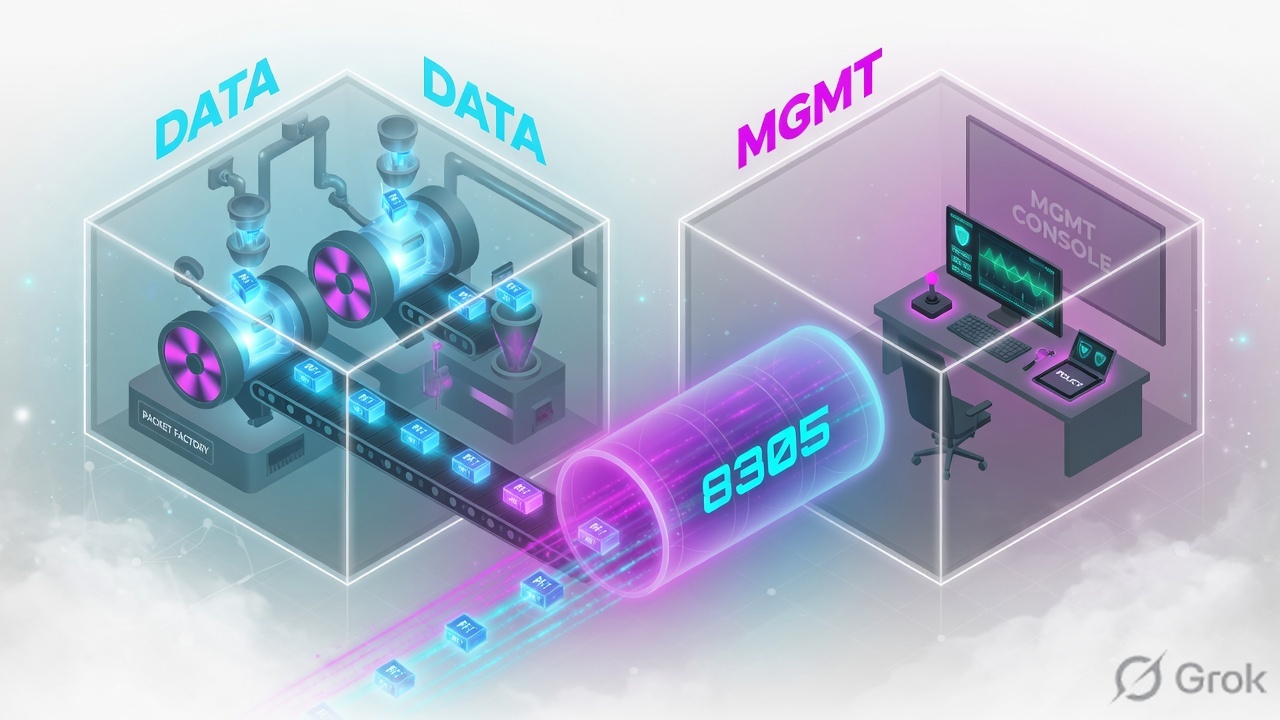
Threat Defense (FTD) is one image with two engines. LINA is the ASA-derived data plane — interfaces, routing, NAT, VPN, the connection table, and L3/L4 access control. Snort is the inspection engine — IPS, application visibility, URL and file/malware. Firewall Management Center (FMC) is the management plane. It never sits in the packet path. The control channel is sftunnel, a TLS tunnel on TCP 8305, with a control channel and an event channel. The same FTD image runs on Secure Firewall / Firepower appliances and as FTDv on VMware, KVM, Hyper-V and the major clouds. FMC HA is Active/Standby — you promote the standby yourself.
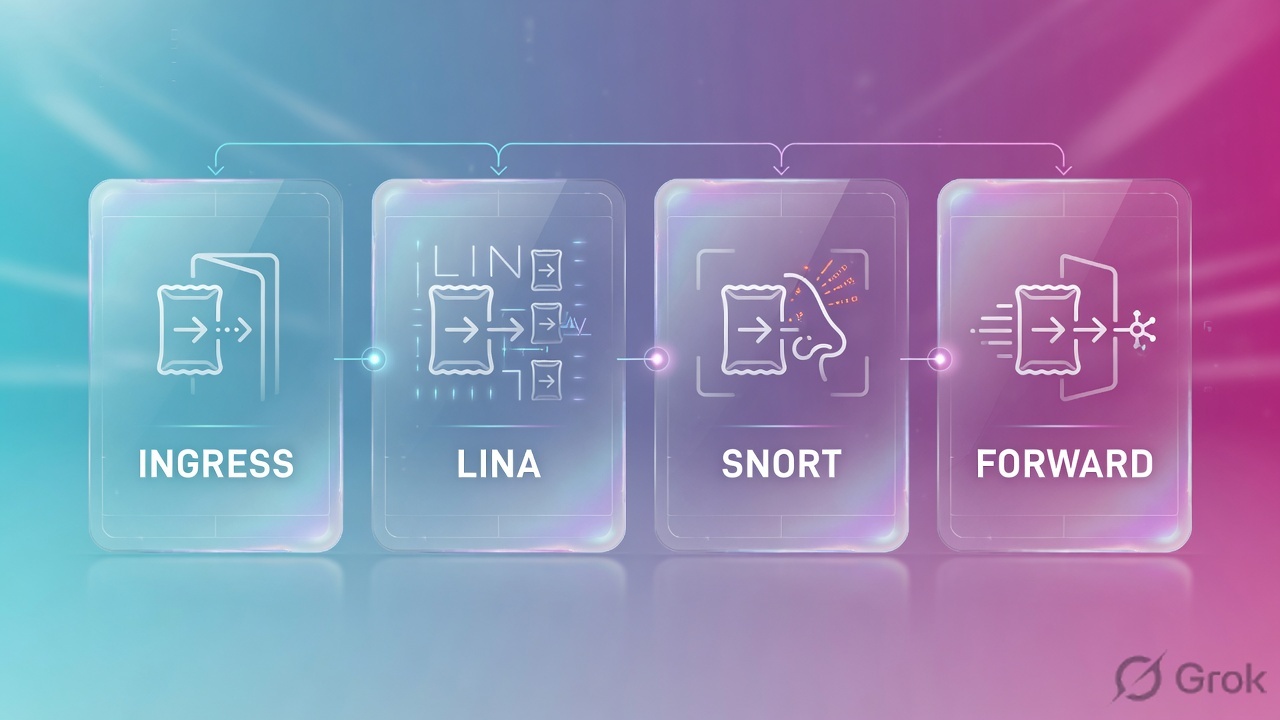
I do not draw FMC as a hop. I draw two rooms. Packets stay in the data plane: LINA classifies, the prefilter can Fastpath, Snort inspects only what is sent to it, LINA forwards or drops. Policy, events, health and upgrades travel in sftunnel on TCP 8305. If users browse and FMC is dark, I check the management plane first.
1. Why the one-box story fails
Interviewers still ask you to “walk a packet through FTD.” Weak answers treat FTD as one monolithic process and FMC as a second firewall in the path. Production tickets punish that picture.
Official TAC language is blunt: FTD is a unified image with a LINA engine and a Snort engine. A packet enters an interface, LINA handles it, Snort inspects only if policy requires it, Snort returns a permit or block verdict, and LINA drops or forwards. FMC is not on that list.
The ticket
Branch FTD still NATs and routes. FMC Health is red, last deploy failed, Connection Events are empty. That is a dead sftunnel, not a dead data plane.
The interview
“Where does FMC sit in the packet path?” The only correct answer is: it does not. If you put FMC between the user and the server, you already failed the architecture question.
“If traffic is flowing, management is fine.” The planes are independent. Cisco TAC warns against hairpinning sftunnel through the FTD data plane for the same reason — a data-plane event can then black-hole the manager that you need to fix it.
2. Mental model — two planes, two engines
Pre-train the nouns before any runbook. Three objects, not one box.
Read left → right. The pink engine is optional. The navy room is never a hop.
- LINA — ASA-derived data plane. Owns interfaces, routing, NAT, VPN, the connection table, and the global ACL
CSM_FW_ACL_. - Snort — deep-inspection engine (Snort 3 is the default). IPS, application identification, URL, file/malware. Returns a verdict; it does not own the wire.
- Prefilter — early L3/L4 policy in LINA. Fastpath or Block can keep a flow out of Snort entirely.
- sftunnel — TLS management tunnel on TCP 8305. Two connections: control and events. Carries policy, heartbeats, NTP, events, VDB/SRU, upgrades.
- FDM — on-box manager for supported models. One device. FMC is the off-box manager for fleets. Secure Firewall 6100 requires FMC — it does not support FDM.
- FXOS + FCM — chassis OS and Firepower Chassis Manager on Firepower 4100/9300 (and related chassis workflows). Multi-instance lives here, and now also on 3100/4200.
3. Decision flow — platform, manager, HA
Flowchart first. Do not start in a datasheet.
*FDM is on-box for supported models only. Secure Firewall 6100 must be FMC-managed. FMCv2 does not support FMC HA.
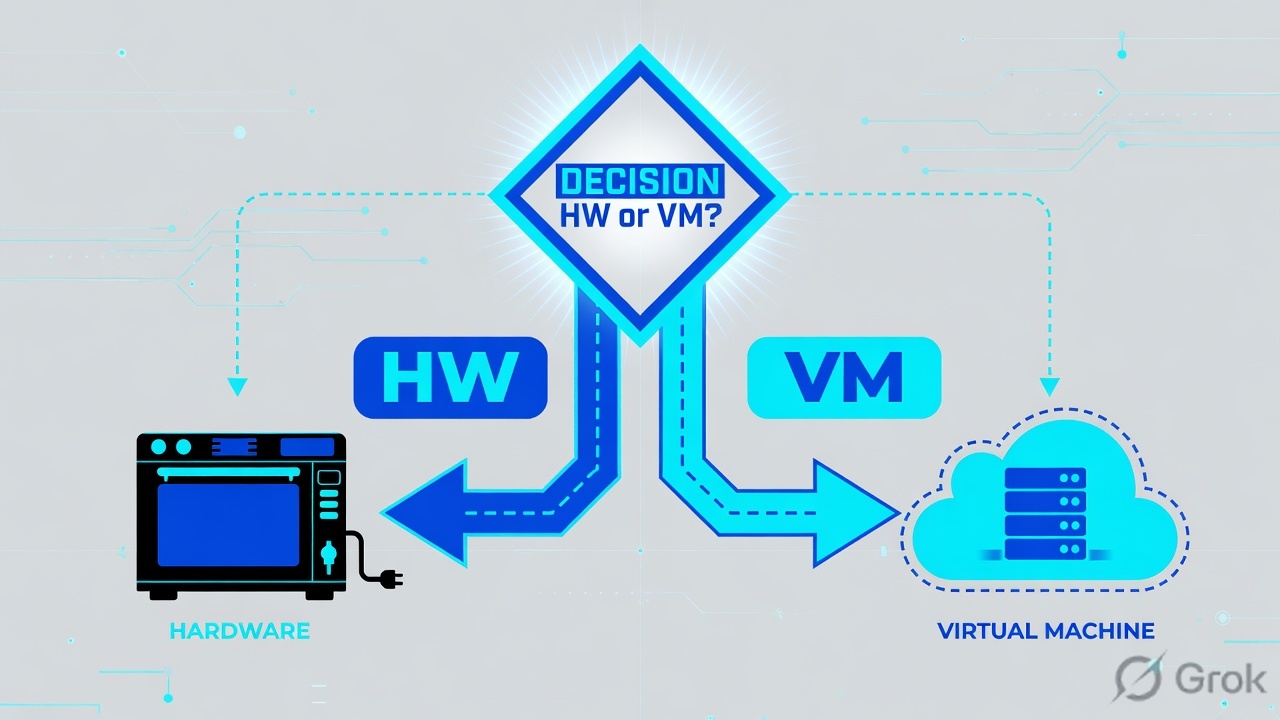
4. How to choose hardware vs FTDv
Same software image. Different contract with physics. Use the table, then confirm the current model on the Threat Defense Compatibility Guide.
| Choice | Pick it when | Do not pick it when | Manager / scale notes |
|---|---|---|---|
| Secure Firewall 200 / 1200 | Branch / small campus. Cost-sensitive, still wants FTD features. | You need chassis multi-instance or DC-class clustering. | HA yes. Clustering — no on these series (compat guide). FDM or FMC. |
| Secure Firewall 3100 / 4200 | Internet edge to mid/high DC. Clustering (8–16 nodes by release). Multi-instance on supported releases. | You only have a hypervisor and no rack. | IPsec / DTLS flow offload on these platforms. Confirm release notes for your version. |
| Secure Firewall 6100 | Ultra-high-end DC / telecom. Modular, clustering (4 nodes in 10.0). | You wanted on-box FDM. | FMC required. FDM is not supported. |
| Firepower 4100 / 9300 | Existing chassis investment. Isolated tenants on one box. | You expected a simple “one image, one box” appliance like a 3100. | FXOS + Firepower Chassis Manager. Multi-instance / container instances. Hardware flow offload on native instances, not container instances. |
| FTDv | Public cloud, lab, burst capacity, or “no truck roll.” Private: VMware, KVM, OpenStack, Nutanix, Hyper-V. Public: AWS, Azure, GCP, OCI, Alibaba, Megaport, Equinix. | You need chassis-level offload or FXOS multi-instance. | Min 4 vCPU / 8 GB / 100 GB. Performance tiers FTDv5–FTDvU cap rate + RA VPN, not vCPU. Active/Standby HA on listed hypervisors. Clustering on a subset (VMware/KVM/AWS/Azure/GCP — check the DS). |
| FMC form factor | Physical (current 1800 / 2800 / 4800 family and earlier 1600–4700), FMCv, or cloud-delivered FMC. | You picked two different FMC models for HA. | HA peers must be the same model / same device-management capacity. Not supported on FMCv2. |
Hardware buys deterministic NICs, optional FPGA/SmartNIC offload, and (on chassis) multi-instance. FTDv buys portability. Do not size FTDv by the license tier alone — Cisco’s virtual data sheet says compute (vCPU/RAM) sets session scale; the tier sets the rate limiter and RA VPN sessions.
5. Runbook Side A → B → C
Side A picks the box. Side B joins the manager. Side C makes the manager redundant. Each block cites one primary source.
Side A — pick the platform (before you rack anything)
Primary source: Secure Firewall Threat Defense Virtual Data Sheet + Compatibility Guide.
-
Write the constraint, not the SKU
Cloud VPC with no rack → FTDv. Branch with a 1RU budget → 200/1200. DC edge that must cluster → 3100/4200. Isolated tenants on one chassis → 4100/9300 multi-instance. 6100 only if you already accepted “FMC-only.”
-
Confirm manager support
Most appliances accept FDM or FMC. 6100 does not accept FDM. FTDv FDM is supported on VMware/KVM/Nutanix/OpenStack/HyperFlex — not on Hyper-V per the virtual DS matrix. When in doubt, manage with FMC.
-
Size FTDv from two knobs
Assign vCPU/RAM for session scale (official min 4 / 8 GB / 100 GB; max 64 / 128 GB / 500 GB). Then pick the performance tier (FTDv5 = 100 Mbps / 50 RA VPN … FTDvU = no rate limiter / 32k RA VPN). Do not expect the tier to grow the VM.
Side B — register FTD to FMC (sftunnel)
Primary source: Configure, Verify, and Troubleshoot Firepower Device Registration (Doc 215540).
-
Open TCP 8305 on the management path
FTD management IP ↔ FMC management IP. If FMC is already an HA pair, allow 8305 to both FMC addresses. Do not route this through an FTD data interface unless you have no other path — TAC marks that design as not recommended.
-
Point the device at the manager
On FTD CLISH, when both sides have static IPs:
FTD CLISH · registrationconfigure manager add 203.0.113.10 Cisco-123 show managers
If one side has no reachable IP, add a NAT ID and use
DONTRESOLVEon that side. Registration key is 2–36 characters: alphanumerics, hyphen, underscore, period. There is no keywordkeyin the command — that is a classic syntax trap. -
Add the device only on the active FMC
Path: Devices → Device Management → Add → Device. Host = FTD IP (or blank + NAT ID). Display Name. Registration Key must match. Access Control Policy. Licenses. If FMC HA already exists, do not add the device on the standby first — register to the active; the standby inherits.
Devices → Device Management → Add → Device
Add Device
Fields from Cisco Doc 215540. Placeholders are RFC 5737 / example.com — not a lab tenant.
Next click: Register, then on the FTD run sftunnel-status until Channel-A (CONTROL) and Channel-B (EVENT) both show Connected and Registration: Completed.
Side C — establish FMC HA
Primary source: Secure Firewall Management Center Administration Guide 7.6 — High availability.
-
Meet the peer contract before you click Register
Same hardware model (or same FMCv device-management capacity). Same major.minor.maintenance software. Identical intrusion rule update (SRU), vulnerability database (VDB) and Lightweight Security Package (LSP). Unique UUIDs in
/etc/sf/ims.conf. TCP 8305 open between the two FMCs. Cisco’s typical bandwidth note for high-latency (~100 ms) peers: at least 5 Mbps. Peers may sit in different data centers. -
Empty the intended secondary
Export any policies you still need, delete devices from the intended secondary, import policies onto the intended primary, deploy, assign licenses. HA copies the primary’s world onto the secondary. A populated secondary is how people lose devices.
-
Secondary first, then primary
On the intended secondary: Integration → Other Integrations → High Availability → Role = Secondary → Primary host (or NAT ID + registration key) → Register. Then on the intended primary: same page → Role = Primary → Secondary host + the same registration key → Register. After sync, the primary is Active; the secondary is Standby. Configuration is hidden on Standby. Events stream to both.
-
Promote by hand when Active dies
FMC HA is not automatic Active/Active failover. Official language: if the active appliance fails, you must promote the standby. Triggering a switchover during a degraded sync can damage the database — contact TAC, do not “just switch roles.”
Integration → Other Integrations → High Availability
Establish High Availability
Path and field names from FMC Admin 7.6 “Establish high availability for Firewall Management Center.” Registration key is one-time, up to 37 characters.
Next click: Register on the secondary, then repeat on the primary with Role = Primary. Watch the High Availability page until peers show Active / Standby — not two Actives (that is split-brain).
Events go to both FMCs. Policy writes only on Active. Two Actives = split-brain — stop and read the traps section before you click anything.
6. Runtime — packet path + sftunnel
After go-live you operate two live systems that fail independently.
Data plane (every user packet)
Ingress on a data interface → LINA. Prefilter Fastpath or an L3/L4 Block can finish the story inside LINA. Otherwise LINA redirects to Snort. Snort may PASS every packet (Allow + inspection), PERMITLIST / fast-forward the rest of the flow (Trust, some SSL-without-decrypt cases), or BLOCKLIST. LINA executes the verdict. On 4100/9300 native instances (and related offload-capable platforms), a trusted or Fastpath’d flow can leave software entirely — show conn flag o, show flow-offload flow.
Management plane (never a user hop)
sftunnel keeps two TLS sockets on TCP 8305. Channel-A is CONTROL (policy, keepalives, upgrades). Channel-B is EVENT. Either side can initiate a channel depending on who has a reachable IP. Heartbeats, NTP, connection/IPS/file events, identity mappings, HA/cluster state, SI/TID, VDB/SRU and software bundles all ride this tunnel. If Channel-B dies you still deploy but events go dark. If both die, Health goes red and deploys fail — while LINA keeps forwarding the last installed policy.
sftunnel-status
show managers
show network          ! Management port : 8305
pmtool status         ! sftunnel (system) - Running
Registration: Completed on show managers. ChannelA Connected: Yes type CONTROL and ChannelB Connected: Yes type EVENT. On FMC HA, show managers lists two Manager hosts, both Completed. On the FMC High Availability page: one Active, one Standby — never two Actives.
7. Traps + proof checklist
| Symptom | Wrong first move | Actual cause | Proof / fix |
|---|---|---|---|
| Users browse. FMC has no events. Deploy fails. | Reboot LINA / “restart Snort.” | sftunnel down (ACL, NAT, MTU, process, clock). | sftunnel-status, capture-traffic on TCP 8305, configure network mtu if DF-bit handshake fails. Open 8305 to both FMCs in HA. |
| FMC HA will not form. | Force Register anyway. | SW / SRU / VDB / LSP mismatch, different models, 8305 blocked between FMCs, or FMCv2. | Appliance Information widget: versions identical. netstat -an | grep 8305 on both. Same model. Not FMCv2. |
| Both FMCs show Active. | Keep configuring on both. | Split-brain after a failed peer came back. | Pick the intended Active. The intended Standby loses device registrations and policy deltas. Export/unregister from the loser first (Admin 7.6 split-brain note). |
| Backup / replica traffic is “trusted” and malware lands. | “Trust means inspect less but still inspect.” | Prefilter Fastpath or hardware flow offload never sends the flow to Snort. | Use Fastpath only for known-good L3/L4. Container instances do not offload. Recheck show flow-offload flow / show asp packet-profile. |
| FTD unregisters after a chassis bootstrap change. | Re-click Register forever. | 4100/9300 bootstrap from FCM (CSCvn45138 class). Do not use FCM bootstrap except disaster recovery. | Delete and re-register. Keep NTP identical on FCM and FMC — 41xx/93xx take time from the chassis. |

- Packet-tracer (or a real capture with trace) shows LINA → optional Snort → forward on a pilot Allow rule.
sftunnel-statusshows CONTROL + EVENT;show managersis Completed (two lines if FMC HA).- A test deploy from the active FMC succeeds; the standby does not offer a conflicting edit.
- A test Fastpath / offload flow is one you intended to skip Snort — and it is documented.
- FMC HA page is Active/Standby. You have a written promote step. You have not switched roles during a degraded sync.
Knowledge check
Six judgment questions. Map each miss back to the section in the reason.
Sources
- Clarify FTD Access Control Policy Rule Actions — LINA + Snort handoff, prefilter Fastpath, Trust vs Allow, flow offload (Doc 212321)
- Configure, Verify, and Troubleshoot Firepower Device Registration — sftunnel TCP 8305, control/event channels,
configure manager add, FMC HA registration (Doc 215540) - FMC Administration Guide 7.6 — High availability — Active/Standby, same model/SW/SRU/VDB/LSP, port 8305, split-brain, Integration → Other Integrations → High Availability
- Troubleshoot for FMC HA — peer reachability and
netstaton 8305 - Secure Firewall Threat Defense Virtual Data Sheet — private/public platforms, min 4 vCPU / 8 GB / 100 GB, performance tiers, HA/clustering matrix
- Cisco Secure Firewall Threat Defense Compatibility Guide — hardware vs virtual vs cloud, HA/clustering by platform
- Threat Defense / Management Center Release Notes 10.0 — Secure Firewall 200 and 6100, FMC 1800/2800/4800
- Cisco Secure Firewall Management Center data sheet — physical, virtual and cloud-delivered manager form factors
- Secure Firewall Threat Defense documentation landing
- Threat Defense Command Reference — sftunnel-status
Related: FTD / FMC fundamentals · Deployment and interface modes · Snort 3 IPS · FTD HA, clustering and troubleshooting · FTD / FMC interview Q&A