Snort 3 inspects only traffic that an Allow (or Interactive Block, or an IPS default action) hands it. Pair the intrusion policy with a variable set so $HOME_NET is your protected space and $EXTERNAL_NET is where threats live. Alert writes an intrusion event and forwards the packet. Block / Drop writes the event and drops — but only if the device is inline and the policy is in Prevention. Proof is not a connection Allow. Proof is Analysis → Intrusions → Events: Message, Inline Result, Intrusion Policy.
1. Why “IPS is on” still fails
Monday you create IPS-CAMPUS-BALANCED from Balanced Security and Connectivity. Tuesday the Allow rule that should use it is still sitting under a Trust any-any, or the Inspection tab still says Default-Set with $HOME_NET = any. HTTPS still works. Intrusion events stay empty — or they flood, every one of them Alert with a blank Inline Result.
Cisco is blunt: Allow rules in the Access Control Policy are the primary way to enable Snort deep inspection. You specify the intrusion policy on the Inspection tab of an Allow rule. Trust and Block never get that tab. Encrypted payloads skip intrusion and file inspection unless you decrypt first.
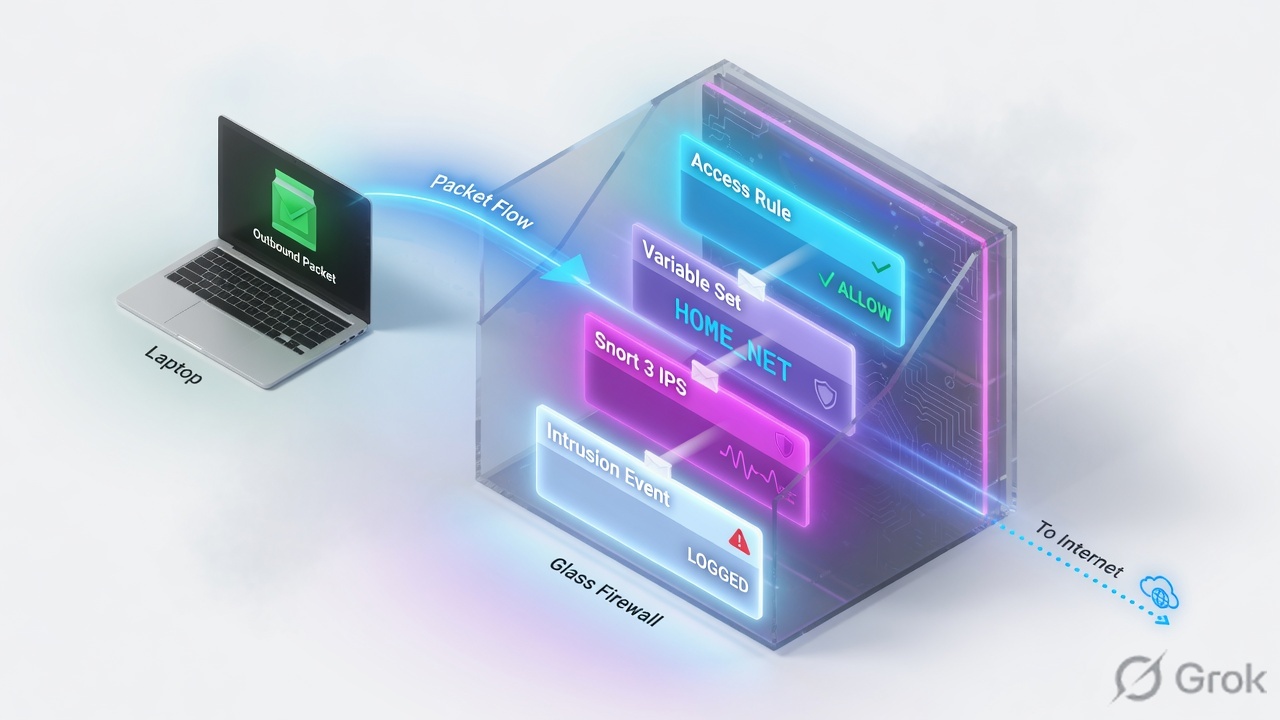
Intrusion policy
Which Talos (or custom) rule set is enabled, and whether each rule is Alert, Block/Drop, or disabled. Needs the IPS / Threat license.
Variable set
Named values the rules use — especially $HOME_NET and $EXTERNAL_NET. Attached per Allow rule, not “somewhere on the chassis.”
2. Mental model: Allow, variables, then Snort
Memorize four objects. Mixing them is why people tune Snort for a flow Snort never received.
Access Control decides who is even eligible. Network Analysis Policy (NAP) decodes and normalizes (Snort 3 inspectors; Snort 2 preprocessors) so pattern matching is possible. Variable set tells each rule header who is home and who is external. Intrusion policy is the enabled rule list and the action on a match.
NAP runs after Security Intelligence and after optional TLS decryption, and before file and intrusion inspection. Cisco wants the NAP base policy to match the intrusion base policy — Balanced with Balanced, Security Over Connectivity with Security Over Connectivity.
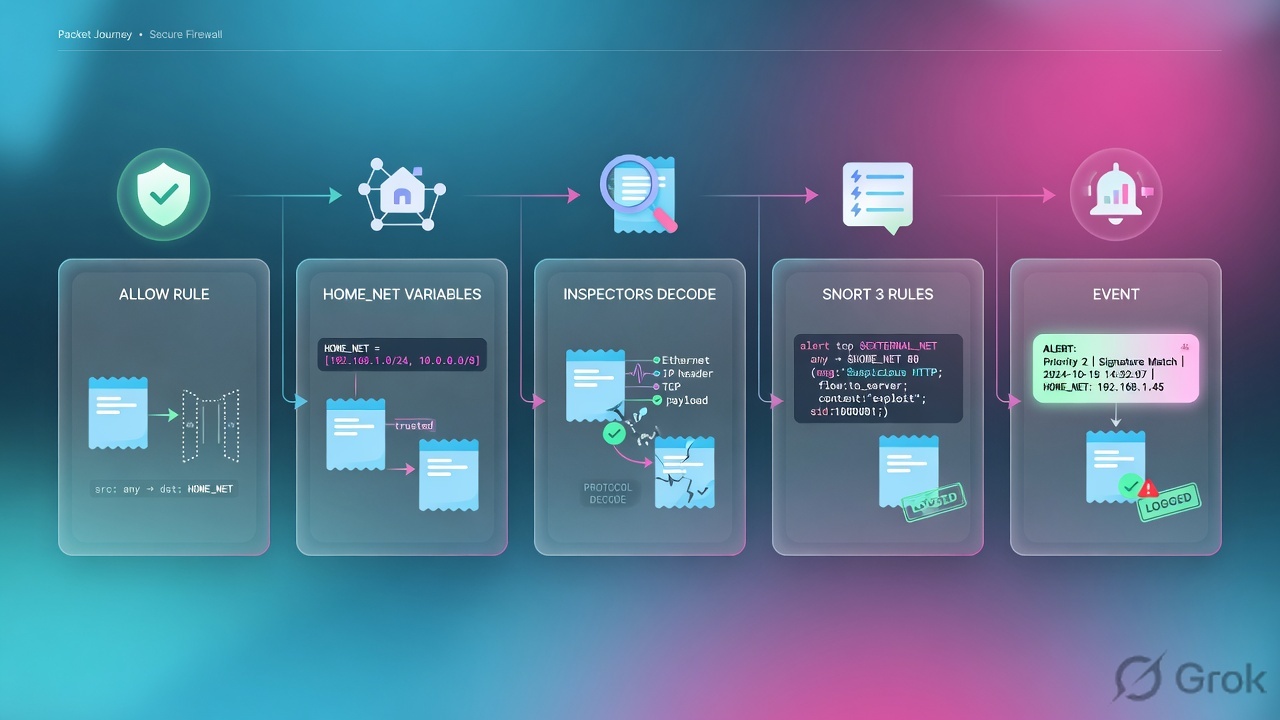
Read left → right, then the green bar. If Q1 on the quiz feels wrong, this is the figure to re-read.
The intrusion policy is the rule list. The variable set is who those rules think they are protecting. Alert is a camera. Block is a door. A camera on a Trust rule is still a Trust rule.
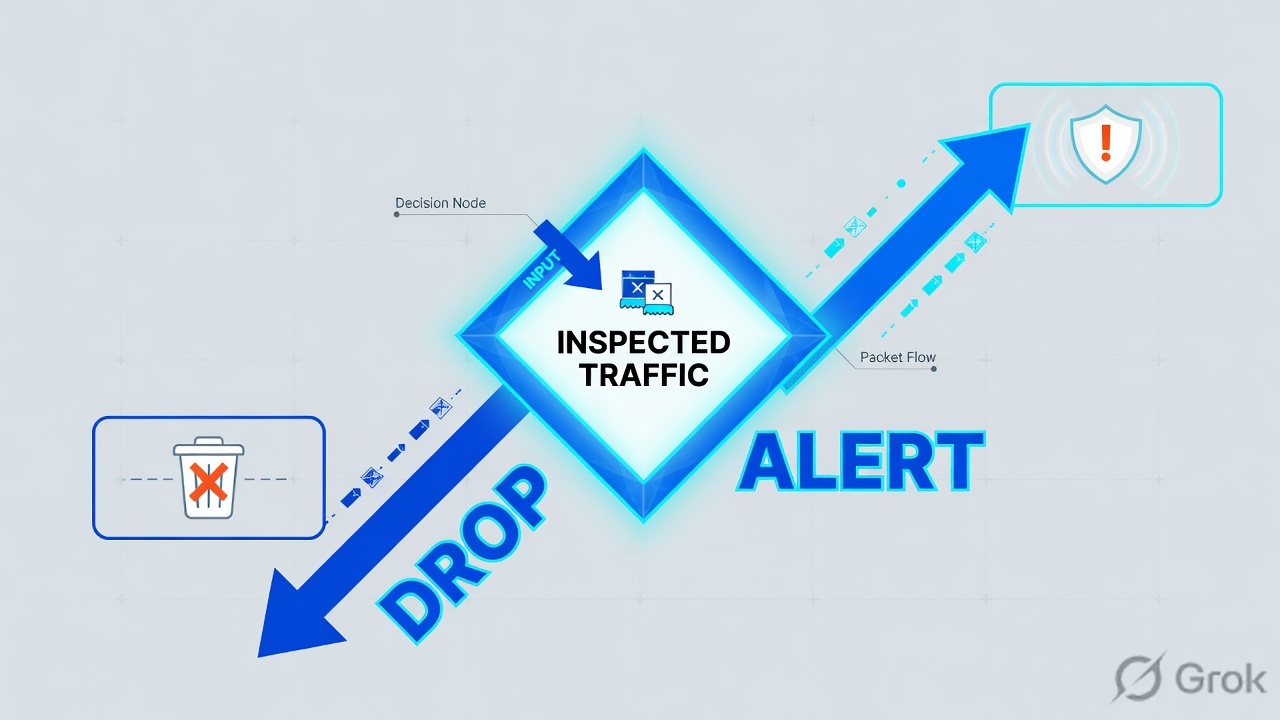
3. Decision: Alert, Drop, or Would have dropped
A rule fires when the packet matches every condition in the header and body, after variables are substituted. What happens next is not “IPS = drop.” It is the rule action plus the inspection mode plus whether the interface can actually drop.

If the SOC wanted a drop and Inline Result is blank, the rule is still Alert. If it says Would have dropped, the action is drop-capable but the box cannot (or will not) drop.
From Management Center 7.4, NAP Detection inspection mode is deprecated. Inspector drops are now controlled by the rule state. Cisco recommends Prevention for the NAP. Do not flip Normalizer / inline normalization off without TAC — Snort 3 relies on it.
4. Base policy and variable-set choices
Create a custom intrusion policy on a Talos base. Do not edit the system-provided policy in place — an LSP (Snort 3 rule package) can rewrite Talos defaults. Match the NAP base to the same name.
| Talos base | Posture | When to use it |
|---|---|---|
| Connectivity Over Security | Fewest enabled rules (Cisco cites ~600). Only the most critical drop rules. | Pilot, brittle apps, or a dedicated “do not break this” Allow. |
| Balanced Security and Connectivity | Default. Cisco cites ~15,000 enabled rules. Speed and detection. | Campus and most production Allows. Start here. |
| Security Over Connectivity | More anomaly rules. Cisco cites ~19,000. More false positives and latency. | High-risk segments after you have a tuning process. |
| Maximum Detection | Cisco: lab / high-security monitors only. ~37,000+ rules. Throughput not guaranteed. | Not a production default. |
| No Rules Active | Typical inspectors, no rules on. | You will enable only the groups you name. |
| Variable | Default | What you should do |
|---|---|---|
$HOME_NET | any | Your protected hosts. Common: object IPv4-Private-All-RFC1918, plus any public DMZ space that device actually protects. |
$EXTERNAL_NET | any | Leave any if you need east-west detections (internal → internal). Exclude $HOME_NET on a pure edge box, or if false positives are unmanageable. Talos lateral rules often already use any in the header. |
$HTTP_SERVERS / $HTTP_PORTS | Tied to $HOME_NET / a long port list | Tighten only when you know the real web farm. Wrong ports = missed HTTP rules. |
Cisco: the default of any on both variables ensures complete inspection but is less efficient and produces extra false positives. A variable set can differ per Allow rule even if the intrusion policy is the same. Most shops still use one set per device to stay sane.
5. Runbook: variables, policy, attach
Primary source for this block: Cisco Secure Firewall Intrusion Policy guidance and the FMC Device Configuration Guide chapter Intrusion Prevention Overview (7.6).
Side A — Variable set (outside the rule editor)
-
Open Variable Sets
Objects → Object Management → Variable Set. Edit Default-Set or clone a set named for the ticket (
VS-CAMPUS). Default-Set is what every Allow uses until you pick something else. -
Set $HOME_NET
Include the networks this FTD protects. Lab example:
10.0.1.0/24(users) and10.0.2.0/24(servers), or the system objectIPv4-Private-All-RFC1918. Including extra RFC1918 space does not hurt detection; missing a range does. -
Decide $EXTERNAL_NET
Edge-only visibility → exclude
$HOME_NET. Need internal attacker → leave any. Save the set before you attach it.
Objects → Object Management → Variable Set → VS-CAMPUS
Edit Variable Set
Placeholder only. Source: Cisco Secure Firewall Intrusion Policy — Variable Sets.
After Save, the set still does nothing until an Allow rule’s Inspection tab points at it. Next step is the intrusion policy, then the attach.
Side B — Intrusion policy and the Allow attach
-
Create a custom intrusion policy
Policies → Access Control heading → Intrusion (or Policies → Intrusion) → Create Policy. Name it for the ticket (
IPS-CAMPUS-BALANCED). Base = Balanced Security and Connectivity. Inspection mode = Prevention if this FTD is routed, switched, transparent, or inline and you intend to drop. Detection only if you must watch first. -
Open the Snort 3 Version
Do not start on the Snort 2 editor unless the device still runs Snort 2. Override a noisy rule to Alert (or disable it) instead of switching the whole base down. Changing a rule group’s security level (1–4) is safer than a pile of permanent individual overrides — LSP updates still apply inside the level.
-
Match the NAP
Policies → Intrusion → Network Analysis Policies tab → Create Policy with the same Talos base. Then Policies → Access Control → edit the ACP → Advanced → Network Analysis and Intrusion Policies. Set Default Network Analysis Policy to that NAP. If any Allow uses application or URL conditions, also set Intrusion Policy used before Access Control rule is determined — Snort 3 needs this more than Snort 2 did, or early packets pass uninspected while AppID runs.
-
Attach on the Allow
Edit the Allow (example
INSIDE-to-OUTSIDE-HTTPS-IPS). Inspection tab: Intrusion Policy =IPS-CAMPUS-BALANCED, Variable Set =VS-CAMPUS. You cannot hang IPS on Trust or Block. An IPS default action is allowed, but a file policy is not available on the default action.
Policies → Access Control heading → Access Control → ACP-CAMPUS → INSIDE-to-OUTSIDE-HTTPS-IPS
Edit Rule · Inspection
Source: Cisco Secure Firewall — Access Control rules attach IPS on Allow; variable set is selected on the same Inspection tab.
Confirm the rule is still above any Trust that could also match this HTTPS flow. Then Save and Deploy. A saved IPS that never deployed is a comment.
Side C — Deploy and generate one hit
-
Save and deploy
Deploy to the targeted FTD. Confirm the device is on Snort 3 (device settings / Snort version). Established connections keep the old inspection until they close.
-
Confirm rule updates
System → Updates → Rule Updates shows both SRU (Snort 2) and LSP (Snort 3). Download and deploy the LSP if the policy is marked out of date after a Talos drop.
-
Pilot one flow you expect to fire
Use a lab SID you own, or a known-safe test the shop already approved. Then prove it in intrusion events — next section — before you call the change done. Connection Allow alone is not IPS proof.
6. Prove it: intrusion events
Primary source: Cisco Secure Firewall Management Center Administration Guide — Intrusion Events (7.4).
Path: Analysis → Intrusions → Events. An intrusion event is generated when a packet matches an enabled Alert or Drop/Block rule (or an enabled preprocessor/inspector rule). Managed devices send those events to FMC. Connection logging being on does not create this row; a Snort match does.
Analysis → Intrusions → Events · last 15 minutes · device FTD-EDGE-01
Intrusion Events
| Message | Inline Result | Intrusion Policy | AC Rule |
|---|---|---|---|
| SQL injection attempt (1:1234:2) | Dropped | IPS-CAMPUS-BALANCED | INSIDE-to-OUTSIDE-HTTPS-IPS |
| Suspicious user-agent (1:5678:1) | — | IPS-CAMPUS-BALANCED | INSIDE-to-OUTSIDE-HTTPS-IPS |
| Malformed HTTP (119:2:1) | Would have dropped | IPS-CAMPUS-BALANCED | INSIDE-to-OUTSIDE-HTTPS-IPS |
Lab SIDs are placeholders. Columns map to Message (GID:SID:rev), InlineResult, IntrusionPolicy, AccessControlRuleName.
Row 1 is a pass for a prevention deploy. Row 2 is a camera, not a door. Row 3 means the action wanted a drop and the box could not (Detection, tap, or passive).
Read these fields on every pilot:
- Message (syslog
Message) — rule text plus(GID:SID:rev). Search that SID on snort.org/rule_docs if you did not write it. - Inline Result (syslog
InlineResult) — dropped / would have dropped / partially dropped / blank. Blank: the triggered rule was not set to Drop and Generate / Block. - Intrusion Policy (syslog
IntrusionPolicy) — the policy you think you attached. - Access Control Rule (syslog
AccessControlRuleName) — the Allow (orDefault Actionif IPS hangs there). Empty can mean the early “before the rule is determined” policy fired. - Access Control Policy (syslog
ACPolicy) — confirms the deployed ACP. - Source IP / Destination IP — check them against
$HOME_NET. If both are “outside,” your variable set is lying.
Message            : SQL injection attempt (1:1234:2)
Inline Result      : dropped
Intrusion Policy   : IPS-CAMPUS-BALANCED
Access Control Rule: INSIDE-to-OUTSIDE-HTTPS-IPS
Source IP          : 198.51.100.66
Destination IP     : 10.0.2.20
Ingress Zone       : OUTSIDE
Egress Zone        : DMZ
Confirm the connection event Action is Allow (or IPS default), the Inspection tab names this policy, the payload is not still encrypted, and the SID is not Disabled. Then check $HOME_NET. Do not raise the base to Maximum Detection to fix a Trust rule.
7. Traps and pilot checklist
| Symptom | Likely cause | What you prove |
|---|---|---|
| Zero intrusion events; HTTPS still works | Trust or Block handled the flow, or no IPS on the Allow, or not deployed | Connection event Action and Access Control Rule. Inspection tab. Deploy status. |
| Events exist, Inline Result blank, traffic not dropped | Rule action is Alert (Generate Events) | Snort 3 Version → that SID → Block / Drop. Redeploy. Re-read the event. |
| Inline Result = Would have dropped | Inspection mode Detection, or interface is passive / inline-tap | Intrusion (and NAP) mode. Interface mode lesson. Cisco: tap/passive cannot drop regardless of rule state. |
| Flood of junk SIDs on internal-to-internal | $HOME_NET and $EXTERNAL_NET still any |
Variable set on that Allow. Set HOME_NET; consider excluding it from EXTERNAL_NET. |
| No events on HTTPS you decrypted in your head | Encrypted payload — Cisco disables IPS/file on encrypted payloads by default | Decryption policy match / SSL Status on the connection. Decrypt first. |
| App/URL Allow has IPS, first packets still dirty | AppID needs data packets; those packets never hit the later IPS rule | ACP Advanced → Intrusion Policy used before Access Control rule is determined. |
| Policy “out of date” after Tuesday’s Talos drop | LSP applied in FMC, not deployed to the device | System → Updates → Rule Updates (LSP vs SRU). Deploy the parent ACP. |
- Device has the IPS / Threat license and is running Snort 3.
- Custom intrusion policy on a named Talos base; NAP uses the same base; both Prevention if you intend to drop.
- Variable set:
$HOME_NETis the protected space;$EXTERNAL_NETis a written choice, not an accident. - Allow rule Inspection tab names that policy and that set. No Trust above it for the same 5-tuple.
- App/URL rules: “Intrusion Policy used before Access Control rule is determined” is set.
- One pilot event:
Intrusion Policyis your name,Inline Resultmatches the intent (dropped vs blank vs would have dropped),GID:SIDis the rule you care about.
Knowledge check
Six judgment questions. Use the path figure, the Alert vs Drop figure, and the intrusion-event fields. Check answers when you are done.
Sources
- Cisco Secure Firewall — Intrusion Policy (NAP vs IPS; four Talos bases; variable sets; HOME_NET / EXTERNAL_NET; attach via Allow; Snort 3 rule groups and actions)
- Cisco Secure Firewall — Snort 3 Adoption (Alert vs Block naming; Drop / Rewrite / Pass / Reject from 7.1; LSP vs SRU; Allow Inspection tab; “policy used before the rule is determined”)
- Cisco Secure Firewall Management Center Device Configuration Guide, 7.6 — Intrusion Prevention Overview (NAP then IPS; variable sets required; encrypted payloads skip IPS; IPS license)
- Cisco FTD Device Manager — Intrusion Policies (Prevention vs Detection; Alert / Drop / Disabled; apply IPS only on Allow; default variable values)
- Cisco Secure Firewall Management Center Administration Guide, 7.4 — Intrusion Events (Analysis → Intrusions → Events; Message, Inline Result, Intrusion Policy, Access Control Rule)
- Cisco — Custom Snort 3 Intrusion Policies for Access Control
Related: FTD Access Control Policy · FTD / FMC fundamentals · Interface modes · FTD NAT · FTD session factory · FTD evidence desk · FTD interview Q&A