The ticket
Priya: “Internet is down.” Switch Plugin is green. Inventory exists. 802.1X Last Authentication State - User Credentials = RADIUS-Rejected. 802.1X Authentication Type = PEAP. Restarting fs-app1 will not mint a password. This is an admission ticket.
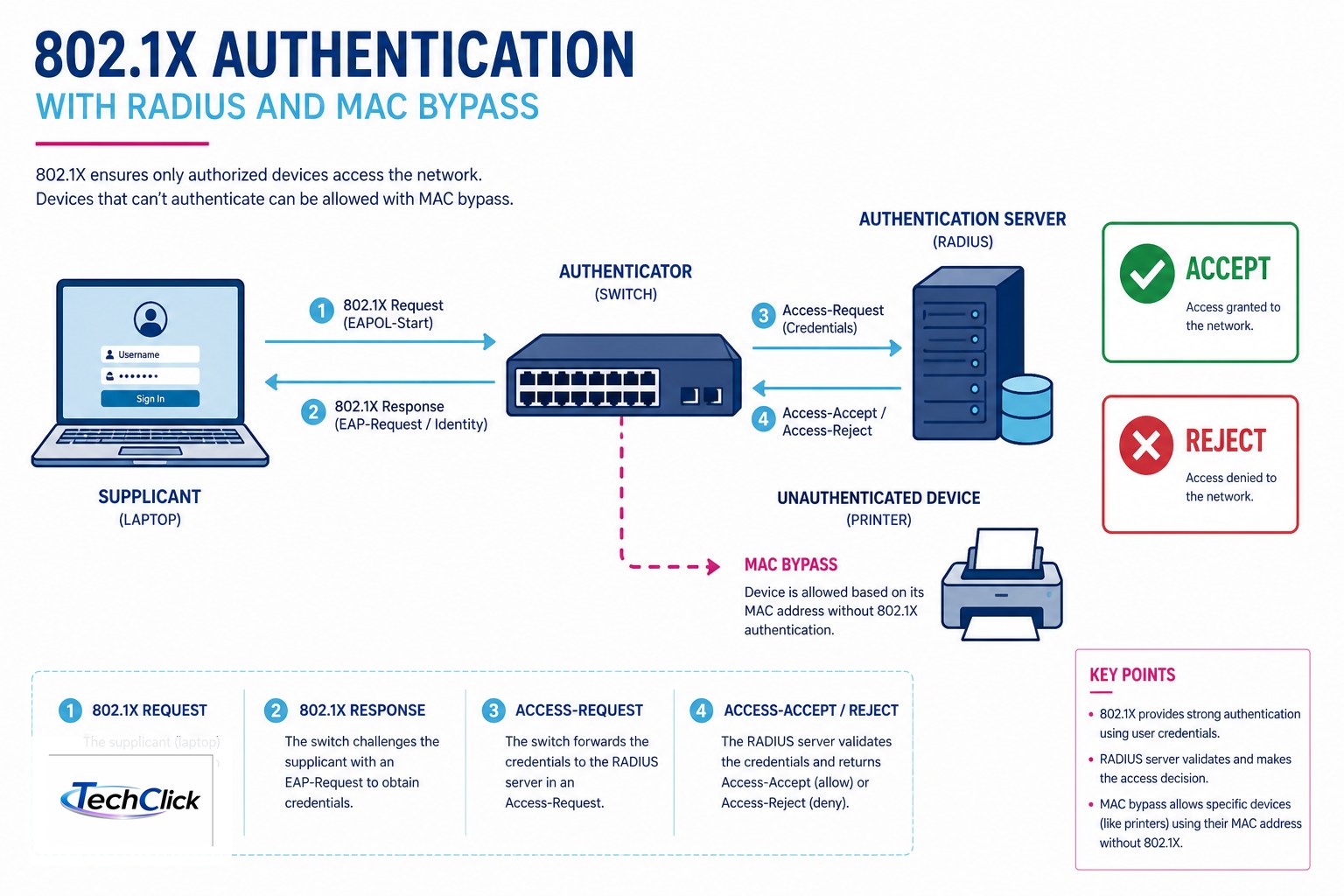
The RADIUS Plugin exposes 802.1X properties for policy and Host Details. Official: 802.1X Last Authentication State - User Credentials, … Computer Credentials, … MAC Based (MAB) — each is RADIUS-Accepted or RADIUS-Rejected. 802.1X RADIUS Authentication State is the last Accept/Reject. 802.1X Authentication Type is EAP-TLS, EAP-TTLS, MAB, PEAP, or PEAP-EAP-TLS. Accept is not a VLAN. One port, one enforcement owner: ISE/Forescout RADIUS for users; Forescout Virtual FW/plugin for agentless — not both wild. Source: RADIUS properties for use in policy conditions.
Enterprise Manager fs-em 10.10.10.30 · Appliance fs-app1 10.10.10.31 · span/mirror on sw-access-01 · same LAN 10.20.30.0/24 · Priya 10.20.30.80 · printer 10.20.30.60 · OT PLC 10.50.1.10. Not a live customer.
Three authentication states
| Property | Means |
|---|---|
802.1X Last Authentication State - User Credentials | Last user 802.1X — RADIUS-Accepted or RADIUS-Rejected |
… Computer Credentials | Machine account / computer EAP |
… MAC Based | MAB using the MAC as identity |
802.1X Authentication Type | PEAP, EAP-TLS, EAP-TTLS, MAB, PEAP-EAP-TLS |
Lesson 6 decision still stands. This lesson is the RADIUS proof field on that decision.
802.1X properties
Who owns the port
Windows domain laptop → 802.1X (ISE or Forescout RADIUS as the written RADIUS server — pick one). Printer / camera that will never supplicant → MAB or Forescout switch plugin / Virtual FW — pick one. PLC → neither PEAP nor MAB in this class design (lesson 9). If ISE already does CoA on that interface, Forescout inspects and may eyeExtend; it does not also Virtual-FW.
How you prove admission
Side A — NAD
Switch: 802.1X then MAB order on user ports. Printer ports: MAB or none, matching the owner spreadsheet from lesson 6.
Side B — Host Details
Quote Last Authentication State (which of the three) + Authentication Type + RADIUS Authentication State. If Rejected, read RADIUS Log Details / Last Rejected Authentication Time when present. Do not Assign to VLAN yet.
Side C — one owner
If RADIUS-Accepted and the VLAN is still wrong, that is authorization (policy / dACL / plugin) — lesson 5/7 — not “restart RADIUS.” If Rejected, fix identity/EAP/cert/MAR. If empty 802.1X properties, the RADIUS plugin never saw the exchange — SPAN/NAD config, not HPS.
show authentication sessions interface Gi1/0/10
# Method: dot1x     Status: Authz Failed
# Next: quote Forescout 802.1X Last Authentication State - User Credentials
#        = RADIUS-Rejected  and  Authentication Type = PEAP
Four RADIUS failures
1 · Restart Switch Plugin because PEAP rejected
2 · MAB and 802.1X both succeeding then Virtual FW remapping VLAN
3 · PEAP on a PLC
4 · Empty 802.1X properties treated as “Forescout is down”
Empty means the plugin did not see RADIUS. Check NAD pointing at the right RADIUS IP, and that the Appliance actually handles that exchange on your design.
How to prove it
1) Quoted User vs Computer vs MAC Based state. 2) Quoted Authentication Type. 3) Accept or Reject matches the NAD session. 4) Written port owner. 5) Priya is not also Virtual-FW’d.
Traps
| Wrong | Right |
|---|---|
| RADIUS-Accepted = VLAN 30 | Accepted = identity. VLAN is authorization |
| MAC Based state for Priya’s PEAP | User Credentials for user EAP; MAC Based is MAB |
| MAB = 802.1X with a cert | MAB uses the MAC as identity |
Knowledge check
Judgment items. One best answer. Reasons send you back to the matching section.
Forescout class series: Three products · First day · Discovery · Classification · Policy · Enforcement · Switch plugin · eyeExtend · OT / IoT · vs ISE + interview · HPS posture · eyeSegment matrix · RADIUS 802.1X MAB
Sources
- RADIUS properties for use in policy conditions — Last Authentication State User/Computer/MAC, Authentication Type, RADIUS Authentication State.
- This series lesson 6 (Virtual FW vs 802.1X), lesson 7 (switch plugin), lesson 11 (do not confuse HPS with RADIUS).
- Forescout evidence desk — same 802.1X proof fields on a night-shift ticket.
Related: Forescout evidence desk · session factory · Cisco ISE series.