The ticket
Helpdesk: “NAC blocked Priya.” Host Details: Function = Laptop, OS = Windows 11. Windows Manageable Domain is empty. Policy Actions shows a control that never had a property to evaluate. That is not a failed AV check. That is a failed inspect.
HPS Inspection Engine (Host Property Scanner) lets eyeSight access Microsoft Windows endpoints: classification, OS/security/services/apps, then optional remediation actions. Access is Remote Inspection (WMI and other domain/host protocols; TCP 445 on Windows 7+) or SecureConnector (small executable on the host, encrypted tunnel to the Appliance on TCP 10003). When access succeeds the host is Manageable. Manageable is not compliant. Docs: About the HPS Inspection Engine; Configure via Tools → Options → Modules → Endpoint → HPS Inspection Engine → Configure.
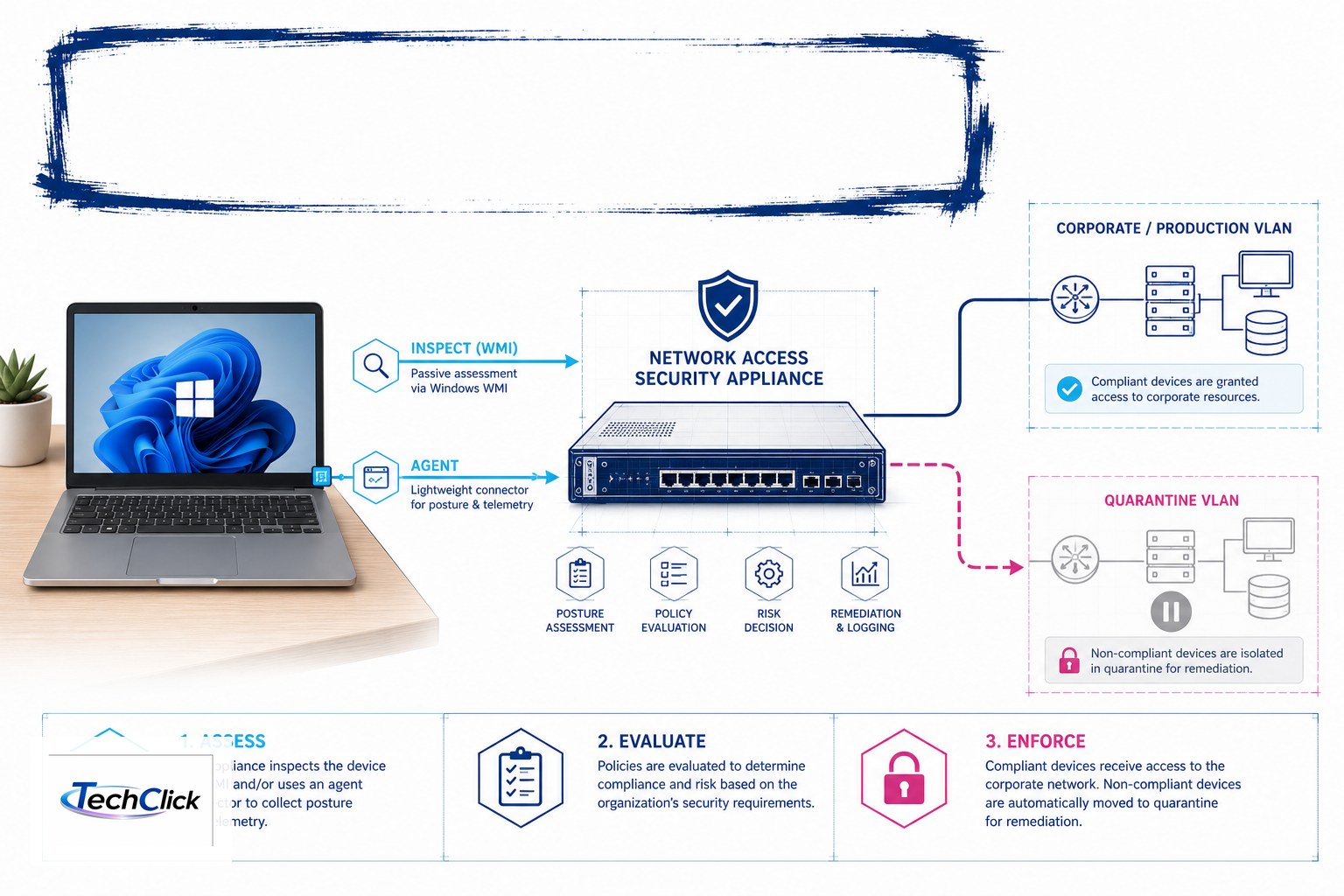
Enterprise Manager fs-em 10.10.10.30 · Appliance fs-app1 10.10.10.31 · span/mirror on sw-access-01 · same LAN 10.20.30.0/24 · Priya 10.20.30.80 · printer 10.20.30.60 · OT PLC 10.50.1.10. Not a live customer.
Two inspection paths
| Remote Inspection | SecureConnector | |
|---|---|---|
| How | WMI / SMB-RPC from the Appliance | Agent on the endpoint reports in |
| Port | TCP 445 (Win 7+); 139 on older | TCP 10003 to the Appliance |
| Proof property | Windows Manageable Domain / Local | Windows Manageable SecureConnector |
| Needs | Reachable host + least-privilege inspect account | Start SecureConnector action + firewall allow |
Classification (lesson 4) is what the device is. HPS is whether you can read Windows. Control is a later checkbox.
HPS Inspection Engine
When SecureConnector
Remote Inspection first for on-net domain PCs that allow WMI. SecureConnector when the laptop is off-net, firewalled, or you need a Start SecureConnector / HTTP install path. Never install SecureConnector on the PLC VLAN. Never use a Domain Admin shared secret as the inspect account — least privilege, logged.
How you prove posture
Side A — module
Tools → Options → Modules → Endpoint → HPS Inspection Engine. Running. Connectivity test against a host that is allowed to be inspected (docs suggest a DC/LDAP address for the test — not a PLC).
Side B — host properties
Host Details on 10.20.30.80:
Windows Manageable Domainor SecureConnector analogue is true before you read AV/patch. Empty Manageable = stop.Side C — policy
Inspect-only: log AV / host firewall / patch window. Notify week. Control (HTTP Notification, quarantine VLAN) only on the manageable Windows group — never on Unknown, never on 10.50.1.0/24.
Four HPS failures
1 · Control before Manageable
Policy fires “AV missing” because the property never resolved. Quote Manageable first.
2 · TCP 445 filtered
Remote Inspection needs 445 (Win 7+). Host firewall or a downstream NGFW silently drops WMI. That is a path ticket, not a “HPS is broken” ticket.
3 · SecureConnector but 10003 closed
Docs: SecureConnector creates an encrypted tunnel to the Appliance on TCP 10003. Enterprise firewalls must allow it. Partial Enforcement also disables HTTP Actions / Virtual Firewall — do not delete the posture policy until you have quoted that mode.
4 · Domain Admin inspect account campus-wide
Blast radius if the Appliance is abused. Dedicated least-privilege account. OT prefixes stay in the exclude list from lesson 3.
How to prove it
1) HPS module Running. 2) Priya shows a Manageable property. 3) Inspect policy hit is logged. 4) No control on Unknown or 10.50.1.10. 5) 445 or 10003 path is written on the ticket if inspect failed.
Traps
| Wrong | Right |
|---|---|
| Classified Windows = we can read AV | Read Windows Manageable * first |
| Quarantine Unknown because “posture” | Unknown is a discovery ticket (lesson 4) |
| HPS on the PLC VLAN | Passive only (lesson 9) |
| HTTP Notification never shown | NAC → HTTP Redirection + Partial Enforcement — not “delete HPS” |
Knowledge check
Judgment items. One best answer. Reasons send you back to the matching section.
Forescout class series: Three products · First day · Discovery · Classification · Policy · Enforcement · Switch plugin · eyeExtend · OT / IoT · vs ISE + interview · HPS posture · eyeSegment matrix · RADIUS 802.1X MAB
Sources
- About the HPS Inspection Engine — Windows access, Remote Inspection, SecureConnector, Manageable properties.
- Configure the HPS Inspection Engine — Tools → Options → Modules → Endpoint → HPS Inspection Engine → Configure.
- HPS Inspection Engine Plugin Requirements — TCP 10003 for SecureConnector.
- This series lessons 3 (discovery excludes), 4 (empty = do not enforce), 5 (inspect vs control).
Related: Forescout evidence desk · session factory · Cisco ISE series.