The ticket
Same HR portal as the last lesson: hr.techclick-lab.in on VIP 203.0.113.25. The virtual server is enabled. Members are green. A user on the office LAN cannot load the page. From the same laptop, http://10.20.30.41/health returns 200.
If you rebuild the VIP now, you will waste the window. The app is alive. The thing that changed is the source IP the server sees.
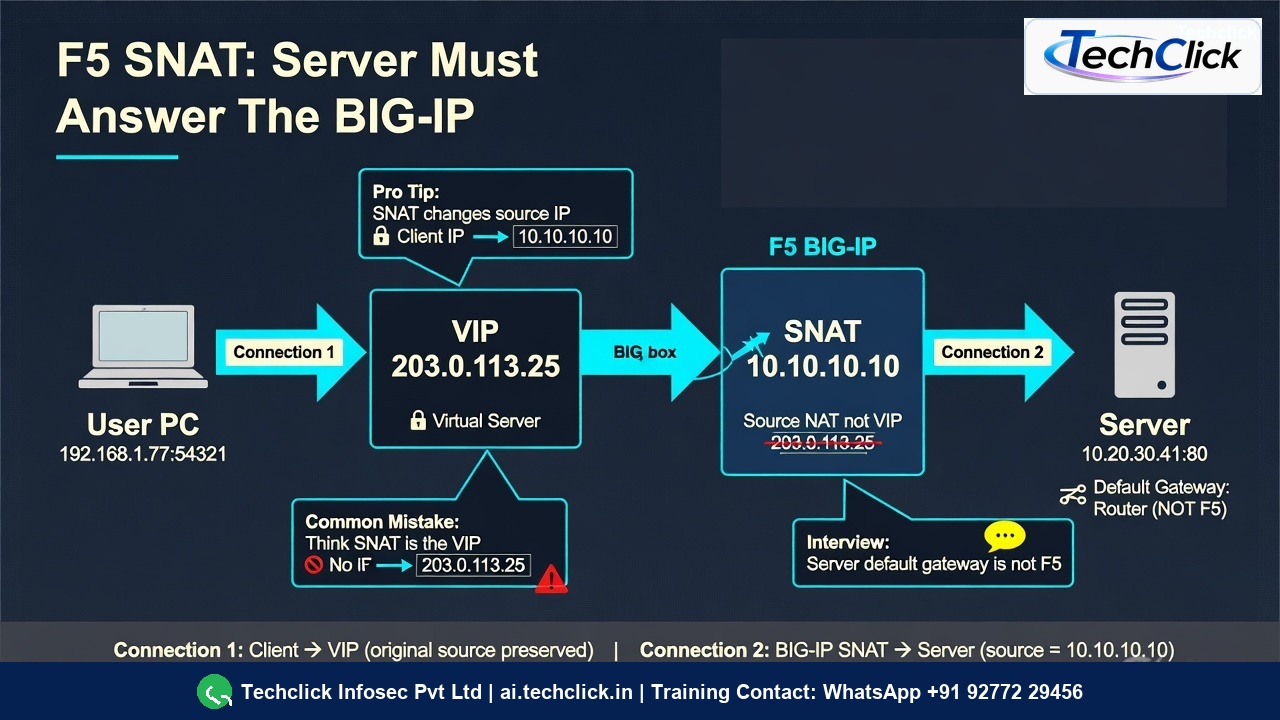
SNAT is source NAT on the server-side connection. The laptop still talks to the VIP. F5 opens a new TCP session toward the pool member using a translation address (Automap self-IP or a SNAT-pool IP). The server must reply to that translation address so F5 can finish the client conversation. F5 ADC lab wording: SNAT Auto Map “ensures that responses to server request are always sent back to the BIG-IP system.”
What SNAT actually is
NAT means “change an address.” On BIG-IP you already have one NAT everyone notices: the VIP (destination NAT). Users send packets to 203.0.113.25. That is not SNAT.
SNAT means secure / source network address translation. It changes the source of Connection 2 — the new session F5 opens toward 10.20.30.41:80. In this lab that source becomes 10.10.10.10.
Why bother? Because BIG-IP is a full proxy. The laptop already has a TCP session with the VIP. If the server replies to the laptop IP, those packets never go back through F5. The laptop ignores them. The user sees a hang. Objects stay green.
F5’s own ADC lab shows this exactly: when the Windows server default gateway is moved off the BIG-IP self-IP to an external router, the page fails. tcpdump on the internal VLAN shows requests from the client IP and no replies. After Source Address Translation = Auto Map, the same capture shows the internal floating self-IP talking to the server — and the page loads.
If the last arrow’s source is still the laptop IP, you did not SNAT.
The VIP is who the user calls. SNAT is who the server thinks called it. If those two ideas mix, every later command will be read wrong.
VIP 203.0.113.25:443 · VS vs_hr_https · members 10.20.30.41:80, .42:80 · SNAT Automap / pool IP 10.10.10.10 · pool snatpool_hr. Not a live customer.
None vs Automap vs pool
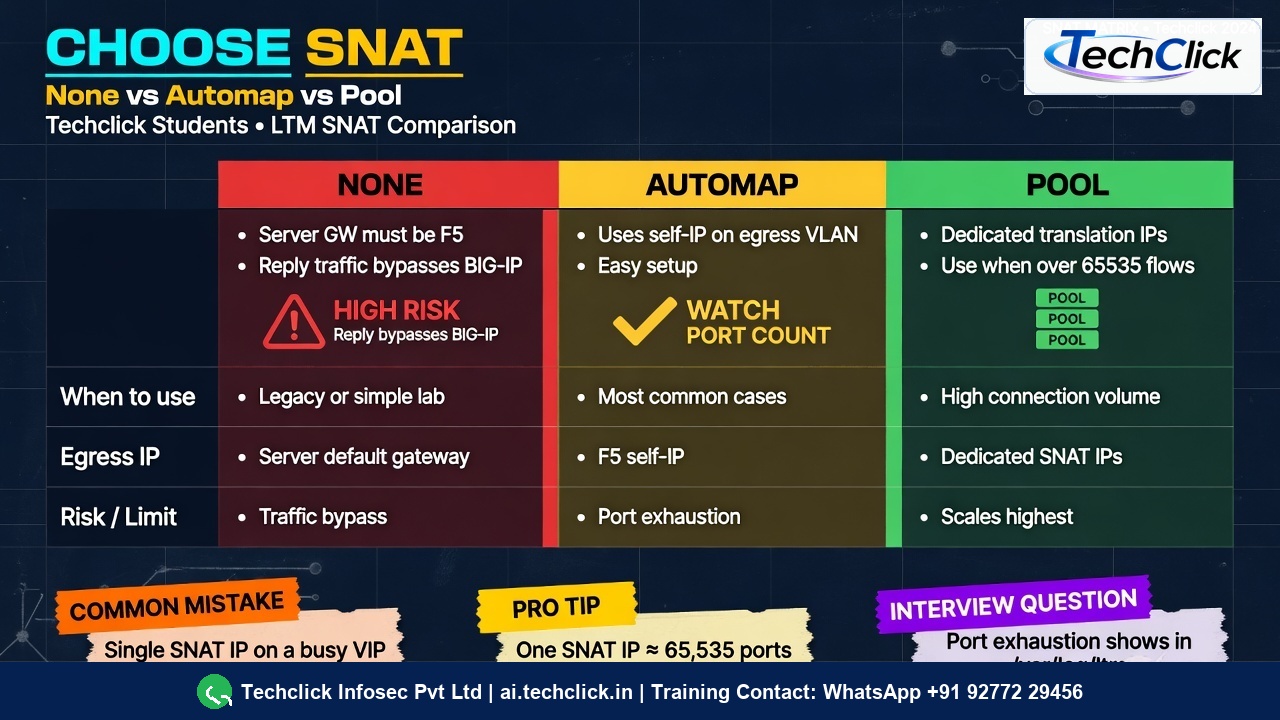
On the virtual server this is the field Source Address Translation (GUI) or source-address-translation in tmsh. Three useful values:
| Setting | What F5 uses as source toward the server | Use when | Main risk |
|---|---|---|---|
| None | The original client IP | Every pool member’s default gateway is this BIG-IP (or a floating self-IP) | If the gateway is a core router, replies bypass F5 |
| Automap | A self-IP on the egress VLAN (often the floating self-IP) | Most inbound VIPs where servers are not routed back through F5 | One busy self-IP can hit ~65535 concurrent translations |
| SNAT pool | Dedicated translation addresses you list | High connection count, or you need a known IP for the firewall team | Forgot to add the pool IP to FW-INT-01 |
F5 301a / tmsh notes: a single SNAT address is treated as having about 65535 concurrent translations. If you expect more, add addresses (SNAT pool, or more self-IPs for Automap). Exhaustion shows in the LTM log as port exhaustion, and new connections fail even though members are green.
tmsh list ltm virtual vs_hr_https source-address-translation
ltm virtual vs_hr_https {
    source-address-translation {
        type automap
    }
}

# After you switch to a pool:
tmsh list ltm snatpool snatpool_hr
ltm snatpool snatpool_hr {
    members {
        10.10.10.10
        10.10.10.11
    }
}
GUI path (F5 ADC lab): virtual server → Source Address Translation → Auto Map, or Local Traffic → Address Translation → SNAT Pool List / SNAT List for listener-wide SNATs.
Four SNAT failures
Read the explanation, then the CLI. The command only confirms the story.
1 · No SNAT — green objects, dead users
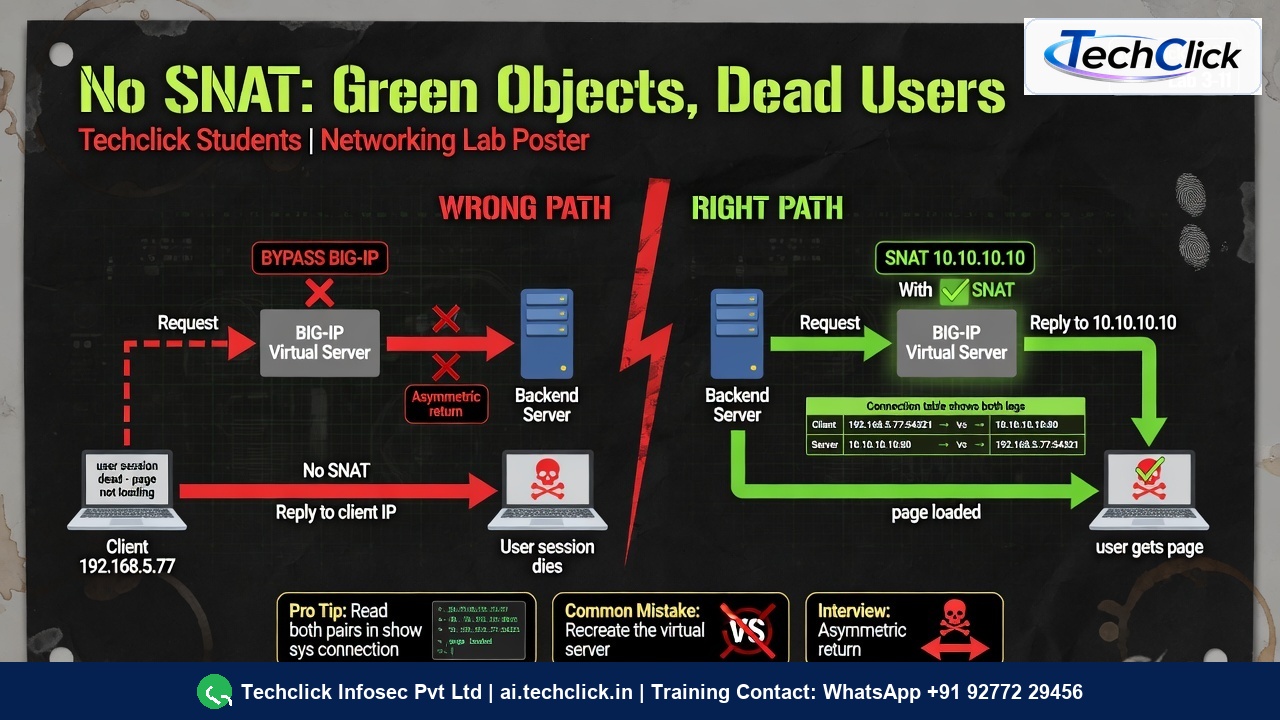
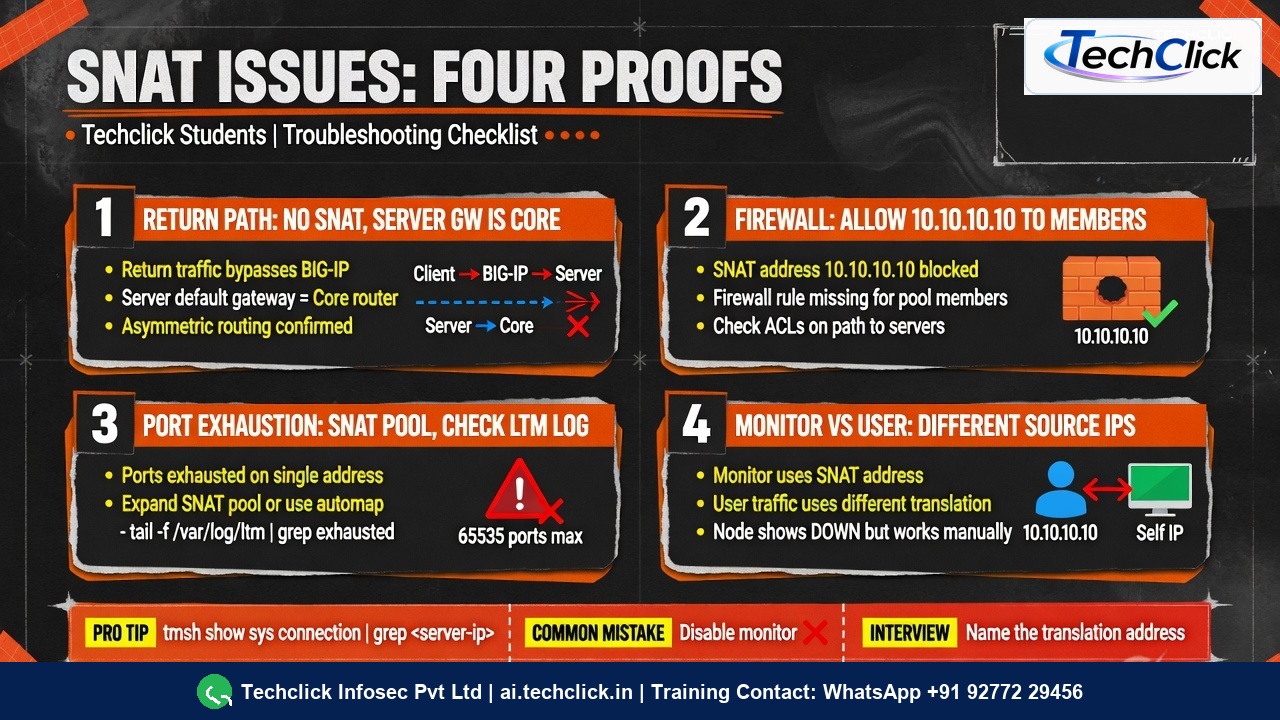
What this is. Connection 1 works. Connection 2 uses the laptop IP as source. The server’s default gateway is the core router, not F5. Replies never return through BIG-IP.
What you see. VIP and pool stay green. Browser hangs. tcpdump on the server VLAN shows SYN from the client IP and no useful return through F5. The F5 ADC lab reproduces this by changing the Windows default gateway off the BIG-IP self-IP.
tmsh list ltm virtual vs_hr_https source-address-translation
ltm virtual vs_hr_https {
    source-address-translation { type none }
}

tmsh show sys connection cs-server-addr 203.0.113.25
Sys::Connections
203.0.113.80:52011  203.0.113.25:443  203.0.113.80:52011  10.20.30.41:80  tcp  3
# Last pair still uses the CLIENT IP as source. Server will not come back through F5.
Fix. Set Automap or a SNAT pool. Re-test. The right-hand pair must show 10.10.10.10 → 10.20.30.41:80.
None is not “faster.” None is “I promise every server default gateway is F5.” If that promise is false, users die and icons stay green.
2 · Firewall or host ACL blocks the SNAT IP
What this is. SNAT is on. The server is healthy. The laptop can hit the server directly (source = office LAN). F5 cannot (source = 10.10.10.10). FW-INT-01 or firewalld never got a line for the translation address.
This is the sister of the previous troubleshooting lesson, now named correctly as a SNAT problem — not a “VIP problem.”
# Laptop — allowed
curl -sI http://10.20.30.41:80/health
HTTP/1.1 200 OK

# From F5 — SNAT source, blocked
curl -sI --connect-timeout 5 http://10.20.30.41:80/health
curl: (28) Connection timed out

# Ask FW-INT-01:
# allow 10.10.10.10/32 -> 10.20.30.41/32:80 and .42/32:80
Do not recreate the virtual server. Do not disable the monitor. Open the SNAT IP on the firewall, then re-test the VIP.
3 · Port exhaustion on one translation IP
What this is. Automap or a one-IP SNAT pool is in use. The VIP is busy (many users, many short connections, or HTTP/1.1 with lots of unique client ports). One IPv4 address has about 65535 usable source ports. When they are all busy, new translations fail.
F5 301a notes: this shows in the event log as port exhaustion. Mitigation is more translation addresses — a SNAT pool, or more self-IPs if you stay on Automap.
011e0002:4: SNAT pool snatpool_hr — translation 10.10.10.10 port exhaustion
011e0001:4: Source translation failed for 203.0.113.80:55102 -> 10.20.30.41:80
tmsh modify ltm snatpool snatpool_hr members add { 10.10.10.11 }
tmsh modify ltm virtual vs_hr_https source-address-translation {
    type snat
    pool snatpool_hr
}
tmsh save sys config
Then tell FW-INT-01 about 10.10.10.11 as well. A new SNAT IP that the firewall does not allow just creates failure 2.
4 · Monitor is green, users fail (different source)
Health monitors are F5’s own probes. They may leave from a self-IP that is allowed, while user traffic SNATs to an address that is not — or the reverse. Ping / ICMP node monitors never test SNAT at all.
So: a green member only proves the probe you configured. It does not prove the SNAT path your users take.
tmsh show ltm pool pool_hr_80 members
# Availability: available   Reason: Monitor /health passed from 10.10.10.5

tmsh show sys connection cs-server-addr 203.0.113.25
# user flows still sourced from 10.10.10.10 — and those SYNs die on FW-INT-01
How to prove it
Always read the connection table as two pairs.
tmsh show sys connection cs-server-addr 203.0.113.25
Sys::Connections
203.0.113.80:53122  203.0.113.25:443  10.10.10.10:53122  10.20.30.41:80  tcp  12
Left pair = user → VIP (Connection 1). Right pair = SNAT → member (Connection 2). If the third IP is still the client, SNAT is off. If the right pair never appears, F5 accepted the user and never completed the server side (route or firewall).
Side A — user
curl -vk https://hr.techclick-lab.in/ --resolve hr.techclick-lab.in:443:203.0.113.25Side B — F5
list ltm virtual vs_hr_https source-address-translationthencurlthe member from bash. Thenshow sys connection.Side C — server / firewall
Direct curl from laptop. tcpdump for source
10.10.10.10. Ask FW-INT-01 for that IP, not only the VIP.
1) VS shows automap or the intended snatpool. 2) Connection table shows SNAT IP on the right. 3) F5 curl to both members works. 4) One browser login works. 5) No new port-exhaustion lines after load.
Traps
| Symptom | Likely SNAT story | First proof | Dangerous wrong fix |
|---|---|---|---|
| Green VS, users hang, direct 200 | None, or firewall on SNAT IP | Connection table third IP + F5 curl | Recreate the VIP |
| Works at night, fails at 10:00 | Port exhaustion | /var/log/ltm exhaustion | Disable persistence only |
| Monitor green, users red | Probe uses a different self-IP | Compare monitor source vs SNAT source | Disable the monitor |
| New SNAT IP, still timeout | Forgot FW-INT-01 | F5 curl to member | Add a third SNAT IP blindly |
| Only some apps fail | iRule snat none on that path | list ltm rule | Change Automap on the wrong VS |
iRules can override VS SNAT with snat <addr>, snat automap, or snat none (DevCentral snat command). If one URI fails and others work, read the iRule before you rebuild Automap.
Knowledge check
Eight judgment items. One best answer. Reasons send you back to the matching section.
F5 LTM series: F5 LTM troubleshooting path · F5 SNAT concept and issues · F5 cookie vs source-address persistence · F5 SSL offload vs passthrough.
Sources
- F5 ADC lab: Work with SNAT, Profiles, and Monitors — gateway moved off BIG-IP, then Auto Map; internal SNAT list.
- F5 301a study notes — ~65535 translations per SNAT address; port exhaustion in event logs; SNAT pools / extra self-IPs.
- F5 tmsh: ltm snat, ltm snatpool.
- F5 DevCentral iRule
snat— override VS SNAT with address / none / automap. - Techclick Fast Track workbook — everything green, still fails = return path / no SNAT.
Related: User-to-VIP / firewall / iRule lab · 503 / SNAT evidence lab · Virtual servers and pools · Command ladder.