Start here · understand the lesson before the detail
What you are learning
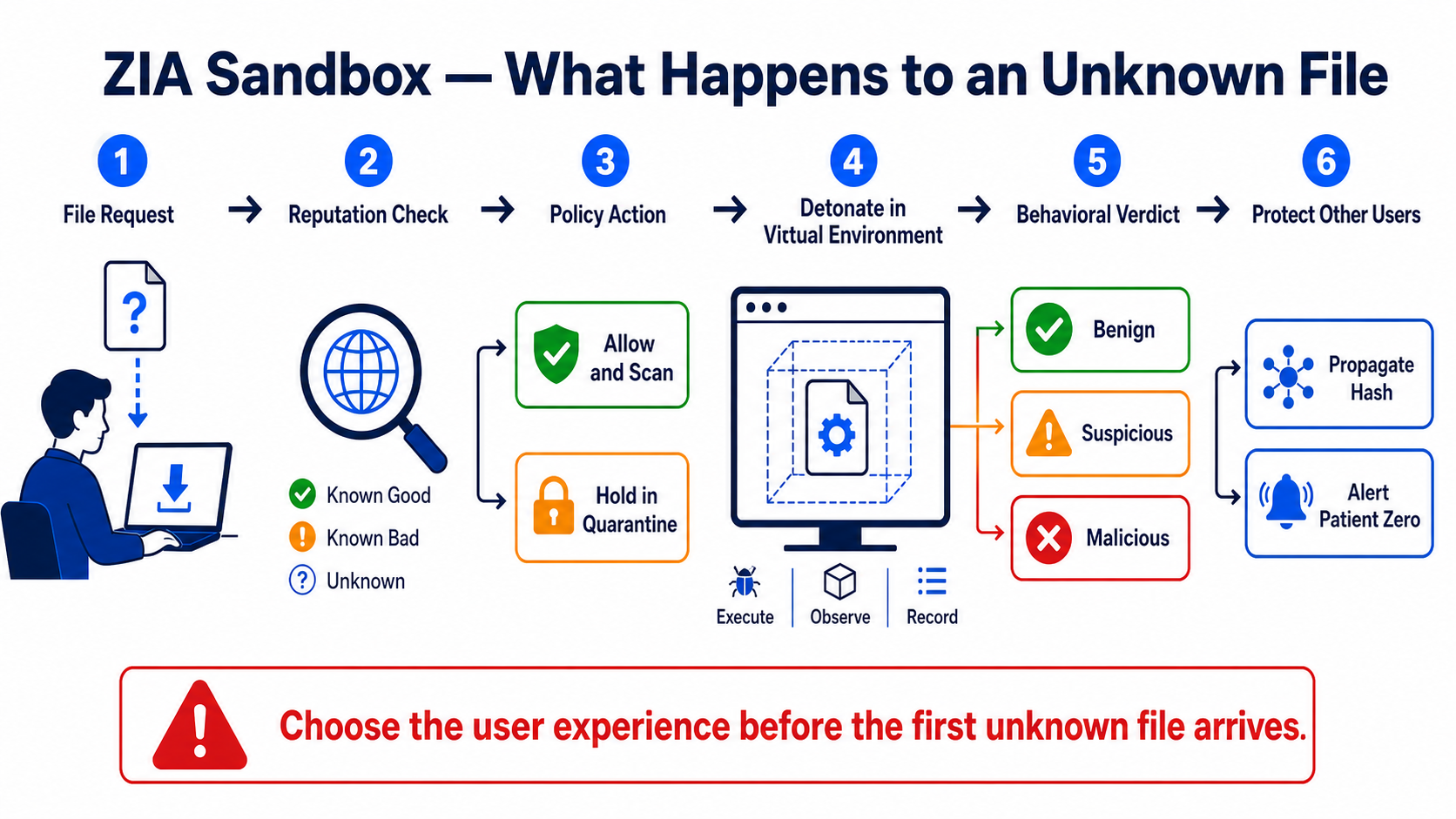
This lesson follows one unknown file from the user’s request to the final verdict. You will understand reputation checks, sandbox policy, allow-and-scan versus quarantine, virtual detonation, malicious-hash propagation, and Patient Zero response.
In plain English
Known good and known malicious files can be handled from existing reputation. An unknown file may be run safely in a virtual environment so its behaviour can be observed. Policy decides whether the user receives it immediately while analysis continues or waits for a verdict in quarantine.
Real example
A user downloads a new invoice archive that has no known reputation. ZIA policy holds the file, detonates its contents, and observes suspicious process and network behaviour. A malicious verdict blocks delivery, propagates the file hash to protect other users, and gives the security team Patient Zero evidence.
Follow this flow
- Choose users, destinations, URL categories, file types, and sizes to analyse.
- Decide the user experience for unknown files: allow and scan or hold in quarantine.
- Create and order a pilot Sandbox rule with only required exceptions.
- Test known-good, known-bad, and approved unknown sample behaviour.
- Review verdict, report, hash, Patient Zero event, user impact, and response workflow.
Evidence to collect
- User, URL, file name/type/size, hash, and rule
- Reputation result and policy action before analysis
- Sandbox behavioural report and final verdict
- Quarantine/release event, Patient Zero alert, and propagated protection
Common mistake to avoid
Do not describe sandboxing as ordinary antivirus scanning. It observes behaviour in an isolated environment. Also do not choose quarantine without planning the user message, release process, file-size/type coverage, business exceptions, and analyst ownership.
Current official source checkpoint
- About ZIA Sandboxcurrent official reference used for this beginner explanation
- Sandbox troubleshooting runbookcurrent official reference used for this beginner explanation

Key terms before you continue
Most engineers think…
"Cloud Sandbox scans every file a user downloads — that's why it's slow."
Wrong on both counts. Sandbox doesn't scan every file, and a well-tuned policy isn't slow. Known files are answered instantly from a verdict cache — only the genuinely unknown, first-time-seen file gets detonated. And the real design decision isn't speed, it's a trade-off most admins fumble: do you hold the unknown file (Quarantine) or let the first user have it and analyse in parallel (Allow & Scan)? Get that wrong and you either annoy 5,000 users or create patient zero. This lesson rewires that instinct.
Why a sandbox exists — the patient-zero problem
Think of airport security. The X-ray machine has a database of known dangerous shapes — it catches the obvious knife instantly. That's your signature AV. But a clever attacker brings something the database has never seen. For that, you need a separate room where security makes the person open the bag and demonstrate the object actually works. That second room is the sandbox.
In ZIA, signature AV and Cloud Sandbox are two layers. Signature engines catch known malware in milliseconds. But the file a Wipro analyst downloaded five minutes ago may have been compiled today — no signature exists anywhere on earth yet. If you only had signatures, that user becomes patient zero, and the breach spreads from there.
Cloud Sandbox closes that gap. It takes the first-time-seen file, runs it in an isolated cloud VM, watches its behaviour, and delivers a verdict — Benign, Suspicious, or Malicious — that then drives policy. Zscaler's models are trained on 600M+ samples and trillions of daily signals, so the verdict is fast and confident.
Pause & Predict
Signature AV already scans downloads. So why add a sandbox that runs the file — isn't matching a fingerprint faster and safer? Type why a fingerprint alone isn't enough.
Four words you must own before the pipeline
A sandbox conversation falls apart if these four are fuzzy. Tap each card.
Actually running the file in an isolated cloud VM and watching what it does to files, registry and network. So what: behaviour catches malware no signature has yet.
A file whose hash ZIA has never encountered — no prior verdict exists. So what: only these need detonation; everything else is answered from cache.
The ThreatLabz store of MD5 → verdict. So what: a file seen once for the whole cloud is "known" for everyone — that's the speed.
The first victim of brand-new malware, before a signature exists. So what: the whole Quarantine-vs-Allow debate is about whether you accept a patient zero.
The pipeline — what happens to one unknown file
Sneha at Infosys downloads invoice_q3.exe from a file-sharing site. Here is the exact journey that file takes. The key idea: detonation is the last resort, not the first step. ZIA tries to answer cheaply before it spends compute detonating.
▶ Watch the sandbox pipeline — then break it
Press Play for the healthy detonation flow on an unknown file. Then Break it to see the SSL-inspection trap.
MD5 and checks the ThreatLabz verdict cacheScenario
Rahul at TCS asks: "Why did my colleague's identical download get blocked instantly, but mine took a few seconds the first time?"
Rahul was first. His file was first-time-seen, so it was detonated — a few seconds. The colleague hit the same MD5 after the verdict was cached, so ZIA answered instantly from the ThreatLabz verdict cache. No second detonation.
One detonation per unique file, cloud-wide. This is why Sandbox feels "slow" only on the genuinely new file and instant on everything else.
A file with a known MD5 hash (already in the ThreatLabz verdict cache and rated benign) is downloaded again. What does Cloud Sandbox do?
Pause & Predict
The verdict on Sneha's first-time-seen file isn't instant — detonation takes seconds. So while ZIA is busy detonating, what should it do with the file the user is waiting for? Type your guess before reading on.
First Time Action.The Sandbox Rule — and the one choice everyone fumbles
A Sandbox Rule decides which traffic is eligible for sandboxing and what to do with the unknown file. You build it in the admin portal under Policy → Sandbox. The rule matches on the usual ZIA criteria and then sets the critical First Time Action.
Rule criteria you'll set
- Who / where: Users, Groups, Departments and Locations — e.g. apply a stricter rule to the Finance team.
- What sites: URL Categories (e.g.
File Sharing,Newly Registered Domains) — sandbox riskier destinations harder. - What files: File Types —
Windows EXE,DLL/MSI, MS Office macro documents,PDF, archives (ZIP/7z/RAR), scripts,APK, andUndetectable Fileunder "Other" to catch unknown file types.
▶ AI Instant Verdict — closing the first-user gap
Priya at HCL downloads an unknown file. Play the AI-Instant-Verdict path, then Break it to see what a too-broad bypass costs.
Scenario
Aditya, a security lead at a 5,000-user bank, sets the Finance team's Sandbox Rule to Allow & Scan for "user happiness". A week later, ransomware lands on a finance laptop from a fresh file.
With Allow & Scan, the first user received the unknown file before the verdict came back. The file was malicious — that user became patient zero. The verdict caught it cloud-wide afterward, but one machine was already hit.
For a high-value group, set First Time Action = Quarantine on the unknown file, and enable AI Instant Verdict so most clean files still pass without a wait. Reserve Allow & Scan for low-risk groups.
Re-test with a benign test file: it should be held, scanned and released. A known-bad test should never reach the endpoint.
A bank wants zero chance of a single infection from an unknown download for its Finance team. Which First Time Action fits?
SSL inspection is the silent prerequisite
Here's the gotcha that breaks new deployments. Almost all malware arrives over HTTPS today. If ZIA can't decrypt the download, it can't extract the file, compute its hash, or send it to the sandbox. So without SSL inspection enabled for that traffic, your Sandbox Rule silently does nothing for encrypted downloads. Engineers enable Sandbox, test with an HTTPS site, see no detonation, and assume Sandbox is broken — when the real fix is upstream.
1. Policy → SSL Inspection      → enable for the target traffic (decrypt HTTPS)
2. Policy → Malware Protection  → confirm signature AV is on (catches known)
3. Policy → Sandbox             → add a Sandbox Rule:
     Criteria : Users/Groups/Locations + URL Categories + File Types
     File Types: Windows EXE, DLL/MSI, MS Office docs, PDF, archives, scripts, APK, Undetectable File
     First Time Action: Quarantine   (or Allow & Scan for low-risk groups)
AI Instant Verdict / AI Quarantine: ENABLED (block ML score 91-100)Unknown HTTPS download from a finance user → held, detonated, verdict in ~seconds Known-benign file (cached verdict) → allowed instantly, no detonation AI score 91-100 on an unknown file → blocked inline, before full detonation SSL inspection OFF for that traffic → file invisible to Sandbox (silent no-op)
You added a Sandbox Rule, but unknown files downloaded over HTTPS are never detonated. HTTP test files work. What's the first thing to check?
The detonation report, the gotchas & verification
When a file is detonated, ZIA produces a detonation report. This is your evidence, and an L3 engineer reads it instead of trusting the verdict blindly.
What the report shows
- Classification: the final verdict —
Benign,Suspicious, orMalicious. - Behavioural indicators: file activity (drops/modifies), registry changes, process creation, and network callbacks (C2).
- MITRE ATT&CK mapping: the tactics and techniques observed, so your SOC can hunt for the same behaviour elsewhere.
- Threat-intel context: polymorphism, callback behaviour and attack-lifecycle notes from ThreatLabz.
The report is exportable via API into your SIEM / SOAR / EDR — so a sandbox verdict at the edge becomes a hunt across the whole SOC.
Three gotchas that bite in production
These come straight from real practitioner threads on the Zscaler community. Tap each.
If a "static" file's MD5 changes on every download (dynamic build/wrapper), it's always first-time-seen → detonated forever. So what: check why the hash isn't stable, don't blame the sandbox.
Bypassing a whole URL category to "fix" one false positive leaves un-detonated ground for malware. So what: exempt the specific app/domain, never a category.
Files over the per-type limit (Office/PDF 20MB, EXE/DLL/APK/archive 50MB, scripts 5MB) aren't detonated. So what: a 60MB EXE can slip past — plan for it.
No SSL inspection on the traffic = the sandbox never sees the HTTPS download. So what: this is the #1 "sandbox isn't working" cause — fix it first.
Scenario
Karthik reports a legit internal installer (setup.exe) from the company's update server is being repeatedly quarantined, frustrating the whole Pune office.
The build pipeline rewraps the installer on each pull, so its MD5 changes every time. ZIA sees it as first-time-seen on every download → detonation never reaches a stable cached verdict.
Compare the file hash across two downloads — if it differs, the file isn't actually static.
Analytics → Sandbox → Sandbox Activity Report → check repeated hashes for the same file nameFix the source so the file hash is stable, OR scope a tight allow-list for that specific trusted internal domain — not a whole category. Avoid blanket bypasses.
Two consecutive downloads now share one MD5; the second is served from cache with no quarantine delay.
A 60MB Windows EXE downloads with no sandbox detonation logged, while a 10MB EXE from the same site is detonated. What's the most likely reason?
Pause & Predict
A teammate wants to test that Sandbox really works without risking real malware. What's a safe way to prove detonation and a verdict are firing? Type your idea.
Scenario
Meera's SOC wants to confirm a blocked file was genuinely malicious and hunt for the same behaviour on endpoints. Where does she look?
Note the MITRE ATT&CK techniques, registry/file activity and any C2 callback domains in the report.
Export via API into the SIEM/EDR and hunt those IOCs and techniques across endpoints — the edge verdict becomes a SOC-wide hunt.
Which port set does a ZIA Public Service Edge accept web traffic on (the path the inspected download arrives through)?
When a clean file is wrongly quarantined, the lazy fix is to bypass its whole URL category from sandboxing. Don't. You carve a hole where the next unknown malware rides in un-detonated. Exempt the specific trusted domain or app, keep everything else inspected and detonated. Scope tightly — a wide bypass at a bank is exactly the un-inspected ground attackers want.
① Pair Quarantine with AI Instant Verdict — most clean files pass in seconds, so users barely feel the hold while real threats are stopped.
② Sandbox high-risk URL categories (File Sharing, Newly Registered Domains) harder than general browsing — risk-based, not one-size-fits-all.
③ For unsupported large files, lean on File Type Control + CDR (content disarm) as a complementary layer — Sandbox is one layer, not the only one.
🤖 Ask the AI Tutor
Tap any question — instant, context-aware answer scoped to this lesson. No login, no waiting.
Pre-curated from Zscaler help docs + community Q&A. For deeper / live questions, paste your output into chat.techclick.in.
🎓 Prove it — 10-question assessment
Scenario-based, cert-prep grade. Pass mark 70% (7 of 10). Pick one answer each, then Submit — you'll get full reasoning. Passing saves to your profile.
🧠 In your own words
Type one line: why does Quarantine prevent a patient zero but Allow & Scan does not? Then compare to the expert version.
🗣 Teach a friend
Best way to lock it in — explain it in one line to a teammate. Tap to generate a paste-ready summary.
Quick reference — the Sandbox cheat-sheet
| Concept | What to remember |
|---|---|
| Sandbox vs AV | AV = known (signature). Sandbox = unknown (behavioural detonation). |
| Pipeline | file → MD5 → ThreatLabz cache → (unknown) detonate → verdict → action |
| Detonation trigger | Only first-time-seen (unknown) hashes. Known hash = instant cached verdict. |
| Verdicts | Benign · Suspicious · Malicious |
| First Time Action | Quarantine (hold, no patient zero) vs Allow & Scan (deliver now, patient-zero risk) |
| AI Instant Verdict | Inline ML scores in seconds; score 91–100 = blocked. Closes the first-user gap. |
| Prerequisite | SSL inspection — without it, encrypted downloads are invisible to Sandbox. |
| Rule criteria | Users/Groups/Locations + URL Categories + File Types (+ Undetectable File) |
| File-size caps | Office/PDF ~20MB · EXE/DLL/MSI/APK/archive ~50MB · scripts ~5MB |
| The report | Classification + MITRE ATT&CK + file/registry/network behaviour → export to SIEM/EDR |
| Verify | Analytics → Sandbox → Activity / Files Found Malicious Report; test with a benign file. |
| Top gotcha | "Sandbox isn't working" on HTTPS = SSL inspection off. Fix that first. |
One Hinglish line to remember it: yaad rakhna — Sandbox sirf "naya" file detonate karta hai; SSL inspection nahi to kuch nahi hoga.
📖 Glossary
- Cloud Sandbox
- The ZIA service that detonates unknown files in an isolated cloud VM to find malware no signature has yet caught.
- Detonation
- Actually executing a file in the sandbox VM and recording its behaviour, instead of matching a signature.
- First-time-seen
- A file whose hash ZIA has never analysed before — it has no cached verdict, so it must be analysed fresh.
- Patient zero
- The first victim of brand-new malware, before any signature or verdict exists to stop it.
- MD5 hash
- A fingerprint of the file used to look it up in the verdict cache, so identical files aren't re-detonated.
- ThreatLabz verdict cache
- Zscaler's store of file-hash → verdict; a file analysed once for the cloud is "known" for everyone.
- Quarantine (First Time Action)
- Holds the unknown file until the sandbox verdict confirms benign — prevents a patient zero, costs a short wait.
- Allow & Scan
- Delivers the unknown file to the first user immediately and analyses in parallel — zero delay, first-user risk.
- AI Instant Verdict
- Inline ML that rates an unknown file in seconds; a score of 91–100 is blocked, closing the first-user gap.
- MITRE ATT&CK
- A framework of attacker tactics/techniques; the detonation report maps observed behaviour to it for SOC hunting.
📚 Sources
- Zscaler Help — About Sandbox · Configuring the Sandbox Policy · Sandbox Policy & Settings · Recommended Sandbox Policy (Sandbox Rule criteria, file types, First Time Action, Undetectable File). help.zscaler.com
- Zscaler Help — Viewing Sandbox Reports and Data · About the Sandbox Activity Report · About the Sandbox Files Found Malicious Report (detonation report, verification paths). help.zscaler.com
- Zscaler Help — Ranges & Limitations (per-type max file sizes: Office/PDF 20MB, EXE/DLL/MSI/APK/archive 50MB, scripts/HTA/Java 5MB) + accepted edge ports. help.zscaler.com
- Zscaler Blogs / Product Insights (2024–2026) — Stop Patient Zero Attacks with Advanced Cloud Sandbox · Intelligent Patient-Zero Prevention Powered by AI · The Productivity and Protection of Cloud Sandbox (Allow & Scan vs Quarantine, AI Instant Verdict, 600M+ samples, MITRE-mapped reports). zscaler.com
- Zscaler Community (Zenith) — "Sandbox Quarantine" · "Does an uploaded file always get detonated?" · "MD5 of a static file keeps changing so sandbox scanning never ends" · "Cloud Sandbox — blocking MD5 hash values" (real production gotchas). community.zscaler.com
- Don't Blame The Network (practitioner) — Beyond Signatures: How Zscaler ZIA Uses Sandboxing for Advanced Protection. dontblamethenetwork.com
- Zscaler Sandbox enhancements (2024–2025 changelog) — AI Instant Verdict / AI Quarantine (ML score 91–100), Votiro CDR + Isolation content-disarm for Office/PDF, Zero-Day VM Scan. zscaler.com
- Zscaler ZDTA Certification — Cyberthreat Protection Services objectives (Cloud Sandbox, advanced threat protection); EDU-200 / EDU-202. customer.zscaler.com / partneracademy.zscaler.com
What's next?
You can now place any unknown-file question on the sandbox pipeline and pick the right First Time Action. Next, see how Sandbox chains with the rest of the policy stack — Cloud Firewall, DNS Control, URL Filtering and IPS inside one SSE hop.