Start here · understand the lesson before the detail
What you are learning
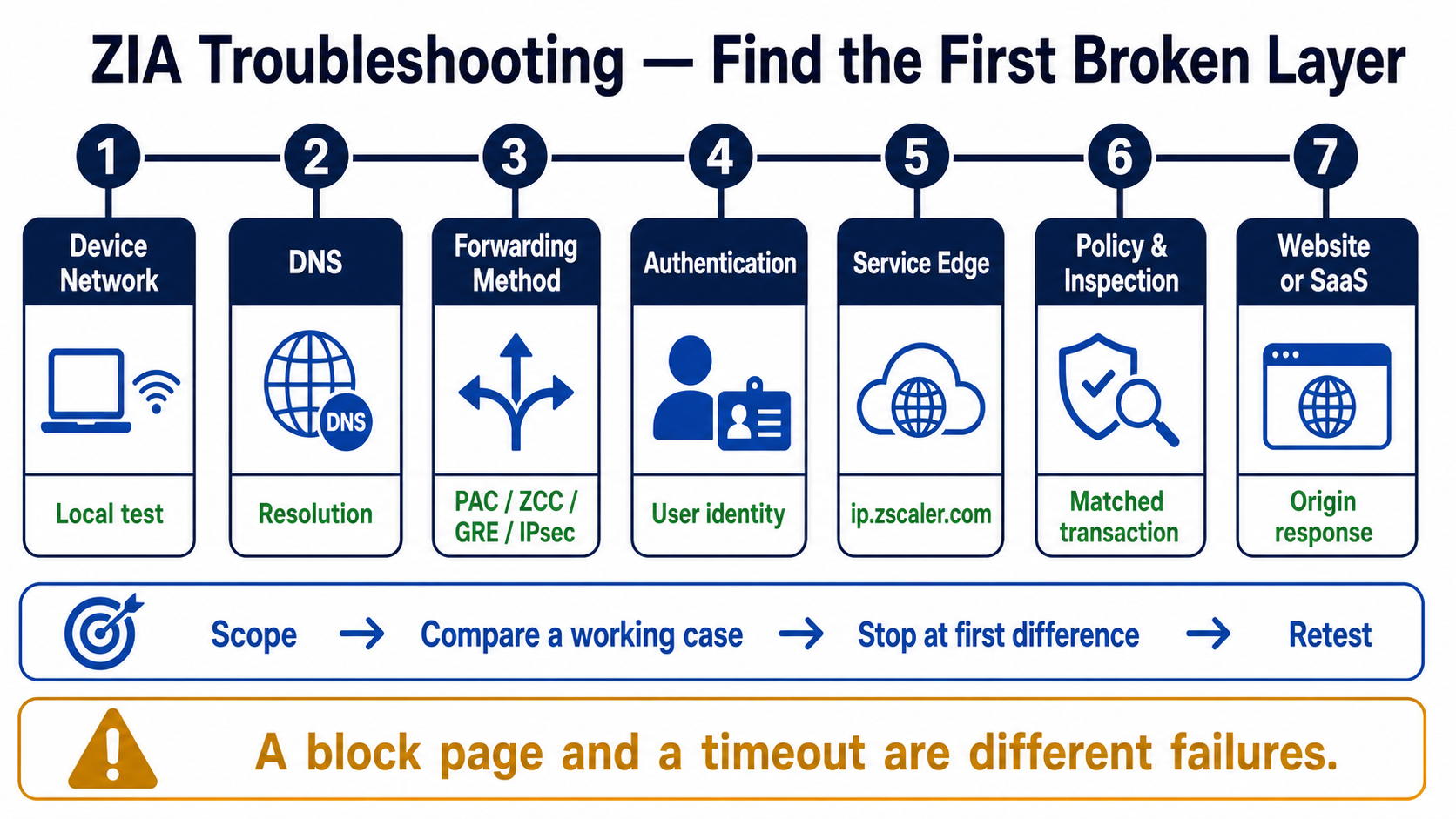
This lesson gives you one stable troubleshooting order for ZIA. Instead of changing PAC files or bypassing inspection immediately, you will compare a working request and stop at the first layer where the evidence differs.
In plain English
The request must pass local networking, DNS, a forwarding method, identity, a ZIA Service Edge, policy and inspection, and the origin website. A healthy result at one layer does not prove the next layer.
Real example
A browser times out before any ZIA transaction appears. That points toward device, DNS, PAC, tunnel, or routing—not URL policy. If a transaction exists and says Block, the forwarding path worked and the policy reason becomes the next evidence.
Follow this flow
- Scope one failing request and one working comparison.
- Verify local network, DNS, route, and the configured forwarding method.
- Confirm authentication and the actual ZIA Service Edge.
- Find the transaction and inspect rule, action, TLS, threat, and timing fields.
- Test the origin path, change the first failed layer, and repeat.
Evidence to collect
- DNS answer, route, PAC result, or tunnel state
- ip.zscaler.com and authenticated user
- Web/Firewall Insight transaction and matched policy
- Origin status, latency, packet capture, and retest
Common mistake to avoid
Do not use a broad bypass to “test” before capturing the failing transaction. Also do not confuse a ZIA block page with an origin timeout; one proves policy enforcement, while the other may not have reached ZIA or the origin.
Current official source checkpoint
- ZIA forwarding runbookcurrent official reference used for this beginner explanation
- ZIA performance runbookcurrent official reference used for this beginner explanation

Key terms before you continue
Most engineers think…
"If a site is broken behind Zscaler, it's a policy problem — go open URL Filtering."
Wrong, and that wrong instinct is exactly why ZIA tickets drag on. The real first question is always: is the traffic even reaching Zscaler? A huge share of "Zscaler broke it" tickets are forwarding, certificate, or tunnel problems — the policy is innocent. This lesson rewires that instinct: follow the request, find where it dies, fix that stage.
The one mental model that solves 90% of ZIA tickets
Every user request walks the same path. Memorise the order and you can place any symptom on it:
Device → traffic forwarding (PAC / ZCC / GRE / IPSec) → ZIA Service Edge → authentication → SSL inspection → policy (Firewall, DNS, URL & Cloud App) → internet.
When something breaks, the request died at exactly one of these stages. Your whole job is to find which one. The biggest mistake is jumping to the last stage (policy) when the request never got past the first (forwarding).
The four ways traffic reaches ZIA
A forwarding problem is the #1 cause of "not protected". You can only fix it if you know which method this user is on. Tap each card.
Browser/ZCC reads a JS file that says which requests go to a Zscaler edge. Typos or proxyPort 0 silently bypass it. So what: test the PAC URL first.
Zscaler Client Connector — the agent. Tunnels traffic per the forwarding + app profile. So what: most roaming-user issues are a ZCC state, not a policy.
Router-based tunnel from a branch edge to the nearest ZIA VIP. No encryption. So what: needs a registered public IP + L7 health check, or the location goes dark.
Encrypted IKEv2 tunnel using VPN credentials (FQDN + PSK). So what: a wrong PSK or unmapped VPN credential = tunnel never establishes for that location.
① "I'm not protected" — traffic isn't reaching ZIA
This is where every ZIA shift starts. The single source of truth is ip.zscaler.com — it tells the user whether their traffic is going through Zscaler at all. Healthy traffic lands on a Public Service Edge; broken forwarding never gets there.
▶ Watch forwarding work — then break
Sneha at a Bengaluru branch opens a website. Press Play for the healthy path, then Break it to see the PAC proxyPort 0 trap.
PROXY gateway.zscaler.net:443 — a Zscaler edge on an accepted portip.zscaler.com shows company name + "You are protected"Symptom
Sneha at Infosys reports "Zscaler isn't applying my policies". ip.zscaler.com shows her ISP's public IP, not Zscaler's, and no company name.
Traffic isn't being forwarded. A PAC typo, a return "DIRECT" for her destination, a proxy port set to 0 (ZIA only accepts web requests on 80, 443, 9400, 9480, 9443), or ZCC is paused/in a captive-portal state.
Open the PAC URL directly in the browser and read the return statement. Confirm a Zscaler edge + an accepted port. Then check ZCC.
ZCC tray → Notifications → "Service Status: ON" + "Internet Security: ON"Correct the PAC return (no proxyPort 0, no stray DIRECT for her host). If ZCC is paused or stuck behind a captive portal, restart the service / re-authenticate.
Reload ip.zscaler.com — it must show your company name and a Zscaler data-center IP.
curl -s "https://pac..net/ /pac" | grep -i "PROXY\|DIRECT"
return "PROXY gateway.zscaler.net:443; PROXY gateway.zscaler.net:80";
# BAD: a line like  return "PROXY gateway.zscaler.net:0"  → port 0 = traffic NOT accepted
# BAD: a blanket    return "DIRECT"                       → bypasses Zscaler entirely
Symptom
Whole branch in Pune shows "Try Again" at ip.zscaler.com — traffic reaches Zscaler but no user identity is attached.
The "Try Again" message means authentication is disabled for the registered Location — common on GRE/IPSec branches where the location was created with auth off.
Cross-check the egress IP is registered to this Location (sub-location ranges included), or users hit the default un-authenticated location.
Enable Authentication on the Location (and Surrogate IP if you want IP-to-user mapping for non-browser apps).
ip.zscaler.com now shows the authenticated user; Web Insights logs carry the username instead of "unauthenticated".
A user's PAC file returns PROXY gateway.zscaler.net:0. Their ip.zscaler.com shows the ISP IP. What's happening?
Pause & Predict
SSL inspection is about to enter the picture. Before you read on: when ZIA decrypts HTTPS, what does the user's browser actually receive instead of the website's real certificate? Type your guess.
② SSL inspection breaks a site — cert errors & pinning
To inspect HTTPS, ZIA decrypts the traffic, then re-signs it with the Zscaler CA and re-encrypts to the client. Two things break this: the device doesn't trust the Zscaler root, or the app refuses any cert but the real one (certificate pinning).
▶ Watch SSL inspection — and the cert break
Rahul at TCS opens his bank. Play the working flow, then Break it to see what a missing root cert does.
bank.example.com signed by the Zscaler root CASymptom
Random users at Wipro get "Your connection is not private / NET::ERR_CERT_AUTHORITY_INVALID" on many HTTPS sites after SSL inspection was enabled.
The Zscaler root certificate isn't installed/trusted on those devices (missing from the OS/browser trust store, or a browser using its own store like Firefox).
Click the cert in the browser — issuer reads "Zscaler". Then check the machine's trust store for the Zscaler root.
Administration → SSL Inspection → download the Zscaler Root CertificatePush the Zscaler root to all device trust stores via MDM/GPO. For Firefox/Java apps that use their own store, import it there too (or set Firefox security.enterprise_roots.enabled = true).
Reload an inspected site — padlock is clean and the issuer shows the Zscaler CA, no warning.
Symptom
Browser sites are fine, but the bank's desktop app, MS Teams, Dropbox, or a remote-support agent fails to connect only when on Zscaler.
Certificate pinning. The app ships its expected server cert and rejects Zscaler's re-signed cert — so inspection breaks it even though the root is trusted.
The break happens only for that app, only with inspection on. Web Insights shows the app's domains with TLS handshake failures.
Analytics → Web Insights → Logs → filter on the app domainAdd the app's domains to the SSL Inspection bypass (Do Not Inspect) list. Zscaler maintains recommended bypass categories for known pinned apps — start there before bypassing manually.
Policy → SSL Inspection → Do Not Inspect rulesApp reconnects; the bypassed domains appear in logs as "SSL not inspected" rather than handshake-failed.
Don't reflexively bypass huge URL categories to make a pinned app work — you carve a hole where malware can ride in un-inspected. Bypass the specific app domains (or use Zscaler's curated pinned-app list), keep everything else inspected. A wide bypass is how a "quick fix" becomes next quarter's incident.
A banking desktop app fails only with SSL inspection on, but every browser site works fine and the Zscaler root is trusted. Best fix?
③ Site blocked, DNS wrong, or login looping
Traffic reaches ZIA and inspects fine, but a legit site is blocked or the user can't log in. Now — and only now — you look at policy and auth.
Pause & Predict
A user says "Facebook is blocked but my URL rule says block it — wait, it's actually open". Before reading the scenario: which policy family decided this, and does URL Filtering even get a vote? Type your guess.
Symptom
Priya can reach Facebook even though there's a URL Filtering rule that blocks it. The block "isn't working".
Precedence. By default Cloud App Control runs before URL Filtering. A Cloud App rule that allows Facebook stops ZIA from ever applying the URL Filtering block.
Either block Facebook in the Cloud App Control rule, or enable Allow Cascading to URL Filtering in Advanced Settings so URL Filtering still applies after a Cloud App allow.
Re-request the site; the log "Reason" now shows the URL Filtering block rule by name.
Symptom
Aditya is stuck in a SAML login loop — he authenticates, gets bounced back to the IdP, never lands. Started after SSL inspection went enterprise-wide.
The IdP authentication traffic is being inspected/forwarded into Zscaler instead of going direct, breaking the SAML assertion round-trip.
Confirm the IdP host appears in Web Insights — it shouldn't be inspected at all.
Analytics → Web Insights → filter on the IdP host (e.g. *.okta.com)Create a custom URL category for the IdP host and add it to the SSL Inspection exemption so authentication goes direct, un-inspected.
SAML completes in one round-trip; the IdP domains show as "not inspected" in logs.
Symptom
An internal site resolves to the wrong IP (or fails to resolve) only when users are on Zscaler.
A DNS Control rule is sending the query to Zscaler's Trusted Resolver instead of the enterprise resolver, so internal/split-horizon names don't resolve.
Route internal domains to your enterprise resolver (or a custom DNS Gateway) via a higher-priority DNS Control rule. Keep external lookups on the Trusted Resolver.
nslookup intranet.example.com returns the correct internal IP; DNS Insights shows the right resolver used.
Symptom
Meena can browse fine but every file upload to a partner portal fails or hangs only on Zscaler.
File Type Control or a DLP rule is blocking the upload by true file type (MIME sniff), or the file exceeds the inspected-size limit, so it's quarantined/blocked.
Allow that file type for the destination, or add a scoped DLP/File-Type exception for the trusted partner domain. Don't blanket-allow the type for everyone.
Upload completes; the log Reason flips from "File Type Blocked" to "Allowed".
Symptom
A user sees a Zscaler "caution" / "you've used your time quota" page on a site that worked this morning.
A URL Filtering rule with a Caution action (user must acknowledge) or a time-quota / bandwidth-quota on the category they've now exhausted.
If the caution/quota is unintended, change the action to Allow or raise/remove the quota for that group. If intended, it's working as designed — explain it to the user.
Re-request the site — no caution page; log Reason shows the Allow rule.
Whatever you changed, the truth is in the logs. Open Analytics → Web Insights → Logs, filter on the user + last hour, and read the Reason column — it names the exact rule that allowed or blocked the flow. If "Reason" disagrees with what you expected, your mental model of the policy order is wrong, not the firewall.
nslookup intranet.example.com
dig +short portal.example.com
Server:   100.64.x.x        # enterprise/Trusted Resolver, NOT a random public one
Address:  100.64.x.x#53
Name:     intranet.example.com
Address:  172.16.40.12       # correct internal IP — split-horizon resolved right
A Cloud App Control rule allows LinkedIn; a URL Filtering rule blocks it. Default ZIA behaviour: what does the user get, and why?
Pause & Predict
A whole branch on a GRE tunnel suddenly loses internet, but ZCC roaming users in the same city are fine. Where is the break — device, policy, or underlay? Predict before you read Path 4.
④ Tunnels down & everything slow
Branch offices forward via GRE or IPSec tunnels from their edge router/firewall. When a tunnel drops, the whole location loses protected internet. A L7 health check keeps the path verified. "Slow" is different — usually a wrong data center or a saturated bandwidth class.
▶ Watch a GRE tunnel health-check — then fail
A Hyderabad branch edge keeps the tunnel alive with an L7 health check. Play healthy, then Break it.
Symptom
A whole branch loses internet. The GRE/IPSec tunnel for that location shows down.
For IPSec: wrong/expired VPN credential (FQDN + PSK) or the credential isn't mapped to the Location. For GRE: the branch public egress IP isn't registered, or the upstream ISP dropped the path / MTU fragmentation.
On the branch edge, check IKE/SA state and the tunnel keepalive; verify the registered IP matches the actual egress IP.
Re-enter the correct PSK / map the VPN credential to the Location; register the real public IP; lower the tunnel MTU to avoid fragmentation. Let the L7 health check re-establish.
Tunnel state shows up/established on both the edge and ZIA; branch users pass ip.zscaler.com again.
show vpn ike-sa gateway ZIA-PRIMARY
show vpn ipsec-sa tunnel ZIA-PRIMARY
IKE-SA  ZIA-PRIMARY   state: established   role: initiator   auth: PSK
IPSec-SA ZIA-PRIMARY  state: active        bytes-in: 482M   bytes-out: 511M
# DOWN signs: state "init"/"down", repeated rekey, or bytes stuck at 0 = PSK / mapping / MTU
Symptom
A Mumbai office complains everything is slow on Zscaler. Nothing is "blocked" — it just lags.
Users are landing on a distant data center / wrong sub-cloud, adding round-trip latency, or a bandwidth class is throttling.
Check which data center the user lands on at ip.zscaler.com; compare to the nearest one. Review the bandwidth class limits.
Correct the sub-cloud/data-center selection (geolocation of the egress IP, or sub-cloud mapping) so users hit the nearest edge; raise or re-scope the bandwidth class limit for the throttled app.
Latency drops; the user now lands on the nearby data center, and the bandwidth class no longer caps the priority app.
Symptom
Only one floor / VLAN of an office is unprotected; the rest of the same location is fine.
That subnet's egress IP isn't covered by a sub-location range, so those users fall through to the default un-authenticated location.
Add/extend the sub-location range to include the floor's egress IPs, mapped to the right policy and auth settings.
Those users now pass ip.zscaler.com with the correct location + identity.
Symptom
An app gets ERR_CONNECTION_RESET / a sudden 4xx only on Zscaler — intermittent, no clean cert error.
The flow is hitting a policy reset (firewall/IPS block returning RST) or it expects a dedicated proxy port / transparent path the device isn't using.
If IPS/firewall reset is a false positive, scope an exception for that app. If it needs a dedicated proxy port vs transparent forwarding, align the forwarding profile to the documented port.
Resets stop; the log Reason no longer shows an IPS/firewall block on the app's flows.
Cheat-sheet flips — symptom → first check
These four cover the bulk of your tickets. Tap to reveal the first thing to look at.
First check: ip.zscaler.com → then the PAC return + ZCC state. "Try Again" = location auth off. So what: it's forwarding, not policy.
All sites → Zscaler root not trusted. One app → pinning → bypass that app's domains. So what: read the issuer first.
First check: Web Insights "Reason" column. Remember Cloud App Control beats URL Filtering by default. So what: the log names the deciding rule.
Check the data center at ip.zscaler.com + bandwidth class. So what: "slow" is underlay, not a broken policy.
An entire IPSec-tunnel branch loses internet at 2pm. ZCC roaming users in the same city are unaffected. Where do you look first?
🤖 Ask the AI Tutor
Tap any question — instant, scoped to this lesson. No login, no waiting.
Pre-curated from Zscaler Help docs + community Q&A, scoped to ZIA troubleshooting. For a live prod issue, paste your Web Insights export into chat.techclick.in.
📝 Wrap-up assessment — six more
You've answered 4 inline. Six left. 70% (7 of 10) marks the lesson complete on your profile. Tap Submit all answers at the end.
🧠 In your own words
Type one line: why must IdP authentication traffic go direct (un-inspected) through ZIA? Then compare to the expert version.
🗣 Teach a friend
Best way to lock it in — explain it in one line to a teammate. Tap to generate a paste-ready summary.
📖 Glossary
- ZIA Service Edge
- The Zscaler cloud node (Public Service Edge) that proxies and inspects a user's traffic.
- ip.zscaler.com
- Zscaler's "am I protected?" page — shows your egress IP, data center, and company name if traffic is going through ZIA.
- PAC file
- Proxy Auto-Config — a JavaScript file the browser/ZCC reads to decide which requests go to a Zscaler edge vs direct.
- ZCC
- Zscaler Client Connector — the endpoint agent that forwards and authenticates traffic per the forwarding + app profile.
- SSL inspection
- ZIA decrypts HTTPS, re-signs it with the Zscaler CA, re-encrypts to the client — required for payload-aware controls.
- Certificate pinning
- An app embedding its expected server cert and rejecting any other — including a proxy's re-signed cert.
- Cloud App Control
- The policy family that classifies SaaS apps; by default it is evaluated before URL Filtering.
- VPN credential
- The FQDN + pre-shared key that authenticates an IPSec tunnel and is mapped to a Location.
- Surrogate IP
- Maps an authenticated user to their device IP so non-browser apps inherit identity without re-auth.
📚 Sources
- Zscaler Help — PAC Files / Using PAC Files / Verifying a User's Traffic is Being Forwarded to the Zscaler Service. help.zscaler.com
- Zscaler Help — Recommended URL & Cloud App Control Policy (Cloud App Control precedence + Allow Cascading to URL Filtering). help.zscaler.com
- Zscaler Help — Configuring IPSec VPN Tunnel · Configuring GRE Tunnels · Best Practices for Deploying GRE Tunnels · About VPN Credentials. help.zscaler.com
- Zscaler Help — Bandwidth Control & Classes · ZIA Performance Troubleshooting Runbook · Policy Reasons. help.zscaler.com
- Zscaler Community (Zenith) — "Zscaler root certificate not installed" browser errors, SSL pinning bypass (ConnectWise / ChatGPT / Apple), Deny-All at end of URL/Cloud App policy. community.zscaler.com
- Zscaler ZIA & ZCC Deployment / Troubleshooting Guides — auth traffic must go direct to IdP; PAC
proxyPort 0trap; SSL exemption for IdP host. - Zscaler Client Connector App Release Summary (2025/2026) — ZCC 4.6.x DNS-resolution + VPN-gateway-port retry fixes. help.zscaler.com
- Zscaler ZDTA Certification Exam Guide (2025/2026) — Connectivity & Platform Services (traffic forwarding, TLS inspection) objectives.
What's next?
You can now place any ZIA ticket on the request path and fix the stage that died. Next, go deeper on the policy stack itself — how Cloud Firewall, DNS Control, URL Filtering and IPS chain together inside one SSE hop.