Start here · understand the lesson before the detail
What you are learning
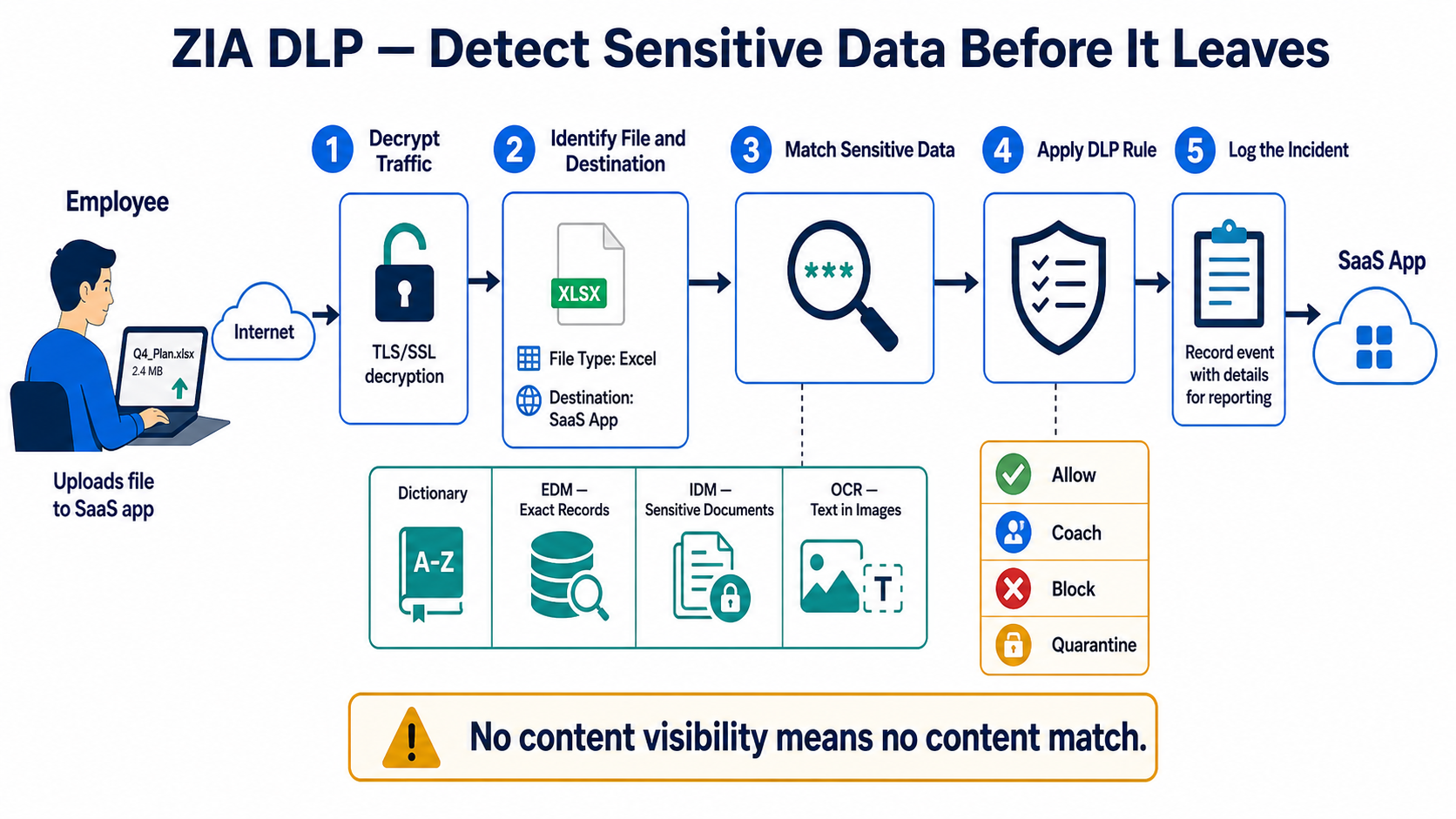
This lesson shows the complete inline DLP decision. ZIA must see the content, understand the file and destination, match sensitive information, apply the ordered rule, and create evidence that an analyst can investigate.
In plain English
A dictionary describes what sensitive data looks like. A DLP engine combines dictionaries and thresholds. EDM matches exact structured records, IDM fingerprints sensitive documents, and OCR can extract text from images. Policy adds who, where, destination, file, action, and exceptions.
Real example
An employee uploads a spreadsheet containing customer account numbers to personal cloud storage. After permitted SSL inspection, ZIA identifies the destination and file, an EDM-based engine matches real customer records, and the rule blocks or coaches the upload while recording an incident for review.
Follow this flow
- Define the data owner, sensitive data, approved destinations, and permitted business action.
- Confirm traffic and file types can be inspected, including required SSL and OCR coverage.
- Build and test dictionaries, engines, EDM/IDM templates, thresholds, and confidence.
- Create a narrow pilot rule with user, destination, protocol, size, file, and action criteria.
- Review incidents and false positives, tune safely, then expand with change control.
Evidence to collect
- User, source, destination, file type, size, and inspection status
- Matched rule, engine, dictionary, threshold, and confidence
- Allow, coach, block, or quarantine action
- Incident owner, business context, false-positive decision, and closure
Common mistake to avoid
Do not enable a broad block rule before validating content visibility and false positives. A regular expression alone is rarely enough for high-value data. Never place real sensitive records in a test screenshot or ticket; use approved synthetic test data.
Current official source checkpoint
- DLP dictionaries and enginescurrent official reference used for this beginner explanation
- Custom DLP dictionariescurrent official reference used for this beginner explanation

Key terms before you continue
Most engineers think…
"DLP means I tick the PCI dictionary and now no card numbers can leave."
Wrong — and that wrong instinct floods the SOC with false positives. A raw card-number pattern fires on every 16-digit string: order IDs, tracking numbers, a developer's test data. Real DLP is two decisions: what counts as sensitive (the dictionary, tuned with thresholds and proximity) and how strict the logic is (the engine's AND / OR). And none of it works at all until SSL inspection decrypts the traffic first. This lesson builds that instinct: match the right data, on the right path, with the right strictness.
① Where DLP sits — and why SSL inspection comes first
Think of ZIA as airport security for outbound traffic. DLP is the bag scanner. But a scanner can only see what's opened. If a request stays inside a sealed TLS tunnel, ZIA sees a destination and nothing else — like a locked suitcase passing the X-ray belt.
That is the single most important fact about ZIA DLP: it is inline web DLP on the SSL-inspected egress path. SSL inspection decrypts the upload, DLP reads the now-visible payload, and the policy decides. No inspection, no payload, no DLP. This is the #1 "DLP isn't working" ticket on the Zscaler community.
Sneha at Infosys faces this
Sneha enabled a PCI DLP rule, then tested by uploading a card list to a personal cloud-storage site. Nothing blocked. The rule "doesn't work".
The destination domain is in the SSL Inspection Do-Not-Inspect list (or inspection isn't enabled for her location). DLP got no decrypted payload, so it had nothing to match.
Check that the test site is actually being decrypted for her.
Policy → SSL Inspection → confirm the destination isn't bypassedRemove the bypass (or add an inspect rule) for that destination so the upload is decrypted before DLP runs.
Re-test the upload. Analytics → Web Insights now shows a DLP block with the rule name and the triggering engine.
▶ Watch an upload get inspected — then watch DLP go blind
Rahul at TCS uploads a spreadsheet of customer records. Press Play for the healthy inspect-and-block path, then Break it to see what an SSL bypass does.
PCI engine — 4,000 card numbers, well over thresholdA new DLP rule never triggers, even on obvious test data, for traffic to one HTTPS site. What do you check first?
Pause & Predict
You want to block uploads only when a document has both a credit-card number AND a customer name nearby — not either one alone. What feature lets you express that "both, and close together" logic? Type your guess.
② Engines vs dictionaries — the two-decision model
This is the part most people blur together. Keep them separate and DLP suddenly makes sense.
A DLP dictionary answers "what does sensitive data look like?" — a credit-card pattern, a list of project code-names, an SSN regex. A DLP engine answers "how strict is a match?" — it combines dictionaries with Boolean AND / OR / NOT. The rule then calls the engine.
Analogy: airport security. A dictionary is one rule ("no liquids over 100 ml"). An engine is the combined checkpoint logic ("valid boarding pass AND matching ID AND no banned items"). One liquid alone might be fine; it's the combination the checkpoint enforces.
Predefined vs custom dictionaries
- Predefined — Zscaler ships hundreds: PCI (credit cards), PII, SSN, HIPAA / health terms, and newer ones rolled out in 2025 such as CCPA, DPDPA (India's data-protection act) and Credentials and Secrets. Fast to switch on, but blunt.
- Custom — you define the match. Three flavours: Phrases (exact words, up to 256 per dictionary), Patterns (regular expressions for structured strings like an employee ID format), and a dictionary of words with a hit-count threshold (fire only after N matches) and an optional proximity (a high-confidence keyword must sit within a set character distance of the pattern, range 0–10000).
A bare credit-card pattern matches every 16-digit number. Add a hit-count threshold (e.g. fire only at ≥ 10 numbers) so a single order ID is ignored, and a proximity requirement (the word "card"/"CVV" within 30 characters) so random digits don't trigger. This single tuning step is the difference between a SOC that trusts DLP and one that mutes it.
Priya at Flipkart faces this
Priya's PCI rule blocks legitimate order-confirmation emails because every order has a 16-digit order ID. The SOC is drowning in false positives.
The dictionary fires on any 16-digit string, with a low threshold and no proximity. Order IDs look like card numbers to a raw pattern.
Raise the hit-count threshold, add a proximity requirement (keyword "card"/"CVV" near the digits), and build an engine as card-pattern AND NOT order-keyword to exclude the order format.
Re-send a real order email — allowed. Send a genuine card list — still blocked. Web Insights shows the false-positive volume drop.
An engine is defined as Dictionary-A AND Dictionary-B. A document matches only Dictionary-A. What happens?
Pause & Predict
EDM is coming next. You want DLP to fire only on your actual customer records — never on a developer's fake test data. How can ZIA know a card number is a real one of yours without storing the readable card in the cloud? Type your guess.
③ EDM vs IDM — fingerprinting your actual data (+ OCR, MIP)
Patterns and keywords are generic — they describe a shape of data. Sometimes you need to protect your specific records: this customer, that contract. That's where fingerprinting comes in.
EDM — Exact Data Match (structured data)
EDM protects structured data — a database export or a CSV of customers. An on-prem Index Tool hashes the sensitive fields (name, account number, card) and uploads only the hashes to the Zscaler cloud — never the readable PII. DLP then fires only when a real record's fields appear together. A random test card number won't trigger; your actual customer's exact combo will.
Analogy: EDM is an Aadhaar exact-match. It's not "looks like an Aadhaar number" — it's "this specific person's exact details". No match on a made-up number.
IDM — Indexed Document Match (unstructured data)
IDM protects unstructured documents — a confidential contract, a design doc, a board deck. You index the source files; ZIA detects full or partial copies, even reworded or trimmed. You set a match-accuracy threshold (e.g. flag at ~75% similarity). More flexible than EDM, but partial-matching means a higher false-positive risk — so tune the accuracy.
Analogy: IDM is the plagiarism checker. Even if a student reorders sentences from the original answer sheet, it still flags the overlap.
OCR and MIP labels — two more inputs
- OCR — Optical Character Recognition reads text inside images (PNG/JPG, screenshots, pictures embedded in a Word doc), then runs normal DLP classification on the extracted text. As of a 2025 update, OCR is configured once at the org level under
Administration → DLP Advanced Settings— the old per-ruleocrEnabledtoggle was deprecated. Image quality affects accuracy, so expect more false positives here. - MIP / Purview labels — if your org uses Microsoft Information Protection, ZIA can match on the document's sensitivity label (e.g. "Confidential") instead of re-deriving sensitivity from content. You retrieve the labels from Microsoft into the ZIA MIP account, then use them as match criteria.
▶ Watch an EDM index get built — then misused
Karthik at Wipro indexes a customer database for EDM. Play the correct hash-only flow, then Break it to see the classic mistake.
name, account, card — 2M rowsThe four detection techniques — tap each card
Each card front names the technique; the back gives you the "so what" — when to reach for it.
Patterns + keywords for generic shapes (PCI, SSN, PII). Tune with threshold + proximity. So what: your broad, fast first pass — but the noisiest.
Hashes exact fields from structured data; fires only on your real records. So what: near-zero false positives — use it for known customer/employee datasets.
Indexes whole documents; catches full or partial copies even reworded. So what: protects contracts/designs — but set the match accuracy or it gets noisy.
Reads text inside images, then runs normal DLP on it. Org-level since 2025. So what: stops screenshot exfiltration — but image quality means more noise.
Legal wants to stop a specific confidential contract template from leaking — even if someone reorders paragraphs. Which technique fits best?
Pause & Predict
You're about to flip a brand-new DLP rule live for 5,000 users with action = Block. Before you do — what's the one workflow it might silently break, and what action should you use first instead? Type your guess.
④ Build a DLP rule — order, action, severity, ICAP, validate
You've got the detection pieces. Now wire them into a rule. A DLP rule has criteria, calls one or more engines, and applies an action. Rules evaluate top-down, first match wins — order matters, just like firewall rules.
The pieces of a rule
- Criteria — who and where: users / groups, locations, URL categories, cloud apps, and file types (ZIA inspects file type by Magic Bytes → MIME type → File Extension, so a renamed
.txtthat's really a.docxis still caught). - Engine(s) — the AND/OR logic from Path 2, or an EDM/IDM template.
- Action — Allow, Block, Confirm (warn the user, let them proceed with justification), or Allow and log only (monitor mode — start here to measure before you block).
- Severity — Low / Medium / High / Critical, for incident triage and reporting.
ICAP incident receiver — where the evidence goes
When a rule fires, ZIA can forward the incident to an on-prem ICAP DLP incident receiver (or a third-party DLP). You choose how much it sends:
- MD5 only — just a hash of the offending content. Lightweight, privacy-preserving, but the auditor can't see what leaked.
- Full content — the actual payload, so an investigator can review the leaked data. Heavier, and the receiver must be secured because it now holds sensitive data.
Analogy: MD5-only is a CCTV logbook entry ("something happened at 2pm"). Full content is the actual footage. You keep the footage only where you can lock it down.
Administration → DLP Dictionaries & Engines → Add DLP Dictionary
  Name:        Custom-ProjectKavach
  Type:        Patterns
  Pattern:     PRJ-KAV-[0-9]{6}        # e.g. PRJ-KAV-004217
  Threshold:   Hit Count >= 3          # ignore a single stray mention
Proximity: 30 # keyword must sit within 30 chars (optional)Dictionary "Custom-ProjectKavach" saved. Match preview: 3 of 3 sample lines matched, 0 false hits on order-ID test set. # If preview shows hits on your safe sample → tighten the regex / raise the threshold.
DLP Dictionaries & Engines → Add DLP Engine
  Name:   Engine-Kavach-Strict
  Logic:  ((Custom-ProjectKavach)) AND ((Confidential-Keyword))

Policy → Data Loss Prevention → Add Web DLP Rule
  Name:        Block-Kavach-Exfil
  Order:       1
  Criteria:    Groups = Engineering | URL Category = Personal Storage, Webmail
               File Types = Documents, Spreadsheets, Archives
  Engine:      Engine-Kavach-Strict
  Action:      Block
  Severity:    High
Notification: end-user block page + ICAP incident (Full content)Rule "Block-Kavach-Exfil" active at order 1. Test upload (PRJ-KAV-004217 in a .docx to a webmail draft): Action: BLOCKED Engine: Engine-Kavach-Strict Severity: High Incident #88213 forwarded to ICAP receiver (full payload).
Don't start in Block. New DLP rules surprise you — they catch legitimate workflows you forgot about (HR sending real SSNs to payroll, support attaching customer data). Start in Allow and log only, watch Web Insights for a week, tune thresholds, then switch to Block. Going straight to Block is how DLP gets disabled by an angry business unit on day two.
▶ Watch rule evaluation — first match wins
An upload hits the DLP policy. Play to see top-down evaluation, then Break it to see how a mis-ordered allow rule swallows the block.
Aditya at HCL faces this
Aditya's High-severity block rule never fires, even on real matches. A broad "Allow and log" rule sits above it for the same group.
Rule order. DLP is top-down, first match wins. The Allow-and-log rule at a lower order number matches first and stops evaluation, so the block never runs.
Move the specific Block rule above the broad Allow-and-log rule, or scope the Allow rule's criteria so it doesn't swallow the same traffic.
Re-test; Web Insights "Reason" now names the Block rule, action = Blocked, severity High.
Never claim a DLP rule works from the config screen. Do a safe test upload (synthetic data that matches), then open Analytics → Web Insights, filter on your user + last hour, and read the DLP Engine and Reason columns. They name the exact rule and engine that decided. If the log disagrees with what you expected, your rule order or SSL-inspection scope is wrong — not the cloud.
Analytics → Web Insights → Logs
  Filter:  User = aditya@org.in   AND   Action = Blocked   AND   last 1 hour
  Columns: Show "DLP Dictionary", "DLP Engine", "Rule", "Reason"
2026-05-31 14:22  aditya@org.in  Action: Blocked
  Rule: Block-Kavach-Exfil   Engine: Engine-Kavach-Strict
  Dictionary: Custom-ProjectKavach (5 hits)  Severity: High
  Incident: #88213 → ICAP receiver (full content)
# If "Reason" names a different rule → fix rule order. If no row at all → SSL inspection isn't decrypting it.
A High-severity DLP block rule never fires, yet a real match clearly happened. Web Insights "Reason" names a broad "Allow and log" rule above it. Root cause?
🤖 Ask the AI Tutor
Tap any question — instant, scoped to this lesson. No login, no waiting.
Pre-curated from Zscaler Help docs + community Q&A, scoped to ZIA DLP. For a live prod issue, paste your Web Insights export into chat.techclick.in.
📝 Wrap-up assessment — six more
You've answered 4 inline. Six left. 70% (7 of 10) marks the lesson complete on your profile. Tap Submit all answers at the end.
🧠 In your own words
Type one line: why must SSL inspection be enabled before inline web DLP can do anything? Then compare to the expert version.
🗣 Teach a friend
Best way to lock it in — explain it in one line to a teammate. Tap to generate a paste-ready summary.
📖 Glossary
- DLP (Data Loss Prevention)
- Inspects outbound content for sensitive data and blocks or logs it before it leaves the org. In ZIA this runs inline on the SSL-inspected egress path.
- DLP dictionary
- A definition of what sensitive data looks like — predefined (PCI, SSN, HIPAA) or custom (phrases, patterns/regex, words with thresholds + proximity).
- DLP engine
- A logical container that combines one or more dictionaries with AND/OR/NOT to decide when a match counts. A rule calls the engine.
- EDM (Exact Data Match)
- Fingerprints exact field values from a structured source via an on-prem Index Tool (hashes only). Fires only on your real records — very low false positives.
- IDM (Indexed Document Match)
- Fingerprints whole documents and detects full or partial (reworded) copies via a match-accuracy threshold. For unstructured data.
- OCR
- Optical Character Recognition — extracts text from images so DLP can inspect screenshots and embedded pictures. Configured org-wide since 2025.
- MIP / Purview label
- Microsoft Information Protection sensitivity label; ZIA can match on the label instead of re-scanning content.
- SSL inspection
- ZIA decrypts HTTPS so content controls (including DLP) can read the payload. A hard prerequisite for inline web DLP.
- ICAP incident receiver
- An on-prem endpoint that receives DLP incidents over ICAP — either MD5-only (a hash) or full content (the payload).
- DLP rule
- An ordered policy entry: criteria (users, location, URL category, file type) → engine → action (Allow / Block / Confirm / Allow and log) + severity. Top-down, first match wins.
📚 Sources
- Zscaler Help — About DLP Engines · Understanding DLP Engines · About DLP Dictionaries · Adding Custom DLP Dictionaries (phrases/patterns/threshold/proximity) · Configuring DLP Policy Rules. help.zscaler.com
- Zscaler Help — About Exact Data Match (EDM) · Understanding EDM Index Templates · About Indexed Document Match (IDM) · Defining IDM Match Accuracy. help.zscaler.com
- Zscaler Help — About ICAP Receivers for DLP · DLP Incident Receiver · Configuring OCR for DLP · About Microsoft Information Protection Labels (OCR now org-level in DLP Advanced Settings). help.zscaler.com
- Zscaler Community (Zenith) — "DLP without SSL inspection" and "DLP Policy Best practices" threads (SSL inspection prerequisite, false-positive tuning). community.zscaler.com
- Practitioner write-up — "Stopping Data Leaks: A High-Level Overview of Zscaler ZIA's DLP" (engines vs policies, incidents with content snippets). dontblamethenetwork.com; and "EDM vs IDM vs OCR", hackfaqs.com
- Zscaler — Enhanced DLP Capabilities: OCR; Release Upgrade Summary 2025 (2025 engines: CCPA, DPDPA, Credentials & Secrets;
ocrEnabledAPI deprecated). zscaler.com / help.zscaler.com - Zscaler ZDTA Certification — Data Protection Services domain (file-type inspection by Magic Bytes / MIME / File Extension; EDM = structured match; out-of-band = data at rest). customer.zscaler.com
What's next?
You can now place DLP on the ZIA egress path, pick the right detection technique, and build a rule that fires on the right data. Next, see how DLP chains with the rest of the ZIA policy stack — Cloud Firewall, URL Filtering, File Type Control and IPS — inside one SSE hop.