PAN-OS site-to-site is route-based: a tunnel interface plus a route decide what gets encrypted. Phase 1 (IKE Gateway + IKE Crypto) only proves the peers. Phase 2 (IPSec Tunnel + IPSec Crypto + Proxy IDs) is the child SA. If you leave Proxy IDs empty, ikemgr sends 0.0.0.0/0 ↔ 0.0.0.0/0 / any. Policy-based peers (AWS Site-to-Site, Azure policy-based or UsePolicyBasedTrafficSelectors, Cisco crypto-maps) reject that. IKEv1 needs an exact mirror. IKEv2 can narrow. NAT between gateways → Enable NAT Traversal on the IKE Gateway. Prove with show vpn flow — state active and both encap and decap incrementing.
1. Why Phase 1 green is not a tunnel
Operators treat a green IKE icon as “VPN is up.” Users still cannot reach the VPC. The IKE SA is only the control channel. Interesting traffic needs a Phase 2 / child SA whose traffic selectors match on both sides, a route into tunnel.X, and a Security allow.
That is the interview sentence. Everything else on this page is how you pick IKEv1 or v2, write the objects, and prove the flow.
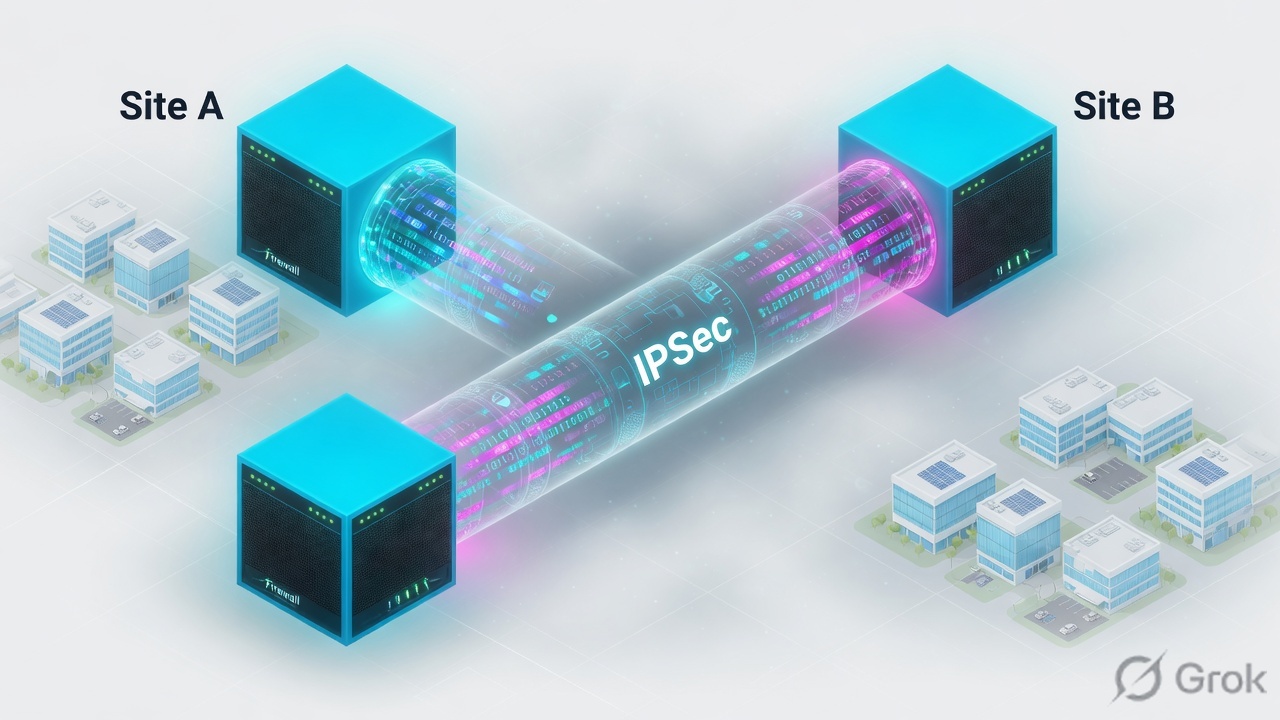
Three production tickets this model closes:
- IKE up, no user traffic to AWS / Azure. Almost always a proxy-ID / traffic-selector mismatch, not a bad PSK.
- Tunnel “up,” then silent black hole. DPD or liveness never proved the inner path. Tunnel monitor was off, or the tunnel interface has no IP.
- Works on public IPs, dies behind a NAT router. NAT-T not enabled on the IKE Gateway. ESP in protocol 50 never returns.
IKE Gateway — the local WAN interface, peer address, PSK or certificate, and IKE version. Feeds Phase 1.
IKE Crypto profile — DH group, hash, encryption, lifetime for the IKE SA. Network → Network Profiles → IKE Crypto.
IPSec Crypto profile — ESP or AH, encryption, authentication, DH / PFS for Phase 2. Network → Network Profiles → IPSec Crypto.
Tunnel interface — logical tunnel.X in a zone. Route-based VPN sends matching routes here. Needs an IP if you want tunnel monitor or BGP/OSPF.
Proxy ID — Local / Remote / Protocol on the IPSec Tunnel. The Phase 2 traffic selector. Empty = 0.0.0.0/0 ↔ 0.0.0.0/0 any. Each Proxy ID counts as one tunnel toward platform capacity.
NAT-T — UDP encapsulation of IKE and ESP so a NAT device in the middle can pass the session. Checkbox on the IKE Gateway, not on the crypto profile.
DPD / liveness check — IKE-peer alive? IKEv1 = Dead Peer Detection. IKEv2 = Liveness Check (default 5 s, up to 10 retries, then delete IKE_SA and CHILD_SA).
Tunnel monitor — ICMP to a destination across the tunnel. Different job from DPD. Requires a tunnel-interface IP and a monitoring profile.
2. Mental model
Hold three parts. Interviews fail when people mix them.
1. Control (Phase 1)
IKE Gateway + IKE Crypto. Peers authenticate (PSK or cert) and build an IKE SA. IKEv1 calls this Phase 1. IKEv2 calls it the IKE SA. Green here does not move a packet of LAN traffic.
2. Data (Phase 2 / child)
IPSec Tunnel + IPSec Crypto + Proxy IDs. ESP (usual) or AH. Selectors must match — exact on IKEv1, narrow-able on IKEv2. This is the SA show vpn ipsec-sa lists.
3. Forward (route-based)
PAN-OS never becomes policy-based. A static or dynamic route points at tunnel.X. Security still has to allow the inner flow. NAT never encrypts; the tunnel interface does.
PAN-OS is route-based. The Proxy ID tab is how we speak policy-based to the peer. Phase 1 is the handshake. Phase 2 is the child SA. If those three disagree, users fail while IKE still looks Mature.
Official setup order: interfaces, zones, and VR first → tunnel interface (prefer its own zone) → IKE Crypto + IKE Gateway → IPSec Crypto + IPSec Tunnel → routes → Security. Optional: tunnel monitor. If a deny-any sits at the bottom of the rulebase, you must allow ike and IPSec applications explicitly above it.
3. Phase 1 → Phase 2 flowchart
Read this before you click Network → IPSec Tunnels. The packet does not encrypt, then negotiate. IKE builds keys. Then a route plus a matching child SA carry the LAN flow.
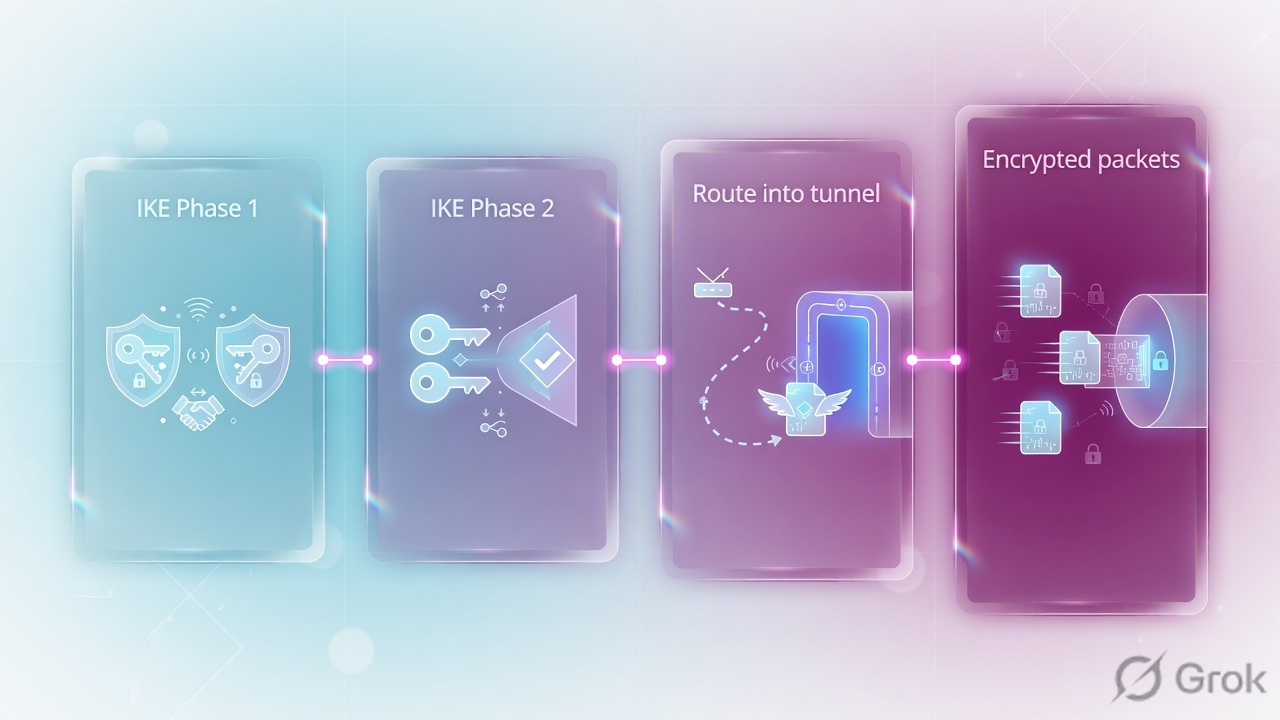
Read left → right, then down. Red box is the ticket that looks like “AWS VPN is broken.” Green box is the only moment LAN traffic can move.
If you remember one picture from this lesson, remember this: empty Proxy IDs send 0/0. Cloud and ASA peers usually do not.
4. How to choose IKE, route vs policy, health
One choice per job. Do not enable every checkbox “so the tunnel is safer.”

| You need | Choose | Where | Why |
|---|---|---|---|
| New tunnel, peer supports IKEv2 | IKEv2 only (or IKEv2 preferred if the far side is unknown) | IKE Gateway → General → Version | Official IKEv2 benefits: 4 messages vs 9/6, built-in NAT-T, liveness check, traffic selectors, cookie validation. Preferred mode falls back to IKEv1 if the peer cannot do v2. |
| Legacy peer that only speaks IKEv1 | IKEv1 only, Exchange Mode = auto unless the peer forces main or aggressive | IKE Gateway → Advanced Options → IKEv1 | If you do not use auto, both peers must use the same exchange mode. Aggressive is for dynamic/unknown peer IPs — weaker identity protection. Azure policy-based gateways are IKEv1-only. |
| Two PAN-OS (or other route-based) peers | Leave Proxy IDs empty only if the peer also accepts 0/0 | IPSec Tunnel → Proxy IDs | Route-based to route-based can share one child SA for everything. Add a route per remote prefix to tunnel.X. |
| AWS Site-to-Site, Azure policy-based, ASA crypto-map | Stay route-based. Add Proxy IDs that mirror the peer selectors | IPSec Tunnel → Proxy IDs | PAN-OS does not implement policy-based VPN. Official tunnel-mode procedure: if the peer is policy-based, define Proxy IDs or Phase 2 fails. AWS uses two tunnels — build both. |
| Azure route-based gateway (current default SKU) | IKEv2. 0/0 can work unless UsePolicyBasedTrafficSelectors is on | Match the Azure VPN connection, then Proxy IDs if selectors are specific | New Azure portal gateways are route-based. Policy-based traffic selectors on a route-based gateway still need matching Proxy IDs on PAN-OS. |
| NAT device between the two public IPs | Enable NAT Traversal on both IKE Gateways | IKE Gateway → Advanced Options → Common Options | Official IKEv2 help: NAT-T must be on both sides. Encapsulates IKE/ESP in UDP 4500. Dynamic peers on the same local IP must share the same NAT-T setting. |
| Detect a dead IKE peer | IKEv1 Dead Peer Detection or IKEv2 Liveness Check | IKE Gateway → Advanced Options | DPD interval 2–100 s, retry 2–100. Liveness default 5 s, up to 10 retries (~7 m 15 s), then delete IKE_SA and CHILD_SA. |
| Detect a black-hole inside the tunnel | Tunnel Monitor + monitoring profile (wait-recover or failover) | IPSec Tunnel → General → Tunnel Monitor | ICMP to a dest IP across the tunnel. Official: you must assign an IP to the tunnel interface. DPD does not replace this. |
Source: IKEv2, Set Up an IKE Gateway, Set Up an IPSec Tunnel (Tunnel Mode).
Do not hunt for a “policy-based mode” toggle — it does not exist. Do not put NAT-T on the IKE Crypto profile; the checkbox is on the IKE Gateway. Do not treat DPD as proof that LAN traffic works. Do not write Proxy IDs with pre-NAT addresses if you source-NAT into the tunnel — official Proxy ID help says use the post-NAT networks.
5. Runbook · Side A peer, Side B PAN-OS, Side C proof
Lab story (RFC 5737 / documentation addresses only): PAN-OS Site A Untrust 203.0.113.10, LAN 10.10.0.0/16, tunnel.1 10.255.0.1/30. Peer (HQ, AWS VGW, or Azure gateway) 198.51.100.20, remote LAN 10.99.0.0/16. PSK is a generated secret — never a dictionary word, never pasted into screenshots. You will not invent a second tunnel “because Phase 2 failed.” You will match selectors, Commit, then prove with show vpn flow.
Primary source for clicks: Configure IPSec VPN Tunnels (Site-to-Site), Set Up an IKE Gateway, and Set Up an IPSec Tunnel (Tunnel Mode).
Side A — the peer first
-
Collect the four numbers that must match
Peer public IP or FQDN, IKE version, PSK or cert, and the exact Phase 2 selectors the peer will propose. For AWS, download the customer-gateway config and read both tunnel outside IPs plus the local/remote IPv4 CIDRs. For Azure, read whether the gateway is policy-based (IKEv1) or route-based, and whether policy-based traffic selectors are enabled. For ASA, copy the crypto-map ACL.
-
Agree crypto that both sides actually support
Lab IKE: DH group14, auth sha256, encryption aes-256-cbc (or aes-256-gcm on PAN-OS 10.0.3+). Lab IPSec: ESP, aes-256-gcm or aes-256-cbc + sha256, PFS group14 (not
no-pfsunless the peer disables PFS). Official Phase 1 marks groups 1/2/5 as not recommended. Match lifetimes to the peer — do not invent a “standard 8 hours” if AWS or Azure published different values.
Side B — PAN-OS objects, then the tunnel
-
Tunnel interface and a VPN zone
Network → Interfaces → Tunnel → Add. Suffix
.1. Config: Virtual Router = default. Official recommendation: New Zone named e.g.vpn-corpso tunneled traffic can use different Security rules. IPv4:10.255.0.1/30(required later for tunnel monitor / BGP). Assign the Untrust Ethernet IP203.0.113.10already exists — IKE cannot invent a WAN address. -
IKE Crypto profile
Network → Network Profiles → IKE Crypto → Add. Name
ike-lab-g14. Add DH Group 14, Authentication sha256, Encryption aes-256-cbc. OK. Attach this profile on the IKE Gateway — creating it does nothing by itself. -
IKE Gateway
Network → Network Profiles → IKE Gateways → Add. General: Name
gw-peer-lab. Version = IKEv2 preferred mode (or IKEv1 only if the peer is Azure policy-based). Address Type IPv4. Interface = the Untrust Ethernet. Local IP Address =203.0.113.10. Peer IP Address Type = IP, Peer Address =198.51.100.20(FQDN if the peer moves; Dynamic if they initiate). Authentication = Pre-Shared Key, paste the shared secret, Confirm. Set Local / Peer Identification if the peer is not using raw IPs (AWS and some Azure configs require this).Advanced Options: Enable NAT Traversal if any NAT sits between the gateways. IKEv2 tab: IKE Crypto Profile =
ike-lab-g14, Enable Liveness Check (default 5 s). IKEv1 tab if you were forced to v1: Exchange Mode auto, same crypto profile, Dead Peer Detection interval/retry. OK. -
IPSec Crypto profile
Network → Network Profiles → IPSec Crypto → Add. Name
ipsec-lab-esp. IPSec Protocol = ESP. Add Encryption and Authentication the peer listed. DH Group = group14 (PFS). Both peers must enable or disable PFS together. OK. -
IPSec Tunnel + Proxy IDs
Network → IPSec Tunnels → Add. General: Name
tun-peer-lab. Tunnel Interface = tunnel.1. Type Auto Key. IKE Gateway =gw-peer-lab. IPSec Crypto Profile =ipsec-lab-esp. Show Advanced Options: leave Replay Protection enabled (default window 1024) unless a vendor asks you to change it. Optional Tunnel Monitor: Destination = a pingable IP on the far LAN, Profile = wait-recover or failover — only after the tunnel interface has an IP.Proxy IDs tab (required for policy-based peers): Add. Name
pid-lan-to-cloud. Local =10.10.0.0/16. Remote =10.99.0.0/16. Protocol = Any. If AWS or Azure lists a second prefix, add a second Proxy ID — do not try to hide two CIDRs in one row. OK. Commit. -
Route and Security
Network → Virtual Routers → default → Static Routes → Add: Destination
10.99.0.0/16, Interfacetunnel.1. Policies → Security: allowikeandipsec-esp(andipsec-ahif you chose AH) on the Untrust zone above any deny-all. Allow the inner LAN appstrust ↔ vpn-corp(or whatever zones you used). Official: VPN traffic that only transits a PA-7000 or PA-5200 needs a bidirectional ESP/AH rule. Commit again if you added these after the tunnel.
Network → Network Profiles → IKE Gateways → Add
IKE Gateway
Click next: Advanced Options → Enable NAT Traversal if a NAT sits between peers → IKEv2 tab → IKE Crypto Profile ike-lab-g14 + Liveness Check → OK, then Network → IPSec Tunnels → Add. Source: Set Up an IKE Gateway.
Network → IPSec Tunnels → tun-peer-lab → Proxy IDs → Add
Proxy ID
Click next: OK, add a second Proxy ID if AWS/Azure listed a second CIDR, Commit, then test vpn ike-sa gateway gw-peer-lab. Source: Set Up an IPSec Tunnel (Tunnel Mode) step 11 · Proxy ID for IPSec VPN.
Side C — prove it
-
GUI status
Network → IPSec Tunnels — IKE Info / Tunnel Status should be green after interesting traffic or after you force negotiation. Monitor → Logs → System, filter subtype vpn, for Phase 1 / Phase 2 fail reasons.
-
Force IKE and IPSec, then read the three commands
Official troubleshooting path: enable / refresh / restart the gateway or tunnel from the same Network screens, or from CLI:
test vpn ike-sa gateway gw-peer-lab
test vpn ipsec-sa tunnel tun-peer-lab
show vpn ike-sa gateway gw-peer-lab
show vpn ipsec-sa tunnel tun-peer-lab
show vpn flow
show vpn flow name tun-peer-lab
total tunnels configured: 1
filter - type IPSec, state any

id  name          state   local-ip       peer-ip         inner-if   outer-if
1   tun-peer-lab  active  203.0.113.10   198.51.100.20   tunnel.1   ethernet1/1

encap bytes/packets   incrementing
decap bytes/packets   incrementing
show vpn ike-sa empty → Phase 1 (PSK, version, WAN ACL, NAT-T, ident). Mature but show vpn ipsec-sa empty → Proxy ID or IPSec Crypto. Both present, show vpn flow encap > 0 and decap = 0 → ESP dropped on the path (NAT-T / UDP 4500 / protocol 50). Decap > 0 and encap = 0 → no route to tunnel.1. Both incrementing, users still fail → Security or inner NAT, not IKE.
6. Runtime path after commit
After go-live the browser is not in this path. A LAN host sends to 10.99.10.10. The VR looks up 10.99.0.0/16 → tunnel.1. The session is in zone vpn-corp. ESP leaves ethernet1/1 toward 198.51.100.20 (UDP 4500 if NAT-T fired). The peer decapsulates only if the child SA selectors include that pair.

If the route misses tunnel.1, encap stays 0. If the Proxy ID misses the pair, there is no child SA to encapsulate into.
7. Traps + proof checklist
Most “IPSec is down” tickets are one of five misses. Quote the evidence before you add a second tunnel.
| Symptom | Likely cause | First check |
|---|---|---|
| IKE Mature, no ipsec-sa, AWS/Azure/ASA | Default 0/0 Proxy ID vs specific selectors | System log Phase 2 / proxy ID. Add a mirror on Proxy IDs. IKEv1 = exact. IKEv2 may narrow. |
| No ike-sa at all | PSK, version, WAN block, ident, NAT-T | show vpn ike-sa. Allow ike. Enable NAT Traversal on both gateways if NAT sits in the middle. UDP 500 and 4500. |
| SA up, encap only, no decap | Return ESP dropped, or peer has no route back | show vpn flow counters. NAT-T. Peer Security / NSG / AWS SG. AWS second tunnel. |
| SA up, decap only, no encap | No route to tunnel.X | VR static (or BGP) for the remote LAN → tunnel.1. |
| Both counters move, app still fails | Security / zone / inner NAT | Session Browser. Dest zone should be vpn-corp, not Untrust. Proxy IDs must be post-NAT if you NAT into the tunnel. |
| Up, then silent black hole | Peer died; DPD/liveness or monitor missing | IKEv2 Liveness Check, or IKEv1 DPD. Tunnel Monitor + tunnel IP for the inner path. |
show vpn ike-sa gateway gw-peer-labshows an IKE SA (not “no IKEv1/v2 SA found”).show vpn ipsec-sa tunnel tun-peer-lablists a child SA whose selectors match the Proxy ID.show vpn flowstate =active, local-ip / peer-ip match the WAN, inner-if =tunnel.1.- After a ping from 10.10.1.10 to 10.99.10.10, encap and decap increment.
- Monitor → Logs → Traffic shows the inner session in zone
vpn-corpwith the expected Security rule. - AWS: both tunnels built, or you can explain why only one is the active path.
Interview close: “PAN-OS is route-based. IKE Gateway plus IKE Crypto is Phase 1. IPSec Tunnel plus IPSec Crypto plus Proxy IDs is Phase 2. Empty Proxy IDs send 0/0 — AWS and policy-based Azure/ASA need a mirror. NAT-T is on the IKE Gateway. I prove with show vpn flow, not with a green IKE icon.”
Knowledge check
Six judgment questions. Map each miss back to the section in the reason.
Sources
- Configure IPSec VPN Tunnels (Site-to-Site) — tunnel interface + zone, IKE Gateway, IPSec Tunnel, routes, Security for ike/IPSec above a deny-all.
- Set Up an IKE Gateway — Version (IKEv1 only / IKEv2 only / IKEv2 preferred), interface, peer IP/FQDN/Dynamic, PSK or cert, NAT Traversal, Passive Mode, DPD, Liveness Check.
- Define IKE Crypto Profiles — Network → Network Profiles → IKE Crypto; DH, authentication, encryption.
- Define IPSec Crypto Profiles — ESP or AH, algorithms, DH / no-pfs for Phase 2.
- Set Up an IPSec Tunnel (Tunnel Mode) — tunnel interface, Auto Key, replay window, tunnel monitor, Proxy IDs for policy-based peers, default 0.0.0.0/0.
- Proxy ID for IPSec VPN — IKEv1 exact match, IKEv2 narrowing, each Proxy ID counts as a tunnel, post-NAT networks.
- IKE Phase 1 and IKE Phase 2 — which profile feeds which SA; ESP vs AH; PFS.
- IKEv2 — 4 messages, NAT-T on both gateways, liveness check replaces DPD, traffic selectors, cookies.
- Monitor Your IPSec VPN Tunnel — tunnel monitor ICMP, DPD vs liveness (default 5 s, 10 retries).
- Tips & Tricks: Why Use a VPN Proxy ID? and Proxy-ID for VPNs with policy-based peers — PAN-OS is not policy-based; default 0/0 must be replaced with a mirror.
- AWS Site-to-Site VPN tunnel options — two tunnels per connection; download the customer-gateway file for the selectors.
- Azure VPN Gateway FAQ — policy-based (IKEv1) vs route-based; new portal gateways are route-based; policy-based traffic selectors still need matching selectors.
Related: PAN-OS to Azure IPSec · NAT — translate last · Security policy fundamentals · Static / OSPF / BGP · Zones, interfaces, VR · Traffic not passing · Palo Alto interview hub · Palo Alto course