NAT matches on the pre-NAT packet and the zone of the pre-NAT dest IP after a route lookup. Security then uses those same pre-NAT addresses but the post-NAT dest zone. The header does not change until egress. Source NAT hides internal hosts (DIPP is many-to-one + ports). Dest NAT publishes a VIP. U-turn is dest NAT for internal clients who resolved the public VIP. Bidirectional is a Static IP source-NAT option only. Prove it with show session id plus Traffic log natsrc / natdst — not by adding a second NAT rule.
1. Why the zone split matters
A dest-NAT rule that “looks correct” can still leave inbound sessions on interzone-default. The NAT object is fine. The Security dest zone is still the zone of the public VIP. Official dest-NAT examples are explicit: NAT dest zone follows the pre-NAT route lookup; Security dest zone follows the post-NAT host.
That is the interview sentence. Everything else on this page is how you pick a type, click Policies → NAT, and prove the xlate.
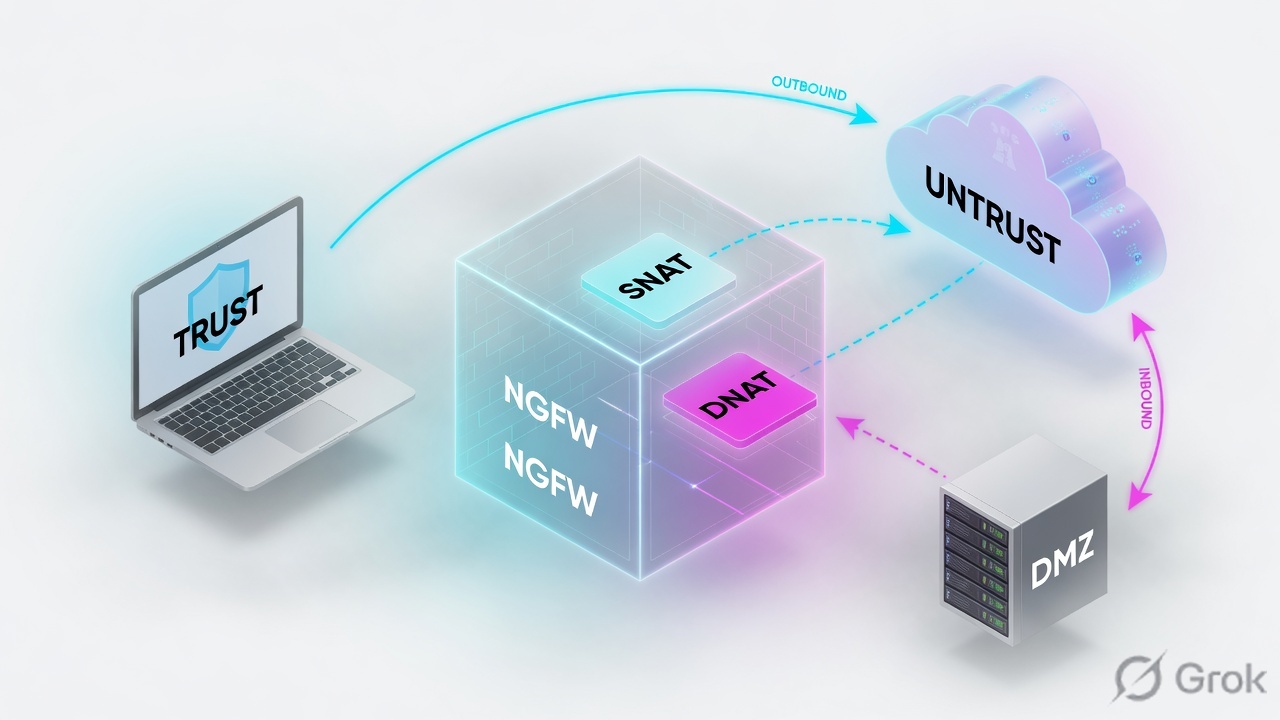
Three production tickets this model closes:
- Internet users cannot browse. Usually missing DIPP, or DIP pool empty, not a missing Security allow.
- Public VIP never reaches the server. Usually Security dest zone is still
untrust, or dest address is the private IP. - Office users cannot open the company website by public FQDN. That is U-turn, not “add the VIP to Trust.”
Source NAT — rewrite the packet’s source IP (and often source port) as it leaves. Types: Static IP, Dynamic IP, Dynamic IP And Port (DIPP), Persistent Dynamic IP And Port.
Destination NAT — rewrite the dest IP (and optionally dest port) so a public VIP lands on a private host. Types: Static IP, Dynamic IP (with session distribution).
DIPP — Dynamic IP And Port. Many internals share one public IP; ports keep sessions unique. Also called NAPT / interface-based NAT when Address Type is Interface Address.
U-turn (destination U-turn NAT) — internal clients resolve the public VIP. Dest zone after the first route lookup is Untrust. You dest-NAT that VIP onto the DMZ host.
Bi-directional — a checkbox on Static IP source NAT only. The firewall installs the reciprocal dest-NAT so the same public IP works inbound.
Proxy ARP — the firewall answers ARP for a NAT-pool address only when that address sits in the same subnet as the ingress/egress interface. Pools are not bound to interfaces.
2. Mental model
Hold three parts. Interviews fail when people mix them.
1. Match (pre-NAT)
NAT rules match original source/dest zone, dest interface, addresses, and service. First match wins. Static rows must sit above DIPP — they do not get automatic precedence.
2. Security (mixed)
Addresses stay pre-NAT. Dest zone becomes the zone of the translated dest host. You still need a Security allow. NAT never permits traffic.
3. Translate (egress)
The IP and port do not change until the packet leaves. Session table and Traffic log then show both originals and natsrc / natdst.
NAT is written on the original packet. Security allows on original addresses and the post-NAT dest zone. The rewrite happens last, on the way out. If those three disagree, the session dies on the default deny — not because NAT “failed to translate.”
Official flow (NAT Policy Rules): ingress inspect → route lookup for egress interface and zone → NAT rule match on those zones → Security on original addresses and post-NAT zones → on egress, translate source and/or dest and ports. You must still write a Security rule to allow the NAT traffic.
3. Packet-order flowchart (NAT vs Security)
Read this before you click Policies → NAT. The packet does not rewrite, then decide. It decides, then rewrites.
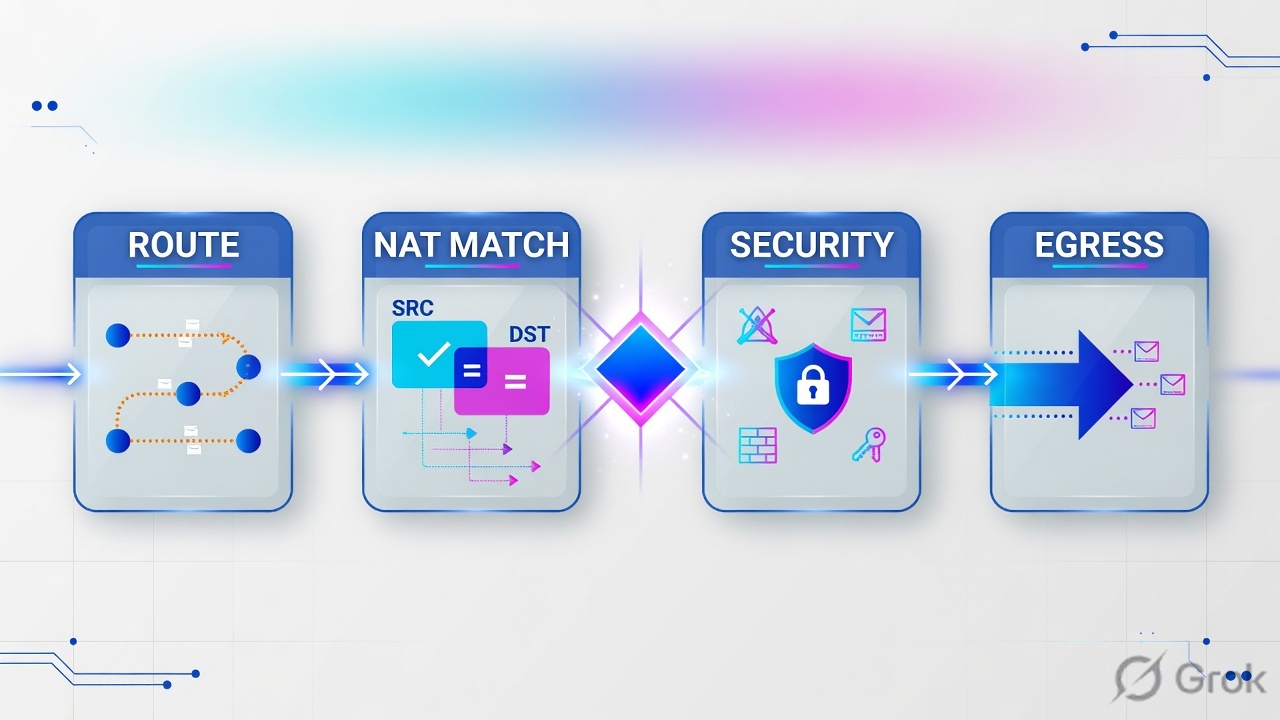
Read left → right, then down. Green box is the only moment the header changes. Red box is the ticket that looks like “NAT is broken.”
If you remember one picture from this lesson, remember this: NAT Untrust→Untrust, Security Untrust→DMZ, dest object stays the VIP.
4. How to choose the NAT type
One rule per job. Do not turn Bidirectional on to “make inbound work” unless the translation is Static IP source NAT.
| You need | NAT | Translation Type | Why |
|---|---|---|---|
| Users on Trust browse the internet | Source NAT | Dynamic IP And Port (DIPP). Address Type = Interface Address on the Untrust IF, or Translated Address = a public pool | Many internals, one (or few) public IPs. Ports distinguish sessions. Official outbound pattern. |
| A 1:1 public IP for a server that also initiates outbound | Source NAT + reciprocal dest NAT | Static IP on Source Address Translation, Bi-directional = Yes | Bidirectional exists only on Static IP. It installs the inbound dest-NAT for you. You still write Security both ways. |
| Publish one VIP to one (or a range of) private hosts | Destination NAT | Static IP dest translation. Optional Translated Port for port-forward / port-hide | Original and translated dest counts must match. Security dest address stays the VIP. |
| Cloud VIP / FQDN that returns many IPs | Destination NAT | Dynamic IP (with session distribution) | Required when the pre-NAT dest is FQDN or a DAG. Methods: Round Robin, Source IP Hash, IP Modulo, IP Hash, Least Sessions. |
| Internal users open the company site by public FQDN | Destination U-turn NAT | Dest Static IP: public VIP → DMZ IP. Original dest zone = Untrust | DNS gave them the public address. First route lookup exits Untrust. Official procedure is dest NAT, not “add VIP to Trust.” |
| STUN / voice / video behind DIPP | Source NAT | Persistent Dynamic IP And Port (PAN-OS 11.1.1+ per rule). Older: global persistent DIPP CLI | Same original source IP:port keeps the same public IP:port across destinations. Oversubscription on that rule is 1. |
| Exclude a host from a later DIPP pool | No-NAT | Match the host, Source Translation = None / No Source Translation | Put the no-NAT row above the broader DIPP. First match wins. |
Source: Source NAT, Destination NAT, and the official Configure NAT tasks. DIPP default oversubscription (how many sessions may reuse the same public IP:port) is a device setting — 8, 4, 2, or 1 — not a hidden “unlimited PAT.”
Do not set Bi-directional on DIPP. The field is not there — bidirectional is Static IP only. Do not write dest-NAT dest zone as DMZ because “the server is in DMZ.” The dest zone on the NAT rule is the zone of the original dest IP after route lookup, which for a public VIP is almost always Untrust.
5. Runbook · Side A objects, Side B NAT, Side C proof
Lab story (documentation / RFC 5737 addresses only): Trust users 10.1.1.0/24 browse out via Untrust interface 203.0.113.100. Internet clients reach the DMZ web server 10.1.1.11 on public VIP 203.0.113.11. You will not invent a second VIP “because inbound failed.” You will build objects, one DIPP rule, one dest-NAT (or one bidirectional Static), Commit, then prove the xlate.
Primary source for clicks: Translate Internal Client IP Addresses (Source DIPP NAT) and Destination NAT Example — One-to-One Mapping.
Side A — objects first
-
Confirm zones and the Untrust IP
Network → Zones already has
trust,untrust,dmzon interfaces. Network → Interfaces shows ethernet1/1 with203.0.113.100/24inuntrust. NAT cannot invent a zone or a next hop. If Untrust has no IP, stop — that is a network build. -
Address objects with a NAT- prefix
Objects → Addresses → Add. Official best practice: prefix NAT pool objects so you never reuse them as Security destinations by accident.
NAT-egress-public— Type IP Netmask —203.0.113.100/32(DIPP / interface).NAT-web-public— Type IP Netmask —203.0.113.11/32(VIP).NAT-web-dmz— Type IP Netmask —10.1.1.11/32(real host). Keep this object off the Security Destination column for inbound.net-users-trust—10.1.1.0/24.
Objects → Addresses → Add
Address Object
Click next: OK, add NAT-web-dmz (10.1.1.11/32) and NAT-egress-public the same way, then Policies → NAT → Add. Source: Objects → Addresses; NAT Policy Rules “NAT-[name]” prefix.
Side B — the NAT rule
-
Add the outbound DIPP rule
Policies → NAT → Add. General: Name
snat-trust-dipp. NAT Type = ipv4 (default). Put Static / no-NAT rows above this one. -
Original Packet
Source Zone = Add
trust. Destination Zone =untrust(the zone after the route lookup of the internet dest). Leave Destination Interface, Source Address, Destination Address, and Service as any unless you are carving a no-NAT exception. -
Translated Packet — source DIPP
Source Address Translation → Translation Type = Dynamic IP And Port. Address Type = Interface Address, Interface = ethernet1/1 (the NAT rule then follows whatever IP that interface later acquires). Or Address Type = Translated Address → Add
NAT-egress-public. Destination Address Translation stays None. OK. -
Add inbound dest NAT (or use bidirectional Static instead)
Policies → NAT → Add. Name
dnat-web-vip. Original Packet: Source Zone =untrust, Destination Zone =untrust, Destination Address =NAT-web-public. Translated Packet: Destination Address Translation → Translation Type = Static IP, Translated Address =10.1.1.11(or theNAT-web-dmzobject). Optional Translated Port if you hide 8080 behind 443.Alternative for a server that also initiates: one Static IP source NAT from
dmztountrust, Source Address =NAT-web-dmz, Translated Address =NAT-web-public, Bi-directional = Yes. Official task name: Enable Bi-Directional Address Translation for Your Public-Facing Servers (Static Source NAT). -
U-turn if Trust users resolve the public FQDN
A second dest-NAT: Source Zone =
trust, Destination Zone =untrust, Destination Address =NAT-web-public, dest translate Static IP to10.1.1.11. Official task: Enable Clients on the Internal Network to Access your Public Servers (Destination U-Turn NAT). If client and server share a Layer-2 that bypasses the firewall, also source-NAT the client so the reply returns through the firewall — that is the hairpin case, not the official three-zone U-turn. -
Security still required
Policies → Security: outbound
trust → untrustallow (your existing web/dns rule). Inbounduntrust → dmz, Destination Address =NAT-web-public(pre-NAT), Application/Service for the published app, Action Allow, Log at Session End. U-turn needstrust → dmzwith dest = the same VIP. Commit.
Policies → NAT → Add
NAT Policy Rule
Click next: OK, write the Security allow Untrust → DMZ dest NAT-web-public, Commit, then Monitor → Session Browser. Source: Policies → NAT · Original Packet / Translated Packet (PAN-OS Configure NAT).
Side C — prove it in session and the Traffic log
-
Optional pre-check: Device → Troubleshooting
Official NAT Policy Rules page: select Device → Troubleshooting and test traffic matches for the NAT rule. This is a config test — it is not a live packet. Use it to confirm the intended row is first match before you generate traffic.
-
Generate traffic, then Session Browser
From a Trust host, browse out. From an Untrust tester, hit
https://203.0.113.11. Monitor → Session Browser — browse and filter running sessions (official Help: Monitor → Session Browser). Confirm source, dest, application, and that the session is live — not DISCARD. -
CLI xlate (same proof, more fields)
Official DIPP verify steps:
show session all, thenshow session id <id>. For Dynamic IP pool exhaustion:show counter global filter aspect session severity drop | match nat. -
Traffic log columns that close the ticket
Monitor → Logs → Traffic. Filter on the tester IP. Quote these official fields: Source Address / Destination Address (originals), NAT Source IP (
natsrc), NAT Destination IP (natdst), NAT Source Port, NAT Destination Port, Source/Destination Zone, Rule (Security). Flag0x00400000means a NAT translation was performed. Log at Session End is enough unless you are debugging a long-lived tunnel.
show session id 42188

Session          42188

        c2s flow:
                source:      192.0.2.250 [untrust]
                dst:         203.0.113.11
                proto:       6
                sport:       51922       dport:      443
        s2c flow:
                source:      10.1.1.11 [dmz]
                dst:         192.0.2.250
                proto:       6
                sport:       443         dport:      51922

        start time                           : Wed Aug 15 10:14:02 2026
        application                          : ssl
        rule                                 : allow-untrust-web
        address/port translation             : destination
        nat-rule                             : dnat-web-vip(vsys1)
Receive Time     src            dst            natsrc         natdst         from     to      rule
2026/08/15 10:14 192.0.2.250    203.0.113.11   192.0.2.250    10.1.1.11      untrust  dmz     allow-untrust-web
Inbound: dst is still the VIP, natdst is the DMZ host, dest zone is dmz, Security Rule Name is your allow — not interzone-default. Outbound DIPP: src is the Trust host, natsrc is 203.0.113.100 (or the pool), natsport is not the original client port. That pair of rows closes the ticket.
6. Runtime path after commit
After go-live the user does not care about your object names. One HTTPS SYN to the VIP does this.
- Untrust host ARPs for
203.0.113.11. If that VIP is on the Untrust subnet, the firewall proxy-ARPs with the Untrust MAC. If the VIP is not on that subnet, there is no proxy ARP — the upstream router needs a route for the VIP pointing at the firewall. - Route lookup of the original dest
203.0.113.11selects Untrust as dest zone. NAT rulednat-web-vipmatches Untrust → Untrust, destNAT-web-public. - Second route lookup of the translated dest
10.1.1.11selects DMZ as the Security dest zone. Security matches Untrust → DMZ, dest = the VIP. Allow + Log at Session End. - On egress ethernet1/3 the dest becomes
10.1.1.11:443. Session installs. Traffic log later writesdst=203.0.113.11andnatdst=10.1.1.11. - Trust users browsing out skip dest NAT, hit
snat-trust-dipp, and leave with source203.0.113.100plus a translated port. DIPP oversubscription decides how many sessions may share that public IP:port.
NAT pools are not bound to interfaces. Same-subnet VIP → firewall answers ARP. Off-subnet pool → you must route the return, or the SYN never arrives. Source: NAT Policy Rules, “Proxy ARP for NAT Address Pools.”
7. Traps + proof checklist

| Failure | Looks like | Actual | Proof |
|---|---|---|---|
| Security dest zone still Untrust | “NAT works, server never answers” | Security evaluated post-NAT dest zone (DMZ) and missed | Traffic log dest zone + Rule = interzone-default |
| Security dest = private IP | Rule never hits | Addresses are pre-NAT — dest must be the VIP | Log dst is still 203.0.113.11 |
| NAT dest zone set to DMZ | Inbound NAT has zero hits | NAT dest zone is the pre-NAT route (Untrust) | Device → Troubleshooting NAT match; hit count 0 |
| No proxy ARP | No SYN on the firewall | VIP not in the Untrust subnet; upstream has no route | No session, no ARP for the VIP on Untrust |
| DIPP pool / ports exhausted | Some users browse, new ones fail | DIPP oversubscription or empty Dynamic IP pool | show counter global … | match nat |
| U-turn missing | Internet works; office cannot open the public site | Trust clients routed to Untrust toward the VIP | Session src zone trust, dest = VIP, no dest NAT |
| Bidirectional on the wrong type | “I cannot enable bi-dir” | Field exists only on Static IP source translation | Translated Packet → Translation Type |
| Static NAT below DIPP | Server outbound uses the shared PAT | First match; static has no automatic priority | Policies → NAT order; session natsrc |
| NAT without Security | Hit count on NAT, deny in logs | NAT never permits | Rule Name is a deny / default |
- NAT rule order: no-NAT and Static above DIPP.
- NAT dest zone = zone of the original dest IP (VIP → Untrust).
- Security dest zone = zone of the translated dest IP (host → DMZ).
- Security Destination Address = VIP / pre-NAT object, not
NAT-web-dmz. - If the VIP is off-subnet: a route (or connected subnet) so the firewall can proxy-ARP or receive the packet.
- Session:
show session idshowsnat-ruleandaddress/port translation : destination(or source). - Traffic log:
natsrc/natdstfilled; Security Rule Name is your allow. - No new NAT row until isolate is done. Change-control is Commit after a named edit.
I match NAT on the original packet and the pre-NAT dest zone. I allow Security on those same addresses and the post-NAT dest zone. Translation happens on egress. I prove it with Session Browser and natsrc / natdst, not with a second NAT rule.
Knowledge check
Six judgment items. Map each one back to the zone split, the NAT type table, or the session / Traffic log proof. Check, then Reset if you miss any.
Sources
- NAT Policy Rules — first match, Security on pre-NAT addresses and post-NAT zones, translate on egress, proxy ARP, Device → Troubleshooting.
- Source NAT — Static IP, Dynamic IP, DIPP, persistent / per-policy Persistent Dynamic IP And Port (PAN-OS 11.1.1+).
- Destination NAT — Static IP vs Dynamic IP (with session distribution), port forward / port translation.
- Destination NAT Example — One-to-One Mapping — Untrust→Untrust NAT, Untrust→DMZ Security, dest stays the public IP.
- Translate Internal Client IP Addresses (Source DIPP NAT) — Policies → NAT, Original / Translated Packet, Interface Address,
show session all/show session id. - Enable Clients on the Internal Network to Access your Public Servers (Destination U-Turn NAT) — Objects → Addresses, Policies → NAT, Trust→Untrust dest VIP → DMZ IP.
- Enable Bi-Directional Address Translation (Static Source NAT) — Bi-directional = Yes on Static IP only.
- Monitor → Session Browser — browse and filter running sessions.
- Traffic Log Fields —
natsrc,natdst, NAT ports, flag 0x00400000. - Log Types and Severity Levels — Monitor → Logs → Traffic, Log at Session End.
Related: Security policy fundamentals · Session factory · Session table and flow · Zones, interfaces, VR · Traffic not passing · Palo Alto interview hub · Palo Alto course