Rahul: network vs user-to-app
Meet Rahul in Finance. He works from home. Today he uses Palo Alto GlobalProtect. After login, the laptop often receives an internal address such as 10.50.20.45. His device is now “inside.” From there he can typically reach the ERP at 10.10.5.20, \\fileserver\share, RDP to a jump host 10.10.8.15, and anything else the VPN zone plus security rules still allow — printers, cameras, lab VLANs. If malware lands on that laptop, it already has a seat on the network. That is lateral movement by design, not by accident.
Zscaler Private Access never gives Rahul that seat. ZCC authenticates him. ZPA brokers a temporary path only to the applications his group is allowed to reach. Example: Finance may use erp.company.local and one RDP jump host. He cannot open the file server, cameras, or a random 10.10.x.x even if he types the IP. Private apps stay inbound-dark. There is no public GlobalProtect VIP to scan.
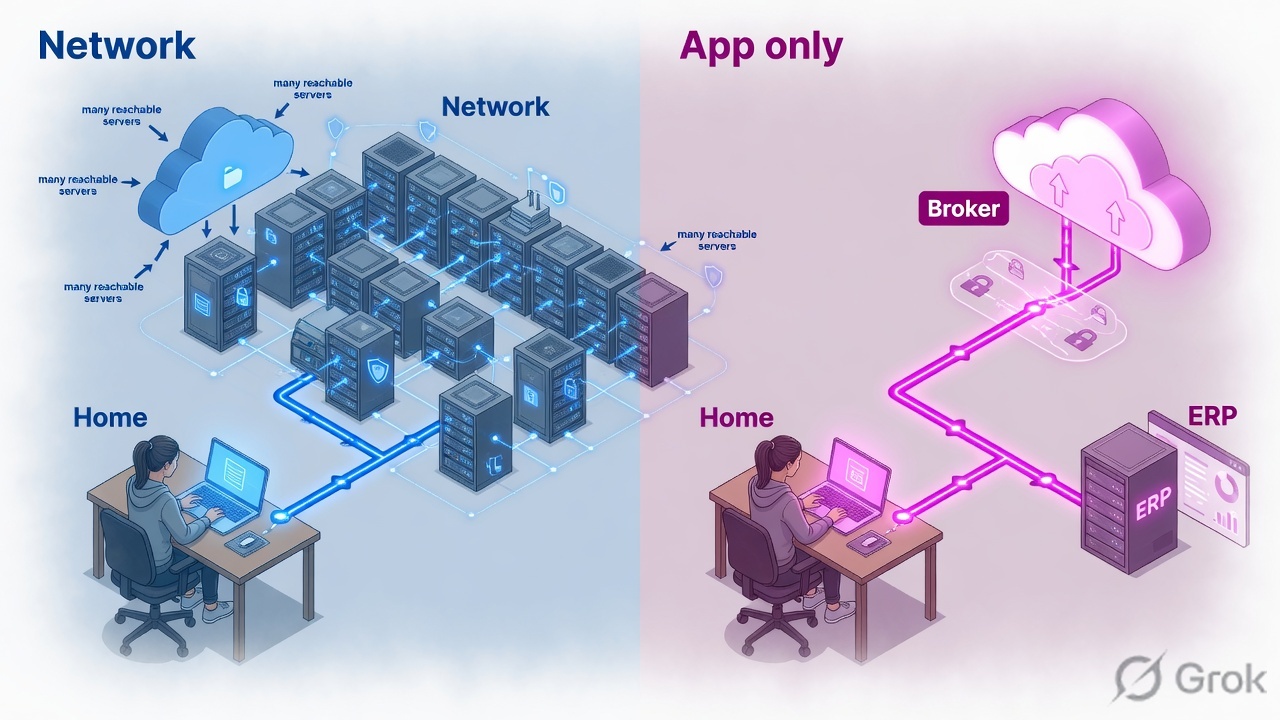
GlobalProtect puts the user on the network. ZPA puts the application in front of the user — only the applications they are allowed to see. Start with a SAML IdP, an inventory of private FQDNs and ports, two App Connectors per site, then publish ERP-Production for a 20-user Finance pilot. Keep GlobalProtect live until that pilot has proof.
Five building blocks (learn the words with Rahul)
Train the words before the menus. On the GP side: portal = config server, gateway = VPN enforcement (HIP lands here), split tunnel = include/exclude access routes. On the ZPA side, five objects do the whole job.
| Building block | What it is | Rahul / Finance example |
|---|---|---|
| Identity Provider (mandatory) | SAML login. SCIM syncs users and groups. Without a working IdP, ZPA cannot function. | Microsoft Entra ID. Rahul is in Finance. Only that group is allowed to reach ERP. |
| Application inventory | Every private web app, RDP/SSH, file share, database, console, other TCP/UDP you today send through GP. | Start with 10–20 names: erp.company.local, Finance SharePoint, jump host, not “the 10.10.0.0/16 LAN”. |
| App Connector | Small VM next to the apps. Outbound TLS 443 only. No inbound internet port. At least two per location. | Two Linux VMs in Mumbai DC, group DC-Mumbai, sitting next to the ERP server. |
| Application Segment | The FQDN/IP + TCP/UDP ports ZPA is allowed to broker. Prefer FQDN over IP. | Segment ERP-Production = erp.company.local ports 443 and 80. |
| Access Policy | Who + which app + (optional) device posture. First-match, most-specific segment. | If group = Finance AND device compliant THEN Allow ERP-Production. |
| Zscaler Client Connector | Endpoint agent. Authenticates and steers private-app traffic to ZPA. MDM deploy. Can dual-run with GP. | Intune installs ZCC on 20 Finance laptops. VPN Gateway Bypass lists every GP portal and gateway. |
ZIA (internet security) is a separate product. You can migrate private access to ZPA without turning ZIA on. Licensing is usually per user in a Zscaler tenant that has ZPA enabled.
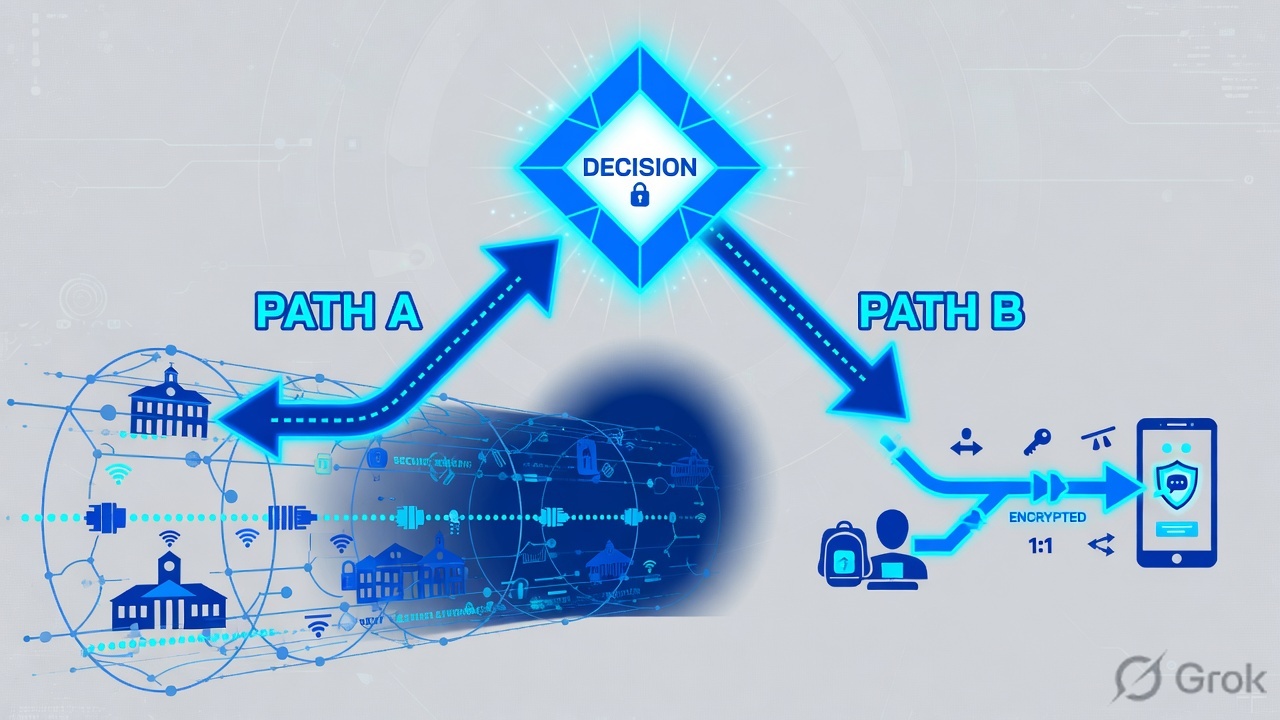
Read left, then right. GP: portal → gateway → LAN. ZPA: ZCC + IdP → broker → inside-out connector → that app only.
GlobalProtect extends the network to the user. ZPA extends the application to the user. If I still design ZPA like a big split-tunnel include list, I rebuilt the VPN.
ERP request, step by step
Scenario: Finance user Rahul needs the internal ERP. He is not given a corporate IP. Watch one URL.
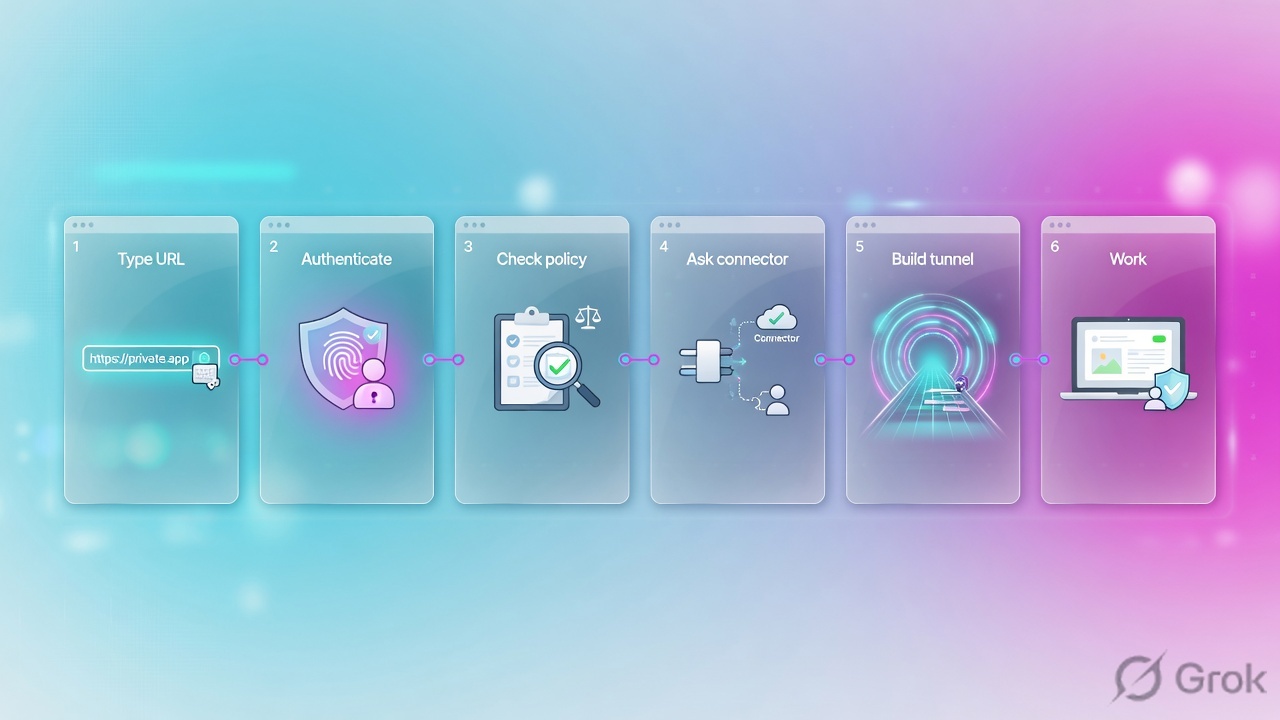
Rahul types the URL
Browser:
https://erp.company.local. ZCC sees a destination that matches Application SegmentERP-Production.Authenticate at the IdP
ZCC sends him through Entra ID SAML. SCIM must already have placed him in
Finance. Login success is not the same as access.ZPA evaluates Access Policy
Is Rahul in Finance? Is the laptop compliant (if you use posture)? Is the app
ERP-Production? All yes → Allow. Any no → deny, even if he knows the URL.Nearest healthy connector is selected
The Mumbai group
DC-Mumbaialready has an inside-out TLS 443 session to the ZPA cloud. ZPA tells that connector to reach the ERP on 443.The stitch is user ↔ ZPA cloud ↔ connector ↔ ERP
Rahul works as usual. He still cannot reach
\\fileserver\shareor the camera VLAN. Those names are not in a segment he is allowed to use.Proof in Diagnostics
Green is a log field: user, group, application, connector group, policy name. If policy is Block, do not debug the connector.
Learn in this order: Zero Trust (never trust, least privilege) → SAML + SCIM → size and deploy App Connectors → ZCC profile → Application Segments / Segment Groups → Access Policy. Do not start in the policy screen if IdP and connectors are not green.
How to choose the rollout style
Zscaler’s leading-practices guide names two segmentation approaches. Most GP replacements should start with Discovery-Based Zero Trust. Day-0 Trust is only for teams that already have a complete app-and-group map and can accept blocked business activity for anything they missed.
| Question | Day-0 Trust | Discovery-Based Zero Trust |
|---|---|---|
| What you define first | Every FQDN/IP, port, and user-to-app Allow | A pattern segment (example: *.corp.internal) plus an authenticated-user Allow |
| VPN replacement speed | Slow. Long time to value. | Zscaler says you can replace the VPN from day one without blocking missed apps |
| Security on day one | Highest if the inventory is complete | Similar to client VPN until you split discovered apps out |
| Business-critical apps | Must be explicit anyway | Still explicit on day one. Do not leave payroll/ERP on the wildcard |
| When to stop discovery | N/A | Set a deadline (60 or 90 days, or ~60% of entitled users), then remove the wildcard |
| Use this if | You already know every private app and owner | You are leaving GlobalProtect and the inventory is incomplete (the normal case) |
ZPA evaluates the most specific application segment, then uses top-down first-match on policy. A tighter FQDN with the wrong port does not fall back to the wildcard. It drops. Design segments so the specific object has the ports the user actually needs.
Recruiter ticket: “everything is on auto-discovery”
A student heard this yesterday: “The company replaced ZPA with VPN (GlobalProtect), but they put everything on an Auto discovery App Segment and they want someone to create App Segments for the rest of the applications.”
Fix the sentence first, then do the job. Recruiters mix the product names. Two readings are both common:
- Reading A (most likely): they replaced GlobalProtect with ZPA, parked every private name on one Application Discovery / wildcard segment, and now hire you to carve real Application Segments. Discovery was never meant to be the end state.
- Reading B: they tried ZPA, left discovery forever, users or auditors screamed, they rolled back to GlobalProtect, and they still need the segment work so they can come back to ZPA without a second outage.
Ask one clarifying question on the call: “Is ZCC still forwarding private apps today, or are users back on GlobalProtect?” The carve-out method is the same. Only the rollback unit changes.
“Discovery is how you replace VPN on day one. It is not Zero Trust yet — every authenticated user can still reach every discovered private name. My first 30 days: export what ZPA already discovered, split crown-jewel FQDNs into defined segments with the real TCP/UDP ports, put group Allows above the discovery Allow, prove each split in Diagnostics, then set a date to turn the wildcard off. I will not delete discovery on Friday night.”
Weak answer (you fail the screen)
“I will delete the discovery segment and users will tell us what broke.” That is Day-0 Trust by accident. You recreate the outage that sent them back to GlobalProtect.
Strong answer (you get the onsite)
“Keep discovery up. Use it as the inventory engine. Graduate apps out one owner at a time. Finance ERP first, then HR, then contractors get a tight Allow + a Block-anything-else. Wildcard dies last.”
What you actually do in week 1
-
Export the discovery pile
In ZPA, Application Discovery / recommended Application Segments already lists FQDNs, ports, and which users touched them. Also pull User Activity / Diagnostics for 14–30 days. That sheet is the missing inventory. Source: ZPA Leading Practices — discovery then split and Understanding Application Discovery.
-
Rank before you click Add
Three buckets only: crown jewel (ERP, payroll, AD/DFS, jump hosts) — define this week with explicit Allow + catch-all Block. Known business app — define this month, map to an IdP group. Long-tail / unknown — leave on discovery until the deadline (Zscaler’s own window is about 60–90 days or ~60% of entitled users).
-
Carve one app the safe way
Example from this lesson: create
ERP-Productionforerp.company.localTCP 80,443 — copy every port users actually used in discovery, not “just 443.” AttachDC-Mumbai. AddAllow-Finance-ERPabove the discovery Allow. AddBlock ERP-Production / Anyimmediately under it so contractors drop even if they know the URL. -
Respect the more-specific trap
The day
erp.company.localexists as its own segment, that object wins over*.company.local. If you forget TCP 8443 and users still hit 8443, ZPA drops — it does not fall back to discovery. This is the #1 outage when people “create the rest of the app segments.” Re-read Understanding Application Access. -
Prove, then remove from the wildcard mentally
Diagnostics must show the new segment name and the new policy name for Finance users. Contractors must show Block. Only then tick that FQDN off the discovery list. Repeat for SharePoint, jump host, HR, and so on.
-
If they are already back on GlobalProtect
Do this carve-out while GP is live. Dual-run ZCC with VPN Gateway Bypass. You are not “replacing VPN again.” You are finishing the job they skipped: defined segments + group policy. When a wave is proven, that wave leaves GP. Discovery still stays until the long tail is owned.
-
Kill discovery last, on a calendar date
After the deadline: disable the wildcard segment, enable a fail-closed Block Any/Any if leadership accepted the risk, and keep a request path (ticket → new segment) for the next app. Discovery with no deadline is just a cloud VPN.
| Week | What you deliver to that recruiter’s hiring manager |
|---|---|
| 0 | One-page: are we on ZPA today or back on GP? Where is the discovery segment? Who owns IdP groups? |
| 1 | Discovered-app spreadsheet + top 10 crown jewels with ports and user groups |
| 2 | First 5 defined segments in production, policy above discovery, Diagnostics screenshots |
| 4 | Finance + one more department off the wildcard. Discovery still present for the tail |
| 8–12 | Discovery disabled. Remaining asks go through a “new Application Segment” request |
Do not rename the discovery segment into 10.0.0.0/8. Do not create 400 segments on day one with empty port lists. Do not map “All users” to every new segment — that is discovery with more objects. The hire is for least privilege, not for more rows in the portal.
Prerequisites
Do not open the ZPA Admin console until this pack is green. Missing one row is how pilots look “random.”
| Track | Must be true before pilot | Why it blocks you |
|---|---|---|
| License / edition | ZPA subscription that includes App Connectors (Professional / Business / Transformation editions are the published starting point) | No connectors, no inside-out path |
| Identity | SAML IdP for ZPA. SCIM enabled and the first SCIM cycle complete before you use SCIM groups in Access Policy | Policy that matches memberOf will miss users |
| App inventory | Export GP split-tunnel include routes, HIP-based security rules, DNS suffixes, and the top private FQDNs from firewall / GlobalProtect logs | You will miss SMB, RDP, thick clients, and “hostname-only” apps |
| App Connector host | Published minimum is 4 GB RAM / 2 CPU cores (Xeon E5 class); Zscaler recommends 8 GB RAM. VMs with hyperthreading commonly need 4 vCPU. Disk ~64 GB thin | Undersized connectors fail under load, not in the lab |
| Connector network | Outbound TLS 443 to ZPA. Internal DNS that resolves app FQDNs. Reach the app TCP/UDP ports. ICMP to servers is mandatory for UDP path selection | User sees “app down” while the server is healthy |
| Connector placement | One connector group per site / VPC / security zone. Same latitude/longitude inside a group. N+1 for HA. Planning number: about 500 Mbps per connector (inbound+outbound) | Mixed-geo groups break AD / DFS “local DC” apps |
| Do not hairpin connectors | Do not send App Connector outbound through a ZIA Public or Private Service Edge | Zscaler explicitly does not recommend this because of multichannel encryption |
| Client | Zscaler Client Connector on the pilot OS mix. App Profile with VPN Gateway Bypass for every GP portal and gateway FQDN/IP | Two traffic controllers on one NIC |
| GlobalProtect stay-alive | Portal + gateway objects stay committed. HIP and split-tunnel configs stay as-is for non-pilot users. Certificates not near expiry | Rollback with a deleted portal is not a rollback |
| DNS search domains | If users type fileserver not fileserver.corp.internal, configure ZPA DNS search domains | Hostname-only apps never match a segment |
Hard words — GP side
Portal pushes client config. Gateway builds the tunnel and can consume HIP. Access route include 0.0.0.0/0 is full tunnel. Exclude lists are how you keep Zoom local.
Hard words — ZPA side
Provisioning key enrolls a connector into a group. Dynamic server discovery is the default server-group mode. Timeout policy default is re-auth every 7 days — shorten it for crown-jewel apps.
Project plan
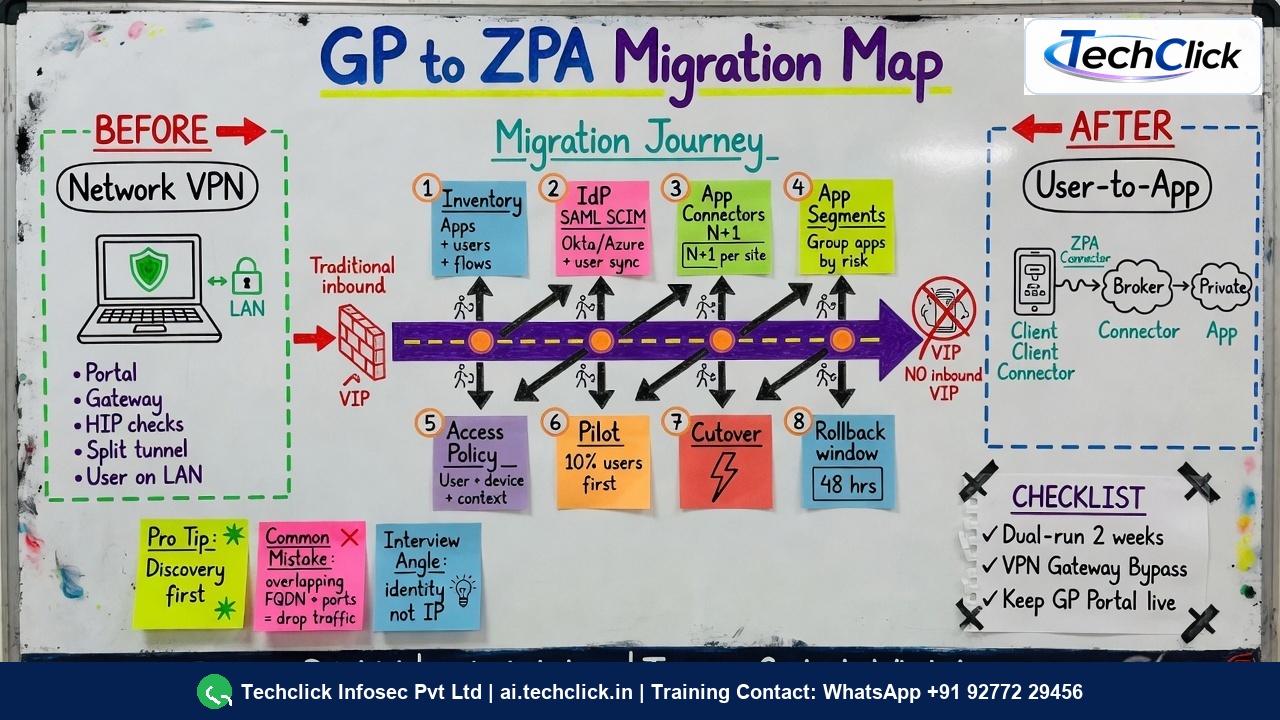
Treat this as a program, not a Friday change window. Safe beginner sequence: IdP + SCIM → connectors in key sites → pilot Application Segments (ERP first) → ZCC on 20 Finance users → GlobalProtect still running → expand apps and groups → decommission GP only after proof. Zscaler’s VPN-to-ZTE write-up is the same idea: assess, map, policy, deploy, IAM, test.
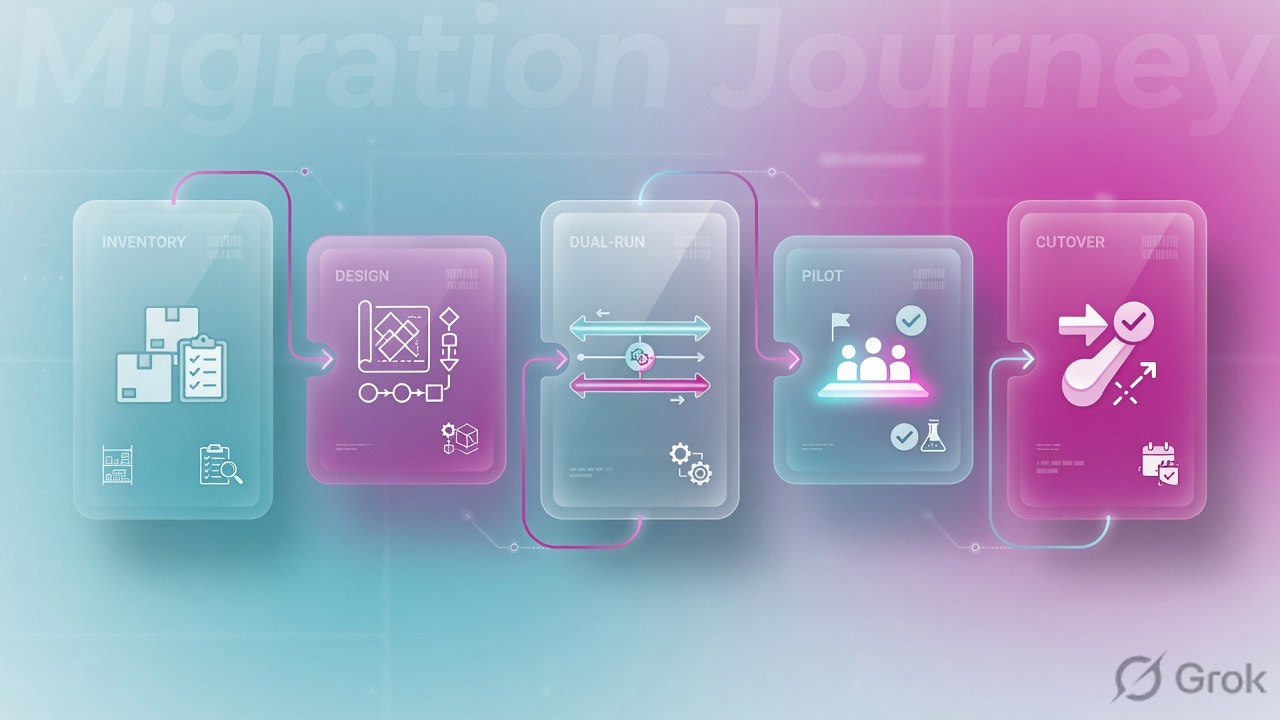
-
Week 0–1 — Assess the current GP estate
List every portal and gateway FQDN, auth method (SAML, cert, RADIUS, LDAP), HIP objects, split-tunnel includes/excludes, and which security rules match the
corp-vpnzone. Capture where traffic is hairpinned through a data-center firewall. Source: GlobalProtect Overview. -
Week 1–2 — Map apps and owners
From GP/firewall logs, build a sheet: FQDN or CIDR, TCP/UDP ports, user group, site (DC / AWS / Azure), criticality. Mark crown-jewel apps (payroll, ERP, domain controllers used by DFS). Those get defined segments on day one. Source: Zscaler VPN migration process.
-
Week 2 — Identity
Stand the ZPA IdP. Map the same NameID you use today. Push SCIM groups that match the GP user groups you already trust. Do not write Access Policy on SCIM attributes until the first sync finishes. Source: Access Policy Deployment guide.
-
Week 2–3 — Connectors and discovery segment
Deploy N+1 connectors per site. Create location-based connector groups. Add a discovery application segment for the private namespace and a permissive Allow for authenticated employees. Create explicit Allow + Block pairs for crown-jewel apps. Source: ZPA Leading Practices Guide.
-
Week 3 — Dual-run the endpoint
Package ZCC. In the App Profile, add every GP portal and gateway to VPN Gateway Bypass. If the forwarding profile uses Tunnel mode with a split-tunnel VPN, this field is required. Keep GP always-on for non-pilot users. Source: Configuring ZCC App Profiles.
-
Week 4 — Pilot, then wave cutover
Pilot IT + one business unit (about 5–10%). Pass the proof checklist in the next section. Then wave by department. After 60–90 days, turn discovery off and keep only defined segments.
Do: segment, policy, connector
Side A is the world you already own (IdP + GlobalProtect stay-alive). Side B is the three ZPA objects beginners actually click: Connector Group, Application Segment ERP-Production, Access Policy Allow-Finance-ERP. Side C is ZCC dual-run. Do them in that order. The Admin path is not “Configuration → Application Segments” — use the documented Policies / Infrastructure paths below.
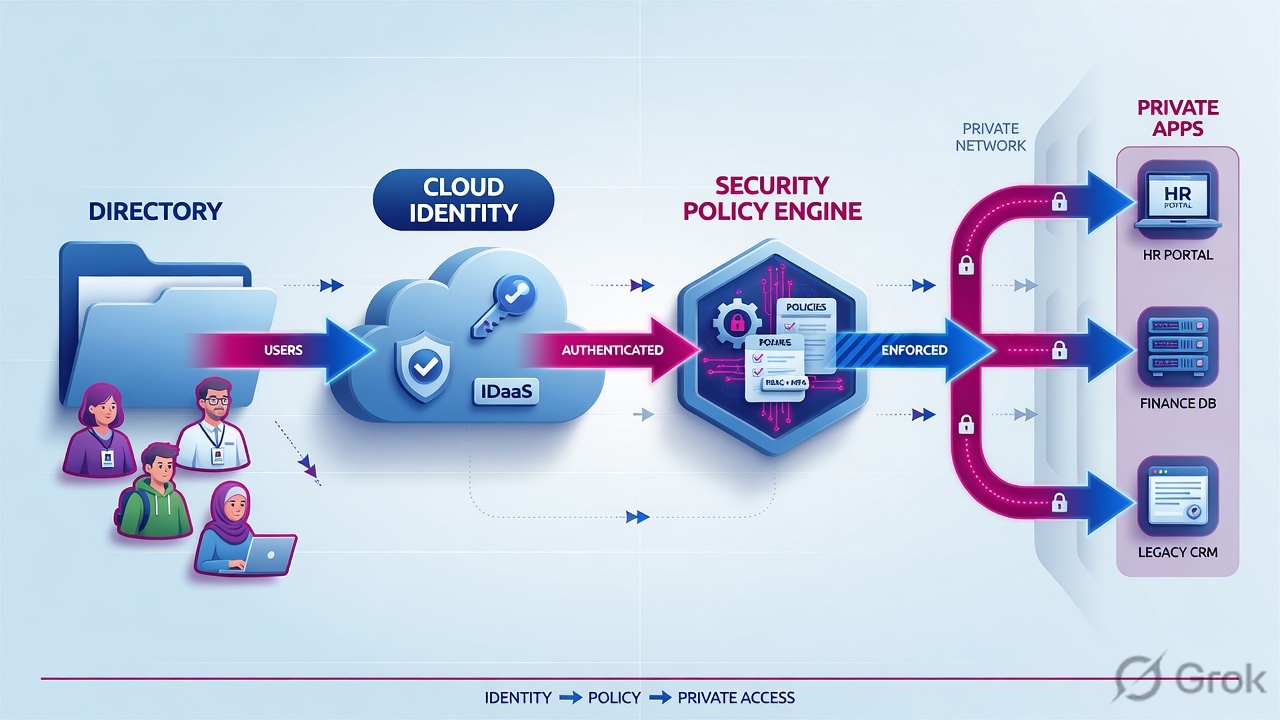
Side A — IdP and GlobalProtect stay-alive
-
Freeze the GP change window
On Panorama or the firewall:
Network → GlobalProtect → PortalsandNetwork → GlobalProtect → Gateways. Export the running config. Note portal FQDN, gateway FQDNs, auth profile, and HIP profiles. Do not delete agent configs used by non-pilot users. -
Publish the same groups to ZPA
In Entra ID / Okta / AD FS, create or reuse groups that match how you already grant VPN (example:
vpn-employees,vpn-contractors,payroll-uk). Enable SCIM toward ZPA. Wait for the first full cycle. Source: Enabling SCIM for Identity Management. -
Decide the dual-run split
Pilot users: ZCC on, GP still installed, GP gateways listed in VPN Gateway Bypass so private apps go to ZPA. Non-pilot users: GP only. Helpdesk gets a one-page “disable ZPA / reconnect GP” card before day one.
Side B — ZPA Admin
Primary source for this block: Configuring Defined Application Segments and Configuring App Connector Groups.
Infrastructure → Private Access → Component → App Connector Groups → Add
Add App Connector Group
Documented path: Infrastructure → Private Access → Component → App Connector Groups / App Connector Keys. One group per site. Then enroll VMs with the provisioning key.
-
Enroll connectors and prove they are Up
Deploy the Linux / VMware / Azure / AWS image. Paste the provisioning key. In the Admin portal, each connector should show enrolled and healthy. From the connector, resolve a private FQDN and
curl/ncthe app port. Confirm ICMP to the server. -
Add the discovery application segment
Path:
Policies → Access Control → Private Applications → Defined Application Segments → Add Application Segment. Use a private wildcard, not*(a wildcard-only*needs Zscaler approval and is not for discovery). Bind a server group with dynamic server discovery. Attach the site’s connector group. Open the TCP/UDP ports you actually use — do not blindly punch 1–65535 on a crown-jewel host.
Policies → Access Control → Private Applications → Defined Application Segments → Add
Add Application Segment
Source: Configuring Defined Application Segments. Prefer FQDN over IP so an ERP address change does not break the segment. Training mock — not a live tenant. Do not publish 10.10.0.0/16 as “the app.”
Policies → Access Policy → Add Rule
Add Access Policy
Source: Configuring Access Policies. Put the Finance Allow above any broader discovery Allow. A contractor who knows the ERP URL still hits deny if they are not in Finance.
-
Write Access Policy in the right order
Path follows Configuring Access Policies. Rule action is Allow Access or Block. First-match, most-specific segment. For Rahul’s company, start explicit then discovery:
Policy order (Finance pilot example)1 Allow ERP-Production memberOf = Finance (+ posture if you use it) 2 Block ERP-Production Any 3 Allow contractor-apps memberOf = contractor 4 Block Any memberOf = contractor 5 Allow *.company.local authenticated employees ← discovery later 6 Block Any Any ← fail closed after discovery ends
Do not enable rule 6 (fail closed) until discovery is finished. During dual-run, rule 5 keeps people working the way VPN did.
-
Client forwarding for on-LAN users
If you want the same Zero Trust path when the laptop is inside the office, add Client Forwarding Policy so those FQDNs still go to ZPA. Same most-specific / first-match rule. A Private Service Edge is the published pattern for local access to specific apps. Source: About Client Forwarding Policy.
- Location chosen: apps actually live in this DC or VPC.
- Outbound TCP 443 to Zscaler from that subnet. Do not hairpin the connector through ZIA.
- Platform picked (VMware / Hyper-V / AWS / Azure / GCP / Linux). Static IP preferred. Internal DNS + gateway set.
- Size: published minimum 4 GB RAM / 2 CPU cores; Zscaler recommends 8 GB RAM. Plan ~500 Mbps per connector, N+1 (two VMs in
DC-Mumbai). - Group created first, then provisioning key, then enroll. Both members same lat/long.
- Post-check: Online in Admin;
dig erp.company.local;curl https://erp.company.localfrom the connector; ICMP to the server; associate group toERP-Production.
Side C — ZCC and the dual-run (coexistence)
-
App Profile — VPN Gateway Bypass
ZCC Admin → App Profiles (Windows / macOS / …). When a VPN client runs next to ZCC and the forwarding profile uses Tunnel, add every GP portal and gateway as FQDN or IP in VPN Gateway Bypass. An FQDN is resolved once at tunnel start and all resulting IPs are bypassed. Keep this list short. Source: Configuring ZCC App Profiles.
-
Do not use Tunnel on a “VPN-trusted” network as the dual-run design
Zscaler’s interoperability note warns against forwarding-profile Tunnel (route-based) for a VPN-trusted network. Prefer explicit bypass of the GP destinations, then let ZPA own the private app FQDNs.
-
Pilot ring in the IdP
Assign ZCC only to
zpa-pilot-wave1. Everyone else keeps GP as today. That group is also the rollback unit — you remove ZCC or disable ZPA for that group without touching the company.
20-user Finance pilot
Current state in this example: 200 users still on GlobalProtect to reach about 15 internal apps. Do not start with all 15. A beginner-safe first ring is 20 Finance users, 2 App Connectors in the main DC, and 3 apps: ERP, Finance SharePoint, one RDP jump host. GlobalProtect stays installed. Users can use either path for a few weeks. Then expand coverage, then retire GP.
A pilot is not “IT connected once.” Score named apps, named users, named failure signals. Run at least five business days so Monday-morning thick clients show up.

| Test ID | Who / what | Pass | Fail → first fix |
|---|---|---|---|
| P1 Auth | Pilot user signs into ZCC via the corporate IdP | SAML success; user shows in ZPA with the expected SCIM groups | IdP ACS / NameID / SCIM cycle not finished |
| P2 Web app | Rahul opens https://erp.company.local | Page loads; Diagnostics show ERP-Production, Allow-Finance-ERP, DC-Mumbai | Connector DNS or missing TCP 443 on the segment |
| P3 Thick client | RDP / SMB / custom port | Session stays up; UDP path (if used) has connector ICMP | Port not on the segment; more-specific overlapping segment stole the FQDN |
| P4 Crown jewel | Payroll user vs a contractor | Payroll Allow hits; contractor hits the Block; rule names match the design | Rule order; SCIM group missing on the contractor |
| P5 Coexistence | ZCC + GP both installed | GP portal/gateway still reachable for non-ZPA traffic; no route flap | VPN Gateway Bypass incomplete (portal and every gateway) |
| P6 On-LAN | Laptop on corporate Wi-Fi | If Client Forwarding is on, private apps still go via ZPA; if off, document that on-LAN still uses the old path | Unexpected hairpin or double encrypt |
| P7 Exit | Disable ZPA for one pilot user | GP reconnects and the same apps work the old way | Rollback drill failed — do not expand the wave |
Expand the wave only if: P1–P5 pass for 95% of the cohort, P7 (rollback drill) passed once on a real user, no Sev-1 ticket older than 4 hours, and connector CPU/throughput has N+1 headroom. Zscaler also wants a substantial share of entitled users on ZPA (their discovery guidance cites more than half before you lean on discovery data, and about 60% in the first 60 days). Do not turn the wildcard off early just because IT is happy.
Runtime path after go-live
After cutover, a request does not “hit the gateway.” Walk this path when a user says the app is down.
If step 4 is Block, do not debug the connector. If step 6 is Unhealthy, do not debug SAML.
First-fix when Rahul cannot open ERP
| What Rahul sees | Check this first | Typical fix |
|---|---|---|
| Login loop / cannot sign in | SAML IdP, ACS, NameID. ZCC can reach Entra. | Fix IdP. Do not rebuild the segment. |
| Signed in, “Access Denied” on ERP | Is he in SCIM group Finance? Is Allow-Finance-ERP above a Block? | Wait for SCIM; fix group mapping; reorder policy. |
| Connector Offline | Outbound 443 from the VM. DNS. Provisioning key group. | Firewall allow-list to Zscaler. Redeploy key only if enrollment failed. |
| ERP times out, other ZPA apps work | From the connector: dig + curl https://erp.company.local. Segment ports 80/443. | Fix internal DNS/route. Do not add 10.10.0.0/16. |
| Flaps with GlobalProtect still installed | VPN Gateway Bypass missing a portal or gateway FQDN/IP | Add every GP VIP. Keep both clients only during the pilot window. |
Project rollback plan
Rollback is a designed state, not “turn GP back on and hope.” You keep GlobalProtect authoritative until ZPA has earned the traffic. The rollback unit is a user group or device ring, never the whole company on the first incident.
If the GP portal was already decommissioned, the red box has nowhere to go. That is why stay-alive is a prerequisite, not a nice-to-have.
Keep these objects until the program is closed
- GlobalProtect portal and every gateway (config + public DNS + certificates + licenses).
- HIP objects and the security rules that reference the VPN zone — non-pilot users still need them.
- The IdP app registration for GP. Do not recycle it into the ZPA app.
- A tested “remove ZCC / set ZPA disabled / reconnect GP” runbook for Intune / Jamf / SCCM.
Rollback runbook (wave)
-
Declare the trigger
Examples: more than 10% of the wave cannot reach a P1 app for 30 minutes; connector group for a site is down and N+1 is gone; IdP outage that ZPA cannot ride through; rollback drill (P7) failed.
-
Stop the bleed
Move the wave’s IdP group out of the ZCC assignment. Optionally set a Client Forwarding / Access Policy Block for that group so half-connected laptops do not black-hole private FQDNs. Do not delete application segments — you will need them after the fix.
-
Return users to GlobalProtect
GP app reconnects to the portal, downloads the existing agent config, and builds the gateway tunnel. Confirm HIP and the old security rules still match. Prove the same P2/P3 apps over GP.
-
Leave ZPA standing
Connectors stay up. Policies stay in place. You lost a wave, not the platform. After root cause, re-enter that wave through the same pilot checklist.
-
Only then retire GP
When every in-scope group has been on ZPA past the discovery deadline, P7 is unused for 30 days, and leadership signs the risk acceptance: remove gateway DNS, then the portal, then licenses. Never reverse that order.
Deleting the GlobalProtect gateway “to force users onto ZPA.” You removed the rollback path and created an outage you cannot undo from the ZPA console. Force users with assignment rings, not by burning the parachute.
Beginner traps and proof
| Symptom | Likely cause | First proof |
|---|---|---|
You published 10.10.0.0/16 as the Application Segment | You rebuilt the VPN. Rahul can again reach cameras and file servers | Delete the subnet segment. Publish erp.company.local:443 and the exact jump-host FQDN only |
| Auth works, every app says Access Denied | SCIM groups never arrived, or policy matches the wrong attribute | Open the user object in ZPA. If Finance is missing, fix SCIM before touching connectors |
| One FQDN works on 443, dies on 8443 | A more-specific application segment won and does not list 8443. ZCC does not fall back to the wildcard | Compare both segments’ FQDN + ports. Source: Understanding Application Access |
| App “down” for everyone at one site | Connector cannot resolve DNS or reach the port; mixed-geo group; connector forwarded via ZIA | From the connector: dig + nc + ICMP. Check group lat/long |
| Intermittent access with GP still installed | ZCC and GP both claiming routes. VPN Gateway Bypass missing a gateway IP that the portal returned | Bypass list includes portal and every gateway FQDN/IP |
| Policy Allow never hits a new joiner | SCIM attribute used before the first SCIM cycle, or NameID mismatch vs GP | User object in ZPA shows the group; if not, wait/fix SCIM, do not add a wildcard Allow for that user |
| Contractors reach payroll | Discovery Allow sits above the contractor Block, or no explicit Block after the payroll Allow | Reorder: specific Allow, then specific Block, then discovery |
| UDP voice / RDP UDP fails | ICMP to the server blocked, so UDP path selection cannot work | Allow ICMP from connectors to app servers (mandatory for UDP) |
- Diagnostics: user, application, server, connector group, policy rule name.
- Connector health: N+1 members Up; upgrade window set to off-hours (ZPA upgrades group members sequentially).
- Crown-jewel apps have explicit Allow/Block, posture if you use it, and a tighter timeout than the 7-day default.
- P7 rollback drill recorded: ticket number, user, time to restore on GP.
- Discovery deadline on the calendar. Wildcard is not a permanent architecture.
“GlobalProtect put Rahul on 10.50.20.45. ZPA never does that. If you hired me after parking everything on discovery, I keep that wildcard up, export what users already touched, carve ERP-Production for Finance above the discovery Allow, copy every live port so the more-specific segment does not drop 8443, and I turn discovery off only on a dated deadline.”
Knowledge check
Seven judgment items. Pick one answer each, then Check answers. Reasons point you back to the section to re-read.
Sources
- Zscaler — ZPA Leading Practices Guide (discovery vs Day-0, N+1, 500 Mbps, geo groups, ICMP, 7-day timeout)
- Zscaler — Understanding Application Discovery (wildcard is an inventory engine, then split defined segments)
- Zscaler — Configuring Defined Application Segments
- Zscaler — Understanding Application Access (more-specific FQDN, no port fallback)
- Zscaler — Configuring Access Policies (first-match)
- Zscaler — Configuring App Connector Groups / App Connector Keys
- Zscaler — App Connector Deployment Prerequisites
- Zscaler — Configuring ZCC App Profiles (VPN Gateway Bypass)
- Zscaler — About Client Forwarding Policy
- Zscaler — How to Migrate from VPN to the Zero Trust Exchange
- Palo Alto Networks — GlobalProtect Overview (portal, gateway, app, HIP)
- Palo Alto Networks — Gateway Client Settings / split tunnel
Related: Migration plan · implement · rollback · GlobalProtect lesson · ZPA architecture · App Connectors · ZPA policies · ZPA access policy · Zscaler authentication