VPN = a network. The user lands on a subnet and can see whatever routing plus ACL still allow. ZPA = one application. Zscaler Client Connector and the App Connector both open outbound TLS to a ZPA Public Service Edge (or a customer-hosted Private Service Edge). The edge checks Access Policy — default is block — and stitches the two legs into a microtunnel. The app stays dark: no inbound VIP, no public DNS. Enabled on an Application Segment is not an allow. No healthy connector means no App Connector in the assigned group is up and able to reach that app — not “ZPA is down.”
1. Why this replaces VPN
ZIA is egress: the user reaches the internet and a Public Service Edge inspects the session. ZPA is the opposite problem. The destination is your Jira, file server, or RDP host in a DC or VPC. The user should reach that one thing and nothing else.
A VPN concentrator solves that by becoming an inbound door. After auth, the laptop usually receives a route into a private subnet. Policy is then a pile of ACLs on that network. One concentrator CVE, one fat-fingered ACL, or one compromised laptop, and the attacker has a place to stand.
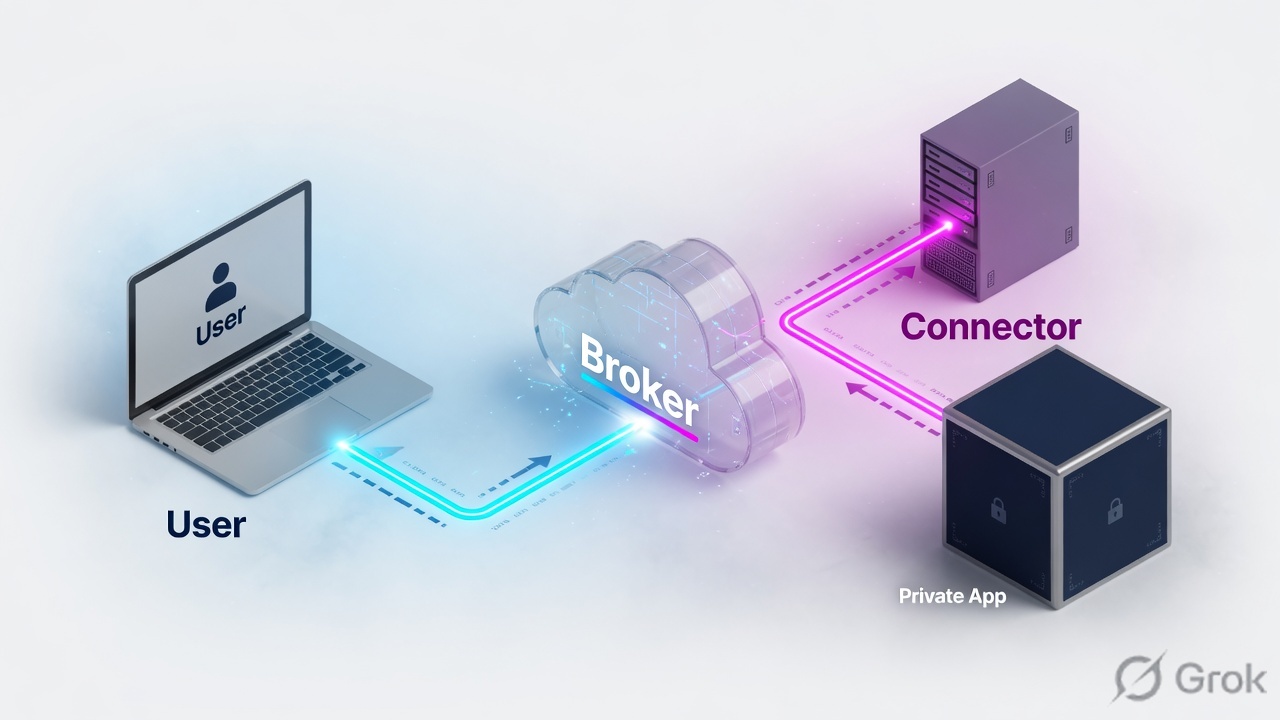
ZPA removes the door. The App Connector never listens. The private app has no NAT. The user never receives the subnet. The only path is a brokered microtunnel for the Application Segment the Access Policy allowed.
| Dimension | Traditional VPN | ZPA |
|---|---|---|
| What the user receives | A network (often a /24 or larger, plus whatever routes the concentrator pushes) | One Application Segment at a time — FQDN/IP + ports you defined |
| Connection direction | User inbound to a public concentrator VIP | Both legs outbound: Client Connector → Service Edge, App Connector → Service Edge |
| What you defend | The concentrator (and every host the tunnel can reach) | Access Policy + App Connector reachability. No inbound VIP on the app |
| Lateral movement | Possible once the laptop is “on the LAN” | Only the ports on the segments that policy allowed |
| Default for unknown apps | Often “whatever the subnet still routes” | Block. ZPA denies until an Access Policy rule explicitly allows |
If someone says “ZPA is a cloud VPN,” answer with the access model, not the transport. SSL-VPN also uses TLS. The difference is network access vs application access, and inbound VIP vs double outbound.
2. Mental model — four parts, one broker
Memorise four named objects. Every ticket, every diagram, every “why is Jira dark” call maps back to these.
Zscaler Client Connector (ZCC)
Agent on the managed device. Intercepts a request for an entitled Application Segment, returns a synthetic IP, and opens an outbound TLS session to the nearest healthy Service Edge. It does not listen for inbound app traffic.
App Connector
Linux VM (or equivalent image) next to the private app. It is the only ZPA component that actually talks to the server. It never accepts inbound connections from the internet. It dials outbound to a Public or Private Service Edge and waits for work.
Public / Private Service Edge
The broker. Authenticates Client Connector and App Connector, evaluates Access Policy, and stitches the two outbound legs into one microtunnel (M-Tunnel). Public = Zscaler-hosted. Private = same broker role, compute you operate, for residency or regulated data-path rules.
Control plane (tenant)
Your Application Segments, Segment Groups, Server Groups, App Connector Groups, IdP binding, and Access Policy live in the ZPA Admin Portal (admin.private.zscaler.com or your cloud variant). Config is not the data path.
Read left → right. Both arrows point into the Service Edge. Nothing on the right accepts inbound from the internet.
The Client Connector does not dial the App Connector. The App Connector does not dial the user. Both dial a Service Edge. The edge is the only thing that stitches.
Hard words before the runbook
| Term | Meaning on a ticket |
|---|---|
| Application Segment | The app definition: domain or IP, TCP/UDP ports, and options such as health reporting or Browser Access. Enabled means the object exists — not that a user is allowed. |
| Segment Group | A bundle of Application Segments so one Access Policy can allow a set of apps. |
| Server Group | Binds the Application Segment to the App Connector Group(s) that can reach those servers. |
| App Connector Group | HA unit. ZPA picks any healthy connector in the group. Always deploy at least two per failure domain. |
| Access Policy | Who may reach which Application Segment or Segment Group, optionally scoped by posture and connector group. Default is deny. |
| Microtunnel (M-Tunnel) | The end-to-end channel Client Connector ↔ Service Edge ↔ App Connector ↔ internal app, after policy allows. |
| Browser Access | Clientless web access: browser + IdP, no ZCC. Only for Browser Access–enabled web apps on the segment. |
| Health reporting | The App Connector probes the defined application. If every connector reports it down, users see no healthy path even when the VM is “Active.” |
3. Packet path — the microtunnel
Do not start the whiteboard with menus. Start with the click. The two TLS sessions to the Service Edge are usually already up before the user opens Jira. The click is what asks the broker to stitch a stream.
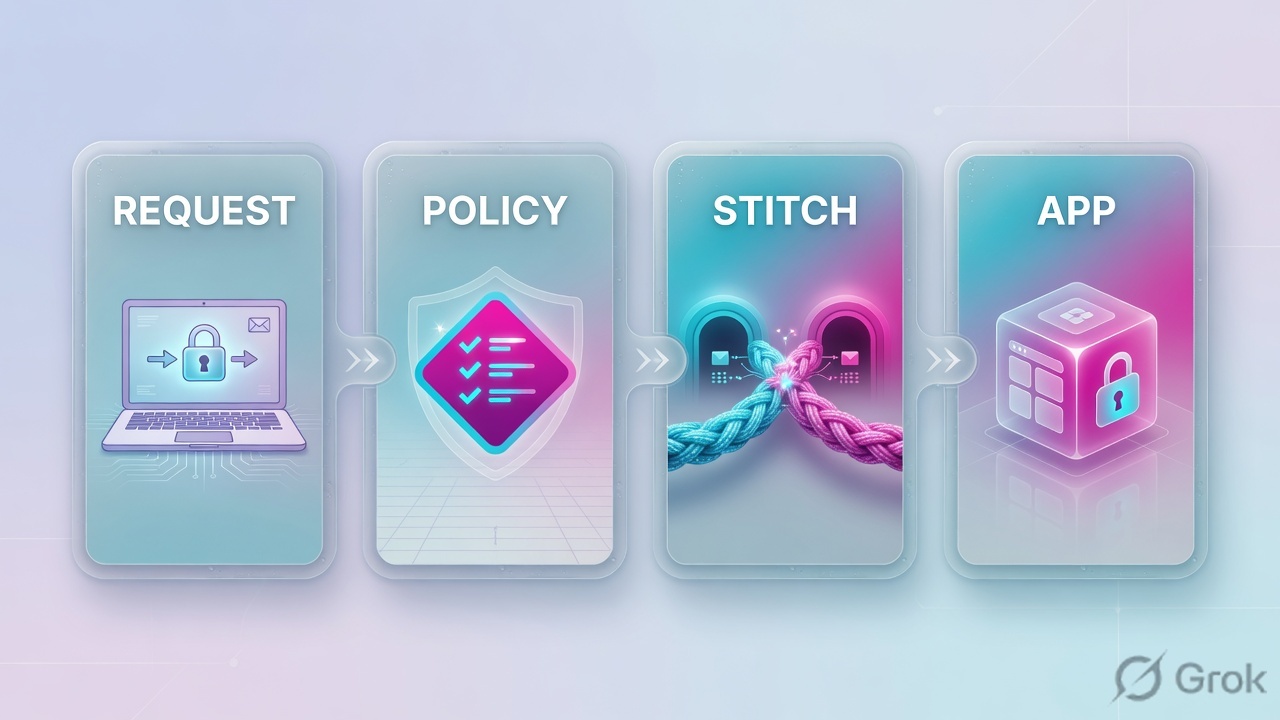
Diamond = decision. Default-deny dies at step 4. “No healthy connector” dies at step 5. Do not treat those as the same ticket.
On a managed laptop the usual hop list is:
- The user opens
https://jira.lab.example. Client Connector already holds an outbound session to a nearby ZPA Public Service Edge (or your Private Service Edge). - Client Connector matches the FQDN to an Application Segment the user is entitled to resolve, and hands the process a synthetic IP (CGNAT-space, not the real server address).
- The SYN rides the existing Client Connector leg to the Service Edge. It does not hairpin through the corporate LAN.
- The Service Edge evaluates Access Policy against the user, groups, posture (if you use it), and the Application Segment / Segment Group. No match → deny. That is the designed default.
- On allow, ZPA selects a healthy App Connector from the App Connector Group bound through the Server Group, and signals that connector over its already-up outbound session.
- The App Connector opens a normal local connection to Jira (internal DNS, internal IP). The Service Edge stitches the two streams into one microtunnel. Jira sees the connector’s source IP, not the user’s home IP.
App Connectors do not accept inbound connections from users or from the internet. Official architecture: they only need outbound reachability to ZPA Public Service Edges or Private Service Edges. If someone files a change to “open 443 on the connector EIP,” reject it.
4. How to choose — VPN vs ZPA vs clientless
Use this table in the design review and on the Monday ticket. The wrong tool is usually “we kept thinking in subnets.”
| Situation | Prefer | Do not |
|---|---|---|
| User needs one (or a few) private apps; no reason to see the subnet | ZPA Application Segment + Access Policy + App Connector Group | Drop them on a “restricted VLAN” via VPN and hope the ACL holds |
| Broadcast / multicast / NetBIOS browse / “Network Neighbourhood” | Keep a scoped VPN or redesign to explicit FQDN/UNC; ZPA will not recreate a LAN | Publish 10.0.0.0/8 as one Application Segment and call it Zero Trust |
| Managed laptop, TCP/UDP apps, posture, thick clients (RDP, SSH, SMB to a known host) | Zscaler Client Connector with ZPA enabled | Tell every contractor to install ZCC when policy forbids it |
| Unmanaged or BYOD, HTTPS app only, cannot install an agent | Browser Access (clientless) on that Application Segment + Access Policy | DNAT the app to the internet “just for contractors” |
| Privileged RDP/SSH to a jump host from a browser | ZPA Privileged Remote Access (separate object set from a normal segment) | Expose RDP on a public VIP |
| Regulator: user-to-app bytes must not traverse Zscaler-hosted brokers | Private Service Edge on customer compute (control plane still in ZPA Cloud) | Assume a Microtenant moves the data path on-prem — it does not |
| MSP / B2B: many customer orgs, one tenant, isolated admins and apps | Microtenant (logical isolation on the same Public Service Edges) | Buy N tenants only to hide one customer’s segment list |
| Internet / SaaS inspection | ZIA — different product window | Hide a private app behind a ZIA allow and a public hostname |
Client Connector vs Browser Access
Zscaler Client Connector is the default for employees. It intercepts the Application Segment (FQDN or IP), can carry more than HTTPS, and can feed device posture into Access Policy.
Browser Access is the official clientless path: the user authenticates in a browser and reaches a Browser Access–enabled web application over ZPA without installing Client Connector. The App Connector still has to resolve and reach the internal host — usually via internal DNS. If the connector uses public DNS for that name, you can loop or miss the app entirely.
Same Access Policy idea either way: define the users, then define which applications or Segment Groups they can access. Clientless is not a back door around default-deny.
5. Runbook Side A → B → C
Goal for a lab Jira that only Finance may reach: the object exists, two App Connectors in the same DC can reach it, and an Access Policy allow is the only reason the stitch happens.
Primary sources: Zscaler Help — Understanding the Private Access Architecture; About App Connectors; Configuring Access Policies; Configuring Defined Application Segments.
Side A — Define the application
-
Name the real destination
Write the FQDN users type, the TCP/UDP ports, and the internal server (IP or hostname the App Connector can resolve). Lab:
jira.lab.example, TCP443, server10.40.12.20. If DBAs bookmark the raw IP, that IP must be on the segment too — Client Connector’s FQDN intercept will not seehttps://10.40.12.20. -
Create the Application Segment
ZPA Admin → Resource Management → Application Management → Application Segments → Defined Application Segments → Add. Name
Jira-Lab, status Enabled, domainjira.lab.example, TCP port443. Place it in a Segment Group (exampleCorp-Private) so Access Policy can allow the group, not one hostname at a time. -
Bind a Server Group + health
On the same object, associate a Server Group that points at the App Connector Group that can actually route to
10.40.12.20. Turn health reporting on so a dead Jira is not advertised as healthy. If this is a web-only contractor app, enable Browser Access here — not as a second mystery product later.
Resource Management / Application Management / Application Segments / Defined Application Segments / Add
Add Application Segment
Source: Zscaler Help — Configuring Defined Application Segments (Resource Management → Application Management → Application Segments → Defined Application Segments). Lab FQDNs only. Enabled is not an allow.
Side B — App Connector next to the app
-
Create the App Connector Group first
Configuration & Control → Private Infrastructure → App Connector Management → App Connector Groups. Name
DC1-Connectors. This group is the failure domain (one DC, one VPC, one AZ pair) — not “one group per app.” Attach the group to the Server Group from Side A. -
Issue a provisioning key and deploy two VMs
Generate a provisioning key bound to
DC1-Connectors. Bootstrap two App Connector images (OVA / marketplace image / supported Linux package — follow the current platform guide). The VMs need outbound TLS to ZPA Public Service Edges or to your Private Service Edges. They do not need inbound firewall holes. Deploy two. One VM is a single point of failure. -
Prove the connector can reach the app
Portal status Active only proves the VM reached ZPA. From the connector itself, resolve and connect to
jira.lab.example:443(or10.40.12.20:443). If that local dial fails, every user will fail even though the connector is green. That is the classic “no healthy connector” after a clean registration.
Configuration & Control / Private Infrastructure / App Connector Management / App Connector Groups / Add
Add App Connector Group
Source: Zscaler Help — About App Connector Groups (Configuration & Control → Private Infrastructure → App Connector Management → App Connector Groups). Two connectors per group. No inbound VIP.
Side C — Access Policy (the actual allow)
-
Remember the default
Official Access Policy behaviour: ZPA blocks access to applications and Segment Groups until you write a rule that explicitly allows. Creating
Jira-Laband turning it Enabled does not entitle Finance. -
Add the allow
Policy → Access Policy → Add Rule (wording may appear under Policies → Access Control). Criteria: users or groups first (SCIM group
Finance), then applications or Segment GroupCorp-Private. Action Allow. If you use posture, require the managed Client Connector posture profile. Optionally pin the rule toDC1-Connectorsso a stray group cannot serve this app. -
Pilot one user, then open the group
Assign one Finance pilot. From Client Connector, confirm ZPA is authenticated. Open
https://jira.lab.example. In ZPA Diagnostics / user trace, you want: SAML (or IdP) success, Access Policy rule name, selected App Connector, successful local dial, bytes. Then widen the group. Contractors without ZCC get a separate Browser Access–enabled segment plus their own allow — not a public VIP.
Policy / Access Policy / Add Rule
Add Access Policy Rule
Source: Zscaler Help — About Access Policy / Configuring Access Policies. Define the users, then the applications or Segment Groups. Default is block.
User trace shows the Access Policy name (not only “allowed”), the App Connector hostname, and a successful app connect. Client Connector ZPA tab is authenticated. From a host that is not entitled, nslookup jira.lab.example on the public internet is NXDOMAIN, and the App Connector public address has no listening app port. That is the proof the app stayed dark.
6. Runtime path after go-live
Once Side A/B/C is saved, the live path is short. Use it as the first five minutes of every Sev-2.
- Is Client Connector (or Browser Access) actually in a ZPA session? If ZCC ZPA is disconnected, you are not in this product yet.
- Did the request match an Application Segment? FQDN intercept vs raw IP. Clientless only matches Browser Access–enabled apps.
- Which Access Policy rule hit? No rule → default deny. Wrong group or missing SCIM group → looks like “ZPA is broken.”
- Which App Connector was chosen, and is it healthy for this app? VM Active ≠ app health. Policy can also pin a group that has nobody live.
- Did the connector dial the real server? Local DNS, security group, and route on the connector subnet. Jira sees the connector IP.
user:            finance.pilot@lab.example
client:          Zscaler Client Connector · ZPA authenticated
application:     jira.lab.example:443  (Application Segment Jira-Lab)
policy:          Finance-Jira-Allow · action Allow
connector_group: DC1-Connectors
connector:       connector-02 · Active · health for Jira-Lab = Up
app_dial:        10.40.12.20:443  connect=ok  bytes>0
public_check:    jira.lab.example NXDOMAIN from internet
7. Traps + proof
| Symptom | What it actually is | First proof |
|---|---|---|
| Segment Enabled, user blocked | Default-deny. No Access Policy allow matches that user + app / Segment Group | User trace: no allow rule. Add Policy → Access Policy, do not “re-enable” the segment |
| “No healthy connector” / no App Connector available | No connector in the bound group is healthy and can reach this app. Causes: wrong App Connector Group on the Server Group or Access Policy; both VMs down; health reporting red because the local dial fails | Which group is bound? Are members Active? From a connector: connect to the app port. Do not reboot ZCC first |
| Connector Active, users time out | Outbound to ZPA works; east-west to the app does not (SG, NACL, route, DNS) | Same local connect test. Green registration is the wrong green |
Works by FQDN, fails by https://10.40.12.20 | Client Connector intercepted DNS, not the raw IP. IP is not on the Application Segment | Add the IP (or stop teaching people to bookmark it) |
| Network browse / mDNS / NetBIOS discovery gone | ZPA is not a LAN. No broadcast domain was granted | Map \\fileserver.lab.example\share on a declared segment. Do not publish a /16 |
| Contractor cannot install ZCC | Wrong client type, not a “ZPA outage” | Browser Access on that web segment + Access Policy for the contractor group |
| One connector per DC | Patch reboot = every app in that group dark | Two members in the App Connector Group before production users |
| Inbound 443 opened to the connector EIP | Breaks the dark-app model; App Connectors are outbound-only | Revert the firewall change. nmap from internet should not show an app port |
- Application Segment lists the FQDN users type and any raw IPs they still bookmark.
- Segment Group + Server Group + App Connector Group form one chain. The allow is an Access Policy rule, not the Enabled toggle.
- Two App Connectors, same group, both can
connectto the app from the VM. - Pilot user in the SCIM group. User trace names the rule and the connector.
- A user not in the group is denied (proves default-deny still works).
- Public DNS for the internal name is NXDOMAIN. Connector has no inbound app listener.
Knowledge check
Six judgment items. Map each miss to the section in the reason, then retry.
Sources
- Zscaler Help — Understanding the Private Access Architecture (Client Connector, App Connector, Public Service Edge, microtunnel)
- Zscaler Help — About App Connectors (outbound-only interface to the ZPA cloud)
- Zscaler Help — Understanding Service Edges (Public vs Private Service Edge role)
- Zscaler Help — Understanding the ZPA Cloud Architecture (Service Edges stitch Client Connector and App Connector; connectors never accept inbound)
- Zscaler Help — Configuring Access Policies (default block until an allow exists)
- Zscaler Help — About Access Policy (define users, then applications or Segment Groups)
- Zscaler Help — Configuring Defined Application Segments (Resource Management → Application Management → Application Segments)
- Zscaler Help — About App Connector Groups (Configuration & Control → Private Infrastructure → App Connector Management)
- Zscaler Help — About Browser Access (clientless web access without Client Connector)
- Zscaler Help — Understanding Health Reporting
- Zscaler Help — Access Policy Deployment and Operations Guide (“No App Connector Available”)
- Zscaler reference architecture — Universal ZTNA with ZPA Private Service Edge (PDF)
Related: Lesson 10 · App Connectors · Lesson 11 · ZPA policies · ZPA troubleshooting · Zscaler authentication · Exchange factory