Start here · understand the lesson before the detail
What you are learning
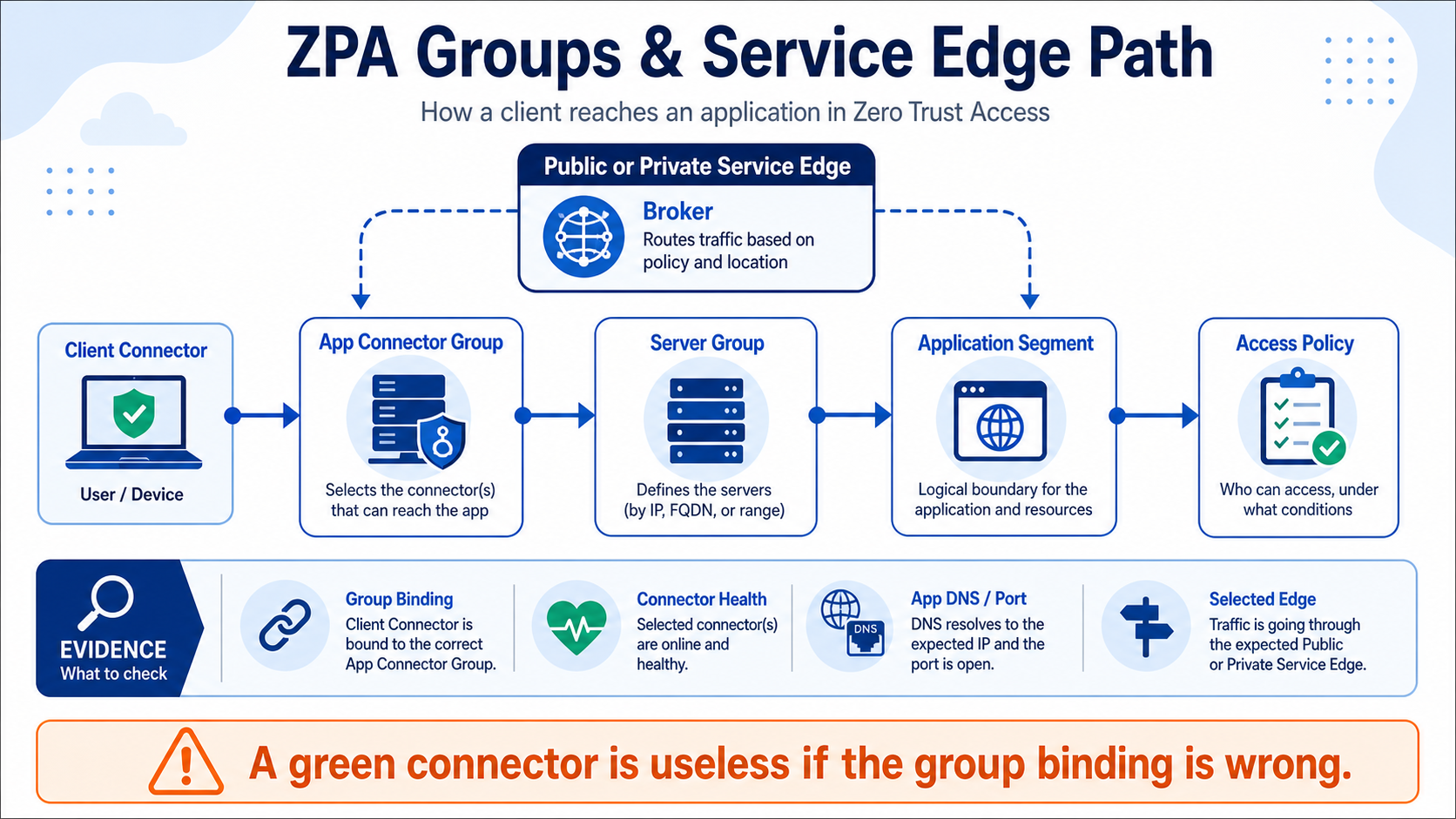
This lesson connects the ZPA objects that students often memorize separately. You will see how connector groups, server groups, application segments, access policy, and Service Edges work together to create one usable path.
In plain English
An App Connector group is the pool of connectors in a region or function. A server group links eligible connector groups to applications. The application segment defines the destination and ports. Access policy decides who may use it, while a Public or Private Service Edge brokers the connection.
Real example
Payroll runs in Mumbai. Two Mumbai App Connectors belong to one connector group, which is linked through a server group to the payroll application segment. Finance policy allows the request. The Service Edge can then select a healthy eligible connector that can actually reach payroll.
Follow this flow
- Start with the application FQDN, ports, hosting region, and availability need.
- Place at least two reachable connectors in a sensible connector group.
- Bind that connector group through the correct server group to the application segment.
- Apply least-privilege access policy and identify the selected Service Edge.
- Test connector failure, group eligibility, private DNS, and the exact application port.
Evidence to collect
- Connector group membership, location, version, and health
- Server-group and application-segment binding graph
- Selected Public or Private Service Edge
- Connector-to-app latency, DNS, port, and failover result
Common mistake to avoid
Do not stop after seeing a green connector. It may be healthy to the ZPA cloud but missing from the server group, located in the wrong region, or unable to reach the application. Follow the whole binding chain.
Current official source checkpoint
- About App Connector groupscurrent official reference used for this beginner explanation
- Understanding Service Edgescurrent official reference used for this beginner explanation

Key terms before you continue
Most engineers think…
"The connector is green, so the app must be reachable." Health is reachability — right?
Wrong. A green connector only proves the connector can talk to the broker. An app is reachable only when that connector's Connector Group is associated to the Server Group that serves the App Segment — and the segment sits in a Segment Group a rule targets. Miss that binding and ZPA returns "no healthy app connector serving this application" while every connector glows green. The app lives at the intersection of two guest-lists — Connector Group AND Server Group; miss either and you are turned away.
① "No healthy app connector serving this application" — the #1 binding error
You already learned how to define the segment object itself in the App Segment object-chain lesson — FQDN, explicit ports, Bypass Type, the one-Segment-Group rule. This lesson goes below the segment, into the infrastructure-binding layer that physically connects it to a connector. It is the layer that produces the single most common ZPA error a fresher meets: no healthy app connector serving this application — while every connector shows green.
The binding graph has two halves that must meet at the app. The infra half: an App Connector belongs to an Connector Group; a Server Group is associated to one or more Connector Groups and bound to the App Segment. The policy half: the App Segment sits in exactly one Segment Group that an Access rule targets. An app works only when a HEALTHY connector's Connector Group is associated to the Server Group that serves the App Segment. Break that one association and ZPA has no healthy connector to broker to — full stop.
Four binding objects freshers confuse
Tap each card — front is the object, back is the binding trap it hides. We unpack all four across this lesson.
A group of App Connectors, deployed in pairs per location. Server Groups are associated to Connector Groups; brokering picks the nearest healthy group.
Bound to the App Segment; associated to Connector Groups. Dynamic Discovery on = resolve the FQDN at request time; off = serve only the static servers you list.
The broker that stitches ZCC ↔ connector. Public = Zscaler cloud; Private = you host it locally for low latency / air-gap / data residency.
A green connector only proves it reaches the broker. Serving an app is a Server-Group ↔ Connector-Group binding — health and serving are different things.
Sneha at Infosys faces this
Sneha publishes a new Oracle reporting app on oracle-rpt.corp.internal. The segment is enabled, the Mumbai connector is green — yet users get "no healthy app connector serving this application". Her first instinct is to reboot the connector.
It is not the connector. The App Segment was bound to a Server Group, but that Server Group is not associated to any Connector Group that holds a healthy connector — so ZPA has nothing to broker to.
Walk the binding, not the connector. Open the segment, read its Server Group, then open that Server Group and check which Connector Group(s) it is associated to and whether they have a healthy connector.
Applications ▸ Application Segments ▸ (segment) ▸ Server GroupsAssociate the Mumbai-DC Connector Group (which holds the healthy connector 172.16.8.21) to the SG-Oracle-RPT Server Group, confirm the server 10.30.12.40:1521 is reachable, and retest.
The session log shows the app brokered via the Mumbai Connector Group — proof the binding is whole, not just that the connector was green.
In ZPA, which object binds an App Segment to the App Connectors that can actually reach the app servers?
Walk the binding in the console — App Segment → Server Group → Connector Group
The fix for "no healthy app connector" lives in three screens that must agree. On the App Segment you pick a Server Group; on the Server Group you tick its Dynamic Discovery (or list static servers) and associate one or more Connector Groups; and each Connector Group must hold at least one healthy connector. Below is the Server Group editor — the screen freshers never open when they should.
Here is the Add Server Group screen — recreated so you recognise the live portal.
The four ways "no healthy connector" actually happens
The error has exactly four root causes, and all four live in the binding — never in the connector binary. (1) The Server Group is not associated to the App Segment. (2) The Server Group's Connector Group holds no healthy connector. (3) Dynamic Discovery is off and no static servers are listed, so the group has nothing to serve. (4) The Connector Group is in the wrong location, so the only group that could serve the app is one nobody is near. Diagnose from the Portal (App Segment → Server Group → Connector Group binding + connector health) and, on the host, journalctl -u zpa-connector.
Decision tree — is there a healthy connector that can serve this app?
Run the four checks in order. The first "no" is your fix.
▶ Walk the binding to a healthy connector — then break the association
Press Play for a fully-bound app, then Break it to see the exact moment the Server Group loses its Connector Group and ZPA returns "no healthy connector".
A new App Segment for db.corp.internal stays unreachable. Its Server Group has Dynamic Discovery OFF and lists zero static servers. Why does it fail, and what is the fix?
Pause & Predict
An admin swears a connector is broken because one app returns "no healthy connector" — yet that same connector serves five other apps perfectly. What is the very first binding you check, and why? Type your guess.
② Connector-group location, geo & load-balancing
Once an app is bound and reachable, the next question is which connector serves it. When a Server Group is associated to more than one Connector Group, ZPA brokers each session to the nearest healthy group and fails over to the survivors when one goes unhealthy. Put your Connector Groups in the wrong place and a Mumbai app brokers from Singapore — correct, but slow.
Group locality decides the broker path
An App Connector Group is your unit of locality. Associate the group that physically sits near the app's servers, and on-prem users in that region broker locally. Associate only a distant group and every session hairpins to it. The fix for asymmetric latency is rarely "more connectors" — it is "a Connector Group in the right place, associated to the right Server Group". Group-level load-balancing then spreads sessions across healthy connectors in the chosen group, and failover moves them to a second group if the first region drops.
One Connector Group per datacenter/region where apps live, deployed in pairs for resilience. Associate each Server Group to the group(s) that can reach its servers with the lowest latency, primary-first. Add a second region's group to the same Server Group only when you want cross-region failover — ZPA will use it only when the primary group has no healthy connector. Never associate a far group "just in case": it becomes a latency tax the day a session lands on it.
Mumbai users reach a Mumbai-datacenter app, but every session brokers via a Singapore Connector Group, adding ~60 ms. What is the cause and fix?
Load-balancing & failover are a property of the association
Brokering, load-balancing and failover all hang off the Server-Group-to-Connector-Group association, not off the segment. Associate two Connector Groups in two regions to one Server Group and ZPA balances within the nearest healthy group and fails over to the other region if every connector there goes unhealthy. This is how you get regional resilience without touching the App Segment at all — and why "the connector is up" never proves "the right group is serving this app".
Rahul at TCS faces this
Rahul's Bengaluru users get great latency to a Bengaluru app, but during a regional power event the whole app went dark even though a healthy Hyderabad connector group existed. He assumed failover was automatic.
The app's Server Group was associated to only the Bengaluru Connector Group. With no second group on that Server Group, there was nothing for ZPA to fail over to when Bengaluru's connectors went unhealthy.
Open the Server Group and count how many Connector Groups it is associated to, and in which regions.
Applications ▸ Server Groups ▸ (group) ▸ App Connector GroupsAssociate the Hyderabad Connector Group to the same Server Group as a secondary. ZPA keeps brokering local to Bengaluru day-to-day and fails over to Hyderabad when Bengaluru has no healthy connector.
Pull a Bengaluru connector and confirm sessions for that app re-broker via Hyderabad with no user re-login.
sudo systemctl status zpa-connector --no-pager | head -3
journalctl -u zpa-connector -n 5 --no-pager | grep -i broker
sudo zpa-connector troubleshoot status
dig +short oracle-rpt.corp.internal
● zpa-connector.service - Zscaler App Connector — active (running)
broker: connected to mtunnel.zpath.net (Mumbai) — outbound 443
status: HEALTHY  group=Mumbai-DC  served_segments=6  latency=2ms
10.30.12.40
A HEALTHY connector with group=Mumbai-DC and a connected broker proves the infra half is fine. If the app still fails, the gap is the Server-Group-to-Connector-Group association or the policy half — not this connector.
Karthik at Flipkart faces this
Karthik adds a Pune Connector Group for a new office. App latency for Pune users stays high — every session still brokers from the original Hyderabad group, 800 km away.
The Pune Connector Group was deployed and is healthy, but it was never associated to the app's Server Group — so ZPA cannot use it and keeps brokering via the only group on that Server Group: Hyderabad.
Open the app's Server Group and check whether the Pune Connector Group appears in its association list.
Applications ▸ Server Groups ▸ (group) ▸ App Connector GroupsAssociate the Pune Connector Group to that Server Group (primary for Pune users), keeping Hyderabad as failover. Deploying connectors is not enough — the association is what makes a group usable.
Pune sessions now broker via the local Pune group and round-trip latency drops sharply in the session log.
Pause & Predict
A Server Group is associated to two Connector Groups — Mumbai (primary, local) and Singapore (secondary). Mumbai's two connectors both go unhealthy. What happens to in-flight and new sessions, and why? Type your guess.
③ Public vs Private Service Edge selection
Every session is stitched together by a Service Edge — the broker. By default that broker is a Public Service Edge in a Zscaler data center, near zero hardware for you. But for an app in your own datacenter, the client picks a Public Edge PoP and traffic hairpins out to the cloud and back. A Private Service Edge (PSE) is a single-tenant broker you host (still Zscaler-managed) so on-prem clients broker locally — the right answer for low-latency local apps, air-gapped/no-internet-egress environments, and data residency. For the deep VPN-replacement comparison see ZPA vs VPN & the Private Service Edge.
Here is the Service Edge selection screen — recreated so you recognise the live portal.
▶ Watch the client pick an edge — then break it with the wrong edge
Press Play for a local Private-Edge broker, then Break it to see the hairpin when only a far Public Edge is available.
An app in your own datacenter hairpins out to a far Zscaler Public Service Edge and back, adding latency for on-prem users. Which design fixes it, and what is the trade-off?
Sneha at Infosys faces this
Sneha must publish an air-gapped lab app on 10.30.40.0/24 with no internet egress at all. She wants zero-trust access without poking a hole to the internet, and asks whether ZPA can even reach it.
A Public Service Edge brokers in the Zscaler cloud, which an air-gapped segment cannot reach — there is no internet path for the client to hairpin out to a PoP.
Confirm the segment's users would need to broker via a Public Edge over the internet, which the air-gap forbids.
Infrastructure ▸ Service Edges (Public vs Private)Deploy a Private Service Edge inside the air-gapped zone so the client and PSE broker entirely on the internal network. The PSE's own control channel to the ZPA cloud is the only outbound path you allow.
The lab app is reachable from authorised users, and the session log shows brokering via the local PSE, never a cloud PoP.
Karthik at Wipro faces this
Karthik's on-prem users hit latency hairpinning to a far Zscaler PoP for a local finance app in the same datacenter. He is asked to cut the round-trip without losing zero-trust.
The Public Service Edge brokers the session in a Zscaler cloud PoP, so a same-building app hairpins out and back — 2–4 extra hops of latency.
Confirm the brokering edge is a remote Public Service Edge, not local, for that segment's users.
Infrastructure ▸ Service Edges (Public vs Private)Deploy a Private Service Edge in the datacenter so on-prem users broker locally. Trade-off: a PSE is a licensed add-on you host, patch and monitor — partly reintroducing the appliance ops ZPA was meant to remove.
Latency for local-DC users drops sharply and the session log shows brokering via the PSE, not the far PoP.
Pause & Predict
A team insists "a Private Service Edge means Zscaler can no longer manage our brokering". Is that right? What exactly does the customer own vs Zscaler with a PSE? Type your guess.
④ Broker assignment & microtunnel establishment
Under every binding sits one mechanism: the App Connector dials outbound to the broker (Service Edge) on TCP 443 — no inbound ports — and the microtunnel (M-Tunnel) is built on top of that session. This is why a connector can show HEALTHY (its broker connection is up) and an app can still fail: health proves the broker dial, not the Server-Group binding. This section reads the handshake so you can tell the two apart.
▶ Walk the broker dial + microtunnel — then break it where HEALTHY misleads
Press Play for the outbound handshake, then Break it to see the connector stay HEALTHY while the app fails on the binding.
Never trust "the connector is green" as proof an app works. Confirm it the right way: the session log shows the app brokered via the expected Connector Group (not APP_NOT_REACHABLE / "no healthy connector"), and on the host journalctl -u zpa-connector shows the outbound broker line and the served Server Group. Green is the broker dial; the session log is access truth. If the connector is HEALTHY but the app fails, the gap is always the Server-Group ↔ Connector-Group binding or the policy half.
🤖 Ask the AI Tutor
Tap any question — instant, scoped to this lesson. No login, no waiting.
Pre-curated from Zscaler docs + community Q&A, scoped to this lesson. For a live prod issue, paste your export into chat.techclick.in.
📝 Wrap-up assessment — six more
You've answered 4 inline. Six left. 70% (7 of 10) marks the lesson complete on your profile. Tap Submit all answers at the end.
🧠 In your own words
Type one line: why can a connector be HEALTHY and an app still return "no healthy app connector serving this application"? Then compare to the expert version.
🗣 Teach a friend
Best way to lock it in — explain it in one line to a teammate. Tap to generate a paste-ready summary.
📖 Glossary
- App Connector
- A lightweight outbound-only Linux VM inside your network that dials out to the Service Edge on TCP 443 and proxies user sessions to private apps — zero inbound ports. Deployed in pairs per location.
- App Connector Group
- A logical group of App Connectors, usually one per datacenter/region. Server Groups are associated to Connector Groups; brokering picks the nearest healthy group and fails over to the rest.
- Server Group
- The bridge object: bound to an App Segment and associated to one or more Connector Groups. With Dynamic Server Discovery on, it resolves the app FQDN at request time; off, it serves only the static servers you list.
- Dynamic Server Discovery
- When on, ZPA resolves the app FQDN at request time and tracks each resolved IP as a separately load-balanced server. Off + an empty static-server list = the Server Group has nothing to serve.
- No healthy app connector
- The error ZPA returns when no healthy connector's Connector Group is associated to the Server Group that serves the App Segment — shown even while connectors are green. Always a binding, never the binary.
- Connector-group location
- Where a Connector Group physically sits. Associate the local group to a Server Group so on-prem users broker locally; an only-distant group makes every session hairpin far away.
- Load-balancing & failover
- Properties of the Server-Group-to-Connector-Group association. ZPA balances within the nearest healthy group and fails over to a second associated region when the first has no healthy connector.
- Service Edge
- The broker that stitches the ZCC-side and connector-side tunnels. Public = multi-tenant Zscaler cloud DCs; Private (PSE) = a single-tenant broker you host (still Zscaler-managed) for low latency, air-gap and data residency.
- Private Service Edge (PSE)
- A customer-hosted, Zscaler-managed broker for latency-sensitive local apps, air-gapped/no-internet-egress zones and data residency. Trade-off: you host, size, patch and monitor it; it is a licensed add-on.
- Microtunnel (M-Tunnel)
- The end-to-end encrypted channel ZCC ↔ Service Edge ↔ App Connector ↔ app server, built on top of the connector's outbound session. A HEALTHY connector proves only the broker dial, not the binding.
- Segment Group
- The policy half: a container that bundles Application Segments. A segment belongs to exactly ONE Segment Group, and Access Policy rules target the group, never a bare segment.
- Application Segment
- The object that defines a private app by FQDN/IP + ports. It is bound to a Server Group (infra half) and placed in a Segment Group (policy half) — both must be intact for access.
📚 Sources
- Zscaler Help — About Server Groups + Enabling Dynamic Server Discovery (a Server Group is bound to App Segments and specifies the App Connector Groups that can access them; Discovery resolves the FQDN and tracks each resolved IP as a load-balanced server). help.zscaler.com/zpa
- Zscaler Help — About App Connector Groups + App Connector Groups (group connectors per location, deploy in pairs; Server Groups associate to Connector Groups; nearest healthy group brokers, with regional failover). help.zscaler.com/zpa
- Zscaler Help — About Private Service Edges + Understanding Service Edges (single-tenant customer-hosted broker, Zscaler-managed; downloads the same policy as a Public Service Edge; low-latency / air-gap / data-residency use cases). help.zscaler.com/zpa
- Zscaler Help — Understanding the Private Access Architecture (the App Connector authenticates the path between app servers and the Zero Trust Exchange; the M-Tunnel is an on-demand end-to-end channel ZCC ↔ Service Edge ↔ App Connector ↔ app server; connector dials outbound, zero inbound ports). help.zscaler.com/zpa
- Practitioner threads + community deep-dives — "no healthy app connector serving this application" root causes (Server Group not associated, Connector Group has no healthy connector, Discovery off with no static servers, wrong-location group). community.zscaler.com / r/Zscaler
- NVD — CVE-2025-54982, Zscaler SAML SP signature not verified (CWE-347, CVSS 9.6) → forged SAML assertion → full ZIA+ZPA auth bypass; patched server-side, no customer action. nvd.nist.gov
What's next?
You can now read the whole binding layer. Next, fold it into a single end-to-end fault tree: the ZPA troubleshooting playbook stitches identity, segments, groups and Service Edge into one diagnostic flow.