Start here · understand the lesson before the detail
What you are learning
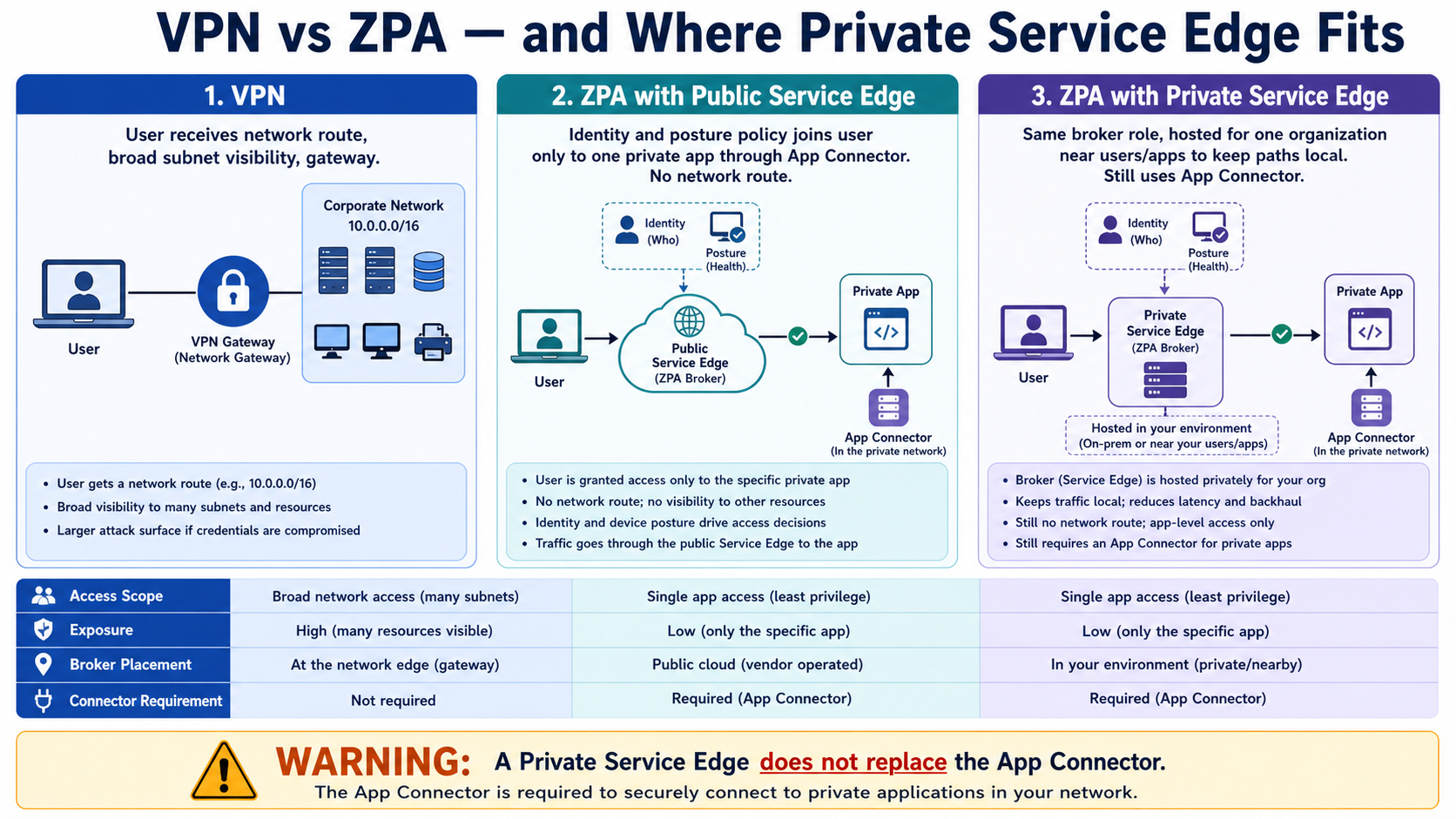
This lesson separates three ideas that are often mixed together: traditional VPN network access, ZPA through a Public Service Edge, and ZPA through an organization’s Private Service Edge. The access model and the broker location are different decisions.
In plain English
A VPN commonly extends a network route to the user. ZPA brokers access to a defined application without giving that route. Public Service Edges are Zscaler-hosted brokers; Private Service Edges provide the broker function for one organization in its environment or cloud. The App Connector still provides the application-side path.
Real example
An office beside its data centre wants payroll traffic to stay local. A Private Service Edge can broker local ZPA sessions while policy still grants payroll only and App Connectors still reach the payroll servers. This is not a return to broad VPN subnet access.
Follow this flow
- Identify whether the requirement is network reachability or access to named applications.
- Define applications and least-privilege policy before choosing broker placement.
- Use Public Service Edges when the global Zscaler path meets the requirement.
- Evaluate Private Service Edges for local path, continuity, compliance, and sizing needs.
- Keep redundant App Connectors and test normal, failover, and disaster paths.
Evidence to collect
- Network route versus application-only access result
- Selected Public or Private Service Edge
- App Connector eligibility and application reachability
- Latency, capacity, failover, policy, and compliance tests
Common mistake to avoid
Do not say a Private Service Edge replaces an App Connector or turns ZPA into a VPN. The Service Edge brokers and enforces the ZPA session; the App Connector remains the secure application-side component.
Current official source checkpoint
- About Private Service Edgescurrent official reference used for this beginner explanation
- Understanding Service Edgescurrent official reference used for this beginner explanation

Key terms before you continue
Most engineers think…
ZPA is just VPN in the cloud, so swapping is a like-for-like upgrade you can flip in a weekend.
Wrong on both counts. A VPN drops you onto a network; ZPA never gives you a network at all — it brokers you to one app after re-checking who you are and how healthy your device is, and the app is invisible to the internet. And you do not flip it; you migrate in risk-ordered waves, run VPN and ZPA side by side, and decide one more thing the VPN never asked: where the broker lives.
① VPN trust vs ZPA trust — the blast-radius argument
Picture an old office building with one front door and a security desk that only checks you once. A VPN is exactly that: log in once, and you are now inside the building, free to wander every floor and rattle every door handle. That is implicit network trust — the network assumes you belong because you got past the desk. ZTNA flips it: you get a keycard cut for one room, re-checked on every request. Zscaler Private Access (ZPA) is Zscaler's ZTNA service, and this single swap — building key to room key — is the whole reason VPN is being retired.
The clearest way to feel the difference is to ask one question: if a single credential is phished, how much can the attacker reach? With a VPN, the answer is "the whole subnet" — they land on the LAN and can scan, enumerate and pivot. Security people call that lateral movement, and it is how one phished password becomes a company-wide incident. With ZPA, the same credential reaches only the one or two apps that user is explicitly authorised for — and the apps are never published to the internet at all. (The deeper components and the brokered microtunnel are taught in the ZPA Fundamentals lesson — here we focus on the decision: VPN vs ZPA, and where to host the broker.)
Here is the honest, interview-ready comparison — ZPA is not free magic, and a good engineer can name where it hurts:
| Dimension | Traditional VPN | ZPA |
|---|---|---|
| Trust model | Implicit — once in, you are on the network | Zero trust — re-checked every request |
| Inbound attack surface | Concentrator exposes UDP 500/4500 or TCP 443 — scannable | Zero inbound; connectors dial out only; app is dark |
| Lateral movement | High — land on LAN, pivot freely | Near-zero — one app per session |
| Visibility | Firewall logs / NetFlow, free | Access logs free; end-to-end needs paid ZDX |
| Scaling / infra | Size hardware concentrators, procurement | Cloud-native, but connector sprawl is real |
| Where ZPA hurts | Familiar; one box to run | Re-auth prompts, mobile-client wobble, 256-rule cap, IdP required, renewal hikes |
The single biggest difference an attacker feels is the inbound attack surface. A VPN concentrator must accept inbound tunnels, so it exposes a port (UDP 500/4500 or TCP 443) to the internet — a public IP that can be found, fingerprinted and brute-forced. ZPA opens zero inbound ports: both the user agent and the App Connector dial OUT to the broker, so the app has no public IP and nothing to scan.
Four myths to flip before we go on
Tap each card — front is the myth most freshers carry, back is the correction.
No. A VPN gives you a network; ZPA gives you one app after re-verifying you. There is no subnet to roam.
The win is blast radius, not crypto. A stolen credential opens one door — and the app was never on the internet to attack.
No. ZPA requires a SAML IdP (Okta, Entra ID). It consumes your identity; it does not replace SSO.
No. You migrate in waves, run VPN and ZPA side by side, and move apps by risk — never a big-bang switch.
Karthik at Flipkart faces this
Over a weekend an attacker phished one developer VPN credential and quietly scanned three internal subnets before anyone noticed. The board now asks: would per-app access have stopped this?
The VPN placed the phished account on the network. From there every reachable host was fair game — the credential was a master key, not a room key.
ZPA never extends a network. The same stolen credential would have reached only the one or two apps that user is explicitly authorised for, and only while their device still passed posture.
"Blast radius." ZPA does not make passwords un-stealable; it makes a stolen password open one door, not the building, and the apps are never published to the internet to begin with.
Prove it in the access log: a ZPA session shows exactly one authorised app per request — there is no subnet the session can wander into.
▶ Watch one stolen credential: VPN vs ZPA
Press Play for the VPN path (attacker pivots across the LAN), then Break it to swap the same credential onto ZPA and watch the pivot die.
A board member asks what makes ZPA more secure than a VPN against a single stolen credential. Which statement is the accurate one-liner?
Pause & Predict
If ZPA never puts a user "on the network", what stops an attacker from just port-scanning the internal app directly over the internet? Type your guess.
② Retiring the VPN in waves — and where ZPA honestly hurts
Nobody flips a company from VPN to ZPA in one weekend. The professional pattern is a wave migration: stand up ZPA alongside the VPN, move applications in batches ordered by risk and blast radius, and only decommission the concentrator once every app has a ZPA segment and a stable success rate. Run the two in parallel so a rollback is just "point that app back at the VPN".
Order the waves by risk, not convenience. A typical sequence: (1) a low-risk pilot app for the IT team, (2) internal web apps for one business unit, (3) thick-client and admin apps (RDP/SSH), (4) the crown jewels — finance, HR, source control — last, with posture conditions. Keep a small VPN footprint for the long-tail legacy app that is not worth a segment yet, then retire it on its own timeline.
Be the engineer who names the trade-offs: a per-rule 256 App Connector Group cap and a per-tenant ceiling on Access Policy rules mean huge estates need clean segment grouping, not one rule per app. ZPA requires a SAML IdP — no Okta/Entra, no ZPA. Deep end-to-end visibility is a paid ZDX add-on (raw access logs are free). Users will hit periodic re-authentication, and the mobile client can be flaky on captive-portal WiFi. And licence renewal hikes are real — budget for them. None of this undoes the lateral-movement win, but pretending it is painless is how a migration stalls.
Rahul at TCS faces this
Rahul is told to "just move everything to ZPA this sprint and switch off the VPN Friday". Two critical apps have no segment yet, and one is a legacy thick-client nobody fully understands.
A big-bang cutover with no rollback path. If any app misbehaves on ZPA after the VPN is gone, there is no way back and the business is down.
Run ZPA and VPN side by side. Migrate in risk-ordered waves, gate each wave on a stable success rate, and keep the VPN as a per-app rollback. Leave the un-mapped legacy app on the VPN until it has a proper segment.
Before retiring the concentrator, confirm every production app has a ZPA Access Policy ALLOW and a clean access log for a full business cycle — then drop the VPN.
③ Public Service Edge vs Private Service Edge — where the broker lives
Every ZPA session is stitched by a Service Edge (the broker). The policy brain — the Central Authority — always lives in Zscaler's cloud. The only thing you are choosing is where the data-path broker sits. A Public Service Edge is Zscaler-hosted and multi-tenant: zero hardware for you, but a same-data-centre app gets brokered out to a Zscaler PoP and back. A Private Service Edge (PSE) is a single-tenant broker you host on VMware, AWS, Azure or GCP — policy still comes from the ZPA cloud, only the brokering and traffic stay local.
So when do you choose a PSE? Five clear triggers: data residency (RBI / DPDP localisation — traffic and brokering must stay in India), low-latency local breakout for users and apps in the same campus or DC (kill the hairpin), OT / air-gapped sites where you cannot route out to a public PoP, high sustained throughput where a dedicated single-tenant broker is worth it, and disaster recovery with locally-cached policy so brokering survives a brief cloud reachability blip. Otherwise the multi-tenant Public Service Edge is simpler and cheaper — no hardware to own.
An Indian bank runs an internal app and its users in the SAME Mumbai data centre, and a regulator requires that the traffic never leave India. Public Service Edge is adding latency by hairpinning. What do they deploy?
Pause & Predict
A PSE keeps traffic local — so does deploying one mean the policy engine and certificates now live in your data centre too? Type your guess.
④ Deploying a PSE — sizing, HA, and the single-point-of-failure trap
A PSE deploys from the ZPA portal almost identically to the cloud broker: you create a Service Edge Group, generate a provisioning key, and bring up the broker VM on your hypervisor or cloud. The stitching to Access Policy is identical — same App Connectors, same Application Segments, same first-match rules. The only new operational reality is that you now own a box: it must be sized, HA-paired, patched and monitored, just like the App Connector.
Two honest limits to bake into the design. First, a single PSE (sometimes called a ZEN in older docs) is a regional single point of failure — never deploy one and call it done; run at least a pair per site so a reboot or patch does not black out the region. Second, not every PoP serves ZPA: only roughly a third of Zscaler PoPs offer ZPA brokering, so your "nearest" public PoP for ZPA may be further than you assume — another reason a local PSE can win on latency for a same-DC app.
Here is the Service Edges configuration screen — recreated so you recognise the real console when you build the group.
And here is the App Connector Group screen — the object you bind to the PSE-served apps. Same chain, whether the broker is public or private.
sudo zpa-service-edge troubleshoot connection
dig +short app1.corp.internal
nc -vz 172.16.20.40 443
timedatectl status | grep -i 'synchronized'
[cloud]  control: UP   (ca: ca.private.zscaler.com)   policy: synced
172.16.20.40
Connection to 172.16.20.40 443 port [tcp/https] succeeded!
System clock synchronized: yes
If control is UP and policy: synced, the PSE is talking to the cloud Central Authority and has its rules. If nc to 172.16.20.40:443 succeeds, the local app is reachable without hairpinning to a PoP — exactly the latency win a PSE buys.
You are deploying a Private Service Edge for a campus where uptime matters. What is the correct minimum design?
▶ Watch a same-DC session brokered by a PSE
Press Play for the healthy local-brokering path, then Break it to see what happens when the PSE is undersized and has no HA pair.
Finance users on ZCC must reach an ERP app brokered by your Mumbai PSE, but ONLY when a CrowdStrike posture check passes. How do you build the Access Policy, and does the PSE change it?
Kavya at Wipro faces this
Kavya deploys one PSE in the Mumbai DC for a bank client and it works beautifully — until the Sunday auto-upgrade reboots it and the entire region loses ZPA for ten minutes. Users panic.
A single PSE is a regional single point of failure. When it reboots for an upgrade, there is no peer to take the sessions, so brokering stops for that location.
Check the Service Edge Group — it has one member, and the upgrade window coincided with the outage.
Administration ▸ Service Edges ▸ (group) ▸ membersAdd a second PSE to the group for an HA pair, and stagger upgrade windows so both never reboot together. For DR, the public PoP can be a fallback if policy allows it.
Reboot one PSE during business hours on purpose; confirm sessions ride the peer with no user-visible drop, then confirm the rebooted PSE rejoins the group.
⑤ Migration gotchas — provisioning, MAC fingerprint and NTP
Standing up the connectors and brokers that replace your VPN has a handful of failure modes that eat hours if you do not know the symptom. These come straight from the field — learn the tell, fix it in minutes.
Priya at Infosys faces this
Priya drops the provisioning key onto a freshly booted App Connector VM, but it never leaves "Starting" and never appears in the portal — even hours later.
The connector reads the provision-key file only ONCE at service start. Drop the key after the service already booted and it will not re-check for around a day. Browser copy-paste can also turn straight ASCII quotes into Unicode curly quotes, which silently rejects the key.
Stop the service, write the key by typing (not pasting), then start and watch the journal for "Enrolled".
systemctl stop zpa-connector ▸ write /opt/zscaler/var/provision_key ▸ systemctl start zpa-connectorVerify the raw bytes with cat (no curly quotes), then journalctl -u zpa-connector -f until it shows Enrolled.
sudo systemctl stop zpa-connector
sudo nano /opt/zscaler/var/provision_key      # TYPE the key, do not paste curly quotes
sudo cat -A /opt/zscaler/var/provision_key    # confirm: no smart-quote bytes
sudo systemctl start zpa-connector
journalctl -u zpa-connector -f | grep -i enroll
provision_key$         (cat -A shows a plain $ EOL, no M-bcM-^@M-^])
zpa-connector[2148]: enrollment: requesting identity cert from CA
zpa-connector[2148]: Enrolled successfully (group: Mumbai-DC-Group)
Rahul at TCS faces this
Rahul clones a connector VM to spin up a second one fast. Both go Offline, and re-provisioning with the same key fails.
ZPA fingerprints a connector cloud identity on its MAC address. A clone, vMotion, NIC swap or a randomised MAC on reboot changes the fingerprint, so the cloud treats it as a new, unprovisioned device and blocks the original.
Set a static MAC in the hypervisor before first enrollment. Give each clone a unique static MAC and re-enroll each with a fresh provisioning key — never reuse the original identity.
Confirm each VM shows a distinct static MAC and a distinct connector entry in the portal, both Healthy.
Sneha at HDFC Bank faces this
A connector logs "certificate not yet valid" and sits in Starting for hours before it (maybe) enrolls.
Enrollment uses a short-lived mTLS cert whose validity starts at the cloud current UTC time. If the connector clock is behind by more than a few minutes (no/broken NTP), the cert is still in the connector future and TLS rejects it.
Allow outbound UDP 123, point chrony at reachable NTP, and restart until the offset is under a second — then restart the connector.
timedatectl shows "System clock synchronized: yes" and chronyc tracking shows a sub-second offset before you retry enrollment.
One reason teams keep a VPN is domain-join and AD/DNS before a user logs in. ZPA covers this with a Machine Tunnel (device tunnel) that comes up at the login screen — but on first-boot Intune/Autopilot laptops it silently fails if ZCC was pushed without the POLICYTOKEN MSI argument, because ZCC cannot pull its App Profile during the Enrollment Status Page. Add POLICYTOKEN=<token> (and use ZCC 4.4+) so the Machine Tunnel establishes pre-logon — removing the last excuse to keep the VPN.
⑥ Hardening the cutover — posture is deterrence, versions are enforcement
Replacing a VPN with ZPA shrinks blast radius dramatically — but it moves the trust boundary onto the client, so the client must actually be trustworthy. Two facts every engineer migrating off VPN needs to internalise: device posture is deterrence that can be bypassed on un-patched clients, and patching the agent is the real enforcement.
Synacktiv (Aug 2025) showed ZPA Device Posture validation runs client-side: by decrypting the local config under DPAPI and patching a few signed binaries, a posture check could be forced to "pass" on un-patched ZCC. Fixed in ZCC 4.4, but exploitable until patched. Treat posture as a deterrent layered with identity, SCIM group and MFA — never as a hard, standalone gate. The fix is the same hygiene as the CVE below: pin a minimum ZCC version.
Disclosed 11 Nov 2025 (CVSS 5.2 v3.1, Medium, CWE-772): a ZCC-for-Windows health-check port was not released after use, and under specific conditions this let traffic bypass ZCC forwarding controls — including ZPA tunnel enforcement — so traffic could route outside the secure ZPA tunnel. In ZTNA the client is the trust boundary, so an agent bypass undermines the whole model even with a perfectly healthy broker. Fix: upgrade ZCC for Windows to 4.6.0.216+ (4.6 branch) or 4.7.0.47+ (4.7 branch), pin a minimum version in the App Profile, and keep agents on a managed auto-update channel.
Pause & Predict
Your ZPA cloud and brokers are perfectly healthy, posture is configured, and the broker passes the user. Why might CVE-2025-54983 still let traffic escape the ZPA tunnel? Type your guess.
Never trust "the connector is green" or "the PSE is up" as proof. Confirm it the right way: the user access log shows an ALLOW against the expected rule and segment; for a PSE, confirm the session was brokered locally (no PoP hairpin) and that policy: synced on the broker; and confirm the retired app no longer has a working VPN path so you have not left a parallel door open. Green is health; the log and the path are access truth.
🤖 Ask the AI Tutor
Tap any question — instant, scoped to this lesson. No login, no waiting.
Pre-curated from Zscaler docs + community Q&A, scoped to this lesson. For a live prod issue, paste your export into chat.techclick.in.
📝 Wrap-up assessment — six more
You've answered 4 inline. Six left. 70% (7 of 10) marks the lesson complete on your profile. Tap Submit all answers at the end.
🧠 In your own words
Type one line: why does retiring a VPN for ZPA shrink an attacker blast radius? Then compare to the expert version.
🗣 Teach a friend
Best way to lock it in — explain it in one line to a teammate. Tap to generate a paste-ready summary.
📖 Glossary
- VPN (Virtual Private Network)
- An encrypted tunnel that drops your device onto the corporate network as if you were in the office — implicit network trust, with a scannable inbound concentrator.
- ZTNA
- Zero Trust Network Access — grant access to one specific app after verifying identity and device health, never the whole network.
- ZPA (Zscaler Private Access)
- Zscaler's ZTNA service that brokers per-app access to private apps without a VPN; the app is never published to the internet.
- Blast radius
- How much an attacker can reach after one compromise. VPN = the whole subnet (high); ZPA = one authorised app (contained).
- Lateral movement
- Moving sideways from one compromised host to others after the first breach — what a flat VPN network enables and ZPA prevents.
- Service Edge
- The Zscaler broker that authenticates the session, enforces Access Policy and stitches the user tunnel to the connector tunnel.
- Public Service Edge
- A Zscaler-hosted, multi-tenant broker in Zscaler's global PoPs — zero hardware for you, but same-DC traffic hairpins out to a PoP and back.
- Private Service Edge (PSE)
- A customer-hosted, single-tenant broker on your VMware/AWS/Azure/GCP; policy still comes from the ZPA cloud, only the data-path broker is local.
- Central Authority (CA)
- The cloud policy brain of the Zero Trust Exchange — stores policy and issues the mTLS certs. Stays in the Zscaler cloud even when you host a PSE.
- App Connector
- A lightweight Linux VM near your private apps that dials outbound-only to the broker and proxies to the real server; never accepts inbound.
- Machine Tunnel
- A device tunnel that comes up pre-logon at the login screen for domain join and AD/DNS — needs the POLICYTOKEN MSI arg on first-boot Intune/Autopilot devices.
- Device Posture
- A device-health condition (e.g. CrowdStrike score) used in Access Policy; evaluates only for the ZCC client type and is validated client-side (deterrence, not hard enforcement until patched).
- Wave migration
- Retiring a VPN by running ZPA side by side and moving apps in risk-ordered batches with a per-app rollback, decommissioning the concentrator last.
📚 Sources
- Zscaler Help — Configuring Access Policies + Service Edges (first-match default-deny logic, Client Type / posture / SCIM conditions, Public vs Private Service Edge). help.zscaler.com/zpa
- Zscaler Help — Configuring Application Segments (Bypass Type NEVER/ALWAYS/ON_NET, Health Reporting, Double Encrypt, the identical object chain behind any broker). help.zscaler.com/zpa
- Practitioner field notes — Deploying ZPA App Connectors / Service Edges (stop-service-before-key enrollment, static-MAC fingerprint, outbound 443 + NTP only, curly-quote key corruption). nathancatania.com / cordero.me
- Synacktiv — Should you trust your zero trust? Bypassing Zscaler posture checks (Aug 2025: posture is validated client-side and was bypassable on un-patched ZCC, fixed in 4.4). synacktiv.com
- NVD — CVE-2025-54983, Zscaler Client Connector for Windows (health-check port not released → ZPA forwarding/tunnel-enforcement bypass; CVSS 5.2; fixed 4.6.0.216+ / 4.7.0.47+). nvd.nist.gov
- Zscaler Cyber Academy — ZDTA (EDU-200) Digital Transformation Administrator blueprint (Z-Tunnel vs Machine Tunnel, PSE vs Public SE, connector-group-per-rule limits, Basic Connectivity domain). zscaler.com
- Practitioner reviews (ZPA vs VPN: connector sprawl, paid ZDX for deep visibility, mobile-client instability, the ~256-rule cap, renewal hikes; ~1/3 of PoPs serve ZPA). peerspot.com / r/Zscaler
What's next?
You can now argue ZPA vs VPN and decide where the broker lives. Next, go back to the foundations and lock the components, the brokered microtunnel and the object chain — then deploy a connector in the live lab.