Start here · understand the lesson before the detail
What you are learning
This lesson teaches the object that makes a private application visible to ZPA: the application segment. You will define the destination and ports, bind the correct server and connector groups, and avoid creating a hidden network tunnel.
In plain English
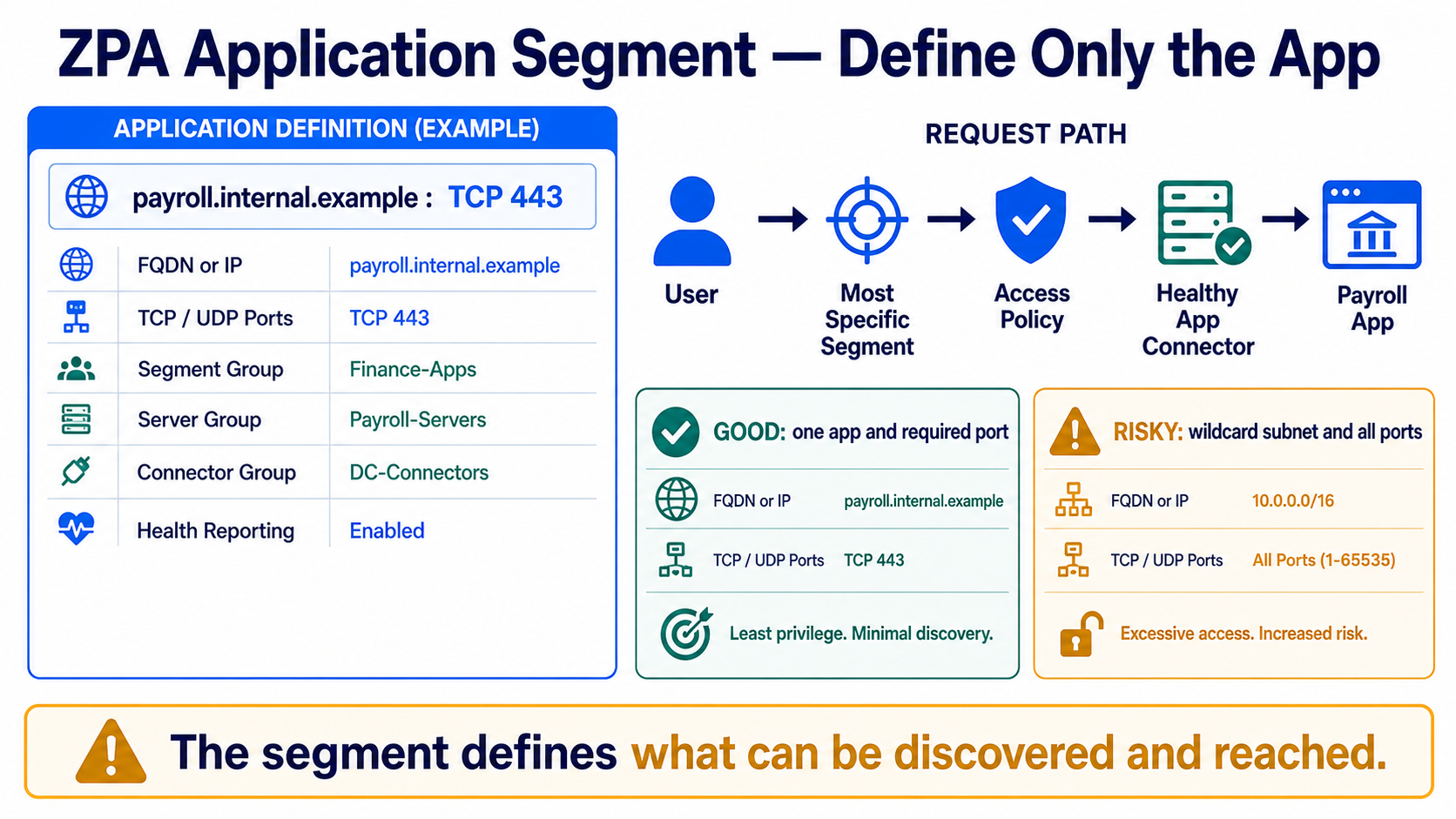
An application segment describes what the app is—not who may use it. It can contain FQDNs, IPs, and TCP or UDP port ranges. Access policy later decides who can reach it. ZPA prefers the most specific matching definition.
Real example
Define payroll.internal.example on TCP 443 and bind its server group to data-centre connectors. Finance policy can then allow that exact app. Defining 10.0.0.0/16 on every port would expose discovery and access far beyond payroll.
Follow this flow
- Inventory the application name, resolved servers, protocol, ports, and owner.
- Create the narrowest correct FQDN/IP and port definition.
- Assign segment, server, and connector groups deliberately.
- Enable appropriate health reporting and test from every connector location.
- Add access policy and verify specific matching with allowed and denied requests.
Evidence to collect
- FQDN/IP, protocol, port, and overlap review
- Segment group, server group, and connector group
- Connector-side DNS and application health
- Matched segment and access rule in diagnostics
Common mistake to avoid
Do not use a broad wildcard or all ports to make an application work. Overlaps can change discovery and policy selection. Fix the exact DNS, port, or server dependency instead of widening the trust boundary.
Current official source checkpoint
- Configure application segmentscurrent official reference used for this beginner explanation
- Understanding application accesscurrent official reference used for this beginner explanation

Key terms before you continue
Most engineers think…
An Application Segment is just “the server’s address” — point it at the box and you are done.
Wrong. A segment is a tightly-scoped object — FQDN, EXPLICIT ports, Bypass Type, Health Reporting — and it must sit in exactly one Segment Group that a rule targets. Fluff the ports and the app is dead; pick Always bypass and ZPA goes blind; use a wildcard with wide ports and the connector browns out. Define the app precisely, or nobody gets in.
① The object chain — why "authenticated" still means "blocked"
You already met the high-level model in the ZPA Fundamentals lesson — the inside-out tunnel, the broker, the four components. This lesson goes one level deeper: the Application Segment, the object that actually defines a private app. Get it wrong and a perfectly authenticated user still reaches nothing — silently.
In ZPA an app is not "a server". It is a chain of objects, and every single link must be intact or the bottom default-deny wins with no error. The chain runs: IdP → Device Posture → Provisioning Key → App Connector Group → Server Group → Application Segment → Segment Group → Access Policy → Timeout Policy. No Application Segment, no access — full stop.
Four segment flags freshers fluff
Tap each card — front is the field, back is the trap it hides. We unpack all four across this lesson.
Explicit FQDN + only the real ports. 0-65535 is the cardinal sin — it makes health checks explode. Exclude DNS port 53.
Never = brokered + logged. Always = direct, ZPA logs nothing and looks broken. On Net = direct only on the corp network.
Inner TLS for plaintext protocols only. It counts double against the connector — 100 Mbps behaves like 200 Mbps.
A segment lives in exactly one Segment Group, and rules target the group. Forget it and the rule cannot see the segment.
Priya at Infosys faces this
Priya's user authenticates perfectly through Okta — the login page loads, MFA passes — but a brand-new Oracle reporting app stays "application unreachable". Her first instinct is to blame the IdP.
It is not auth. The Oracle FQDN was never wrapped in an Application Segment, so ZCC has nothing to match and never even sends the request to ZPA — the default-deny at the bottom of the chain wins.
Walk the chain, not the login. Check the segment exists, its FQDN matches, and it sits in a Segment Group the rule targets.
Applications ▸ Application Segments ▸ (search the FQDN)Create the Application Segment for oracle-rpt.corp.internal on TCP 1521, link the Server Group, and assign it to a Segment Group that an ALLOW rule references.
The user's access log now shows an ALLOW against the new segment — proof the chain is whole, not just that login worked.
An App Connector needs to reach the ZPA cloud. Which single outbound port does it use (with optional UDP 443 for DTLS), and how many inbound ports must be opened?
② Defining the app — Domains, EXPLICIT ports, and the four flags that bite
This is the form where production goes right or wrong. An Application Segment has four decisions that students fluff: the Domain Names (FQDN, wildcard or IP), the TCP/UDP port ranges (never 0-65535), the Bypass Type, and Health Reporting. We will open the real console, then dig into each.
Here is the Add Application Segment screen — recreated so you recognise the live portal.
Domains + ports: scope it like a hotel keycard
Think of a hotel keycard coded for only your floor and your room — it will not open the gym or the manager's office. The Application Segment is that keycard: define just the FQDN and the exact ports the app uses, so a stolen card (a compromised connector) still cannot roam the building. Domain Names accept a precise FQDN (sap.corp.internal), an IP, or a wildcard (*.corp.internal). Port ranges must be the real ports — Zscaler even recommends excluding DNS port 53 from segment ranges. The cardinal sin is 0-65535: it tells the connector the app uses every port, which (with health checks on) becomes self-inflicted CPU death — covered in §4.
Bypass Type — the silent "ZPA looks broken" trap
Bypass Type decides whether ZPA ever sees the traffic. Never (the default) always brokers and logs the session. On Net brokers only when the device is off the corporate network (on-net it goes direct). Always means ZCC sends the traffic straight to the destination and never brokers it — so ZPA logs nothing, and the panicked admin assumes "ZPA is broken". It is the #1 silent trap. Reserve Always/On-Net only for split-tunnel exclusions you intend to skip.
▶ Watch a segment get brokered — then flip Bypass to Always
Press Play for the healthy Never path, then Break it to see what happens the instant Bypass Type is set to Always.
A connector VM was cloned and now stays Disconnected, with the connector log saying certificate is not yet valid; restarting the service changes nothing. Which fix is correct?
Pause & Predict
An admin swears ZPA is down because one app produces zero session logs — yet every other app logs fine and the connector is green. What is the very first segment setting you check, and why? Type your guess.
③ Double Encrypt & Health Reporting — the cost knobs
Two segment options trade safety/visibility for connector capacity. Misjudge either and you brown out a connector. Know exactly what each costs.
Double Encrypt — a second TLS layer that counts double
Double Encrypt adds an inner TLS layer inside the microtunnel, in memory at the Service Edge, so even the broker cannot read the payload. Use it only for genuinely plaintext protocols crossing ZPA — HTTP, FTP, Telnet, RDP-without-TLS. Skip it for HTTPS, SSH or RDP-with-TLS, which are already end-to-end encrypted. The catch is capacity: double-encrypted traffic counts double against the App Connector, so 100 Mbps of Double-Encrypt behaves like 200 Mbps of normal load. Enable it carelessly across a busy segment and you silently halve a connector's headroom.
Ask one question: "is this protocol already encrypted end-to-end?" If yes (HTTPS/SSH/RDP-TLS), leave Double Encrypt off — you would pay ~2× connector load for nothing. If no (Telnet, FTP, legacy HTTP, plain RDP) and the data is sensitive, turn it on and size the connector for double the throughput of that segment. Scope it per-segment, never blanket-on.
An authenticated user can open the app in the browser, but ZPA shows no session logs at all for it, and the admin assumes ZPA is broken. Which segment setting is the cause to revert?
Health Reporting — and the ~6,000-check ceiling
Health Reporting has three modes. None = no active probing. On Access = the connector checks reachability only when a user actually requests the app. Continuous = each connector probes every FQDN+port combination on a cycle (~20 checks/sec). ZPA enforces a hard ceiling of roughly 6,000 health-check targets per App Connector. Combine a wildcard FQDN with a wide port range under Continuous and you blow straight past it — the connector pegs CPU, the health cycle stretches past 10 minutes, and brokering randomly picks connectors. We will do the math next.
Rahul at TCS faces this
Rahul publishes a legacy Telnet jump host through ZPA and ticks Double Encrypt "to be safe". Within a day the Mumbai connector is at 90% CPU and users on three other segments report lag.
Double Encrypt counts double against connector capacity. Enabling it on a busy segment silently halved that connector's effective throughput, starving the other segments it serves.
Check which segments on that connector have Double Encrypt on and estimate their throughput × 2.
Applications ▸ Application Segments ▸ (segment) ▸ Double EncryptKeep Double Encrypt on only for the truly-plaintext Telnet segment, move it to a dedicated connector group sized for 2× its load, and leave the HTTPS/SSH segments with it off.
Connector CPU drops back under ~60% and the other segments recover; the Telnet flow still shows the inner TLS layer in a capture.
④ The 6,000-check explosion — wildcard + wide ports = brownout
This is the single most important number in this lesson. In Continuous health mode the probe count is roughly (FQDNs × IPs-per-DNS) × (TCP ports + UDP ports). An explicit segment stays tiny; a wildcard with all ports explodes into tens of thousands of probes and starves the connector.
sudo zpa-connector troubleshoot health
dig +short sap.corp.internal
nc -vz 172.16.8.20 8443
cat /opt/zscaler/var/health/check_count
[health]  mode: ON_ACCESS   targets: 3   cpu: 11%   cycle: 4s
172.16.8.20
Connection to 172.16.8.20 8443 port [tcp/*] succeeded!
active_targets=3  ceiling=6000  headroom=5997
If active_targets creeps toward 6,000 (or CPU is pegged with a long cycle), you have a wildcard or wide-port segment somewhere on this connector. Find it, make the FQDNs explicit, and trim the ports to what the app truly uses.
Anjali at HDFC faces this
Anjali publishes *.corp.local with a 0–65535 port range "so nothing gets missed". By morning the connector CPU is pegged at idle, the health cycle takes 12 minutes, and brokering jumps between connectors randomly.
A wildcard FQDN with every port makes each connector probe ~65,534 ports per resolved IP under Continuous health — tens of thousands of targets, far past the ~6,000 ceiling.
Inspect the segment's Domain Names and port range; count resolved IPs × ports.
Applications ▸ Application Segments ▸ (segment) ▸ Domain Names / TCP Port RangesRebuild the segment with explicit FQDNs and only the real ports — 443, 1521, 3389 — and assign only the connector group in the app's home datacenter so distant connectors stop probing it.
Health-check count drops back under the ceiling, connector CPU settles, and brokering becomes stable on the local group.
Disclosed 2025-08-05 (CVSS 9.6 Critical, CWE-347): Zscaler's server-side SAML SP failed to verify incoming SAML responses against the configured IdP's public key, so an attacker could forge a SAML assertion naming themselves as any user, receive a valid access token, register a rogue device and gain full authentication bypass into both ZIA and ZPA — reaching every private app behind the tunnel. It was fully patched server-side across all clouds — no customer action required, with no evidence of in-the-wild exploitation. The lesson for segment design: your beautifully-scoped Application Segments are only as trustworthy as the identity feeding them. Confirm your SAML IdP configuration is current. (Pair with CVE-2025-54983 on the ZCC side — update ZCC to 4.6.0.216+ / 4.7.0.47+.)
Pause & Predict
You have one FQDN that resolves to 5 IPs, and you set a TCP range of 1000 ports plus a UDP range of 1000 ports under Continuous health. Roughly how many health-check targets is that, and are you safe? Type your guess.
⑤ Segment Group & the Access rule — where "authenticated but blocked" happens
One hard rule of cardinality: an Application Segment belongs to exactly ONE Segment Group. And Access Policy rules target the group, never a bare segment. So the most common silent failure on Earth is: connector green, segment enabled, ALLOW rule present — yet the segment was never placed in the group the rule references. Result: default-deny, no error.
Here is the Add Access Policy Rule screen, proving the rule targets a Segment Group.
▶ Walk the object chain — then break the Segment Group link
Press Play for a healthy grant, then Break it to see the classic silent failure when the segment is never added to its Segment Group.
You must publish 100 Mbps of plaintext Telnet through ZPA with Double Encrypt enabled. What connector-capacity load does that flow create?
Vikram at Flipkart faces this
Vikram enables a new payments dashboard segment, the connector is green, and an ALLOW rule exists — yet it goes live for absolutely nobody, with no error anywhere in the UI.
The new Application Segment was never placed in a Segment Group, so the ALLOW rule (which targets the group) cannot see it → default-deny.
Open the segment and confirm its Segment Group field is populated and the group lists the segment as a member.
Applications ▸ Application Segments ▸ (segment) ▸ Segment GroupAssign the segment to the exact Segment Group the rule references (each segment lives in exactly one), then retest. Walk the whole chain if it still fails.
The segment now appears in the group's member list and the user's access log shows an ALLOW against the correct rule.
Sneha at Wipro faces this
Sneha's on-prem users hit latency hairpinning to a far Zscaler PoP for a local finance app in the same datacenter. She is asked to cut the round-trip without losing zero-trust.
The Public Service Edge brokers the session in a Zscaler cloud PoP, so a same-building app hairpins out and back — 2–4 extra hops of latency.
Confirm the brokering edge is a remote Public Service Edge, not local, for that segment's users.
Infrastructure ▸ Service Edges (Public vs Private)Deploy a Private Service Edge in the datacenter so on-prem users broker locally, and set a stricter 4-hour idle Timeout on the finance segment group. Trade-off: a PSE is a licensed add-on you must host and patch.
Latency for local-DC users drops sharply and the access log shows brokering via the PSE, not the far PoP.
Pause & Predict
Two Timeout Policy rules match the same user — one says Reauth Idle 24h, the other says 8h. What is the effective reauth interval, and why? Type your guess.
⑥ Public vs Private Service Edge & the revision card
One last design lever your segments inherit. The Service Edge brokers every session, and where it lives changes latency and data residency for the apps your segments define.
Never trust "the connector is green" or "the segment is enabled" as proof. Confirm it the right way: the user's access log shows an ALLOW against the expected rule and the expected Application Segment, and the session reaches the app (not APP_NOT_REACHABLE). If Bypass Type is Always you will see no log at all — that is the tell. Green is tunnel health; the access log is access truth.
🤖 Ask the AI Tutor
Tap any question — instant, scoped to this lesson. No login, no waiting.
Pre-curated from Zscaler docs + community Q&A, scoped to this lesson. For a live prod issue, paste your export into chat.techclick.in.
📝 Wrap-up assessment — six more
You've answered 4 inline. Six left. 70% (7 of 10) marks the lesson complete on your profile. Tap Submit all answers at the end.
🧠 In your own words
Type one line: why does an Application Segment need EXPLICIT ports instead of 0-65535? Then compare to the expert version.
🗣 Teach a friend
Best way to lock it in — explain it in one line to a teammate. Tap to generate a paste-ready summary.
📖 Glossary
- Application Segment
- The object that defines a private app by its FQDN/IP plus TCP/UDP port ranges, with flags like Bypass Type, Health Reporting and Double Encrypt. No segment = nobody can reach the app.
- Domain Names / IP Addresses
- The FQDN, wildcard or IP that ZCC intercepts for a segment. Scope precisely — a wildcard plus wide ports causes a health-check brownout.
- TCP / UDP Port Ranges
- The exact ports a segment uses. Always explicit — never 0–65535. Zscaler recommends excluding DNS port 53 from segment ranges.
- Bypass Type
- Per-segment setting (Never / Always / On Net) that decides whether ZCC routes traffic through ZPA. Never = brokered + logged; Always = direct and ZPA logs nothing; On Net = direct only on the corporate network.
- Health Reporting
- Per-segment probing mode: None (no probes), On Access (probe on user request), Continuous (probe every FQDN+port on a cycle, ~20/sec). Continuous can hit the ~6,000-target ceiling.
- 6,000-check ceiling
- The ~6,000 health-check targets per App Connector that ZPA enforces in Continuous mode. checks ≈ (FQDNs × IPs-per-DNS) × (TCP+UDP ports); wildcard + wide ports blows past it.
- Double Encrypt
- An optional inner TLS layer for plaintext protocols (HTTP/FTP/Telnet/RDP-no-TLS); it counts double against connector capacity, so 100 Mbps behaves like 200 Mbps.
- Segment Group
- A container that bundles Application Segments. A segment belongs to exactly ONE Segment Group, and Access Policy rules target the group, never a bare segment.
- Server Group
- Links app destinations to App Connector Groups. With Dynamic Discovery on, it resolves FQDNs at request time instead of using a static IP list.
- Access Policy first-match
- Rules evaluate top-down and the first match wins, with an implicit default-deny at the bottom — so narrow DENY rules must sit above broad ALLOW rules.
- Timeout Policy
- Rules that force reauthentication. Reauth Idle Timeout minimum is 10 minutes (or Never); the effective value is the minimum across all matching rules, applied after Access Policy.
- Service Edge
- The broker that stitches the ZCC-side and connector-side tunnels. Public = multi-tenant Zscaler cloud; Private (PSE) = customer-hosted for low latency and data residency.
- App Connector
- A lightweight outbound-only Linux VM inside your network that dials out to the Zscaler cloud and proxies user sessions to private apps — zero inbound ports.
📚 Sources
- Zscaler Help — Configuring Application Segments (Name, Status, Health Reporting, Bypass Type, Double Encrypt, Domain Names/IPs, TCP/UDP Port Ranges, Segment Group, Server Groups; exclude DNS port 53). help.zscaler.com/zpa
- Zscaler Help — About Connector Provisioning Keys + About Timeout Policy (provisioning-key enrolment to /opt/zscaler/var/provision_key mode 644; Reauth Idle min 10 min, minimum-wins). help.zscaler.com/zpa
- Community deep-dive — Zscaler app-segment ports and wildcard flow (Continuous health probes every FQDN+port; ~6,000-target ceiling; wildcard + 0-65535 = high CPU and erratic brokering). cordero.me
- Practitioner reviews — ZPA pros/cons (256-rule cap, 48 connector-groups-per-rule cap, "Connected but no traffic", NTP non-negotiable, latency tax fixed by Private Service Edge). peerspot.com / r/Zscaler
- NVD — CVE-2025-54982, Zscaler SAML SP signature not verified (CWE-347, CVSS 9.6) → forged SAML assertion → full ZIA+ZPA auth bypass; patched server-side, no customer action. nvd.nist.gov
- Community control-channel evidence + Zscaler Cyber Academy ZDTA blueprint — connector outbound TCP/UDP 443 (DTLS Z-Tunnel 2.0), systemd zpa-connector, and ZPA exam objectives (segments, first-match Access Policy, SAML/SCIM). nathancatania.com / zscaler.com
What's next?
You can now define a private app the right way. Next, go deeper on the rule that gates it: first-match ordering, AND/OR criteria and device posture in the ZPA Access Policy.