Most engineers think…
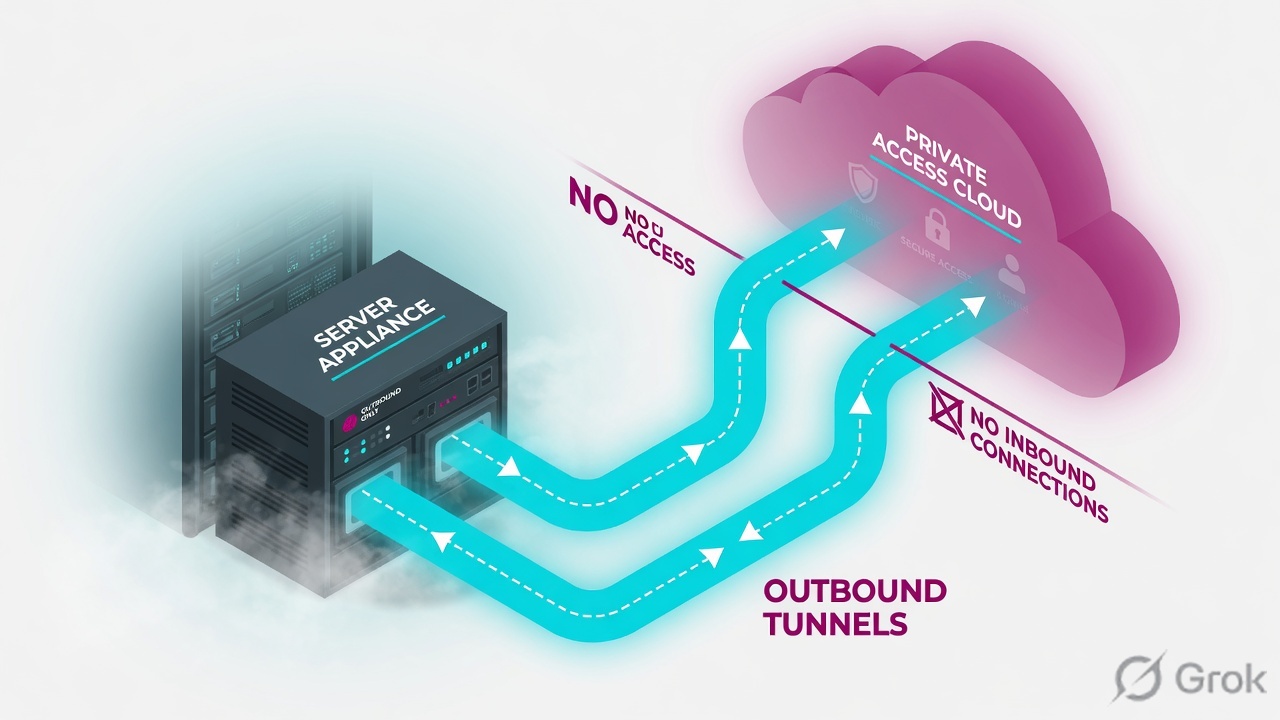
An App Connector is basically a reverse proxy you publish — give it a public IP, open 443 inbound, and the cloud connects in to use it.
Wrong, and backwards. The connector never accepts a connection — it only ever dials OUT to the Zscaler cloud on 443. No public IP, no inbound NAT, no DMZ. Get that one fact and the egress rules, the enrolment handshake and HA all fall into place. The hard parts are not the network — they are the static MAC, the clock, and the provisioning key.
① The App Connector, sized and placed right
An App Connector is not a firewall, not a VPN concentrator, not a server you publish. It is a small Linux VM whose only job is to sit next to your apps, dial out to the Zscaler cloud, and proxy authorised sessions back to the real server. Get its size, its OS, and — the one everyone misses — its MAC address right, and the rest of this lesson is plumbing. Get them wrong and you will chase a ghost for a day.
The minimum spec is deliberately tiny: 2 vCPU, 4 GB RAM, 8 GB disk, on a supported 64-bit Linux — RHEL, CentOS, Oracle Linux or a Zscaler-provided OVA. Each connector pushes roughly 0.3 to 0.5 Gbps, so you scale by adding VMs, not by buying a bigger box. But the spec line that bites freshers is not CPU — it is identity: a pinned static MAC.
When a connector enrols, the ZPA cloud fingerprints it partly by its MAC address. Clone the VM, vMotion it to a host that re-randomises the NIC, or swap the virtual NIC, and the MAC changes — so the cloud sees a different machine, the old identity is gone, and the connector reads as broken. Pin a static MAC on the VM before you enrol it, and never template-clone a live connector — build each one fresh from the base image.
Placement is the other half of sizing. A connector goes near the app, not near the user. ZPA does latency-based selection — it routes a user to whichever connector in the group can reach the app fastest — so a connector sitting in the same data centre as your SAP box is what makes the session quick. Put one in every site/VPC that hosts apps; do not centralise them.
Four deployment facts to lock in first
Tap each card — front is the fact most freshers get wrong, back is the correction you will need all lesson.
No. The minimum is tiny — 2 vCPU / 4 GB / 8 GB. You scale by adding connectors (~0.3–0.5 Gbps each), not by buying a bigger box.
Never. The cloud fingerprints by static MAC; a clone/vMotion/NIC-swap changes it and breaks the identity. Build each connector fresh.
No inbound, ever. The connector dials out only on TCP/UDP 443 — no public IP, no NAT, no DMZ. That is the whole model.
No. Selection is latency-based, so a connector goes near the app, not near the user — one per site/VPC that hosts apps.
Anjali at Infosys faces this
Anjali stands up a connector, enrols it fine, then clones that VM to spin up a second one quickly. Within minutes BOTH connectors flap between Connected and Disconnected, and SAP access gets flaky.
The clone carries the SAME enrolment identity but a different (or duplicate) MAC. The cloud sees two machines claiming one identity and a MAC that no longer matches — so it keeps invalidating the session.
Never clone a live connector. Build the second VM fresh from the base image, pin its own static MAC, and enrol it with a key that allows a second use. Decommission the bad clone in the portal.
Each connector shows a unique ID under its group; sudo systemctl status zpa-connector is steady-Connected on both, no flap in journalctl.
Pause & Predict
If a connector only ever dials outbound, what is the one outbound port your DC firewall MUST allow for the tunnel to even form? Type your guess.
*.prod.zpath.net / *.zscaler.net). Plus UDP 123 for NTP — without correct time the mTLS handshake later fails. There is no inbound rule at all.② Egress rules: what the firewall team needs to open (and what they must NOT)
This is the section that turns a two-week ticket into a ten-minute one. When the firewall team asks "what do we open for this Zscaler thing?", the honest, complete answer is short — and the most important part is what you tell them not to do.
- Outbound TCP 443 and UDP 443 to
*.prod.zpath.netand*.zscaler.net— the Z-Tunnel (TLS, plus DTLS on UDP). - Outbound UDP 123 (NTP) — the connector must hold accurate time or the short-lived enrolment certificate is rejected.
- Outbound DNS (UDP/TCP 53) to a resolver that can resolve the Zscaler cloud and your internal app FQDNs.
- Zero inbound. No NAT, no public IP, no DMZ. The connector is never a destination.
The App Connector certificate-pins to the Service Edge. If an upstream firewall or proxy (Palo Alto, or ZIA itself) does break-and-inspect on its outbound 443, the pinned handshake is terminated and the Z-Tunnel never forms — yet the portal can still show stale "green". Add an SSL-inspection bypass for the ZPA cloud domains. This is a deliberate security control, not a misconfiguration to "fix".
Your firewall team asks which traffic to allow for a new App Connector. What is the minimal correct answer?
Rohit at TCS faces this
Rohit's new Mumbai-DC connector shows Disconnected even though the VM clearly has outbound internet and can browse. There is no obvious error in the portal.
The datacenter firewall is SSL-inspecting all outbound 443. The connector certificate-pins to the Service Edge, so the break-and-inspect terminates the pinned handshake — the Z-Tunnel never establishes.
Run the built-in connector test; it shows the tunnel failing to reach the broker even though plain HTTPS browsing works.
sudo zpa-connector troubleshoot connectionAdd an SSL-inspection bypass for *.zpath.net, *.zscaler.net, *.zscloud.net; confirm outbound UDP 123 (NTP) is allowed too. Re-test.
③ The provisioning key — a secret you can corrupt with a curly quote
A provisioning key is what turns a blank Linux VM into your enrolled connector. It is an OAuth enrolment token, and three facts about it decide whether enrolment works:
- It is bound to exactly one App Connector Group. A key minted for "Mumbai-DC-Group" can never enrol a connector into "Chennai-DC-Group".
- It has a Max Usage count — how many connectors it may enrol before it stops. Set it to the number of connectors you are deploying into that group.
- It is a secret. Anyone with the key can stand up a connector inside your trust boundary, so store it like a service-account password — never in clear text, never in a wiki.
You generate it in the portal, then drop it onto the VM at /opt/zscaler/var/provision_key. Two operational gotchas trip almost everyone the first time:
Write the key while the connector service is running and it may read a half-written file and reject it. Stop zpa-connector first, write the key, then start. And never paste the key through a "smart-quote" editor or chat app: a single straight quote " silently rewritten to a curly “ corrupts the token, and the connector rejects it with a confusing error. Paste into a plain editor, or echo it from a shell that does not autocorrect.
Here is the real Add Provisioning Key form — recreated so you recognise the actual screen and the fields that matter.
sudo systemctl stop zpa-connector # paste the key into a PLAIN editor first (no smart quotes), then: sudo install -o zscaler -g zscaler -m 600 provision_key.txt /opt/zscaler/var/provision_key sudo systemctl start zpa-connector sudo systemctl status zpa-connector --no-pager
● zpa-connector.service - Zscaler App Connector
Active: active (running) since Wed 2026-06-03 09:14:02 IST
Status: "Connected to broker bom2-vse-01, tunnel UP"You are dropping the provisioning key onto a fresh connector VM. Which sequence is correct?
④ Enrolment & the mTLS handshake — why NTP skew = "Disconnected forever"
When you start the service with a valid key, the connector enrols: it presents the key, the ZPA cloud validates it, and the two sides complete a mutual TLS handshake. The cloud issues the connector a short-lived, timestamp-validated certificate, and from then on the connector holds an outbound Z-Tunnel to the broker.
That word timestamp-validated is the whole section. The certificate carries "not-before" and "not-after" times. If the connector's clock is wrong — even by a few minutes — it can present or validate a cert whose window has not opened yet, and the handshake fails with certificate is not yet valid. The connector then shows Disconnected and, because it never gets time-synced on its own, it stays that way forever. This is why UDP 123 (NTP) is not optional.
▶ Watch a connector enrol — then break it with NTP skew
Press Play for a healthy enrolment to Connected, then Break it to see how a wrong clock leaves it Disconnected forever.
systemctl start zpa-connector — the connector dials out on 443 to *.prod.zpath.net and presents the keyA freshly deployed connector stays Disconnected. journalctl shows certificate is not yet valid. What do you fix first?
Sneha at Flipkart faces this
Sneha's connector enrolled perfectly in the lab but goes Disconnected in production, with certificate is not yet valid in the logs. Nothing about the key changed.
The production segment blocks outbound UDP 123, so the VM's clock drifted minutes off. The cloud's short-lived cert then looks "not yet valid" to the skewed connector and the handshake never completes.
Check the clock state on the VM directly.
timedatectl status | grep -i synchronizedAllow outbound UDP 123 to an NTP source, force a sync, then restart the connector. It enrols within seconds once time is correct.
System clock synchronized: yes, and systemctl status zpa-connector reads Connected with a steady tunnel.
Pause & Predict
Why can a clock-skewed connector never recover on its own, even though NTP would fix it? Type your guess.
⑤ High availability — why one connector is an outage waiting for its own upgrade
Connectors auto-update on a schedule you set per group. That is good — patched agents, no manual work. But an update restarts the connector, and during that restart it cannot proxy traffic. With a single connector, your "maintenance window" is every time Zscaler ships an update, whether you planned it or not.
The fix is built into the product: deploy at least two connectors per App Connector Group. ZPA staggers their auto-updates in a round-robin — it upgrades one while the other keeps serving, then swaps. Two connectors means the group is always up; one connector means the group goes dark every upgrade.
Here is the real App Connectors health view — the screen where you confirm a group has its HA pair Connected before you trust it in production.
Priya at Wipro faces this
Priya inherited a ZPA tenant and sees a group with one Connected and one Disconnected connector. The portal shows the dead one stuck on an older version.
The Disconnected connector never finished a past auto-update — most often because its clock drifted (NTP blocked) so it could not re-handshake mTLS, leaving the "group" effectively single-connector and exposed during the next upgrade.
On the dead VM, confirm time first.
timedatectl status | grep -i synchronizedAllow outbound UDP 123, sync the clock, restart the connector; it re-enrols and rejoins the round-robin. Now the group is genuinely HA again.
Vikram at HDFC Bank faces this
Vikram ran a single connector for a critical payments app "to save cost". Every few weeks users report a 3–4 minute outage at odd hours that nobody scheduled.
The connector's scheduled auto-update restarts it; with only one connector in the group, the app is unreachable for the length of the upgrade. The "odd hours" are the group's upgrade window.
Deploy a second connector into the same group (fresh VM, own static MAC, key with Max Usage ≥2). ZPA round-robins the updates so one always serves.
The group shows two Connected connectors; trigger/await the next update and confirm the app stays reachable while one shows "upgrading".
HA is per group, and selection is latency-based within a group, so put both connectors of a group close to the same apps — splitting an HA pair across two distant sites defeats latency selection and can leave one site unserved during the other's upgrade. Also set the group's upgrade schedule to your real low-traffic window; the round-robin still applies, but a sane window keeps even brief per-connector blips off peak.
⑥ Operate it: CLI, SSL-bypass discipline, and patching (the real CVE)
A deployed connector is a Linux service you operate like any other — three commands cover almost every day-2 task. Memorise these; they answer "is it up, why not, and what does it see?"
sudo systemctl status zpa-connector # is the service up? sudo journalctl -u zpa-connector -n 50 # why did it fail / flap? sudo zpa-connector troubleshoot connection # can it reach the broker + the app?
[broker] tunnel: UP (edge: bom2-vse-01) latency: 12ms [time] System clock synchronized: yes [app] 10.20.4.30:443 reachable
If the tunnel is UP but the app line is unreachable, the problem is connector-to-app routing — not ZPA. If time is not synchronized, fix NTP before anything else.
Because the connector cert-pins to the Service Edge, your SSL-inspection bypass for the ZPA cloud domains must stay in place. A common regression: someone "cleans up" firewall bypass rules months later, the next connector update re-handshakes through a now-inspecting proxy, and the whole group goes Disconnected. Document the bypass for *.zpath.net / *.zscaler.net / *.zscloud.net as load-bearing — never "temporary".
Patch the agent — the client is the enforcement point
Disclosed 11 Nov 2025 (CVSS 5.2, Medium): a health-check port in ZCC for Windows was not properly released after use, so traffic could bypass ZCC forwarding controls — escaping ZPA enforcement entirely. This is the user-agent side of the same zero-trust system your App Connectors serve: if the client can sidestep enforcement, a healthy connector does not save you. Fix: upgrade ZCC to 4.6.0.216+ (4.6.x) or 4.7.0.47+ (4.7.x), or later, and keep agents on a managed auto-update channel. (The App Connector itself auto-updates per group — patch hygiene matters at both ends of the tunnel.)
▶ Day-2 health check — and what an SSL-inspection regression looks like
Press Play to walk a healthy day-2 check, then Break it to see a re-enabled SSL-inspection rule knock the group offline at the next update.
systemctl status zpa-connector → Active (running), tunnel UP to the brokertimedatectl confirms clock synchronized: yes — mTLS stays validtroubleshoot connection shows the app reachable from the connectorArjun at TCS faces this
Arjun's connector group was stable for months, then both connectors went Disconnected on the same night — right after a scheduled auto-update. Nobody touched ZPA.
A firewall change re-enabled SSL inspection on outbound 443 (the bypass got "cleaned up"). The next auto-update forced a fresh pinned handshake — which the inspecting proxy broke for both connectors at once.
Run the connector test; the tunnel fails to reach the broker even though the box has internet.
sudo zpa-connector troubleshoot connectionRe-add the permanent SSL-inspection bypass for the ZPA cloud domains and mark it load-bearing in change control. The group reconnects on the next handshake.
Pause & Predict
You SSH into an internal app server through ZPA, and the connection works through one connector but breaks during the group's upgrade window even though you deployed two connectors. What is the most likely placement mistake? Type your guess.
Which set of CLI commands best covers "is it up, why not, and can it reach the app?" for a connector?
A connector is "done" when three things are true, not one: systemctl status zpa-connector reads Connected with a steady tunnel, timedatectl shows the clock synchronized, and the App Connector Group shows ≥2 Connected connectors so an auto-update cannot cause an outage. Green on one connector is tunnel health; two-Connected-in-a-group is availability truth.
🤖 Ask the AI Tutor
Tap any question — instant, scoped to this lesson. No login, no waiting.
Pre-curated from Zscaler docs + community Q&A, scoped to this lesson. For a live prod issue, paste your export into chat.techclick.in.
📝 Wrap-up assessment — six more
You've answered 4 inline. Six left. 70% (7 of 10) marks the lesson complete on your profile. Tap Submit all answers at the end.
🧠 In your own words
Type one line: why does an App Connector show Disconnected forever if its clock is wrong? Then compare to the expert version.
🗣 Teach a friend
Best way to lock it in — explain it in one line to a teammate. Tap to generate a paste-ready summary.
📖 Glossary
- App Connector
- A lightweight Linux VM (2 vCPU / 4 GB / 8 GB) you run next to your apps; it dials outbound-only to the ZPA cloud and proxies authorised sessions to the real server. Zero inbound ports.
- App Connector Group
- The unit of HA, scaling and auto-update. Deploy ≥2 connectors per group; ZPA round-robins their upgrades so one always serves.
- Provisioning Key
- An OAuth enrolment token bound to exactly one App Connector Group, with a Max Usage cap. It is a secret — treat it like a service-account password.
- Max Usage
- The number of connectors a provisioning key may enrol before it stops working. Set it to the connector count for that group.
- Static MAC
- A pinned MAC address on the connector VM. The ZPA cloud fingerprints the connector partly by MAC, so cloning, vMotion NIC-randomise, or a NIC swap breaks the enrolled identity.
- Enrolment
- The first-contact process where a connector presents its provisioning key, the cloud validates it, and the two complete a mutual-TLS handshake to establish the Z-Tunnel.
- mTLS handshake
- Mutual TLS — connector and Service Edge each prove identity with certificates. The connector receives a short-lived, timestamp-validated certificate.
- NTP / clock skew
- Network Time Protocol (UDP 123). A wrong clock makes the timestamp-validated cert appear "not yet valid", so the connector stays Disconnected until time is fixed — it cannot self-heal.
- Z-Tunnel
- The persistent, certificate-pinned outbound TLS/DTLS tunnel the connector holds to the Service Edge on TCP/UDP 443.
- Rolling auto-update
- Per-group scheduled upgrade that staggers connector restarts round-robin, so a multi-connector group has no outage while a single connector goes dark during its own upgrade.
- Certificate pinning
- The connector strictly validates the Service Edge cert. Any inline SSL/TLS inspection on its egress breaks the Z-Tunnel by design — bypass the ZPA cloud domains.
- Latency-based selection
- ZPA routes a user to whichever connector in the group can reach the app fastest — which is why connectors go near the app, not near the user.
📚 Sources
- Zscaler Help — About Connector Provisioning Keys (a key functions like a credential, is bound to one App Connector Group, and has a Max Usage count). help.zscaler.com/zpa
- Zscaler Help — Deploying App Connectors + platform install guides (minimum 2 vCPU / 4 GB / 8 GB, supported RHEL/CentOS/Oracle Linux, static MAC requirement, /opt/zscaler/var/provision_key). help.zscaler.com/zpa
- Zscaler Help — Configuring App Connector Groups + App Connector upgrade/HA best practices (deploy ≥2 per group, staggered round-robin auto-update, latency-based selection). help.zscaler.com/zpa
- Zscaler Community — connector enrolment and certificate is not yet valid / NTP clock-skew threads (UDP 123 mandatory; connector cannot self-heal a wrong clock). community.zscaler.com
- Zscaler Community — connectors showing Disconnected behind SSL-inspecting firewalls (cert-pinning breaks break-and-inspect; bypass *.zpath.net / *.zscaler.net). community.zscaler.com
- NVD — CVE-2025-54983, Zscaler Client Connector for Windows (health-check port not released → forwarding/ZPA-enforcement bypass; fixed 4.6.0.216+ / 4.7.0.47+). nvd.nist.gov
- Zscaler Cyber Academy — EDU-202 (ZDTE) Connectivity Services blueprint (App Connector deployment, provisioning, group HA, upgrade scheduling — the exam-critical objectives this lesson teaches). zscaler.com
What's next?
You can now deploy, enrol and HA-pair an App Connector. Next, see why ZPA beats a VPN architecturally — the attack-surface, lateral-movement and same-LAN trade-offs an L2 engineer designs around — and where a Private Service Edge fits.