Start here · understand the lesson before the detail
What you are learning
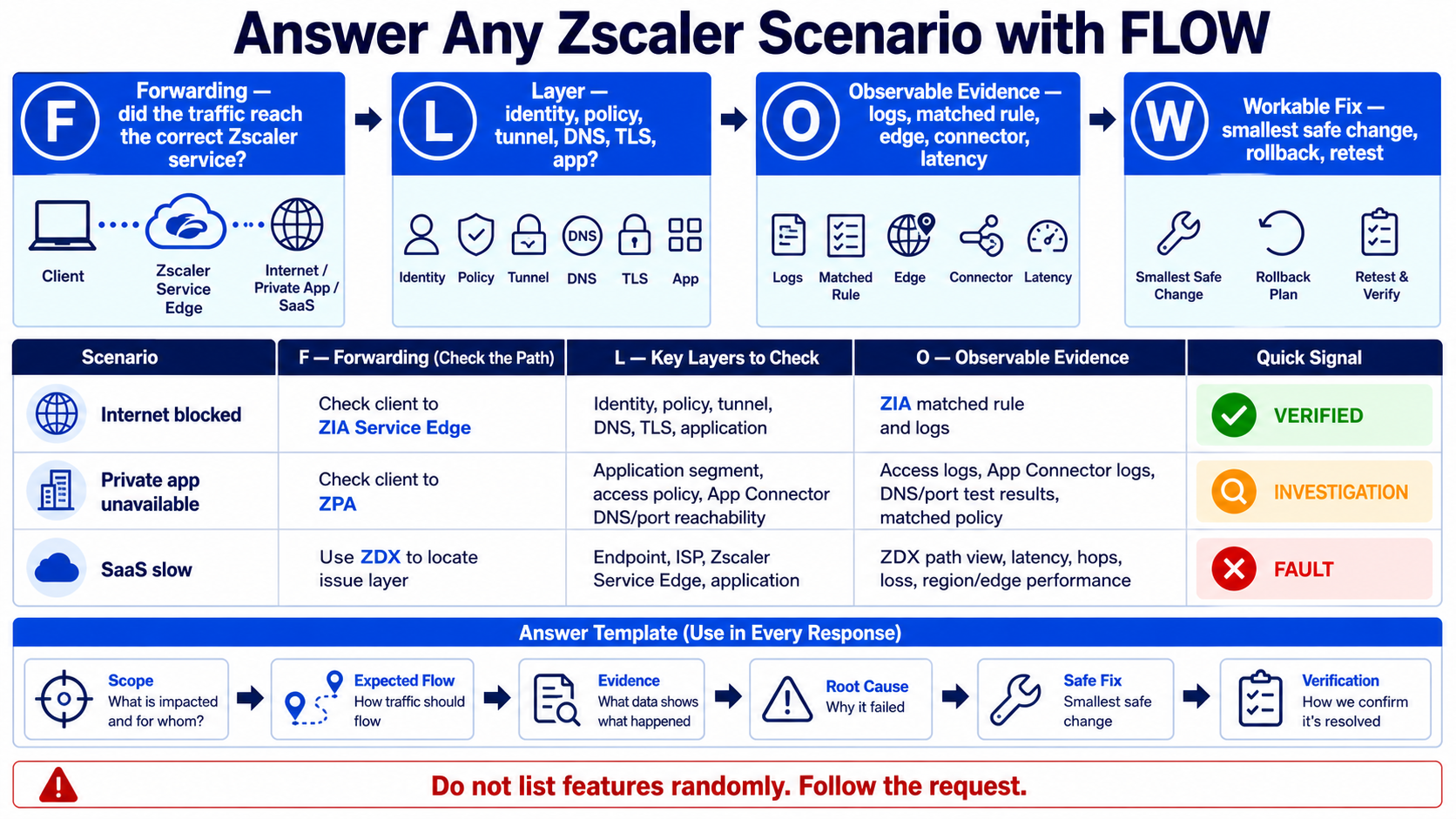
This guide is not a list to memorise. It teaches you how to answer an unfamiliar Zscaler scenario by following the request, naming the failing layer, using evidence, and proposing a safe verified fix.
In plain English
Strong answers connect product knowledge to a request path. First prove the traffic reached the correct service. Then isolate identity, forwarding, policy, DNS, TLS, connector, network, or application. Cite the log or measurement, make the smallest safe change, and retest.
Real example
For “a private app is down,” do not recite ZPA features. Scope the affected users and app, confirm Client Connector selected ZPA, identify the application segment and access rule, test App Connector DNS and port reachability, then use diagnostics to prove the first failed layer.
Follow this flow
- Scope who, what, where, when, and expected behaviour.
- Draw the expected ZIA, ZPA, or ZDX request path.
- Name the evidence available at each layer.
- State the most likely root cause and one discriminating test.
- Propose the smallest safe fix, rollback condition, and verification.
Evidence to collect
- Forwarding status and actual Service Edge
- Identity, posture, application, and matched policy
- Connector, DNS, port, TLS, and server reachability
- ZDX latency/loss or ZIA/ZPA transaction evidence
Common mistake to avoid
Do not claim certainty before gathering evidence. Avoid random feature lists, “restart everything,” broad bypasses, and policy changes without rollback. If an exact limit, screen name, licence, or certification detail may change, say you would verify the current official documentation.
Current official source checkpoint
- ZIA documentationcurrent official reference used for this beginner explanation
- ZPA documentationcurrent official reference used for this beginner explanation

Key terms before you continue
When the interviewer asks "Why Zscaler?", lead with one line — "It connects users to applications, never to the network." That single sentence signals you understand Zero Trust (ZTNA) and instantly separates you from candidates who describe it as "just a cloud proxy." Every answer below carries a 👉 Interview tip so you know the exact line to land.
Visual cheat-sheets — the whiteboard answers
Fundamentals & Zero Trust (7)
Start here — what Zscaler is, Zero Trust, and the SASE vs SSE picture every interviewer opens with.
L11. What is Zscaler? Explain what it does and why companies move to it from traditional appliances.
Zscaler is a cloud-delivered security platform (its core product is the Zero Trust Exchange). Instead of buying hardware boxes that sit in your data center, you route user and device traffic through Zscaler's globally distributed cloud, where it is inspected and policy-checked before reaching the internet, SaaS apps, or private apps.
Its main services are ZIA (secure internet/SaaS access), ZPA (zero-trust access to private apps), and ZDX (digital experience monitoring).
Why companies switch from appliances:
- No hardware to buy, patch, or scale — Zscaler scales elastically.
- Same security policy follows the user anywhere (office, home, mobile).
- Removes slow
MPLSbackhaul to a central data center. - Full
TLS/SSLinspection at cloud scale without choking appliances.
Analogy: instead of every office having its own security checkpoint, everyone passes through one smart, always-updated checkpoint in the cloud.
👉 Interview tip: Lead with "cloud-native security platform built on Zero Trust", then name ZIA/ZPA/ZDX.
L12. What are the core principles of Zero Trust, and how does Zscaler implement 'never trust, always verify' compared to a traditional perimeter/VPN model?
Zero Trust means no user, device, or request is trusted just because it is "inside" the network. Core principles: verify explicitly (identity, device posture, context), enforce least-privilege access, and assume breach (segment everything, never give broad network access).
Traditional perimeter/VPN model: once you connect to the VPN, you are placed on the network and can often reach many systems (lateral movement risk). Trust is based on network location.
How Zscaler implements "never trust, always verify":
- Every connection is brokered through the
Zero Trust Exchangeafter checking identity, device, and context. - With
ZPA, users connect to a specific app, never the network — apps stay invisible (no inbound listening ports). - Policy is re-evaluated per session, not granted once.
Analogy: a VPN hands you the building's master key; Zscaler escorts you to one room and locks the rest.
👉 Interview tip: Stress "connect users to apps, not to the network" — that one line defines ZTNA.
L23. What is the difference between SASE and SSE, and where do ZIA, ZPA, and ZDX fit in that picture?
SASE (Secure Access Service Edge) is the full framework that combines networking (like SD-WAN) and security services, delivered from the cloud. SSE (Security Service Edge) is the security half of SASE — the cloud security services without the SD-WAN networking piece. So: SSE + SD-WAN = SASE.
The three classic SSE pillars are SWG (secure web gateway), CASB (cloud app security), and ZTNA (zero-trust network access).
Where Zscaler fits:
ZIAdelivers the SWG, CASB, DLP, and firewall functions — the SSE "internet/SaaS" side.ZPAdelivers ZTNA — the SSE "private app" side.ZDXis not strictly SSE; it is digital experience monitoring that measures end-to-end performance.
Together ZIA + ZPA = Zscaler's SSE offering; with partner SD-WAN it becomes a full SASE architecture.
👉 Interview tip: Say plainly "SSE is the security subset of SASE" — many candidates blur the two.
L14. What is the difference between ZIA and ZPA, and when would you use each? (The classic 'internet/SaaS security vs private-app ZTNA' question.)
ZIA (Zscaler Internet Access) secures outbound traffic — when users go out to the internet and SaaS apps. It acts as a cloud proxy doing SWG, full SSL inspection, cloud firewall, DLP, CASB, and sandboxing. Use ZIA to safely browse the web, block malware/phishing, and control SaaS usage.
ZPA (Zscaler Private Access) gives zero-trust access inbound — to internal/private apps (in your data center or cloud). It replaces VPN: users connect to a specific app via the broker, apps are never exposed to the internet, and there is no network-level access.
When to use each:
- User opening Gmail, Salesforce, or a website →
ZIA. - User reaching an internal HR portal, SSH box, or RDP server →
ZPA.
Memory hook: ZIA = going OUT to the internet; ZPA = coming IN to private apps.
👉 Interview tip: One sentence wins it — "ZIA secures internet/SaaS egress; ZPA is ZTNA for private apps and replaces VPN."
L25. Why is Zscaler called a cloud-native / proxy-based platform, and what does it replace in a legacy hub-and-spoke network (MPLS backhaul, on-prem SWG, VPN concentrators)?
Zscaler is cloud-native because it was built as a multi-tenant cloud service from day one — not a hardware appliance virtualized into the cloud. It runs across 150+ data centers worldwide and scales elastically.
It is proxy-based because it terminates the connection: traffic goes user → Zscaler Service Edge → destination. As a full proxy it can decrypt SSL/TLS, inspect content, and apply policy inline (unlike a passive firewall that just forwards packets).
What it replaces in a legacy hub-and-spoke design:
- MPLS backhaul — branches no longer haul traffic to a central data center just to reach the internet; they break out locally to the nearest Zscaler edge.
- On-prem SWG/proxy appliances → replaced by
ZIA. - VPN concentrators → replaced by
ZPA(ZTNA). - Centralized firewalls/DLP boxes → cloud firewall + DLP in ZIA.
Analogy: instead of every road leading back to one toll booth, toll booths sit everywhere near you.
👉 Interview tip: Differentiate "cloud-native" from "hosted appliance" — that nuance impresses architects.
L36. Explain the business case for decommissioning MPLS and VPN by adopting the Zscaler Zero Trust Exchange. What trade-offs and migration risks would you raise as an architect?
Business case: MPLS circuits are expensive and slow to provision; backhauling internet/SaaS traffic to a central hub adds latency. Replacing MPLS with local internet breakout + the Zero Trust Exchange cuts circuit cost, improves SaaS performance, and removes appliance refresh cycles. Replacing VPN with ZPA removes the attack surface (no inbound ports, no lateral movement) and improves user experience.
Trade-offs / risks I would raise as an architect:
- Internet dependency: local breakout makes branch ISP quality and redundancy critical — dual links/SD-WAN failover needed.
- SSL inspection scope: bypass lists for pinned-cert and privacy-sensitive traffic must be planned, plus root-CA deployment.
- Phased migration: run VPN and ZPA in parallel; migrate app-by-app, not big-bang.
- App discovery & dependency mapping before ZPA cutover.
- Identity/IdP and conditional access become the new control plane — secure them.
- Latency-sensitive/legacy protocols may not suit a proxy model.
👉 Interview tip: Pair every benefit with a risk and a mitigation — that signals true architect thinking.
L27. How does Zscaler's single-pass / Single Scan Multi-Action (SSMA) inspection model differ from chaining multiple security appliances in series?
In a traditional stack, traffic passes through several appliances in a line — firewall, then proxy, then DLP, then antivirus, then sandbox. Each device decrypts, inspects, re-encrypts, and forwards, so you pay that cost multiple times. This adds latency, complexity, and inconsistent policy.
Zscaler's Single Scan, Multi-Action (SSMA) engine inspects the traffic once. After a single decryption, all security engines — SWG, antivirus, DLP, CASB, firewall policy, sandbox triggers — run in parallel against that same content stream, then a single action is applied.
Key differences:
- One decryption instead of many → much lower latency.
- Parallel engine evaluation, not serial chaining.
- Consistent policy — one decision point, not several boxes that can disagree.
- Scales in the cloud without per-appliance bottlenecks.
Analogy: airport security where one scanner simultaneously checks for metal, liquids, and explosives — instead of five separate lines.
👉 Interview tip: Say "decrypt once, inspect with all engines in parallel" — that is the whole SSMA idea.
ZIA Architecture (7)
How ZIA is built — Central Authority, Public Service Edges and Nanolog — and why it never goes down.
L18. Describe the overall ZIA architecture and name its three core planes/components.
ZIA is built on three separate layers so that control, traffic, and logging never interfere with each other:
- Central Authority (CA) — the control plane. It holds your configuration and policy, manages the cloud, and pushes policy to the enforcement nodes. It is not in the live traffic path.
- Public Service Edges (formerly
ZEN/ Zscaler Enforcement Nodes) — the data plane. These are the full-proxy nodes that actually inspect every user transaction, decryptSSL, and enforce policy inline. - Nanolog clusters — the logging/reporting plane. They receive, compress, and store transaction logs for dashboards, reports, and SIEM streaming.
Traffic flow: a user's request goes to the nearest Service Edge → policy enforced → logs sent to Nanolog → CA stays out of the data path managing policy centrally.
Analogy: CA is the head office writing rules, Service Edges are the guards at the gate, Nanolog is the CCTV recording room.
👉 Interview tip: Name the three planes — control (CA), data (Service Edge), logging (Nanolog) — and stress CA is out-of-path.
L29. What is the Central Authority (CA) in Zscaler? Is it in the data path, and how is it made resilient (active/passive node design)?
The Central Authority (CA) is the brain / control plane of the Zscaler cloud. It stores your tenant configuration, policies, URL categories, and user/admin settings, and it distributes that configuration to all Public Service Edges so every node enforces the same policy.
Is it in the data path? No. User traffic does not flow through the CA. Service Edges already hold the policy locally and inspect traffic independently, so even if the CA were unreachable, existing policy keeps being enforced — traffic does not break. This out-of-band design is a key resilience point.
How it is made resilient:
- The CA runs as geographically distributed, redundant nodes in an active/passive arrangement.
- If the active CA fails, a passive node takes over without losing configuration.
- Configuration is replicated, so policy state survives a node loss.
Analogy: the CA is head office issuing the rulebook; guards (Service Edges) keep working from their copy even if head office is briefly offline.
👉 Interview tip: Emphasize "control plane, NOT in the data path" — that single fact is what interviewers want.
L110. What are ZIA Public Service Edges (formerly ZEN / Zscaler Enforcement Nodes), and what role do they play in the data plane?
Public Service Edges (older name ZEN = Zscaler Enforcement Nodes) are the workhorses of the ZIA data plane. They are full-proxy security nodes sitting in Zscaler's 150+ global data centers, and all user traffic actually flows through them.
What they do per transaction:
- Terminate the connection as a full proxy.
- Perform
SSL/TLSdecryption and inspection. - Run the
SSMAengine — SWG, antivirus, DLP, CASB, cloud firewall, sandbox triggers — in a single pass. - Enforce the policy received from the
Central Authority. - Forward clean traffic to the destination and send logs to
Nanolog.
There are also Private Service Edges (dedicated, customer-specific) for organizations needing isolation, but the public ones serve the shared multi-tenant cloud.
Analogy: they are the security checkpoints every traveler passes through — inspecting, deciding allow/block, and logging the event.
👉 Interview tip: Call them "the inline enforcement / data-plane proxies where all traffic is inspected" and note ZEN is the legacy name.
L211. How does a user get connected to the nearest Service Edge, and why does geographic proximity (geo-IP / DNS steering) matter for latency?
Zscaler steers each user to the closest, least-loaded Public Service Edge automatically. The mechanism depends on how traffic is forwarded:
- With Zscaler Client Connector (the agent), it discovers and connects to the optimal Service Edge based on the user's location and node health/load.
- For other methods, DNS-based steering / geo-IP resolves the Zscaler hostname (e.g. a
gateway.zscaler.net-style name) to the nearest data center's IP. GRE/IPsectunnels from a branch point to the geographically nearest edge.
Why proximity matters: because Service Edges are a full inline proxy, every request makes a round trip to the edge. If the edge is far away, that round-trip distance adds latency to every connection. A nearby edge keeps added latency minimal, so security inspection feels "invisible" to the user.
Analogy: a toll booth right at your highway on-ramp barely slows you; one 500 km away would.
👉 Interview tip: Mention Client Connector + DNS/geo-IP steering and tie proximity directly to per-request round-trip latency.
L212. What are Nanolog clusters, and how does Nanolog Streaming achieve high compression and high availability for transaction logs?
Nanolog clusters are ZIA's logging and reporting plane. Public Service Edges generate a log line for every transaction and stream it to Nanolog, which stores it for the admin dashboard, reports, and analytics — keeping logging completely separate from the traffic-inspection data plane.
High compression: Nanolog uses a highly efficient tokenization/compression scheme (Zscaler cites roughly 50:1 compression). Repetitive fields (URLs, categories, users) are encoded as compact tokens rather than stored as full repeated text, so massive transaction volumes shrink dramatically for storage and transport.
High availability:
- Nanolog runs as clustered, redundant nodes, so a node failure doesn't lose logs.
- Service Edges buffer logs and forward them reliably.
- Nanolog Streaming Service (NSS) streams logs in near real time to your
SIEM(Splunk, QRadar, etc.);Cloud NSSdoes this without an on-prem VM.
Analogy: a CCTV system that records every event in a super-compressed format with backup recorders running in parallel.
👉 Interview tip: Mention the ~50:1 compression and that NSS streams to SIEM — concrete details score points.
L213. Map each ZIA component to its plane: which is control plane, which is data plane, and which is the logging/reporting plane — and why does Zscaler keep them separate?
The mapping:
- Control plane → Central Authority (CA): stores and distributes configuration and policy; out of the traffic path.
- Data plane → Public Service Edges (formerly
ZEN): inline full proxies that inspect and enforce on live traffic. - Logging/reporting plane → Nanolog clusters: receive, compress, and store transaction logs for reports and
SIEMstreaming.
Why Zscaler separates them:
- Resilience: if the CA or Nanolog has an issue, the data plane keeps inspecting traffic — security never breaks.
- Independent scaling: each plane scales to its own load (more Service Edges for traffic, more Nanolog for log volume).
- Performance: logging and config management never add latency to live user traffic.
- Security/blast-radius: a problem in one plane is contained, not cascaded.
Analogy: a factory where the management office (CA), production line (Service Edges), and record-keeping room (Nanolog) run independently — one slowing down doesn't stop the others.
👉 Interview tip: State the three pairs crisply, then give "resilience + independent scaling" as the why.
L314. As an architect, how would you design Service Edge placement, global PoP/egress selection, and HA for a multi-region enterprise, and how does 'nothing written to disk' on the Service Edge affect compliance posture?
Service Edge placement & egress:
- Use
Zscaler Client Connectorfor roaming users so they always hit the nearest, healthiest Public Service Edge automatically. - For branches, terminate
GRE/IPsectunnels to the two nearest data centers (primary + secondary) with local internet breakout — no MPLS backhaul. - For data-residency or fixed-egress-IP needs (geo-locked SaaS, allowlists), use dedicated source IPs or Private Service Edges in-region.
HA: rely on the multi-tenant cloud's built-in redundancy, but design tunnel failover (primary/secondary VIPs), dual ISP at branches, and sub-clouds where regional egress control is required.
"Nothing written to disk" & compliance: Service Edges inspect traffic in memory and do not persist payload content to disk. This shrinks the data-at-rest attack surface and supports privacy/compliance (less sensitive data lingering). Only metadata logs go to Nanolog, so design log retention, residency, and SIEM streaming around that.
👉 Interview tip: Tie "in-memory, no payload on disk" to a concrete compliance win (reduced data-at-rest exposure, GDPR-style data minimization).
Traffic Forwarding & Client Connector (8)
Getting user traffic into Zscaler — GRE, IPSec, PAC, Z-Tunnel 1.0 vs 2.0, forwarding profiles and surrogate IP.
L115. What traffic-forwarding methods are available to send traffic to the Zscaler cloud, and what are GRE vs IPSec tunnels best suited for?
To inspect traffic, Zscaler must first receive it. ZIA offers several forwarding methods, picked by where the user sits:
- GRE tunnels — from a branch/HQ router to the nearest
ZIA Public Service Edge. High throughput, no encryption. - IPSec tunnels — site-to-cloud tunnels that are encrypted; good for devices without static IPs or where you want privacy on the WAN.
- PAC files — browser/OS config that steers traffic to a proxy node.
- Zscaler Client Connector (ZCC) — agent on the endpoint, ideal for roaming users.
- Cloud/Explicit proxy — point browsers directly at the proxy.
Think of GRE as a wide highway and IPSec as the same road but inside an armored truck.
👉 Interview tip: Say "GRE for big bandwidth at sites with static IPs, IPSec when I need encryption or have dynamic IPs."
L216. GRE vs IPSec tunnel: compare encryption, throughput (the ~200 Mbps per-IPSec-tunnel cap), and when you'd pick one over the other for a location.
Encryption: GRE is a plain encapsulation tunnel — no encryption, so your ISP path must be trusted (or you ride a private circuit). IPSec encrypts the payload (IKEv2 + ESP), protecting traffic over the public internet.
Throughput: a single IPSec tunnel to Zscaler is capped around ~200 Mbps because the cloud must do crypto per tunnel; to go higher you add multiple tunnels or use ECMP. GRE has no such practical cap and scales to multi-gig, making it the choice for large branches/HQ.
When to pick: GRE = high-bandwidth site with static public IPs and trusted transport. IPSec = sites with dynamic/NAT'd IPs, broadband links, or where encryption is mandatory.
Analogy: GRE is a fast open lane; IPSec is a slightly slower lane that is fully shielded.
👉 Interview tip: Always mention the ~200 Mbps per-IPSec-tunnel limit — interviewers love that detail.
L117. What is Zscaler Client Connector (ZCC), formerly Z App? What does it do for ZIA and ZPA traffic on an endpoint?
Zscaler Client Connector (ZCC) — earlier called Z App or Zscaler App — is the lightweight agent installed on laptops, phones, and tablets. It is the single piece of software that connects the device to the Zscaler cloud no matter where the user is.
It serves two engines at once:
- For ZIA (internet/SaaS): it forwards outbound traffic into the Zscaler proxy so web/firewall/DNS policies and SSL inspection apply, even off the corporate network.
- For ZPA (private apps): it builds an identity-based, zero-trust micro-tunnel to internal apps — no full network VPN, so the user reaches only the apps they're authorized for.
Analogy: ZCC is one airport security gate that routes you to two different terminals — public (ZIA) and private (ZPA).
👉 Interview tip: One agent, two jobs — ZIA = internet protection, ZPA = private app access.
L218. Explain the difference between Z-Tunnel 1.0 and Z-Tunnel 2.0 (CONNECT / web-only-on-80-443 vs DTLS all-ports-all-protocols), and which ZCC capability Z-Tunnel 2.0 unlocks.
Z-Tunnel is how ZCC carries traffic to the ZIA cloud.
- Z-Tunnel 1.0 uses an HTTP
CONNECTmethod and only handles web traffic on ports 80 and 443. Non-web ports and non-TCP protocols fall outside it, so Cloud Firewall and DNS Control can't see them. - Z-Tunnel 2.0 uses
DTLS(with TLS fallback) and tunnels all ports and all protocols — TCP and UDP. This is what lets ZIA's Cloud Firewall and DNS Control inspect non-web traffic.
Z-Tunnel 2.0 requires a modern Zscaler Client Connector release (it was introduced in the newer ZCC generations; current fleets typically run ZCC 4.x). The practical takeaway: Z-Tunnel 2.0 is what unlocks full Cloud Firewall and DNS Control.
Analogy: 1.0 is a gate that only lets in web visitors; 2.0 is a gate that lets in every kind of visitor and logs them all.
👉 Interview tip: Say "Z-Tunnel 2.0 = DTLS, all ports/protocols, needed for Cloud Firewall + DNS Control."
L219. What is a Forwarding Profile in ZCC? Explain the network states (On Trusted, Off Trusted, VPN Trusted, Split VPN Trusted) and the per-state modes (Tunnel, Tunnel with Local Proxy, Enforce Proxy, None).
A Forwarding Profile tells ZCC how to send traffic depending on the network the device is currently on. ZCC detects the network and maps it to a state, and each state gets a mode.
States:
- On Trusted — device is on the corporate network.
- Off Trusted — roaming / home / public Wi-Fi.
- VPN Trusted — connected over a full corporate VPN.
- Split VPN Trusted — split-tunnel VPN where only some traffic uses the VPN.
Modes:
- Tunnel — send via Z-Tunnel (typically 2.0).
- Tunnel with Local Proxy — loopback PAC/proxy then tunnel.
- Enforce Proxy — force traffic to a defined PAC/proxy.
- None — ZCC doesn't forward (often used On Trusted where a GRE/IPSec tunnel already exists).
👉 Interview tip: Forwarding Profile = network-aware steering: "different mode per state so we don't double-tunnel on-prem."
L220. What is the difference between a Forwarding Profile and an App Profile in ZCC, and how does trusted-network detection drive behavior?
Both are ZCC configuration profiles, but they answer different questions:
- Forwarding Profile answers "HOW do I send traffic?" — it maps the current network state (On/Off Trusted, VPN, Split VPN) to a mode (Tunnel, Tunnel with Local Proxy, Enforce Proxy, None).
- App Profile (App Profile / PAC + policy settings) answers "HOW does the ZCC app itself behave?" — which PAC URL to use, ZIA/ZPA enablement, captive-portal handling, logout/password controls, and which users/OS it applies to.
Trusted-network detection is the trigger: ZCC checks signals like DNS server, search domain, hostname resolution, or reachability of a defined endpoint. If those match the Trusted Network criteria, the device is "On Trusted" and the Forwarding Profile applies that state's mode (often None when a site already has GRE/IPSec); otherwise it's "Off Trusted" and tunnels.
👉 Interview tip: Forwarding Profile = how to forward; App Profile = how the app behaves; trusted-network detection switches between states.
L121. What is a PAC file? Explain the FindProxyForURL(url, host) function and how PAC files are used to steer traffic to the nearest Service Edge or define bypasses.
A PAC file (Proxy Auto-Config) is a small JavaScript file the browser/OS loads to decide, per request, whether to send traffic to a proxy or go direct.
Its heart is one function:
function FindProxyForURL(url, host) { ... }— the browser calls it for every request, passing the fullurland thehost. The function returns a string like"PROXY gateway.zscaler.net:80"or"DIRECT".
Zscaler uses PAC files to:
- Steer to the nearest Service Edge — return the closest ZIA proxy hostname so users hit a low-latency node.
- Define bypasses — use helpers like
shExpMatch(host, "*.internal.local")orisInNet(...)to return"DIRECT"for internal sites, trusted SaaS, or auth endpoints that must skip the proxy.
Analogy: a PAC file is a traffic cop reading each car's destination and waving it to the proxy or the direct lane.
👉 Interview tip: Mention FindProxyForURL returns PROXY or DIRECT, and bypasses use shExpMatch/isInNet.
L322. As an L3, how would you choose a forwarding strategy across HQ, branch, and roaming users (GRE vs IPSec vs PAC vs ZCC tunnel), and why does Cloud Firewall / DNS Control require Z-Tunnel 2.0?
I design by location profile, layering methods rather than picking one:
- HQ / large data center — primary + backup
GREtunnels for multi-gig throughput, static public IPs, no per-tunnel crypto cap. On-prem ZCC runs inNonemode to avoid double-tunneling. - Branch offices —
IPSecfrom the SD-WAN/firewall when links are broadband or IPs are dynamic; remember the ~200 Mbps per-tunnel cap and add tunnels/ECMP if needed. - Roaming / WFH users —
ZCC with Z-Tunnel 2.0as primary;PACas a fallback or for browser-only/unmanaged scenarios.
Why Z-Tunnel 2.0 for Cloud Firewall / DNS Control: Z-Tunnel 1.0 only carries web on 80/443 via HTTP CONNECT, so non-web ports and UDP are invisible. Cloud Firewall inspects all ports/protocols and DNS Control inspects UDP/53 — both need the DTLS, all-ports/all-protocols transport that only Z-Tunnel 2.0 provides.
👉 Interview tip: Frame it as "right tool per location, and FW/DNS Control mandates Z-Tunnel 2.0 because 1.0 is web-only."
Authentication & Provisioning (8)
How Zscaler knows who the user is — SAML, SCIM, Kerberos, LDAP sync and the auth methods you'll be asked to list.
L123. How many authentication methods does ZIA support, and can you name them? Which is most common in production?
ZIA supports roughly seven ways to authenticate users before applying policy:
- SAML 2.0 SSO — federated login against an IdP (Okta, Azure AD/Entra, Ping, ADFS). Most common in production.
- Hosted DB — Zscaler stores the user accounts itself (good for labs/small orgs).
- LDAP / Secure LDAP — sync and authenticate against a directory.
- Kerberos — transparent auth on Windows-joined machines.
- Zscaler Authentication Bridge (ZAB) — transparent auth using an on-prem AD bridge.
- Form-based / Basic authentication — for hosted-DB or directory accounts via a login form.
- OpenID Connect (OIDC) — used with newer ZCC / ZIdentity flows.
User identity is paired with provisioning (SAML auto-provisioning or SCIM) to push users/groups.
Analogy: it's like a building offering several ID-check options, but most enterprises just badge in through one trusted SSO desk.
👉 Interview tip: Lead with "around seven methods, but SAML SSO is the production standard, often paired with SCIM for provisioning."
L224. Explain how SAML SSO works for Zscaler with an IdP (Okta / Azure AD / Entra / Ping). What does the IdP assert back to Zscaler?
SAML SSO lets an external Identity Provider (Okta, Azure AD/Entra, Ping) vouch for the user, so Zscaler never stores passwords. Here Zscaler is the Service Provider (SP).
Flow (SP-initiated):
- User's traffic hits ZIA and is unauthenticated, so ZIA redirects the browser to the IdP with a
SAML AuthnRequest. - The IdP authenticates the user (and may enforce MFA).
- The IdP sends back a digitally signed SAML assertion to Zscaler's ACS URL.
The assertion contains:
- The NameID — usually the user's email/UPN (the identity).
- Attributes — group membership, department, and other claims used for policy.
- A signature Zscaler validates with the IdP certificate.
Analogy: the IdP is a trusted passport office; Zscaler just checks the stamped passport, it doesn't issue IDs.
👉 Interview tip: "IdP asserts identity (NameID) + group attributes, signed; Zscaler is the SP and trusts the signature."
L225. What is the difference between SCIM provisioning and SAML auto-provisioning, and when would you choose SCIM?
Both create users in Zscaler, but they differ in timing and completeness.
- SAML auto-provisioning (JIT) — the user is created/updated in Zscaler at login time, using attributes from the SAML assertion. No account exists until the first successful login, and there's no real-time deprovision when someone leaves.
- SCIM provisioning — the IdP pushes user and group objects to Zscaler over the
SCIMAPI continuously, independent of login. Users, groups, and departments exist before first login, and disables/removals sync in near real time.
Choose SCIM when you need accurate group-based policy before login, large or frequently changing directories, fast deprovisioning for security/compliance, and reliable group membership (JIT can miss groups not present in the assertion).
Analogy: SAML JIT registers a guest when they walk in; SCIM keeps the full guest list synced ahead of time.
👉 Interview tip: "SCIM = pre-provision + real-time deprovision; pick it for group policy and clean offboarding."
L226. What is a Surrogate IP? What problem does it solve, and in which situations is it required (non-cookie apps, undecrypted HTTPS, unknown user-agents)?
Surrogate IP is a ZIA feature that maps an authenticated user to their device's source IP for a period of time. Once mapped, ZIA can attribute later traffic from that IP to the user without re-authenticating every request.
The problem it solves: ZIA normally identifies users with auth cookies, but many flows can't carry or be matched by a cookie. Surrogate IP keeps user-based policy and reporting working in those cases:
- Non-cookie / non-browser apps — thick clients and APIs that don't send the Zscaler cookie.
- Undecrypted HTTPS — when SSL inspection is off, Zscaler can't read/insert the cookie.
- Unknown or odd user-agents — devices that don't handle cookie-based auth.
It's configured per location and tied to authentication.
Analogy: after you badge in once, the building remembers your desk's phone extension and assumes calls from it are you.
👉 Interview tip: "Surrogate IP = user-to-IP binding so non-cookie/undecrypted traffic still gets user policy."
L327. How do idle vs strict (enforced) Surrogate IP timeouts work, and what risk does a too-long surrogate mapping introduce on shared/NAT'd IPs?
Surrogate IP uses two timeout controls per location:
- Idle timeout (Surrogate IP refresh) — the user-to-IP mapping lives as long as there's activity and is dropped after a defined idle period. Active users effectively stay mapped, rolling forward with each request.
- Strict / enforced timeout ("enforce surrogate IP" / hard lifetime) — caps how long the mapping is trusted regardless of activity, forcing re-authentication after the window even for active sessions.
Risk on shared / NAT'd IPs: if the timeout is too long, the IP-to-user binding goes stale. On a NAT gateway, terminal server, or shared kiosk, a second user inheriting the same egress IP can be silently attributed to the previous user — meaning wrong policy enforcement, mis-logged activity, and a potential cross-user identity leak. So on NAT'd/shared egress, keep idle short and the strict timeout tight (or avoid surrogate there).
👉 Interview tip: "Long surrogate on NAT = wrong-user attribution; tighten idle + strict timeouts on shared IPs."
L128. What is the difference between a Known location and an Unknown (Road Warrior) location, and how does Zscaler identify each by egress/source IP?
ZIA classifies where traffic comes from to apply the right policy:
- Known location — an office/branch/data center you've defined in ZIA by its static public egress IP (or by GRE/IPSec tunnel). When traffic arrives from that IP, Zscaler recognizes the location and applies that location's policy, bandwidth, and gateway settings.
- Unknown / Road Warrior location — roaming users (home, hotel, café) whose source IP isn't tied to any defined location. Their traffic is identified by the user identity via ZCC or a PAC file rather than by IP.
So the key signal is the egress/source IP: match a configured public IP/tunnel = Known; no match = Unknown, fall back to user-based identification.
Analogy: a Known location is a registered office address; a Road Warrior is an employee phoning in from anywhere, identified by their badge, not their address.
👉 Interview tip: "Known = recognized by static egress IP/tunnel; Road Warrior = identified by user via ZCC/PAC."
L229. What are sub-locations, and how do location and surrogate IP interact to apply user-based vs location-based policy?
Sub-locations are subdivisions of a parent location, defined by internal IP ranges behind the same public egress IP. A single branch (one public IP) can be split into, say, Guest-WiFi, Corp-LAN, and IoT sub-locations, each with its own policy, SSL-inspection, and bandwidth rules — useful because the parent's one egress IP can't differentiate internally on its own.
Location vs surrogate interaction:
- Location-based policy applies whenever traffic matches a location/sub-location IP — even for unauthenticated or non-user traffic (e.g., guest network). It's the baseline by source IP.
- User-based policy requires knowing who the user is. Surrogate IP binds an authenticated user to their source IP so subsequent flows (including non-cookie/undecrypted) still resolve to that user and get user/group policy.
So location answers "where," surrogate answers "who," and sub-locations refine the "where" inside one egress IP.
👉 Interview tip: "Sub-locations split one public IP by internal subnet; surrogate adds the user dimension on top of location."
L330. How would you design identity for an org running BOTH ZIA and ZPA — same IdP or separate, and how does ZIdentity unify admin identity in the new model?
For an org running both ZIA and ZPA, I use one common IdP (e.g., Okta or Entra) federated to both services, not separate identity stores. Same SAML/OIDC source plus SCIM pushing the same users and groups to both ZIA and ZPA gives consistent group-based policy, single sign-on, and clean offboarding — disable in the IdP, access drops everywhere.
In the newer model, ZIdentity is Zscaler's centralized identity service that unifies this further:
- It becomes the single identity broker in front of ZIA, ZPA, ZDX, etc. — you federate your IdP once to ZIdentity instead of per-service.
- It centralizes admin identity and entitlements — unified admin login, role/entitlement management, and MFA across the Zscaler platform.
- It streamlines provisioning and group sync so policy stays consistent across services.
Analogy: ZIdentity is one front-desk that issues badges for every Zscaler building, instead of each building running its own desk.
👉 Interview tip: "Same IdP for ZIA+ZPA via SCIM; ZIdentity = central broker unifying user and admin identity across the platform."
ZIA Policies & Security Controls (9)
The security controls — URL filtering, Cloud App Control, SSL inspection, file-type, DLP, sandbox and bandwidth — and the precedence traps.
L131. Between URL Filtering and Cloud App Control, which takes precedence by default, and why does that ordering matter?
This is a classic trap, and the surprising answer is: Cloud App Control takes precedence over URL Filtering by default. In ZIA's policy order, the Cloud App Control policy is evaluated FIRST; URL Filtering runs after it.
The key behavior: if a Cloud App Control rule explicitly allows or blocks a transaction, ZIA applies that decision and does not fall through to URL Filtering at all. For example, if Cloud App Control allows viewing Facebook but URL Filtering has a rule blocking www.facebook.com, the user is still allowed in — because the Cloud App Control allow already settled it.
You can change this with the "Allow Cascading to URL Filtering" advanced setting: enable it and ZIA will also apply URL Filtering even after a Cloud App Control allow.
Why it matters: a generous Cloud App Control allow can silently shadow a stricter URL Filtering block, so admins must know which engine wins.
👉 Interview tip: Say clearly "Cloud App Control precedes URL Filtering by default; enable 'Allow Cascading to URL Filtering' to also apply URL Filtering."
L232. What is Admin Rank in URL Filtering (the 0–7 scale, 0 = highest), and how does it constrain what rules an admin can create?
Admin Rank in ZIA is a privilege level from 0 to 7, where 0 is the highest authority and 7 is the lowest. It is assigned to each admin and also set on individual policy rules (in URL Filtering, Firewall, etc.).
It constrains admins in two ways:
- An admin can only create or edit a rule whose rank is equal to or lower (numerically equal or higher) than their own. A rank-3 admin cannot create a rank-0 or rank-2 rule, but can create a rank-3 to rank-7 rule.
- Rule rank also influences ordering and override behavior, so higher-ranked admins set policy that lower-ranked admins cannot supersede.
Analogy: it is like military rank — a captain (rank 3) can issue orders within their level but cannot override a general (rank 0).
👉 Interview tip: Stress "0 = highest" because the inverted scale trips people up, and mention it enforces delegation in large multi-team SOC setups.
L233. How does SSL/TLS inspection work in Zscaler? Explain intermediate/custom root CA distribution and what you typically do NOT decrypt (banking, healthcare).
Most traffic today is HTTPS, so Zscaler must decrypt it to scan for threats and apply policy. In SSL/TLS inspection, the Zscaler cloud acts as a trusted man-in-the-middle: it terminates the user's TLS session, presents its own certificate signed by an intermediate CA, then opens a fresh TLS session to the real server and re-encrypts.
For the browser to trust Zscaler's cert without errors, you distribute either the Zscaler root CA or your own custom intermediate CA to all endpoints, usually via GPO/MDM into the system and browser trust stores.
You typically do NOT decrypt sensitive categories — online Banking/Finance and Healthcare — for privacy, legal, and compliance reasons. These are added to a bypass/do-not-inspect exemption.
Analogy: it is like a trusted post office opening and re-sealing parcels to screen them — but skipping medical and bank envelopes.
👉 Interview tip: Mention cert pinning apps also need bypass, or they break.
L234. What is Cloud App Control / SaaS Tenant Control, and how do you block a personal instance of M365 / Google / Dropbox while allowing the corporate tenant?
Cloud App Control in ZIA governs what users can do inside SaaS apps (e.g. allow view, block upload/download/share) per app category. SaaS Tenant Control goes one level deeper: it distinguishes which tenant/account of an app a user signs into.
The risk: an employee logs into their personal M365, Gmail, or Dropbox and exfiltrates corporate data. With Tenant Control, Zscaler inspects tenant identifiers during the request and injects a restriction.
- For Microsoft 365 Zscaler inserts the
Restrict-Access-To-Tenants/Restrict-Access-Contextheaders listing allowed tenant IDs. - For Google it injects the
X-GoogApps-Allowed-Domainsheader to permit only your domain. - For Dropbox it uses
X-Dropbox-allowed-Team-Ids.
Analogy: same office building, but your badge only opens the company floor, not your personal one.
👉 Interview tip: Tenant Control needs SSL inspection on, since the headers are injected into the decrypted session.
L235. What is Zscaler Cloud Firewall (FWaaS)? Describe L3–L7 rules, network services, and how DNS Control detects DNS tunneling and handles DNS-over-HTTPS.
Zscaler Cloud Firewall is Firewall-as-a-Service (FWaaS) delivered from the cloud, so you get next-gen firewall controls for all ports and protocols without shipping appliances to every branch.
It enforces rules across L3–L7: match on source/destination IP, ports, and network services (named port+protocol objects like DNS, HTTP), up to Layer 7 application awareness so it identifies apps even on non-standard ports.
DNS Control is a dedicated policy that inspects DNS. It detects DNS tunneling (data smuggled inside DNS queries) using behavioral/ML signals like abnormal query volume, long/random subdomains, and unusual record types, then blocks it. For DNS-over-HTTPS (DoH), which hides DNS inside HTTPS to evade inspection, ZIA can detect and block known DoH endpoints so users fall back to inspectable DNS.
Analogy: a security guard who reads every letter — even ones hidden inside other envelopes (tunneling) or sealed packages (DoH).
👉 Interview tip: Note FWaaS is identity-aware, not just IP-based.
L136. Explain File Type Control and Bandwidth Control — how rules apply per URL category / cloud app and how fair-share rate limiting works.
File Type Control lets you allow or block specific file types (e.g. .exe, .zip, .iso) by direction (upload vs download). Rules are scoped, so you can say "block executable downloads from Newly Registered Domains" or "block uploads to personal file-sharing apps" — applying per URL category and per cloud application.
Bandwidth Control manages how much network capacity different traffic gets. You build bandwidth classes (e.g. Streaming, Software Updates) and rules that map URL categories or cloud apps to those classes, then set guaranteed minimum and maximum percentages per location.
Fair-share rate limiting means: when the link is uncongested, low-priority traffic can borrow spare bandwidth; but when contention hits, Zscaler throttles it back so business-critical apps always get their guaranteed share.
Analogy: a highway where trucks (streaming) use empty lanes freely, but during rush hour ambulances (critical apps) get priority.
👉 Interview tip: Stress that limits are per-location and only enforced under congestion.
L237. How do Advanced Threat Protection and Cloud Sandbox work together — inline AI/ML detection, zero-day detonation, and patient-zero vs quarantine (hold-for-analysis) behavior?
Advanced Threat Protection (ATP) is Zscaler's inline defense: every decrypted packet is scanned in real time against signatures, reputation, and AI/ML models that catch phishing, malicious scripts, botnet C2, and known malware — blocking instantly without ever touching the endpoint.
Cloud Sandbox handles the unknown. Files that ATP can't conclusively judge are detonated in an isolated virtual environment to observe real behavior (file changes, network calls), catching zero-day malware.
The key tradeoff is policy mode:
- Patient-zero risk (allow-and-scan): the first user gets the file while it's analyzed in parallel; if malicious, the verdict protects everyone after — but patient zero may be hit.
- Quarantine / hold-for-analysis: the file is held at the proxy until the sandbox verdict returns; nobody — not even patient zero — receives it if it's bad, at the cost of a short delay.
Analogy: food tasting — patient-zero lets the first guest eat while you test; quarantine makes everyone wait for the lab result.
👉 Interview tip: Name the patient-zero vs quarantine tradeoff — interviewers probe whether you understand the delay-vs-risk choice.
L338. Explain Zscaler DLP at depth: dictionaries vs engines, EDM (Exact Data Match) vs IDM (Indexed Document Match), OCR, ICAP, and the DLP Incident Receiver / Workflow Automation flow.
Zscaler DLP inspects content leaving the org to stop data loss. The building blocks:
- Dictionaries = pattern matchers (regex, keywords, predefined like credit-card/SSN) with thresholds. Engines = logic that combines dictionaries with AND/OR/count rules into a usable policy (e.g. "PCI = card-number dictionary AND expiry keyword").
- EDM (Exact Data Match) fingerprints structured data — a hashed index of your customer/SSN database — so it alerts only on real records, slashing false positives.
- IDM (Indexed Document Match) fingerprints unstructured documents (contracts, source files) and detects full or partial copies.
- OCR extracts text from images/screenshots/PDFs so secrets hidden in pictures are still caught.
- ICAP lets ZIA send files to an external DLP/server or store full content for evidence.
The DLP Incident Receiver securely stores the offending content; Workflow Automation then routes incidents to reviewers for triage, assignment, and closure.
👉 Interview tip: EDM = structured, IDM = unstructured — never swap them.
L339. Compare inline (forward-proxy) CASB with out-of-band API CASB / SSPM — what does each catch (shadow IT, tenant restrictions, posture) and why do you need both?
Zscaler offers two complementary CASB modes:
- Inline (forward-proxy) CASB sits in the live traffic path. Because all user traffic flows through ZIA, it sees data in motion in real time — discovering Shadow IT (unsanctioned apps), enforcing tenant restrictions, blocking risky uploads/downloads, and applying inline DLP before data leaves.
- Out-of-band API CASB connects to sanctioned SaaS (M365, Google, Box, Salesforce) via their APIs, no traffic path needed. It scans data at rest already in the cloud — exposed public shares, externally shared files, malware sitting in storage — and remediates retroactively.
- SSPM (SaaS Security Posture Management) audits SaaS configuration/posture against best practice (weak MFA settings, over-permissioned admins, risky integrations).
You need both: inline catches threats as they happen but can't see data already uploaded or scan dormant files; API/SSPM cleans up resting data and misconfig but reacts after the fact.
Analogy: inline is the security guard at the door; API CASB is the auditor checking what's already inside the building.
👉 Interview tip: "Inline = data in motion; API CASB/SSPM = data at rest + posture" — say both are needed.
Zscaler Private Access (ZPA) (7)
Zero-trust private access — App Connectors, app segments, server/connector groups, access policy and why it replaces the VPN.
L140. What is ZPA (Zscaler Private Access), and how does it provide access to private apps as a VPN alternative?
Zscaler Private Access (ZPA) is a cloud-delivered Zero Trust Network Access (ZTNA) service that connects users to private internal applications (data-center or cloud apps) without putting them on the corporate network.
Unlike a traditional VPN — which drops a user onto the LAN and gives broad network access — ZPA brokers a connection per application. The user's Zscaler Client Connector and a lightweight App Connector next to the app each make outbound connections to the Zscaler cloud, which stitches them together only if policy allows. The user reaches the specific app, never the underlying network.
This means apps are never exposed to the internet, there's no inbound firewall hole, and a compromised user can't move laterally.
Analogy: instead of handing someone keys to the whole building (VPN), ZPA escorts them to one specific room and nowhere else.
👉 Interview tip: Frame ZPA as "connect-user-to-app, not user-to-network" — that one line captures the whole ZTNA model.
L141. What is an App Connector? Explain that it makes outbound-only (inside-out) connections, needs no inbound firewall ports, and keeps apps dark to the internet.
An App Connector is a lightweight software broker (a VM or container) you deploy next to your private applications — in a data center, AWS, Azure, etc. It is the bridge between your apps and the Zscaler cloud.
Its defining trait is that it makes outbound-only (inside-out) connections. The App Connector dials out to the Zscaler cloud and keeps that tunnel open; the cloud never initiates a connection inward. Because of this:
- You open no inbound firewall ports — nothing needs to listen for incoming traffic.
- Your apps stay dark/invisible to the internet — there's no public IP, no DNS, nothing to scan or attack. They simply don't exist from an attacker's view.
When a user is authorized, the cloud joins the user's outbound session with the App Connector's outbound session.
Analogy: like a customer-service callback — you don't expose your phone number; you call out, and they connect you mid-call.
👉 Interview tip: The phrase "inside-out, no inbound ports" is what interviewers want to hear.
L242. Why is ZPA considered safer than a traditional VPN end-to-end? Walk through inside-out connections, no inbound holes, app invisibility, and no lateral network access.
ZPA is safer than VPN across the whole chain:
- Inside-out connections: Both the user's
Client Connectorand the App Connector dial outbound to the Zscaler cloud, which brokers the session. Nothing listens for inbound connections, so there's no attack surface to target. - No inbound firewall holes: A VPN concentrator needs a public-facing listener (a juicy target for exploits like the many VPN-gateway CVEs). ZPA opens zero inbound ports.
- App invisibility: Private apps have no public IP/DNS — they're "dark." You can't attack what you can't see or even discover.
- No lateral movement: VPN places you on the network subnet, so a compromised laptop can scan and pivot. ZPA grants access to one specific application, never the network — there's no subnet to roam.
Analogy: VPN gives a hotel guest a master key to every floor; ZPA escorts them to exactly one room.
👉 Interview tip: Tie it to real VPN-gateway CVEs to show you understand the threat model, not just buzzwords.
L243. Explain the ZPA policy objects — Application Segment, Segment Group, Server Group, and App Connector Group — and how Server Groups bind to App Connector Groups for reachability/steering.
ZPA models access with a few stacked objects:
- Application Segment: the actual app(s) defined by FQDN/IP + ports (e.g.
hr.corp.local:443). This is what users ultimately reach. - Segment Group: a logical bundle of related Application Segments (e.g. all HR apps), used to simplify access-policy targeting.
- Server Group: the back-end servers/hosts that serve those apps. Can be defined manually or via App Connector discovery.
- App Connector Group: a set of App Connectors (usually grouped by location/region) that provide the physical path to those servers.
The crucial binding: a Server Group is associated with one or more App Connector Groups. This tells ZPA which connectors can actually reach those servers, driving both reachability and traffic steering — e.g. EU users' traffic flows through EU connectors to EU servers.
Analogy: Application Segment = the destination address; App Connector Group = which local courier hub delivers there.
👉 Interview tip: If Server-Group-to-Connector-Group binding is wrong, apps appear "unreachable" even with correct access policy.
L244. What is the ZPA Access Policy ('the glue')? How do you build least-privilege user-to-app rules using SAML / SCIM attributes, plus timeout, client-forwarding, app-bypass, and re-auth policies?
The Access Policy is the "glue" that decides who can reach which application — it ties identity to Application/Segment Groups. Without an allow rule, ZPA denies by default (zero trust).
For least privilege, you write rules matching user identity using SAML attributes (passed in the auth assertion, e.g. department, group) and SCIM attributes (synced from your IdP, e.g. group membership), then grant only the specific Segment Groups that role needs.
Supporting policies refine the experience:
- Timeout Policy: how long a session stays valid / idle before re-evaluation.
- Client Forwarding Policy: decides whether traffic is forwarded to ZPA, bypassed direct, or intercepted.
- App Bypass: certain apps go direct (not through ZPA).
- Re-authentication Policy: forces users to re-authenticate after a period or on sensitive access.
Analogy: SAML/SCIM is the guest list; the Access Policy is the bouncer checking it room-by-room.
👉 Interview tip: Stress "default deny + identity-attribute matching" as the core of least privilege.
L245. What is ZPA Browser Access (clientless/agentless), how does it use a wildcard cert for HTTPS apps, and how does it differ from client-based access via ZCC?
Browser Access (also called clientless/agentless access) lets users reach internal web apps over HTTPS using just a browser — no Zscaler Client Connector (ZCC) installed. This is ideal for contractors, BYOD, or unmanaged devices where you can't deploy software.
It works by publishing the internal app under a public ZPA Browser Access domain. To serve those HTTPS apps without certificate errors, you upload a wildcard certificate (e.g. *.b.yourcompany.com) so any app hostname under that domain presents a valid, trusted cert in the browser.
Difference from ZCC client-based access:
- ZCC is an installed agent that tunnels any protocol (RDP, SSH, thick-client apps), works transparently, and is for managed devices.
- Browser Access is browser-only, limited to web/HTTPS apps, but needs nothing installed.
Analogy: ZCC is having the company app on your phone; Browser Access is logging in through a secure web link from any device.
👉 Interview tip: Note Browser Access only supports HTTP/HTTPS apps — not RDP/SSH.
L346. As an architect, how would you size and place App Connectors for HA and capacity, and how do App Connector Groups and Server Groups give you both redundancy and traffic steering across regions?
As an architect, I'd treat App Connectors like any HA tier:
- Always deploy ≥2 per location in an App Connector Group so one can fail or be patched with no outage; ZPA load-balances and health-checks across members automatically.
- Place connectors close to the apps (same VPC/data center/region) to minimize latency — the user-to-cloud hop is already optimized by Zscaler's edge.
- Size for capacity by estimating concurrent users/throughput and adding N+1 headroom; scale out by adding connectors to the group rather than over-sizing one.
For multi-region: create a separate App Connector Group per region (EU, US, APAC), then bind each Server Group to its regional App Connector Group. This gives redundancy (multiple connectors per group) and traffic steering — EU users reach EU servers via EU connectors, keeping data and latency local.
Analogy: regional courier hubs — each city has multiple vans (HA) and you route parcels to the nearest hub (steering).
👉 Interview tip: Say "2+ connectors per group, grouped by region, Server Group bound to the regional Connector Group" — that's the model answer.
Advanced & 2026 (ZDX, CASB, CBI, SIPA, Deception) (8)
The 2024–2026 questions that separate you from the crowd — ZDX, CASB, CBI, Source IP Anchoring, Deception, Risk360 and ZIdentity.
L147. What is ZDX (Zscaler Digital Experience)? Explain the ZDX score, CloudPath hop-by-hop probes, and why it reduces help-desk MTTR.
ZDX (Zscaler Digital Experience) is Zscaler's monitoring product that measures the end-to-end experience a user gets when reaching an app — even though the device, Wi-Fi, ISP, Zscaler cloud, and the app are all owned by different parties.
The ZDX Score (0–100) blends three signals: device health (CPU, memory, Wi-Fi), page-load / response time, and network latency. A drop instantly flags a problem.
CloudPath runs hop-by-hop probes that trace every router between the device and the app, showing latency and packet loss at each hop. So you can see exactly where the slowdown lives.
Think of it as a fitness tracker for the user's app journey — it doesn't just say "you feel tired," it says "your heart rate spiked at minute 12." This slashes help-desk MTTR (mean time to resolve) because admins stop guessing and pinpoint the fault.
👉 Interview tip: Stress that ZDX gives proactive visibility — it spots issues before users even call.
L248. What is Source IP Anchoring (SIPA)? How does it forward selected ZIA-inspected traffic to egress from a specific source IP so SaaS IP-allowlists still work, and how does it bridge ZIA with ZPA App Connectors?
Source IP Anchoring (SIPA) solves a real problem: many SaaS apps only accept traffic from a company's known public IPs (an IP allowlist). But when users go through ZIA, their traffic egresses from a Zscaler data-center IP — which the SaaS would reject.
SIPA lets you select specific ZIA-inspected traffic and route its egress through a ZPA App Connector sitting in your own network or cloud. The traffic then leaves from your known source IP, so the SaaS allowlist still passes.
Mechanically, it bridges the two clouds: ZIA still inspects (URL filtering, DLP, threat), then hands the flow over the ZPA fabric to an App Connector you choose, which performs the final egress.
Think of it as a return address sticker — Zscaler still opens and scans the parcel, but stamps your office address before sending it on.
👉 Interview tip: Emphasize you keep full ZIA inspection AND satisfy the SaaS allowlist — no compromise.
L249. What is Cloud Browser Isolation (CBI)? Explain pixel-streaming of risky/uncategorized sites, isolate-vs-block decisioning, and the no-copy/paste/download data-protection controls.
Cloud Browser Isolation (CBI) runs a risky website inside a disposable, isolated browser in the Zscaler cloud instead of on the user's device. The user only receives a safe pixel stream (essentially a live video) of the page, while all active code (JavaScript, downloads, malware) executes in the cloud container and never touches the endpoint.
Isolate-vs-block decisioning: instead of bluntly blocking uncategorized or risky URLs (which frustrates users), policy can isolate them — users still get their work done, but with zero local risk. Blocking is reserved for clearly malicious categories.
Data-protection controls: within an isolated session you can disable copy/paste, file download/upload, and printing — so even legitimate-but-untrusted sites can't exfiltrate or drop data.
Think of it as watching a suspicious package on a security camera in a sealed room rather than opening it on your desk.
👉 Interview tip: Position CBI as the middle ground between "allow" and "block."
L250. What is Zscaler Deception, and how do decoys / lures / planted credentials detect lateral movement and Active Directory attacks as part of the ITDR story?
Zscaler Deception scatters fake assets across your environment — decoys (fake servers, databases, file shares), lures (fake breadcrumbs like saved RDP sessions or browser passwords on real endpoints), and planted/honey credentials (fake AD accounts and tokens).
Real users and apps have no reason to ever touch these. So the moment an attacker who has breached one machine starts scanning, hops to a decoy, or tries the planted credentials against Active Directory, it generates a high-fidelity alert with almost zero false positives — catching lateral movement and AD attacks (Kerberoasting, credential theft) that traditional tools miss.
This is core to ITDR (Identity Threat Detection and Response): it surfaces identity-based attacks early, before the attacker reaches crown-jewel systems.
It's like sprinkling marked banknotes in a vault — only a thief touches them, so any movement is a guaranteed tip-off.
👉 Interview tip: Stress "high-fidelity, low false-positive" — that's deception's biggest selling point.
L351. Explain the ZIdentity migration and the Experience Center: what is changing for admins, and why are Risk360, Health360, and Zero Trust Branch only available in the new unified console?
ZIdentity is Zscaler's unified identity and entitlement layer. Historically admins logged into separate ZIA, ZPA, and ZDX admin portals, each with its own admin accounts and roles. ZIdentity consolidates this into one identity directory and single sign-on for admins, with centralized role-based entitlements across all services.
The Experience Center is the new unified admin console that sits on top of ZIdentity — one pane of glass to manage ZIA, ZPA, ZDX, policies, and analytics together, instead of switching tabs between products.
Why new-console-only: Risk360, Health360, and Zero Trust Branch are cross-product features — they correlate data from ZIA, ZPA, ZDX, and posture simultaneously. The legacy per-product portals can't surface that unified view, so these only exist in the Experience Center.
It's like moving from three separate apps to one super-app dashboard.
👉 Interview tip: Frame ZIdentity migration as the foundation that enables the cross-platform features.
L352. What is Risk360, and how does it quantify cyber-risk across the four stages of attack (external attack surface, compromise, lateral movement, data loss) for board-level reporting?
Risk360 is Zscaler's risk-quantification engine. Instead of vague "you're at risk" statements, it produces a measurable risk score and even a financial impact estimate that a CISO can put in front of the board.
It maps risk across the four stages of an attack:
- External attack surface — exposed apps, ports, and internet-facing assets an attacker could target.
- Compromise — likelihood of initial breach (phishing, malware, risky web access).
- Lateral movement — how easily an attacker could spread internally once inside.
- Data loss — exposure of sensitive data to exfiltration.
Risk360 pulls real telemetry from the Zscaler platform plus external signals, scores each stage, and shows drivers, trends, and prioritized fixes.
Think of it as a credit score for your security posture — one number, but with a clear breakdown of what's dragging it down.
👉 Interview tip: Emphasize it translates technical risk into business/financial language for executives.
L353. How would you design device-posture / identity-posture (ITDR) gating for ZPA and ZIA access using EDR/UEM signals, and what is Zero Trust Branch + Cloud/Branch Connector for agentless server/IoT/OT forwarding?
Posture gating design: define device posture profiles in ZCC/Zscaler that check signals like disk encryption, OS patch level, firewall on, and crucially whether a trusted EDR/UEM agent (CrowdStrike, Defender, Intune) is present and healthy. These posture results become conditions in access policy: e.g., a healthy device gets full ZPA app access; a non-compliant device gets limited access, isolation, or block. Identity-posture / ITDR adds checks for risky identity behavior or AD exposure, so a compromised identity is gated even on a healthy device. Same posture conditions can gate ZIA web/SaaS access.
Zero Trust Branch extends zero trust to a whole site. The Branch Connector (and Cloud Connector for cloud workloads) forwards traffic for agentless devices — servers, IoT, OT, printers that can't run ZCC — into the Zscaler cloud for inspection and policy, with no inbound firewall holes.
It's like a smart doorman that checks ID and health before letting anyone — even devices that can't speak — into specific rooms.
👉 Interview tip: Always tie posture to policy conditions, not just visibility.
L354. Where do Zscaler for Workloads / Posture Control (CNAPP/DSPM) and the AI/Data-Protection convergence (unified DLP + GenAI app governance like ChatGPT/Copilot) fit in the platform breadth story?
These show Zscaler expanding from securing users to securing workloads, data, and AI.
Zscaler for Workloads / Posture Control (CNAPP/DSPM): Zero Trust isn't only for people — cloud workloads (VMs, containers, serverless) also need protected, segmented connectivity. Posture Control (CNAPP) scans cloud environments for misconfigurations, vulnerabilities, excessive permissions, and toxic risk combinations, while DSPM (Data Security Posture Management) discovers and classifies where sensitive data lives in the cloud.
AI / Data-Protection convergence: Zscaler unifies DLP across all channels (web, email, SaaS, endpoint) and adds GenAI governance — visibility and policy over tools like ChatGPT and Copilot, so users can be allowed, coached, isolated, or blocked, and sensitive data is prevented from being pasted into prompts.
Together they make Zscaler a broad zero-trust platform, not just a secure web gateway — protecting users, workloads, data, and AI on one fabric.
👉 Interview tip: Use this to show Zscaler's strategic shift from "SWG" to "full platform."
Troubleshooting & Real Scenarios (9)
Real scenarios — the 'a user reports…' questions where L2/L3 candidates are actually made or broken.
L255. A user reports certificate errors on multiple HTTPS sites after ZCC enrollment. How do you confirm it's the Zscaler SSL inspection root cert, and what do you check (cert distribution, pinned apps, do-not-decrypt categories)?
When ZIA does SSL inspection, it decrypts and re-signs HTTPS with the Zscaler intermediate/root certificate. If that cert isn't trusted by the device, the browser throws cert errors on many sites at once — a classic symptom.
Confirm it's Zscaler: open the failing site, inspect the certificate chain — if the issuer is Zscaler (or your custom intermediate) but it shows "not trusted," the root isn't installed.
What to check:
- Cert distribution — is the Zscaler root pushed to the OS/browser trust store (via MDM/GPO/Intune)? Some browsers (Firefox) use their own store and need it added separately.
- Pinned apps — apps that use certificate pinning (banking, some native apps) will break under inspection; add them to a SSL bypass / do-not-decrypt list.
- Do-not-decrypt categories — verify sensitive categories (banking, health) are correctly excluded.
It's like a customs officer re-sealing your luggage — fine only if everyone trusts that officer's seal.
👉 Interview tip: First confirm the cert issuer, then check the trust store before blaming policy.
L156. A roaming user's traffic is not being forwarded to Zscaler at all. Walk through your triage: ZCC service state, authentication, forwarding profile/network state, PAC logic, and Z-Tunnel status.
Work top-down through the ZCC (Zscaler Client Connector) chain:
- ZCC service state — is the client installed, running, and the service started? Check the ZCC app shows "On" / connected, not paused or errored.
- Authentication — is the user logged in and authenticated (SSO/IdP)? An expired session or failed auth means no forwarding. Re-login or check the IdP.
- Forwarding profile / network state — ZCC applies different rules for Trusted vs Off-Trusted (roaming) networks. Confirm the device is correctly detecting it's off-network and the active forwarding profile actually enables tunneling there.
- PAC logic — if using PAC-based forwarding, verify the PAC is reachable and its
FindProxyForURLisn't sending trafficDIRECT. - Z-Tunnel status — confirm Z-Tunnel (1.0/2.0) is established to the nearest ZIA node; if down, traffic goes direct.
It's like checking a hosepipe end-to-end — tap on, connected, no kinks — before assuming the water company failed.
👉 Interview tip: Always go in order — service, auth, profile, PAC, tunnel.
L257. A private app is unreachable via ZPA for some users but fine for others. How do you isolate it — App Connector up/down, wrong Server Group/Connector Group binding, access policy, or DNS resolution?
"Some users fail, others work" usually points to policy or group scope, not a total outage. Isolate methodically:
- App Connector health — if it were fully down, everyone would fail, so check whether multiple connectors exist and one (serving a subset/region) is down or overloaded.
- Server Group / Connector Group binding — verify the App Segment is bound to the correct Server Group, and that Server Group maps to a Connector Group that can actually reach the app. A mismatch can leave certain regions unserved.
- Access policy — check the ZPA access policy and SAML/SCIM attributes; the failing users may be in a group that isn't allowed, or hit a deny rule.
- DNS resolution — confirm the app's domain is in the App Segment's domains and resolves correctly via the connector (App Connector does the DNS lookup).
It's like a delivery failing only for one postcode — the warehouse is fine; the routing for that zone is wrong.
👉 Interview tip: "Some users" = scope/policy; "all users" = connector/app outage.
L258. Users at one branch suddenly get road-warrior/default policy instead of their location policy. How does this happen (egress IP change, tunnel flap, unprovisioned IP), and how do you fix it?
In ZIA, a Location is identified by its public egress IP (for GRE/IPSec) or sub-location. If Zscaler no longer recognizes the branch's egress IP, it falls back to road-warrior / default policy (or treats users as off-net), so the branch's specific rules, bandwidth, and SSL settings stop applying.
Common causes:
- Egress IP change — ISP changed the branch's public IP (DHCP/lease change), so it no longer matches the configured Location IP.
- Tunnel flap — the GRE/IPSec tunnel dropped, so traffic now egresses directly via the local breakout with an unknown IP.
- Unprovisioned IP — a new IP/range wasn't added to the Location object.
Fix: confirm the branch's current public IP, update the Location object with the correct egress IP, ensure the tunnel is stable, and where possible use static IPs or tunnel-based location identification to avoid drift.
It's like a VIP wristband tied to your seat number — sit elsewhere and you lose the perks.
👉 Interview tip: Location = egress IP. Fix the IP mapping first.
L359. A user keeps getting another user's policy or an identity mismatch on shared/NAT'd egress. How does Surrogate IP timeout configuration cause this, and how do you remediate it?
Surrogate IP is a ZIA feature that maps an authenticated user to their device IP for a set time, so traffic that can't carry auth (non-browser apps, some protocols) is still attributed to the right user without re-authenticating.
How it misfires on shared/NAT'd egress: if many users sit behind one NAT IP, or a DHCP IP is reused, ZIA may bind that IP to User A, and when User B later appears on the same IP — before the surrogate timeout expires — B's traffic is mis-attributed to A. So B inherits A's policy, logging, and identity. Long idle/auth timeouts make the stale mapping linger.
Remediation:
- Shorten the Surrogate IP idle timeout so stale bindings clear quickly.
- Disable Surrogate IP on shared/multi-user or NAT'd locations, or use it only where one IP = one user.
- Prefer per-user auth (ZCC) so identity isn't IP-derived.
It's like a hot-desk badge not being cleared before the next person sits down.
👉 Interview tip: Tie the symptom directly to timeout + shared IP.
L260. A whole site's GRE/IPSec tunnel is flapping and throughput is degraded. How do you diagnose tunnel health, the IPSec ~200 Mbps cap, and decide between GRE failover or adding tunnels?
Diagnose tunnel health: check the tunnel status in the ZIA portal and on the edge router — look for repeated up/down (flap), and monitor latency, packet loss, and keepalive/IKE failures. Flapping often comes from MTU/fragmentation issues, ISP instability, or IKE rekey problems; throughput drops because traffic keeps re-establishing.
The IPSec ~200 Mbps cap: a single IPSec tunnel to a ZIA node is limited to roughly 200 Mbps (encryption overhead per tunnel). If the branch needs more, one tunnel becomes a bottleneck and can appear as degradation.
GRE failover vs adding tunnels:
- GRE doesn't have that per-tunnel encryption cap and scales higher — good for high-throughput sites; pair primary + secondary GRE to the nearest two ZIA data centers for failover.
- Adding IPSec tunnels (ECMP / multiple tunnels) lets you aggregate beyond 200 Mbps when GRE isn't available or you want encryption.
It's like adding more lanes versus switching to a wider highway.
👉 Interview tip: Remember the ~200 Mbps per-IPSec-tunnel number — it's a classic question.
L261. Help desk reports a sudden ZDX score drop for a SaaS app for users in one region. Using CloudPath hop analysis, how do you determine whether it's the device, Wi-Fi, local ISP, the Zscaler PoP, or the SaaS provider?
The fact it's one region, one app already narrows it — but CloudPath hop analysis pinpoints the exact segment. Read the hop-by-hop path and isolate where latency/packet loss begins:
- Device — if ZDX device metrics (CPU, memory, Wi-Fi signal) are bad but the network path is clean, it's the endpoint.
- Wi-Fi / LAN — high latency at the first hop (the local gateway/AP) points to Wi-Fi or the local network.
- Local ISP — degradation appears in the ISP hops between the home/branch and the Zscaler PoP (region-wide ISP issue).
- Zscaler PoP — the slowdown clusters at the Zscaler data-center hop; compare against other apps via the same PoP.
- SaaS provider — the path is clean all the way to Zscaler, but the final hops to the app / app response time are bad — and likely affects everyone, not just your region.
It's like a GPS showing exactly which junction the traffic jam starts at.
👉 Interview tip: Match the symptom hop to the owner — first hop = Wi-Fi, middle = ISP, end = SaaS.
L262. You're asked to validate a PAC file before rollout. How do you read/test the FindProxyForURL logic, confirm bypass rules, and avoid breaking captive portals or critical SaaS?
A PAC file is JavaScript with a FindProxyForURL(url, host) function that returns either a proxy (send to Zscaler) or DIRECT (bypass). Validate it carefully before rollout:
- Read the logic — trace the
ifconditions in order; PAC evaluates top-down and returns on first match, so rule order matters. CheckshExpMatch,dnsDomainIs, and IP-range checks. - Test it — run the PAC against many sample URLs (internal, SaaS, captive-portal, RFC1918) using a PAC tester / browser dev tools and confirm each returns the expected proxy-or-DIRECT verdict.
- Confirm bypass rules — ensure internal/RFC1918, link-local, and known-good SaaS that must not be inspected return
DIRECT. - Captive portals — these need DIRECT to load (hotel/airport Wi-Fi login pages) or users can't get online; verify captive-portal detection URLs and link-local ranges bypass.
- Critical SaaS — confirm pinned/sensitive SaaS routes correctly and isn't accidentally blocked.
It's like proof-reading a flowchart before printing 10,000 copies.
👉 Interview tip: PAC is first-match top-down — order and DIRECT bypasses are where things break.
L363. As escalation lead, an app works via Browser Access but fails via client-based ZPA (or vice-versa). How do you root-cause across access type, app-segment definition, server group reachability, and re-auth/timeout policy?
Browser Access (clientless, via browser to a Zscaler-published URL) and client-based ZPA (via ZCC Z-Tunnel) take different paths and policies to the same app — so a split symptom usually means a config difference between the two, not an app outage.
- Access type — Browser Access needs a published BA application with a valid wildcard/SAN certificate; client-based needs ZCC tunneling + correct ports/protocols. A cert or BA-config issue breaks only the browser path; a tunnel/port issue breaks only the client path.
- App-Segment definition — confirm the failing path's domain, ports, and protocols are all in the App Segment. Client ZPA may need extra ports the BA config doesn't.
- Server Group reachability — verify both paths bind to a Server Group whose App Connectors can reach the backend; a connector issue usually hits both, narrowing it to config.
- Re-auth / timeout policy — check reauthentication / session timeout and SAML; one path may have a stricter timeout forcing failure.
It's like a building with two entrances — one keycard works, the other door's reader is misconfigured.
👉 Interview tip: Different access types = compare their configs side-by-side first.
20-minute drill: Pick one question from each of the 8 sections, set a 90-second timer, and answer out loud. If you can land the one-line 👉 Interview tip for every section, you're interview-ready. Re-take any L3 scenario you stumble on — those are where L2/L3 candidates are actually decided.
What's next?
Start the real course — Zero Trust foundations and how Zscaler's architecture fits together, from the ground up.