Lessons · Cortex series · XSOAR playbooks
This lesson is Cortex XSOAR: incident types, classifiers, playbooks, War Room. Cortex XDR is the telemetry and causality engine that often feeds XSOAR. Cortex XSIAM renamed many of the same objects to issues — do not mix the menus.
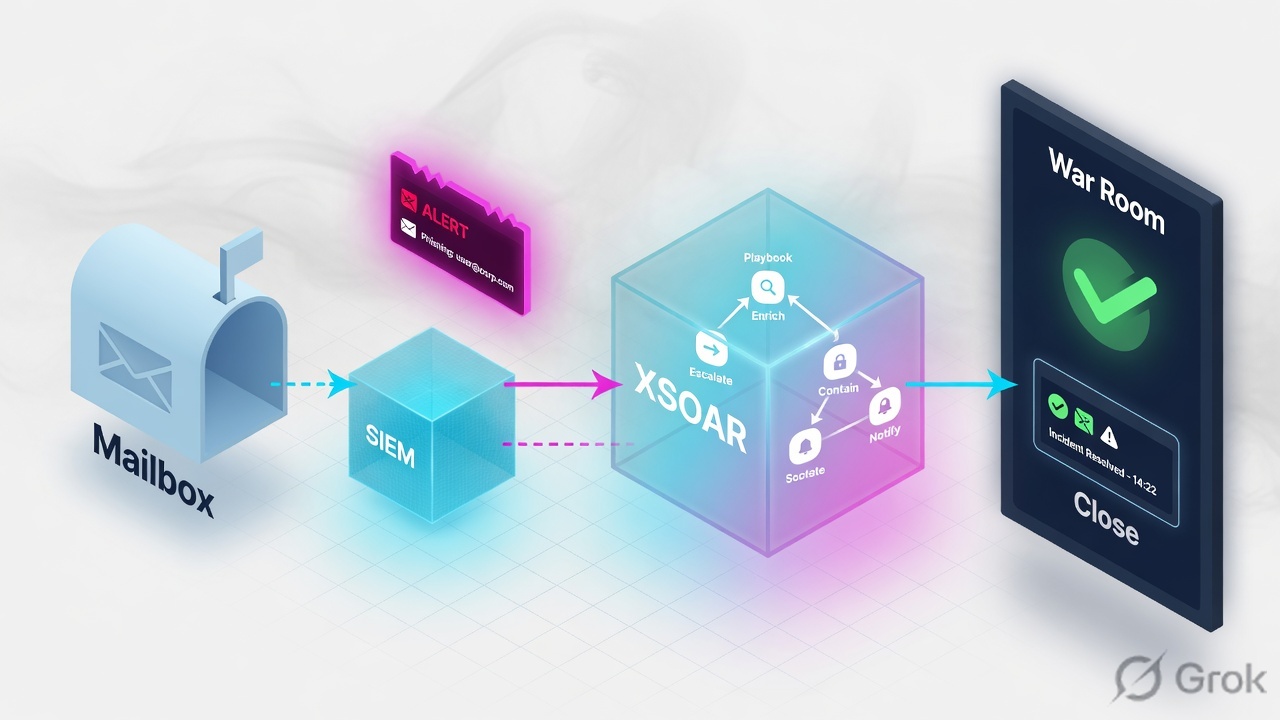
An integration fetches events. A classifier (or the instance default type) sets the incident type. A mapper copies rawJSON into incident fields; leftovers are labels. Pre-process may drop or link duplicates. The type’s default playbook runs if “Run playbook automatically” is on. Tasks write Context for the next hop and the War Room for the audit. Enrichment can be automatic. Isolate / block / mailbox purge wait on a manual or conditional task. Proof is the War Room task trail plus Context scores — Closed is just a field.
Why Closed is not a verdict
The day-one ticket is always the same: “The playbook finished, so the case is done.” Wrong. A playbook finishes when it reaches an end task. That can happen because enrichment succeeded, because a condition was empty, or because nobody wired an error branch. Closed means someone — or !closeInvestigation — wrote a close reason. It does not mean WildFire returned malicious, or that the URL was detonated at all.
Three silent-wrong states look identical in the incident list (status Closed):
- Classifier missed; incident landed on the instance default type; the wrong playbook ran and auto-closed.
- Mapper never filled
Email URL; the enrich task ran against empty input and continued. - WildFire /
!urlerror; no conditional onDBotScore.Score; the close task still fired.
Start at ingest. If Classification & Mapping shows the event as Unclassified, the default playbook on the integration instance is what ran — not Phishing Investigation. War Room of INC-4821 will show which playbook name actually executed.
Four objects: integration, type, playbook, War Room
An integration instance is the connector: fetch incidents, run commands, optionally mirror. Fetch is a checkbox on the instance. Commands (!url, !wildfire-upload, !setIncident) are what playbook tasks and the War Room CLI actually call.
An incident type owns the default playbook, whether that playbook runs on ingest, auto-extract mode (None / Inline / Out of band), SLA, layout, and the post-process script. Classifier output is a type name. Type is not a playbook.
Integration
Marketplace pack → Settings → Integrations → Add instance. Lab: Microsoft Graph Mail graph_phish_in, Fetches incidents on, mailbox phish@lab.techclick.in.
Classifier / mapper
Classifier = incident type from a rawJSON key. Mapper = fields. Unmapped attributes → incident.labels. Classifier overrides the instance default type.
Playbook
Graph of standard (script/command), conditional, data-collection, and manual tasks. Inputs/outputs ride Context. Sub-playbooks are tasks with “Skip if unavailable.”
War Room vs Context
War Room is the journal: commands, notes, evidence, errors. Context is the JSON memory the next task reads. Quiet Mode still logs errors; it hides I/O noise.
The integration fetches. The classifier names the type. The mapper fills fields. The type’s default playbook runs. Tasks write Context and the War Room. Close is a task, not a side effect of enrichment.
Incident lifecycle — ingest then automate
Official order: plan fields/types/layouts → configure integrations → classification and mapping → pre-processing → incident created → playbook (on create or manual) → post-processing on close. Playbooks also run when you launch them from Work Plan. Manual / playbook-created incidents skip the classifier — you set the type yourself.
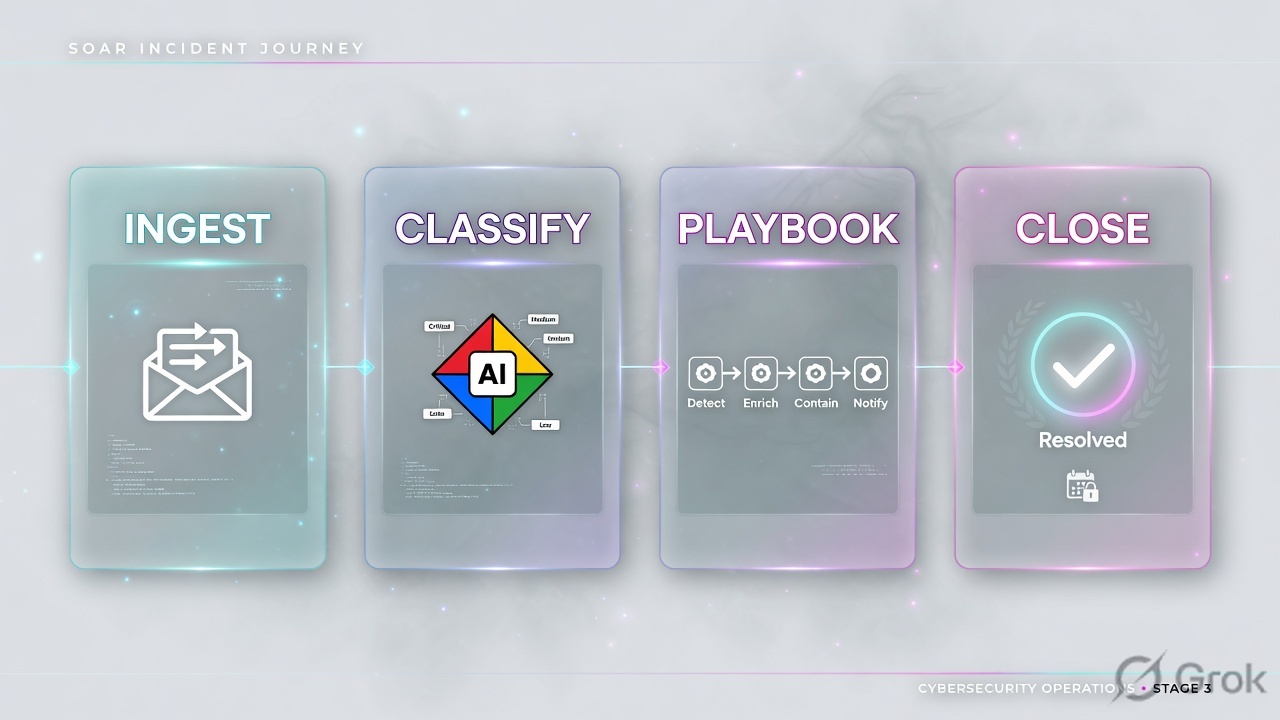
Read left → right, then the gold bar. Classifier picks the type; the type picks the playbook. Close is a playbook task plus optional post-process.
| Object | Lab value | If missing |
|---|---|---|
| Integration instance | graph_phish_in · Fetches incidents · mailbox phish@lab.techclick.in | Nothing in Incidents. Test with !graph_phish_in-fetch debug-mode=true. |
| Classifier | Key that maps this mailbox to type Phishing (or instance default type = Phishing) | Wrong type → wrong default playbook. War Room playbook name will not be TC-Phish-Lab. |
| Incoming mapper | Email From, Email Subject, Email URL, occurred, severity | Data only in labels. Enrich task has empty input. |
| Incident type | Phishing · default playbook TC-Phish-Lab · Run automatically | Incident sits Unassigned / no Work Plan. You will run the playbook by hand forever. |
| Pre-process | Same subject + same sender within 24h → Link and close | Campaign floods the queue; analysts investigate copies. |
| Proof | War Room: playbook tasks + !url result; Context: DBotScore.Score | Closed with no score is a governance failure, not a FP. |
Enrich, ask, or contain
Pick the automation level the type is allowed to run. Mixing them is the usual “the playbook isolated a VIP laptop” ticket.
Three columns, three tickets. Do not toggle isolate to “make the playbook useful.”
| Need | Use | Skip |
|---|---|---|
| One mailbox, one type | Instance default incident type = Phishing. Classifier optional. | A classifier key you cannot see in rawJSON. |
| One SIEM, many types | Classifier on event type / signature. Mapper per type. | One default type for everything, then hoping the playbook branches. |
| Campaign noise | Pre-process: Link and close on same subject, oldest parent, 24h window. | Drop until you have proven the parent exists. |
| Enrichment only (week 1) | Standard tasks + skip-if-unavailable. No isolate commands on the graph. | Quiet Mode on the whole playbook — you will lose the War Room you need to debug. |
| Containment (week 3+) | Conditional on score + manual task, “Only the assignee can complete.” | Auto-isolate from an OOTB sub-playbook you did not read. |
| Change OOTB logic | Duplicate the playbook, point the type at the copy, version in a pack. | Detach in place. Detach is drift. |
Runbook Side A / B / C
Side A is ingest objects. Side B is the playbook graph. Side C is War Room proof. Do not start at C.
Side A — integration, classifier, type
-
Install the pack, add the instance
Marketplace → Microsoft Graph Mail (or EWS O365). Then Settings → Integrations → Servers & Services → Add instance. Name
graph_phish_in. Fetches incidents = on. Mailboxphish@lab.techclick.in. Incident type fallback = Phishing. Click Test. Source: Cortex XSOAR Incident Lifecycle — Configure Integrations; integration instance Classifier / Mapper fields. -
Classifier then mapper
Settings → Integrations → Classifications & Mapping (or Mapping next to the instance). Classifier: if this mailbox is phishing-only, instance default type is enough. Mixed SIEM: set a classification key in rawJSON, drag values to Phishing. Mapper: Edit Mapping on type Phishing — Email From, Email Subject, Email URL, occurred, severity. Unmapped stays in labels.
-
Incident type + pre-process
Incident Types (XSOAR 6: Settings → Advanced → Incident Types; XSOAR 8: Settings → Object Setup → Incidents → Types). Phishing: default playbook
TC-Phish-Lab, Run playbook automatically = on, auto-extract = Out of band until you need inline scores. Pre-process: Settings → Integrations → Pre-Process Rules — first matching rule wins; Link and close campaign dupes to the oldest parent.
Settings › Integrations › Servers & Services › graph_phish_in
Microsoft Graph Mail · graph_phish_in
Source: Classification and Mapping — Settings → Integrations → Classifications & Mapping; instance Classifier / Mapper / default incident type. Classifier overrides the fallback type. Test is not a fetch of production mail — use !graph_phish_in-fetch debug-mode=true when Test is green but Incidents is empty.
Side B — playbook then gates
Incident Types › Phishing › Edit
Phishing
Source: Working with Incident Types — Default playbook, Run playbook automatically, Auto extract (None / Inline / Out of band), Post process using. Inline extract delays the playbook until enrichment finishes. Out of band does not put scores in Context in time for the next task — do not condition on DBotScore if extract is out of band and you did not run !url yourself.
-
Duplicate OOTB, do not detach
Playbooks → open
Phishing Investigation - Generic v2→ Duplicate asTC-Phish-Lab. Point the Phishing type at the copy. Detaching the pack playbook freezes you on that version when Marketplace ships fixes. -
Graph: enrich → condition → ask → contain → close
Section header “Enrich.” Standard tasks: parse email, extract indicators,
!url/ WildFire detonate with Skip this branch if this automation/playbook is unavailable and retries. Conditional:DBotScore.Score≥ 3 or task error / empty output → “Ask analyst.” Manual task: Isolate endpoint? Only the assignee can complete. Containment commands only on the Yes edge. Close with reason + notes on both Yes (True Positive) and No (False Positive). Mark detonation output as evidence.
Inputs:  EmailURL  from incident field (mapper), fallback ${incident.labels}
Outputs: DBotScore, WildFire.Report, IsolateResult

Enrich (standard)
  !url url=${incident.emailurl}
  wildfire-upload / wildfire-report   # skip if unavailable
  Number of retries: 3 · Retry interval: 30s

Condition
  YES: DBotScore.Score >= 3
  ERR: task state = Error OR DBotScore is empty   → same YES (ask, do not close)
  NO:  Score 0–2 and task completed

Ask (manual)
  Name: Approve isolate / block?
  Only the assignee can complete the task: on
  SLA: 30m · reminder: 10m

Contain (standard, Yes edge only)
  isolate / block-url / mailbox-purge
  Mark results as evidence: on

Close
  !closeInvestigation closeReason="..." closeNotes="War Room entry IDs …"
Skip-if-unavailable is for a missing pack or disabled instance so the rest of the graph can run. A WildFire task that ran and failed is an Error entry. Route Error to Ask. Quiet Mode still records errors; it hides inputs/outputs you wanted for the RCA.
Side C — prove it in the War Room
-
Trigger one mail, open the incident
Send the lab URL
https://203.0.113.80/owa-logintophish@lab.techclick.in. Incidents → INC-4821. Type must be Phishing. Work Plan must showTC-Phish-Lab, not an OOTB name you did not choose. Source: Incident Lifecycle — Running Playbooks. -
War Room filters
War Room → filter Commands and playbook tasks, then Errors. You want the
!url/ WildFire human-readable result, not only a green Work Plan. Marked evidence should appear under Evidence. Notes are tagged entries — use them for the close narrative. -
Context, then close
Context Data:
DBotScore.Indicator,DBotScore.Score,URL.Data. Empty score + Closed = the bug in the ticket. Re-run the failed task from Work Plan, or from CLI withdebug-mode=true. Then close with a reason that cites the War Room entry.
!graph_phish_in-test-module debug-mode=true
!graph_phish_in-fetch debug-mode=true
# log file attaches to the War Room when debug-mode=true

!url url="https://203.0.113.80/owa-login"
# expect DBotScore in Context; human-readable table in War Room

# Context Data tab → DBotScore.Score / URL.Data
# Score missing → do not close. Fix mapper input or the enrich instance.

# after analyst decision:
!closeInvestigation closeReason="False Positive" closeNotes="WildFire verdict benign; War Room entry attached"
INC-4821 type Phishing, Work Plan = TC-Phish-Lab, War Room has the enrich command result, Context has DBotScore.Score, and if Score ≥ 3 the manual task is waiting — not already Closed. That is the close of the lab, not a green integration Test button.
One phish after go-live
Mail lands in phish@lab.techclick.in. Graph Mail fetch builds rawJSON. Classifier (or instance default) sets type Phishing. Mapper writes Email URL = https://203.0.113.80/owa-login. Pre-process does not match a parent. Incident INC-4821 is created. Type runs TC-Phish-Lab. Extract + !url write Context. Score 3 → Ask task blocks on the assignee. Analyst isolates from the Yes edge. Evidence tagged. !closeInvestigation True Positive. Post-process mails the reporter. War Room holds every command; Context holds the scores the report will quote.
Failure path: WildFire times out. Condition sees empty Score → Ask, not Close. If you never built that condition, the close task runs and the queue looks clean. That is INC-4821 as filed.

Incidents → INC-4821
  Info:     type, playbook name, close reason
  Work Plan: which task is completed / error / waiting
  War Room:  Commands and playbook tasks · Errors
  Context:   DBotScore.Score · URL.Data · incident.emailurl
  Evidence:  detonation report marked as evidence

If type ≠ Phishing: Classification & Mapping, not the playbook editor.
If emailurl empty: incoming mapper. Labels will still have the raw key.
If task Error and status Closed: missing condition — add Error → Ask.
Traps + proof
| Symptom | Likely cause | Proof |
|---|---|---|
| Playbook never starts | Run playbook automatically off, or classifier sent a type with no default playbook. | Incident type field vs Playbooks → that type’s Default playbook. |
| Wrong playbook name in Work Plan | Classifier miss; instance fallback type won. | Settings → Classifications & Mapping; unmapped values sit under the fallback. |
| Enrich task has no URL | Mapper did not map the attribute; it is only in labels. | Context incident.labels vs incident.emailurl. |
| Closed while WildFire never returned | No condition on Error / empty DBotScore. Close task is unconditional. | War Room error entry + empty Context score + closeReason set. |
| VIP laptop isolated | Containment on the automatic edge; no manual task / no “Only assignee.” | Work Plan: isolate task completed by Playbook, not a user. |
| OOTB playbook “won’t save my edit” | Content is attached; or you detached and now pack updates skip you. | Playbook menu: Detached vs Duplicate. Prefer the copy in your pack. |
| Test is green, no incidents | Fetch not enabled, fetch window, or pre-process Drop. | !instance-fetch debug-mode=true; Pre-Process Rules order (first match wins). |
| Quiet Mode “lost the output” | Quiet Mode hides I/O and skips auto-extract; errors still log. | Turn Quiet off on the enrich task for the pilot. |
Duplicate, bind the type to TC-Phish-Lab, ship the copy in your content pack. Detach is how production drifts from Marketplace and how the next pack upgrade looks like a regression.
- Instance Test green, then
!graph_phish_in-fetch debug-mode=truecreates INC-4821. - Type = Phishing. Work Plan = TC-Phish-Lab. Mapper filled Email URL.
- War Room shows
!url/ WildFire result. Context hasDBotScore.Score. - Force a failed detonation (disable WildFire instance): playbook waits on Ask, status not Closed.
- Containment task is manual; completed by the assignee, marked as evidence.
- Close reason cites the War Room entry. Post-process ran. OOTB playbook still attached in Marketplace.
Knowledge check
Six judgment items. Submit once. Reasons point back at the section to re-read.
Sources
- Cortex XSOAR — Incident Lifecycle (plan fields/types/layouts → integrations → classify/map → pre-process → playbook → post-process)
- Cortex XSOAR — Classification and Mapping (classifier vs instance default type; unmapped → labels; Settings → Integrations → Classifications & Mapping)
- Cortex XSOAR — Incident Types (default playbook, run automatically, auto-extract None/Inline/Out of band, post-process)
- Cortex XSOAR — Pre-processing Rules (Settings → Integrations → Pre-Process Rules; first match; Drop / Link / Link and close / Run a script)
- Cortex XSOAR — Playbooks overview (standard, conditional, data-collection, section headers; inputs/outputs; field mapping)
- Cortex XSOAR — Playbook Task Field Reference (skip if unavailable, Quiet Mode, mark as note/evidence, only assignee can complete, retries)
- Cortex XSOAR — Troubleshooting / debug-mode (
debug-mode=true,!instance-fetch, log file on the War Room) - Cortex XSOAR — Phishing Investigation - Generic v2 (duplicate this; do not detach in place)
- Palo Alto Admin Guide — Incident lifecycle (6.8); playbooks chapter for Work Plan / War Room
Related: Cortex XDR architecture · Xpanse attack surface · Palo Alto operator stack