Lessons · Cortex XSOAR · Agent, incidents, response
Cortex XDR 3.x grouped alerts into incidents. 5.x renamed those to issues grouped into cases. Same job: one investigation container for related detections, assets and causality. This lesson uses incident as the operational word; on a 5.x tenant, open Cases / Issues and the Causality view from there.
XSOAR interview · playbooks after you already have a scoped incident.
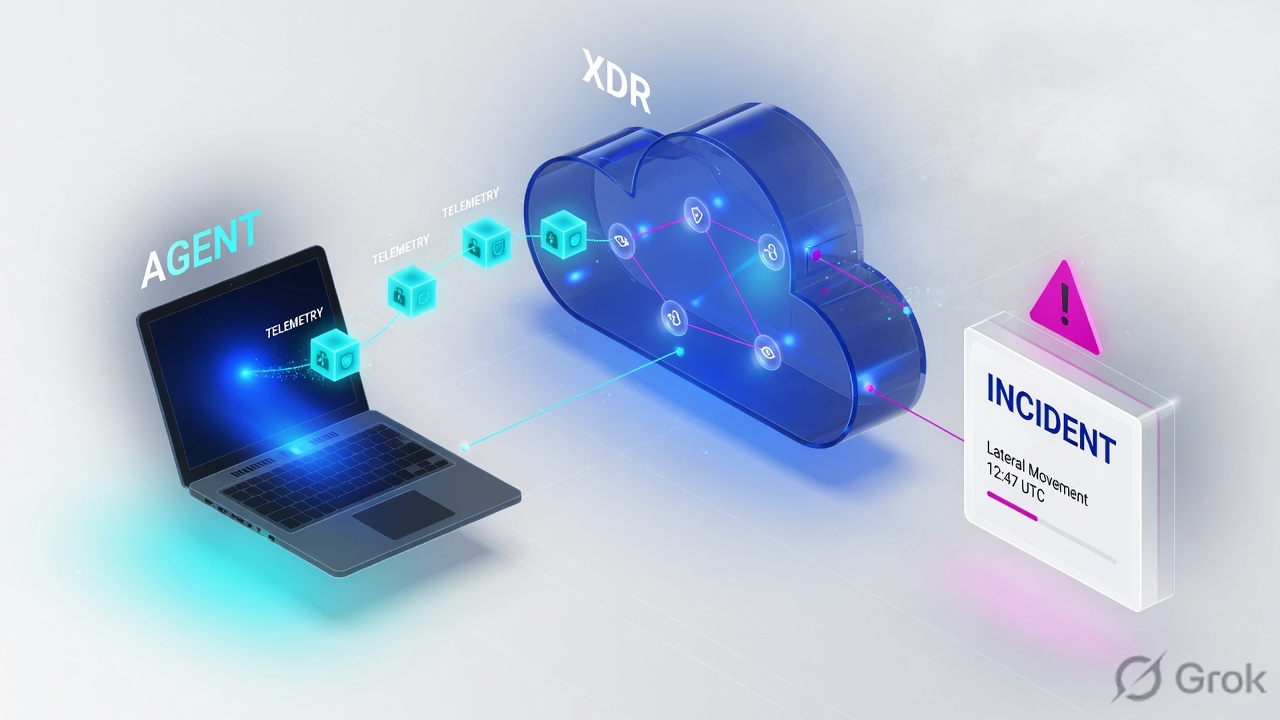
xdr_data, analytics groups them, you hunt, then isolate. The card on the right is not “one EDR alert.”The Cortex XDR agent prevents and ships endpoint telemetry. Data sources add NGFW, cloud, Broker VM, XDR Collectors and connectors. Analytics, BIOC, IOC and correlation rules raise detections; Cortex groups related detections into an incident and builds a causality instance (CGO → actor). Hunt the rest of the estate with XQL on dataset = xdr_data. Contain from Investigation & Response → Response → Action Center → New Action → Isolate. Proof is endpoint status Isolated after the next heartbeat — DHCP/DNS still work; everything else is cut except traffic to Cortex XDR.
Concept — why one alert is not the case
The day-one SOC ticket is always the same: “We have a PowerShell alert. I closed it after kill-process.” Wrong unit of work. An alert (5.x: issue) is one detector firing on one host. The incident is the grouped story: same CGO, same C2 IP, same timeframe, other data sources. If you close the alert, the other hosts keep talking.
Three silent-miss states look identical from the queue (one red row):
- Agent on
WIN-FIN-04fired a BIOC. Agents on HR/OPS never matched the BIOC, but NGFW logs already have203.0.113.88. - Analyst terminated
powershell.exeon the last process in the chain. Causality Group Owner is stillWINWORD.EXE; the next child relaunches. - Isolate clicked in the UI. Endpoint still Pending Isolation — agent has not heartbeated. Host is not contained.
Status lives on the endpoint object: Isolated / Not Isolated / Pending Isolation / Pending Isolation Cancellation. Action Center → Currently Applied Actions → Endpoint Isolation is the tracker. The alert table is not.
Agent, sources, incident, XQL, response
Five objects. Name them before you click Isolate.
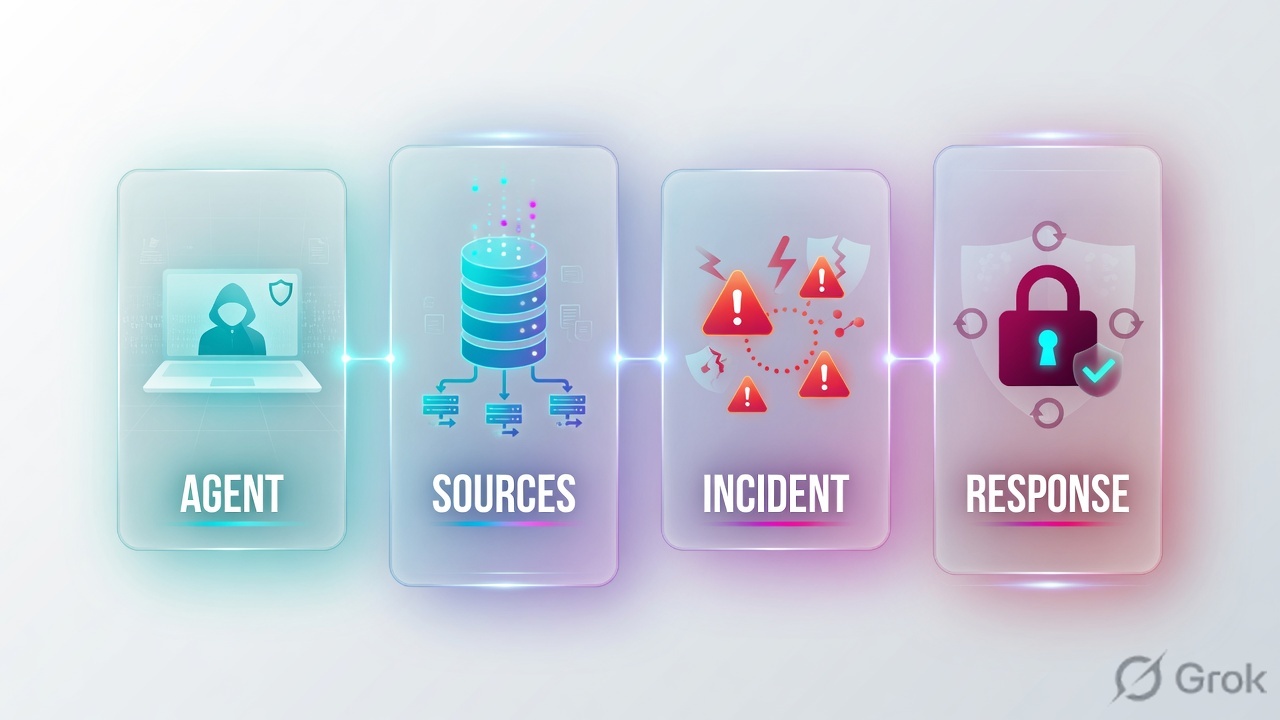
Agent
Prevention + telemetry + forensics on the endpoint. Profiles under Inventory → Endpoints → Policy Management → Prevention → Profiles. Heartbeat is how Isolate actually arrives.
Data sources
Settings → Data Sources & Integrations. NGFW / Prisma Access, cloud (AWS/Azure/GCP), Broker VM syslog, XDR Collectors, connectors. Agent-only is EDR.
Incident
Grouped detections, assets, artifacts, causality. 5.x UI: Cases. Open Causality view from the issue — CGO on the left, actor of the alert on the branch.
XQL + response
Query Center hunts xdr_data. Action Center isolates, quarantines, terminates, blocklists. XSOAR playbooks sit after you already scoped the hosts.
The agent is one sensor. Data sources fill the lake. Analytics writes the incident. Causality names the chain. XQL finds the quiet hosts. Isolate is a response action that waits for heartbeat.
Path — telemetry then incident
Existing incident first: if Cortex already grouped this CGO / dest IP, you join that story. New activity walks ingest → detectors → grouping → causality. XQL is how you prove the grouping did not miss a host. Isolate is last.
Read left → right, then the gold bar. Detectors write alerts. The incident is the container. XQL is how you find hosts that never alerted.
| Object | Lab value | If missing |
|---|---|---|
| Agent | WIN-FIN-04 connected, content current | No process events. NGFW may still log the C2; you cannot isolate from XDR. |
| NGFW source | PAN-OS traffic logs in Data Sources | Incident is endpoint-only. Lateral / C2 from agentless hosts is invisible. |
| Incident | INC-1042 (5.x: case) grouping BIOC + firewall | Queue is a pile of alerts. Analyst closes one row. |
| Causality | CGO WINWORD.EXE → powershell.exe | Terminate last process; parent relaunches child. |
| XQL | action_remote_ip = "203.0.113.88" | HR/OPS keep talking. “Only one host was infected.” |
| Isolate proof | Status Isolated after heartbeat | Pending Isolation = action queued, host still on the wire. |
IOC vs BIOC vs XQL vs isolate
Pick the detector that matches the evidence you actually have. Mixing them is the usual “we have a hash, so I isolated the whole OU” ticket.
Four columns, four tickets. Do not isolate to “fix” a noisy BIOC. Tune the rule or add an exception.
| Need | Use | Skip |
|---|---|---|
| Known bad hash / C2 domain from intel | IOC rule (SHA256, IP, domain, path) | BIOC. You already have a static property. |
| Encoded PowerShell from Word | BIOC on process + command line; Restrictions if you want agent block | IOC on powershell.exe — that is a living-off-the-land binary. |
| Who else talked to 203.0.113.88 | XQL on xdr_data (and NGFW fields in the same lake) | Closing the one BIOC and hoping grouping is complete. |
| Stop C2 now on confirmed hosts | Action Center Isolate; track Isolated | Auto-isolate from an unreviewed BIOC. VDI/Linux need allow-list in Agent Settings. |
Do — runbook Side A / B / C
Side A is sensors. Side B is the incident and causality. Side C is XQL then isolate. Do not start at C.
Side A — agent and data sources
-
Endpoint is connected
Inventory → Endpoints → All Endpoints (3.x: Endpoints → Endpoint Management → Endpoint Administration). Lab:
WIN-FIN-04Operational Status connected, Isolated = Not Isolated, last seen within heartbeat. No row = you cannot isolate from XDR and process events are missing. Source: Cortex XDR — Manage endpoints. -
Data sources actually ingest
Settings → Data Sources & Integrations. Confirm PAN-OS / Prisma Access, cloud connectors if in scope, Broker VM applets for syslog. Agent-only tenants will not stitch firewall causality. Source: Cortex XDR — What are Cortex XDR data sources and connectors.
dataset = xdr_data
| filter agent_hostname = "WIN-FIN-04"
| fields _time, event_type, actor_process_image_name, action_process_image_name
| sort desc _time
| limit 20
Side B — incident then causality
Incidents › INC-1042 › Causality
INC-1042 · Suspicious encoded PowerShell
Source: Cortex XDR causality view — CGO on the left of the chain; Information overview for SHA256, parent PID, MITRE; Forensics highlights for script engines / network / file. 5.x: right-click an issue in Cases or Issues. Closing the BIOC row is the wrong button.
-
Open the incident, not the alert
3.x: Incident Response → Incidents. 5.x: Cases. Starred / featured hosts help grouping but do not replace XQL. Count of grouped alerts > 1 is the first hint you are not looking at a singleton.
-
Walk causality before kill-process
Right-click the issue → Causality view. CGO is the process responsible for the rest of the chain. Lab CGO is Word, not PowerShell. From a process node you can terminate, quarantine, or add to block/allow list — after you understand the branch. Source: Cortex XDR — Causality view.
dataset = xdr_data
| filter event_type = PROCESS and action_process_image_name = "powershell.exe"
| filter action_process_command_line contains "-enc" or action_process_command_line contains "bypass"
| fields agent_hostname, action_process_command_line, actor_process_image_name, causality_actor_process_image_name, _time
| sort desc _time
| limit 100
Side C — hunt, then isolate, then prove
Action Center › New Action › Isolate
Isolate endpoints
Source: Cortex XDR — Isolate an endpoint. Path: Investigation & Response → Response → Action Center → New Action → Isolate. Agent receives the instruction on the next heartbeat. Cancel only while still Pending. Isolated endpoints still pass DHCP, DNS, and HTTPS to Cortex XDR; IP-based file storage mounts break.
-
XQL the dest IP across the lake
Investigation & Response → Search → Query Center. Filter
event_type = NETWORKand the C2. Lab must return three hostnames, not one. Same query with NGFW fields if the firewall source is onboarded. Source: Cortex XQL schema —xdr_data. -
Isolate the confirmed set
New Action → Isolate, comment with incident id, select the three hosts. Do not isolate from a dest IP that is a shared proxy until XQL shows the process that opened it.
-
Read Isolated, not Pending
All Endpoints column Endpoint Isolated, plus Action Center → Currently Applied Actions → Endpoint Isolation. Pending Isolation = server has the job, agent has not applied it. After remediation: Endpoint Control → Cancel Endpoint Isolation.
dataset = xdr_data
| filter event_type = NETWORK and action_remote_ip = "203.0.113.88"
| fields agent_hostname, action_remote_ip, action_remote_port, actor_process_image_name, _time
| sort desc _time
| limit 200

# after Isolated: this should go quiet on those three hostnames
# DHCP/DNS to Cortex XDR still appear — that is expected, not a failed isolate
Three hosts Isolated. XQL to 203.0.113.88 from those agents stops. Incident (case) still open until you document CGO, XQL result set, and Action Center action id. That is the close — not “alert status = closed.”
One PowerShell story after go-live
WINWORD.EXE on WIN-FIN-04 launches powershell.exe -enc …. Agent BIOC fires. NGFW traffic log for 203.0.113.88:443 lands in the same lake. Cortex groups BIOC + firewall into INC-1042. Causality: CGO Word, actor PowerShell, dest C2. XQL on the dest IP adds WIN-HR-12 and WIN-OPS-07 — no BIOC there because the parent was a different LOLBin. Isolate all three. Next heartbeat: Isolated. Re-query C2: quiet on those hostnames.

# After the incident: if this command-line pattern is how they live off the land,
# save as BIOC (process) rather than a one-off Query Center search.
# Restriction profile can push that BIOC to the agent as prevention.
# Do not auto-isolate from the new BIOC until false-positive review on a pilot OU.

dataset = xdr_data
| filter event_type = PROCESS and action_process_image_name = "powershell.exe"
| filter action_process_command_line contains "-enc"
Traps + proof
| Symptom | Likely cause | Proof |
|---|---|---|
| One alert, “host cleaned” | Worked the alert, not the incident/causality/XQL. | Same dest IP in xdr_data on other agent_hostname values. |
| Kill powershell, it comes back | CGO still alive (Word, explorer, scheduled task). | Causality view CGO node; Event log 4698 via XQL if it is a task. |
| Isolate clicked, C2 continues | Pending Isolation — no heartbeat yet, or Linux/Mac prerequisites missing. | Endpoint Isolated column. Mac needs network extension; Linux needs iptables + Agent Settings allow list. |
| Empty XQL on a host you can ping | Agent disconnected, or event type/field wrong (PROCESS vs NETWORK). | All Endpoints last-seen. Side A query returns no rows. |
| NGFW saw C2, XDR incident did not | Firewall data source not onboarded / not in the same tenant lake. | Settings → Data Sources & Integrations. Agent-only EDR view. |
| Mass isolate from an IOC IP | That IP is a CDN/proxy; BIOC/process context missing. | XQL actor_process_image_name for that dest. Isolate the process owners, not the subnet. |
| File shares die after isolate | Expected: IP-based file storage is blocked. DHCP/DNS still pass. | Cortex isolate doc. Unmount those shares if the host hangs on listing folders. |
Deploy agents by group, validate data sources, tune BIOCs, then automate only reviewed response actions (XSOAR or native playbooks). Global isolate-on-alert is how you freeze VDI and jump servers. Restriction profiles are the right place for “block this behaviour on the agent,” not Action Center spray.
- Pilot OU agents connected; content current; Isolation allow list set for VDI/Linux if those are in the OU.
- NGFW (or at least one non-endpoint source) green on Data Sources & Integrations.
- Lab: BIOC on encoded PowerShell groups with a firewall alert into one incident/case.
- XQL on dest IP returns every host that talked, including those without a BIOC.
- Isolate → wait heartbeat → Isolated. Re-XQL C2 quiet. Then Cancel Endpoint Isolation on the lab hosts.
Knowledge check
Six judgment items. Submit once. Reasons point back at the section to re-read.
Sources
- Cortex XDR — What are Cortex XDR data sources and connectors (Settings → Data Sources & Integrations; Broker VM; XDR Collectors)
- Cortex XDR — Causality view (CGO, Information overview, Forensics highlights, All Events)
- Cortex XDR — Isolate an endpoint (Action Center → New Action → Isolate; Isolated vs Pending; DHCP/DNS/HTTPS to XDR)
- Cortex XDR — Manage endpoints (Inventory → Endpoints → All Endpoints; Isolated status values)
- Cortex XDR — Detection rules: IOC / BIOC / Correlations (Threat Management → Detection Rules); Restriction profiles for BIOC prevention
- Cortex — XQL schema reference (
xdr_data; agent + NGFW fields) - Cortex XDR 3.x docs — What are incidents (alerts grouped into incidents; 5.x rename to issues/cases)
Related: Cortex XSOAR interview · playbooks after the incident is scoped, not instead of causality and XQL.