Lessons · FortiSASE series · FortiClient steering
This lesson is the agent path: FortiClient steers to a security PoP, then SPA to the hub. Agentless SWG, ZTNA rule sets, and SD-WAN on-ramp live on the sibling page. Do not mix those menus into this runbook.
FortiSASE SWG, ZTNA and SD-WAN policy · FortiGate zone, policy, NAT · SASE architecture
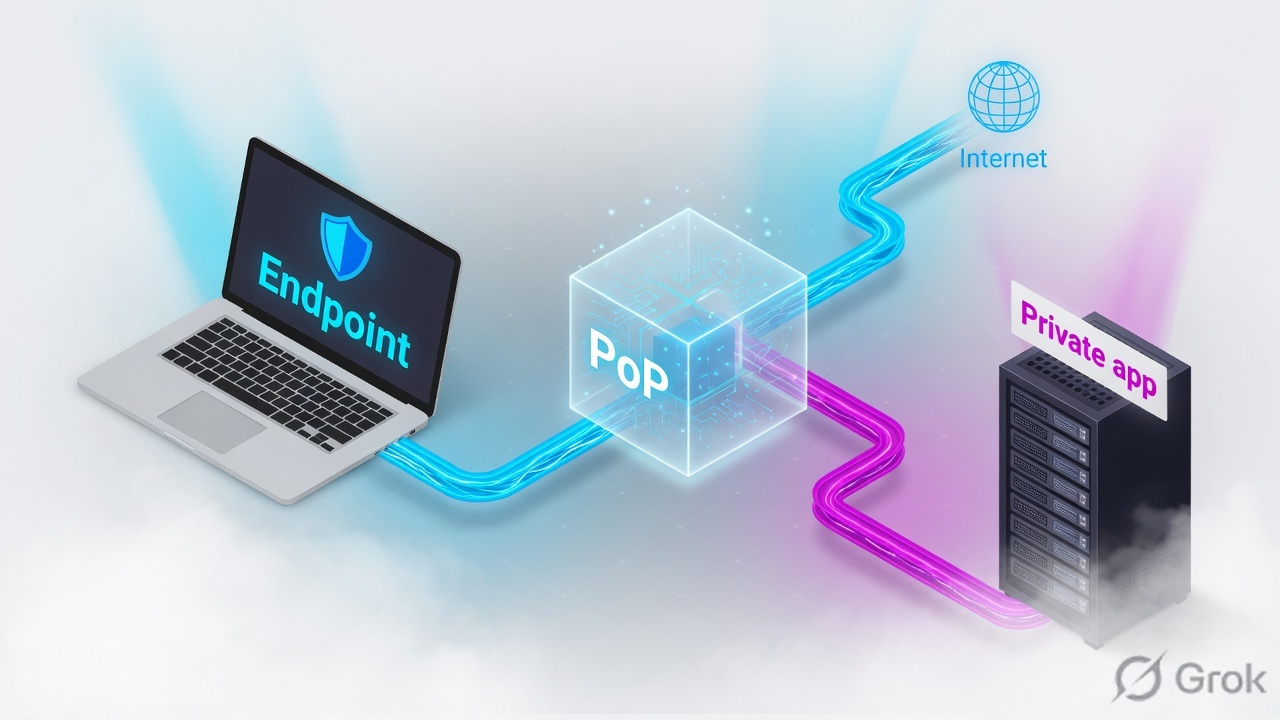
FortiClient enrolled to FortiSASE builds a Cloud Security tunnel to a security PoP. Empty steering bypass destinations = full tunnel (all IPv4 to the PoP). Internet is inspected as SIA on that PoP. Private apps are SPA: the PoP is a spoke of the FortiGate SPA Connector over IPsec; a private access policy must accept client-to-server. Three exceptions skip the PoP: ZTNA to a FortiGate access proxy, steering bypass (split tunnel), local LAN. Proof is Connected Users + hub tunnel/BGP + SPA traffic log. Lab: HQ 10.20.20.0/24, app 10.20.20.80:443.
Why SIA up is not SPA up
The day-one ticket is always the same: “VPN is connected, so the intranet should work.” Wrong. The padlock only proves FortiClient reached a security PoP. SIA (web filter, IPS, DNS) runs on that PoP toward the internet. SPA is a different overlay from that PoP into the on-prem hub. No service connection, no BGP prefix, no private access policy — 10.20.20.80 blackholes at the PoP even while YouTube is cleanly blocked.
Three silent-zero states look identical from the laptop (timeout to the app):
- FortiClient is up; SPA subscription / service connection was never built. PoP has nowhere to send
10.20.20.0/24. - Overlay is up; FortiSASE private access policy or the hub LAN→overlay policy is missing. Route exists, accept does not.
- Someone added
10.20.20.0/24as a steering bypass. Packets leave the physical NIC toward HQ and never hit SPA. That is ZTNA/bypass behaviour, not private access through the PoP.
Steering bypass is for Zoom/Teams bandwidth or for the FortiGate ZTNA access proxy IP/FQDN. Putting 10.20.20.0/24 on the bypass list sends the app around FortiSASE. SPA then has nothing to log. If you wanted ZTNA, say so and bypass the proxy, not the whole LAN.
Steering, PoP, private app — three objects
A steering method is how user-edge traffic is forced to FortiSASE. This page is the FortiClient agent method: install the agent, enroll, auto-connect the Cloud Security tunnel. Agentless (browser proxy) is HTTP/HTTPS only. IPsec-with-routing is for Thin Edge / Secure Edge / Branch On-Ramp, not a laptop.
A security PoP is the FortiSASE location that terminates that tunnel and runs FWaaS. You pick several at provision, plus one analytics PoP (logs) and one endpoint-management location. Users should land on a nearby security PoP. An SPA Connector is the on-prem FortiGate hub; FortiSASE PoPs become its spokes over IPsec, and BGP carries the HQ prefixes (lab 10.20.20.0/24).
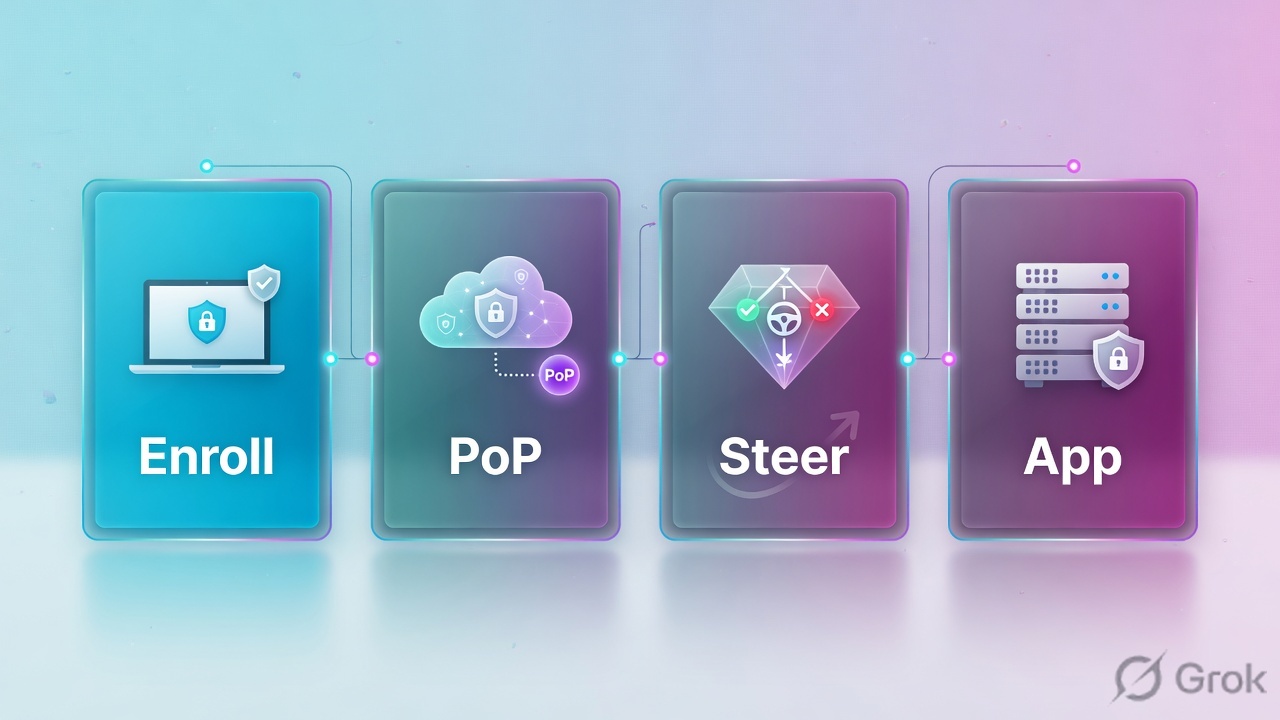
FortiClient steering
Agent on Windows/macOS/Linux/iOS/Android. Outbound UDP 500/4500 to the PoP. Configuration › Profiles › Connection: Endpoint connects to FortiSASE VPN = Automatically. Older trains: Endpoint management › Endpoint profiles.
Security PoP
Terminates the tunnel, inspects SIA. Pick PoPs near users at provision. Geofencing and on-net rules decide whether the agent is even allowed to attach.
SPA overlay
PoP spoke ↔ FortiGate hub IPsec. BGP advertises HQ. Private access policy (client-to-server) is the allow. Hub still needs LAN/DMZ → overlay accept.
Exceptions
ZTNA (direct to FortiGate access proxy), steering bypass (split tunnel), local LAN (printers on the same subnet). None of these hairpin through the PoP.
FortiClient steers me to a security PoP. The PoP inspects internet. Private apps leave that PoP over IPsec to the hub, then a private access policy. Bypass and ZTNA skip the PoP on purpose.
How a packet is steered
Enroll first. FortiClient registers, pulls the endpoint profile, and (if Automatically) brings up the Cloud Security tunnel to a selected security PoP. Existing tunnel: IPv4 that is not bypassed, not ZTNA, not local-LAN is encapsulated to the PoP. At the PoP, dest-internet hits SIA policy. Dest-HQ hits SPA: overlay to the hub, then private access policy, then the hub firewall. IPv6 is dropped on the agent — only IPv4 traverses the tunnel.
Read left → right, then the gold bar. PoP is mandatory for SPA. Bypass of 10.20.20.0/24 skips the gold bar on purpose — that is not a repair.
| Object | Lab value | If missing |
|---|---|---|
| Endpoint profile | Default: Endpoint connects = Automatically; disconnect button off for non-admin | User never attaches. No Connected Users row. SIA and SPA both dead. |
| Agent ports | UDP 500 and 4500 egress to FortiSASE | Tunnel fails on NAT/guest Wi-Fi that only allows 443. Padlock stays down. |
| Security PoP | Provisioned near the user; analytics PoP separate | Long RTT or attach fail. Logs live on the analytics PoP, not the security PoP. |
| SPA service connection | PoPs as spokes of the FortiGate hub; BGP for 10.20.20.0/24 | SIA works. Traceroute to 10.20.20.80 dies at the PoP. |
| Private access policy | Client-to-server accept to 10.20.20.80 HTTPS | Overlay up, app still deny. Hub policy is a second accept, not a substitute. |
| Hub overlay policy | LAN_HQ / DMZ_HQ → fgt_hub1 accept (server-to-client needs this too) | SPA log may show accept; return traffic dies on the hub. |
Agent vs bypass vs ZTNA vs SPA
Pick the path the destination actually needs. Mixing them is the usual “internet is fine, SAP is dead, ZTNA rule is green” ticket.
Four columns, four tickets. Do not toggle NAT on the hub to “fix” a missing bypass for ZTNA.
| Need | Use | Skip |
|---|---|---|
| Inspect all internet from laptops | FortiClient agent, full tunnel, auto-connect | Agentless SWG if you need non-HTTP. Alternate VPN clients beside FortiSASE. |
Reach 10.20.20.80 with inspection at the PoP | SPA: service connection + private access policy + hub overlay accept | Steering bypass for 10.20.20.0/24. That is the opposite of SPA. |
| Shortest path + posture to a TCP app | ZTNA connection rules + bypass dest = FortiGate access proxy | Hairpinning ZTNA through the SIA tunnel. Fortinet documents that as the failure mode. |
| Keep Zoom off the PoP | Steering bypass FQDN on Connection tab | Wildcard FQDN. Not supported. Bypass the named hosts. |
| >100 agents behind one public IP on one PoP | Branch On-Ramp / Thin Edge / FortiGate Secure Edge | More FortiClient installs on that NAT. Architecture guide calls this out. |
Runbook Side A / B / C
Side A is the agent and profile. Side B is the PoP and SPA overlay. Side C is the private access policy and proof. Do not start at C.
Side A — enroll and steer
-
Install and enroll FortiClient
Windows, macOS, Linux, Android, iOS only — platforms FortiSASE lists for the agent. Invite / installer from FortiSASE, not a leftover EMS on-prem package pointed at a different FortiClient Cloud. Source: FortiSASE SIA Architecture Guide — Traffic steering method with FortiClient.
-
Allow UDP 500/4500
Guest Wi-Fi and hotel NATs that only pass 443 will leave the padlock down. Confirm the agent can reach FortiSASE on those ports before you debug SPA.
-
Connection tab — auto-connect
Configuration › Profiles (older: Endpoint management › Endpoint profiles). Default or Corporate profile. Endpoint connects to FortiSASE VPN = Automatically. Disable Show button to disconnect for non-admin. Enable On/off-net detection and Exempt endpoint from FortiSASE auto-connect when endpoint is on-net for campus laptops.
Configuration › Profiles › Default › Connection
Endpoint profile — Connection
Field names from FortiSASE Administration Guide — Connection, and Endpoint Management Deployment Guide. Subnet bypasses go on Default; custom profiles cannot create them. No wildcard FQDN.
1. FortiClient enrolled to this FortiSASE tenant (not a stray EMS).
2. Connection: Automatically. Disconnect hidden for the user profile.
3. UDP 500/4500 egress proven (not only TCP 443).
4. Steering bypass empty except Zoom/Teams or the ZTNA proxy.
5. On-net exempt enabled for Corporate; left off for NonCorporate.
6. IPv4 only through the tunnel — do not chase IPv6 SPA.
Side B — PoP then SPA overlay
-
Security and analytics PoPs
Chosen at provision: multiple security PoPs near users, one analytics PoP for logs, one endpoint-management location. You cannot treat the analytics PoP as a user attach point. GDPR-style log residency is the analytics choice, not the security PoP list. Source: FortiSASE SIA Architecture Guide — Selecting security and analytics PoPs.
-
SPA service connection
Network › SPA. Configure FortiSASE security PoPs as spokes of the FortiGate hub (SPA Connector). Build the service connection, wait for IPsec up, confirm BGP has
10.20.20.0/24. View health and VPN tunnel status in FortiSASE; on the hub, verify IPsec and BGP separately.
Side C — private access policy then proof
Network › SPA › Private access policy › Create (client-to-server)
Private access · client-to-server
Client-to-server is the remote-user → HQ direction. Server-to-client is a separate policy plus a hub firewall policy (incoming LAN_HQ/DMZ_HQ, outgoing overlay e.g. fgt_hub1). Source: FortiSASE SPA deployment guides.
-
Hub firewall
On the FortiGate SPA hub: Policy & Objects › Firewall Policy. Incoming LAN_HQ (and DMZ if used), outgoing overlay (
fgt_hub1in Fortinet’s example), destination the remote-agent pool or all as documented, action ACCEPT. NAT only if the hub addressing requires it — do not enable NAT to paper over a missing overlay. -
ZTNA only if that is the design
If the app is ZTNA TCP forwarding, push ZTNA connection rules and add a steering bypass for the access-proxy IP or FQDN. Do not also send that dest through SPA. FortiClient shows the rules on the ZTNA CONNECTION RULES tab after the profile update.
One flow after go-live
Laptop off-net. FortiClient auto-connects to the nearest allowed security PoP. User opens https://10.20.20.80. FortiClient has no bypass and no ZTNA rule for that dest, so the packet is in the Cloud Security tunnel. PoP matches SPA, encapsulates to the hub, private access policy accepts, hub policy accepts, app answers. Return follows the overlay. Internet to the same laptop still dies at the PoP as SIA — two dests, two engines, one tunnel.

FortiSASE › Connected Users shows the endpoint on a security PoP. Network › SPA shows the hub tunnel healthy. Hub: IPsec up, BGP has 10.20.20.0/24. Private access traffic in the FortiSASE portal lists the test to 10.20.20.80. Browser to the app works from the same laptop that already had SIA.
Traps + proof
| Symptom | Wrong move | Right proof |
|---|---|---|
SIA works, 10.20.20.80 times out | Add HQ to steering bypass | SPA tunnel/BGP + private access policy + hub overlay policy. Bypass would hide the failure. |
| ZTNA app loops or hits the PoP | Rebuild SPA | Bypass dest = access-proxy IP/FQDN. Connection rules on FortiClient ZTNA tab. Wildcard FQDN will not save you. |
| Campus laptop still tunnels to SASE | Tell users to click Disconnect | On-net rule set + Exempt auto-connect when on-net. NonCorporate profiles keep auto-connect on purpose. |
| Padlock never comes up on hotel Wi-Fi | SPA policy edits | UDP 500/4500 blocked. Agent never reached a PoP. Connected Users empty. |
| Many users behind one NAT, attach flaps | More FortiClient licenses on that public IP | Architecture limit: <100 concurrent agents sharing a source IP per security PoP. Move the site to On-Ramp / Secure Edge. |
| IPv6-only test “proves SASE is down” | Open a TAC for SPA BGP | FortiClient blocks IPv6; only IPv4 in the tunnel. Test with IPv4. |
FortiClient steers IPv4 to a FortiSASE security PoP. Internet is SIA there. Private apps need the SPA overlay to the FortiGate hub plus a private access policy. ZTNA and steering bypass skip the PoP. I prove with Connected Users, hub IPsec/BGP, and the SPA log — not the FortiClient icon.
Knowledge check
Six judgment items. Submit to see reasons. Map misses back to the section named in the reason.
Sources
- FortiSASE Secure Internet Access Architecture Guide 7.4.0 — Design concept and considerations (steering required; SIA/SPA/SSA; ZTNA, bypass, local LAN exceptions; security vs analytics PoP)
- FortiSASE SIA Architecture Guide — Traffic steering method with FortiClient (UDP 500/4500, full vs split tunnel, IPv6 blocked, <100 agents per source IP per PoP, on-net exempt)
- FortiSASE Secure Private Access Architecture Guide — remote users steer to a security PoP, then private traffic over IPsec between the PoP and the SPA Connector
- FortiSASE Administration Guide — Connection (Endpoint connects Automatically/Manually; disconnect button; steering bypass)
- FortiSASE Endpoint Management Deployment Guide — Corporate vs NonCorporate profiles; Exempt endpoint from FortiSASE auto-connect when endpoint is on-net; steering bypass destinations
- FortiSASE SPA using ZTNA Deployment Guide — Configuring a split tunneling destination (bypass the access proxy; no wildcard FQDN; subnet bypass on Default profile)
- FortiSASE SPA deployment guides — private access policy client-to-server / server-to-client; FortiGate hub overlay policy; verify IPsec, BGP, and private access traffic in the FortiSASE portal
Related: FortiSASE SWG, ZTNA and SD-WAN policy · FortiGate zone, policy, NAT · SASE architecture · Zero trust vs SASE vs SSE