Start here · understand the lesson before the detail
What you are learning
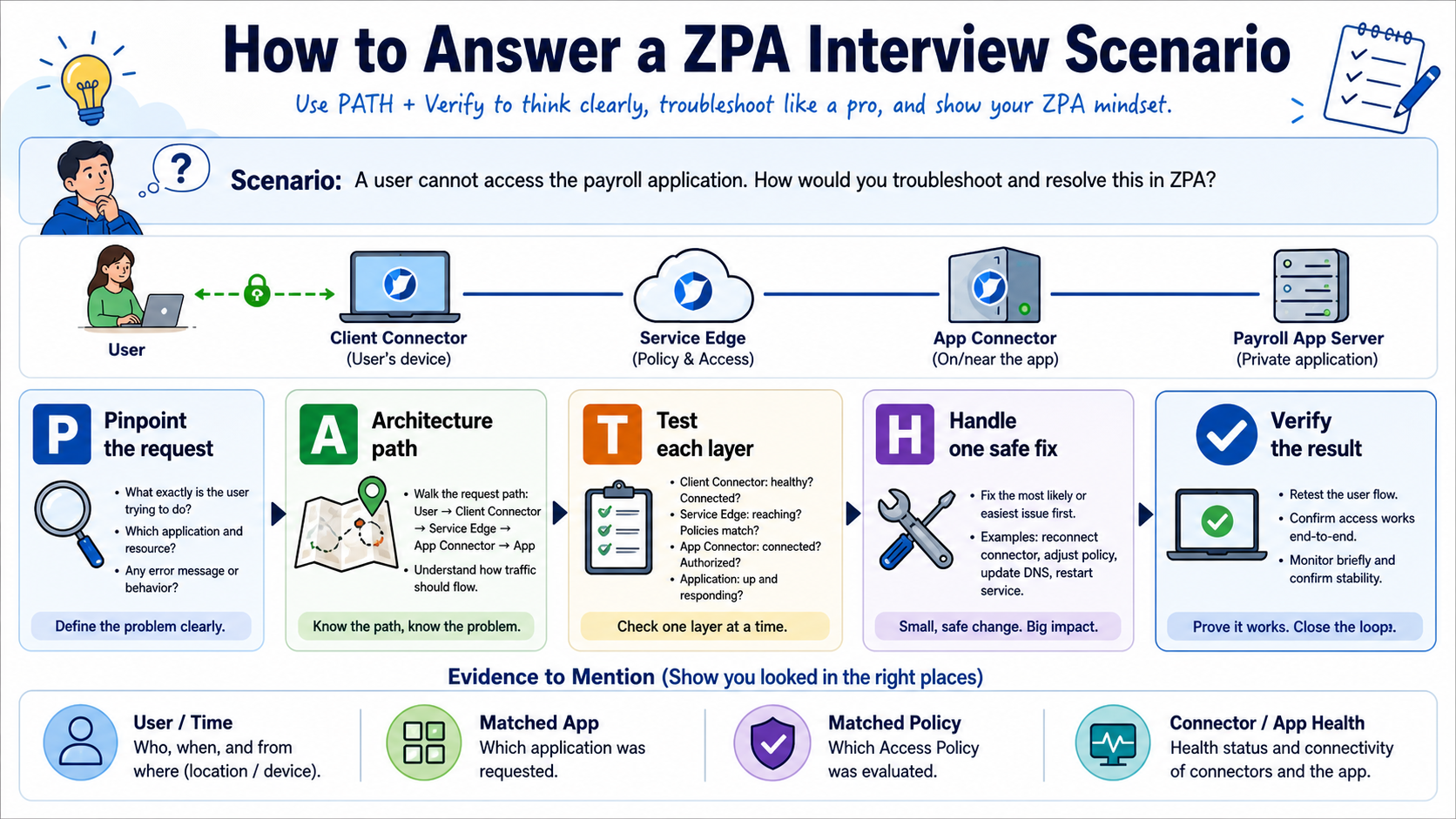
This lesson helps you answer ZPA interview questions like an engineer, not like someone reciting definitions. Use the PATH method to explain the request, walk the architecture, test with evidence, make one safe change, and verify the result.
In plain English
A strong interview answer says what you would check and why. It follows the real path from user and Client Connector to policy, Service Edge, App Connector, and private application. It also separates facts you know from assumptions you still need to test.
Real example
The interviewer says one Finance user cannot open payroll. First ask for the exact error and time. Then compare a working user, find the ZPA session, identify the matched app and policy, check the selected connector, test connector-to-payroll DNS and TCP 443, fix the first failed layer, and retest.
Follow this flow
- Pinpoint the user, device, location, app, action, time, and exact symptom.
- Describe the expected architecture path in plain language.
- Test discovery, identity, policy, Service Edge, connector, DNS, and app port in order.
- Handle one evidence-backed fix with a rollback plan.
- Verify the original action and explain what evidence proves success.
Evidence to collect
- User, timestamp, error, and affected-versus-working comparison
- Matched application segment and access rule
- Session status, Service Edge, and App Connector
- Private DNS/port test and before-and-after result
Common mistake to avoid
Do not answer every question with 'check the policy' or list ten commands without a decision. Interviewers want a clear order, the evidence that changes your next step, and a safe way to confirm the fix.
Current official source checkpoint
- Understanding ZPA architecturecurrent official reference used for this beginner explanation
- About access policycurrent official reference used for this beginner explanation

Key terms before you continue
In a Zscaler ZPA interview, structure beats memorisation — when a question stretches you, reason out loud from fundamentals instead of guessing. Use the visual cheat-sheets below to lock in the diagrams interviewers love, and note that every answer ends with a 👉 Interview tip giving the exact line to say.
Visual cheat-sheets — the whiteboard answers
ZPA Fundamentals & Zero Trust / ZTNA (10)
L11. What is Zero Trust Network Access (ZTNA), and how would you define it in one sentence?
Zero Trust Network Access (ZTNA) is a security model that grants a user access to a specific private application only after their identity and device are verified, instead of dropping them onto the whole network like a VPN does.
One-sentence definition: ZTNA connects an authenticated, authorized user directly to a named application over a brokered, identity-based tunnel — never to the network itself.
Think of an old VPN as a building key that opens every room once you're inside. ZTNA is like a hotel keycard that opens only your room, for your stay, and is re-checked at every door.
Key traits: no inbound firewall holes, no network-level trust, access is per-app, per-session, and continuously evaluated.
Interview tip: Always contrast ZTNA with VPN — interviewers want to hear "app-level access, not network-level access."
L12. What does the Zero Trust principle 'never trust, always verify' mean in the context of ZPA?
Never trust, always verify means ZPA assumes no user, device, or network is trustworthy by default — not even traffic coming from inside the corporate office.
In ZPA this shows up concretely as:
- Identity check — the user authenticates through your IdP (SAML/OIDC) before any app is reachable.
- Device posture — the Zscaler Client Connector verifies the device meets policy (patched OS, AV running, disk encryption).
- Per-request policy — every access decision is evaluated against access policy, not granted once and forgotten.
- No implicit network trust — being on the LAN gives you nothing; you still must be verified.
It's like airport security checking your boarding pass at every gate, not just the entrance.
Interview tip: Mention the three pillars verified — identity, device posture, and context (location/time/risk).
L13. What is Zscaler Private Access (ZPA) and what problem does it solve?
Zscaler Private Access (ZPA) is a cloud-delivered ZTNA service that gives remote and on-site users secure access to private (internal) applications — without putting those apps on the internet and without a traditional VPN.
The problem it solves: legacy VPNs place users on the network, expose inbound firewall ports, allow lateral movement if an account is compromised, and are slow because all traffic hairpins through a data-center concentrator.
ZPA fixes this by:
- Brokering app-to-user connections through the Zscaler cloud — apps are never publicly exposed.
- Using inside-out connections: the App Connector dials out to the cloud, so no inbound ports are opened.
- Enforcing identity + posture before each connection, eliminating lateral movement.
Apps become invisible to the internet — you can't attack what you can't see.
Interview tip: Lead with "app access without network access" and "no inbound ports / apps dark to the internet."
L14. Name the three core components of ZPA and state what each one does.
ZPA has three core components that together form a brokered, inside-out connection:
- Zscaler Client Connector (ZCC) — the lightweight agent on the user's device. It captures traffic destined for private apps and forwards it into the Zscaler cloud over an encrypted tunnel.
- App Connector — a lightweight software connector deployed next to the apps (on a Linux VM, cloud instance, or container in the data center or VPC). It makes outbound-only connections to the Zscaler cloud and stitches the user to the app. No inbound ports needed.
- ZPA Service Edge (the broker) — the policy-decision and connection-stitching point in the Zscaler cloud (Public Service Edge in Zscaler's cloud, or a Private Service Edge you host). It authenticates the user, evaluates access policy, and brokers the two outbound tunnels together.
Picture a switchboard operator (broker) connecting a caller (ZCC) to a private extension (App Connector) only after checking who they are.
Interview tip: The key insight is that both ZCC and the App Connector dial OUT to the broker — that's why apps need no inbound exposure. If pressed, you can add a fourth piece: the Zscaler control plane / Central Authority that distributes policy.
L15. What is the Zscaler Client Connector (ZCC) and what role does it play in a ZPA session?
The Zscaler Client Connector (ZCC) is the agent installed on a user's laptop, phone, or tablet. It is the on-device endpoint that makes ZPA (and ZIA) work transparently for the user.
In a ZPA session it:
- Enrolls the device and authenticates the user via your IdP.
- Intercepts traffic destined for configured private applications (based on app segments / domains).
- Builds the encrypted Z-Tunnel outbound to the nearest ZPA Service Edge.
- Reports device posture (OS version, AV, encryption, firewall) so policy can use it.
- Applies the forwarding profile to decide whether traffic is tunneled, sent to a local proxy, or left direct.
Think of ZCC as the smart on-ramp that decides which traffic enters the secure Zscaler highway.
Interview tip: Note ZCC is a single unified agent for ZPA, ZIA, and ZDX — not three separate clients.
L26. Explain the concept of 'segment of one' or user-to-app segmentation in ZPA.
Segment of one (also called user-to-app or microsegmentation in ZPA) means each authorized session is a private, one-to-one tunnel between a single user and a single application — nothing else is reachable.
How it differs from traditional segmentation:
- Network microsegmentation still works at the network layer (subnets, VLANs, ACLs) — a user lands in a zone and can reach everything in it.
- ZPA segments at the application layer. The broker stitches the user only to the specific app defined in their access policy. There is no "zone" to roam.
Result: no east-west / lateral movement. Even a compromised device can only touch the exact apps that user is entitled to, not scan or pivot across the network.
It's like giving each person a private hallway to one door, instead of a shared corridor.
Interview tip: Stress that there is no routable network path — the broker is the only link, so lateral movement is structurally impossible.
L27. Why does ZPA reduce the attack surface compared to a traditional perimeter / VPN model? Walk me through the security reasoning.
ZPA shrinks attack surface at several layers; walk through it step by step:
- No inbound exposure. App Connectors make outbound-only connections to the Zscaler cloud, so you open zero inbound firewall ports. A VPN concentrator, by contrast, must listen on a public IP — a permanent target for scanning and exploits.
- Apps are dark. Private apps have no public DNS/IP and aren't internet-reachable. Attackers can't recon or attack what they can't discover.
- No network access. Users connect to an app, never the network — so a stolen credential can't be used to scan subnets or move laterally.
- Identity + posture gating. Every session checks the IdP and device health, so compromised or non-compliant endpoints are blocked before reaching anything.
- Brokered, per-session. Access is evaluated continuously, not granted once at login.
VPN = a front door on the internet; ZPA = no door at all, only a vetted introduction.
Interview tip: Lead with "outbound-only connectors = no inbound ports = no exploitable VPN gateway."
L28. How does least-privilege access manifest concretely in a ZPA deployment versus a flat network?
In a flat network, once a user authenticates to the VPN they are routed onto a subnet and can reach any host/port in that range — least privilege exists only on paper, enforced (if at all) by sprawling firewall ACLs.
In ZPA, least privilege is the default and is enforced at the broker:
- Application Segments define exactly which FQDNs/IPs and ports are an app — nothing outside that definition is reachable.
- Access Policies bind users/groups (from the IdP) to specific segments, with optional device-posture and context conditions.
- SAML/SCIM attributes drive entitlement, so HR sees only HR apps, finance only finance apps.
- Default deny — if no policy grants access, the app is invisible.
Flat network = an open-plan office you can wander; ZPA = badge-gated rooms where your badge opens only what your role allows.
Interview tip: Name the actual objects — Application Segment, Segment Group, Access Policy — to show hands-on knowledge.
L39. A stakeholder asks 'why is Zero Trust better than just hardening our firewall and VPN?' How do you frame the architectural argument?
Frame it as a model problem, not a tuning problem: hardening a VPN makes a flawed architecture slightly safer, but the flaws are structural.
- Implicit trust remains. A VPN still places the user on the network. Once on, they can route to other hosts — hardening rules slow this but don't remove the network path. Zero Trust removes the path entirely (user-to-app only).
- The gateway is always exposed. A hardened VPN still listens on a public IP — a single CVE (the industry has seen many critical VPN-gateway CVEs) breaches everything. ZPA has no inbound listener to exploit.
- Coarse vs. continuous. Firewall ACLs are static and IP-based; Zero Trust is identity-, device-, and context-aware, re-evaluated per session.
- Operational drag. ACL sprawl is unmanageable at scale; policy-as-identity is cleaner and auditable.
Analogy: hardening the VPN is adding locks to a glass door; Zero Trust removes the door from public view.
Interview tip: Close with risk + business value: smaller breach blast radius, fewer emergency VPN-CVE patch nights, and a better user experience.
L310. Where do you see the ZPA / ZTNA platform heading in 2026 with unified policy convergence (ZIA + ZPA on one policy fabric) and the AI Policy Engine? How would that change how you design access?
The clear direction in 2026 is convergence: ZIA (internet/SaaS access) and ZPA (private access) increasingly share one policy fabric, one unified client (ZCC), and one set of identity/posture signals — so you author one access intent rather than maintaining two siloed rule sets.
Add an AI/ML-assisted policy engine and the platform can:
- Recommend least-privilege policies by learning real access patterns, flagging over-broad segments.
- Auto-discover applications and suggest segmentation instead of manual definition.
- Drive risk-adaptive access — dynamically tightening access when a user/device risk score rises.
How my design changes:
- Define access around identity and app intent, not network location or destination type.
- Lean on posture + risk signals as first-class policy conditions, not afterthoughts.
- Treat AI recommendations as advisory — validate before enforcing, keep default-deny and human review.
Interview tip: Show balance — convergence and AI reduce toil, but you still own least-privilege intent and verify AI suggestions before they go live.
Inside-Out Broker Architecture & Components (10)
L111. What does it mean that private apps are 'dark to the internet' in ZPA, and why are there no inbound listening ports?
"Dark to the internet" means your private apps have no public IP, no public DNS record, and no open inbound port that an attacker on the internet can reach. They are effectively invisible. Think of it like a building with no doors on the outside wall: you can't knock on a door that doesn't exist.
This works because ZPA never opens a listening port for inbound traffic. Instead, the App Connector sitting next to the app dials outbound to the Zscaler cloud broker (the Service Edge). All sessions ride on these pre-established outbound tunnels.
The security win: scanners, brute-force bots, and exploit kits have nothing to target. You can't attack what you cannot see or connect to. Apps only become reachable after a user is authenticated and policy explicitly allows them.
Interview tip: Say "no inbound listening ports = no public attack surface" — that one line shows you understand the core ZTNA value.
L112. In which direction does the App Connector make its connections, and why does that matter?
The App Connector always makes outbound connections to the Zscaler Service Edge (broker) over TLS on port 443. It never accepts inbound connections.
Why this matters: because the connector initiates the tunnel from the inside, your firewall only needs to allow outbound 443 — no inbound port-forwarding, no NAT rules, no apps exposed to the public. It's like a customer phoning a call centre: the company never has to publish your home number; you reach out to them.
This outbound-only model is the foundation of ZPA's "inside-out" architecture. It eliminates the public attack surface, simplifies firewall configuration, and means even apps in tightly locked-down segments can be reached as long as they can dial out.
Interview tip: Stress "outbound-only, no inbound firewall rules" — interviewers love when you connect the direction to the reduced attack surface.
L113. What is the role of the ZPA Service Edge (the broker) in establishing a session?
The ZPA Service Edge (the broker) is the meeting point in the Zscaler cloud where the user and the app are introduced. Neither side ever connects directly to the other — they both connect outbound to the broker, and the broker stitches them together.
Its jobs are: (1) terminate the client-side tunnel from the user's ZCC; (2) terminate the connector-side tunnel from the App Connector; (3) check the user's identity and apply the access policy; and (4) if allowed, relay traffic between the two tunnels for that one session.
Think of it as a switchboard operator who verifies who's calling, confirms they're allowed to talk to that department, then patches the two lines together — without either party knowing the other's number.
Interview tip: Use the word "broker" deliberately — the Service Edge brokers a session, it does not route a flat network.
L214. Walk me through the inside-out broker model: how does the Service Edge 'stitch' a client tunnel and a connector tunnel into one session?
Two outbound tunnels meet in the cloud:
- The
App Connectordials outbound to the Service Edge and stays registered, advertising which apps it can reach. - The user's
ZCCdials outbound to the Service Edge (the Z-Tunnel) and the user authenticates via the IdP.
When the user requests an app, the broker checks access policy + device posture, picks a healthy connector that serves that app, and signals it to bring up a fresh connector-side microtunnel for this session. The broker then "stitches" the client tunnel and the connector tunnel together — relaying encrypted traffic between them.
Crucially, the broker brokers but does not bridge networks: the user is never placed on the corporate LAN. It's like two people each phoning a switchboard, which connects their calls without giving either a direct line.
Interview tip: Emphasise "two outbound tunnels, stitched per-session, no network bridging" — that's the inside-out model in one sentence.
L215. How does ZPA's architecture eliminate lateral movement, and why is that a key selling point over VPN?
A VPN puts the user on the network — once connected, they get an IP on the LAN and can reach (or scan) anything routable, so a compromised laptop can move laterally. ZPA never does this.
In ZPA, access is application-level, not network-level. The broker only stitches a tunnel to the specific app the policy allows. The user gets no IP on the corporate network, cannot see other hosts, cannot ping subnets, and cannot discover apps that policy didn't grant. Each app is a separate, brokered, one-to-one connection.
Think of a VPN as a master key to the whole building; ZPA is a one-time escort to a single room and nowhere else.
This is the headline selling point: even if an endpoint is compromised, the blast radius is limited to the handful of explicitly-permitted apps — there's no flat network to pivot across.
Interview tip: Frame it as "app-level segmentation by default" — VPN gives network access, ZPA gives app access.
L216. Trace a single user request end to end, from the ZCC on the endpoint to the application server behind the App Connector.
- ZCC on the endpoint intercepts traffic to a configured app domain and forwards it into the
Z-Tunnelto the nearest Service Edge. - The user is already authenticated via the IdP (SAML for sign-in, SCIM for user/group provisioning), so the broker knows their identity and posture.
- The Service Edge matches the request against access policy and selects a healthy
App Connectorthat serves that app. - The selected connector resolves the app's DNS locally and brings up a fresh outbound microtunnel (M-Tunnel) to the broker for this session.
- The broker stitches the client tunnel and the connector microtunnel; encrypted traffic now flows user → Service Edge → connector → app.
- The connector opens a local TCP/UDP connection to the app server and relays the response back the same path.
Interview tip: Always mention that the connector — not the client — does the DNS lookup; it's a classic follow-up.
L217. What is the difference between a Public Service Edge and a Private Service Edge, and when would you deploy a Private Service Edge?
A Public Service Edge is a broker that Zscaler runs and operates in its global cloud — shared, multi-tenant, zero infrastructure for you. It's the default for almost everyone.
A Private Service Edge is the same broker function, but deployed on your own infrastructure (data centre or private cloud) while still being managed from the Zscaler console. It is dedicated to your tenant and keeps the brokering local.
You deploy a Private Service Edge when you need:
- Lower latency for users and apps in the same campus/region (traffic doesn't hairpin out to the public cloud).
- Data-residency / sovereignty — keep the brokering inside a country or facility.
- Resilience for critical on-prem apps so local users keep working even if internet egress to the public cloud is degraded.
Interview tip: Say "Private Service Edge = same broker, your infra, for latency, residency, and local resilience".
L318. Explain microtunnels (M-Tunnels): how does one Z-Tunnel carry many M-Tunnels, and what isolation benefit does that give?
The Z-Tunnel is the single encrypted transport the ZCC (or connector) holds open to the Service Edge. Inside it, ZPA multiplexes many microtunnels (M-Tunnels) — one logical, per-application data path each.
Think of the Z-Tunnel as a motorway and each M-Tunnel as a dedicated lane reserved for one app's traffic. You build the motorway once, then open and close lanes per app as needed.
The isolation benefit: each application's flow is carried in its own M-Tunnel, so apps don't share a single flat data path. Access to App A doesn't expose App B; one app's session can be torn down without touching others; and because M-Tunnels are spun up per authorised app, the user only ever has paths to apps policy actually permitted. This reinforces least-privilege and prevents one allowed app from becoming a pivot to another.
Interview tip: Phrase it "one Z-Tunnel transport, many per-app M-Tunnels multiplexed inside — isolation + least privilege".
L319. What does double encryption add on top of the default TLS, and in what scenarios would you turn it on versus leave it off?
By default, ZPA tunnels are already protected with mutual TLS end to end. Double encryption wraps the traffic in a second, independent encryption layer so that no single intermediate point — including the Service Edge broker — can see cleartext: the inner payload stays encrypted between the client and the App Connector even as it transits the broker.
Turn it on when you have strict requirements: highly sensitive data (PCI/PII, regulated workloads), compliance mandates demanding the cloud broker never be able to inspect payloads, or zero-trust-of-provider postures.
Leave it off (the default) for most apps, because the second layer adds CPU/latency overhead and the single mutual-TLS layer already meets the bar for typical internal apps. Don't enable it blanket-wide — scope it to the specific high-sensitivity Application Segments.
Interview tip: Note the trade-off: double encryption = stronger confidentiality from the provider, at a performance cost — apply selectively, not globally.
L320. Design the Service Edge topology for a latency-sensitive, data-residency-constrained deployment across multiple regions. Where do Public vs Private Service Edges sit, and why?
Goal: low latency + keep brokering in-region.
- Per region, deploy Private Service Edges close to that region's users and apps (in-country data centre / cloud). Brokering local users locally means traffic doesn't hairpin out of the region, satisfying both latency and data-residency.
- Deploy App Connectors next to each app cluster, in pairs minimum, so connector→app hops stay intra-region.
- Keep Public Service Edges as fallback for roaming/remote users who are outside any private region, and for resilience if a Private Service Edge is unavailable.
- Use Service Edge groups + connector groups per region so the broker prefers the nearest healthy edge/connector and load-balances within region.
Net effect: in-region users get local brokering (fast, compliant); travelling users still reach apps via Public Service Edges without breaking residency for the regulated apps (which are pinned to in-region connectors).
Interview tip: Lead with "co-locate Private Service Edges + connectors per region, Public Edges as roaming fallback".
Object Model, App Segments & Configuration (10)
L121. What is an Application Segment in ZPA, and what does it contain?
An Application Segment is the core ZPA object that defines a set of internal applications you want to publish privately. Think of it as a labelled box that says: 'these destinations, on these ports, are reachable through ZPA.'
- Domains / IPs (FQDNs) — the destinations users reach, e.g.
app.internal.com, an IP, or a wildcard like*.internal.com. - TCP / UDP port ranges — which ports are allowed (e.g.
443,22). - Health reporting and bypass type settings.
- A required link to one Segment Group and one or more Server Groups.
An App Segment by itself does not grant access — an Access Policy still decides who can use it. (Note: ZPA recently added Application Segment Multimatch, but the classic rule for learners is one destination matches the most specific segment.)
Interview tip: Stress that an App Segment defines the 'what' (destinations + ports), while policy defines the 'who.'
L122. What is a Segment Group and how does it relate to Application Segments?
A Segment Group is a logical container that groups one or more Application Segments together. It is purely an organisational and policy-anchoring construct — like a folder that holds related apps.
- Every Application Segment must belong to exactly one Segment Group (it is a mandatory field).
- You typically group apps that share similar policy and connectivity needs — e.g. all 'HR apps' or all 'Finance apps.'
- Access Policies and reporting can target a whole Segment Group, so you manage many apps with one rule instead of editing each app individually.
So the relationship is one-to-many: one Segment Group has many App Segments, but each App Segment lives in only one group.
Interview tip: Say a Segment Group simplifies policy at scale — write a rule once, apply it to every app in the group.
L123. What is an App Connector Group, and can one App Connector belong to more than one group?
An App Connector Group is a logical grouping of App Connectors that share the same location and settings — things like geographic region, version-profile (upgrade schedule), DNS resolution, and latency-based load balancing. It tells ZPA: 'these connectors all sit in the same place and behave the same way.'
- Connectors in a group are treated as interchangeable peers for high availability and load balancing.
- Settings like upgrade windows and DNS are applied at the group level, not per connector.
No — a single App Connector can belong to only one App Connector Group. A Server Group, however, can reference multiple App Connector Groups.
Interview tip: The clean line to remember — one connector = one connector group; but one Server Group can point to many connector groups.
L224. Walk me through the full object/dependency chain: Application Segment → Segment Group and Server Group → App Connector Group → App Connectors. What references what?
The ZPA object model is a chain of references. Reading top-down:
- Application Segment defines destinations (FQDNs/IPs) + TCP/UDP ports. It references one Segment Group and one or more Server Groups.
- Segment Group is the policy/organisational folder the App Segment lives in (mandatory).
- Server Group represents the backend servers and references one or more App Connector Groups — this is the link that says 'these connectors can reach these servers.'
- App Connector Group groups App Connectors by location/settings.
- App Connectors are the actual lightweight VMs that dial out and broker traffic.
So traffic resolution flows: App Segment, to its Server Group(s), to their Connector Group(s), to an available Connector.
Interview tip: Draw it as AppSeg -> {SegGroup, ServerGroup -> ConnGroup -> Connectors}. The Server Group is the bridge to connectors; the Segment Group is just for policy.
L225. What is a Server Group, and how does it link Application Segments to the connectors that can reach those servers? Explain dynamic discovery vs defined servers.
A Server Group is the object that ties an Application Segment to the App Connector Groups capable of reaching the backend servers. An App Segment must reference at least one Server Group, and the Server Group references one or more Connector Groups — that chain decides which connectors broker the traffic.
Server Groups operate in two modes:
- Dynamic discovery (recommended, default): you do not list individual servers. ZPA lets the connectors resolve and reach whatever FQDNs/IPs the App Segment defines. Much less to maintain.
- Defined servers (manual): you turn dynamic discovery OFF and manually create Server objects (specific IPs/FQDNs) and attach them. Used when you need explicit control over exactly which hosts are reachable, or for an app defined purely by IP.
Interview tip: Default to dynamic discovery; mention defined servers only for tight, explicit-host scenarios — and note dynamic discovery scales far better.
L226. How would you onboard a brand-new private application end to end? List every object you create and the order you create them in.
Because objects reference each other, you build bottom-up so each layer exists before something points to it:
- App Connector Group — define the location/settings.
- Deploy App Connectors — enrol the connector VMs into that group with a provisioning key (provision the actual brokers).
- Server Group — create it, reference the Connector Group, choose dynamic discovery (or turn it off and add defined Server objects).
- Segment Group — create the policy folder for the new app.
- Application Segment — define FQDNs/IPs + TCP/UDP ports, then link it to the Segment Group and the Server Group.
- Access Policy — write the rule granting the right user groups access to the App Segment.
- Optionally a Client Forwarding and/or Timeout policy, then test from an enrolled client.
Interview tip: Lead with 'build bottom-up' — connectors and Server Group must exist before the App Segment can reference them, and nothing works until the Access Policy is written.
L227. What is the design rule for grouping apps into a Segment Group, and why does 'one segment group = apps with similar policy/connectivity' matter?
The design rule is: group Application Segments that share the same access policy, user audience, and connectivity path into one Segment Group. For example, all 'Finance apps' reachable by the finance team via the same datacentre connectors.
Why it matters:
- Policy simplicity: Access Policies can target the whole Segment Group, so one rule covers many apps. Mixing unrelated apps forces messy, per-app exceptions.
- Least privilege: tight, similar grouping means a single rule does not accidentally over-expose unrelated apps.
- Operational clarity: reporting, troubleshooting, and audits are cleaner when a group maps to one logical purpose.
It is like sorting files into well-named folders — random folders make rules and audits painful.
Interview tip: Tie the rule back to least privilege and manageability — that is the 'why' interviewers want, not just the 'what.'
L228. Configure an Application Segment for an app that uses both TCP and UDP across a wildcard domain. Which fields and toggles (bypass type, double-encryption, health reporting) do you set, and why?
For a mixed-protocol app on a wildcard domain, configure the App Segment like this:
- Domains: add the wildcard, e.g.
*.app.internal.com. Keep wildcards as narrow as possible to avoid overlap with other segments. - TCP and UDP ports: populate both port-range fields with exactly the ports the app needs (e.g. TCP
443, UDP3478). Leave a protocol blank if unused. - Bypass type: set to
NEVERso all matching traffic tunnels through ZPA (useALWAYSonly when you intentionally want Client Connector to send it direct, outside ZPA). - Double Encryption: enable only for highly sensitive apps — it adds a second TLS layer between client and connector at a small performance cost. (Note: it is not supported with all features, e.g. Browser Access / inspection paths.)
- Health Reporting: set to
Continuous(orOn Access) so connector health/probes are tracked for that app.
Interview tip: Mention that overlapping wildcard segments cause unpredictable routing — keep domains specific and ports minimal.
L329. An App Connector belongs to exactly one Connector Group, but a Server Group can reference multiple Connector Groups. How do you exploit that for HA and DR design across AWS, on-prem, and a DR site?
You exploit the asymmetry by mapping each physical location to its own Connector Group, then having a single Server Group reference all of them:
- Create three Connector Groups:
AWS,On-Prem,DR-Site. Each holds two or more connectors locally (so each site is internally HA). - Create one Server Group for the app and attach all three Connector Groups.
Now ZPA load-balances across healthy connectors and, if an entire site (say AWS) goes down, traffic automatically shifts to On-Prem or DR connectors — active/active multi-site HA with built-in DR, no policy change needed.
- Keep version-profiles per group so you can stagger upgrades site-by-site.
- Connector selection is governed by the group's load-balancing method (latency-based is typical) so users hit the closest healthy site.
It is like having three independent doors to the same room — close one and people still get in.
Interview tip: Call it 'one Server Group, many Connector Groups = automatic cross-site failover without editing policy.'
L330. How do you size and scale App Connectors? Explain the scale-out (not scale-up) and N+1 / HA-pair philosophy and how it enables rolling upgrades.
Zscaler's guidance is scale-out, not scale-up: instead of building one giant connector, deploy multiple right-sized connectors in a Connector Group and let ZPA load-balance across them.
- N+1 sizing: provision enough connectors to handle peak load, then add one extra. If one fails or is upgrading, the rest still carry full load — no user impact.
- HA pair minimum: never run a single connector per site; always at least two so there is no single point of failure.
- Right-size the VM to the recommended CPU/RAM/instance type, then add count rather than a bigger box.
This directly enables rolling upgrades: connectors in a group upgrade one at a time per the version-profile, while the others keep brokering traffic — so the app stays reachable throughout. It is like a relay team: one runner rests while the others keep running.
Interview tip: Say 'add connectors, do not enlarge them — N+1 keeps capacity during failures and upgrades.'
Access Policy, Identity & Posture (10)
L131. Is the ZPA access policy default-allow or default-deny? What does that mean for an app with no matching rule?
ZPA is default-deny (deny-all). This is the heart of Zero Trust: nothing connects unless a rule explicitly allows it. Think of it like a nightclub bouncer who turns everyone away unless your name is on the list.
So if you define an application (an application segment) but write no matching Allow rule, users simply cannot reach it. The connection is silently dropped. There is an implicit Deny at the bottom of the Access Policy that catches anything you did not explicitly permit.
This is the opposite of an old VPN, where once you are on the network you can often reach everything. In ZPA, access is per-app, least-privilege, and you must grant it.
Interview tip: Say the phrase implicit deny-all and contrast it with VPN's broad network access — that signals you understand Zero Trust, not just the product.
L132. What is the difference between SAML and SCIM in ZPA — which one authenticates and which one provisions?
They solve two different problems and work together.
- SAML authenticates — it proves who you are. At login, your IdP (Okta, Entra ID, etc.) sends ZPA a signed SAML assertion saying 'this is Ravi, here are his attributes (email, department, etc.)'. SAML runs at sign-in time.
- SCIM provisions — it tells ZPA what users and groups exist ahead of time. SCIM syncs users and group memberships from the IdP into ZPA in the background, before you ever log in.
Analogy: SAML is showing your passport at the gate; SCIM is the airline having already loaded your booking and seat into their system.
You use SAML attributes and SCIM groups/attributes together to build access rules.
Interview tip: One line nails it — SAML = authentication (who you are), SCIM = provisioning (what users/groups/attributes exist).
L133. What is a device posture profile, and name a few attributes it can check.
A device posture profile (posture check) is a health rule the Zscaler Client Connector (ZCC) evaluates on the endpoint to decide if a device is trustworthy before it gets access. It answers 'is this device safe enough?', not just 'who is the user?'.
Common attributes it can check:
- Domain joined or MDM-enrolled (managed device)
- OS version / patch level
- Disk encryption (BitLocker, FileVault)
- Antivirus / EDR running (CrowdStrike, Defender)
- Firewall enabled
- Client certificate present
- Specific file, registry key, or process exists
You then reference these profiles in access rules — e.g. only encrypted, EDR-protected laptops reach the finance app.
Interview tip: Stress posture is checked by ZCC on the device and re-evaluated on a periodic re-posture interval, so a device that drifts out of compliance loses access on the next check.
L234. Explain how the access policy is evaluated: top-down, first-match. Why does rule order matter, and where do specific vs broad rules belong?
ZPA evaluates the Access Policy top-down and stops at the first matching rule (first-match wins). Once a rule matches the user + app + conditions, that rule's action (Allow/Deny) is applied and evaluation stops — lower rules are never seen. If nothing matches, the implicit deny blocks the connection.
This is exactly like a firewall ACL — order is everything.
Rule placement:
- Specific / narrow rules go at the TOP — e.g. 'Deny contractors from the HR app', or tight posture-gated allows.
- Broad / catch-all rules go LOWER — e.g. 'Allow all employees to internal wiki'.
If you put a broad Allow above a specific Deny, the Allow matches first and your Deny never fires — a classic misconfiguration.
Interview tip: Say first-match wins, so most-specific rules go highest, and give the broad-Allow-shadowing-a-Deny example — interviewers love that you spotted the shadowing trap.
L235. What criteria can you build an access rule on (SAML attributes, SCIM groups, client type, posture, platform)? Give an example rule.
A ZPA access rule combines who, what, and under what conditions. Common criteria:
- SAML attributes — e.g.
department=Finance,userType=Employeefrom the login assertion - SCIM groups / attributes — synced IdP groups like
Finance-App-Users - Application segment / app group — the target app(s)
- Client type — Client Connector (ZCC), Browser Access (clientless), Machine Tunnel, etc.
- Device posture — must satisfy posture profile(s)
- Platform / OS — Windows, macOS, iOS, Android, Linux
- Trusted network, country/location
Example rule: Allow if SCIM group = Finance-App-Users AND client = Client Connector AND posture = Disk-Encrypted + EDR-Running AND platform = Windows/macOS → grant access to the Finance app segment.
Interview tip: Frame it as 'identity + device + context' — that maps your answer straight onto Zero Trust conditional access.
L236. How do device posture profiles feed into access and client-forwarding policy? Walk through a posture-gated access rule.
Posture profiles are defined once, then referenced as conditions in policy. ZCC evaluates each profile on the device and reports a pass/fail to the ZPA cloud, which feeds policy decisions.
Access Policy uses posture to decide whether a user reaches an app. Client Forwarding Policy uses it to decide how matching traffic is steered — Forward through ZPA, Bypass (send direct, outside the tunnel), or Intercept/Block. In ZPA, Client Forwarding governs the steering decision; the actual allow-or-deny to a specific app is the Access Policy's job, so the two work in tandem rather than the forwarding policy 'denying' apps itself.
Walkthrough of a posture-gated Allow:
- Admin defines posture profiles:
Disk-Encrypted,EDR-Running,Domain-Joined. - User opens the finance app; ZCC checks the device against those profiles.
- Rule says:
Allow Finance-Apponly if user in SCIMFinance-UsersAND all three posture profiles pass. - If the laptop's encryption is off, the posture fails, the rule does not match, and the implicit deny blocks access.
Interview tip: Note posture is re-evaluated on a re-posture interval — a device drifting out of compliance can lose access on the next check, which is true Zero Trust. And be precise: Client Forwarding steers (forward/bypass), Access Policy allows/denies.
L237. What is the SCIM settle / propagation gotcha, and why might a brand-new SCIM-group-based policy not work right away?
The gotcha: SCIM group membership is not learned from the SAML login — it is provisioned separately by the IdP pushing (or ZPA syncing) updates over the SCIM connector. There can be a real lag between a user being added to a group in the IdP and ZPA actually having that membership.
So if you create a brand-new policy keyed on a SCIM group, it can silently fail for affected users until two things happen: (1) the SCIM data has propagated into ZPA, and (2) the user re-authenticates so the updated SCIM attributes attach to their new session. Because IdP SCIM sync runs on a schedule (Okta, Entra and others sync on their own cadence — often near-real-time on change but sometimes only every few hours), this settling typically takes from minutes to a few hours, and occasionally longer if the IdP sync interval is wide or a full reconciliation is pending.
Mitigations: verify the user shows under SCIM Attributes / Groups in the admin portal, trigger a SCIM sync from the IdP, and have the user log out and back in to refresh the session.
Interview tip: Mention 'check the SCIM attributes pane and re-auth' — it shows you have debugged this in production, not just read docs.
L238. What is Browser Access (clientless), and how does it let unmanaged or BYOD / third-party users reach an internal app without ZCC? What objects (ZPA-signed cert, public CNAME) does it require?
Browser Access (the clientless way to reach an internal web app) lets a user connect from just a browser — no Zscaler Client Connector installed. Perfect for BYOD, contractors, and third parties you cannot push an agent onto. (Note: this is distinct from Zscaler Privileged Remote Access (PRA), which is the clientless path for RDP/SSH/VNC sessions — Browser Access is for HTTP/HTTPS web apps.)
How it works: the internal app is published at a public-facing hostname. The user's browser hits ZPA's cloud over TLS, authenticates via SAML, and ZPA brokers the connection inward through App Connectors. The user never touches the internal network directly.
Required objects:
- A Browser Access application segment mapping the public-facing domain to the internal app.
- A public DNS record (CNAME) pointing the app's public hostname to the Zscaler-provided Browser Access domain.
- A TLS certificate for that hostname — you upload your own signed certificate (and ZPA can sign the connection chain) so the browser sees valid HTTPS.
Interview tip: Emphasize 'agentless = no ZCC, ideal for third parties and web apps', name the trio public CNAME + TLS cert + Browser Access app segment, and don't confuse it with PRA (RDP/SSH).
L339. Design a posture-driven conditional access scheme for managed vs unmanaged devices accessing the same sensitive app at scale. How do ZIdentity, SAML and SCIM fit at scale?
Goal: one sensitive app, two device classes, least-privilege at scale.
- Identity layer — ZIdentity is Zscaler's unified identity service that federates your IdP(s) once and shares identity across the Zscaler platform (ZIA/ZPA). SAML authenticates each session; SCIM pre-provisions users and groups (e.g.
Sensitive-App-Users) so policy keys on stable groups, not hand-typed users. - Posture profiles — define
Managed(domain/MDM-joined + disk-encrypted + EDR) vsUnmanaged. - Rule 1 (top): SCIM group + client = ZCC + posture =
Managed→ full access. - Rule 2: same group via Browser Access (clientless), unmanaged → restricted, read-only / browser-isolated access (no agent needed).
- Implicit deny catches everything else.
At scale, lean on SCIM groups (not users) and reusable posture profiles so onboarding thousands is just an IdP group add. ZIdentity gives one consistent identity fabric across the platform and centralizes the IdP integration.
Interview tip: Stress 'group-based + posture-based, never per-user' — that is the only way it scales cleanly.
L340. How are AI-assisted policy capabilities used in ZPA, and what would you still verify by hand when using them for compliance auditing?
Zscaler has been adding AI-assisted policy capabilities across its platform — the practical idea is that you describe intent in plain language (e.g. 'only encrypted managed laptops in Finance should reach the payroll app'), and the tooling helps draft or recommend the access rule, surfaces conflicts, shadowed rules, and overly broad grants, and previews likely impact before you commit. Treat exact product names and availability as things to confirm in the current admin console / release notes, since these features evolve release to release.
For compliance auditing I'd use such tooling to: map rules to controls (PCI/SOC 2/ISO), spot unused or over-permissive rules, flag access that violates least-privilege, and generate human-readable reports for auditors.
What I would still verify by hand:
- Rule order / first-match — AI suggestions can still introduce shadowing.
- Posture and SCIM-group correctness — that the named group/profile actually exists and is populated.
- Implicit-deny behavior and blast radius on the real app segment.
- Sensitive exceptions — never auto-approve privileged access.
Interview tip: Position AI as a co-pilot, not autopilot — 'AI drafts and audits, a human approves and tests' shows mature security judgment. Being honest that you'd confirm the exact feature in the console (rather than over-claiming) also reads as credible.
Forwarding, Advanced Security & VPN Migration (10)
L141. What is the Zscaler Client Connector forwarding profile, and name the network trust states it can detect.
The forwarding profile in the Zscaler Client Connector tells ZCC how to handle traffic depending on which network the device is on. It's the decision logic that maps a detected network state to a forwarding action (tunnel, local proxy, or none).
ZCC detects three network trust states:
- On Trusted Network — the device is on a recognized corporate network (matched via trusted DNS servers/suffixes, hostname, or network ranges you define).
- VPN Trusted Network — the device is connected through a legacy/3rd-party VPN that is treated as trusted.
- Off Trusted Network — the device is anywhere else (home Wi-Fi, café, mobile hotspot).
Detecting state lets you, say, tunnel everything when off-network but behave differently when sitting inside HQ.
It's like a phone that switches behavior between home Wi-Fi and mobile data.
Interview tip: Remember the three states by their config names: On-Trusted, VPN-Trusted, Off-Trusted.
L142. At a high level, how does ZPA differ from a traditional VPN for the end user and for security?
For the end user:
- VPN: manual connect, slow logins, all traffic hairpins through a concentrator, drops on network change.
- ZPA: always-on and transparent via ZCC — apps just work, connections route to the nearest Zscaler edge, and it follows the user across networks.
For security:
- VPN: puts the user on the network, opens inbound ports, allows lateral movement, trusts by network location.
- ZPA: connects the user to a specific app only, opens no inbound ports (outbound App Connectors), enforces identity + posture per session, and blocks lateral movement by design.
VPN extends the network to the user; ZPA brings only the app to the user. Same goal — remote access — opposite trust model.
Interview tip: A crisp one-liner: "VPN = network access with a public gateway; ZPA = app access with no inbound exposure."
L243. What does an App Connector's certificate pinning prevent, and why can't you do inline SSL inspection of the Z-Tunnel?
Certificate pinning across the Z-Tunnel control/data path means the App Connector, ZCC, and the Zscaler broker each only trust the specific Zscaler-issued certificate they expect, not any CA in the system trust store.
What it prevents:
- Man-in-the-middle (MITM) interception of the control/data path — a rogue proxy or compromised public CA can't impersonate the broker or connector.
- Unauthorized devices from joining the ZPA fabric.
Why you can't do inline SSL inspection of the Z-Tunnel: the Z-Tunnel is a mutually authenticated, pinned TLS channel. A middlebox trying to inspect it would have to terminate and re-sign TLS, but pinning rejects any cert that isn't the exact expected one — so interception breaks the tunnel rather than reading it. This is by design: it guarantees confidentiality and integrity of the transport end to end.
It's like a sealed diplomatic pouch that's tamper-evident — open it and it's void.
Interview tip: Clarify the alternative: inspect the application traffic at the App Connector / policy layer (App Protection L7 WAF) instead — you don't break the transport tunnel to do it.
L244. Explain the forwarding profile actions Tunnel vs Tunnel-with-local-proxy vs None, and how they map to On-Trusted / VPN-Trusted / Off-Trusted network states.
The three forwarding actions decide what ZCC does with traffic:
- Tunnel — ZCC forwards traffic into the Zscaler service (Z-Tunnel). Standard for ZPA private-app and ZIA internet protection.
- Tunnel with Local Proxy — ZCC forwards via the OS/local proxy settings (PAC-based), useful where an on-prem proxy or specific routing must stay in the path.
- None — ZCC does not forward; traffic goes direct. Used when the device is already inside a trusted environment.
Typical mapping (you configure it, but the common pattern):
- Off-Trusted (home/café) → Tunnel — full protection, user is outside.
- On-Trusted (in HQ) → None or Tunnel — often direct for ZPA if apps are locally reachable, still tunnel ZIA.
- VPN-Trusted → Tunnel-with-local-proxy or None depending on the legacy path.
Interview tip: Stress the mapping is policy-driven, not fixed — explain the intent (protect off-network, avoid hairpin on-network) rather than memorizing one combination.
L245. What is the difference between the Client Forwarding Policy and a Bypass? When would traffic be forwarded to ZPA, bypassed direct, or blocked?
The Client Forwarding Policy in ZPA decides, for traffic matching an application segment, whether ZCC should forward it to ZPA, bypass it (send direct, outside the tunnel), or it's simply not handled.
- Forward to ZPA — the destination is a defined private app; ZCC sends it through the broker for policy + brokered access. This is the default for app segments.
- Bypass — traffic that matches a segment but you explicitly want to go direct (e.g., a host best reached locally, or to avoid double-handling). It skips the ZPA tunnel.
- Block / Deny — handled by the Access Policy: if no policy permits the user-to-app pair, access is denied (default-deny) and the app stays invisible.
Key distinction: Client Forwarding Policy = transport decision (tunnel vs direct); Access Policy = authorization decision (allow vs deny).
Think: forwarding policy picks the road; access policy checks the ticket.
Interview tip: Don't conflate the two — forwarding routes traffic, access policy authorizes it.
L246. What is Browser Access used for that the standard ZCC tunnel is not, and what are the trade-offs of clientless access?
Browser Access (clientless ZPA) lets users reach specific web/HTTPS private apps through a browser only — no ZCC agent installed. Zscaler publishes the app behind a Zscaler-managed hostname and TLS cert; the user authenticates via the IdP and connects through the broker.
What it does that the ZCC tunnel doesn't:
- Serves unmanaged / BYOD devices and third parties (contractors, partners) who can't or shouldn't install an agent.
- Enables quick, agentless onboarding for browser-based apps.
Trade-offs of clientless access:
- Web/HTTPS apps only — no thick-client or non-HTTP protocols over plain Browser Access (RDP/SSH/VNC are covered clientlessly by Privileged Remote Access, not Browser Access).
- No device posture from an agent — weaker endpoint assurance, so often paired with Browser Isolation or stricter policy.
- Relies on browser security; less granular control than the full tunnel.
It's the visitor pass vs the employee badge of ZCC.
Interview tip: Say "Browser Access = HTTP/S apps for unmanaged/3rd-party devices; use PRA for clientless RDP/SSH/VNC."
L347. Explain App Protection (inline AppProtection / L7 WAF) for private apps. What is the difference between a control profile and a block profile, and how do predefined vs custom rulesets work?
App Protection is ZPA's inline Layer-7 WAF for private apps. Because traffic to the app already flows through the broker/App Connector, Zscaler can inspect HTTP/S requests inline and detect web attacks (injection, XSS, protocol anomalies) before they reach the private app — without exposing the app to the internet.
Control profile vs Block profile:
- Control profile = monitor / detect-only. Matching requests are logged and surfaced but still allowed through. Ideal for tuning and avoiding false-positive outages during rollout.
- Block profile = enforce. Matching malicious requests are dropped. Used once rules are validated.
Predefined vs custom rulesets:
- Predefined rulesets are Zscaler-maintained signatures (e.g., OWASP-aligned categories) — fast to enable, kept current by Zscaler.
- Custom rulesets let you write tailored conditions for your specific app's behavior or to suppress a noisy predefined rule.
Best practice: start in control, tune, then promote to block.
Interview tip: Emphasize the safe rollout path — monitor (control) first, enforce (block) after tuning.
L348. Explain Privileged Remote Access (PRA): clientless RDP/SSH/VNC, credential injection from a vault, session recording, and just-in-time access. When do you reach for it?
Privileged Remote Access (PRA) extends ZPA to give clientless, browser-based access to privileged sessions — RDP, SSH, and VNC — for admins, third-party vendors, and OT/IT operators, without a VPN, jump box, or agent on their device.
Core capabilities:
- Clientless RDP/SSH/VNC — the session is rendered in the browser through the broker; the target is never internet-exposed.
- Credential injection from a vault — credentials are pulled from a secrets store and injected server-side, so the user never sees or knows the password (you can use Zscaler's built-in PRA credential store or integrate a 3rd-party PAM vault).
- Session recording — sessions can be recorded/monitored for audit and compliance.
- Just-in-time (JIT) access — privileges are granted for a limited window via approval, then revoked, shrinking standing access.
When to reach for it: third-party/vendor admin access, privileged server/OT access, contractors on unmanaged devices, and anywhere you need audit trails and no shared standing credentials.
It's a supervised, time-boxed control room instead of handing out the master keys.
Interview tip: Tie PRA to compliance — credential vaulting + session recording + JIT directly support least-privilege and audit requirements.
L349. Lay out a phased VPN-to-ZPA migration strategy for an enterprise. How do you run them in parallel, pick the first apps, and cut over without an outage?
Run it as a phased, parallel coexistence — never a big-bang cutover.
- Discover and baseline. Inventory private apps, users, and access patterns (ZPA's App Discovery / logs help here). Identify owners and dependencies.
- Deploy in parallel. Stand up App Connectors near the apps and roll out ZCC alongside the existing VPN. Both work simultaneously — users keep the VPN as a safety net.
- Pick low-risk first apps. Start with simple, well-understood web/HTTP apps with a contained user group (e.g., an internal wiki or a pilot team's tools). Avoid latency-sensitive or thick-client apps on day one.
- Pilot and validate. Onboard a pilot group, define Application Segments + Access Policies, verify posture and performance, tune.
- Wave-by-wave rollout. Migrate apps and user groups in waves; keep VPN reachable for not-yet-migrated apps. Monitor with ZDX.
- Decommission. Once an app's traffic fully shifts to ZPA, remove its VPN route/ACL; retire the VPN only after the last app moves.
Parallel running = building the new bridge before closing the old one.
Interview tip: Stress "coexistence + waves + per-app decommission" — outages come from cutting VPN before validating ZPA.
L350. How does ZDX for ZPA give you end-to-end observability (device health, CloudPath hop-by-hop, private-app performance), and how do unified ZIA + ZPA incidents in the ZDX dashboard help you?
ZDX (Zscaler Digital Experience) turns the same agent/cloud path used for access into a monitoring plane, scoring the end-to-end user experience so you can answer "why is it slow?" without guessing.
For ZPA it gives:
- Device health — CPU, memory, Wi-Fi quality, and ZCC status on the endpoint, so you can tell if the problem is the laptop itself.
- CloudPath hop-by-hop — a network trace from the device to the Zscaler edge to the App Connector to the private app, showing latency and packet loss at each hop to localize the bottleneck (home ISP vs middle-mile vs the app side).
- Private-app performance — response time and availability per app segment.
Unified ZIA + ZPA incidents in one dashboard let you see whether a user's pain spans both internet (ZIA) and private (ZPA) traffic — pointing to a common cause (e.g., the device or local network) rather than chasing two tickets. That collapses mean-time-to-resolution and cuts cross-team finger-pointing.
It's a fitness tracker for the whole connection path, not just the destination.
Interview tip: Lead with "is it the device, the network, or the app?" — CloudPath answers exactly that, and unified incidents stop the network-vs-app blame game.
Troubleshooting & Real Scenarios (10)
L151. In the admin console, how do you tell whether an App Connector is healthy, and what does a 'disconnected' / not-green connector indicate?
In the ZPA admin console under Infrastructure → App Connectors, a healthy connector shows a green status, a recent last-seen / heartbeat timestamp, a current software version, and reasonable CPU/memory. Green means it has a live outbound tunnel to the Service Edge and is ready to serve sessions.
A not-green / disconnected connector means it has lost its outbound connection to the broker — its heartbeat stopped. Common causes: the VM is down or rebooting, outbound 443 is blocked by a firewall change, DNS/NTP failure on the host, expired/invalid provisioning, or the host is starved of CPU.
Operationally, if one connector is disconnected, sessions fail over to other connectors in the same group — which is exactly why connectors are deployed in pairs/groups.
Interview tip: Mention "green = live outbound tunnel + recent heartbeat" and that disconnected usually means blocked outbound 443 or a dead host.
L152. A user says a single private app stopped working but everything else is fine. What are the first three things you check?
If only one app is broken while everything else works, the problem is almost certainly scoped to that app, not the user's tunnel. Check, in order:
- Application Segment — does the FQDN/IP/port the user is hitting actually match a defined segment, and is the port range correct? A typo or missing port is the #1 cause.
- Access policy — is there a rule that allows this user/group to this app, and is rule order right (no earlier rule shadowing it)? Recent policy or SCIM-group changes are prime suspects.
- The app and its connector — is the app server itself up, and is an App Connector that serves it green and able to resolve the app's DNS and reach it on the LAN?
Because ZCC works for other apps, you've already ruled out the user's tunnel and authentication.
Interview tip: Show the funnel: segment → policy → app/connector. Scoping to the broken app first is what separates a junior from a senior answer.
L253. Classic scenario: the App Connector is green but the application is still unreachable. Walk me through your full troubleshooting tree.
A green connector means the broker side is fine; the break is downstream. Work the tree:
- Application Segment: confirm FQDN/IP and port/protocol exactly match what the app uses (right port range, TCP vs UDP).
- Access policy: a matching allow rule exists for this user/group, correct order, not shadowed by an earlier rule.
- DNS at the connector: the connector must resolve the app FQDN — check it returns the right internal IP, not a stale or public one.
- Connector-to-app reachability: can that connector reach the app IP:port on the LAN? Local firewall/ACL/routing between connector and app is a common silent blocker.
- App health: is the service actually listening and up?
- Connector group placement: is a connector that can see this app assigned to the segment's server group?
Use the console diagnostics / app discovery logs to see where the session stops.
Interview tip: Say "green proves broker reachability only — DNS at the connector and connector→app LAN reachability are the usual culprits."
L254. Two Application Segments overlap on the same FQDN or IP range. What symptoms does that cause and how do you resolve the conflict?
Symptoms: intermittent or wrong-target behaviour — the same FQDN/IP sometimes routes to the wrong connector group, sessions land on an app that's up while the intended one looks "down", inconsistent policy enforcement (because the segment that wins decides the policy), and the console may warn about domain/IP overlap. Users report "it works sometimes" — a classic overlap fingerprint.
Why: ZPA must resolve a request to exactly one segment. When two segments claim the same FQDN/IP, matching becomes ambiguous.
Resolve:
- Find the overlapping segments (the console flags them) and make the FQDN/IP/port ranges mutually exclusive — narrow one, or split by port.
- Consolidate duplicate definitions into a single authoritative segment.
- If overlap is unavoidable, use more specific FQDNs (the most specific match wins) and align connector/server groups.
Interview tip: The tell-tale phrase is "works intermittently / wrong app" — overlap creates ambiguous, unreliable matching.
L255. DNS resolution is the culprit. Why does it matter that the App Connector (not the client) resolves the app's name, and how do you confirm DNS is working at the connector?
In ZPA the App Connector performs the DNS lookup, not the endpoint. This matters because the connector sits inside the network next to the app, so it sees internal/split-horizon DNS and returns the correct private IP. The client never needs to resolve internal names — it just hands the FQDN into the tunnel. If the client tried to resolve it, it would get a public answer or NXDOMAIN and break.
So DNS problems usually live at the connector: it points at the wrong resolver, gets a stale record, or the internal DNS server is unreachable from it.
Confirm at the connector:
- Check the connector host can resolve the app FQDN to the right internal IP (its configured resolvers /
resolv.conf). - Verify reachability to the DNS server (for example
digornslookupfrom the host). - In the console, use diagnostics / app discovery to see what the connector resolved.
Interview tip: One-liner: "the connector resolves DNS because it sees internal/split-horizon records the client can't."
L256. A user is being denied access to an app they should reach. How do you tell whether it's a policy-order misfire, a posture failure masquerading as a policy block, or a stale SAML assertion / expired IdP session?
Distinguish them by reading the diagnostic / policy logs — each leaves a different fingerprint:
- Policy-order misfire: the log shows the session matched an earlier deny or wrong rule before the intended allow. The fix is reordering rules or tightening criteria. Tell-tale: access is consistently denied for a specific user/group, not everyone.
- Posture masquerading as a policy block: the access rule's posture condition isn't satisfied (device certificate missing, OS/AV check failed). It looks like a deny, but the log shows a failed posture profile, not a rule-precedence problem. Re-check the device's posture status.
- Stale SAML / expired IdP session: symptoms are re-auth loops, SAML errors, or sudden denial after a timeout. Logs show authentication/assertion failures, clock skew, or an expired session — not an access-policy hit at all. Fix by re-authenticating and checking IdP session lifetime and time sync.
Interview tip: "Logs first" — auth failure, posture failure, and policy deny are three different log signatures; don't guess.
L257. A newly created access rule based on a SCIM group isn't taking effect for some users. What's the likely cause and what do you tell the requester?
The usual cause is a SCIM sync / group-membership lag: ZPA evaluates policy against the SCIM users and groups it has synced from the IdP, not live IdP data. If a user was just added to the group, ZPA may not have received the update yet, or the user is carrying an old session/assertion whose group claims predate the change.
Other suspects: the rule references the wrong SCIM group name/ID, group provisioning to ZPA isn't enabled for that group, or rule order shadows it.
What I tell the requester: "The rule is correct; affected users need their group membership to sync and their session to refresh. Ask them to sign out of ZCC and re-authenticate so a fresh assertion with the new group is picked up. If it still fails after the sync, we'll verify the SCIM group is provisioned to ZPA and the rule references the exact group."
Interview tip: Key insight — ZPA matches on synced SCIM groups; new membership needs sync + re-auth to take effect.
L258. Users intermittently fail Kerberos-backed app access after their ZPA auth expires. How do you handle stale auth / Kerberos tickets, given the 2026 ZCC enhancements (clear Kerberos ticket after reauth, immediate ZPA reauthentication)?
Root cause: when the ZPA session expires and the user re-authenticates, the endpoint can still hold a stale Kerberos ticket tied to the old session context. The app then sees a ticket that no longer aligns with the refreshed ZPA auth, so access fails intermittently — a classic stale-credential mismatch.
Handling it with the 2026 ZCC enhancements:
- Enable the ZCC behaviour to clear/purge the Kerberos ticket after re-auth, so the client requests a fresh ticket aligned to the new session instead of reusing the old one.
- Use immediate ZPA re-authentication so there's no window where traffic flows on an expired session.
- Ensure time sync (NTP) on endpoints, connectors and the KDC — Kerberos is intolerant of clock skew.
Operationally: confirm ZCC is on the version that supports these options, push the config, and validate that the ticket cache is cleared on re-auth.
Interview tip: Tie it together — "expired ZPA session + reused old Kerberos ticket = mismatch; the 2026 ZCC options purge the ticket and force immediate re-auth."
L359. An App Connector VM is showing CPU starvation or appears frozen, and users on apps it serves are timing out. How do you diagnose, mitigate immediately, and prevent recurrence?
Diagnose: in the console check the connector's CPU/memory and last-seen; on the host check load (top), memory pressure, disk/IO, and the connector service logs. Confirm whether it's truly starved (noisy-neighbour VM, undersized vCPU, runaway process) or losing its outbound tunnel.
Mitigate immediately: because connectors live in groups, drain/disable the sick connector so the broker fails sessions over to healthy peers in the same group; or restart the connector service / reboot the VM. Spin up an additional connector if the group is now under-capacity. This restores users fast without waiting for a root-cause fix.
Prevent recurrence:
- Right-size vCPU/RAM per Zscaler sizing guidance and avoid CPU oversubscription on the hypervisor.
- Always run connectors in N+1 pairs/groups so one failure never drops the app.
- Add monitoring/alerts on connector CPU + heartbeat.
- Keep connectors auto-updated and patched, and distribute load across connectors.
Interview tip: Lead with "fail over within the group first, root-cause second" — recovery before forensics.
L360. Your App Connectors / Private Service Edges are still on CentOS 7 / RHEL 7 / Oracle Linux 7, whose Zscaler connector support ended 31 March 2025. Lay out the risk and a zero-downtime RHEL 9+ migration plan.
Two dates to be precise about: the OSes themselves reached end-of-life in 2024 (CentOS 7 and RHEL 7 on 30 June 2024, Oracle Linux 7 on 31 December 2024), and Zscaler's support for App Connector and Private Service Edge software running on CentOS 7.x / RHEL 7.x / Oracle Linux 7.x ended 31 March 2025. Zscaler selected RHEL 9 as the next-generation OS for ZPA.
Risk: these OSes are end-of-life — no security patches, so unfixed kernel/OpenSSL CVEs accumulate; you've also lost Zscaler support for connectors on them; plus compliance findings and rising instability. This is straight technical debt and an audit red flag.
Zero-downtime migration (build-new, not in-place):
- Stand up new RHEL 9+ hosts alongside the old ones and install the current App Connector / Private Service Edge build (prefer the prebuilt RHEL 9 image, which also gets automated OS security updates).
- Provision them into the same connector/Service Edge group so they register and go green next to the legacy ones — now the group has both.
- Validate the new hosts serve all app segments (DNS resolves, apps reachable, sessions land).
- Drain the old connectors gradually (disable them so sessions fail over to the new RHEL 9 nodes within the group) — users never notice because the group keeps serving.
- Decommission the EOL VMs once traffic is fully on the new nodes.
Do it region/group by group, keeping N+1 throughout.
Interview tip: Stress "in-place upgrade is wrong — add new RHEL 9 connectors to the same group, drain the old ones, the group masks the cutover for zero downtime."
20-minute drill: Pick one question from each section, set a 90-second timer, and answer out loud. If you can sketch the key Zscaler ZPA diagram from memory and land each 👉 Interview tip, you’re interview-ready.
What's next?
From answers to the policy engine — ZPA default-deny, first-match, and the SAML/SCIM/posture gate that decides every access.