Start here · understand the lesson before the detail
What you are learning
This lesson explains how ZPA recognizes a private application request and why DNS must be checked in two places. You will learn what Client Connector discovers, what an application segment matches, and what the App Connector must resolve near the private server.
In plain English
Application discovery helps ZPA notice destinations that fit a broad domain, subnet, and port definition. After an application is known and allowed, the App Connector still needs working private DNS and network access to reach the real server. Discovery and server-side DNS are related, but they are not the same test.
Real example
A user enters payroll instead of payroll.corp.example. A configured DNS search domain can expand the short name for discovery. ZPA then matches the request, while the selected App Connector resolves payroll.corp.example using the DNS available in its own data-centre network and opens the defined port.
Follow this flow
- Record the exact hostname or IP, protocol, port, user, and timestamp.
- Check whether the request matches an explicit or discovery application segment.
- Confirm DNS search domains when users enter short hostnames.
- From the App Connector network, resolve the private name and test the application port.
- Turn useful discoveries into narrow application segments and least-privilege policy.
Evidence to collect
- Requested hostname, suffix, IP, protocol, and port
- Matched discovery or defined application segment
- App Connector DNS answer, route, and TCP/UDP result
- Session status plus successful access after a narrow definition
Common mistake to avoid
Do not create a permanent wildcard with every port just to make discovery work. Broad discovery is temporary learning space. Define the real application narrowly, and do not assume DNS that works on the user device also works from the App Connector network.
Current official source checkpoint
- Application Discovery guidecurrent official reference used for this beginner explanation
- Define a discovered applicationcurrent official reference used for this beginner explanation
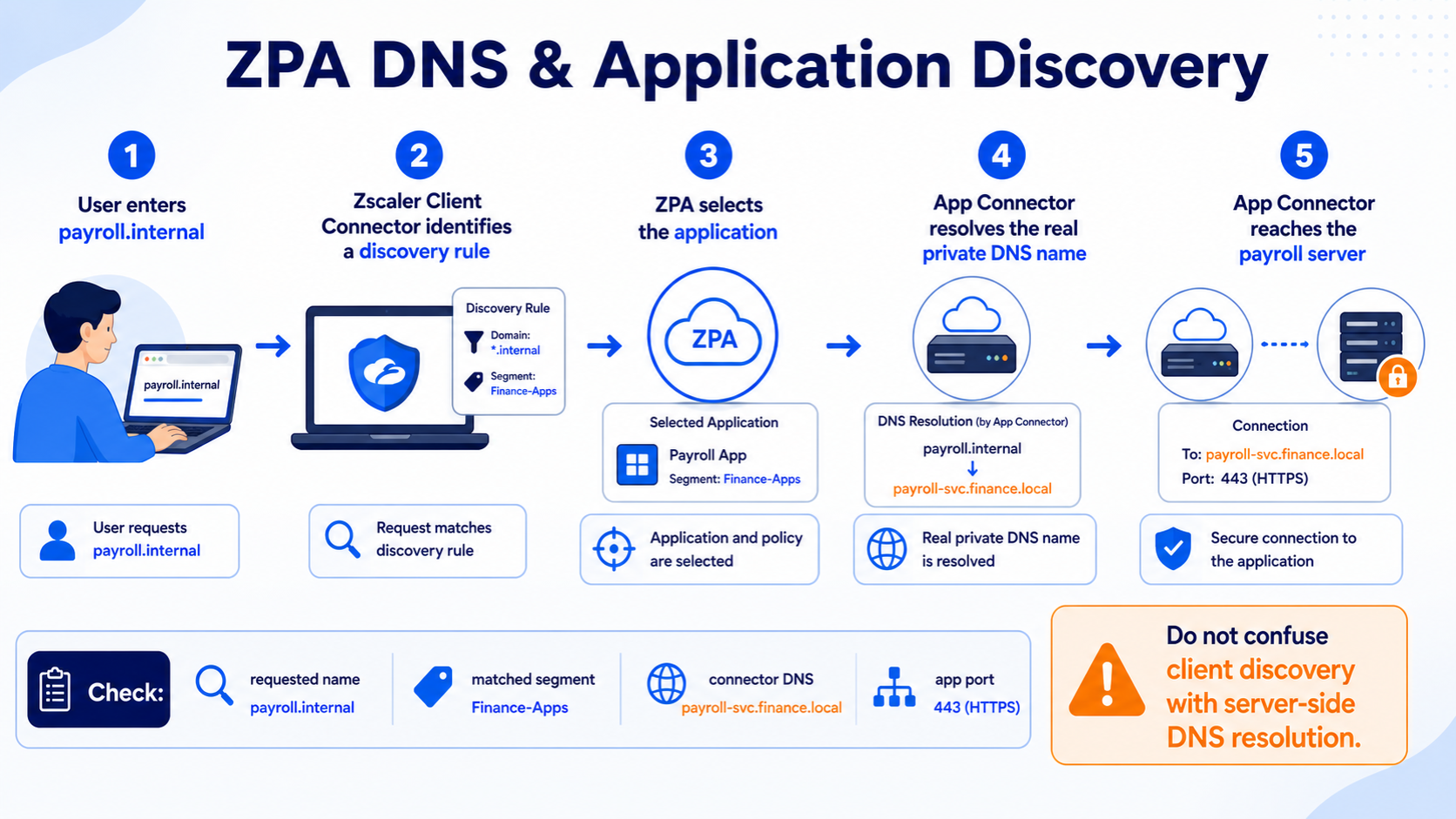

Key terms before you continue
The belief that costs you four hours
Most engineers see "works by IP, fails by name" and start debugging DNS on the user's laptop. Wrong — and that wrong instinct is exactly why a 10-minute fix turns into a half-day outage. In ZPA the laptop's resolver is irrelevant to a private app: the ZCC client intercepts the FQDN, the broker picks an App Connector whose App Segment matches, and the connector resolves the name locally via its own resolver and connects. The name only ever gets looked up on the connector host.
The everyday analogy: when you arrive at a gated society, you don't go knock flat-by-flat. The courier desk looks up the flat number and walks the parcel in. In ZPA the connector is the courier desk — it does the lookup, not you. So the senior move is never "fix the laptop's DNS". It's "which name does the connector resolve, with which resolver, and which segment claimed that name?" This blog teaches who-resolves-what first, then walks the 12 DNS-and-discovery scenarios that live on the connector.
No scoring. Just notice which ones you can't answer yet — those are the sections to slow down on. We answer all three as you scroll.
- A user reaches
10.20.9.40fine buthr.corp.localtimes out. Whose DNS do you check — the laptop's, or somewhere else? - You add a
*.corp.localApp Segment and suddenly one specific app — or some internet traffic that should go to ZIA — starts behaving differently. Why? - An app's access-control list is keyed to the user's source IP, but after moving to ZPA it rejects everyone. What IP is the app actually seeing?
The big picture — who actually resolves the app name
The ZPA App Connector is a lightweight Linux daemon you run next to your private apps — in your data centre, your VPC, your branch. The user's laptop never routes to your network and never resolves your app: ZCC simply captures the FQDN and hands it to the broker. The broker matches that name to an App Segment, picks a connector in the mapped group, and that connector does the DNS lookup with its own /etc/resolv.conf and reaches the app. That single fact — resolution happens at the connector — is the whole troubleshooting map for DNS and discovery.
Your DNS & discovery toolbox — tap each card
These six are the commands and files you'll reach for in every scenario below — all run on the connector, because that's where resolution happens. Memorise the front of each card; the back tells you what it proves.
Which DNS server does the connector use, and which search domains expand short names? If it points at a public resolver, internal app names never resolve.
Ask the internal DNS server directly. An answer here but NXDOMAIN from the default resolver = the connector is pointed at the wrong DNS. The truth test for every name fault.
If app fails but app.corp.local works, the connector has no search domain to expand the short name — and the user typed the short form the segment doesn't list.
A more-specific FQDN segment always wins over a wildcard. List overlapping segments to see which one actually claimed the name the user typed.
Without source-IP anchoring, the app sees the connector's IP. ACLs/licensing keyed to the user's IP break — fix with SIPA or by allowlisting the connector subnet.
Discovered apps only populate from a wildcard discovery segment plus real user traffic. No traffic or no wildcard segment = an empty list, not a bug.
Watch a name request flow — and see where it breaks
Before the scenarios, run this once. Press Play and watch the six stages a private-app name walks from the user typing it to the app actually answering. Each scenario below maps to exactly one of these stages going red.
▶ Resolving a private app — 6 stages
Press Play (auto-steps), or tap Next to walk it yourself. Stage 4 turns red — that's where the connector's own DNS lookup fails (wrong resolver, no search domain, missing record).
hr.corp.local. ZCC intercepts the FQDN — the laptop never resolves it.hr.corp.local to the App Segment that claims it (most-specific wins).hr.corp.local via /etc/resolv.conf → internal DNS 10.10.0.53. This is the hop that fails most.Bucket 1 — Resolution path & split-DNS
Symptoms here all share one trait: the app works by IP but fails by name, or works with the full FQDN but fails with a short hostname. The fault is always on the connector's resolution — a wrong resolver, a missing search domain, or a name the user typed in a form the App Segment doesn't list. Your truth test is to resolve the app's name from the connector itself.
Sneha at Infosys reaches the HR app by IP (172.16.9.40) but hr.corp.local times out. The connector is healthy and the segment is published.
- The connector's
/etc/resolv.confpoints at a public/wrong DNS that can't resolve the internal zone - The internal DNS record is missing or points to the wrong IP
- The app name only exists in a split-horizon internal view the connector isn't using
Resolve the app name on the connector, and compare the default resolver against the internal DNS directly.
cat /etc/resolv.conf
dig +short hr.corp.local
dig @10.10.0.53 +short hr.corp.local
nameserver 8.8.8.8            # public DNS — can't see corp.local
hr.corp.local: NXDOMAIN       # via default resolver
172.16.9.40                   # but the INTERNAL DNS knows it fine
Point the connector at the internal DNS server (10.10.0.53) that owns the corp.local zone, then restart the service.
echo "nameserver 10.10.0.53" | sudo tee /etc/resolv.conf
sudo systemctl restart zpa-connector
dig +short hr.corp.local via the default resolver now returns 172.16.9.40; users reach the app by name.
Users who type hr (the short hostname) get nothing, but hr.corp.local works. Some legacy bookmarks and scripts use the short form.
- The connector's
/etc/resolv.confhas nosearch corp.localline to expand short names - The App Segment lists only the FQDN, so the short name the user typed never matches a segment
getent hosts hr
getent hosts hr.corp.local
grep -E "^search|^domain" /etc/resolv.conf
# getent hosts hr          -> (nothing)
172.16.9.40   hr.corp.local      # FQDN resolves
# resolv.conf has NO 'search corp.local' line
Add a search domain so the connector expands short names, and define both name forms in the App Segment so either matches.
echo "search corp.local" | sudo tee -a /etc/resolv.conf
# then in the portal: add BOTH 'hr' and 'hr.corp.local' to the App Segment
sudo systemctl restart zpa-connector
getent hosts hr now returns 172.16.9.40; users reach the app whether they type the short name or the FQDN.
Rahul at TCS gets "app not reachable" for a newly-stood-up app. The connector is green; the segment is correct. From the connector, the name returns NXDOMAIN even against internal DNS.
The A record for the app simply doesn't exist in the internal zone yet (new app), or it was created in the wrong zone/view. ZPA can't broker to an IP the connector can't learn.
dig @10.10.0.53 newapp.corp.local
nslookup newapp.corp.local 10.10.0.53
;; ->>HEADER<<- opcode: QUERY, status: NXDOMAIN
;; QUESTION SECTION:
;newapp.corp.local.   IN  A           # internal DNS has no record at all
Create the A record in the internal zone that the connector queries (or correct the zone/view). This is a DNS-team fix, not a ZPA one — but you prove it from the connector.
dig @10.10.0.53 +short newapp.corp.local returns the correct IP; the brokered session now reaches the app.
Predict: a user reaches a private app fine by its IP, but the FQDN times out. The connector is green and healthy. Where do you run dig first — on the laptop, or somewhere else — and why?
dig hr.corp.local and dig @10.10.0.53 hr.corp.local on the connector: if internal DNS answers but the default resolver doesn't, the connector's /etc/resolv.conf points at the wrong DNS.Sneha reaches 172.16.9.40 fine but hr.corp.local times out. The connector is healthy. On the connector, dig hr.corp.local returns NXDOMAIN but dig @10.10.0.53 hr.corp.local returns the IP. What's the fix?
/etc/resolv.conf at internal DNS and restart.Bucket 2 — Wildcard FQDN match precedence
Resolution can be perfect and an app still break — because a wildcard App Segment claimed the name. The rule the whole bucket turns on: a more-specific FQDN segment always wins over a wildcard, and a wildcard on the wrong connector/server group can quietly steal traffic that should go to ZIA or the public internet. This is the bucket engineers misdiagnose most, because the connector and DNS both look fine.
Everything worked, then someone added a *.corp.local App Segment for convenience — and now one specific app (hr.corp.local) behaves differently or routes to the wrong location.
The wildcard now claims names that previously had no segment — and if it maps to a different connector/server group than the app's location, traffic is brokered through the wrong place. Worse, if there's no more-specific FQDN segment, the wildcard's group wins by default.
In the portal, list segments that overlap the name and see which group each maps to. Use ZPA Diagnostics to confirm which segment/connector served the FQDN.
# Segment 1: *.corp.local   -> Connector Group A (DC-Pune)
# Segment 2: (none specific for hr.corp.local)
# ZPA Diagnostics: hr.corp.local served by Group A  # wrong DC
hr.corp.local matched: *.corp.local (wildcard)
served by: Connector Group A (DC-Pune)   # app actually lives in DC-Mumbai
Add a more-specific FQDN segment for hr.corp.local mapped to the correct connector group — the specific segment then wins over the wildcard automatically.
ZPA Diagnostics shows hr.corp.local now served by the correct group; the app behaves exactly as before the wildcard was added.
After a broad wildcard segment is published, some traffic that should go out through ZIA (or directly to the internet) starts trying to route via ZPA — users report certain SaaS or internet hostnames suddenly failing or slowing.
A wildcard like *.com or an over-broad internal pattern matches far more names than intended. ZPA claims them, but the connector can't (and shouldn't) resolve or reach public destinations — so those sessions die in ZPA instead of going to ZIA.
Identify which names the wildcard captures, and confirm with ZPA Diagnostics that an internet hostname is being matched by a ZPA segment.
# ZPA Diagnostics on a failing SaaS host:
# saas-tool.example.com matched: *.example.com (ZPA wildcard)
# expected lane: ZIA / direct internet — NOT ZPA
matched segment: *.example.com  (ZPA)
result: no app / unreachable     # ZPA can't serve a public SaaS host
Tighten the wildcard to the internal namespace only (e.g. *.corp.local, not *.com), and add specific FQDN segments for the handful of internal apps that need ZPA. Let everything else fall through to ZIA.
ZPA Diagnostics shows the internet hostnames no longer match any ZPA segment; they route via ZIA/direct again and recover.
An app in DC-Mumbai is suddenly slow or unreachable. The app, DNS, and connectors all look fine — but the FQDN is being brokered through a connector group in a different region.
A wildcard segment mapped to the wrong connector/server group claims the name. Without a more-specific FQDN segment pointing at the right group, the wildcard's group wins — even though it can't optimally (or at all) reach the app's subnet.
# *.corp.local -> Connector Group A (DC-Pune)
# app lives in DC-Mumbai (Group B) but no specific segment exists
# ZPA Diagnostics: app served via Group A across the WAN
db.corp.local matched: *.corp.local -> Group A (DC-Pune)
path: Mumbai user -> Pune connector -> Mumbai app   # hair-pinned
Create a specific FQDN segment for the app, mapped to the connector group that actually sits next to it. Precedence does the rest — the specific segment wins and the path straightens out.
ZPA Diagnostics shows the app served by the local group; latency drops and reachability is restored.
Predict: an app worked perfectly, then someone added a *.corp.local App Segment mapped to a Pune connector group. Now that one app, which lives in Mumbai, is slow. The connectors and DNS are all healthy. What single change fixes it — without deleting the wildcard?
A *.corp.local wildcard segment (Group A, Pune) and a specific hr.corp.local segment (Group B, Mumbai) both exist. A user requests hr.corp.local. Which segment serves it, and why?
hr.corp.local routes to Group B. The wildcard only serves names that have no more-specific segment.Bucket 3 — Source-IP anchoring for IP-sensitive apps
Resolution and precedence are correct, the app is reachable — but it rejects the user or logs the wrong source. The reason is structural to ZTNA: the app server sees the connection coming from the connector's IP, not the user's. Any ACL, licence, or geo-rule keyed to the user's source IP breaks. The decision tree below is your triage map for the whole blog; print it.
Priya at Wipro can resolve and reach an internal app, but it rejects her — or logs the wrong source. The app's allow-list / licence is keyed to the user's office IP range, and after moving to ZPA every session looks like it comes from one IP.
In ZTNA the connector terminates the user session and opens a fresh one to the app — so the app sees the connector's source IP (e.g. 10.20.5.11), not the user's. Any ACL, geo-rule, or licence keyed to the user's IP now fails or mis-attributes.
Check what source IP the app server actually logs for a ZPA session, and compare it to the connector's IP.
# app access log for a ZPA-brokered request:
tail -f /var/log/app/access.log
ip addr show   # on the connector — note its source IP
access.log: 10.20.5.11 - - "GET /hr" 403 (ACL: src not allowed)
# 10.20.5.11 = the App Connector, NOT the user's 192.0.2.x office IP
Two options: (1) allowlist the connector's subnet on the app/ACL (simplest, but loses per-user IP granularity), or (2) use Source IP Anchoring (SIPA) so the app sees a controlled, known source IP. Note: pure ZTNA can't preserve each user's original client IP — anchoring gives you a predictable one instead.
The app's access log shows the expected anchored/allowlisted source IP, the 403s stop, and IP-keyed licensing counts sessions correctly.
A vendor app counts "concurrent IPs" for licensing, or applies a geo/IP rule. Under ZPA it either over-counts (everyone shares the connector IP looks like one user) or blocks users because the connector's IP isn't in the licensed range.
The app's logic assumes the source IP identifies the user or their location. Behind ZPA, the source is always the connector — so per-user IP assumptions collapse.
# on the app/licence server, inspect the source seen for several users:
grep "license check" /var/log/app/license.log | tail
license: src 10.20.5.11 (connector)  user=sneha  -> OK
license: src 10.20.5.11 (connector)  user=rahul  -> counted as SAME IP
# IP-based seat counting is meaningless behind ZPA
Allowlist the connector subnet in the app's licensed range so the connector IP is accepted, and move seat-counting to a user identity signal (ZPA passes the authenticated user), not source IP. Use Source IP Anchoring where the vendor must see a specific public egress IP.
Licensed users are admitted, seat counts track real users (by identity), and the geo/IP rule passes for the anchored source.
An internal app's ACL only allows the office IP range. After cutover to ZPA it 403s every user, and its access log shows source 10.20.5.11 for all of them. What is 10.20.5.11, and what's the right fix?
Bucket 4 — Application discovery
Everything resolves and routes correctly — but the discovered-apps list is empty or stale, so you can't see what's actually being accessed. Discovery isn't broken; it has prerequisites. It needs the feature enabled, a wildcard discovery segment, and — crucially — real user traffic to observe. No traffic, no discovery. This bucket also covers making your internal DNS server itself reachable through ZPA.
You open the discovered-applications view expecting to see what users access — and it's empty. Users are reaching apps successfully, so the connectors clearly work.
- Application discovery is simply not enabled in the tenant
- There's no wildcard discovery segment for the connector to observe traffic against
- Discovery is on, but users aren't yet sending traffic through the relevant segment
In the portal, confirm discovery is enabled and that a wildcard segment exists for the namespace you expect to discover.
# 1. Application discovery feature: ENABLED?
# 2. Wildcard discovery segment e.g. *.corp.local : exists + access policy?
# 3. Are users actually sending traffic to *.corp.local names yet?
discovery: OFF
wildcard discovery segment: none
=> discovered-apps list will stay empty by design
Enable application discovery, create a wildcard discovery segment (e.g. *.corp.local) with an access policy for the target users, then let real traffic flow. ZPA observes the interactions and populates the list.
After real user traffic flows for a while, the discovered-apps list begins to populate with the FQDNs/IPs users actually hit.
Discovery is enabled and a *.corp.local wildcard segment exists, but nothing shows up. The team suspects a bug.
Discovery is traffic-driven: it learns apps by watching real user sessions. If users haven't been assigned to the discovery segment, or simply haven't accessed anything under it yet, there's nothing to learn. An empty list is the expected state, not a fault.
# Access policy: do target users actually MATCH the discovery segment?
# Are there recent allowed sessions to *.corp.local in the logs?
discovery segment *.corp.local: 0 sessions in last 24h
=> nobody has generated traffic to learn from yet
Confirm the access policy lets the right users reach the discovery segment, then drive a representative set of users to actually use their apps. Give it time — discovery accumulates as traffic flows.
As sessions to *.corp.local names appear in the logs, matching apps begin showing in the discovered-apps list.
Discovery is working and the list is full — but everything is still being served by the broad wildcard, so you have no per-app policy, logging, or precedence control.
A wildcard discovery segment is meant to be a starting point. Leaving every app on the wildcard gives you no granularity — and no way to route a specific app to the right connector group (precedence only kicks in once a specific segment exists).
# discovered: hr.corp.local, payroll.corp.local, wiki.corp.local ...
# all currently served by the *.corp.local wildcard
# group/owner unknown for several -> need to classify
3 business apps identified, 5 to evaluate with app owners
=> promote the known ones to defined FQDN segments
For each identified app, create a defined (specific) FQDN segment mapped to the correct connector group, with its own access policy. The specific segment wins over the wildcard by precedence; engage app owners to classify the ambiguous ones.
ZPA Diagnostics shows each promoted app served by its specific segment/group; per-app policy and logging now work, and the wildcard only catches the long tail.
A subset of clients or services need to query the internal DNS server itself over ZPA, but they can't — name resolution that depends on reaching 10.10.0.53 fails for those flows.
The internal DNS server is just another private resource — if there's no App Segment that brokers traffic to it (TCP/UDP 53 to 10.10.0.53), ZPA won't carry those queries. Don't confuse this with the connector's own resolution, which uses the host's /etc/resolv.conf directly.
# Is there an App Segment for the DNS server?
# e.g. 10.10.0.53  ports: TCP/UDP 53  -> connector group near it
no App Segment claims 10.10.0.53 / port 53
=> ZPA cannot broker queries to the internal DNS server
Create an App Segment for the internal DNS server (its IP or FQDN, ports TCP/UDP 53), mapped to a connector group that sits next to it, with an access policy for the clients that need it.
The dependent clients can resolve names that require the internal DNS server over ZPA; the brokered DNS flow shows up in the logs against the new segment.
Predict: you enabled application discovery and built a *.corp.local wildcard segment yesterday, but the discovered-apps list is still empty this morning. The connectors are healthy and users reach apps fine. Bug or expected — and what makes the list fill?
A few clients need to query the internal DNS server (10.10.0.53) over ZPA, but those queries fail. Connectors are healthy and other apps resolve fine. What's the fix?
/etc/resolv.conf (b) governs the connector's resolution, not what ZPA brokers for clients.🤖 Ask the ZPA DNS & Discovery Tutor
Tap any question — instant, scoped to this lesson. The kind of thing you'd ask after reading.
Pre-curated from Zscaler docs + community threads. For deeper/live questions, paste your config into chat.techclick.in.
In two lines: why is "it works by IP but not by name" almost never a laptop-DNS problem in ZPA? Type your answer first — then reveal the expert version and compare.
/etc/resolv.conf. So a name fault lives on the connector (wrong resolver, no search domain, missing record), and the laptop's DNS is irrelevant. You run dig on the connector, not on the laptop.Tap to generate a one-liner you can paste to a teammate stuck on a "works by IP, fails by name" ZPA app.
dig app.corp.local + dig @internal-dns app.corp.local. Wrong resolver, no search domain, or a missing record — fix it there. And remember: a specific FQDN segment always beats a wildcard. — learned this on ai.techclick.in"📖 Glossary
- App Connector
- A lightweight Linux daemon (
zpa-connector) deployed next to your private apps. It — not the user's laptop — resolves the app's name and connects. - ZPA
- Zscaler Private Access — connects users to private apps over the Zscaler cloud, no network-level VPN.
- ZCC (Client Connector)
- The agent on the user's device. It captures the app FQDN and forwards it to Zscaler — it does not resolve the private app.
- Split-DNS
- The same name resolving to different answers for internal vs external clients. The connector must use the internal view to reach private apps.
- Search domain
- A suffix (e.g.
corp.local) in/etc/resolv.confthat lets the connector expand a short hostname (hr) into an FQDN (hr.corp.local). - Application Segment
- The portal object declaring which domains/ports an app uses; the broker uses it to pick which connector resolves and reaches the app.
- Wildcard / match precedence
- A
*.corp.localsegment catches many names, but a more-specific FQDN segment always wins over a wildcard. - Source IP Anchoring (SIPA)
- Presents a controlled, known source IP to the app so IP-based ACLs/licensing keep working — because by default the app sees the connector's IP, not the user's.
- Application Discovery
- A traffic-driven feature: a wildcard discovery segment plus real user traffic lets ZPA learn which apps users access, so you can promote them to defined segments.
🎓 Prove it — 10-question assessment
Q1–Q4 above already count. Answer Q5–Q10 below, then Submit. Pass = 70% (7/10). Passing marks this lesson complete on your profile.
📚 Sources
- Zscaler Help — Networking Deployed App Connectors (the connector resolves app DNS names and enumerates each resolved IP as a load-balanced server). help.zscaler.com/zpa/networking-deployed-connectors
- Zscaler Help — About Applications & About Application Segments Settings (wildcard vs explicit FQDN; most-specific match wins). help.zscaler.com/zpa
- Zscaler Help — Configuring Defined Application Segments (domains, short names, DNS-server segments). help.zscaler.com/zpa/configuring-defined-application-segments
- Zscaler Community (Zenith) — Zscaler Private Access and resolving wildcard DNS. community.zscaler.com/t/…/14155
- Zscaler Help — Understanding / Configuring Source IP Anchoring (the destination sees the App Connector's IP; preserving IP-based controls). help.zscaler.com/zpa/understanding-source-ip-anchoring-direct
- Zscaler Reference Architecture — Zero Trust App Segmentation with ZPA (start with wildcard discovery segments + access policy, learn from real traffic, then define granular segments). help.zscaler.com/downloads/zpa/reference-architecture
- Zscaler Help — Troubleshooting App Connectors (connector-side DNS diagnosis). help.zscaler.com/zpa/troubleshooting-app-connectors
- Zscaler Academy — ZDTA Certification blueprint (App Segments, DNS resolution, application discovery). zscaler.com/zscaler-cyber-academy
What's next?
You can now diagnose any ZPA name or discovery fault. Go deeper: the full troubleshooting playbook ties resolution into enrollment, tunnel, and health — and the App Segments lesson covers the domain sets, ports, and server-group mapping these DNS fixes plug into.
— Techclick Team