Start here · understand the lesson before the detail
What you are learning
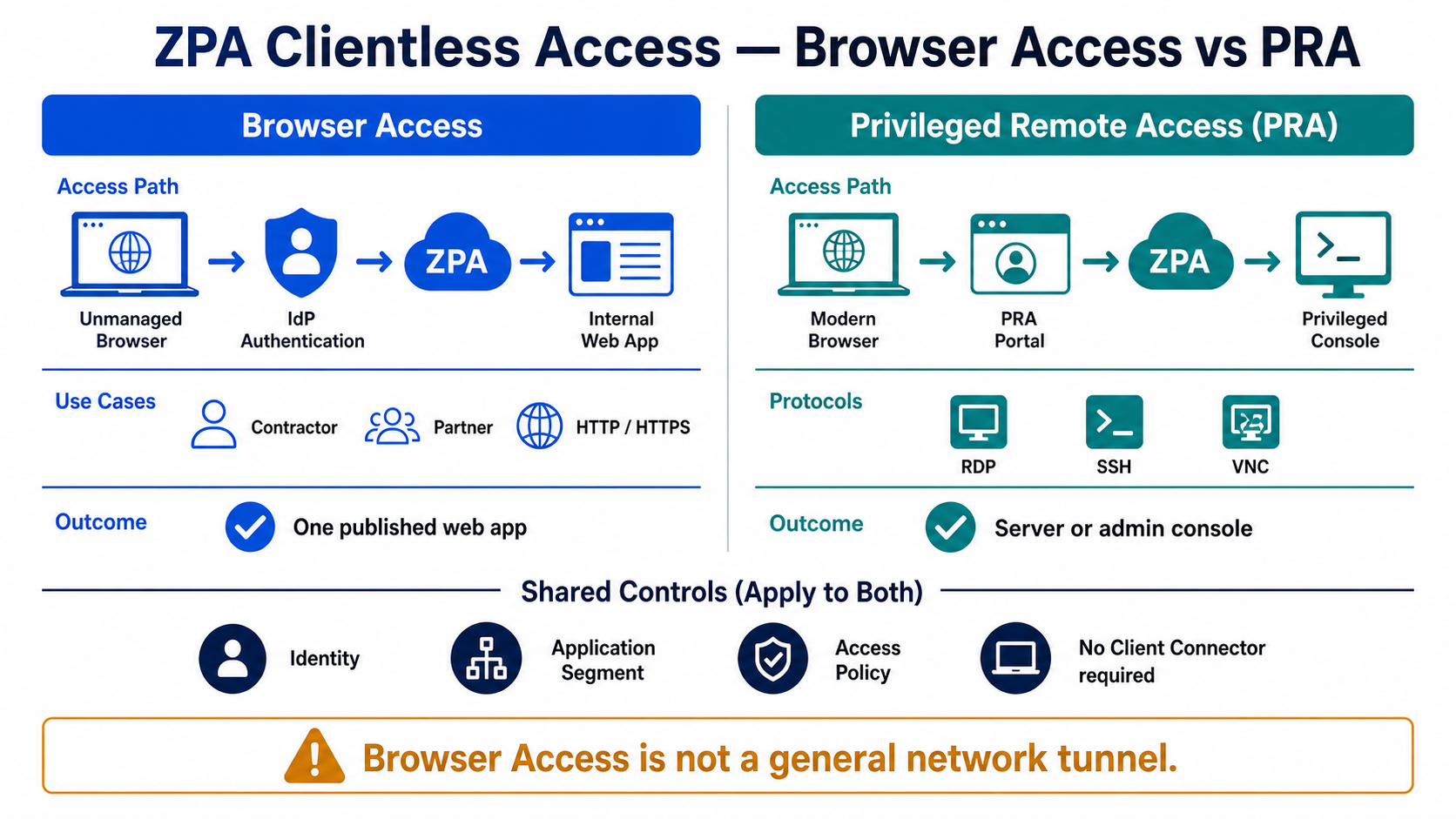
This lesson separates two clientless ZPA experiences. Browser Access is for internal web applications. Privileged Remote Access is for browser-based administrative sessions such as RDP, SSH, and VNC.
In plain English
Both methods can work without Client Connector, but they do not create a general network tunnel. Browser Access exposes an authorised HTTP/HTTPS application through an external domain. PRA uses a portal and privileged console definitions for administrative protocols.
Real example
A contractor needs one reconciliation website from a personal laptop: use Browser Access. A support engineer needs approved SSH access to one Linux jump host: use PRA. Identity, application definitions, policy, and connector reachability still apply to both.
Follow this flow
- Identify whether the target is a web app or a privileged console.
- Define the internal application and connector path.
- Configure the external domain, certificate, and portal as required.
- Create identity and least-privilege access policy.
- Test allowed, denied, timeout, clipboard, credential, and audit behaviour.
Evidence to collect
- External FQDN, certificate, and DNS result
- Application segment, protocol, and connector health
- IdP authentication and matched access policy
- Portal/session event, duration, user action, and closure
Common mistake to avoid
Do not use Browser Access as a substitute for arbitrary TCP/UDP access. Do not treat PRA as only a remote desktop tool; the privileged portal, console, protocol, policy, credentials, and audit expectations all matter.
Current official source checkpoint
- About Browser Accesscurrent official reference used for this beginner explanation
- Understanding PRAcurrent official reference used for this beginner explanation

Key terms before you continue
Most engineers think…
Browser Access is just a VPN for the browser, and PRA needs a jump host - both are basically remote-desktop tools.
Wrong on both counts. Browser Access is a reverse proxy to ONE web app at a Zscaler URL - no network, nothing to roam. PRA is a clientless privileged-access tool that pixel-streams HTML5 RDP/SSH into the browser, injects a vaulted credential so the user never sees the password, and records the session - no agent and no jump host. Get those two ideas and every clientless decision falls out of one rule: managed + any protocol is ZCC, clientless web is Browser Access, clientless RDP/SSH is PRA.
① The agentless problem — who can't (or won't) install ZCC
Open the ZPA Fundamentals lesson and you'll see the whole model assumes one thing: the user runs ZCC on a managed device. That is true for your own staff. It is flatly false for the people who actually cause the most access headaches — a 90-day audit contractor on their personal laptop, a partner SOC analyst, a kiosk in a branch, a BYOD phone. You are not putting your agent on a machine you do not own, and they are not letting you.
So ZPA gives you two clientless doors that need no agent at all: Browser Access (BA) for private web apps, and Privileged Remote Access (PRA) for RDP/SSH/VNC — both delivered inside an ordinary browser tab. This lesson is about choosing between those two (and ZCC), wiring them on top of the object chain you already know, and avoiding the one trap that breaks every clientless rollout: trying to apply device posture to a device you cannot see.
Anjali at Infosys faces this
An external pen-test vendor needs three months of access to one internal web ticketing tool, from their own laptops. Anjali, on her first ZPA lab, tries to push ZCC to them via email and is told flatly the vendor will not install a corporate agent on personal machines.
She is reaching for the managed-device tool (ZCC) for an unmanaged-device problem. ZCC requires install rights and MDM — neither of which she has on a third party laptop.
Is the target a web app (HTTP/HTTPS) or a thick-client app (RDP/SSH)? Ticketing is web, so the answer is Browser Access — a clientless reverse proxy at a Zscaler URL, no agent.
Publish the ticketing app via Browser Access, gate it with the vendor's SAML/SCIM group plus Country, and time-box it by disabling the BA app object at contract end.
The vendor opens the Zscaler-managed HTTPS URL, gets bounced to the IdP for login, and lands on the one app — with no ZCC anywhere on their device.
Here is the honest, interview-ready decision table — the one a panel actually asks you to draw:
| Question | ZCC | Browser Access | PRA |
|---|---|---|---|
| Agent on device? | Yes (managed) | No — clientless | No — clientless |
| Protocols | Any (TCP/UDP) | HTTP/HTTPS only | RDP / SSH / VNC |
| Posture / trusted-network? | Yes | No (no agent) | No (no agent) |
| Credential injection / recording? | No (native session) | No | Yes — its whole point |
| Best for | Your own staff | Contractor/BYOD web | Privileged admin/auditor SSH-RDP |
Three myths to flip before we go on
Tap each card — front is the myth most freshers carry, back is the correction.
No. Browser Access is a reverse proxy to ONE web app at a Zscaler URL. There is no network, no tunnel adapter, nothing to roam.
No jump host, no bastion VM. The cloud broker pixel-streams an HTML5 RDP/SSH session straight into the browser via the connector.
Different, not weaker. You swap device posture for SAML/SCIM + country gating — and PRA adds recording + credential vaulting that ZCC sessions don't have.
Opposite. PRA injects a vaulted credential into the session — the human never sees or types the privileged password.
Pause & Predict
A contractor on a BYOD laptop needs SSH to one prod server, with no agent and full session recording. Which of the three doors fits — and why not Browser Access? Type your guess.
② Browser Access — the clientless web door, end to end
Browser Access turns one internal web app into a public HTTPS URL that Zscaler operates and certifies. The flow is short: the user opens the Zscaler-managed URL, the Service Edge redirects them to your IdP for SAML login, and on success the edge reverse-proxies their requests through the App Connector to the real internal web server. Same broker, same zero-inbound connector, same default-deny policy — the only thing missing is the agent.
Three pieces make it work, and students mix them up: a clientless / BA application object (the FQDN of the web app, linked to its Application Segment), the Zscaler-managed domain the user actually types, and the TLS certificate Zscaler presents for that domain (Zscaler-managed by default, so there is no cert for you to renew). The Service Edge does SNI-based routing: the hostname in the TLS handshake tells the edge which BA app this is, then it maps to the linked Application Segment and connector.
Now the actual console. This is the Application Segment with Browser Access (clientless) enabled — recreated so you recognise the real screen, including the certificate and domain fields.
Contractors need browser-only SSH to a prod bastion with no client install and full session recording. Which ZPA feature do you use?
③ Why posture can't gate clientless — and what to use instead
This is the single most important idea in the whole lesson, and the one freshers fail an interview on. Device posture and trusted-network criteria need ZCC to report them. Posture is a device-health verdict — OS version, patch level, AV/EDR running, a device certificate — collected by the agent. A clientless browser has no agent, so there is nothing to report. ZPA does not "fail open" here; it rejects posture and trusted-network criteria on Web Browser client-type rules. The Add Rule form won't even save them.
So how do you secure a contractor you can't fingerprint? With what you do have: SAML/SCIM group membership (only the vendor's directory group), Country, and a time-box (disable the app/rule at contract end). That is the supported, exam-correct way to gate clientless access. If posture is genuinely mandatory — say, a regulator demands a compliant device — then clientless is simply the wrong answer and the user must run ZCC.
Concretely, the rule you build for that contractor sets Action = ALLOW and Criteria · Client Type = Web Browser (under Policy ▸ Access Policy ▸ Add Rule), then layers SCIM Group = Vendor-PenTest AND Country = India, applied to the Browser Access segment group. The Posture Profile row is greyed-out and the rule won't save with it — exactly because the session is clientless. That is the supported pattern: identity and location stand in for the posture you cannot collect.
A clientless Browser Access session and a clientless PRA session both reach the policy engine as which client type?
▶ Watch a contractor's Browser Access session get brokered
Press Play for the healthy clientless path, then Break it to see the classic mistake — someone adds a posture condition and the contractor is locked out.
Rohit at TCS faces this
Rohit "hardens" a working Browser Access contractor rule by adding a device-posture check to be safe. The rule refuses to save, and after he forces a different config the contractor is locked out entirely.
It's a Web Browser client-type (clientless) rule. There is no ZCC on the contractor's BYOD laptop, so there is no posture to evaluate — ZPA disallows the criterion by design.
Check the rule's Client Type; if it's Web Browser, posture and trusted-network are simply unsupported.
Policy ▸ Access Policy ▸ (rule) ▸ Criteria ▸ Client TypeDrop the posture condition; gate with SAML + the vendor's SCIM group + Country. If posture is non-negotiable, the contractor must install ZCC — clientless is the wrong tool.
The rule saves; the contractor's access log shows an ALLOW against the Web Browser rule with the SCIM group matched.
Even on ZCC, security researchers (Synacktiv, 2023) showed ZPA posture checks are evaluated client-side, so a determined attacker who controls the endpoint can spoof a "compliant" verdict. Treat posture as a deterrent and a UX gate for honest users, not a hard enforcement boundary. This is one more reason not to over-trust posture — and not to mourn its absence on clientless rules. Defence-in-depth (identity + MFA + least-privilege segments) is what actually contains a bad device.
Pause & Predict
Your security lead insists every contractor rule must enforce "compliant device". The contractors are on BYOD with no ZCC. What do you tell the lead? Type your guess.
④ PRA — clientless RDP/SSH with recording & credential injection
Browser Access stops at HTTP/HTTPS. The moment an auditor or a third-party admin needs SSH or RDP with no agent, you reach for PRA. The cloud broker runs an HTML5 RDP/SSH/VNC client server-side and pixel-streams the session into the browser tab. No agent, no jump host, no bastion VM to patch — and three features that make it a privileged-access tool, not just remote access:
- Credential injection — PRA pulls the privileged password from a vault (its own PRA Credential object, or an external CyberArk / BeyondTrust vault) and injects it into the session. The human never sees or types the password.
- Session recording — full video capture of the SSH/RDP session for audit, stored and searchable.
- Clipboard / file-transfer control + privileged approval — block copy-paste and uploads, and optionally require an approver to grant the session.
PRA is wired with its own objects: a PRA Portal (the branded HTTPS entry URL), one or more PRA Consoles (the RDP/SSH/VNC apps), and PRA Credential objects — all referenced by a separate PRA Application Segment, distinct from a Browser Access app.
Here's the console object behind it. This is a PRA Credential wired into a PRA Console — the bit that makes injection happen.
An auditor opens a PRA SSH session and asks you for the bastion's root password "so I can log in". What is the correct answer?
▶ Watch a PRA SSH session — and a wrong-tool failure
A vendor admin needs SSH. Play the healthy PRA path, then Break it to see what happens when someone tries Browser Access for RDP/SSH — the wrong tool.
Sneha at HDFC faces this
Sneha needs to give an external auditor RDP to a Windows jump server from an unmanaged laptop, with full recording. She publishes the server as a Browser Access app and it simply won't connect.
Wrong tool. Browser Access is HTTP/HTTPS only — it cannot carry RDP. RDP/SSH/VNC clientless is PRA's job, with its own Portal, Console and Credential objects.
Check the protocol of the target. RDP (3389) / SSH (22) / VNC ⇒ PRA, not Browser Access.
Privileged Remote Access ▸ Consoles ▸ Add Console (RDP)Build a PRA Console for the RDP server, attach a PRA Credential (vaulted) with recording on, and publish via the PRA Portal. Gate the rule with SCIM group + country (clientless = no posture).
The auditor reaches the RDP desktop in-browser, the password is injected (never shown), and a recording appears under PRA session logs.
⑤ Certificates, SNI & the SAML redirect under the hood
Why does a contractor's browser trust ticketing.ba.zscaler.net with no certificate warning? Because the Service Edge presents a Zscaler-managed TLS certificate for that managed domain, signed by a CA browsers already trust. You don't generate, install or renew anything — that's the default and the reason BA "just works" on a kiosk. (If you need your own brand domain, e.g. apps.yourco.com, you can upload a custom certificate, but then you own its renewal.)
Routing uses SNI: the hostname in the browser's TLS ClientHello tells the edge which clientless app this request is for, before any HTTP is exchanged. The edge maps that SNI hostname → the BA app object → its linked Application Segment → the App Connector that can reach the internal FQDN. Get the SNI/domain mapping wrong and the edge can't pick a backend — you get a TLS or 404-style failure, not a posture error.
The login itself is a plain SAML redirect: unauthenticated request → 302 to your IdP → user logs in → signed assertion posts back to the edge → session established. This is exactly why a signed-assertion bug is catastrophic, which is our CVE.
dig +short ticketing.ba.zscaler.net
openssl s_client -connect ticketing.ba.zscaler.net:443 -servername ticketing.ba.zscaler.net </dev/null 2>/dev/null | openssl x509 -noout -issuer -subject
curl -sI https://ticketing.ba.zscaler.net/ | head -3
34.120.18.55
issuer=C=US, O=Zscaler Inc., CN=Zscaler Browser Access CA
subject=CN=ticketing.ba.zscaler.net
HTTP/1.1 302 Found
location: https://login.example-idp.com/saml2/sso?SAMLRequest=...
The issuer line proves the cert is Zscaler-managed (no warning), and the 302 to the IdP proves the SAML redirect is firing. If the 302 is missing, the clientless app or its SAML link is misconfigured — never a posture problem.
A contractor reports a TLS certificate warning on the Browser Access URL, and the page never reaches the IdP login. Where do you look first?
Disclosed 5 Aug 2025 at DEF CON 33 (AmberWolf), CVSS 9.6 CRITICAL (CWE-347, improper verification of a cryptographic signature): Zscaler's server-side SAML 2.0 Service Provider — covering both ZIA and ZPA — did not verify that incoming SAML responses were signed with the configured IdP's public key. An attacker could forge a SAML assertion naming themselves as any user and achieve a complete authentication bypass to internal apps reached via ZPA — including clientless Browser Access and PRA, where SAML is the only gate. Fix: resolved server-side across all Zscaler Clouds — no customer patch and no client upgrade; Zscaler reported no evidence of exploitation in the wild. Still confirm your IdP is correctly configured and watch trust.zscaler.com. The lesson: on clientless access, the signed assertion is the security boundary — verifying its signature is non-negotiable.
Pause & Predict
Why is a SAML signature-verification bug far more dangerous for Browser Access / PRA than for a ZCC user on a managed device? Type your guess.
⑥ ZCC vs Browser Access vs PRA — the decision, and what breaks
You now have the full toolkit. The interview-grade decision is one sentence: managed device + any protocol + posture → ZCC; clientless web → Browser Access; clientless RDP/SSH/VNC → PRA. Everything else is detail. Here are the production gotchas that send freshers down rabbit holes.
Karan at Flipkart faces this
Karan publishes an internal dashboard via Browser Access. It works for him on the corporate laptop but a partner on BYOD sees a blank page and the access log shows the request never matched his ALLOW rule.
His ALLOW rule has Client Type = ZCC (or no client type), so a Web Browser (clientless) session doesn't match it and falls through to default-deny.
Use Diagnostics ▸ User Activity to see which rule the clientless session matched (none).
Policy ▸ Access Policy ▸ (rule) ▸ Criteria ▸ Client Type = Web BrowserAdd a rule whose Client Type includes Web Browser, scoped to the BA segment group + the partner's SCIM group + country. Clientless and agent sessions need their own rules.
The partner's access log now shows an ALLOW against the Web Browser rule for the dashboard.
Priya at Wipro faces this
Priya gives auditors PRA SSH but they complain they can't copy command output back to their report, and her CISO complains there is no audit trail of what they ran.
Two separate PRA settings: clipboard/file-transfer is disabled (intended for security), and session recording was never enabled on the credential/console.
Decide the clipboard policy deliberately (off is safer for privileged sessions); enable Session Recording on the PRA Console/Credential so every keystroke is captured for the CISO.
A recording appears under PRA session logs; if auditors truly need file export, allow file-transfer narrowly rather than re-opening the clipboard wholesale.
Vikram at Infosys faces this
Vikram tries to publish a legacy fat-client app (not web, not RDP/SSH — a proprietary TCP protocol) to contractors via Browser Access, and nothing works no matter what he configures.
Clientless has hard protocol limits. Browser Access = HTTP/HTTPS only; PRA = RDP/SSH/VNC only. A proprietary TCP fat-client fits neither clientless door.
For an arbitrary-protocol app the user must run ZCC (managed device). If the contractor can't install ZCC, there is no clientless path — that's a genuine ZPA limitation, not a misconfig.
Confirm the protocol: if it's not HTTP/HTTPS and not RDP/SSH/VNC, stop trying clientless and plan a ZCC or L3-VPN exception instead.
Never trust "I saved the BA app" as proof a contractor can get in. Confirm it the right way: the user's access log shows an ALLOW against the Web Browser client-type rule and the expected segment; for PRA, a session recording appears in the PRA session log and the credential shows as injected (not entered). Clientless has no posture and no tunnel adapter — the log is the only access truth.
🤖 Ask the AI Tutor
Tap any question — instant, scoped to this lesson. No login, no waiting.
Pre-curated from Zscaler docs + community Q&A, scoped to this lesson. For a live prod issue, paste your export into chat.techclick.in.
📝 Wrap-up assessment — six more
You've answered 4 inline. Six left. 70% (7 of 10) marks the lesson complete on your profile. Tap Submit all answers at the end.
🧠 In your own words
Type one line: why can a clientless Browser Access or PRA rule never use a device-posture condition? Then compare to the expert version.
🗣 Teach a friend
Best way to lock it in — explain it in one line to a teammate. Tap to generate a paste-ready summary.
📖 Glossary
- Browser Access (BA)
- Clientless (no-ZCC) zero-trust access to private HTTP/HTTPS web apps via a reverse proxy at the Service Edge, reached at a Zscaler-managed HTTPS URL.
- Privileged Remote Access (PRA)
- Clientless HTML5 RDP/SSH/VNC pixel-streamed into the browser by the cloud broker, with credential injection, session recording and approval — for privileged access without an agent.
- Clientless / Web Browser client type
- The ZPA rule condition for sessions with no agent. Both BA and PRA arrive as Web Browser client type — which is why neither can carry posture or trusted-network criteria.
- ZCC (Zscaler Client Connector)
- The agent on a managed device that authenticates via SAML, checks device posture and dials out to the broker. Required whenever you need posture or non-web/non-RDP protocols.
- Credential injection
- PRA pulls a privileged password from a vault (a PRA Credential object or external CyberArk/BeyondTrust) and injects it into the session, so the user never sees or types the secret.
- Session recording
- Full video capture of a PRA RDP/SSH/VNC session, stored for audit — the feature that turns clientless remote access into a privileged-access control.
- PRA Portal / PRA Console / PRA Credential
- The PRA objects: the Portal is the branded entry URL, a Console is the RDP/SSH/VNC app, and a Credential supplies the injected secret — all referenced by a separate PRA Application Segment.
- Clientless (BA) app object
- The Browser Access object that links a single web FQDN to its Application Segment and a Zscaler-managed domain; FQDN-only, HTTP/HTTPS.
- Zscaler-managed certificate
- The TLS certificate the Service Edge presents for a Browser Access domain, signed by a browser-trusted CA — so the user sees no warning and you never renew it.
- SNI (Server Name Indication)
- The hostname in the TLS ClientHello that tells the Service Edge which clientless app a request is for, before any HTTP is exchanged.
- SAML redirect
- The 302 the edge issues to send an unauthenticated clientless user to the IdP; a signed assertion posts back to establish the session. On clientless access this is the entire security boundary.
- Posture (device posture)
- A device-health verdict (OS, patch, AV/EDR, certificate) collected by ZCC. Impossible on clientless sessions, so BA/PRA are gated with SAML/SCIM group + country instead.
📚 Sources
- Zscaler Help — About Browser Access + Configuring Browser Access (clientless reverse proxy, Zscaler-managed domain + TLS cert, FQDN-only clientless app, posture unsupported on Web Browser rules). help.zscaler.com/zpa
- Zscaler Help — About Privileged Remote Access + Configuring PRA Portals, Consoles & Credentials (HTML5 RDP/SSH/VNC, credential injection, session recording, clipboard/file-transfer control, approval). help.zscaler.com/zpa
- Zscaler Help — Configuring Access Policies + Client Types (default-deny first-match; Web Browser client-type rules and the posture/trusted-network restriction). help.zscaler.com/zpa
- NVD — CVE-2025-54982, Zscaler SAML SP signature-verification bypass (CVSS 9.6, CWE-347; affects ZIA + ZPA; fixed server-side, no customer action). nvd.nist.gov
- AmberWolf / DEF CON 33 disclosure + Synacktiv research — SAML assertion-forgery auth bypass, and the finding that ZPA device-posture is evaluated client-side (deterrence vs hard enforcement). amberwolf.com / synacktiv.com
- Zscaler Cyber Academy — ZDTA (EDU-200) Digital Transformation Administrator blueprint (ZPA clientless access: Browser Access, PRA, Access Control / Identity domains). zscaler.com
What's next?
You can now choose ZCC, Browser Access or PRA on sight and wire clientless access end to end. Next, see why ZPA beats a VPN for everyone else - and when a Private Service Edge earns its place.