Lessons · Cloud App Control · GenAI SaaS
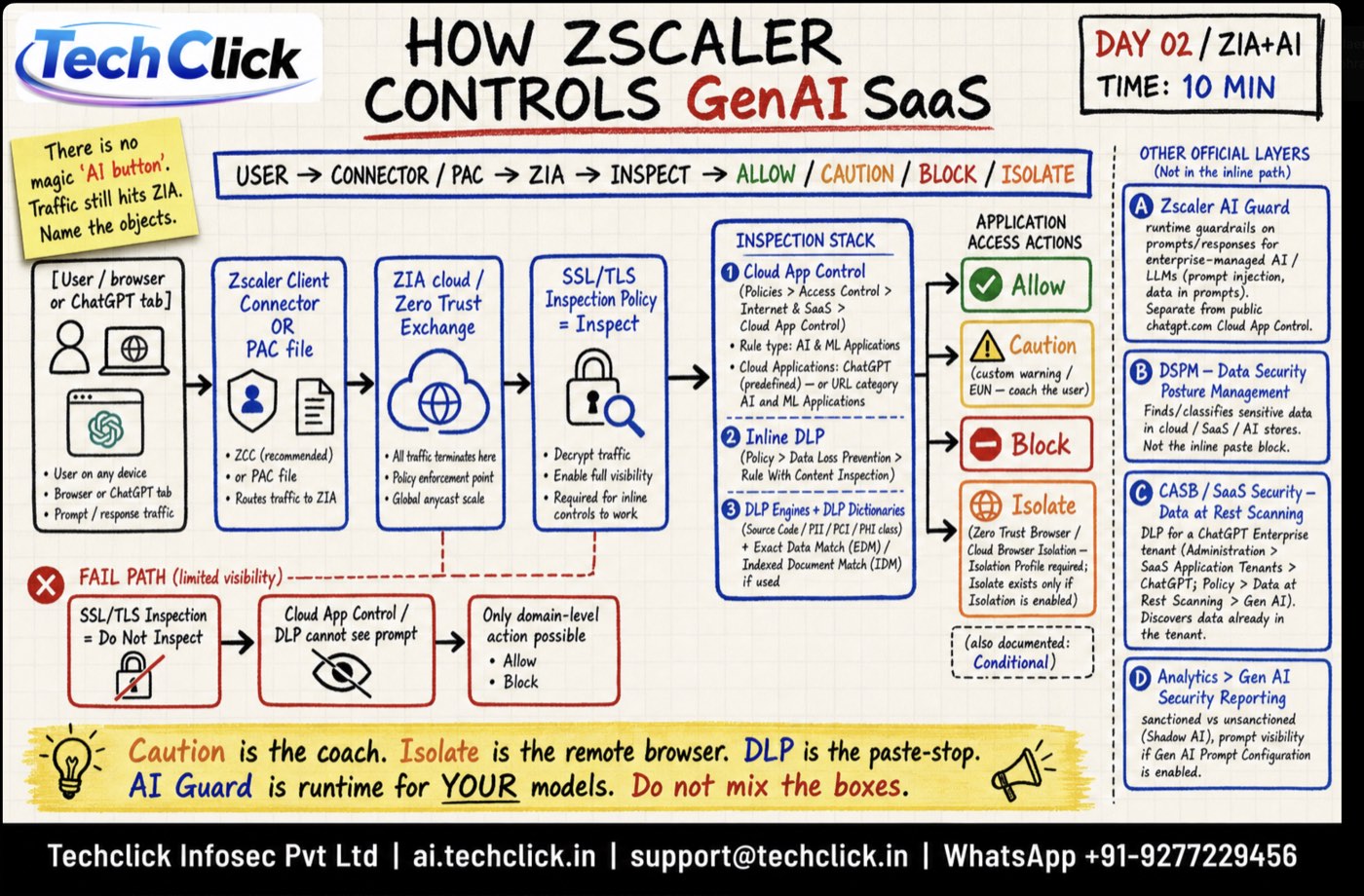
Caution is the coach. Isolate is the remote browser. DLP is the paste-stop. AI Guard is runtime for YOUR models. Do not mix the boxes.
Why this exists
Users open ChatGPT in a browser tab. Prompts, file uploads, and pasted source code leave the company over HTTPS. ZIA can see that traffic only if it is forwarded and decrypted. If SSL Inspection is Do Not Inspect, Cloud App Control and DLP see a domain name, not the prompt.
The poster is the class drawing: one inline path, four actions, three inspection engines, four other official layers that are not that inline path.
The inline path
Read left to right:
- User / browser or ChatGPT tab — any device. Prompt and response are still HTTPS.
- Zscaler Client Connector or PAC — ZCC is the recommended forwarder. PAC also works. Traffic must reach ZIA.
- ZIA cloud / Zero Trust Exchange — all forwarded traffic terminates here. Policy enforcement point. Global anycast.
- SSL/TLS Inspection Policy = Inspect — decrypt so later engines can read the prompt. Required for inline controls.
- Cloud App Control → DLP — then an action: Allow, Caution, Block, or Isolate.
SSL/TLS Inspection = Do Not Inspect → Cloud App Control / DLP cannot see the prompt → only domain-level Allow or Block is possible. That is why “we blocked chatgpt.com” still leaks if the user hits another AI app you never classified.
Inspection stack (three layers)
-
1 · Cloud App Control — AI & ML Applications
Path:
Policy → URL & Cloud App Control → Cloud App Control Policy → Add → AI & ML Applications.Use the predefined ChatGPT app (or the AI & ML category). Granular ChatGPT actions include Chatting, Uploading, Downloading, Deleting, Sharing, Inviting.
-
2 · Inline DLP
Path:
Policy → Data Loss Prevention → Rule With Content Inspection. This is the paste-stop for source, PII, PCI, PHI. -
3 · DLP engines + dictionaries
Source Code, PII/PCI/PHI class, Exact Data Match (EDM), Indexed Document Match (IDM) if you licensed them. Without a dictionary, “block secrets in ChatGPT” is a slogan.
Allow / Caution / Block / Isolate
| Action | What the user feels | When to use |
|---|---|---|
| Allow | Full access (optionally with granular ChatGPT actions). | Approved users, after Inspect + DLP are on. |
| Caution | End User Notification (EUN) coaches them, then access. Officially only for CONNECT, GET, or HEAD — one method per Caution rule. | Teach first. Not a remote browser. |
| Block | Denied. | Shadow AI you will not permit. |
| Isolate | Remote browser (Zero Trust Browser / Cloud Browser Isolation). Download/paste stay off the endpoint. | Need the app, not the data on disk. Requires an Isolation Profile. Isolate exists only if Isolation is enabled. |
Other official layers — not the inline path
A · AI Guard
Runtime guardrails on prompts/responses for enterprise-managed AI / LLMs (prompt injection, data in prompts). Separate from public chatgpt.com Cloud App Control.
B · DSPM
Finds and classifies sensitive data sitting in cloud / SaaS / AI stores. Not the inline paste-block.
C · CASB / SaaS Security — Data at Rest
DLP for a ChatGPT Enterprise tenant: SaaS Application Tenants → ChatGPT → Data at Rest Scanning → Gen AI. Discovers data already in the tenant.
D · Analytics → Gen AI Security Reporting
Sanctioned vs unsanctioned (Shadow AI), prompt visibility if Gen AI Prompt Configuration is enabled.
Do this in the tenant
Policy → URL & Cloud App Control → Cloud App Control Policy → Add → AI & ML Applications
Add AI & ML rule
Source: Zscaler Help — Adding an AI & ML Applications Rule for Cloud App Control. Training mock, not a live tenant.
Inspect first
Policy → SSL/TLS Inspection → SSL/TLS Inspection Policy— Inspect for ChatGPT / AI & ML. Without this, stop.Write the AI & ML Cloud App Control rule
Add rule, pick ChatGPT, set Allow / Caution / Block / Isolate. If Isolate, attach Isolation Profile.
DLP on the same users
Content inspection rule with Source Code + PII dictionaries. Test paste of a dummy secret.
Prove it
Web Insights Logs: user, cloud app = ChatGPT, SSL Inspected = Yes, policy action. Then Analytics → Gen AI Security Reporting if licensed.
Traps
| Symptom | Likely miss | Fix |
|---|---|---|
| Logs show chatgpt.com but no prompt | Do Not Inspect | Inspect that app, then retest. |
| Caution never fires on POST chat | Caution is limited to CONNECT / GET / HEAD | Use Block, Isolate, or granular ChatGPT actions for chat/upload. |
| Isolate greyed out | Isolation not enabled / no profile | Enable Cloud Browser Isolation; attach Isolation Profile. |
| “AI Guard will stop ChatGPT.com” | Wrong box | AI Guard is for your hosted models. Public ChatGPT is Cloud App Control. |
| Files already in ChatGPT Enterprise | Inline DLP never saw them | CASB Data at Rest Scanning on the tenant. |
Knowledge check
Six judgement questions. If you mix AI Guard with Cloud App Control, redo the poster.
Sources
- Zscaler Help — Adding an AI & ML Applications Rule for Cloud App Control
- Zscaler / OpenAI ChatGPT Enterprise Deployment Guide — granular ChatGPT actions, Isolate, SSL inspect for prompt visibility
- Zscaler Gen AI Security at a Glance — Cloud App Control, DLP, Isolation
- Techclick class poster: How Zscaler controls GenAI SaaS (Day 02 / ZIA+AI)
Related: URL Filtering + Cloud App Control · SSL Inspection · ZIA DLP · ZIA traffic flow