Start here · understand the lesson before the detail
What you are learning
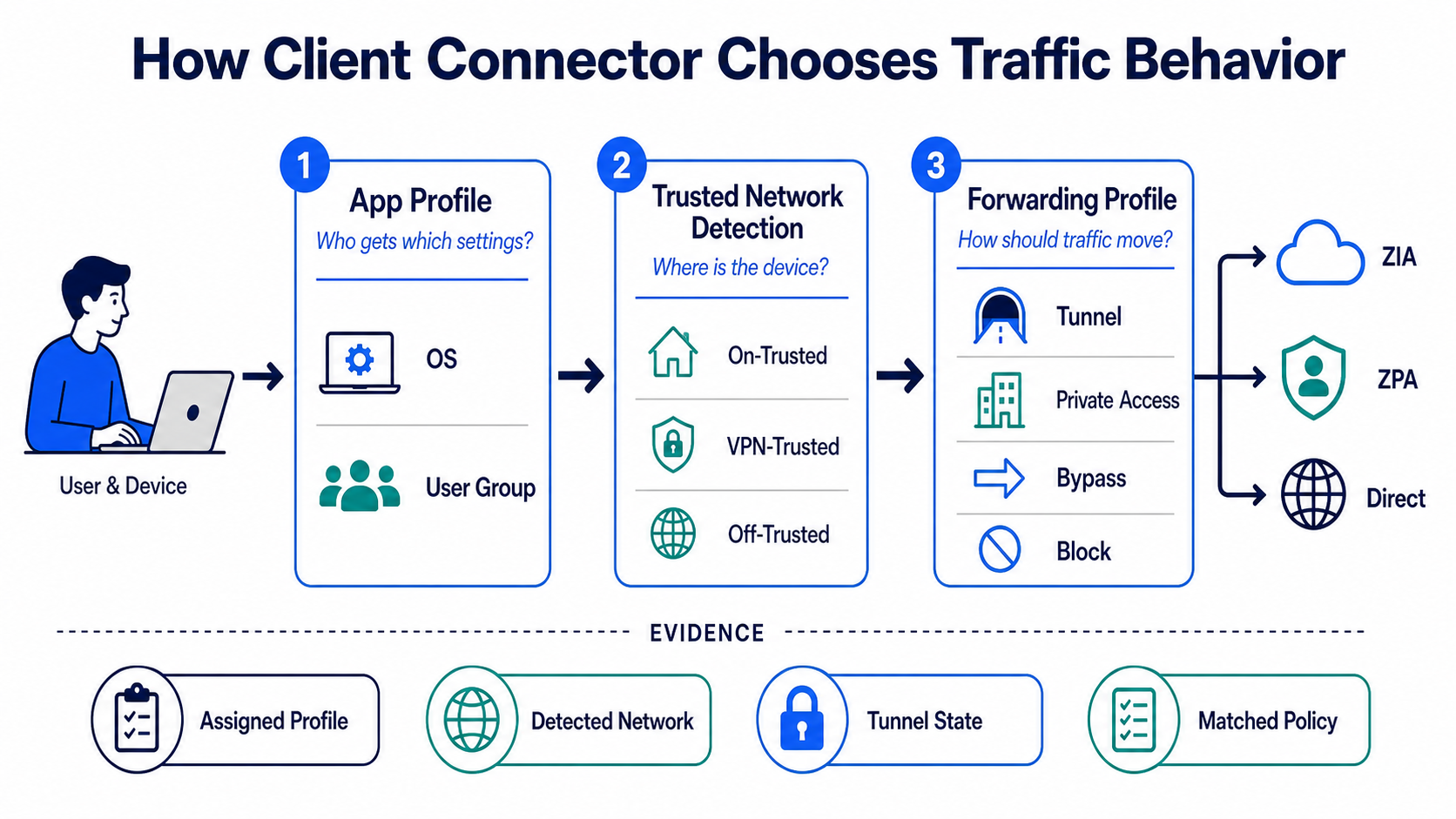
This lesson gives each Client Connector profile one clear job. The app profile decides who receives settings, trusted network detection describes the device’s environment, and the forwarding profile decides how traffic behaves there.
In plain English
Think of the app profile as the settings package and the forwarding profile as the traffic instruction. Trusted network criteria supply context such as on-trusted, VPN-trusted, or off-trusted. The final behaviour can differ for Internet & SaaS and Private Access.
Real example
A finance laptop receives the Windows finance app profile. At headquarters it is detected as on-trusted; at home it is off-trusted; with a full-tunnel VPN it may be VPN-trusted. The forwarding profile can apply different ZIA and ZPA actions in each environment without rebuilding the user’s identity.
Follow this flow
- Map operating systems, user groups, services, and coexistence requirements.
- Create a narrow app profile and assign the intended forwarding profile.
- Define trusted network criteria that are stable and testable.
- Configure on-trusted, VPN-trusted, and off-trusted behaviour separately.
- Test each environment and record the assigned profile, detected network, tunnel state, and matched policy.
Evidence to collect
- App profile name, priority, OS, and assigned user/group
- Trusted network criteria and detected environment
- Forwarding profile action for ZIA and ZPA
- Client status, tunnel, DNS, Service Edge, and transaction log
Common mistake to avoid
Do not treat “trusted network” as a security guarantee; it is a detected context used by policy. Avoid overlapping profile assignments and fragile network criteria. When troubleshooting, first prove which profile and environment the device actually selected.
Current official source checkpoint
- About forwarding profilescurrent official reference used for this beginner explanation
- Configure app profilescurrent official reference used for this beginner explanation

Key terms before you continue
Most engineers think…
Most engineers think ZCC config lives on the laptop — that you "set it up" on the device once and walk away.
Wrong. Every rule is pushed from the Client Connector Portal; the laptop just obeys what it downloads at enrollment and on each policy refresh. Get the portal wrong and 2000 laptops misbehave at once — no per-device fix will save you.
💡 Why this matters — the HR dress-code memo
Picture a company with branches in Lucknow, Pune and Bengaluru. HR writes ONE dress-code memo and pushes it to every branch. The branch manager does not invent his own rule — he reads the memo and follows it. If HR sends the wrong memo, every branch dresses wrong on the same Monday.
The App Profile is exactly that memo. The Client Connector Portal is HR. Each laptop is a branch that just obeys what HR pushed. So when a ticket says "policy not applying on 200 laptops", you do not log into 200 laptops — you fix the one memo in the portal. This is the single biggest mindset shift for a new ZCC engineer.
Three objects do the work. App Profile = WHO + which OS gets which bundle. Trusted Network = WHERE the device thinks it is. Forwarding Profile = HOW traffic leaves, given where it is. Mix these up and you will chase ghosts.
🔑 Six words you will see on every portal screen
Tap each card. These six terms repeat across App Profiles, Forwarding Profiles and Trusted Networks — learn them once, read every screen faster.
The per-OS policy rule. Matches users/groups/device-groups, picks ONE Forwarding Profile, sets PAC, posture and captive-portal behaviour. One App Profiles tab per OS (Windows/macOS/Linux/iOS/Android).
Decides HOW traffic leaves: it sets one tunnel mode per network state (On-Trusted / VPN-Trusted / Off-Trusted / Split VPN). Modes: Tunnel, Tunnel with Local Proxy, Enforce Proxy, None.
A definition of "this is our corporate LAN", matched by criteria like DNS Server, DNS Search Domains, Hostname and IP or Network Range. Drives whether ZCC thinks it is On-Trusted or Off-Trusted.
The packet-filter tunnel that carries ALL ports and protocols (not just web 80/443). Z-Tunnel 1.0 only forwards web. If non-web apps (RDP/SSH) must tunnel, the Forwarding Profile needs Z-Tunnel 2.0 selected.
The action ZCC takes for a network state. Tunnel = route to Zscaler; Tunnel with Local Proxy = PAC forces traffic to localhost; Enforce Proxy = use system proxy, no tunnel; None = forward nothing.
Proxy Auto-Config file. The App Profile PAC defines bypass/exception logic; the Forwarding Profile system PAC sets the OS proxy in Local-Proxy / Enforce modes. The App Profile PAC URL is capped at 512 characters.
① What the Client Connector Portal is + where it sits
The Client Connector Portal is a separate management console from the ZIA admin console and the ZPA admin console. You sign in, build profiles, and Zscaler's cloud pushes them down to every enrolled ZIA / ZPA agent.
The navigation root moved from the old "Administration" tree to the current Infrastructure tree. As of June 2026, use the Infrastructure paths. App Profiles live at Infrastructure > Connectors > Client, Forwarding Profiles at Infrastructure > Connectors > Client > Forwarding Profile for Platforms, and Trusted Networks at Infrastructure > Locations > Trusted Networks.
Aditya at Infosys faces this
"I changed the policy on a test laptop and it reverted overnight. Why won't my local edit stick?"
He edited the device, not the portal. ZCC re-downloads its profiles on the next refresh and overwrites any local change.
Confirm the live profile the device pulled, then compare to the portal.
Infrastructure > Connectors > Client > Windows > App ProfilesMake the change in the App Profile in the portal. Save. Let it push.
On the device, ZSACli.exe status -s all shows the refreshed state once the push lands.
Pause & Predict
A teammate says "let me just RDP into the user's laptop and fix the tunnel setting there." Why is that the wrong instinct? Type your guess.
② App Profiles — the per-OS, per-group policy bundle
An App Profile is the rule object that maps users, groups and device-groups (plus the OS, via which tab you build it under) to one chosen Forwarding Profile, a PAC, posture, and captive-portal behaviour. There is one App Profiles tab per OS — Windows, macOS, Linux, iOS, Android — so the "by OS" criterion is enforced by where you build the rule.
You reach it at Infrastructure > Connectors > Client > Windows, then on the App Profiles tab click Add Windows Policy (or Add macOS Policy, Add Linux Policy, etc.). The Rule Order field decides which rule a user gets — precedence is ascending, so the lowest number wins. The Forwarding Profile drop-down is the literal binding link: if you use Z-Tunnel 2.0, you must pick a Forwarding Profile that has Z-Tunnel 2.0 selected.
Three fields make or break the rule. ① Name is just a unique label, but a good convention (region-OS-tunnel-tier) saves you in audits. ② Rule Order is the trap field — a perfect rule placed below a default rule never matches. ③ Forwarding Profile is the binding link; if it lacks Z-Tunnel 2.0, non-web traffic silently won't tunnel even though the rule "looks right".
You can verify the live state from the device using ZSACLI, but only if Command Line Interface access is enabled in the App Profile (under the Add Windows Policy window). The Windows binary lives at C:\Program Files\Zscaler\ZSACli\ZSACli.exe; run it as administrator.
C:\> cd "C:\Program Files\Zscaler\ZSACli"
C:\Program Files\Zscaler\ZSACli> ZSACli.exe status -s all
{
  "zia":  { "state": "ENABLED",  "tunnel": "ZTUNNEL_2_0", "serviceMode": "TUNNEL" },
  "zpa":  { "state": "ENABLED",  "broker": "10.20.4.11",   "assigned": true },
  "zdx":  { "state": "ENABLED" },
  "networkType": "OFF_TRUSTED",
  "appProfile":  "IN-Win-ZT2-Standard",
  "fwdProfile":  "FWD-ZTunnel2-Remote"
}
Read the last three lines first. They tell you exactly which App Profile matched, which Forwarding Profile it bound, and what network state ZCC currently thinks it is in. If appProfile is not the rule you expected, your Rule Order or group binding is wrong — not the laptop.
Priya at TCS faces this
"My new Z-Tunnel 2.0 rule shows green in the portal, but RDP and SSH still bypass Zscaler on every laptop."
She built the rule under the macOS tab but the fleet is Windows; meanwhile a lower-numbered default Z-Tunnel 1.0 rule still matched everyone. 1.0 only forwards web, so non-web bypasses.
On a Windows device, the status JSON shows the OLD default profile, not her new one.
ZSACli.exe status -s all → "appProfile": "Default-Win-1.0"Rebuild the rule under the Windows tab, set the Forwarding Profile with Z-Tunnel 2.0 selected, and lower its Rule Order number so it wins precedence.
Re-run status — "appProfile" now reads her new rule and "tunnel": "ZTUNNEL_2_0".
Two Windows App Profiles match a user: "VIP-Win" at Rule Order 3 and "Default-Win" at Rule Order 1. Which one does the user get?
③ Forwarding Profiles — tunnel mode per network state
Think of the Forwarding Profile as the auto-rickshaw meter. When the driver is in your own colony (On-Trusted), he switches the meter off because the society already covers the ride — your office has a GRE/IPSec tunnel to Zscaler. Out on the highway (Off-Trusted = home / café), the meter is on (Tunnel) so every km is tracked and tolled — inspected by Zscaler. The Forwarding Profile sets one of four modes per network state.
You build it at Infrastructure > Connectors > Client > Forwarding Profile for Platforms → Add Forwarding Profile. Under Forwarding Profile Action for Internet & SaaS you pick the mode for each network type: On-Trusted Network, VPN-Trusted Network, Off-Trusted Network and Split VPN-Trusted Network.
The four exact modes: Tunnel (routes traffic to Zscaler — choose Z-Tunnel 2.0 for all ports), Tunnel with Local Proxy (installs a PAC that forces traffic to localhost; proxy Enforce is locked on), Enforce Proxy (uses system proxy, tunnels nothing), and None (forwards no traffic at all). Zscaler recommends Tunnel (Packet Filter-Based) for Windows and Tunnel with Local Proxy for macOS.
▶ Watch the meter switch: same profile, three networks
Aditya's laptop carries one Forwarding Profile. Watch what it does on the office LAN, on full-tunnel VPN, and on home Wi-Fi. Press Play for the healthy path, then Break it to see the classic outage.
Karthik at Wipro faces this
"During a pilot I cloned the office profile. Remote users show 'connected' in ZSATray but have no internet and can't reach internal apps."
The office profile used On-Trusted = None (IPSec tunnel exists at HQ). He cloned it and left Off-Trusted Network = None, so at home ZCC forwards nothing.
Status shows the tunnel down on an off-network device.
ZSACli.exe status -s all → "zia": { "serviceMode": "NONE" }, "networkType": "OFF_TRUSTED"Set Off-Trusted Network = Tunnel with Z-Tunnel 2.0 selected. Leave On-Trusted = None only because the office tunnel really exists.
ZSATray's Internet Security window now shows Off-Trusted + tunnel up; status JSON shows "serviceMode": "TUNNEL".
A 2000-user fleet is fully remote. Which Forwarding Profile setting keeps their internet inspected and ZPA apps reachable from home?
Pause & Predict
The HQ in Pune already has a GRE tunnel to Zscaler. What breaks if you set On-Trusted Network = Tunnel anyway? Type your guess.
④ Trusted Network Detection — and how all three bind
Trusted Network Detection (TND) is the auto driver recognising your own mohalla. He spots the colony gate — a landmark — and knows he is home. ZCC does the same with Trusted Network Criteria: it checks signals like DNS Server, DNS Search Domains, Hostname and IP, or Network Range, and decides "this is corporate" or "this is not".
You define a Trusted Network at Infrastructure > Locations > Trusted Networks → Add Trusted Network. Add one or more conditions, then set Condition Match to Any (one condition is enough) or All (every condition must match). Zscaler recommends the static criteria — DNS Server and DNS Search Domains — over the dynamic Hostname and IP, because hostname resolution can fail during network transitions and wrongly flip the device to untrusted.
The anchor that matters: ① DNS Server set to your internal-only resolvers, ② DNS Search Domains that exist only on the corporate LAN, and ③ Condition Match = All so one coincidental match (like a home router handing out a .local suffix) can never trip it. Never anchor TND on a public resolver like 8.8.8.8 or a too-broad range like 192.168.0.0/16 — almost every home LAN matches those.
Sneha at HCL faces this
"A WFH user reports zero web inspection and can't reach ZPA apps — but ZSATray says On-Trusted at home. How?"
TND was set to DNS Search Domains = corp.local with Condition Match = Any. The user's home router hands out a .local suffix, so ZCC wrongly classifies it On-Trusted — where ZIA = None (office uses GRE).
Status confirms the wrong classification at home.
ZSACli.exe status -s all → "networkType": "ON_TRUSTED", "zia": { "serviceMode": "NONE" }Re-anchor TND on an internal-only DNS Server IP plus a Hostname and IP that resolves only on the LAN, and switch Condition Match = All.
From home, status now reads "networkType": "OFF_TRUSTED" and the tunnel comes up; ZSATray flips to Off-Trusted.
You want a Trusted Network that can never be faked by a home router. Which criteria + match setting is safest?
.local suffix with Match=Any are all routinely present on home Wi-Fi — they fake On-Trusted.Pause & Predict
A VPN is running full-tunnel but ZCC still calls the network Off-Trusted. Name one reason the VPN-Trusted check can fail. Type your guess.
Cisco, Juniper, Fortinet, PanGP or VPN. A no-default-route split tunnel, or a VPN adapter named oddly, fails the check. (macOS checks for a utun / PPP / GPD interface instead.)Common mistakes & pro tips
- TND too loose → home seen as office. Symptom: a WFH user has no web inspection and no ZPA, yet ZSATray shows On-Trusted. Cause: a public DNS / broad range / generic search-domain with Condition Match = Any. Fix: internal-only anchors + Match = All.
- Off-Trusted Network = None left after cloning. Symptom: remote users show "connected" but get no internet and no internal apps;
status -s allshows the tunnel down. Cause: a cloned office profile whose Off-Trusted state was never set to Tunnel. - App Profile bound to the wrong group or OS tab. Symptom: "policy not applying" — RDP/SSH keep bypassing Zscaler even though the rule looks correct. Cause: rule built under macOS for a Windows fleet, and/or sitting below the default in Rule Order, and/or the Forwarding Profile lacks Z-Tunnel 2.0.
1. Name profiles by region-OS-tunnel-tier (e.g. IN-Win-ZT2-Standard) so an auditor reads intent at a glance and you never clone the wrong one.
2. Prefer static TND criteria (DNS Server, DNS Search Domains) over dynamic Hostname-and-IP — hostname resolution can fail mid-transition and flip the device to untrusted.
3. When you must skip Zscaler, do it deliberately in the profile (VPN Gateway Bypass / IP-based bypass), never by setting a network state to None — None is forward-nothing, not a clean bypass.
The config screen says what you intended. ZSACLI and ZSATray say what the device is doing. After any change, confirm on a real device with ZSACli.exe status -s all and read the bottom three keys — networkType, appProfile, fwdProfile. If those don't match your intent, the fix is in the portal, not the laptop. (Note: ZSACLI exposes only enable / disable / status / params / help — there is no ZSACLI packet-capture command; PCAP is triggered from the app profile / ZSATray.)
🤖 Ask the AI Tutor
Tap any question — instant, scoped to this lesson. No login, no waiting.
Pre-curated from Zscaler docs + community Q&A, scoped to this lesson. For a live prod issue, paste your export into chat.techclick.in.
📝 Wrap-up assessment — six more
You've answered 4 inline. Six left. 70% (7 of 10) marks the lesson complete on your profile. Tap Submit all answers at the end.
🧠 In your own words
Type one line: Why does the same Forwarding Profile tunnel at home but not at the office? Then compare to the expert version.
🗣 Teach a friend
Best way to lock it in — explain it in one line to a teammate. Tap to generate a paste-ready summary.
📖 Glossary
- Client Connector Portal
- The admin console that authors and pushes ZCC profiles — separate from the ZIA and ZPA admin consoles.
- App Profile
- Per-OS rule that matches users/groups/device-groups and binds them to one Forwarding Profile, PAC, posture and captive-portal behaviour.
- Forwarding Profile
- Sets the tunnel mode (Tunnel / Tunnel with Local Proxy / Enforce Proxy / None) per network state for ZIA and ZPA.
- Trusted Network (TND)
- A definition of "this is our corporate LAN", matched by criteria like DNS Server, DNS Search Domains, Hostname and IP or Network Range.
- Rule Order
- Ascending precedence for App Profiles — the lowest number is evaluated first and wins.
- Z-Tunnel 2.0
- Packet-filter tunnel carrying all ports/protocols; Z-Tunnel 1.0 carries web (80/443) only.
- On / VPN / Off-Trusted
- The network states TND classifies; each gets its own forwarding mode in the Forwarding Profile.
- ZSACLI / ZSATray
- The device-side CLI and tray GUI used to read the live tunnel state and network type.
- PAC URL
- Proxy Auto-Config file; the App Profile PAC sets bypass logic, the Forwarding Profile system PAC sets the OS proxy.
📚 Sources
- Zscaler Help — Configuring Zscaler Client Connector App Profiles. help.zscaler.com/zscaler-client-connector/configuring-zscaler-client-connector-app-profiles
- Zscaler Help — Configuring Forwarding Profiles for Zscaler Client Connector. help.zscaler.com/zscaler-client-connector/configuring-forwarding-profiles-zscaler-client-connector
- Zscaler Help — Configuring Trusted Networks for Zscaler Client Connector. help.zscaler.com/zscaler-client-connector/configuring-trusted-networks-zscaler-client-connector
- Zscaler Help — About Forwarding Profiles (network-state + VPN interface-keyword logic). help.zscaler.com/zscaler-client-connector/about-forwarding-profiles
- Zscaler Help — Interacting with Zscaler Client Connector Remotely (ZSACLI). help.zscaler.com/client-connector/interacting-zscaler-client-connector-remotely
- Zscaler Help — Client Connector App Release Summary (2026) — ZCC 4.8.0.232 for Windows fixes a CVSS 9.1 auth-bypass + RCEs; keep ZCC patched. help.zscaler.com/zscaler-client-connector/client-connector-app-release-summary-2026
- Zscaler Community (Zenith) — "Zapp OFF TRUSTED NETWORK" + "Detection when switching between VPN-Trusted and Off-Trusted Network". community.zscaler.com/t/zapp-off-trusted-network/2845
- Zscaler Academy — Zscaler Digital Transformation Administrator (ZDTA) blueprint — Basic Connectivity ~20%: Client Connector, Z-Tunnel 2.0, Tunnel Modes, Forwarding Profiles, Trusted Networks, App Profiles. zscaler.com/zscaler-cyber-academy/digital-transformation-administrator
What's next?
Profiles decide HOW traffic leaves the device. Next: how the portal decides WHICH devices are trusted enough, what skips Zscaler, and which ZCC version each group runs.