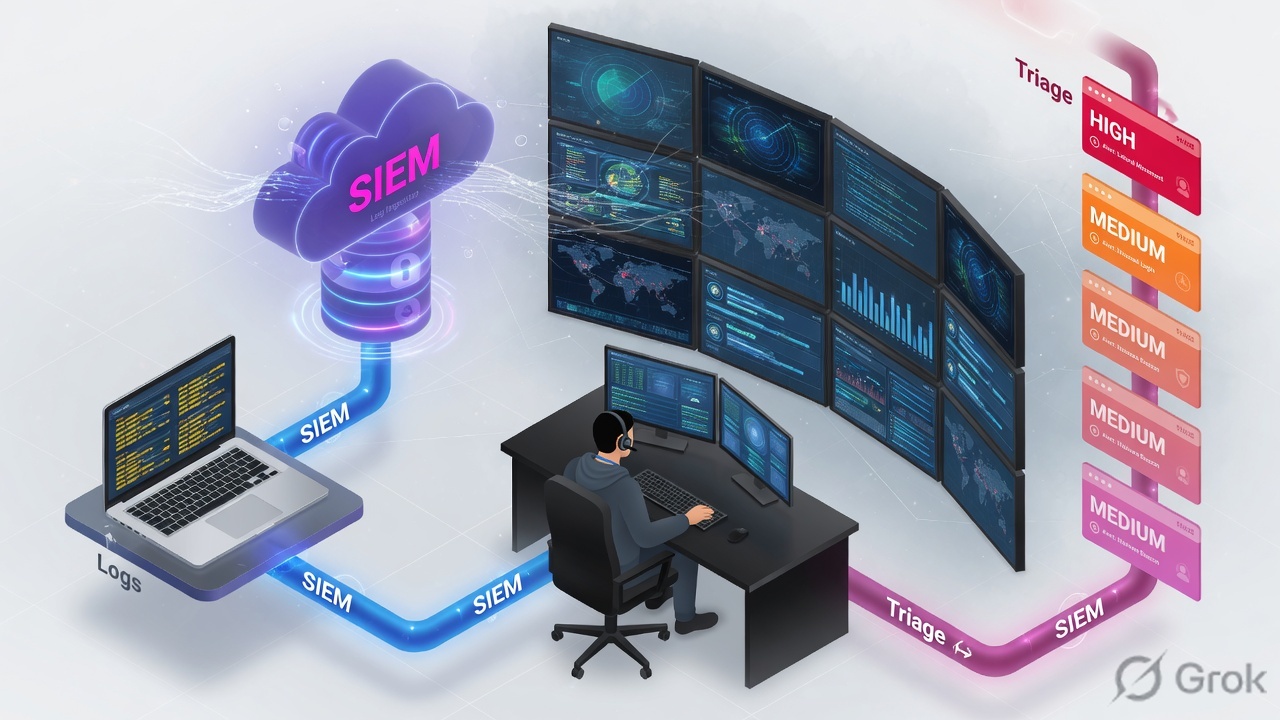
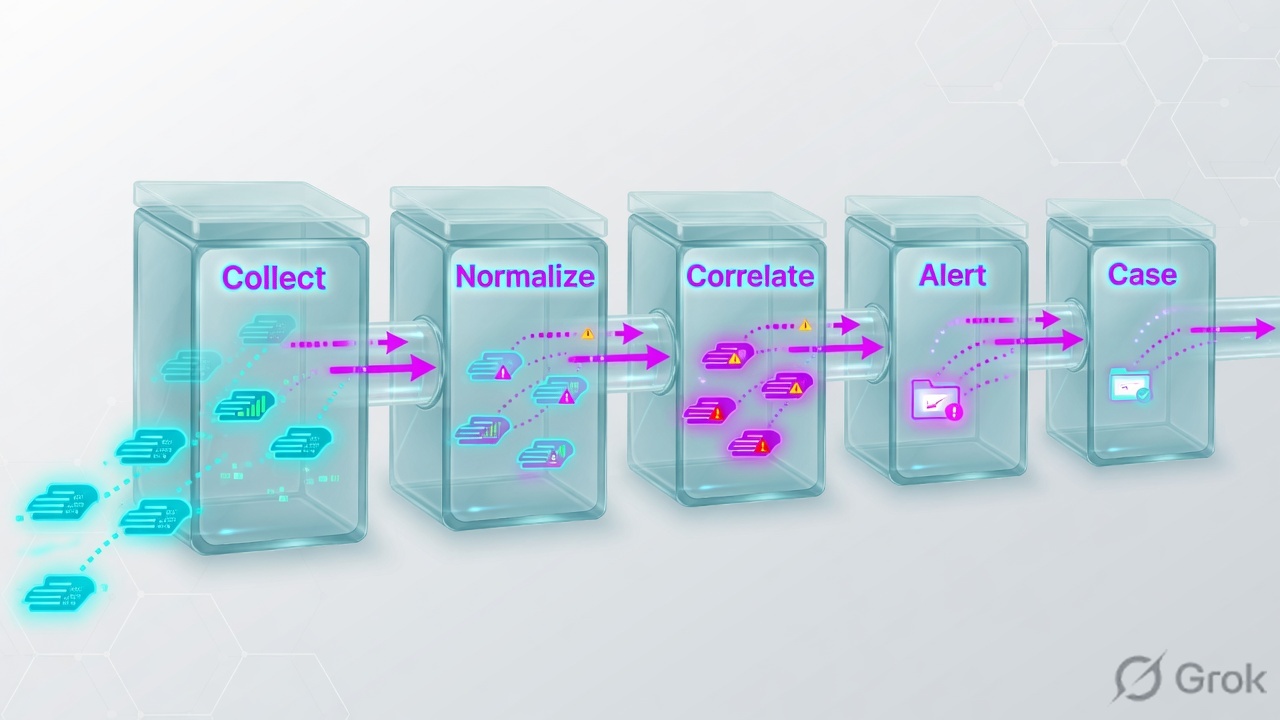
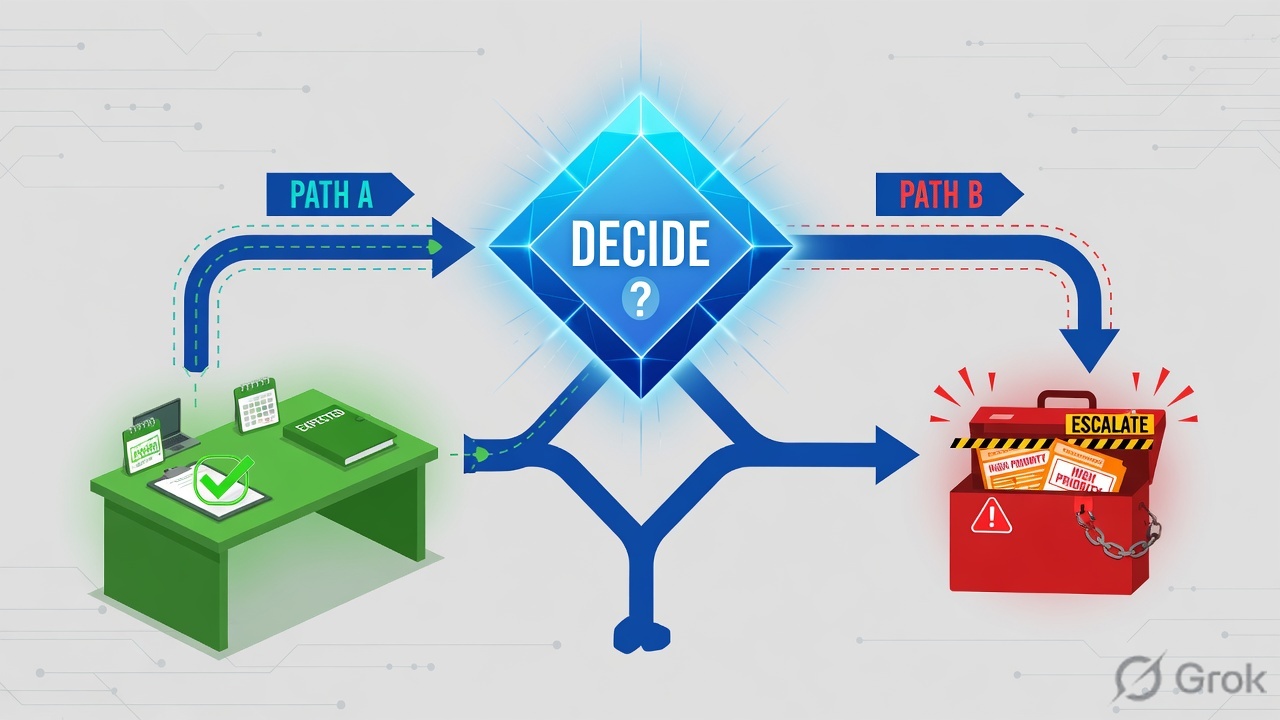
In a SOC & SIEM interview, structure beats memorisation — when a question stretches you, reason out loud from fundamentals instead of guessing. Use the visual cheat-sheets below to lock in the diagrams interviewers love, and note that every answer ends with a 👉 Interview tip giving the exact line to say.
Visual cheat-sheets — the whiteboard answers
SOC Fundamentals, Roles & Triage Workflow (9)
L11. What does a SOC do, and what are the differences in responsibility between L1, L2, and L3 analysts?
A SOC (Security Operations Center) is the team that monitors, detects, investigates, and responds to security threats, usually around the clock. Think of it as the security control room of an organization, like a hospital ER triaging patients by urgency.
- L1 (Triage analyst): the first responder. Watches the alert queue in the SIEM, validates whether an alert is real, does basic enrichment, closes documented false positives, and escalates the rest. Speed and consistency matter most.
- L2 (Investigator / IR analyst): takes escalations, performs deep investigation, correlates across logs and endpoints, carries out containment, and drives incident response.
- L3 (Threat hunter / detection engineer): proactive threat hunting, malware and forensic analysis, detection engineering (writing and tuning rules), and handling advanced or APT-level incidents.
Interview tip: Stress that L1 is about disciplined triage, not just "watching screens" — that signals you understand the role.
L12. Walk me through your end-to-end alert triage workflow from the moment an alert hits the queue to when you close or escalate it.
My triage flow is deliberately repeatable so nothing slips through:
- Pick and acknowledge: claim the alert in the queue so there is no duplicate work, and note the time.
- Understand the alert: read the rule that fired, the severity, and what behavior it is detecting.
- Gather context: identify who and what is involved — user, host, source and destination IP, process, time. Check whether it is a critical asset or a VIP user.
- Enrich: reputation-check IPs, domains, and hashes (
VirusTotal,AbuseIPDB), and correlate nearby logs in the SIEM. - Decide: true positive, false positive, or benign, following the playbook for that alert type.
- Act: close with documented reasoning if it is a false positive; escalate to L2 with full notes if it is a true positive or suspicious.
Interview tip: Saying "acknowledge first" and "follow the playbook" shows process maturity, not guesswork.
L13. Define true positive, false positive, true negative, and false negative with an example of each in a SOC context.
These four outcomes describe whether an alert (or the absence of one) matched reality. Think of a smoke detector: it should sound for fire and stay quiet for clean air.
- True Positive (TP): the alert fired AND it was a real threat. Example: an EDR ransomware alert that turned out to be genuine encryption activity.
- False Positive (FP): the alert fired but the activity was benign. Example: a vulnerability scanner triggers an "attack" rule during a scheduled, authorized scan.
- True Negative (TN): no alert fired AND nothing malicious happened. Example: a normal user logging in during work hours — correctly silent.
- False Negative (FN): no alert fired BUT a real attack occurred — the most dangerous outcome. Example: malware that evaded detection so no rule fired.
Interview tip: Emphasize that false negatives are the most dangerous, because the threat slips by unseen.
L14. What is a runbook or playbook, and how do you use one as an L1 analyst when you get an alert you've never seen before?
A playbook (or runbook) is a step-by-step guide for handling a specific alert or incident type — what to check, in what order, and when to escalate. It is like a pilot's checklist: it keeps responses consistent and correct even under pressure.
For an alert I have never seen:
- Find the matching playbook by alert name, rule ID, or category in the knowledge base.
- Follow the steps exactly — gather the listed fields, run the enrichment, and apply the decision criteria.
- If no playbook exists, I document what I observed, do safe read-only enrichment, and escalate to L2 rather than guessing or taking risky action.
- Afterward, I flag the gap so a new playbook can be created.
Interview tip: Never claim you would "figure it out alone" — escalating an unknown safely is the right L1 answer.
L15. How do you decide the severity or priority of an alert, and when exactly do you escalate to L2 versus closing it yourself?
Severity is not guesswork — I weigh two things: impact (what could be harmed) and confidence (how sure I am it is real).
- Asset criticality: a domain controller or finance server outranks a test box.
- Threat type: active ransomware or confirmed C2 beats a single failed login.
- Scope: one host versus many; one user versus signs of spreading.
- Confidence: corroborating evidence versus a lone noisy rule.
I close it myself only when it is a clear, documented false positive that matches a known benign pattern in the playbook. I escalate to L2 when it is a confirmed or likely true positive, touches critical assets, shows signs of lateral movement or data exfiltration, or whenever I am genuinely uncertain.
Interview tip: "When in doubt, escalate" — over-escalating an unknown is safer than wrongly closing a breach.
L26. What information do you capture in your documentation/ticket notes so that the next shift or L2 can pick up where you left off?
Good notes let anyone resume the case cold, like a clear medical handover chart. I capture:
- What fired: alert name, rule ID, SIEM source, and exact timestamps with timezone.
- Entities involved: user, hostname, source and destination IPs, process, and file hashes.
- What I did: every enrichment and query I ran, in order, with the actual results — not just "checked VirusTotal" but the score or verdict.
- Evidence: log snippets, screenshots, and links to the raw events.
- Current assessment: my working hypothesis (TP, FP, or uncertain) and the reasoning.
- Actions taken and pending: what is contained, what is still open, and the explicit next step.
Interview tip: Mention writing notes "for someone who has zero context" — that signals real operational discipline.
L27. Describe how you would reduce false positives on a noisy rule without creating a blind spot that lets a real attack through.
The goal is to silence the noise precisely, not bluntly. Turning a rule off entirely is how breaches get missed.
- Investigate the noise: pull a sample of recent hits and find the common benign cause — a backup service, a scanner, or a specific automation account.
- Tune narrowly: exclude the specific known-good entity (exact account plus host plus behavior), not the whole rule. Avoid broad wildcards.
- Add context, do not delete: downgrade severity or route to a low-priority queue instead of suppressing, so you keep visibility.
- Validate: confirm the tuned rule still fires for a true-positive test case.
- Document and review: log the exception with an owner and a review or expiry date so it does not become a permanent hole.
Interview tip: Emphasize "exclude the specific benign cause, never the whole rule" — that is the line between tuning and blinding yourself.
L28. How do you handle a shift handover when an incident is still open and only partially investigated?
An open incident at shift change is where details get lost, so I treat the handover like a relay baton pass — nothing dropped.
- Write a current-state summary: what the incident is, its severity, the affected assets and users, and the timeline so far.
- State the working hypothesis and separate what is confirmed from what is still suspected.
- List actions taken (containment, blocks) and actions pending with the explicit next step.
- Flag time-sensitive items: anything that must happen soon, such as a host awaiting isolation approval or an expected callback.
- Do a live verbal sync with the incoming analyst, not just a ticket dump — confirm they understand and take ownership.
- Stay reachable for critical incidents per the IR policy.
Interview tip: Mention the verbal plus written double handover — written alone causes context loss on serious incidents.
L39. AI and UEBA-based auto-triage are increasingly handling low-fidelity alerts. How do you see the L1 role changing, and where does human judgment still add value?
AI-assisted triage and UEBA (User and Entity Behavior Analytics) are absorbing the repetitive, high-volume, low-fidelity alerts — the obvious false positives and clear closures. In 2026 this increasingly includes agentic SOC tooling that drafts an investigation summary and a recommended verdict. So the L1 role is shifting from clicking through a queue toward supervising and validating the automation.
Human judgment still adds clear value:
- Context the model lacks: business context such as a known maintenance window or an executive traveling — nuance that explains anomalous behavior.
- Novel and ambiguous cases: attacker techniques the model has not learned; AI is weakest on the genuinely new.
- Tuning the AI: validating its verdicts, feeding back corrections, and catching automation bias, drift, and hallucinated conclusions.
- Decisions and accountability: escalation, communication, and judgment calls a model should not own alone.
Interview tip: Frame it as "AI handles volume, humans handle ambiguity and accountability" — that is the 2026 SOC reality, not job loss.
MITRE ATT&CK, Kill Chain & Threat Models (9)
L110. What is the MITRE ATT&CK framework, and what is the difference between a tactic, a technique, and a procedure (TTP)?
MITRE ATT&CK is a free, globally-used knowledge base of real adversary behaviour, maintained by MITRE and built from observed attacks. Think of it as a menu of everything attackers actually do, organised so defenders speak one common language.
- Tactic = the WHY (the goal). Example:
Initial Access,Persistence,Exfiltration. These are the columns of the ATT&CK matrix. - Technique = the HOW (the method). Example:
T1566 Phishingachieves Initial Access. - Procedure = the EXACT implementation one attacker used. Example: APT29 sent a spear-phish with a malicious ISO attachment.
So an analyst reads an alert and says: this is technique T1059 (the How), serving the Execution tactic (the Why). Mapping alerts this way makes detections consistent and comparable across teams.
Interview tip: Memorise one clean example chain (Tactic to Technique to Procedure) so you can answer fluently.
L111. List the stages of the Lockheed Martin Cyber Kill Chain and briefly explain what happens at each stage.
The Lockheed Martin Cyber Kill Chain describes an intrusion as 7 ordered stages. Like a burglar planning a heist, the attacker must complete earlier steps before later ones, so breaking any link stops the attack.
- Reconnaissance — researching the target (emails, tech stack, employees).
- Weaponization — building the payload, e.g. a malicious document.
- Delivery — sending it (phishing email, USB, malicious link).
- Exploitation — the code runs by abusing a vulnerability.
- Installation — malware/backdoor installs for persistence.
- Command and Control (C2) — the malware calls home for orders.
- Actions on Objectives — the real goal: steal data, encrypt, or destroy.
SOCs aim to detect as early (left) as possible, since cost and damage grow at later stages.
Interview tip: Stress that defenders win by breaking any one link — that is the whole point of the model.
L112. Give an example of a MITRE ATT&CK technique you've seen in an alert (e.g., T1110 Brute Force or T1059 Command and Scripting Interpreter) and what tactic it maps to.
A common one in any SOC is T1110 Brute Force, which maps to the Credential Access tactic. The SIEM fires when one account sees many failed logins in a short window — say 50 failed Windows logins (Event ID 4625) in 2 minutes from one source IP, followed by a success. That pattern means someone likely guessed the password.
Another everyday example is T1059 Command and Scripting Interpreter, mapping to the Execution tactic — for instance a Word document spawning powershell.exe with an encoded -enc command. Legitimate users rarely launch encoded PowerShell from Office, so it is high-signal.
When triaging, I note the technique ID, confirm whether the activity is expected, check the source/account, and decide false positive versus escalate.
Interview tip: Pick ONE technique you can describe with a concrete log or Event ID — interviewers prefer specifics over theory.
L213. Why do most modern SOCs map detections to MITRE ATT&CK rather than to the Cyber Kill Chain, and how do the two relate?
The Kill Chain is a great high-level story (7 linear stages), but it is too coarse for detection engineering — Exploitation alone does not tell you what to write a rule for. ATT&CK is far more granular: it has 15 Enterprise tactics (and the count grows as MITRE adds new ones) plus hundreds of techniques and sub-techniques, each with concrete data sources, detection ideas, and real groups that use them. That maps directly to SIEM/EDR rules.
ATT&CK is also not strictly linear — real attackers loop, skip, and revisit (e.g. Discovery, then more Lateral Movement), which matches reality better than a one-way chain.
They relate well: think of the Kill Chain as the chapters of the book and ATT&CK as the sentences. Many teams map ATT&CK tactics roughly onto Kill Chain phases for executive reporting while using ATT&CK techniques for actual detection coverage.
Interview tip: Do not trash the Kill Chain — say it is complementary: Kill Chain for the narrative, ATT&CK for the detail.
L214. What are sub-techniques in ATT&CK, and how would you use the ATT&CK Navigator to visualize your detection coverage?
Sub-techniques are more specific variants under a technique. For example T1110 Brute Force has sub-techniques like T1110.001 Password Guessing, T1110.003 Password Spraying, and T1110.004 Credential Stuffing. They let you say precisely how a technique was carried out, instead of lumping different attacks together.
The ATT&CK Navigator is a free web tool that shows the matrix as a colour-coded grid (a heat map). To visualise coverage, I:
- Create a layer and score each technique by how well we detect it (e.g. green = good detection, yellow = partial, red = none).
- Drive scores from real data — which SIEM/EDR rules cover which technique IDs.
- Add comments linking each cell to the detection rule name.
The red cells instantly reveal gaps to fix. You can also overlay a threat group's techniques to see your defence against that specific adversary.
Interview tip: Mention that layers can be exported and compared over time to show coverage improving.
L215. How would you map a multi-stage intrusion you investigated to ATT&CK tactics across the attack lifecycle?
I tell the story tactic by tactic, attaching each piece of evidence to a technique. A typical phishing-led intrusion maps like this:
- Initial Access —
T1566.001Spearphishing Attachment (malicious Office doc in email logs). - Execution —
T1059.001PowerShell (Office spawned encodedpowershell.exe, seen in EDR). - Persistence —
T1547.001Registry Run key added. - Credential Access —
T1003.001LSASS memory dump. - Discovery —
T1018remote system discovery (network scans). - Lateral Movement —
T1021.001RDP to another host. - Command and Control —
T1071.001HTTPS web-protocol beaconing. - Exfiltration / Impact —
T1041exfiltration over the C2 channel, or ransomwareT1486.
This produces a clean attack narrative and an ATT&CK Navigator layer showing exactly which links we caught and which we missed.
Interview tip: Walk it like a timeline — interviewers want structured, evidence-backed thinking, not a random list of IDs.
L316. Explain the Diamond Model and how it complements ATT&CK and the kill chain when analyzing an intrusion.
The Diamond Model describes any intrusion event with four linked corners: Adversary (who), Capability (their tools/malware/TTPs), Infrastructure (IPs, domains, C2 they use), and Victim (the target). The core idea: an adversary uses a capability over some infrastructure against a victim — and pivoting along any edge reveals more. For example, from one malicious domain (Infrastructure) you can pivot to other victims contacting it.
How they fit together: the Kill Chain gives the timeline, ATT&CK gives the behaviour detail (techniques populate the Capability corner), and the Diamond Model gives the relationships and attribution needed for threat intel and for clustering activity into campaigns or groups. They are not rivals — mature analysts use all three: Diamond to pivot and attribute, ATT&CK to detect and describe, Kill Chain to stage and report.
Interview tip: Say Diamond is intel-centric (pivoting/attribution) while ATT&CK is detection-centric, to show you understand their different jobs.
L317. How would you run a coverage-gap analysis with ATT&CK Navigator to prioritize which new detections your SOC should build next?
I run it as a data-driven exercise, not guesswork:
- Build a current-coverage layer — map every existing SIEM/EDR rule to its technique ID and score cells green/yellow/red in Navigator.
- Build a threat layer — overlay the techniques used by groups that actually target our sector (from threat intel and ATT&CK group pages).
- Intersect them — red cells that are also high-relevance threat techniques are the top priority. A gap nobody targets matters less.
- Weight by feasibility and data — do we even collect the logs to detect it? No data means fix logging first (a prerequisite gap).
- Rank and ticket — produce a prioritised backlog: high-threat + currently-undetected + data-available = build first.
I also weigh choke-point techniques (like T1003 OS Credential Dumping or C2 T1071) that many attack paths pass through — covering those gives outsized value.
Interview tip: Emphasise prioritising by relevant threat x current gap x data availability, not just painting the whole matrix green.
L318. How do you use ATT&CK to drive purple-team exercises and adversary emulation in your SOC?
ATT&CK is the shared script that makes red (attack) and blue (defend) work together as purple. My approach:
- Pick a realistic adversary — choose a threat group from ATT&CK that targets our industry and pull its known techniques.
- Build an emulation plan — sequence those techniques across the lifecycle (Initial Access to C2 to Exfiltration), using tools like Atomic Red Team, CALDERA, or the published MITRE Adversary Emulation Plans.
- Execute test-by-test — the red side runs one technique at a time while blue watches the SIEM/EDR.
- Score each technique: did we prevent, detect/alert, or miss it? Record it in a Navigator layer.
- Close gaps — write or tune detections for the misses, then re-test to confirm.
The deliverable is a measurable before/after coverage map plus concrete detection improvements — far more useful than a one-off pentest report.
Interview tip: Name a real tool (Atomic Red Team or CALDERA) and stress the loop: emulate, measure, tune, re-test.
SIEM Fundamentals, Log Sources & Event IDs (9)
L119. What is a SIEM and how does it work — walk me through the collect, normalize/parse, correlate, and alert stages.
A SIEM (Security Information and Event Management) is the SOC's central platform — it pulls in logs from across the environment, makes sense of them, and raises alerts when something looks malicious. Think of it as an air-traffic control tower for your whole network.
- Collect: Agents, syslog, or APIs ship raw events from servers, firewalls, endpoints, and cloud into the SIEM.
- Normalize/Parse: Messy vendor formats are broken into common fields like
src_ip,user, andaction, so a firewall log and a Windows log become comparable. - Correlate: Rules link events across sources (for example, repeated failed logins then a success) to spot patterns a single log would miss.
- Alert: When a rule fires, the SIEM raises an alert and opens a case for analysts to triage.
Interview tip: Name a real SIEM (Splunk, Microsoft Sentinel, or Elastic) and stress that correlation across sources is what makes a SIEM more than just log storage.
L120. What is the difference between log aggregation and log correlation in a SIEM?
Aggregation is collecting and centralizing logs in one place; correlation is connecting those logs to find meaning. Aggregation gathers the puzzle pieces — correlation assembles the picture.
- Log aggregation: Pulling events from many sources (firewall, AD, endpoints, cloud) into a single store, with parsing and indexing so you can search them together. It answers what happened, and where?
- Log correlation: Applying rules or logic that link multiple events — across time and across sources — to detect a scenario. It answers do these events together mean an attack?
Example: aggregation stores 50 failed logins and 1 success; correlation says 50 failures, then a success from a new country, equals likely brute force and raises an alert.
Interview tip: Aggregation equals storage and visibility; correlation equals detection logic. A SIEM does both, but the value is in correlation.
L121. What do these Windows Security Event IDs mean: 4624, 4625, 4634, 4688, 4672, and 4720?
These are core Windows Security log events every SOC analyst should recognize:
4624— Successful logon. Check the Logon Type (2 = interactive, 3 = network, 10 = RemoteInteractive/RDP) to see how the user got in.4625— Failed logon. Many in a row can mean brute force or password spraying.4634— Logoff (session ended). Note that this is logged inconsistently for network logons, so pair it with4647(user-initiated logoff) when tracking session duration.4688— New process created. Excellent for spotting malicious commands (for example,powershell.exespawned by Word). Enable command-line auditing to capture the full command line.4672— Special privileges assigned at logon (admin-level rights) — watch for unexpected accounts.4720— A user account was created. Sudden new accounts can indicate attacker persistence.
Interview tip: Describe the chain — 4625 (brute force), then 4624 plus 4672 (success with admin rights), then 4720 (new account). That sequence is a classic compromise story.
L122. Beyond Windows logs, name several log sources a SOC ingests (firewall, proxy, DNS, VPN, AD/auth) and what each is useful for.
A SOC stitches together many sources because each tells one part of the story:
- Firewall: Allowed and blocked connections — spot port scans, command-and-control (C2) beaconing, and data egress to unusual IPs.
- Proxy / web gateway: URLs and downloads — catch malware sites, phishing links, and large uploads (exfiltration).
- DNS: Domain lookups — detect malware domains, DNS tunneling, and newly registered domains.
- VPN: Remote logins — flag impossible travel, logins from new countries, and shared accounts.
- AD / authentication: Who logged in where — detect brute force, privilege escalation, and lateral movement.
Think of it like a crime investigation: the firewall is the building's door log, DNS is the phone-call record, and AD is the staff badge system — together they reveal the full picture.
Interview tip: Also mention endpoint/EDR, email gateway, and cloud logs (AWS CloudTrail, Azure Activity) to show breadth.
L223. What is Sysmon and how does it improve your endpoint visibility compared to default Windows logging?
Sysmon (System Monitor) is a free Microsoft Sysinternals tool that runs as a Windows service and driver, writing rich, detailed events to a dedicated log. If default Windows logging is a building's basic entry log, Sysmon is full CCTV with timestamps and faces.
- Process creation with the full command line, parent process, and a
Hashesfield (MD5/SHA256) — far richer than Event 4688 (Sysmon Event ID 1). - Network connections tied to the process that made them (Event ID 3).
- File creation, registry changes, image/DLL and driver loads, and named pipes — key for spotting persistence and code injection.
- Configurable via an XML config so you log what matters and cut noise.
This process lineage (parent and child) is what lets you catch winword.exe spawning powershell.exe — a classic phishing payload.
Interview tip: Mention the SwiftOnSecurity Sysmon config (or the maintained Olaf Hartong fork) as a strong community baseline.
L224. Give an example of a correlation rule that combines two different log sources — for example firewall plus authentication logs — to detect something neither sees alone.
Scenario: detecting a successful brute force followed by exfiltration. Neither log proves an attack on its own — but together they tell a clear story.
- Auth logs (AD): 20 or more failed logons (
4625) for one user, then a success (4624) from an unusual source IP, all within 5 minutes. - Firewall logs: Within 30 minutes, that same host makes a large outbound transfer to an external IP (high bytes-out on an unusual port).
The correlation rule joins on the source IP or host within a time window: IF (failed-then-successful logon) AND (large outbound transfer from the same host within 30 minutes) THEN raise a High-severity alert.
Auth activity alone might be a forgotten password; firewall activity alone might be a backup job. Combined, they signal account compromise plus data theft.
Interview tip: Always state the join key (IP, user, or host) and the time window — that is what makes a correlation rule real rather than two separate alerts.
L225. Why is log normalization and field parsing important, and what happens to detections when a sourcetype parses incorrectly?
Normalization maps each vendor's fields into a common schema (for example src_ip, user, action) so logs from different products can be searched and correlated together. Parsing is the step that extracts those fields from the raw text.
- Without it, a Cisco
srcaddr, a Palo Altosource, and a WindowsIpAddressstay separate — a correlation rule looking forsrc_ipfinds nothing. - If a sourcetype parses incorrectly, fields land in the wrong place or stay unextracted, so rules silently miss events — a false negative you never see.
- Bad parsing also breaks dashboards, threat-hunting queries, and timestamps (events show the wrong time, throwing off correlation windows).
It is like filing documents in the wrong folders — the data exists, but you can never find it when it matters.
Interview tip: Stress that broken parsing causes silent detection gaps — worse than a noisy alert, because nobody knows coverage is missing. Validate parsers after every onboarding.
L226. Cloud log sources like AWS CloudTrail, Azure Activity, and NSG flow logs are now standard. What would you watch for in CloudTrail to catch a compromised IAM credential?
CloudTrail records every AWS API call — who did what, from where. A compromised IAM credential leaves a trail of recon, then abuse. Key signals to watch:
- Recon bursts: a sudden run of
List*,Describe*, andGetCallerIdentitycalls — the attacker mapping their access. - Privilege escalation:
AttachUserPolicy,PutUserPolicy,CreateAccessKey,CreateUser, or changes to IAM roles. - New geography or IP: calls from an unusual
sourceIPAddress, a new region, or an unfamiliar user agent. - Defense evasion:
StopLoggingorDeleteTrailon CloudTrail itself — the attacker blinding the camera. - Resource abuse: spinning up large EC2 fleets (crypto-mining) or mass
GetObjectcalls on S3 (data theft). - Failures: spikes of
AccessDeniedorUnauthorizedOperation— probing for what the credential can do.
Interview tip: Call out CreateAccessKey for a different user and StopLogging — those two are textbook compromise indicators, and pairing CloudTrail with GuardDuty findings shows you know the AWS detection stack.
L327. How would you design log source onboarding and a data model (e.g., CIM/ASIM) so detections stay portable as the SIEM scales?
The goal is to write detections against a normalized schema, not raw fields, so a rule survives new vendors and SIEM migrations. A data model like Splunk's CIM (Common Information Model) or Microsoft Sentinel's ASIM (Advanced Security Information Model) defines common field names — for example SrcIpAddr and EventType — per category (authentication, network, process).
- Standardize onboarding: use a repeatable pipeline — define the source, parse it, map to the model's fields, set the correct timestamp and timezone, tag it with the schema, then validate.
- Normalize at ingest or query time: CIM applies tags and field aliases against accelerated data models; ASIM uses KQL parser functions so every source emits the same field names regardless of vendor. Either way, detections see one consistent schema.
- Write portable detections: rules reference model fields and data categories, so swapping firewall vendors needs no rule rewrite — only a new parser.
- Govern coverage: map onboarded sources to MITRE ATT&CK techniques, version-control parsers in Git, and run validation tests to catch parsing drift.
It is like USB — any device works because everyone agrees on one plug shape.
Interview tip: Say detect against the model, normalize at ingest, and tie coverage to MITRE ATT&CK — that signals senior-level thinking.
Splunk SPL, Sentinel KQL & Query Skills (9)
L128. In Splunk, what is the difference between an index and a sourcetype, and why does it matter when you search?
Think of Splunk as a giant library. An index is the physical shelf where data is stored on disk (for example wineventlog, firewall, main). A sourcetype is the format label that tells Splunk how to parse each event into fields (for example WinEventLog:Security, cisco:asa).
- One index can hold many sourcetypes, and the same sourcetype can appear in many indexes.
- Indexes control storage, retention, and access (RBAC); sourcetypes control field extraction and parsing.
It matters when searching because Splunk only scans the indexes your role is allowed to read, and filtering on index= first dramatically narrows the data scanned. Always scope your search, for example index=wineventlog sourcetype=WinEventLog:Security. Omitting the index forces Splunk to fall back to your role's default search indexes (often a wide set), which is slow and burns license and compute.
Interview tip: Say "index = where it is stored, sourcetype = how it is parsed," and always lead a search with index= for performance.
L129. Write a basic Splunk SPL search to find failed logon events (EventCode 4625) and count them by source IP.
Windows logs a failed logon as Event ID 4625. A clean SPL search scopes the index first, filters the event code, then aggregates:
index=wineventlog sourcetype=WinEventLog:Security EventCode=4625| stats count by src_ip| sort - count
The full one-liner: index=wineventlog EventCode=4625 | stats count by src_ip | sort - count. The stats count by src_ip groups all failures per source IP, and sort - count puts the noisiest sources on top. The raw 4625 field is actually Source_Network_Address; src_ip is the CIM-normalized name that exists only when the Splunk Add-on for Windows is installed. If src_ip is not populated, swap it for Source_Network_Address or rename it with | rename Source_Network_Address as src_ip.
Interview tip: Mention that the raw 4625 field is Source_Network_Address, and that CIM-normalized fields like src_ip only exist if the Splunk Add-on for Windows (TA) is installed.
L130. In Microsoft Sentinel KQL, explain what where, summarize, project, and extend each do.
These are four core KQL operators you chain with the pipe |, like an assembly line where each step refines the rows:
wherefilters rows by a condition, keeping only matches. Example:where EventID == 4625.summarizeaggregates rows into groups, like SQL GROUP BY. Example:summarize Count = count() by IPAddress.projectselects which columns to keep, and can rename or reorder them. Example:project TimeGenerated, Account, IPAddress.extendadds a new calculated column without dropping the existing ones. Example:extend Hour = bin(TimeGenerated, 1h).
In short: where picks rows, project picks columns, extend creates columns, and summarize collapses rows into stats.
Interview tip: Remember the SQL parallels: where equals filter, summarize equals GROUP BY, project equals SELECT, and extend equals a computed column.
L231. Write a KQL query to detect a brute-force pattern: more than 10 failed sign-ins from the same IP within 5 minutes.
For Entra ID (formerly Azure AD) sign-ins, failures live in SigninLogs where ResultType != 0 (a ResultType of 0 means success). Use bin() to bucket events into 5-minute windows, then count per IP:
SigninLogs| where ResultType != 0| summarize FailedCount = count(), Accounts = make_set(UserPrincipalName) by IPAddress, bin(TimeGenerated, 5m)| where FailedCount > 10
The bin(TimeGenerated, 5m) groups events into fixed 5-minute slots, so each row is "this IP in this window." The final where FailedCount > 10 keeps only suspicious bursts, and make_set(UserPrincipalName) shows how many distinct accounts were targeted (spray vs. single-account brute force).
Interview tip: Note that fixed bin() windows can miss a burst straddling two buckets. Mention a sliding/hopping window or analyzing on a per-account basis as a refinement.
L232. In SPL, what do stats, eval, and rex do, and when would you use tstats instead of a normal search?
Three workhorse SPL commands:
statsaggregates events into summary tables:stats count, dc(user) by src_ip(count of events and distinct users per IP).evalcreates or transforms a field with expressions:eval is_internal = if(cidrmatch("10.0.0.0/8", src_ip), "yes", "no").rexextracts fields with regex at search time, for examplerex field=_raw "user=(?P[username]\w+)"(where the named-capture group becomes the new field).
Use tstats when you need speed at scale. Normal searches read and decompress raw events; tstats queries the indexed tsidx metadata and accelerated data models instead, so it runs roughly 10 to 100 times faster for counts over huge volumes, which is ideal for dashboards and Enterprise Security correlation searches. The trade-off: it only works on indexed fields (such as default fields and any index-time extractions) or accelerated data models, not arbitrary search-time fields.
Interview tip: Say "tstats is for accelerated and indexed fields and is far faster than stats, which works on any extracted field but must read raw events."
L233. How would you use a join (or lookup/watchlist) in KQL or SPL to enrich raw events with context like asset owner or known-bad IPs?
Enrichment means attaching context (owner, threat-intel verdict) to raw events. There are two flavors: lightweight lookups/watchlists and heavier joins.
- Splunk lookup (preferred, fast): a CSV or KV store keyed by a field.
... | lookup asset_owners host OUTPUT owner departmentadds owner columns from a reference table. - Splunk join: correlates two searches but is slow and row-capped, so use it only when a subsearch or lookup will not work.
- Sentinel watchlist:
let bad = (_GetWatchlist("KnownBadIPs") | project IPAddress); SigninLogs | where IPAddress in (bad). - Sentinel join:
SigninLogs | join kind=inner (ThreatIntelIndicators) on $left.IPAddress == $right.NetworkIP.
Prefer lookups and watchlists for static reference data: they are cheaper and avoid the join row limits.
Interview tip: Stress that lookups and watchlists beat joins for static enrichment; reserve joins for correlating two live datasets.
L234. What is a Splunk correlation search / notable event in Enterprise Security, and how is it different from an ad-hoc search?
In Splunk Enterprise Security (ES), a correlation search is a saved, scheduled SPL search that runs on a recurring interval (for example every 5 minutes) and looks for a specific threat condition across one or more data sources. When it matches, it creates a notable event, a tracked, prioritized record that appears in the Incident Review dashboard with an urgency, owner, and status workflow.
- Ad-hoc search: you type SPL once, manually, to investigate. Nothing is saved or tracked.
- Correlation search: automated, always running, produces notables/alerts, and can trigger adaptive response actions (notify, throttle, run a playbook).
Think of an ad-hoc search as asking a one-time question, while a correlation search is a tireless analyst watching 24/7 and raising a ticket the moment a pattern appears.
Interview tip: Link it to detection engineering. Correlation searches are often mapped to MITRE ATT&CK and feed the notable/Incident Review workflow; ad-hoc search is for hunting and investigation.
L335. How would you tune a Sentinel scheduled analytics rule that is generating too many alerts — what knobs do you adjust before disabling it?
Disabling a noisy rule blinds you to real threats, so tune first. The knobs, roughly in order:
- Tighten the KQL logic: add
wherefilters to exclude known-good accounts, service principals, scanners, or expected admin behavior. This is the biggest lever. - Raise the threshold: increase the alert threshold (the count or aggregation condition) so only meaningful bursts fire.
- Use alert grouping (incident settings): group related alerts into a single incident by entity instead of generating one incident per alert.
- Use a watchlist or exclusion list for sanctioned IPs and users instead of hardcoding values in the query.
- Adjust query frequency and lookback period so the windows do not overlap and double-count the same events.
- Configure suppression ("Stop running query after alert is generated") to stop re-alerting on the same condition for a set period.
Document why each change was made so the detection stays auditable. Disable only as a last resort after tuning fails.
Interview tip: Lead with "tighten the query logic and add allow-lists." Graders want filter-first thinking, not just bumping the threshold.
L336. How do props.conf and transforms.conf affect field extraction at index time versus search time in Splunk, and what are the performance trade-offs?
props.conf and transforms.conf are the config files that control parsing. They can extract fields at two very different stages:
- Search-time extraction (default, preferred): a regex defined directly in
props.confwithEXTRACT-, or referenced viatransforms.confwithREPORT-, runs when you run the search. Nothing is baked into the index, so you can change the regex anytime and it applies to old data too. This is Splunk's recommended approach. - Index-time extraction: a
TRANSFORMS-stanza inprops.confpointing to atransforms.confstanza writes fields into the index as indexed fields at ingest. They are fixed for that data and increase index size.
Trade-offs: search-time is flexible and keeps indexes small but costs CPU on every search. Index-time makes those specific fields searchable very fast (great with tstats) but increases storage, adds load on the indexing pipeline, and only applies going forward, so it cannot be changed retroactively for already-indexed data.
Interview tip: Say "extract at search time by default; reserve index-time for a few high-value fields you will filter on constantly." That is the textbook answer.
Investigations, Incident Response & Threat Intel (9)
L137. What is an IOC? Give examples and explain the difference between an IOC and an IOA.
An IOC (Indicator of Compromise) is forensic evidence that a breach has likely already happened — like fingerprints left at a crime scene. Examples:
- Malicious file hashes (
MD5,SHA256) - Known-bad IP addresses or C2 domains
- Suspicious file names, registry keys, or mutexes
- Malicious URLs or email sender addresses
An IOA (Indicator of Attack) focuses on behavior and intent — what the attacker is doing, regardless of the specific tools. Example: a Word document spawning powershell.exe, which then makes an outbound network connection. That sequence is an IOA even if the file hash is brand new.
Key difference: IOCs are reactive (known-bad artifacts, easily changed by attackers); IOAs are proactive (attack behavior, much harder to fake).
Interview tip: Summarize as "IOC is what they left behind, IOA is what they are trying to do."
L138. How would you enrich a suspicious IP, domain, or file hash using tools like VirusTotal, AbuseIPDB, or Shodan?
Enrichment means adding context so I can judge whether an indicator is actually malicious. I match the tool to the indicator type:
- File hash with
VirusTotal: look up theSHA256and check how many AV engines flag it, the malware family, and the first-seen date. Using a hash lookup avoids re-uploading sensitive files. - IP address with
AbuseIPDB: check the abuse confidence score and report history (scanning, brute force). I also useVirusTotalfor passive DNS. - IP or host with
Shodan: see exposed ports, services, and banners — useful for understanding what an attacker IP is hosting. - Domain with
VirusTotalor WHOIS: reputation, registration age (newly registered is suspicious), and resolution history.
I always cross-reference multiple sources rather than trusting one verdict, and I watch for false positives such as a shared CDN IP.
Interview tip: Mention using hash lookups, not file uploads for sensitive data — it shows OPSEC awareness.
L139. List the phases of the incident response lifecycle (SANS PICERL or NIST 800-61) and explain why containment is so critical.
The SANS PICERL model has six phases:
- Preparation — tools, playbooks, and training before anything happens.
- Identification — detect and confirm that an incident is real.
- Containment — stop the bleeding by isolating affected systems (short-term and long-term).
- Eradication — remove the threat (malware, persistence, attacker access).
- Recovery — restore systems to normal and monitor them.
- Lessons Learned — review and improve.
NIST SP 800-61 groups it similarly: Preparation; Detection and Analysis; Containment, Eradication, and Recovery; and Post-Incident Activity. (The newer NIST guidance also frames IR around the broader Govern, Identify, Protect, Detect, Respond, and Recover functions, but PICERL and the 800-61 four-phase model remain the interview standard.)
Containment is critical because it stops the attack from spreading — like sealing a flooding compartment on a ship. Without fast containment, ransomware encrypts more hosts, an attacker pivots deeper, and data keeps leaving. It directly limits damage, cost, and blast radius before you can safely clean up.
Interview tip: Know both models by name — interviewers love when you map PICERL to NIST.
L240. Walk me through how you would investigate a reported phishing email — including email headers and SPF, DKIM, and DMARC checks.
I investigate safely, never clicking links or opening attachments on a normal machine.
- Get the original email with full headers (for example, the
.emlfile or "Show original"). - Analyze the headers: trace the
Receivedhops to find the true origin, compareReturn-PathagainstFromfor a mismatch, and check the sending IP's reputation. - Check authentication:
SPF(was the IP authorized to send for that domain?),DKIM(is the cryptographic signature valid and unmodified?), andDMARC(does theFromdomain align with SPF or DKIM and pass policy?). Fails or alignment mismatches are strong red flags. - Examine content and URLs: detonate links and attachments in a sandbox, and extract IOCs.
- Scope it: search the mail gateway and SIEM for other recipients, and check whether anyone clicked or entered credentials.
- Respond: block the sender and URLs, quarantine the messages, and force password resets if needed.
Interview tip: Explain SPF, DKIM, and DMARC in one line each — that crisp distinction is what interviewers probe.
L241. You see a spike in Event ID 4625 failed logons followed by one 4624 success on a server. How do you investigate, and what's the difference between brute force and password spraying?
This pattern — many 4625 failures then a 4624 success — suggests a credential attack that may have succeeded, so I treat it as high priority.
- Examine the 4624 success: which account, the source IP or workstation, and the logon type (for example, type 3 network or type 10 RemoteInteractive / RDP). A privileged-account success is urgent.
- Profile the failures: how many accounts were targeted, from which source IPs, over what time window, and the failure reason (the Status and Sub Status codes).
- Assess post-login activity: what did the account do after the success — new processes, lateral movement, or persistence?
- Contain: if confirmed, disable or reset the account, isolate the host, and block the source.
Brute force = many passwords tried against one (or a few) account(s) — fast and noisy. Password spraying = one common password tried across many accounts — slow and stealthy, designed to stay under lockout thresholds.
Interview tip: Always check the logon type and whether it is a privileged account — that drives urgency.
L242. How would you investigate suspected C2 beaconing, and what network and endpoint signals would point to it?
C2 (Command-and-Control) beaconing is malware periodically "phoning home" — like a captive tapping out a signal at regular intervals.
Network signals:
- Regular, periodic connections to the same destination with low jitter — the classic beacon rhythm.
- Consistent small payload sizes; traffic to newly registered or rare domains; suspicious user-agents.
- DNS tunneling, or encrypted traffic to non-CDN IPs with no legitimate business reason.
Endpoint signals: an unusual process making outbound connections, an unsigned binary, persistence (scheduled tasks or run keys), or a non-browser process talking over port 443.
Investigation: pull proxy, firewall, and DNS logs, plot the connection timing to confirm periodicity, and enrich the destination with threat intelligence. On the host, use EDR to identify the calling process and its parent. If confirmed, isolate the host and block the C2.
Interview tip: The word "periodicity" (regular interval) is the signature — say it explicitly.
L243. Explain the difference between SIEM, EDR, XDR, and SOAR, and when you'd reach for each. How would you contain a host using EDR?
Each tool covers a different layer:
- SIEM (for example, Splunk or Microsoft Sentinel): central log aggregation and correlation across the whole environment. Reach for it to investigate broadly and hunt across sources.
- EDR (for example, CrowdStrike Falcon or Microsoft Defender for Endpoint): deep visibility and response on endpoints — process trees, isolation, and remediation. Reach for it for host-level investigation and containment.
- XDR: extends EDR by unifying endpoint, network, email, identity, and cloud telemetry into one correlated platform — broader detection with less swivel-chair work between consoles.
- SOAR: orchestrates and automates response across tools via playbooks — automated enrichment, ticketing, and bulk containment. Reach for it to scale and speed up repetitive response.
Containing a host with EDR: use the network isolation (contain) action — it cuts the host off from the network while keeping the EDR management channel alive, so you can still investigate and remediate remotely without the threat spreading.
Interview tip: Stress that EDR isolation keeps the agent link up — a common follow-up question.
L344. Explain the Pyramid of Pain and how it shapes which indicators you prioritize hunting for and blocking.
The Pyramid of Pain (David Bianco) ranks indicators by how much pain it causes an attacker when you detect and block them. The bottom is trivial for them to change; the top forces them to rebuild their operations.
- Hash values — trivial to change (just recompile).
- IP addresses — easy (rotate infrastructure).
- Domain names — slightly harder.
- Network and host artifacts — annoying to change.
- Tools — painful; the attacker must re-tool.
- TTPs (Tactics, Techniques, and Procedures) — most painful; this is the attacker's behavior itself.
It shapes priorities: blocking hashes and IPs gives quick but short-lived wins. To truly disrupt an adversary, I hunt for and build detections around TTPs (mapped to MITRE ATT&CK), because changing behavior forces them to fundamentally re-engineer their attack.
Interview tip: Say "detect at the top of the pyramid" — TTP-based detection is the strategic goal interviewers want to hear.
L345. Describe a hypothesis-driven threat hunt you would run for lateral movement or privilege escalation, mapped to ATT&CK, and how you'd operationalize the findings into a Sigma detection.
Threat hunting starts with a hypothesis, not an alert. Example hypothesis: "An attacker is using stolen admin credentials for lateral movement via remote service creation."
- Map to ATT&CK: Lateral Movement
T1021(Remote Services) andT1570(Lateral Tool Transfer), persistence and execution viaT1543.003(Create or Modify System Process: Windows Service), and privilege escalation or initial access viaT1078(Valid Accounts). - Define the data and query: hunt Windows logs for
Event ID 7045(a new service was installed) and4624type-3 logons from unusual sources, plus PsExec-style artifacts and remote4688process-creation events. - Analyze: baseline normal admin behavior, then isolate anomalies — new services on multiple hosts in a short window, or off-hours admin logons.
- Operationalize: turn a confirmed pattern into a Sigma rule — a vendor-neutral YAML detection with a
logsource, adetectionblock of selections (for example, a service install plus a suspicious image path), and acondition— then convert it to the SIEM's query language and deploy it.
Interview tip: Naming concrete ATT&CK IDs and writing the finding back as reusable Sigma shows true L3 detection-engineering maturity.
Troubleshooting & Real Scenarios (9)
L146. It's 2 AM and you get a single high-severity alert: a domain admin account logged in from an unusual country. What are your first steps?
A domain admin from an unexpected country at 2 AM is a treat-as-real-until-proven-otherwise alert. My first steps:
- Validate the alert — open the raw logs: source IP, geolocation, login type, timestamp, and target system. Is the IP a known VPN or cloud range?
- Check the baseline — does this admin ever log in from there or at this hour? Is travel plausible (an impossible-travel check against the last login)?
- Look for follow-on activity — after the login, were there new account creations, privilege changes, or lateral movement? That separates a curiosity from an active breach.
- Contact and verify — reach the on-call or the user to confirm whether it is really them.
If it looks malicious, I escalate immediately and move toward containment (disable/reset the account, isolate sessions) per the IR playbook. With a domain admin, I lean toward acting quickly — the blast radius is huge.
Interview tip: Show urgency for privileged accounts, but never act blind — validate the raw log first.
L147. A user reports their machine is slow and showing pop-ups, but no SIEM alert fired. How do you start investigating, and is this an incident?
No alert does not mean no problem — the SIEM only catches what it has rules and logs for. A user report is itself a valid detection source, so I treat this as a suspected incident until cleared. My start:
- Gather context — when did it start? Any new software, email attachment, or download? Pop-ups suggest adware or malware.
- Check the endpoint in EDR — running processes, recent file writes, scheduled tasks, browser extensions, and outbound network connections.
- Pivot in the SIEM manually — search that hostname for proxy/DNS hits to suspicious domains the rules may not flag.
- Decide — confirmed malware means declare an incident, isolate the host, and follow IR. Just bloatware or ads means note it and remediate.
Crucially, I ask why no alert fired — missing logs or a coverage gap — and raise it so we improve detection.
Interview tip: Say a user report is a detection source and that you would file a detection-gap ticket — that shows SOC maturity.
L248. Your SIEM dashboard suddenly shows zero events from a critical firewall for the last 2 hours. How do you troubleshoot whether it's a logging gap or something worse?
Zero logs is itself an alert — it could be a benign pipeline issue or an attacker deliberately blinding us (T1562 Impair Defenses). I troubleshoot from the SIEM outward:
- Scope it — is it only this firewall, or all devices on that collector/forwarder? One device versus all points to very different causes.
- Check the pipeline — is the log forwarder or syslog collector up? Disk full, service crashed, or a recent config or certificate change?
- Verify the device — is the firewall reachable and alive? Ask the network team if it was rebooted or had maintenance.
- Check for tampering — was logging disabled, a rule changed, or the syslog destination altered? Who changed it, and when?
While investigating I treat us as partially blind for that segment and lean on other sensors (EDR, NetFlow). If I cannot quickly explain it, I escalate it as a possible security event, not just an IT issue.
Interview tip: Always mention that silence can be an adversary covering tracks — do not assume it is just a glitch.
L249. You're drowning in 500+ alerts on your shift and most are the same noisy rule. How do you stay effective and what do you do about the noise?
Alert fatigue is dangerous — a real threat hides in the noise. I handle it on two timelines.
Right now (stay effective):
- Triage by priority, not arrival order — sort by severity, crown-jewel assets, and privileged accounts first.
- Batch the duplicates — group the noisy rule's alerts, sample-validate a few to confirm they are the same benign pattern, then handle them as a batch.
- Don't blindly close — quickly scan the batch for one that is subtly different (a different host or user), which could be the real one.
Fix the root cause:
- Tune the rule — add exclusions for known-good behaviour, adjust thresholds, or require correlation so it only fires on genuine signal.
- Document and escalate to the detection-engineering owner, and raise a tuning ticket so this does not recur next shift.
Think of it like a smoke alarm that beeps on toast — silencing it once is fine, but you must fix the sensitivity so a real fire is not ignored.
Interview tip: Stress that you tune, not suppress — never just mute alerts without analysis.
L250. You confirmed malware on one endpoint via EDR. Walk me through containment, eradication, and recovery — and how you check whether it spread.
I follow the standard NIST incident-response lifecycle:
- Contain first — network-isolate the host in EDR (it stays manageable but is cut off). Do not power it off; you would lose volatile memory evidence. Preserve file hashes, the process tree, and any C2 IPs/domains as IOCs.
- Check for spread — pivot on those IOCs across the SIEM/EDR: did any other host contact the same C2 IP/domain or run the same file hash? Hunt for lateral movement — admin logons, RDP/SMB to other hosts, and the compromised account's recent logins.
- Eradicate — remove the malware, kill persistence (services, run keys, scheduled tasks), and reset credentials that were exposed on that box.
- Recover — reimage if integrity is uncertain (safest), patch the entry vulnerability, then monitor the host closely before returning it to production.
Finally, a lessons-learned review: how it got in, and what detection or control prevents a repeat.
Interview tip: Say isolate, do not shut down, and explain pivoting on IOCs to check for spread — both signal real hands-on IR.
L251. An L1 escalated an alert to you that you believe is a false positive, but the customer is anxious. How do you validate it and communicate your conclusion?
I separate the technical validation from the customer communication — both matter in an MSSP or SOC role.
Validate properly (don't dismiss):
- Reproduce the L1's reasoning, then check the raw logs and context — is the trigger legitimate business activity (a known admin tool, a scheduled job, an approved scan)?
- Pivot for any follow-on activity that would contradict the false-positive conclusion.
- Confirm against the asset/identity baseline and any change records.
Communicate clearly:
- Acknowledge their concern first — anxiety drops when they feel heard.
- State the conclusion in plain language with evidence: this fired on X; we confirmed it was Y legitimate activity, saw no malicious follow-up, and here is what we checked.
- Offer the next step: tune the rule to stop the false alarm, and tell them what would make us re-open it.
Interview tip: Show you never say it is nothing without evidence, and that you coach the L1 on what they missed — that is the senior-analyst part.
L352. Under India's CERT-In rules you have 6 hours to report a qualifying incident. You suspect a breach 30 minutes in but aren't certain — how do you balance triage velocity with reporting accuracy?
CERT-In's 2022 directive requires reporting qualifying cyber incidents within 6 hours of noticing them (the clock is tied to awareness, not to a finished root-cause report), so the deadline is real but workable with disciplined triage.
My approach is parallel tracks, not sequential:
- Start the IR clock and a written timeline immediately — record what was seen and when. Good notes protect both accuracy and compliance.
- Run fast confirmatory triage — focus on the few signals that confirm or deny a qualifying breach (data access or exfiltration, and the scope of affected systems).
- Engage stakeholders in parallel — alert the incident lead, legal, and compliance early so the reporting decision is not last-minute. Reporting is a business and legal decision, not just a technical one.
- Lean toward timely reporting — CERT-In expects a report on reasonable suspicion of a qualifying incident, and you may file with the information available so far and update CERT-In as facts firm up. Missing the window is worse than reporting with caveats.
So I do not rush a wrong conclusion, but I keep the reporting path warm so we can file accurately well inside 6 hours.
Interview tip: Say reporting is a legal/compliance call you escalate early, and that an initial report can be updated — that shows maturity beyond pure tech.
L353. Tell me about a time the alerts pointed one way but the real root cause was something else. How did you figure it out?
I would answer with a structured story (the STAR format). Example:
Situation: A burst of T1110 brute-force alerts fired against several service accounts, so it looked like an external password-spray attack.
Task: Confirm whether we were under attack and stop it.
Action: Instead of trusting the alert label, I checked the raw logs and the source. The failures all came from one internal application server, not the internet, and started right after a scheduled password rotation. The app was still using a cached old credential and retrying in a loop — generating thousands of failures.
Result: The real root cause was a misconfigured service after a credential change, not an attacker. I confirmed there were no successful malicious logins, documented it, and worked with the app team to update the stored credential. I also tuned the rule to correlate source context so internal retry storms do not masquerade as attacks.
Interview tip: Pick a story that proves you question the alert's assumption and validate with raw data — and always end with the lesson or fix.
L354. Your SOC's MTTD and MTTR are trending worse quarter over quarter. As a senior analyst or lead, how would you diagnose the bottleneck and where would AI/SOAR automation help most?
First, define the terms: MTTD = mean time to detect, MTTR = mean time to respond/resolve. Rising numbers mean we are detecting and fixing things more slowly — I diagnose with data, not blame.
Diagnose the bottleneck:
- Break the timeline into stages — detect, triage, investigate, contain, resolve — and measure time spent in each. The longest stage is the bottleneck.
- Check inputs — is alert volume or noise up? Is staffing or shift coverage down? Are new log sources missing? Are more false positives stealing analyst time?
Where AI/SOAR helps most (target the bottleneck):
- Triage stage (usually the worst): SOAR playbooks auto-enrich alerts (geo-IP, reputation, user and asset context) and auto-close obvious false positives, so analysts only see what matters. AI can summarise and rank alerts.
- Response stage: SOAR auto-contains (isolate host, disable account) on high-confidence detections, slashing MTTR.
- Detection stage: better correlation and behaviour analytics catch threats sooner, lowering MTTD.
I would pilot automation on the highest-volume, lowest-risk workflow first, measure the metric move, then expand.
Interview tip: Measure per-stage before automating — automating a non-bottleneck wastes effort. Show you keep humans in the loop for high-impact actions.
20-minute drill: Pick one question from each section, set a 90-second timer, and answer out loud. If you can sketch the key SOC & SIEM diagram from memory and land each 👉 Interview tip, you’re interview-ready.