System Log answers “did this actor even hit Okta, and what was outcome.result?” Authentication / MFA events answer “did the factor succeed — user.authentication.auth_via_mfa, user.session.start?” Device Trust / FastPass answers “was the device registered / managed, and what health signals came back?” App sign-in policy evaluation answers “which rule matched — policy.evaluate_sign_on Allow, Deny, or Challenge?” An ACTIVE People page is not a session. A green Okta Verify screenshot is not a policy Allow.
1. Why “is Okta working?” is four questions
Operators collapse four failures into one sentence. The browser never reached the Okta org. The factor failed. FastPass saw an unmanaged device. The app sign-in rule denied after a perfect password. Those are four first clicks.
This page is the night-shift desk for proof. The session factory taught the five stamps — status, assignment, policy / risk, zone, factor. Here you learn the four official surfaces you actually open, in order, when someone asks you to prove Okta is working or explain why they cannot sign in.

If they say “prove Okta is working,” do not say “I opened Admin Console.” Say: “I prove the hit with System Log eventType + outcome.result, the factor with user.authentication.auth_via_mfa, the device with FastPass health signals, and the rule with policy.evaluate_sign_on.”
2. Mental model — four proof tools
Memorise four named objects before you click. Each tool is allowed to prove one thing. Over-claiming a field is how you disable a high-risk rule at 02:00.
1 · System Log
Admin path: Reports → System Log. Expand the row. Quote eventType, outcome.result, actor, client.ipAddress, debugContext. Empty for that user + UTC window means they never hit the org.
2 · Auth / MFA events
user.authentication.auth_via_mfa, user.session.start, user.authentication.verify, user.authentication.sso. Proves the factor and the SSO assertion. Enrollment on Authenticators is not this row.
3 · FastPass / Device Trust
On FastPass sign-in, official events carry a Device object: disk encryption, jailbreak, screen lock, secure hardware. Device Trust certificate path uses user.authentication.authenticate. Unmanaged is a signal, not an outage.
4 · App sign-in evaluation
policy.evaluate_sign_on — the global session policy or app sign-in policy that matched. Allow / Deny / Challenge. Path to edit is Security → Authentication Policies → App sign-in, but you do not open it first.
Hard words, once
Actor = who Okta thinks initiated the event. Client = browser / IP / user-agent. DebugContext = risk, ThreatInsight, behaviors. Transaction.id = glue for the same attempt.
What each cannot prove
System Log existence is not an Allow. MFA SUCCESS is not a FastPass managed device. Device health is not assignment. A named policy Deny is not “Okta is down.”
Read left → right. Each box is allowed one claim. If you cannot name the field, you are not proving — you are guessing.
I prove the hit, then the factor, then the device, then the rule. I do not change an app sign-in policy, a network zone, or ThreatInsight until I can quote the field that made me do it.
3. Decision flow — ticket → first tool
Flowchart first. Do not open Security → Authentication Policies until a diamond says so.
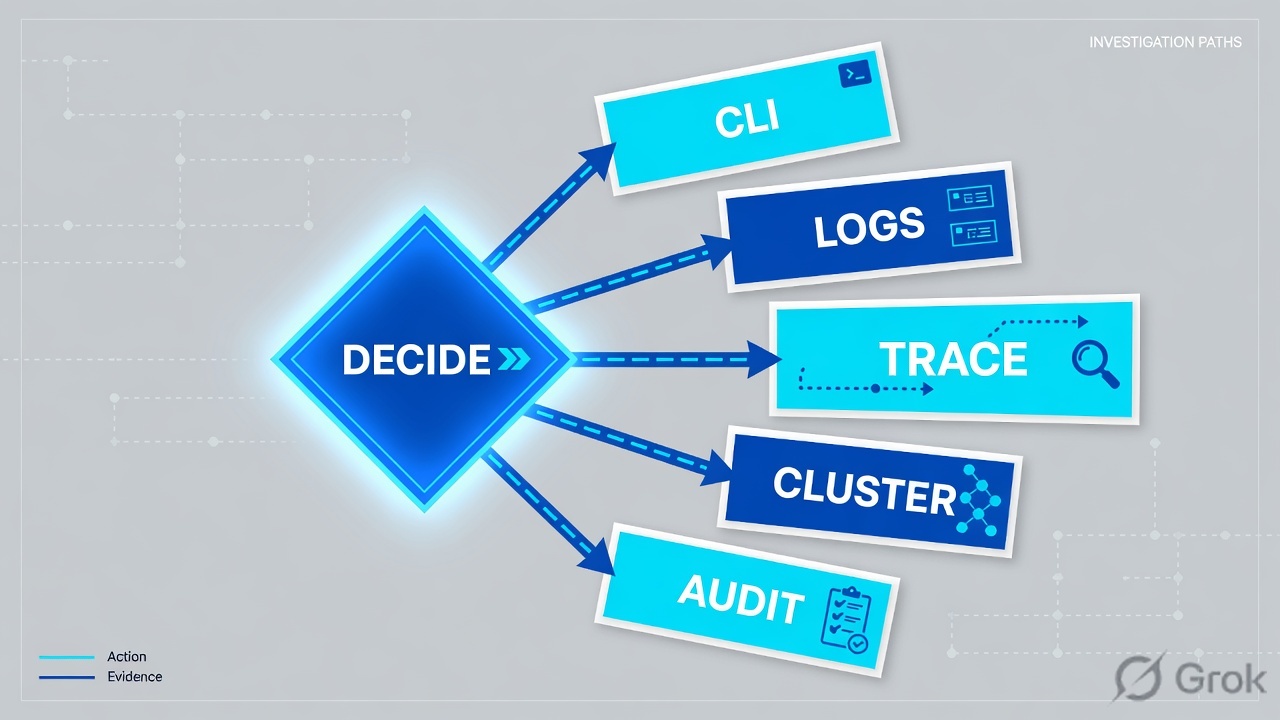
Read the diamond first. No tile never starts in ThreatInsight. Named Deny never starts with a password reset. Empty log never starts in Access is Denied.
4. How to choose — first tool + proof field
Print this next to Admin Console. If you cannot recite the proof field, you are not ready to change anything.
| If the ticket says… | First tool (official path) | Proof field | Do not open first |
|---|---|---|---|
| “Is Okta even working?” / hotel laptop / bookmark | Reports → System Log · actor + UTC window | Any row exists? Then eventType + outcome.result + actor |
A new app sign-in Allow |
| Password ok, MFA / push / FastPass fails | System Log query eventType eq "user.authentication.auth_via_mfa" |
outcome.result + authenticator target + outcome.reason |
Directory → People password reset |
| Unmanaged / personal laptop / “device not trusted” | Same attempt: expand Device on FastPass events | Device Registered / Managed + health signals (disk encryption, screen lock, secure hardware) | Disable the app sign-in policy |
| Named deny after a policy ship / high-risk | Query eventType eq "policy.evaluate_sign_on" |
Allow / Deny / Challenge + the policy / rule that matched + debugContext.debugData.risk |
Rebuild SAML metadata |
| ACTIVE user, no Finance tile, no SSO | Query eventType eq "user.authentication.sso" then Applications → Assignments |
Missing SSO row + assignment (or application.user_membership.remove) |
ThreatInsight block mode |
| Whole new office challenged / denied | Expand client → IP; compare to Security → Networks |
client.ipAddress + debugContext.debugData.risk (Anomalous location / device) |
Org-wide policy off |
Official ThreatInsight events use eventType eq "security.threat.detected" and debugContext.debugData.threatSuspected eq "true". Those events often have no username — ThreatInsight evaluates before the user is identified. If your deny already names a policy rule, quote that rule. Do not flip ThreatInsight from Log to Log and enforce at 01:40 to “see if it helps.”
5. Runbook Side A → B → C
Side A proves the hit and the five System Log fields. Side B proves the factor and the policy evaluation. Side C proves the device / FastPass posture and the app sign-in rule you would change. On a messy Sev-2, do them in this order until a field lights up.
Side A — System Log first (the hit)
-
Open Reports → System Log, not Directory
Official: Reports → System Log (System Log; System Log filters and search). Default window is the last seven days — set From / To / Time Zone to the ticket UTC. Search the actor (username). People → Status = ACTIVE does not prove a sign-in occurred.
-
Expand the row — five fields, always
Click the right arrow. Official Help: the expansion shows actor, client, event, request, and target. From those surfaces copy:
eventType,outcome.result,actor,client.ipAddress(hover the IP in Client to filter), anddebugContext(DebugContext / DebugData). -
If the log is empty for that actor + window, stop
Empty is a result. The browser never presented this org. Check the Okta URL, DNS, a stale bookmark to another cell, or a wrong time zone on the filter. There is no
policy.evaluate_sign_onto edit. -
Glue the attempt
Copy
transaction.id. Official query:transaction.id eq "<TRANSACTION_ID>". That pulls MFA, policy evaluation, ThreatInsight, and session-start rows for the same click. Source: System Log events for Okta ThreatInsight.
Path:     Reports → System Log
Window:   ticket From / To / Time Zone  (default is last 7 days)

# This actor, this hour
actor.alternateId eq "priya@lab.example"

# MFA result
eventType eq "user.authentication.auth_via_mfa"

# Policy / rule that matched
eventType eq "policy.evaluate_sign_on"

# SSO assertion to the app
eventType eq "user.authentication.sso"

# Same click
transaction.id eq "<TRANSACTION_ID>"

# Risk / ThreatInsight
debugContext.debugData.risk co "level=HIGH"
debugContext.debugData.threatSuspected eq "true"
eventType eq "security.threat.detected"
Reports / System Log / event detail
Event detail
debugContext.debugData.threatSuspected = false
Device.registered = true · Device.managed = false · FastPass = Okta Verify
Lab identities and RFC 5737 address only. Live: expand Event / Actor / Client / DebugContext. Filter the IP from Client.
Source: Okta Help — System Log; System Log filters and search (expand actor, client, event, request, target); Risk scoring (DebugContext / DebugData, debugContext.debugData.risk); Global session policy evaluation (policy.evaluate_sign_on). Training mock · not live.
Side B — Authentication / MFA + policy evaluation
-
Read the official trio for auth issues
Okta Help (Global session policy evaluation) lists three System Log events to identify and resolve authentication issues:
policy.evaluate_sign_on,user.authentication.auth_via_mfa, anduser.session.start. Search all three on the sametransaction.id. -
MFA row —
user.authentication.auth_via_mfaOfficial Help: this event can carry Allow, Deny, and Challenge (Challenge = additional authentication required). It can include the app the user accessed and the policy rule that matched. The sign-on policy may be evaluated more than once in one sequence. Device-health Help also lists
USER_AUTHENTICATION_AUTH_VIA_MFAon FastPass sign-in. Chrome Device Trust Help: this event appears only if the app sign-in policy requires MFA. -
Session start —
user.session.startOfficial: status of the first authenticator verification that establishes an identity-provider session. Incorrect authenticator →
VERIFICATION_ERROR. It logs user ID, session start time, and the method used. It does not mean an access token was granted. ThreatInsight’sThreatSuspectedfield also appears on this event. -
Policy row —
policy.evaluate_sign_onOfficial Help (and Classic Engine release notes on help.okta.com): triggered when the Okta sign-on policy and/or app sign-on policy are evaluated. Behavior Detection Help: open
DebugContext/DebugDataonuser.session.startandpolicy.evaluate_sign_onfor behavior key=value pairs (POSITIVE / NEGATIVE / UNKNOWN / BAD_REQUEST). Quote Allow, Deny, or Challenge plus the rule name. -
SSO row — only after the broker allowed
Official common filter:
eventType eq "user.authentication.sso"(Application Access / Sign-in Success). No SSO row + healthy actor usually means assignment or they never launched the app — not a factor bug.
The global session policy controls how long the overall Okta session is valid. The app sign-in policy controls re-authentication frequency. After Maximum Okta global session idle time, users reauthenticate per the app sign-in rule — even if they selected Keep me signed in. Source: Global session policy evaluation · Notes.
Side C — FastPass / Device Trust + the rule you would change
-
Read device health on the FastPass events
Official (Device health attributes in System Log events): when users sign in with Okta FastPass, these events carry device health —
POLICY_EVALUATE_SIGN_ON,USER_AUTHENTICATION_VERIFY,USER_AUTHENTICATION_AUTH_VIA_MFA,USER_SESSION_START. The Device object shows Disk Encryption Type, Jailbreak, Screen Lock Type, Secure Hardware Present. Use that against the device assurance policy — do not guess from a phone photo of Okta Verify. -
Know FastPass vs legacy Device Trust events
FastPass is the phishing-resistant, passwordless authenticator in Okta Verify (Android, iOS, macOS, Windows; managed and unmanaged). Official Device Trust verification events (replace Desktop Device Trust with FastPass):
user.authentication.authenticate(device through a certificate),user.credential.enroll,pki.cert.issue,pki.cert.revoke. If you still see only the certificate events, the org may not have finished the FastPass cutover. -
Open the app sign-in rule only after you can name it
Path: Security → Authentication Policies → App sign-in → the policy → Rules → the rule System Log named. Official IF conditions include Device state (Registered), Device management, Device assurance policy, Device platform, User’s IP (network zones), and Risk. THEN Access is Denied or Allowed after successful authentication. Possession constraints include Phishing-resistant (FastPass / passkeys) and Hardware protection.
-
Zone and risk live on the same attempt
Risk scoring Help: open
DebugContext/DebugData. Example: MEDIUM becausereasons=Anomalous Device, withThreatSuspected=false. Queries:debugContext.debugData.risk co "level=HIGH"(also MEDIUM / LOW). A new office NAT that is not in Security → Networks looks high-risk. Adding the CIDR is change-control. Source: Risk scoring; Add IPs to a network zone from the System Log.
Security / Authentication Policies / App sign-in / High-Risk-SignOn / Rules / Add rule
Add an app sign-in policy rule
Lab labels. Official IF/THEN names from Add an app sign-in policy rule. Catch-all rule on a new policy allows Any two factor types — do not confuse it with this deny rule.
Source: Okta Help — Add an app sign-in policy rule (Security → Authentication Policies → App sign-in → Rules → Add rule; Device state, Device management, User’s IP, Risk, THEN Access is). FastPass / phishing-resistant constraint. Training mock · not live.
- Side A: System Log row for that actor in the UTC window. Five fields pasted. Empty log treated as “never hit,” not as a deny.
- Side B:
user.authentication.auth_via_mfaandpolicy.evaluate_sign_onon the sametransaction.id.user.session.startis not an access token. - Side C: Device object quoted (Registered / Managed + health). The app sign-in rule you would change is the one the evaluation event named.
6. Five tickets as full stories
These five land every quarter. Memorise first tool + proof field. Times and identities below are lab-only. RFC 5737 addresses only.
| Ticket | Symptom | First tool | Proof field |
|---|---|---|---|
| OEVD-01 | WFH: “Okta is down, I can’t even see the widget” | Reports → System Log | Row exists? eventType + outcome.result + actor |
| OEVD-02 | Password accepted; push / MFA fails after a rule ship | user.authentication.auth_via_mfa | outcome.result + authenticator target |
| OEVD-03 | Personal laptop, FastPass, “device not trusted” | Device object on FastPass events | Registered / Managed + health signals |
| OEVD-04 | ACTIVE, Finance tile missing, no SSO | user.authentication.sso then Assignments | Missing SSO + group assignment |
| OEVD-05 | New office NAT: everyone challenged or denied | client.ipAddress + Networks + risk | IP vs ZONE-HQ + debugContext.debugData.risk |
OEVD-01 — Prove they hit Okta (System Log)
01:42 · P2. Priya on a hotel network. Slack already says outage. L1 drafted a new app sign-in Allow and a password reset.
First tool: Reports → System Log. Filter actor priya@lab.example, last 30 minutes, the ticket time zone.
If empty: she never reached this org. Quote “no System Log row for actor + window.” Next check is the Okta URL, a bookmark to another preview / cell, split DNS, or a captive portal — not Access is Denied.
If a row exists: copy eventType, outcome.result, actor, client.ipAddress, debugContext. You are now allowed to open the MFA and policy events on that transaction.id. Existence of a row is not an Allow.
Do not trust a colleague’s System Log search from a different time zone. Official filters include Time Zone. Seven-day default will hide a ticket from last month and flood you with noise from yesterday.
OEVD-02 — Prove the factor (auth_via_mfa)
02:05 · P2. Password is accepted. Okta Verify push fails after last night’s phishing-resistant ship. Someone wants “SMS as a backup for Finance.”
First tool: eventType eq "user.authentication.auth_via_mfa" for that actor. Also pull user.session.start on the same transaction — official Help: wrong authenticator returns VERIFICATION_ERROR, and this event is not an access token.
Proof field: outcome.result on the MFA event (Allow / Deny / Challenge) plus the authenticator target (Okta Verify vs SMS vs FastPass). If the new rule requires phishing-resistant possession, enrolled SMS will fail even though Security → Authenticators shows two factors. Enrollment ≠ the policy accepted that factor.
I would not add SMS to Finance. I would quote user.authentication.auth_via_mfa and the rule’s possession constraint. A user-level exception is change-control with the policy owner.
OEVD-03 — Prove the device (FastPass / Device Trust)
02:20 · P2. User swears MFA is set up. Screenshot of Okta Verify. Finance still DENY. Hypothesis: unmanaged device vs a rule that wants Device: Registered, Managed.
First tool: same transaction, expand Device on the FastPass events listed in Device health attributes in System Log events. Quote Disk Encryption Type, Jailbreak, Screen Lock Type, Secure Hardware Present, and whether the device is registered / managed.
Proof field: Device.managed = false (lab) on policy.evaluate_sign_on with THEN Access is Denied. Official FastPass flow: Okta issues a challenge → Okta Verify / FastPass collects device signals and signs with the proof-of-possession key → policies evaluate on that device context. A healthy Verify install on an unmanaged laptop is working as designed when the rule requires managed.
Password reset will not mark the device managed. Disabling High-Risk-SignOn is not a night-shift fix. Asking the owner to enroll a managed device, or a scoped exception with the policy owner, is the designed path.
OEVD-04 — Prove assignment (no SSO row)
02:40 · P3. New hire is ACTIVE. Finance-SaaS SAML metadata is valid. No tile. L1 wants the SAML app rebuilt.
First tool: eventType eq "user.authentication.sso" for that actor + app. Official common filter for Application Access / Sign-in Success. Also search application.user_membership.remove if they used to have the tile (Common System Log filters).
Proof field: no SSO row in the window + Assignments tab missing the joiner’s group. Official assign path: Applications and Resources → Applications → the app → Assignments → Assign to People / Assign to Groups. Valid metadata ≠ this user is assigned. Rebuilding SAML is the wrong change.
Named DENY means they reached the broker and a rule refused them. No event ≈ never assigned or never launched. I would assign the group of record, not rebuild the SAML app.
OEVD-05 — Prove the zone / risk (client.ipAddress + debugContext)
03:05 · P2. Brand-new office NAT. Everyone there is challenged or denied. Someone typed “ThreatInsight is blocking the building.”
First tool: expand Client on any of their events. Official: hover the IP → Filter. Quote client.ipAddress = 203.0.113.40 (lab). Open debugContext.debugData.risk — official example reasons include Anomalous location and Anomalous device. Compare the IP to Security → Networks (Create an IP zone / Add IPs to a network zone from the System Log).
Then rule ThreatInsight out: eventType eq "security.threat.detected" and debugContext.debugData.threatSuspected eq "true". Official outcome.result values on that event: DENY, RATE_LIMIT, ALLOW. Those events often have no username. Path: Security → General → Okta ThreatInsight settings (No Action / Log authentication attempts from malicious IPs / Log and enforce). If ThreatInsight is Log-only and threatSuspected is false, it is not this DENY.
I would quote the office IP and the HIGH / Anomalous location reason. Updating ZONE-HQ CIDRs is change-control. Turning the app sign-in policy off for the org is the trap.
7. Traps + close-the-ticket proof
| You see | Weak close | Strong close |
|---|---|---|
| Empty System Log for actor + UTC | “Okta is down” / new Allow | Quote no row; fix URL / DNS / time zone; re-search |
| Row exists, still failing | “Okta is fine” | You only proved the hit. Read MFA + policy.evaluate_sign_on |
user.session.start SUCCESS | “They have a token” | Official: not an access token. Wait for SSO / app allow |
| Two factors enrolled | Reset password | auth_via_mfa vs the possession constraint |
| Okta Verify screenshot | “Device is trusted” | Device object: Registered / Managed + health |
| ACTIVE + valid SAML metadata | Rebuild the app | Assignments + user.authentication.sso |
| New office IPs | Disable High-Risk-SignOn | client.ipAddress + Networks CIDR via change-control |
| ThreatInsight in the channel | Flip to Log and enforce | security.threat.detected + threatSuspected first |
debugContext risk HIGH | Tenant Sev-1 | Quote reasons= (device / location / ThreatInsight) |
- UTC window + time zone written next to Reports → System Log.
- Five fields when there is a row:
eventType,outcome.result,actor,client.ipAddress,debugContext. - Same-attempt glue:
transaction.id eq "…". - One named event:
user.authentication.auth_via_mfa, orpolicy.evaluate_sign_on, or FastPass Device health, or missinguser.authentication.sso. - Isolate vs change-control in the last line. No org-wide rule edit without an owner.
- No password reset used as an assignment, zone, or FastPass fix.
| Stamp (from the factory) | Desk proof | Change-control? |
|---|---|---|
| Status | Actor exists; lifecycle events if you must. ACTIVE is not the close. | HR / lifecycle — not 01:40 |
| Assignment | Missing user.authentication.sso + Assignments tab | Assign to Groups if you own the app |
| Policy / risk | policy.evaluate_sign_on + debugContext.debugData.risk | Edit the named rule with owner |
| Zone | client.ipAddress vs Security → Networks | CIDR add is a change |
| Factor / FastPass | auth_via_mfa + Device health object | Do not lower phishing-resistant at 02:00 |
I name the question, then the first tool, then one official field. System Log proves the hit. user.authentication.auth_via_mfa proves the factor. FastPass Device health proves posture. policy.evaluate_sign_on proves the rule. I do not change an app sign-in policy, a zone, or ThreatInsight until that field is on the ticket. Factory model: ACTIVE is not allowed — five stamps.
Knowledge check
Six night-shift judgments. Each maps to a first tool or a proof field. Check answers, then Reset if you picked the wrong surface.
Sources
- Okta Help — System Log (Reports → System Log; expand row; actor / event type graphs)
- Okta Help — System Log filters and search (From / To / Time Zone; expand actor, client, event, request, target; filter client IP;
eventType eq "user.authentication.sso") - Okta Help — Common System Log filters (
application.user_membership.remove) - Okta Help — Global session policy evaluation (
policy.evaluate_sign_on,user.authentication.auth_via_mfa,user.session.start; Allow / Deny / Challenge; session vs app re-auth) - Okta Help — Add an app sign-in policy rule (Security → Authentication Policies → App sign-in; Device state / management / IP / Risk; THEN Access is; phishing-resistant / FastPass)
- Okta Help — Create a global session policy (Security → Global Session Policy)
- Okta Help — Okta FastPass (phishing-resistant; device posture; challenge → Verify → policy evaluate)
- Okta Help — Configure Okta FastPass
- Okta Help — Device health attributes in System Log events (FastPass events; Disk Encryption, Jailbreak, Screen Lock, Secure Hardware)
- Okta Help — Integrate Okta with Chrome Enterprise (
user.session.start,user.authentication.verify,policy.evaluate_sign_on,user.authentication.auth_via_mfaif MFA required) - Okta Help — Replace Desktop Device Trust with Okta FastPass (
user.authentication.authenticate,user.credential.enroll,pki.cert.issue/revoke) - Okta Help — Risk scoring (
DebugContext/DebugData;debugContext.debugData.risk co "level=HIGH"; Anomalous device / location) - Okta Help — Behavior Detection System Log events (DebugContext on session start / policy evaluate; POSITIVE / NEGATIVE / UNKNOWN / BAD_REQUEST)
- Okta Help — System Log events for Okta ThreatInsight (
security.threat.detected;outcome.resultDENY / RATE_LIMIT / ALLOW;actor;transaction.id;threatSuspected) - Okta Help — Configure Okta ThreatInsight (No Action / Log / Log and enforce)
- Okta Help — Create an IP zone
- Okta Help — Add IPs to a network zone from the System Log
- Okta Help — Assign app integrations (Applications → Assignments → Assign to People / Groups)
- Okta Help — Application Access report (queries System Log; outcome result)
Related: Okta session factory — ACTIVE is not allowed · Okta MFA & adaptive policies · Okta architecture & SSO · Okta practice dashboard