Okta is an identity session factory. The user is raw material (status + assignment). The global session policy decides how the org-wide session is established and how long it lasts. MFA / FastPass is the authenticator stamp that satisfies that policy. The app sign-in policy decides whether that session may enter Finance-SaaS. Success is a minted session you can prove in Reports → System Log — not a green Active badge. Official: GSP controls overall session lifetime; app sign-in controls re-authentication frequency. user.session.start does not mean an access token was granted.
I do not start with SAML. I ask whether the user is usable, whether the app is assigned, which global session rule established the org session, which authenticator stamped it, and which app sign-in rule Allowed or Denied this app. Active without a session is not success.
1. Why Active is not a session
Every other blog starts with MFA, FastPass and “adaptive policy” as three marketing boxes. That is why students freeze in interviews. The real object is the session. Features are only stations the factory walks before it prints a ticket the app will accept.
Official user-status table: Active means the profile is usable — an admin set a password, the user self-registered, or an admin activated the account. It does not mean Finance-SaaS has a tile. It does not mean a global session exists. It does not mean the app sign-in rule Allowed the click. Suspended users cannot open apps, the Admin Console, or the End-User Dashboard — and their assignments stay. Deactivated users lose every assignment and the password is deleted. Those are different factory jobs.

What the ticket asked
“Okta is blocking Finance-SaaS.” That sentence is a hypothesis. The factory may already have identified the user and denied the app on purpose.
What you prove first
Status, then assignment, then which GSP rule fired, then which factor, then which app sign-in rule. The evidence desk is the night-shift version of this order.
“They are Active, so Okta is fine — reset the password.” Active only means the factory was willing to look at the profile. If assignment is missing, the tile never appears. If the app sign-in rule says Denied, FastPass can succeed and Finance still 403s. Resetting the password reprints the same dead ticket.
Org lab.okta.example. User 00uLAB1042 / finance.user@lab.example. App APP-LAB-77 Finance-SaaS. Policy High-Risk-SignOn. Zone ZONE-HQ. Event 00eLAB2048. Client IP 203.0.113.40. Nothing here is a live tenant.
2. Mental model — five stations on one ticket
Hold five parts. Interviews fail when people mix the org session with the app ticket.
1. The user is raw material
Directory → People status (Active, Staged, Suspended, Deactivated…). Applications → Assignments puts the tile on the dashboard. No assignment = no SAML, no OIDC token for that client.
2. Auth policy is the global session policy
Official: GSP supplies the context to advance after Okta identifies the user. It allows access, prompts a challenge, and sets how long the org session lasts. Path: Security → Global Session Policy.
3. MFA / FastPass is the stamp
Authenticators live under Security → Authenticators. FastPass is a phishing-resistant, passwordless authenticator inside Okta Verify. Enrolled ≠ the policy accepted that factor.
4. App sign-in is the hiring manager
Official: app sign-in policies define how a user must authenticate to gain access to an app — group, IP zone, risk, device. Path: Security → Authentication Policies → App sign-in.
Read left → right. A later station can Deny even when every earlier station is green. Session start is not the app opening.
User. Official statuses you will actually see: Staged (created, activation not started), Pending user action / Provisioned (activation email not completed), Active, Password reset, Password expired, Locked out, Suspended, Deactivated. Assignment is a separate menu. Prefer Assign to Groups so joiners inherit the tile.
Global session policy. All orgs have a default GSP that applies to all users. Default allows access with a password, an IdP, or any factor allowed by the app sign-in policies. You change that condition, add higher-priority rules, or create a new policy and put it above the default. Rules evaluate in priority order until one matches. The everyone rule stops evaluation.
MFA / FastPass. Official factor types are possession, knowledge, and biometric. FastPass uses public-key cryptography inside Okta Verify on Android, iOS, macOS, and Windows. It is not supported on ChromeOS because Okta Verify is not available there. Possession constraints on the app sign-in rule — phishing-resistant, hardware protection, require user interaction — decide whether that FastPass stamp is enough.
App sign-in policy. New apps, except API service apps, start on the shared default policy. That catch-all allows access with two factors. You can share one policy across many apps. There is no limit on how many apps share a policy. You still view an app’s policy from Applications → Sign On, but you edit rules under Security → Authentication Policies → App sign-in.
Session. Official evaluation help: user.session.start logs the first authenticator verification used to establish an IdP session. It logs user ID, session start time, and authentication method. It does not indicate that an access token was granted. The app still has to pass the app sign-in rule.
3. Factory path — user to session
Draw this on a whiteboard before you touch a rule. The browser never goes straight to Finance-SaaS. Okta identifies the user, evaluates the GSP, stamps a factor, then evaluates the app sign-in policy. Then it either posts a SAML assertion / issues a token, or writes Deny to System Log.
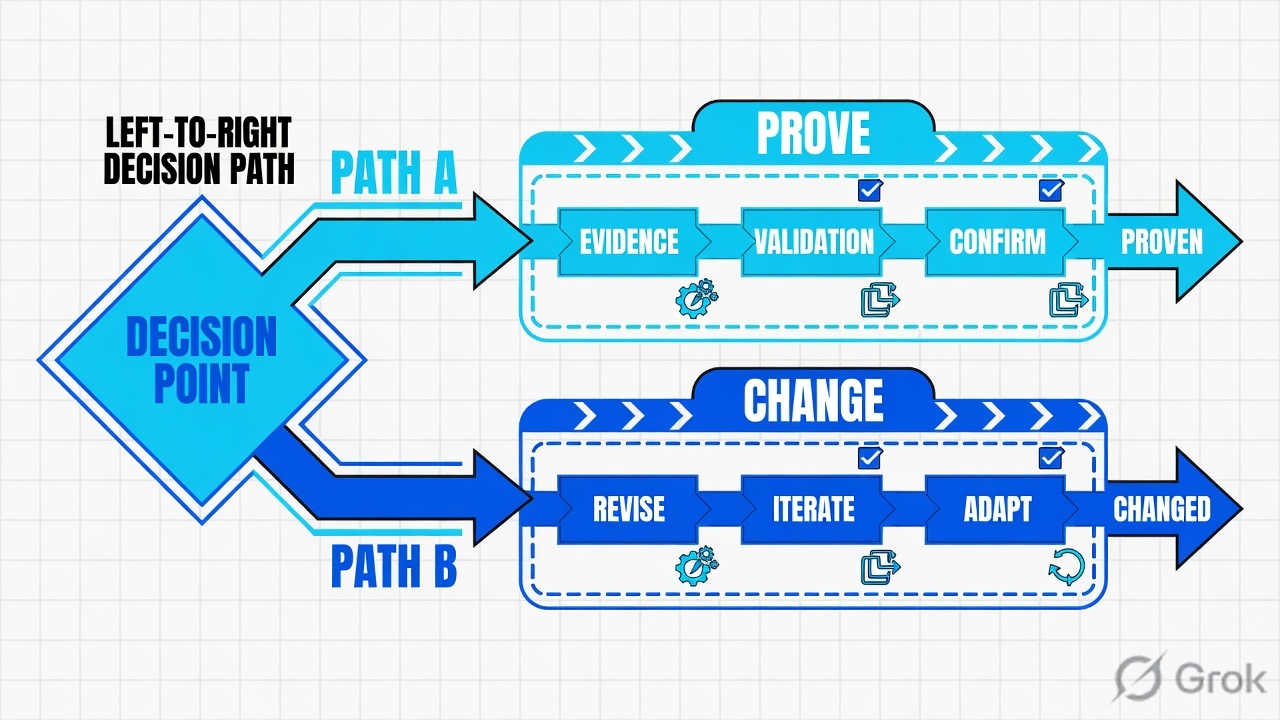
Read left → right, then the green session bar. Decision diamond = “is this profile usable and assigned?” Do not skip to FastPass if assignment is missing.
Official wording: user.session.start is triggered after the primary authentication challenge. It does not indicate that an access token was granted. You can have a healthy org session and a Denied app sign-in on the same click. Quote the app sign-in rule. Do not bounce the org.
4. How to choose the station
You are not choosing a product. You are choosing which station of the factory is allowed to write on the ticket.
| Choice | Use when | Do not use when | Proof you were right |
|---|---|---|---|
| Assign to Groups | Joiners should inherit Finance-SaaS. HR already owns the group. | You assign one person from a ticket and forget the next hire. | Applications → Assignments lists the Finance group. Tile appears after refresh. |
| Establish session with Any factor used to meet the Authentication Policy | You want FastPass / passwordless. Official FastPass GSP recipe. | You still require “A password” here and then wonder why FastPass never skips the password field. | GSP rule matches. FastPass users establish the session without a password prompt. |
| GSP MFA is Not required | Paired with the FastPass recipe so the app sign-in policy owns the factor set. | You set MFA Required on GSP and Any 2 factor types on every app, then users get double-prompted. | App sign-in Prompt for authentication is the only extra challenge you designed. |
| GSP MFA is Required · At every sign in | High-risk or behavior conditions. Official: if Risk is High, set MFA to At every sign in. | You combine High risk with a per-device or per-session MFA lifetime. | System Log Challenge / MFA events on every new Okta sign-in from that rule. |
| App sign-in THEN Denied | Unmanaged + high risk, or not-in-zone, by design. Finance should not open. | You treat that Deny as an outage and disable the policy to clear the queue. | user.authentication.auth_via_mfa = Deny. Policy name quoted on the ticket. |
| User must authenticate with Any 2 factor types | Default catch-all for a new org / new app. Safe baseline. | You leave it as the only rule for a high-value app that should require phishing-resistant FastPass. | Preset “Any two factors” is the official default for new orgs. |
| Possession constraint · Phishing-resistant | Finance, Admin Console, or any app that must refuse SMS / email / push-fatigue. | You require it before FastPass and passkeys are enrolled. Users lock themselves out. | Official: FastPass and passkeys (FIDO2 WebAuthn) satisfy phishing-resistant. |
| IF User's IP is In zone / Not in zone | Known HQ / VPN CIDRs in ZONE-HQ. Extra assurance on-net. |
You deny solely on geolocation. Official: IPs are dynamic; do not depend solely on location to deny. | Networks last update is current. New office CIDR is in the zone after propagation. |
Official FastPass GSP pair, quoted from Configure a global session policy for Okta FastPass: Establish the user session with = Any factor used to meet the Authentication Policy requirements, and Multifactor authentication (MFA) is = Not required. That lets FastPass users have passwordless authentication and sign in without biometrics at the GSP layer. The app sign-in rule still owns phishing-resistant / user-interaction constraints.
5. Runbook Side A → B → C
Lab values only. Goal: Finance group is assigned to Finance-SaaS, a FastPass-friendly GSP can establish the org session, an app sign-in policy named High-Risk-SignOn Denies unmanaged + high risk, and System Log proves the station that printed or refused the ticket.
Side A — user and assignment (raw material)
Primary source: User account status + Assign app integrations. If the profile is not Active, or the app is not assigned, later stations are theater.
-
Confirm the profile is usable
Directory → People. Open
finance.user@lab.example(00uLAB1042). Status must be Active. Staged = activation never started. Pending user action = activation email not completed. Suspended = cannot open apps, assignments stay. Deactivated = assignments removed, password deleted. Do not reset a password to fix Staged. -
Confirm the group of record
Directory → Groups. Open Finance. Members include
finance.user@lab.example. If the group is empty, assignment later is a green toast on an empty set. -
Assign the group to the app
Applications → Applications (official article: Applications and Resources → Applications). Open Finance-SaaS
APP-LAB-77. Assignments tab → Assign → Assign to Groups. Assign Finance. Done. Prefer groups over one-off people. -
Do not rebuild Sign On
Sign On tab: sign-on mode SAML 2.0, metadata Valid. Valid metadata is not “this user is assigned.” If 214 other people already have the tile, the ACS and cert are not the incident.
Applications › Applications › Finance-SaaS › Assignments
Assign Finance-SaaS to Groups
Dummy lab. Valid metadata is not this user. Field names from Okta Help — Assign app integrations.
Source: Assign app integrations — Applications and Resources → Applications → Assignments → Assign → Assign to Groups. Dummy values only.
Side B — GSP, authenticators, app sign-in (printing the ticket)
Primary source: Add a global session policy rule + Configure a global session policy for Okta FastPass + Add an app sign-in policy rule. Remember: GSP owns lifetime. App sign-in owns re-auth and whether this app is Allowed.
-
Stand up the authenticators first
Security → Authenticators. Official: you add an authenticator, configure it, then add it to an enrollment policy. For this lab, Okta Verify (TOTP and Push) plus Okta FastPass must be available. Phishing-resistant on the app rule is useless if FastPass and passkeys are not enrolled.
-
Write the FastPass-friendly GSP rule
Security → Global Session Policy. Open the lab policy (or add one above Default). Add rule. Rule name
gsp-fastpass-finance. IF User's IP is Anywhere (or In zoneZONE-HQif you already trust HQ). THEN Access is Allowed. Establish the user session with = Any factor used to meet the Authentication Policy requirements. Multifactor authentication (MFA) is = Not required. Set a Maximum Okta global session lifetime and a Maximum Okta global session idle time — do not pick No time limit on a finance org. Create rule. Put it above the everyone catch-all. -
Keep the zone current before you condition on it
Security → Networks → Add Zone → IP Zone. Zone Name
ZONE-HQ. Gateway IP addresses / CIDRs (lab:203.0.113.0/24). Optional Trusted Proxy IPs if a WAF sits in front. Save. Official: configure at least one gateway or proxy; a non-blocked zone accepts up to 150 gateway/proxy entries. Zone edits propagate — do not expect instant world-wide effect. -
Write the app sign-in policy and apply it to the app
Security → Authentication Policies → App sign-in. Create or open High-Risk-SignOn. Rules → Add rule. Restrictive rule above the catch-all. Then Applications tab → Add app → Finance-SaaS. Official: after you add rules, apply the policy to one or more apps.
Security › Global Session Policy › Add rule
Add rule
Dummy lab. FastPass-friendly pair from Okta Help — Configure a global session policy for Okta FastPass. GSP still owns idle / lifetime.
Source: Add a global session policy rule + Configure a global session policy for Okta FastPass. Establish session with Any factor… and MFA is Not required. Dummy values only.
Security › Authentication Policies › App sign-in › High-Risk-SignOn › Rules › Add rule
Add rule
Dummy lab. IF/THEN labels from Add an app sign-in policy rule. Catch-all below this rule stays Allowed after successful authentication / Any 2 factor types for managed + low risk.
Source: Add an app sign-in policy rule + Assign apps to an app sign-in policy. THEN Access is Denied is a designed outcome, not an outage.
Policy: High-Risk-SignOn
  Rule 1  Deny unmanaged high risk
          IF Device management is Not managed
          AND Risk is High
          THEN Access is Denied
  Rule 2  Catch-all (do not delete)
          IF Any
          THEN Access is Allowed after successful authentication
          AND User must authenticate with Any 2 factor types
          Prompt for authentication: When an Okta global session doesn't exist
Official: when you create an app sign-in policy it starts with a single catch-all that allows all requests with any two factor types. Add restrictive rules and prioritize them over that catch-all. Do not delete the catch-all to “make Deny work.”
Side C — prove the session in System Log
Primary source: Reports → System Log + Global session policy evaluation (the three events). This is not the People page. This is not a green Assign toast.
-
Reproduce the same click
IdP-initiated: End-User Dashboard → Finance-SaaS tile. SP-initiated: open the app login and accept the redirect to
lab.okta.example. Use the same laptop and the same public IP you will search. -
Open the live log
Reports → System Log. Official: the System Log contains details of all logged events for your org. Default filter is the last seven days. Search the username and the event window. You can also open the user under Directory → People and click View Logs.
-
Read the three events in order
user.session.start= first factor for the IdP session.policy.evaluate_sign_on= attempt success or failure, authenticator type and instance.user.authentication.auth_via_mfa= GSP or app sign-in evaluation with Allow, Deny, or Challenge, plus the app and the rule that matched. Expand the row. Copy outcome, policy, risk, authenticator, device, client IP. -
If session.start is green and Finance is red, do not reset the password
The org ticket printed. The app door did not open. That is Side B, rule 1 — not a broken IdP. The evidence desk is the night-shift version of this read.
Reports → System Log
Events · last 7 days
| Time | Event | Actor | Target | Result | Policy / factor |
|---|---|---|---|---|---|
| 10:42:18 | user.session.start | 00uLAB1042 | Okta | SUCCESS | FastPass |
| 10:42:19 | user.authentication.auth_via_mfa | finance.user@lab.example | Finance-SaaS | DENY | High-Risk-SignOn |
| 10:42:19 | policy.evaluate_sign_on | finance.user@lab.example | Finance-SaaS | FAILURE | Okta FastPass · unmanaged |
Row 1 is the org ticket. Rows 2–3 are the app door. Active + session.start SUCCESS + app Deny is the product working.
Click next: expand event 00eLAB2048. Copy outcome, policy, risk, authenticator, device, client.ipAddress. Source: System Log + Global session policy evaluation.

eventType     user.authentication.auth_via_mfa
uuid          00eLAB2048
actor         00uLAB1042  finance.user@lab.example
target        APP-LAB-77  Finance-SaaS
outcome       DENY
policy        High-Risk-SignOn
rule          Deny unmanaged high risk
risk          HIGH
authenticator Okta FastPass
device        Unmanaged
client.ip     203.0.113.40
client.zone   (not in ZONE-HQ)
debug         Device management is Not managed AND Risk is High
People = Active. Assignments lists Finance. GSP rule gsp-fastpass-finance can establish the session. App sign-in catch-all still exists under the deny. Pilot click: tile present, FastPass prompt, System Log Allow on Finance-SaaS (or the Deny you designed, with the named rule). user.session.start SUCCESS plus app Deny is not an outage. Active with no user.session.start is not success.
6. Runtime — FastPass, lifetime, re-auth
After Side A/B are live, a browser request is not “Okta looks up Active and opens the app.” It is a short factory line. Official FastPass how-it-works, student labels:
FastPass can succeed and app sign-in can still Deny on device management or risk. That is station 4, not a broken authenticator.
Official lifetime split, one more time, because this is the interview question: the global session policy controls how long an overall session is valid. The rules of the app sign-in policy control the re-authentication frequency. An end user’s session expires on Maximum Okta global session idle time regardless of Keep me signed in. After that they reauthenticate according to the app sign-in rules.
Prompt for authentication on the app rule has three official settings: every time the user signs in to the resource; when it has been over a specified length of time since they signed in to any resource protected by the active Okta global session; or when an Okta global session does not exist. Password + another factor splits into two prompts (password vs other factors) with their own intervals.
Keep me signed in is a global setting that persists across apps. Showing the prompt is configured on an app sign-in rule (Option to stay signed in). It does not override GSP idle / lifetime. Persistent cookies for GSP are an API usePersistentCookie option and are never set for Okta admins.
Device posture is a FastPass benefit, not a separate product. During authentication FastPass collects signals and evaluates device assurance. Non-compliant devices are denied unless the user remediates. ChromeOS: no Okta Verify, so no FastPass, no device record, and the “Access with Okta FastPass is granted” condition has no effect on ChromeOS rules.
New apps land on the shared default policy (Any two factors for new orgs). Preset “Seamless access based on risk context” requires FastPass and a GSP that establishes the session with Any factor used to meet the Authentication Policy, MFA not required. Preset “Seamless access based on network context” needs LegacyIPZone filled with corporate / VPN CIDRs. Do not apply a preset whose GSP pair you never wrote.
7. Traps + System Log proof
| Symptom | Looks like | Actually | First move |
|---|---|---|---|
| Active, no tile, metadata Valid | Broken SAML | Missing assignment | Applications → Assignments for this user or Finance group |
| Tile present, FastPass, then 403 | Okta is down | App sign-in Denied (risk / device / zone) | System Log policy name + Deny. Quote High-Risk-SignOn |
user.session.start SUCCESS, app still dead |
Token bug | Org session ≠ app Allow | Read user.authentication.auth_via_mfa for that app |
| Factors enrolled, still Deny | MFA broken | Enrolled ≠ accepted. Rule wants phishing-resistant FastPass | THEN User must authenticate with + possession constraints |
| Whole new office challenged | ThreatInsight block | Stale IP zone / Not in zone rule | Security → Networks last update. Do not disable the policy |
| FastPass never skips password | Verify install failed | GSP still says Establish session with A password | Official FastPass pair: Any factor… + MFA Not required |
| Double MFA prompt | Okta bug | GSP MFA Required and app sign-in also challenges | Decide which station owns MFA. Do not stack both blindly |
| Keep me signed in ignored | Cookie bug | GSP idle / lifetime expired. KMSI does not override it | Read Maximum Okta global session idle time |
| ChromeOS users fail FastPass | Need another GSP | Okta Verify is not on ChromeOS. FastPass conditions do nothing | Separate app sign-in rule for that platform |
| SSO worked, API 403 | Okta outage | Assertion / token is not resource-server authorization | Scopes and audience. Not People status |
- Directory → People: status Active, Finance group present.
- Applications → Assignments: Finance group listed on Finance-SaaS.
- Security → Global Session Policy: FastPass-friendly rule is above the everyone catch-all.
- Security → Authentication Policies → App sign-in: High-Risk-SignOn is applied to Finance-SaaS; catch-all still exists below the deny.
- Reports → System Log:
user.session.startfor this user in the test window. - Same window:
policy.evaluate_sign_onanduser.authentication.auth_via_mfaAllow for Finance-SaaS — or the Deny you designed, with the named rule. - Pilot user completes the same Finance click you used as the test.
- If you changed
ZONE-HQ: new office IP is In zone after propagation. You did not depend solely on geolocation to Deny.
Okta is an identity session factory. The user is raw material. The global session policy establishes the org session and sets its lifetime. MFA or FastPass is the stamp. The app sign-in policy decides whether that session may enter this app. I prove the ticket in System Log: user.session.start is not an access token. I quote the named app sign-in rule and Allow or Deny. Active without a session is not success.
Related: Okta evidence desk · Okta MFA & adaptive policies · Okta architecture & SSO · Okta hub
Knowledge check
Six judgment questions. Map each miss back to the section named in the reason.
Sources
- Global session policies — context after identify; default GSP; password / IdP / any factor allowed by app sign-in
- Add a global session policy rule — IF IP / IdP / behavior / risk; Establish the user session with; MFA; lifetime and idle; priority order
- Global session policy evaluation —
policy.evaluate_sign_on,user.authentication.auth_via_mfaAllow/Deny/Challenge,user.session.startis not an access token - App sign-in policies — how a user must authenticate to an app; shared default; two-factor catch-all
- Add an app sign-in policy rule — IF device / zone / risk; THEN Access is; factor types; possession constraints; prompt for authentication
- Preset app sign-in policies — Any two factors default; seamless risk / network presets and their GSP pair
- Assign apps to an app sign-in policy — Applications tab on the policy; no limit on shared apps
- Assign app integrations — Applications and Resources → Applications → Assignments → Assign to Groups
- User account status — Staged, Pending user action, Active, Recovery, Locked out, Suspended, Deactivated
- Multifactor authentication — possession / knowledge / biometric; phishing-resistant; Security → Authenticators
- Okta FastPass — phishing-resistant passwordless; seven-step challenge; ChromeOS not supported
- Configure a global session policy for Okta FastPass — Any factor used to meet the Authentication Policy; MFA Not required
- Create an IP zone — Zone Name, Gateway IPs, Trusted Proxy IPs, limits
- Use network zones in your org — GSP, app sign-in, VPN notifications, routing rules
- System Log — Reports → System Log; last seven days default; expand actor / client / event
- Keep me signed in — prompt is configured on an app sign-in rule; global across apps; does not override GSP idle
Related: Okta evidence desk · Okta MFA & adaptive policies · Okta architecture & SSO · Okta practice dashboard