Netskope is a steering + policy factory. The first job is the on-ramp: Netskope Client, GRE, IPSec or Cloud Explicit Proxy must deliver the flow to a NewEdge POP. Official SSL Decryption then runs — default is decrypt everything that was steered. Real-time Protection (access + activity), Inline CASB (cloud-app activity) and DLP (payload) are stamps written on that one ticket. Success is a Skope IT Application Event with Access Method, Action and Policy Name — not a green Apply Changes toast.
I do not start in DLP. I ask whether the on-ramp delivered the flow to NewEdge, which Access Method Skope IT wrote, which Real-time Protection rule was the first match, whether SSL was Decrypt or Do Not Decrypt, and whether DLP stamped Block after the site was allowed. Empty Skope IT is a steering ticket. A DLP block is a control, not an outage.
1. Why a green policy is not a session
Every other blog starts with Real-time Protection, DLP profiles and Inline CASB as three marketing boxes. That is why students freeze in interviews. The real object is the steered session. Features are only stamps the factory puts on a ticket after NewEdge has the bytes.
Official steering overview: Steering Configurations control what kind of traffic gets steered to Netskope for real-time deep analysis and what kind of traffic gets bypassed. The Netskope Client, a GRE or IPSec site tunnel, or Cloud Explicit Proxy is how those bytes arrive. Real-time Protection, SSL Decryption and DLP all live in the tenant. None of them fire on traffic the on-ramp never sent.
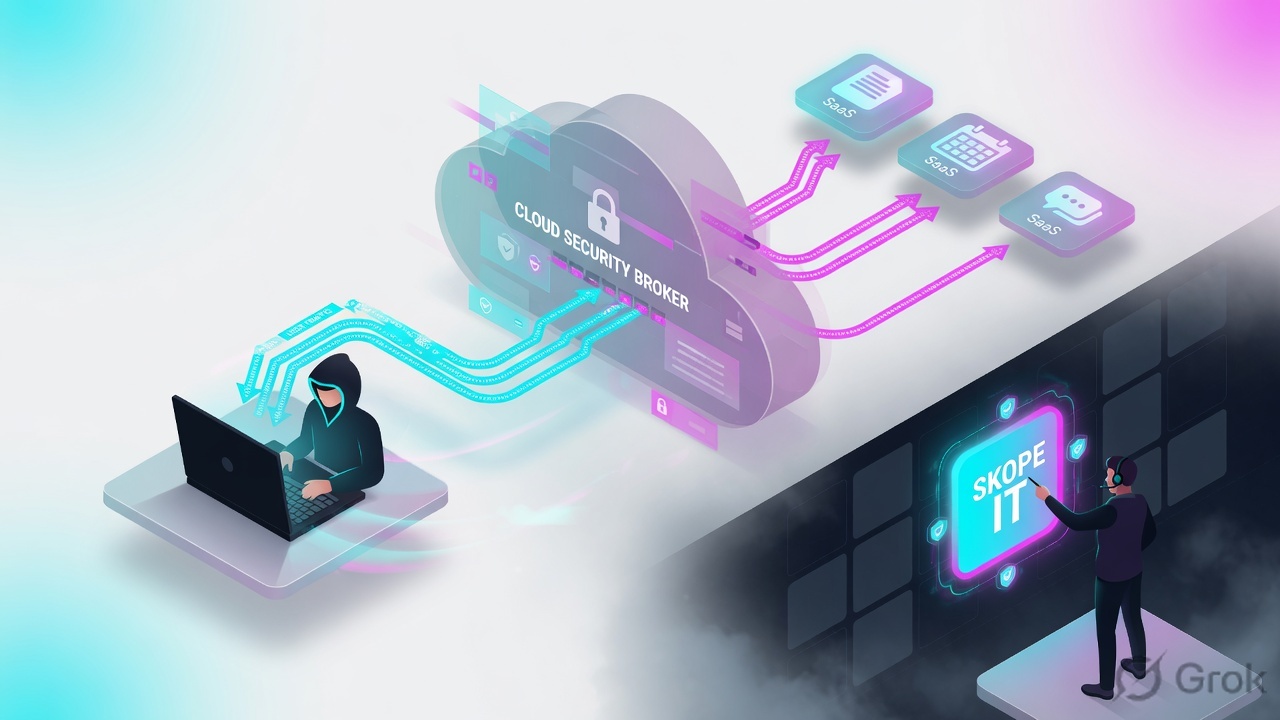
What the ticket asked
“Netskope is down — payroll failed.” That sentence is a hypothesis. The factory may already have allowed Salesforce and stamped Block on q3-payroll.xlsx.
What you prove first
On-ramp first: Client Internet Security Status, GRE/IPSec site Up, or Explicit Proxy Access Method. Then the Skope IT row. The evidence desk is the night-shift version of this order.
“The Real-time Protection rule is Allow, so Netskope is fine — we need a wider rule.” An Allow only means the factory was willing to print the ticket. If Skope IT is empty, the on-ramp never delivered. If DLP Profile Name is Finance-DLP and Action is Block, widening the allow just prints more blocked tickets.
2. Mental model — on-ramp plus three stamps
Hold four parts. Interviews fail when people mix them.
1. The ticket is the steered session
Bytes must reach a NewEdge POP. Access Method on the event is Client, GRE, IPSec or Explicit Proxy. No on-ramp = no ticket. A Steering Bypass never reaches the cloud.
2. The stamps are RTP, Inline CASB, DLP
Real-time Protection = access + activity. Inline CASB = cloud-app activity (upload / download / post). DLP = is the payload leaking. SSL Decrypt is taking the envelope off so the last two can read.
3. The hiring manager is the on-ramp + Apply Changes
Steering Configuration (or the GRE/IPSec/PAC site) decides whether to print the ticket. SSL Decryption runs next. RTP is top-down first match. DLP Alert + Continue is the official exception that is not terminal.
4. Proof is Skope IT
Skope IT → Events & Alerts → Application Events is the live activity table. Page Events is the browse. Transaction Events is the HTTP row. Devices is whether the Client is even steering. Apply Changes is a recipe.
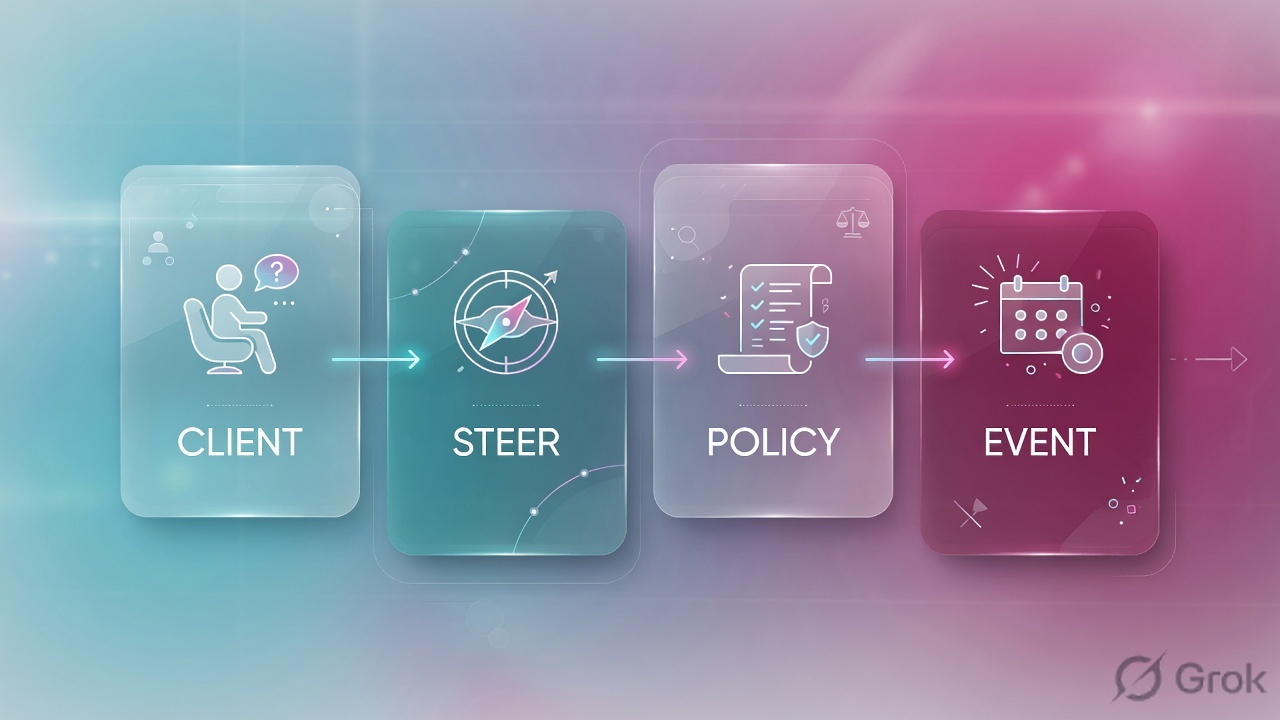
Read the solid arrow first (on-ramp → NewEdge → SaaS). If Skope IT stays empty, do not add a Real-time Protection rule. Re-read stamps only after Access Method exists.
Hard words, before the runbook
| Term | What official docs actually mean |
|---|---|
| Steering Configuration | Settings → Security Cloud Platform → Steering Configuration. Assigned by OU, user group, OS Family or device tags. Picks Cloud Apps Only / Web Traffic / All Traffic / None, plus Exceptions. |
| Cloud Apps Only | CASB mode. Enforcement points check the CCI database. If the destination is not a tracked cloud app, traffic is not steered. |
| Web Traffic | All HTTP/HTTPS. Needs SWG / Next Gen SWG. Exceptions exist for personal or private content. |
| All Traffic | HTTP(S) plus non-HTTP(S). Needs Cloud Firewall. TCP 80/443 go to the proxy; other TCP/UDP (except default DNS/mDNS) go to Cloud Firewall. |
| None | Client does not establish an Internet Security tunnel. It keeps watching on-prem status. Last Event can show Admin Disabled / Backed Off. |
| Dynamic Steering | One configuration, on-prem vs off-prem modes, using an On-Premises Detection Profile. Do not swap two configs at 18:00. |
| Steering Bypass | Exceptions tab → New Exception. Leaves the device DIRECT. Never reaches NewEdge. No Skope IT row for that flow. |
| Do Not Decrypt | Policies → SSL Decryption → Add Policy → Action Do Not Decrypt. Still reaches the POP. RTP continues with limited context. Click Apply Changes. |
| NewEdge | Netskope private security cloud / POP the on-ramp lands on. Client Configuration shows Gateway FQDN and POP name. GRE/IPSec land on the VIP you picked as Primary POP. |
| Inline CASB | Real-time Protection against a Cloud App / App Instance, with Activities (Upload, Download, Post). Same engine as SWG, activity-oriented. |
| Skope IT | Transaction evidence. Application Events = activity + Policy Name + Action. Page Events = browse. Empty page = steering miss until proven otherwise. |
Steering is the on-ramp. NewEdge is the factory floor. Real-time Protection / Inline CASB / DLP are stamps. SSL Decrypt is opening the envelope. Skope IT is the printed ticket. Disable DLP to “restore payroll” is tearing up the stamp, not fixing the factory.
Client / GRE / IPSec / explicit → NewEdge POP → SSL Decryption (default Decrypt) → Real-time Protection first match → Inline CASB activity / DLP profile → Skope IT Application Events. Skip a station and you quote the wrong object on the ticket.
3. Factory flow — steer, then stamp
The first packet of a new conversation has no Skope IT row yet. It must survive the on-ramp, land on NewEdge, pass SSL Decryption, then walk Real-time Protection. Later packets of the same TLS session ride that steered path. That is why “I added a rule” sometimes does nothing until the Client checks in, Apply Changes is clicked, or the old GRE/IPSec SA dies.
Read left → right, then the green Skope IT bar. Decision diamond = “did the on-ramp steer this flow?” Do Not Decrypt still stays on the NewEdge path.
If Application Events and Page Events have no row for finance.user@lab.example at the time of the click, the factory never saw the flow. Official Client Status table: Tunnel down due to GRE / IPSec / Secure Forwarder = Backed Off. A Steering Bypass is DIRECT. Traffic mode None does not establish a tunnel. Do not open Policies → DLP. Prove the on-ramp first — that is the evidence desk ticket NEVD-01.
4. How to choose the on-ramp and stamps
You are not choosing a product SKU in a slide. You are choosing how the factory is allowed to receive the ticket, and what it is allowed to write on it.
| Choice | Use when | Do not use when | Proof you were right |
|---|---|---|---|
| Netskope Client | Managed laptop that roams. Follows the user to the nearest NewEdge POP. Provisions the signing CA. | Kiosks / OT you cannot install on. Also when GRE/IPSec is already on the path — Client will Back Off. | Devices → Internet Security Status Enabled, Last Event Tunnel Up, Config Updated after the change. |
| GRE site | Branch or DC with a GRE-capable edge. HTTP/HTTPS 80/443 (plus non-HTTP if Cloud Firewall). No encryption tax. | You NAT every endpoint to one public IP inside the tunnel. Official: that collapses load-balance, reporting and policy granularity. | Settings → Security Cloud Platform → GRE shows Up + keepalive Seen. Access Method = GRE in Page Events. |
| IPSec site | Same as GRE when the path must be encrypted. IKEv2 only. NAT-T required. Primary + failover POP. | You reuse one source IP across two high-capacity IPSec sites, or you skip DPD/keepalive. | IPSec page Up. Source Identity matches the peer. Access Method = IPSec. |
| Cloud Explicit Proxy | No Client, no site tunnel. PAC points browsers at eproxy-<tenant>:8081. Unmanaged / contractor browsers. |
You send the IdP through the PAC (SSO loop). You expect non-HTTP ports. You skip the remote-user Root CA. | Skope IT Page Event Details → Access Method = Explicit Proxy. User is not unknown unless you designed that. |
| Cloud Apps Only | On-prem NGFW already inspects web. You only want sanctioned SaaS inline. | You then wonder why example.test never logs. It is not in the CCI cloud-app list. |
Application Events exist for Salesforce. Page Events for random web stay empty — by design. |
| Web Traffic | You own HTTP/HTTPS off-prem (or everywhere). SWG / Next Gen SWG licence. | You need SSH / non-web ports. That is All Traffic + Cloud Firewall. | Page Events for the test URL. Port 22 still invisible. |
| All Traffic | Cloud Firewall licence. Non-HTTP(S) must land on NewEdge. | On-prem, unless Flexible Dynamic Steering is enabled for All Traffic on-prem (R112+). Contact Support if the option is missing. | Network / firewall events exist for the non-web port. DNS only if DNS Security is on. |
| Do Not Decrypt | Pinned host, banking / health category, or a named legal exception. You still want a NewEdge log. | You want DLP on the payload. Do Not Decrypt = limited RTP context. Prefer this over a Steering Bypass. | SSL policy Enabled + Apply Changes. Application Event still exists. Payload fields stay thin. |
| Steering Bypass | SSO login hosts (login.microsoftonline.com, *.okta.com) and VPN destinations. Official recommended minimum. |
A catch-all *.com, or a pinned app you still wanted to log. Excessive bypasses are a visibility hole. |
Client Exceptions list. No Skope IT row for that host — expected. |
| RTP Cloud App Access + DLP profile | Inline CASB: block Upload of PCI / payroll on Salesforce for Finance-IN. Attach the DLP profile, Action Block. | You Allow the app with no profile and call it “protected.” That is an uninspected tunnel through NewEdge. | Application Events Action = Block, Policy Name + DLP Profile Name set. Incident exists. |
Official bias, word for word in spirit: use SSL Bypasses over Steering Bypasses whenever possible. Excessive steering bypasses expose the organisation. Netskope already maintains a certificate-pinned application exception list under the Steering Configuration → Exceptions tab. Source: Add Bypasses in Netskope.
Best Practices for Real-time Protection Policies: Threat Protection (high risk) → Utility → Remote Browser Isolation → CASB (activity oriented) → Web (category based) → Netskope Private Access. Place small-group exceptions at the top. Drag to reorder, then Apply Changes. Policy changes do not take effect until you apply.
5. Runbook Side A → B → C
Side A builds one on-ramp. Side B writes SSL then Real-time Protection (with a DLP profile on the Inline CASB activity). Side C proves Access Method + Action + Policy Name in Skope IT. Dummy lab only.
Lab values only. Tenant lab.goskope.example, user finance.user@lab.example, group Finance-IN, laptop 192.0.2.25, GRE/IPSec source 203.0.113.10, SaaS saas.example.test, file q3-payroll.xlsx. Nothing here is a live tenant. Confirm syntax on the current docs.netskope.com page before you type on a real box.
Side A — build the on-ramp (the factory floor)
Primary source: Steering Configuration + Creating a Steering Configuration + GRE / IPSec / Cloud Explicit Proxy. Pick one on-ramp for the pilot. Mixing Client with GRE on the same path is how Internet Security goes Backed Off.
-
Trust the Signing CA before you decrypt anything
Settings → Manage → Certificates → Signing CA. Download the Netskope Root and intermediate CA. Push with MDM/GPO to the OS store. Firefox NSS and some Java keystores are separate. The Client installs the CA automatically on managed devices. GRE/IPSec/explicit do not — you distribute the file. Cert warnings on every site after go-live is a Side A miss, not a POP outage.
-
If the pilot is a managed laptop — Client Configuration + Steering Configuration
Settings → Security Cloud Platform → Netskope Client → Client Configuration. Assign the pilot OU / group only. Enable On-Premises Detection if you will use Dynamic Steering. Then Settings → Security Cloud Platform → Steering Configuration → New Configuration. Name cannot exceed 40 characters. Match Criteria: User Group = Finance-IN (R124+ also OS Family, R134.0.5 also Device Tags). Traffic Steering tab: Off-Premises = Web Traffic (needs SWG). On-Premises = Cloud Apps Only if the branch NGFW already inspects web. Status: leave Disabled until steered items and exceptions exist. Source: Creating a Steering Configuration.
-
If the pilot is a branch you cannot install on — GRE or IPSec site
Settings → Security Cloud Platform → GRE → Create New → New GRE Site (or IPSec → New IPSec Site). Site Name
LAB-DEL-BR01. Source IP Address =203.0.113.10(the exit public IP Netskope will receive). Primary Netskope POP = closest POP; Failover POP = second closest on a different release Day-N. Do not NAT endpoints inside the tunnel. Enable ICMP keepalive (official recommendation: probe every 20 seconds, retry 5 times every 6 seconds). IPSec is IKEv2 only, NAT-T required, PSK authentication. After the site is Up, choose identity: Client on the laptop, or provision the CA and accept user = unknown / IP unless SAML/explicit identity is designed. Source: Creating a GRE Site / IPSec. -
If the pilot is a browser you cannot tunnel — Cloud Explicit Proxy
Settings → Security Cloud Platform → Explicit Proxy. Download the sample PAC. Replace
<Tenant Name>. Official return isPROXY eproxy-<Tenant Name>:8081for http/https, else DIRECT. Do not proxy the IdP — leave the official commenteddnsDomainIs(host, '.okta.com')pattern in place for your real IdP. Distribute the remote-user Root CA. SAML 2.0 via Settings → Security Cloud Platform → Forward Proxy → SAML. Only send HTTP/HTTPS. Source: Cloud Explicit Proxy. -
Minimum exceptions, with a reason
Steering Configuration → Exceptions → New Exception. Official recommended minimum: SSO login page (Steering Bypass —
login.microsoftonline.comor*.okta.com/*.oktacdn.com), VPN gateways (domain + destination location), EDR callbacks as SSL Do Not Decrypt not a full steer-off. Certificate-Pinned Applications already has a vendor-maintained list. Source: Add Bypasses in Netskope.
Settings › Security Cloud Platform › Steering Configuration › New Configuration
New Configuration
Web Traffic requires SWG. All Traffic requires Cloud Firewall. None means no Internet Security tunnel. Name ≤ 40 characters. Dummy values only.
Source: Creating a Steering Configuration — Name, Match Criteria (User Group / OU / OS Family / Device Tags), Traffic Steering (Dynamic Steering, Cloud Apps Only / Web Traffic / All Traffic / None), Bypass exception traffic at Client or Netskope Cloud. Enable only after steered items and exceptions.
Side B — SSL then Real-time Protection (printing the ticket, choosing stamps)
Primary source: SSL Decryption + Add a Policy for SSL Decryption + Configuring Real-time Protection Policies + Best Practices. Remember: SSL runs immediately after steering. Default is decrypt. RTP is top-down first match. DLP Alert + Continue is the official non-terminal exception. Netskope allows the activity by default if nothing matches.
Policies › Real-time Protection › New Policy › Cloud App Access
Real-time Protection Policy
Name: alphanumeric plus _ - []. Block on Upload + DLP profile is the payroll stamp. Place this in the CASB band, above broad Web allows. Dummy values only.
Source: Configuring Real-time Protection Policies — New Policy templates DLP / Threat Protection / Cloud App Access / Web Access / Private App Segment Access. Source, Destination (Cloud App + Activities), Add Profile (DLP or Threat Protection), Action, Policy Name, Enable, Save. Then Apply Changes on the list.
-
Write SSL Decryption exceptions first
Policies → SSL Decryption → Add Policy. Add Criteria: Category (Finance / Health), Domains (
api.example.test— SNI, not CN/SAN; wildcards like*.example.comonly), App, Access Method, OS Family (Client only). Action Do Not Decrypt for pinned APIs and banking. Action Decrypt is the default path for everything else you steer. New SSL policies are created disabled — enable them. Click Apply Changes. Source: Add a Policy for SSL Decryption. Do Not Decrypt still matches RTP with limited context; a Block RTP can still drop the flow without a user block page. -
Create the DLP profile, then attach it — do not invent a bare rule
Policies → DLP (profiles). Lab profile
Finance-DLP-PCI. Then on the RTP policy, Add Profile → DLP Profile. Action Block. Optional: Set action for each profile if you attach more than one. Continue policy evaluation after match is only for Alert. Add Traffic Action is how you keep a Cloud App Allow when the DLP profile does not match. Source: Configuring Real-time Protection Policies · Profile & Action. -
Place the policy in the official stack
Threat → Utility → RBI → CASB → Web → NPA.
Finance-SaaS-Uploadsits in the CASB band, above any “allow Salesforce browse” web rule. Drag, then Apply Changes. If you forget Apply Changes, the Client and the POP are still running yesterday. -
Apply Changes, then do not celebrate
A green Apply Changes means the recipe printed. It does not mean Salesforce answered, and it does not mean the Client pulled Config Updated. Side C is the proof. Steering exceptions apply on the next Client check-in (official: about every 15 minutes).
NSKP-LAB> show client-config finance.user@lab.example
org=lab.goskope.example
gateway=gateway.lab.example pop=DEL1
user=finance.user@lab.example
client-configuration=LAB-Finance-Laptops
steering-configuration=LAB-Finance-Laptops
traffic-steering=web-traffic
on-premise=no
config-updated=10:40Z
internet-security=enabled last-event="Tunnel Up"
Say the word recipe. This tray/Configuration panel is what the laptop actually loaded. Compare it to the tenant. If Config Updated is still 08:12Z, “we changed it” is false. Source: Using Netskope Client · Configuration (Organization, Gateway, POP, Client Configuration, Steering Configuration, Traffic Steering Type, Config Updated).
Side C — prove the ticket in Skope IT
Primary source: Application Events + Page Events + Devices + Transaction Events. This is not the policy list. This is the printed ticket. Field-by-field night-shift version: Netskope evidence desk.
-
Baseline the on-ramp
Client: Settings → Security Cloud Platform → Netskope Client → Devices. Internet Security Status, Last Event, Steering Configuration on View Details. GRE/IPSec: site Status Up, keepalive Seen. Explicit: a Page Event with Access Method = Explicit Proxy. Half of “it doesn’t match the doc” is a different Client train. Half of empty Skope IT is Backed Off because GRE is on the path.
-
Click Salesforce, upload the dummy file, then open Application Events
Skope IT → Events & Alerts → Application Events. Filter user
finance.user@lab.exampleand app Salesforce. You need Access Method = Client (or GRE / IPSec / Explicit Proxy — the on-ramp you built), Action, Policy Name =Finance-SaaS-Upload, and if the file was the point, DLP Profile Name =Finance-DLP-PCI. -
Read the stamps on the row
Allow + empty DLP Profile Name on an Upload means you never attached the profile. Block + Finance-DLP-PCI means the factory succeeded. Browse activity with Action Alert may not generate an alert — official caveat. Page Events is a different table (heuristic browse, Total Bytes, Bypass Traffic); it is not a second Application Event.
-
If Skope IT is empty, do not add a rule
Check Devices / GRE / PAC / Steering Bypass / traffic mode None. That is the evidence desk, not a missing Cloud App Access policy.
Skope IT → Events & Alerts → Application Events
Application Events
| Time | App / Activity | Access Method | Action | Policy Name | DLP Profile |
|---|---|---|---|---|---|
| 10:42:02Z | Salesforce / Browse | Client | Allow | Finance-SaaS-Browse | — |
| 10:42:18Z | Salesforce / Upload | Client | Block | Finance-SaaS-Upload | Finance-DLP-PCI |
Row 1 is the site allow. Row 2 is the proof stamp: same on-ramp, Upload activity, DLP Block. That is not an outage.
Click next: open the Upload row, copy Policy Name + DLP Profile Name onto the ticket, then confirm Incidents → DLP if you need the file object. Source: About Application Events — Policy Name, Action, DLP Profile Name. Dummy values only.

NSKP-LAB> show app-event user=finance.user@lab.example
time=10:42:18Z app=Salesforce activity=Upload
access_method=Client user=finance.user@lab.example
url=https://saas.example.test file=q3-payroll.xlsx
action=block policy=Finance-SaaS-Upload
dlp_profile=Finance-DLP-PCI ssl=decrypt
pop=DEL1

NSKP-LAB> show page-event user=finance.user@lab.example
time=10:42:02Z site=saas.example.test
access_method=Client total_bytes=18440
bypass_traffic=no
On-ramp matches the design (Client Enabled / GRE Up / PAC Access Method). Application Event Access Method is that on-ramp. Policy Name = Finance-SaaS-Upload on the Upload. DLP Profile Name = Finance-DLP-PCI and Action = Block if the file was the test. Browse can still be Allow. That is working. Apply Changes with an empty Skope IT page is not.
6. Runtime — decrypt, first-match, backoff
After the on-ramp is up, later packets of the same TLS session stay on NewEdge. Official SSL Decryption: policies are applied right after traffic is steered. By default all steered traffic is decrypted, then further analysed via Real-time Protection. Do Not Decrypt still matches RTP with limited context. A Block RTP on a Do Not Decrypt flow generates a Skope IT alert; a user block page is not sent.
Real-time Protection is sequential. When traffic matches rule conditions, the action applies without further processing — all policies are terminal except DLP policies set as Alert and Continue. If you enable Continue policy evaluation after match and several DLP profiles fire, the DLP incident lists every matched profile; the alert uses the last matched policy as Alert Name and lists all Policy Names; Action is the last non-Alert action, or None if every match was Alert. Source: Configuring Real-time Protection Policies.
Inline CASB is not a second engine. It is Real-time Protection with Destination = Cloud App or App Instance plus Activities. Upload / Download / Post are the stamps students skip. A Cloud App Allow with no Activity constraint is “any activity.” A Web Access category allow below a CASB Block still never sees the upload — first match already left the list.
The Client is not a mute pipe. Official Using Netskope Client: Internet Security Status is the tunnel that forwards Cloud Apps, Proxy and Firewall. Last Event Tunnel Up = Enabled. Tunnel down due to GRE / IPSec / Secure Forwarder / Data Plane on-premises = Backed Off. Admin selecting steering mode None also sends Admin Disabled / Backed Off for Dynamic Steering tenants. Creating a Steering Configuration: you can tell the Client to Steer or Not Steer private apps when GRE, IPSec or Explicit Proxy is already present. Mixing on-ramps without that decision is how a laptop “has the Client installed” and Skope IT stays empty.
GRE and IPSec are stateful. Official: during planned POP maintenance the tunnel goes down and comes up briefly. You must configure a failover tunnel on a different Day-N POP; failover happens on your gateway, outside Netskope’s control. Traffic from the same user must stay on the same tunnel — do not load-balance one endpoint across two GRE/IPSec sites. High-capacity GRE (3/5 Gbps) and IPSec (1/2 Gbps) are licensed, primary+failover only, and a source-IP change needs a maintenance window.
Cloud Explicit Proxy identifies users with cookies after SAML. Official: do not send the IdP request/response to Netskope. Firefox Enhanced Tracking Protection can break the cookie surrogate. Unauthenticated traffic from unknown locations must authenticate unless you Allow listed source egress IPs. Access Method on the Page Event is Explicit Proxy — that is the stamp that proves this on-ramp, not Client.
Steering exceptions apply on the next Client check-in (about 15 minutes). RTP and SSL need Apply Changes. The tray Configuration panel shows Config Updated. Devices shows Last Event. If those timestamps are before your change window, the laptop is still running yesterday. Another tenant-side edit on top just widens the blast radius.
7. Traps + Skope IT proof
| Symptom | Looks like | Actually | First move |
|---|---|---|---|
| No Skope IT row | Missing RTP allow | On-ramp miss — Client disabled / Backed Off / Steering Bypass / mode None / GRE down | Devices Last Event, or GRE/IPSec status, or PAC Access Method |
| Allow + spinning browser | Need a wider rule | Page Event Total Bytes = 0, or Transaction Events SSL error, or pin | Evidence desk: Page Events then Transaction Events. Do not add any-any. |
| Payroll upload “outage” | NewEdge is down | DLP Block after Cloud App Allow — factory succeeded | Application Events Action + DLP Profile Name. Exception process, not disable DLP. |
| Added a rule, nothing changed | Apply Changes failed | Forgot Apply Changes, or Client Config Updated is stale, or first-match hit a rule above yours | Policy list order + Config Updated + Last Event |
| Client installed, still empty | Bad Client package | Internet Security Backed Off — GRE/IPSec/explicit already on the path | Last Event “Tunnel down due to GRE/IPSec”. Pick one on-ramp. |
| Every HTTPS page warns | POP cert is broken | Signing CA missing on the device (or Firefox NSS) | Settings → Manage → Certificates → Signing CA, then MDM. Do not disable SSL tenant-wide. |
| Mobile API fails, browser lives | Missing allow | Decrypt on a certificate-pinned host | Do Not Decrypt that host with an owner. Not inspect-off. Not Steering Bypass unless you accept going blind. |
| GRE Up, policy never matches per user | RTP is broken | NAT inside the GRE tunnel — Netskope sees one IP | Remove inner NAT. Official GRE guideline. |
| Explicit users loop at login | IdP is down | PAC steers the SSO host | Steering / PAC DIRECT for the IdP. Official Cloud Explicit Proxy + Add Bypasses. |
| SSH never logs | Cloud Firewall is broken | Steering mode is Web Traffic, not All Traffic | All Traffic + Cloud Firewall licence. Web Traffic is HTTP/HTTPS only. |
- On-ramp is the one you designed: Devices Internet Security Status = Enabled and Last Event = Tunnel Up, or GRE/IPSec site Up with keepalive Seen, or Page Event Access Method = Explicit Proxy.
- Client Configuration and Steering Configuration names on the tray match
LAB-Finance-Laptops. Config Updated is after the change window. - Skope IT Application Events shows the user, Access Method, app Salesforce, activity Upload.
- Policy Name =
Finance-SaaS-Upload. Action = Block when the dummy payroll file is the test. DLP Profile Name =Finance-DLP-PCI. - SSL action on that host is Decrypt (or Do Not Decrypt with a named owner if you designed a pin).
- SSO login hosts are a Steering Bypass so identity does not loop.
- The same user can complete a non-DLP Salesforce click (Browse Allow) — the factory is up; the file stamp is the control.
Netskope is a steering + policy factory. Client, GRE, IPSec or explicit delivers the flow to NewEdge. SSL Decrypt is the default envelope-off. Real-time Protection, Inline CASB and DLP are stamps on that one ticket, not three extra clouds. I prove the ticket in Skope IT: Access Method, Action, Policy Name. Empty Skope IT is a steering miss. A DLP Block after an Allow is the product working.
Related: Blog 2 · Evidence desk — first tool + proof field · Architecture & steering · Next Gen SWG / Real-time Protection · Inline + API CASB · DLP deep-dive · Netskope hub
Knowledge check
Six judgment questions. Map each miss back to the section named in the reason.
Sources
- Steering Configuration — Settings → Security Cloud Platform → Steering Configuration; Cloud Apps Only / All Traffic behaviour; OU vs user-group conflict order; log bypassed traffic
- Creating a Steering Configuration — New Configuration, Match Criteria, Dynamic Steering, Cloud Apps Only / Web Traffic / All Traffic / None, Private App Segments, Fail Close, exceptions before Enable
- Choose a Traffic Steering Method — Client, IPSec, GRE, Explicit Proxy, Proxy Chaining; CASB vs SWG steering modes
- GRE and Creating a GRE Site — Settings → Security Cloud Platform → GRE; Source IP Address; Primary / Failover POP; no inner NAT; keepalive 20 / 5 / 6; MSS
- IPSec — Settings → Security Cloud Platform → IPSec; IKEv2 only; NAT-T; DPD 20 5 6; Source Identity; recommended AES-256-GCM
- Cloud Explicit Proxy — Settings → Security Cloud Platform → Explicit Proxy; PAC
PROXY eproxy-<Tenant Name>:8081; do not proxy the IdP; Access Method = Explicit Proxy - SSL Decryption and Add a Policy for SSL Decryption — applied right after steering; default decrypt; Do Not Decrypt; Apply Changes; new policies start disabled
- Add Bypasses in Netskope — Steering Bypass vs SSL Bypass; prefer SSL; SSO / VPN / EDR recommended set; Exceptions → New Exception
- Real-time Protection and Configuring Real-time Protection Policies — New Policy templates; Source / Destination / Profile & Action; DLP Alert + Continue
- Best Practices for Real-time Protection Policies — top-down first match; Apply Changes; default allow; Threat → Utility → RBI → CASB → Web → NPA
- Using Netskope Client — Internet Security Status; Last Event Tunnel Up / Backed Off (GRE, IPSec, Secure Forwarder); Configuration panel (Gateway, POP, Steering Configuration, Config Updated)
- Devices — Settings → Security Cloud Platform → Netskope Client → Devices; Internet Security Status, Last Event
- Application Events — Skope IT → Events & Alerts → Application Events; Policy Name, Action, DLP Profile Name
Related: Blog 2 · Netskope evidence desk · Architecture & steering · Next Gen SWG · Inline + API CASB · DLP deep-dive · Private Access (NPA) · Netskope hub
Dummy lab data only. Confirm live syntax, permissions and privacy rules on the production release before you type on a real tenant.