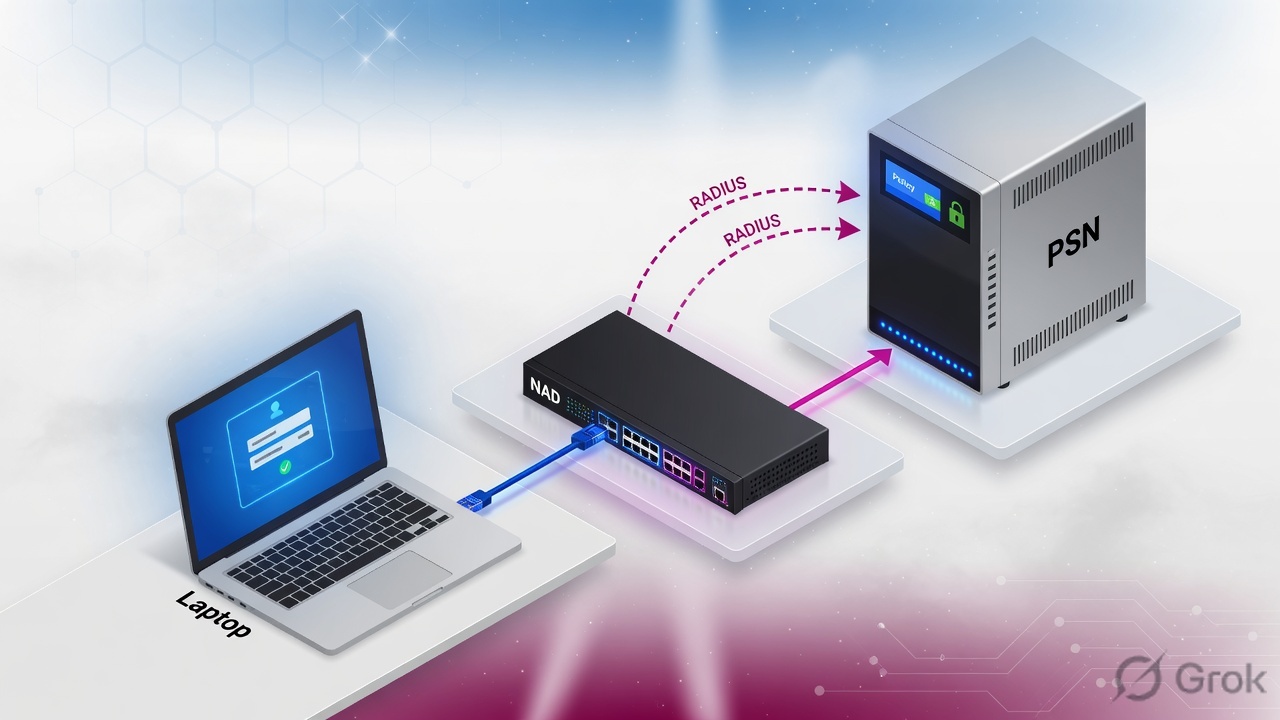
Supplicant talks to the NAD. NAD talks RADIUS to a PSN. The PSN picks a policy set, then an identity store (AuthC), then an authorization profile. The profile is the session: ACCESS_ACCEPT or ACCESS_REJECT, plus dACL, VLAN, SGT, or URL-Redirect. Posture is after Auth-Accept. Never say “RADIUS failed.” Quote 22056 or 15039, the policy set, and the result the NAD holds.
Authentication names who is on the wire. Authorization names the session. A green Event 5200 with the wrong dACL is still a failed ticket. CoA is how ISE changes that session — if the NAD applies it.
1. Why the reason code is first
ISE is not “the RADIUS box.” It is identity plus authorization plus (often) profiling and posture. A running Application Server does not mean 802.1X succeeded. A green PSN does not mean that NAD used it. A user who “got on the network” can still be in a remediation dACL.
Live Logs sit on MnT and are viewed on the primary PAN. Official path: Operations → RADIUS → Live Logs. Click the Details icon. The fields that close a ticket are Failure Reason, Event, Authentication Policy, Authorization Policy, Authorization Profiles, Security Group, Posture Status, and Session ID.
22056 is “Subject not found in the applicable identity store(s).” That is AuthC — typo, wrong sequence, machine identity hitting a user-only store, or a MAB MAC not in Internal Endpoints. 15039 is “Rejected per authorization profile” — AuthC often passed; AuthZ chose a profile with ACCESS_REJECT (commonly default DenyAccess). Same word “failed.” Opposite station. Event 5200 is Authentication succeeded. Event 5400 is Authentication failed. Do not mix the two.
“RADIUS failed — restart ISE.” That sentence hides 22056, 15039, a posture redirect, a missing NAD, and a CoA the switch ignored. Quote the code, then name the result.
Event 5200
Authentication succeeded. Still read Authorization Profiles, Security Group, and Posture Status. Success here is not “user is productive.”
Event 5400
Authentication failed. Now you need Failure Reason — 22056, 15039, and 22040 are not interchangeable.
Operations → RADIUS → Live Logs · Primary PAN
RADIUS Live Logs
Source: Cisco ISE Administrator Guide 3.3 — Troubleshoot, RADIUS Live Logs. Viewed on the primary PAN. Click Details for Authentication Detail. Lab names only.
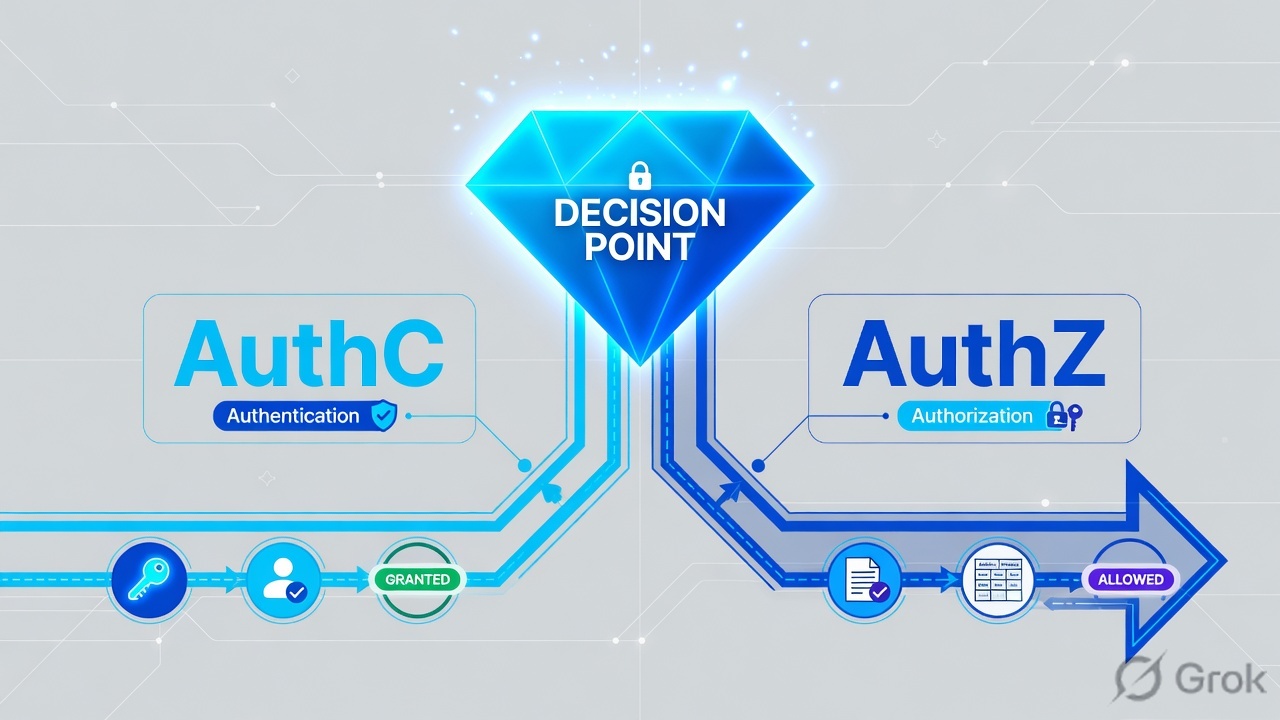
2. Mental model: AuthC names who, AuthZ is the session
Memorize the order before you open Policy Sets. Every ticket is “which station broke?” The last station that succeeded is what the NAD still holds.
Read left → right, then down. Station 4 is the point of the lesson: the session is not AuthC. It is the authorization result the NAD applied.
Hard words, once
| Word | Means | If you mix it up |
|---|---|---|
| NAD | Network Access Device — switch, WLC, or VPN concentrator that sends RADIUS. | You debug ISE while the shared secret or source IP is wrong. No Live Log. |
| Policy set | Container: allowed protocols + AuthC rules + exceptions + AuthZ rules. Path: Work Centers → Network Access → Policy Sets. | You edit Default while Wired-MAB-then-Dot1X is the set that hit. |
| AuthC / identity store | Where ISE looks up who: Internal Users, AD, LDAP, Internal Endpoints (MAB), or a sequence. | 22056. User exists in AD; policy pointed at Internal Users. |
| AuthZ / authorization profile | The RADIUS result: Access Type, VLAN, dACL, SGT, URL-Redirect, Airespace ACL. | 15039 — default DenyAccess, not a dead PSN. |
| Session | What the NAD holds after AuthZ — not the password check. | You close the ticket on Event 5200 while the dACL is still QUAR-LIMIT. |
| dACL | Downloadable ACL named on the authorization profile and pushed to the NAD. | You chase a VLAN when the profile only sent a dACL. |
| SGT | Security Group Tag (TrustSec). Live Logs column: Security Group. | You look only at VLAN and miss the tag the firewall is matching. |
| CoA | Change of Authorization (RFC 5176). ISE tells the NAD to reauthorize the same session. | You rebuild the policy set because the switch never applied CoA. |
3. Decision flow at the PSN
Cisco’s policy-set evaluation is hierarchical. First the set matches. Then allowed protocols. Then identity-store rules. Then local exceptions, then global exceptions, then authorization rules. If no set matches, the Default policy set runs. You cannot delete Default. Its default authorization rule denies access.
Diamond = decision. If there is no Live Log, stop guessing stores. The NAD never delivered a valid RADIUS request.
I open Live Logs first. I quote the reason code, the policy set, and the authorization profile. The session is that profile — dACL, VLAN, or SGT — not the password check.
4. How to choose the result (dACL / SGT / VLAN)
Do not start in Policy Sets until you know which flow the endpoint is supposed to use, and which result the NAD should hold. Wrong method + right password still fails. Right password + wrong profile is a failed session.
| If the endpoint is… | Use | Identity store (AuthC) | Session result (AuthZ) | Watch this trap |
|---|---|---|---|---|
| Managed laptop / user with a supplicant | 802.1X (PEAP-MSCHAPv2 or EAP-TLS) | AD or cert store / sequence | Employee VLAN + dACL, or SGT Employees | Machine identity host/PC.domain hitting a user-only store → 22056 |
| Printer, camera, badge reader, no supplicant | MAB | Internal Endpoints (MAC) | Profiled VLAN / printer dACL / SGT Printers | Laptop reuses the drop → leftover HP-Printer profile |
| Contractor / BYOD web login | CWA / Guest | Guest or sponsor portal | Redirect, then Guest after login | AuthZ never includes Cisco_WebAuth / URL-Redirect |
| Must prove disk encryption / AV | 802.1X + posture | Same as 802.1X | Unknown → redirect + limited dACL; Compliant → PermitAccess | Treating Unknown as AuthC fail |
| Unknown device, visibility only | MAB + profiler, No CoA if you only watch | Internal Endpoints | Limited or monitor | Global profiler CoA = No CoA overrides per-profile CoA |
Policy → Policy Elements → Results → Authorization → Authorization Profiles → EMP-ACCESS
Authorization Profile · EMP-ACCESS
Source: Cisco ISE Administrator Guide 3.3 — Segmentation, Authorization Profiles. Access Type, DACL Name, VLAN, and Security Group are the session. Identity Source is not on this page. Lab names only.
5. Do: Live Logs, AuthC, AuthZ proof
Primary sources for this block: Cisco ISE Administrator Guide 3.3 — Troubleshoot (Live Logs) and Segmentation (policy sets, authorization profiles). Confirm live UI labels on your release before you change production.
Side A — Live Logs first
If ISE has no Live Log, the PSN never accepted a valid request. Do not edit AuthZ until you have a row — or you have proved the NAD object is missing.
-
Open Live Logs on the primary PAN
Path:
Operations → RADIUS → Live Logs. Filter Identity or Endpoint ID. Click Details. Write down Event, Failure Reason, Authentication Policy, Authorization Policy, Authorization Profiles, Security Group, Posture Status, Session ID, Network Device. -
If the row is empty
Path:
Administration → Network Resources → Network Devices → Add. IP Address must be the RADIUS source the NAD actually uses. Shared Secret must match (lab only — never a production secret in chat). Device Profile decides which CoA method ISE will send. RADIUS host on the switch/WLC = PSN IP, not PAN. -
If Event is 5400
Stop at Failure Reason. 22056 → Side B (store). 15039 → Side C (profile / default deny). 22040 → password or shared secret. Do not restart Application Server for any of those.
Side B — AuthC (who)
-
Open the set that actually hit
Work Centers → Network Access → Policy Sets. Insert a set above Default. Condition it on Device Type, Location, or NAS-IP so wireless guest never hits wired 802.1X rules. -
Authentication policy
Dot1X rule → AD or All_User_ID_Stores. MAB rule → Internal Endpoints. Set If User not found deliberately: REJECT for 802.1X user rules; CONTINUE only when you truly want MAB fallback on the same set.
-
Prove 22056 is a store miss
Quote the store on the Details report. A contractor in AD who hits Internal Users is still 22056. A machine identity
host/…hitting a user-only sequence is still 22056. Restarting the PSN does not create the account.
Side C — AuthZ (the session)
-
Authorization policy order
Exceptions, then specific (Compliant_Devices_Access), then posture Unknown redirect, then profiled phones, then Default DenyAccess. Profiles live under
Policy → Policy Elements → Results → Authorization → Authorization Profiles. -
Name the result on the profile
Access Type = ACCESS_ACCEPT or ACCESS_REJECT. Then DACL Name, VLAN, Security Group, Web Redirection. That tuple is what the NAD should hold. Event 5200 with Authorization Profiles = DenyAccess is 15039 territory — AuthC passed, AuthZ rejected.
-
Posture pair (if you enforce)
Unknown / NonCompliant → URL-Redirect and a remediation dACL. Compliant → PermitAccess (or your employee profile). CoA is mandatory to move the session when posture status changes. Enable
aaa server radius dynamic-authoron Catalyst with the PSN as client. -
Prove the NAD applied it
Live Log Authorization Profiles / Security Group must match the switch or WLC session. If Live Logs show the new profile and the NAD still has the old VLAN or dACL, treat it as CoA ignored. Do not rebuild the set.
show logging application ise-psc.log tail
10:42:18 5400 Authentication failed
  User: finance.user  NAS: 10.10.1.2  Policy: Wired-MAB-then-Dot1X
  Failure: 22056  Subject not found in the applicable identity store(s)
What you say: “Live log 22056 — user not in the identity store used by that policy.” Next: check which ID store the policy set calls. Then prove process health so nobody restarts a healthy box:
show application status ise
ISE PROCESS NAME     STATE
Database             running
Application Server   running
M&T Session Database running
ISE Indexing Engine  running
Live Log: Event 5200, Failure Reason empty, Policy Set = the set you intended, Identity Store = AD (or the store you designed), Authorization Profiles = EMP-ACCESS (or PermitAccess), Security Group = the SGT you designed, Posture Status = Compliant or not required. NAD session shows the same VLAN / dACL / SGT.
6. Runtime path after go-live
A healthy user session is not “ISE is up.” It is this sequence, end to end. The NAD session at the end is the authorization result.
- Supplicant starts EAP (or MAB sends the MAC).
- NAD sends Access-Request to the PSN in its server group.
- PSN matches a policy set → allowed protocols → identity store → AuthZ (exceptions first).
- Access-Accept carries VLAN / dACL / SGT / redirect. Access-Reject is still an ISE decision — read 15039 before you blame the switch ACL.
- If posture is on: first Accept is often Unknown + URL-Redirect. The agent reports. ISE sends CoA. NAD reauthorizes. Second Live Log shows Compliant or NonCompliant and a new profile.
- Profiler may CoA later if the endpoint identity changes. ANC Quarantine is a human (or SOAR) action — treat it as change-control.
- pxGrid can publish the session to FMC / DNAC. pxGrid down looks like “ISE worked, the firewall never saw the SGT.”
PAN authors and replicates policy. PSN answers RADIUS. MnT stores Live Logs (view them on the primary PAN). pxGrid is the bus. The NAD points at PSN IPs.
Four tickets, four stations
22056, contractor not in the store. Event 5400. “ISE is up. The store that policy called does not contain this user.” Open the AuthC rule. Do not restart the PSN.
15039, default deny. AuthC often passed. Authorization Profiles is DenyAccess. “Rejected per authorization profile — fix the hit rule, not the password.”
5200 + printer SGT. Password works. Endpoint Profile = HP-Printer, static=no. Authorization followed the printer rule. Quote the profile. Do not reset AD.
5200 + old VLAN. Live Logs show the new profile. Switch session is stale. ISE sent CoA; the NAD ignored it. Quote aaa server radius dynamic-author. Do not rebuild the set.
7. Traps + proof checklist
| Failure | Looks like | Station | Do this |
|---|---|---|---|
| 22056 | “RADIUS failed” | AuthC / store | Quote the store on the hit policy. Fix sequence or identity. Do not restart ISE. |
| 15039 | “RADIUS failed” | AuthZ | Hit rule is often Default DenyAccess. Fix conditions, not the password. |
| 5200 + wrong dACL/SGT | Auth success, no apps | AuthZ result / profiler | Quote Authorization Profiles and Security Group. Re-profile or change the rule. |
| Posture NonCompliant | Auth success, remediation page | Posture after Accept | Restricted dACL until the check is green and CoA fires. |
| No Live Log | Port hanging | NAD | Device object, source IP, shared secret, PSN as radius host. |
| CoA ignored | ISE new, NAD old | NAD CoA | dynamic-author + NAD profile. Do not rebuild AuthZ. |
| ANC Quarantine | Good creds, still dead | Change-control | Name the owner. Do not reset the password. |
| FMC has no user / SGT | “ISE worked” | pxGrid | Publish path, not a new policy set. |
- Live Log row exists for this MAC / user / NAS IP on the primary PAN.
- Reason code quoted — or Event 5200 with empty Failure Reason.
- Policy set name is the set you designed, not an accidental Default hit.
- Identity store matches the method (AD vs Internal Endpoints).
- Authorization Profiles + VLAN / dACL / SGT match intent — that tuple is the session.
- NAD session shows the same result. If not, CoA is the next sentence.
- If posture is in scope: status Compliant, or Unknown/NonCompliant explained.
- Never paste real usernames and MACs together into a public chat. Dummy lab data only.
Knowledge check
Six judgment items. Mapped to Live Logs, AuthC vs AuthZ, and the session-as-result rule. Check answers, then Reset to retry.
Sources
- Cisco ISE Administrator Guide 3.3 — Troubleshoot (RADIUS Live Logs fields; primary PAN)
- Cisco ISE Administrator Guide 3.3 — Segmentation (Policy Sets, AuthC, AuthZ, Authorization Profiles, dACL, SGT)
- Cisco ISE Administrator Guide 3.3 — Secure Access (Network Devices, Shared Secret)
- Cisco ISE Administrator Guide 3.3 — Compliance (Posture)
- Cisco ISE Syslogs — message list (22056 and related codes)
- Configure External RADIUS Servers on ISE — 15039 vs external reject
- How To Troubleshoot ISE Failed Authentications (Live Logs, 22056, 15039)
- Tips for New ISE administrators — Live Logs status
Related: Blog 2 · Evidence desk · Cisco ISE interview hub · Dummy lab