TTechclick All blogs
F5 BIG-IP · LTM / GTM / ASM · Interview Prep
L1 → L2 → L3 ENGINEER

F5 BIG-IP Interview Questions & Answers

71 real F5 BIG-IP interview questions — answered in plain language a student can understand, yet precise enough to say in the room. Covers LTM objects, load balancing, persistence, SNAT, SSL profiles, iRules, health monitors, GTM/DNS, HA and the production troubleshooting scenarios that separate L1 from L3 — updated for 2026 (BIG-IP Next, SSL Orchestrator, Advanced WAF, APM, F5 Distributed Cloud).

👤 TechClick · 📅 Jun 1, 2026 · ⏱ 24 min read · 🏷 F5 · BIG-IP / ADC

71 questions · 15 foundational (L1) · 33 working-knowledge (L2) · 23 design & scenario (L3)

⚡ Quick Answer

71+ real F5 BIG-IP interview questions with detailed, student-friendly answers — LTM Virtual Servers, pools, load balancing, persistence, SNAT, SSL offload/bridging, iRules, health monitors, GTM/DNS GSLB, HA and troubleshooting. Free for ADC & network-security job seekers.

💡Pro Tip

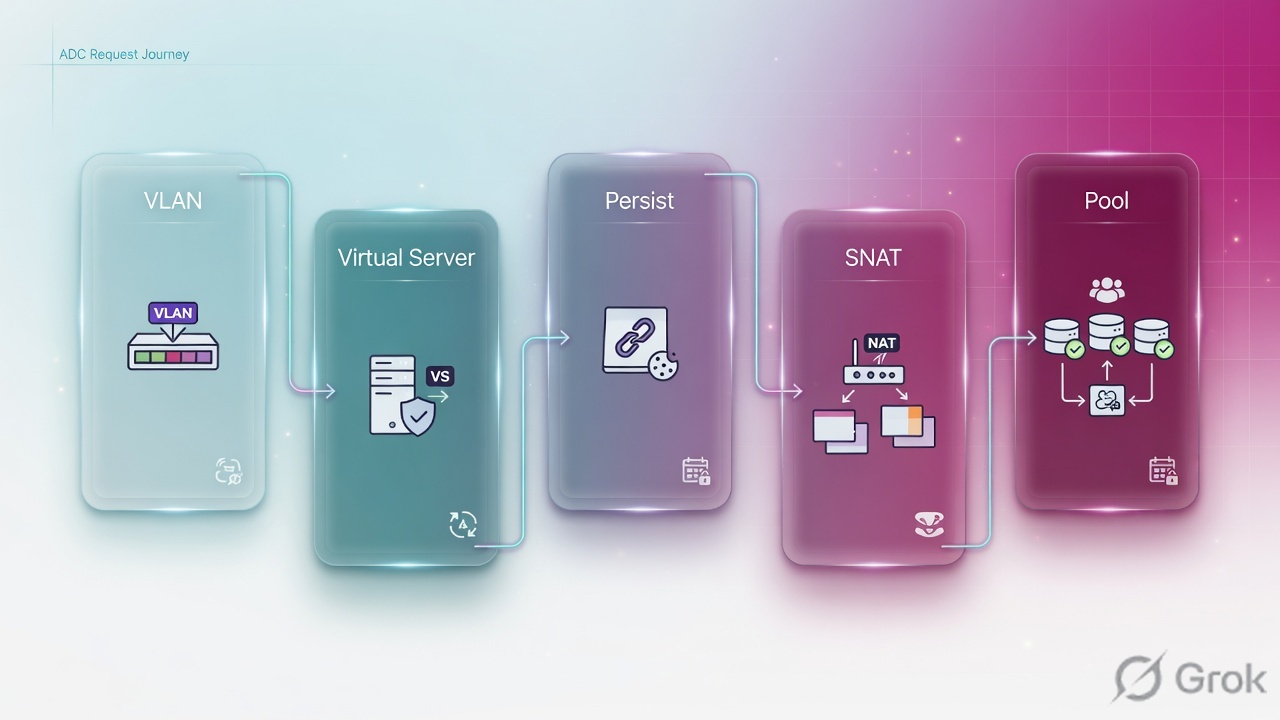
When asked “Walk me through what happens when a request hits a Virtual Server,” narrate the chain in order: VLAN → Virtual Server → iRule / LTM policy → persistence → load-balancing method → pool member (monitor-checked) → SNAT → server. Naming that path instantly marks you as someone who has actually touched a BIG-IP. Every answer below ends with a 👉 Interview tip.

Visual cheat-sheets — the whiteboard answers

Packet Path Through an LTM Virtual Server1Client packet hits VLAN/Self IPArrives on a VLAN bound to the BIG-IP; L2/L3 sanity checks2Matches Virtual Server (VIP:port)Destination IP+port maps to a virtual; profiles attach here3Profiles + iRule events fireTCP/HTTP/SSL profiles process; CLIENT_ACCEPTED / HTTP_REQUEST iRules run4Persistence lookupExisting session? Reuse same pool member (cookie/source-addr)5LB method picks pool memberIf no persistence: Round Robin / Least Conn / Ratio selects a node6Health monitor gates the memberOnly members marked UP by the monitor are eligible7SNAT rewrites source IPSNAT/Auto Map so the server replies return through BIG-IP8Server responds; LTM proxies backReverse path: server -> BIG-IP -> client (full proxy)
Walk this left-to-right to show you understand LTM's full proxy data plane, not just 'it balances traffic' — naming SNAT and the monitor signals real config experience.
SSL Offload vs SSL Full-Proxy (Bridging)SSL Offload (Termination)• TLS terminates ON the BIG-IP• Client SSL profile only• Traffic to pool is cleartext HTTP• Frees CPU on backend servers• iRules can inspect/modify payload• Backend network must be trustedSSL Full-Proxy / Re-encrypt (Bridging)• Two TLS sessions: client + server side• Client SSL + Server SSL profiles• Re-encrypts before reaching pool• Meets end-to-end encryption / PCI• Still allows L7 inspection on box• Higher CPU; needs server-side certs
Drawing two TLS sessions vs one signals you grasp why re-encryption exists — interviewers probe this to test whether you understand compliance and inspection trade-offs.
LTM Load-Balancing Methods: Static vs DynamicRound RobinStatic; rotates members evenly, ignores loadRatioStatic; weighted share by member capacityLeast ConnectionsDynamic; fewest active conns winsFastestDynamic; lowest app response time winsObservedDynamic; blends conns + ratio over timePredictiveDynamic; Observed + trend (improving load)Least SessionsDynamic; fewest persistence sessionsDynamic RatioUses SNMP/agent metrics (CPU/mem) live
Reciting which methods read live server feedback shows you can pick the right algorithm under load — say 'Least Connections for long-lived sessions, Round Robin for stateless' to sound senior.
Virtual Server Types in LTMStandardFull proxy; L7 profiles, iRules, SSL, persistencePerformance (Layer 4)Fast L4 path, FastL4 profile, minimal inspectionPerformance (HTTP)Optimized HTTP fast path, limited L7 featuresForwarding (IP)Routes packets, no load balancing/poolForwarding (L2)L2 forwarding across VLANs, transparentRejectDrops matching traffic (block/blackhole)StatelessUDP, no conn table; high-volume one-wayInternalTarget for in-TMM services (e.g. ICAP)
Knowing Standard vs Performance L4 vs Forwarding proves you can match VIP type to use case — interviewers ask this to see if you'd waste full-proxy overhead on simple L4 traffic.
LTM vs GTM/DNS (BIG-IP DNS)LTM (Local Traffic Manager)• Load balances within ONE datacenter• Distributes across pool MEMBERS• Full proxy at L4-L7• Health monitors check servers• Decision per TCP/HTTP connection• Object: Virtual Server -> PoolGTM / BIG-IP DNS (Global)• Balances ACROSS datacenters/sites• Resolves DNS to best VIP/site• Operates at the DNS layer• Probes via iQuery to LTM/listeners• Decision per DNS query (geo/latency)• Object: Wide IP -> Pool of VIPs
Separating 'which server' from 'which datacenter' is the classic F5 module question — answer it cleanly to show you understand local vs global server load balancing.

F5 & BIG-IP Fundamentals (9)

BIG-IP, TMOS, TMM, the module family and where LTM fits — the openers.

L11. What is F5 BIG-IP LTM, and what role does it play in application delivery?

F5 BIG-IP LTM (Local Traffic Manager) is F5's core load-balancing and application-delivery module. It sits in front of your application servers and distributes incoming client traffic across a pool of backend servers (called pool members), so no single server gets overloaded.

Think of it like a smart receptionist at a busy clinic: patients (requests) arrive, and the receptionist sends each one to whichever doctor is free and healthy, never to one who has gone home.

LTM provides availability (it health-checks servers and stops sending traffic to dead ones), scalability (add more servers behind one virtual server / VIP), SSL/TLS offload, persistence (sticky sessions), and traffic shaping via iRules.

Interview tip: Say LTM is a full-proxy Layer 4-7 load balancer, not just a simple round-robin distributor — that distinction impresses interviewers.

L12. What does it mean that BIG-IP is a 'full proxy'? Contrast it with a packet-by-packet (packet-based) load balancer and explain why F5 maintains separate client-side and server-side connections.

A full proxy terminates the client's TCP/TLS connection completely, then opens a separate, brand-new connection to the backend server. There are always two independent connections: client-side and server-side. BIG-IP understands and can fully inspect/modify both.

A packet-based load balancer just forwards individual packets, rewriting addresses on the fly — it never truly owns either conversation.

Analogy: a full proxy is a translator who listens to your whole sentence, then re-speaks it to the other party; a packet-based device is a relay passing notes through a slot.

Keeping them separate lets F5 use different TCP settings per side, do SSL offload, buffer slow clients without tying up servers, inspect/rewrite Layer 7 data, and shield servers. Interview tip: emphasize 'two TCP stacks, independently optimized' — that's the killer phrase.

L23. What is TMOS, and what is TMM (the Traffic Management Microkernel)? Explain how the data plane (TMM) relates to the Linux control/management plane and where modules like LTM, ASM, and APM actually run.

TMOS (Traffic Management Operating System) is the overall software platform that runs on BIG-IP. It is split into two planes.

  • Control/management plane: a host Linux OS that runs configuration, the GUI, tmsh, logging, SSH, and management daemons. It is not in the traffic path.
  • Data plane (TMM): the Traffic Management Microkernel — a high-performance, purpose-built process that actually handles every client packet, proxies connections, and runs the traffic modules at line rate.

Crucially, LTM, ASM, and APM all run inside TMM as add-on modules processing live traffic — not in Linux. Linux just configures and feeds them.

Analogy: Linux is the office manager filing paperwork; TMM is the worker on the factory line doing the real-time job.

Interview tip: Stress that data and control planes are separated so a management hiccup doesn't drop traffic.

L14. What does the LTM module specifically provide for an application in terms of availability and scalability?

LTM delivers two big wins for any application:

  • Availability (high uptime): LTM runs health monitors against each backend server. If a server fails its check, LTM stops sending it traffic and reroutes to healthy ones — users never notice. With persistence, existing user sessions stay on the right server.
  • Scalability (handle more load): Instead of one big server, you place several behind a single virtual server (VIP). LTM spreads traffic using algorithms like round robin, least connections, or ratio. Need more capacity? Just add another pool member — no client changes.

It also offloads SSL/TLS and compression from servers, freeing their CPU.

Analogy: LTM is a checkout-lane manager opening more tills as the queue grows and closing a till whose cashier goes on break.

Interview tip: Pair each word — availability = health monitors + failover; scalability = pools + load-balancing algorithms.

L35. What is MCPD, and how does configuration flow from tmsh/GUI down into TMM? What happens to the data plane if MCPD restarts?

MCPD (Master Control Program daemon) is the central configuration broker on BIG-IP. It owns the in-memory authoritative copy of the running configuration and is the single source of truth that all other components read from.

Config flow: when you change something in the GUI or tmsh, that change goes to MCPD. MCPD validates it, persists it (to bigip.conf on disk via the save), and then pushes the relevant config down to TMM and other daemons. TMM never reads config files directly — it gets everything through MCPD.

If MCPD restarts: this is service-affecting. TMM and other daemons depend on MCPD; historically a full MCPD restart forces TMM to restart too, which drops active connections / fails over an HA pair. Treat it like a control-plane outage and do it only in a maintenance window.

Currency note (2026): BIG-IP TMOS v21.0 (Nov 2025) re-engineered MCPD to be multi-threaded with faster restart and ~25% quicker config validation, improving control-plane resilience — but the principle that MCPD is the source of truth and a restart is service-affecting still holds.

Interview tip: Say MCPD = single source of truth; restarting it is service-affecting, so do it only in a maintenance window.

L36. Compare BIG-IP (TMOS) vs NGINX (Plus / App Protect) vs F5 Distributed Cloud (XC) for a given placement. When would you put each in front of an application?

All three are F5 products that solve traffic delivery, but at different layers:

  • BIG-IP (TMOS): the heavyweight appliance/VE for the data center / on-prem edge. Rich Layer 4-7 features, iRules, full Advanced WAF (ASM), APM access, network-level control. Use it when you own infrastructure and need deep, hardware-grade traffic control and many modules in one box.
  • NGINX (Plus + App Protect): lightweight, software-only reverse proxy ideal close to the app — inside Kubernetes, containers, microservices, or per-service. App Protect brings F5 WAF logic in a small footprint. Use for cloud-native, CI/CD, ingress.
  • F5 Distributed Cloud (XC): a SaaS, global edge platform — multi-cloud load balancing, WAAP, bot/DDoS defense, delivered as a service. Use when apps span clouds/regions and you want F5 to run the edge.

Analogy: BIG-IP = on-site flagship store; NGINX = nimble kiosks near customers; XC = a global delivery network you rent.

Interview tip: Frame it as a placement question — DC edge vs app-adjacent vs global SaaS edge.

L37. What happened to BIG-IP Next, and what is F5's current strategic direction for classic TMOS (BIG-IP v21.0, late 2025)? Why does this pivot matter for upgrade planning?

BIG-IP Next was F5's next-generation, containerized rearchitecture intended to eventually replace classic TMOS, managed centrally by BIG-IP Next Central Manager. Adoption lagged and migration from feature-rich classic TMOS proved hard.

The current reality (2025-2026): F5 has discontinued standalone BIG-IP Next and refocused on modernizing classic BIG-IP TMOS. Per F5's strategic update (article K000152956), the final standalone BIG-IP Next release (20.3.0) reached End of Software Development on April 30, 2025, and the enhancements once planned for Next are being folded into TMOS instead — delivered in BIG-IP v21.0, which went GA on November 18, 2025 (multi-threaded MCPD, larger control-plane scale, faster upgrades, AI/security features).

Important exception: the discontinuation does not apply to the Kubernetes-native variants — BIG-IP Next for Kubernetes, Service Proxy for Kubernetes (SPK), and Cloud-Native Network Functions (CNFs) — which F5 continues to develop.

Why it matters for upgrades: there is no migration off TMOS to plan; instead you upgrade within the TMOS line toward 21.x, keeping your iRules/ASM/APM configs.

Interview tip: Saying 'BIG-IP Next was discontinued; F5 is modernizing classic TMOS, with v21.0 in late 2025, while keeping the Kubernetes variants' is current and impressive.

L28. What was the October 2025 F5 nation-state breach, and why should a BIG-IP engineer care? What did F5 and CISA advise?

In October 2025, F5 publicly disclosed that a nation-state threat actor (a China-nexus group, with malware dubbed BRICKSTORM) had maintained long-term access to parts of F5's internal environment and exfiltrated BIG-IP source code and information about undisclosed vulnerabilities. F5 learned of the intrusion in August 2025 and delayed disclosure at the U.S. DoJ's request.

Why an engineer should care: stolen source code plus knowledge of unpatched bugs raises the risk of fast exploit development against BIG-IP. The practical takeaways are operational hardening you should already be doing:

  • Never expose the management interface / TMUI to the internet — keep it on an isolated management network or behind VPN.
  • Lock down self IPs with Port Lockdown (Allow None / tight Allow Custom) on untrusted VLANs.
  • Patch promptly to the fixed versions F5 released alongside the disclosure.

The U.S. CISA issued Emergency Directive ED 26-01 requiring federal agencies to inventory F5 BIG-IP devices, remove public exposure of management interfaces, and apply F5's updates on a tight deadline.

Interview tip: The single best one-liner is 'management plane off the public internet, patch fast' — it shows you understand defensive posture, not just the headline.

L29. What is the F5 Automation Toolchain (AS3, Declarative Onboarding, Telemetry Streaming, FAST) and why are interviewers increasingly asking about it over GUI configuration?

The F5 Automation Toolchain is a set of REST-API extensions that let you configure BIG-IP declaratively (you describe the desired end-state in JSON; F5 makes it so), instead of clicking the GUI step by step.

  • DO (Declarative Onboarding): initial system/network setup — hostname, VLANs, licensing, HA.
  • AS3 (Application Services 3): declares application config — virtual servers, pools, monitors, iRules, WAF policies.
  • TS (Telemetry Streaming): pushes stats/logs to tools like Splunk, ELK, or Grafana.
  • FAST (F5 Application Services Templates): reusable templates that generate AS3 declarations for repeatable app deployments.

Analogy: GUI clicking is hand-cooking each meal; the toolchain is a tested recipe you run identically every time.

Interviewers love it because modern shops do Infrastructure-as-Code — version-controlled, repeatable, CI/CD-friendly, auditable, no human click-errors.

Interview tip: Say 'declarative, idempotent, GitOps-friendly' and mention pairing AS3 with Ansible/Terraform.

LTM Objects — Virtual Server, Pool, Node, Self IP, VLAN (9)

Virtual Server, Pool, Node, Pool Member, Self/Floating IP and VLANs — the building blocks every config uses.

L110. What is a Virtual Server, and what exactly is the VIP? What gets attached to a virtual server (profiles, iRules, default pool)?

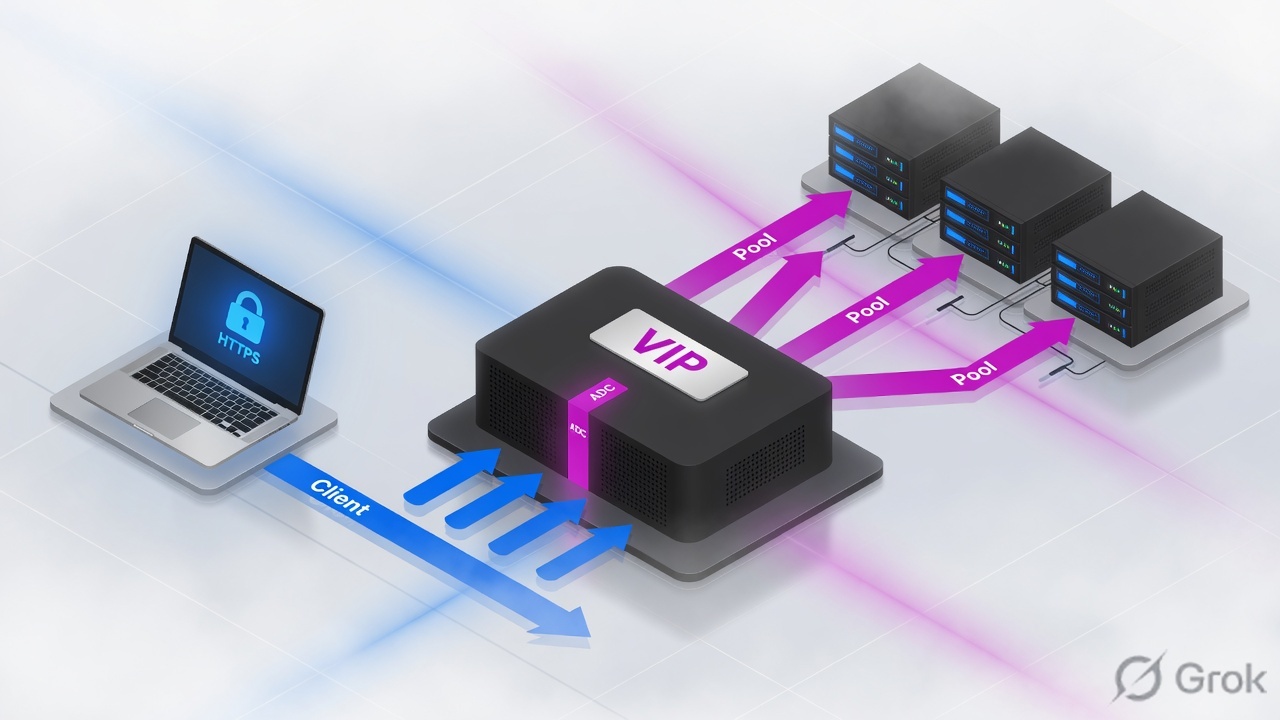
A Virtual Server is the listening object on the BIG-IP that accepts client traffic. It is defined by an IP address and port, e.g. 10.1.10.100:443. The VIP (Virtual IP) is simply the IP address part of that virtual server — the public-facing address clients connect to instead of hitting servers directly.

Think of the virtual server as a hotel front desk: clients always come to one address, and the desk forwards them to a free room (a backend server) behind the scenes.

To a virtual server you attach:

  • Profiles — how traffic is handled (tcp, http, clientssl/serverssl, persistence, compression).
  • A default pool — the group of backend servers it load-balances to.
  • iRules — optional Tcl logic for custom routing, header inserts, redirects.
  • Optional SNATs and policies.

Interview tip: Say clearly that the VIP is the IP, and the virtual server is IP+port+profiles+pool together.

L111. Explain the difference between a Node and a Pool Member. Can one node be multiple pool members, and how does monitoring differ between the node level and the member level?

A Node is just a backend server's IP address (e.g. 10.1.20.11) — no port. A Pool Member is that node's IP plus a specific service port (e.g. 10.1.20.11:443). The member is what actually receives load-balanced connections.

Yes — one node can be many pool members. A single server 10.1.20.11 can run web on :443 and an API on :8080, so it appears as two distinct members, possibly in two different pools.

Analogy: the node is the building; a pool member is one specific office (service) inside it.

Monitoring differs by scope:

  • Node monitor (e.g. icmp) checks if the whole server is reachable. If the node is down, every member on it is marked down.
  • Member monitor (e.g. http, https) checks one specific service/port. The web service can fail while ICMP still answers.

Interview tip: Node = IP only; Member = IP:port. Node monitor = reachability, member monitor = per-service health.

L212. Walk me through the bottom-up order of operations to build a working virtual server from scratch (nodes -> pool -> monitor -> virtual server + profiles).

You build BIG-IP objects bottom-up, because higher objects reference lower ones:

  1. Create the monitor (or use a built-in like http/https) that defines health-check logic — what request to send and what response proves the server is healthy.
  2. Create nodes — the backend server IPs (often auto-created when you add pool members).
  3. Create the pool — add members (IP:port), assign the monitor, and pick a load-balancing method like round-robin or least-connections-member.
  4. Create the virtual server — set the VIP and port (e.g. 10.1.10.100:443), attach profiles (tcp, http, clientssl), set the default pool, configure SNAT/auto-map if needed, and optionally bind iRules/policies.

Analogy: you build the foundation (monitors, nodes) before the front door (virtual server).

Interview tip: Stress that you cannot select a pool in the virtual server until the pool (and its members/monitor) already exist — that is why the order is bottom-up.

L213. Name and describe the common virtual server types (Standard, Forwarding-IP, Forwarding-L2, Performance L4/FastL4, Performance-HTTP, Stateless, Reject, Internal). When would you choose FastL4 over a Standard virtual server?

Common BIG-IP virtual server types:

  • Standard — full proxy; terminates the client connection and opens a separate server-side one. Needed for SSL offload, HTTP profiles, iRules on payload.
  • Forwarding (IP) — routes traffic to a destination without load balancing (BIG-IP acts like a router).
  • Forwarding (Layer 2) — forwards at L2 without changing addressing, for transparent/bridged insertion.
  • Performance (Layer 4) / FastL4 — uses the FastL4 profile; packet-by-packet acceleration, often hardware-offloaded.
  • Performance (HTTP) — optimized fast HTTP handling.
  • Stateless — forwards UDP without per-connection state tracking, for very high throughput.
  • Reject — actively rejects matching traffic.
  • Internal — used by features like content adaptation (ICAP) for internal service calls.

Choose FastL4 when you only need fast L4 load balancing or pass-through with no SSL/HTTP/iRule payload inspection — it gives lower latency and higher throughput than a full-proxy Standard VS.

Interview tip: Standard = full proxy / L7 features; FastL4 = speed when you don't need L7.

L114. What is a Self IP? Differentiate a static (non-floating, traffic-group-local-only) self IP from a floating self IP, and explain why servers use the floating self IP as their default gateway.

A Self IP is an IP address the BIG-IP itself owns on a VLAN — it lets the device participate in that subnet (routing, ARP, sending health monitors, terminating SNAT).

There are two kinds:

  • Static / non-floating self IP — unique to one specific device in an HA pair (traffic-group-local-only). Each BIG-IP has its own. It does not move during failover and is mainly used for device-level traffic like monitoring.
  • Floating self IP — a shared address tied to a traffic group that lives on whichever unit is Active. On failover it moves to the standby (which becomes active).

Servers use the floating self IP as their default gateway because it always points at the currently active BIG-IP. If a unit fails, the floating IP relocates to the new active device, so server return traffic keeps flowing with no gateway reconfiguration.

Analogy: the floating IP is a relay baton handed to whoever is actively running.

Interview tip: Non-floating = per-device, doesn't move; floating = shared, follows Active. Gateways always point to the floating IP.

L215. What is Port Lockdown on a self IP? Explain the Allow None / Allow Default / Allow All / Allow Custom options and why you would harden a self IP.

Port Lockdown is a per-self-IP firewall setting that controls which protocols/ports the BIG-IP will accept on the self IP itself (management of the device on that subnet) — it does not affect traffic to virtual servers.

Options:

  • Allow None — no connections to the self IP. Most locked-down; common on internet-facing self IPs.
  • Allow Default — permits only the protocols/ports BIG-IP needs to function, such as HA/config sync and routing protocol ports — a safe baseline.
  • Allow All — accepts any port/protocol on the self IP. Convenient but insecure; avoid on untrusted networks.
  • Allow Custom — you list exactly which ports/protocols are allowed (e.g. only the monitor or sync ports you need).

You harden a self IP because an exposed self IP that accepts everything is an attack surface — an attacker could probe management or routing services. On external VLANs you typically set Allow None or a tight Allow Custom.

Interview tip: Port Lockdown protects the device's own IP, not the VIPs. Internet-facing self IP -> Allow None. (Hardening the management plane is exactly the lesson reinforced by the 2025 F5 breach.)

L216. Explain tagged vs untagged interfaces (802.1Q). How does this map to a one-arm (trunk) vs two-arm (access) BIG-IP design, and in what order do you create VLANs vs self IPs?

With 802.1Q, an interface is either:

  • Untagged (access) — carries one VLAN; frames have no VLAN tag. The interface belongs to a single VLAN.
  • Tagged (trunk) — carries multiple VLANs over one physical link; each frame includes a VLAN ID so the switch/BIG-IP can separate them.

Mapping to BIG-IP design:

  • Two-arm (access) — separate physical interfaces, each untagged in one VLAN (e.g. one for external/client side, one for internal/server side). Clean physical separation.
  • One-arm (trunk) — a single link carries client and server VLANs as tagged VLANs (often over a LACP link aggregation). Saves ports; relies on SNAT/routing to steer return traffic.

Order of creation: VLANs first, then self IPs. A self IP must reference an existing VLAN, so you create the VLAN (assigning tagged/untagged interfaces) before assigning the self IP to it.

Interview tip: Untagged = one VLAN per port (two-arm); tagged = many VLANs per port (one-arm). Always VLAN before self IP.

L317. What are route domains and administrative partitions, and what problem does each solve (overlapping IP space vs multi-tenant config isolation)?

These are two different multi-tenancy features that are often confused.

  • Route Domains solve overlapping IP space. They create isolated L3 routing tables so the same IP (e.g. 10.1.1.10) can exist for two different tenants without conflict. Each domain has an ID, written with a percent sign — 10.1.1.10%2 means that IP in route domain 2. It's like having multiple separate routing universes inside one BIG-IP.
  • Administrative Partitions solve config isolation and role-based access. A partition is a container for objects (VIPs, pools, monitors) with its own permissions. Tenant-A admins manage only the Tenant-A partition and can't see or break Tenant-B's objects. /Common is the shared default partition.

Analogy: route domains keep tenants' addresses from colliding; partitions keep tenants' configurations and admins from colliding.

Interview tip: If the question is about duplicate/overlapping IPs -> route domains. If it's about who can manage what / object separation -> partitions.

L318. What are trunks/LACP and VLAN groups on BIG-IP, and when would you use a VLAN group (e.g. for transparent insertion / bridging two VLANs at L2)?

A Trunk bundles multiple physical interfaces into one logical link for more bandwidth and redundancy. LACP (Link Aggregation Control Protocol, 802.3ad) is the standard that negotiates and monitors that bundle with the switch, so if one member link fails traffic continues on the others.

A VLAN Group joins two VLANs and bridges traffic between them at Layer 2, so the BIG-IP behaves like a transparent bridge between them while still able to apply load-balancing/security to the flows.

You use a VLAN group for transparent insertion: you drop the BIG-IP inline between an existing router/switch and the servers without re-IPing the servers or changing the subnet. Both VLANs stay in the same IP subnet; the BIG-IP bridges them and can still inspect/steer traffic.

Analogy: a VLAN group is a smart patch cable between two segments that quietly inspects what passes through.

Interview tip: Trunk/LACP = aggregate links for bandwidth+HA; VLAN group = L2 bridge for transparent inline insertion with no IP changes.

Load Balancing, Persistence, SNAT & OneConnect (10)

How BIG-IP picks a server, keeps a user pinned, hides source IPs and reuses connections.

L119. Name the LTM load-balancing methods and classify them as static vs dynamic. What is the default method?

LTM load-balancing methods decide which pool member gets the next connection. They split into two families:

  • Static (ignore live server load, just follow a fixed rule): Round Robin and Ratio (member or node).
  • Dynamic (react to live server state): Least Connections (member/node), Fastest (lowest response time), Observed and Predictive (assign ratios from connection trends over time), and Dynamic Ratio (ratios from real-time SNMP/iControl metrics).

Think static = a fixed roster, dynamic = a coach watching who's tired. The default method is Round Robin (a static method), which cycles evenly through members.

Interview tip: Say "Round Robin is the default and is static; Least Connections is the most common dynamic choice."

L220. When would you choose Round Robin vs Least Connections vs Ratio vs Observed/Predictive? Give a real scenario for each.

Pick the method that matches your server reality:

  • Round Robin — identical servers, short uniform requests. Example: three equal web nodes serving static pages; even rotation is fine.
  • Least Connections — sessions vary in length. Example: an app where some users stay 2 seconds and others 20 minutes; route new traffic to whoever has the fewest active connections so nobody overloads.
  • Ratio — mixed hardware. Example: one 32-core server and one 8-core server; set ratio 4:1 so the big box takes four times the load.
  • Observed/Predictive — load is unpredictable and you want LTM to learn. Predictive even favors members whose performance is improving. Example: a backend recovering from a spike.

Interview tip: "Round Robin for equal servers, Least Connections for variable sessions, Ratio for unequal hardware."

L221. What is Priority Group Activation, and how would you use it with Slow Ramp to bring a recovered or newly-added server back into rotation gracefully?

Priority Group Activation lets you tier pool members by a priority number. LTM sends traffic only to the highest-priority group as long as it has at least the min active members you set; lower-priority members stay idle as warm standby. If the top group drops below that threshold, the next tier activates. It's an active/standby pattern inside one pool.

Slow Ramp solves a different problem: when a member is just added or comes back from a failed monitor, sending full traffic instantly can crush a cold cache or empty connection pool. Slow Ramp (e.g. 300 seconds) linearly increases the traffic it accepts over that window.

Used together: Priority Group decides who serves, Slow Ramp decides how fast a returning member ramps up. Like easing a car back onto the highway instead of flooring it.

Interview tip: "Slow Ramp prevents the thundering-herd hit on a freshly recovered member."

L322. Explain the 'Action On Service Down' pool setting (None / Reset / Reselect / Drop). What is the practical impact of each on existing client connections when a member fails?

Action On Service Down tells LTM what to do with connections already pinned to a pool member when that member's monitor marks it down. The four options:

  • None (default) — LTM does nothing to existing connections; they sit until they naturally time out. New connections won't pick the dead member. Least disruptive, but stuck clients hang.
  • Reset — LTM sends a TCP RST to the client, immediately tearing the connection so the client can quickly retry (often to a healthy member). Best for fast failover.
  • Reselect — LTM transparently moves the connection to another live member. Only safe for stateless/long-lived flows (e.g. some UDP or simple protocols); risky if the app expects session state.
  • Drop — LTM silently discards packets with no RST; the client waits and times out. Rarely ideal.

Interview tip: "Reset gives the cleanest, fastest client recovery; None is the safe default."

L123. What is session Persistence, and why is it needed? Describe the common methods (source-address affinity, cookie, SSL session ID, universal, destination-address, hash) and the role of a fallback persistence method.

Persistence (or "stickiness") forces all requests in one user session to keep hitting the same pool member. It's needed because many apps store session state (a shopping cart, a login) locally on one server, so bouncing the user to another member would lose it. Common methods:

  • Source-address affinity — sticky by client IP. Simple, but breaks behind a shared NAT/proxy.
  • Cookie — LTM uses an HTTP cookie to remember the member. Most reliable for web apps.
  • SSL session ID — sticky by TLS session ID when traffic isn't decrypted.
  • Universal — sticky on any value you extract via iRule (e.g. a header).
  • Destination-address — sticky by target IP, used for caching/firewall tiers.
  • Hash — like source affinity but hashed for scale.

A fallback persistence method kicks in when the primary can't apply (e.g. cookie missing) so the session still sticks, usually falling back to source-address.

Interview tip: "Cookie is preferred for web; source-address is the usual fallback."

L224. Compare the cookie persistence sub-modes (insert, rewrite, passive, hash). When can you NOT use cookie persistence, and what would you fall back to?

Cookie persistence has four sub-modes that differ in who creates the cookie:

  • Insert (most common) — LTM adds its own cookie (default BIGipServer<pool>) to the server's response. The backend needs no changes. The cookie encodes the member's IP/port.
  • Rewrite — the server sends a blank/placeholder cookie and LTM overwrites its value. Useful when the app must own the cookie name.
  • Passive — LTM only reads a cookie the server already sets; it never creates one. The app is responsible for the value.
  • Hash — LTM hashes an existing cookie's value to map to a member, hiding the raw server identity.

You cannot use cookie persistence when there is no HTTP layer to read — e.g. pure TCP/UDP traffic, or SSL that BIG-IP isn't decrypting (the cookie is inside the encrypted payload). Fall back to source-address affinity (or SSL session ID for TLS).

Interview tip: "Insert = LTM owns the cookie, Passive = app owns it; no HTTP profile means no cookie persistence."

L225. What is SNAT? Explain why it is needed for the symmetric/full-proxy return path, and contrast a single SNAT address vs a SNAT pool vs Automap. How does BIG-IP pick a self IP for Automap?

SNAT (Secure/Source Network Address Translation) replaces the client's source IP with a BIG-IP-owned address before traffic goes to the pool member. It's needed to guarantee a symmetric return path: the server must reply back through the BIG-IP so the full proxy can finish processing. If BIG-IP isn't the server's default gateway, SNAT forces the server to answer the BIG-IP instead of routing the reply directly to the client (which would break the connection). Three options:

  • Single SNAT address — every client maps to one IP. Simple, but the ~64K-ports-per-destination limit can exhaust under high load.
  • SNAT pool — a set of translation IPs; BIG-IP spreads connections across them, multiplying available source ports for scale.
  • Automap — BIG-IP auto-selects an existing self IP; no manual address needed.

For Automap, BIG-IP prefers the floating self IP on the egress VLAN facing the server (choosing floating over non-floating for HA).

Interview tip: "SNAT guarantees the reply comes back through BIG-IP; use a SNAT pool when one address runs out of source ports."

L226. The application team complains the back-end server logs show the BIG-IP self IP instead of the real client IP after you enabled SNAT. How do you preserve/expose the original client IP (e.g. X-Forwarded-For)?

This is expected: SNAT rewrites the source IP, so the server only sees BIG-IP's address. For HTTP/HTTPS, the clean fix is to enable the Insert X-Forwarded-For option in the HTTP profile. BIG-IP then adds an X-Forwarded-For: <real-client-IP> header to each request, and you configure the web server (Apache mod_remoteip, Nginx real_ip, IIS) to log/trust that header instead of the TCP source.

  • If BIG-IP is decrypting (SSL bridging/offload), it can insert XFF because it sees the HTTP layer.
  • For an existing XFF header from an upstream proxy, an iRule can append rather than overwrite.
  • For non-HTTP/TCP traffic where headers aren't possible, use the Proxy Protocol profile, or redesign so BIG-IP is the server's default gateway and skip SNAT entirely.

Think of XFF as a sticky note BIG-IP attaches saying "the real caller was X."

Interview tip: "Insert X-Forwarded-For in the HTTP profile, then make the web server trust it."

L327. What is the OneConnect profile and what problem does it solve? What does the source mask control, why does it require an HTTP profile, and when is OneConnect inappropriate?

OneConnect enables server-side connection pooling/reuse. Normally each client connection opens a fresh TCP connection to a pool member. OneConnect lets BIG-IP keep idle server-side connections open and reuse them for requests from different clients, drastically cutting the TCP setup/teardown load on backends and improving throughput. Like a taxi rank that keeps engines running instead of restarting per passenger.

The source mask controls which client connections are allowed to share a pooled server connection. A mask of 0.0.0.0 (most aggressive) lets any client reuse any connection; 255.255.255.255 restricts reuse to the same client IP, which is safer when source-IP context matters.

It requires an HTTP profile because OneConnect must detach and re-pool on HTTP request boundaries (Keep-Alive), and only the HTTP profile gives BIG-IP that request-level visibility.

It's inappropriate when the backend ties session state to a TCP connection (NTLM auth, some stateful/non-idempotent apps), where connection sharing can leak one user's context to another.

Interview tip: "OneConnect pools server-side TCP; the source mask decides who may share, and it can break NTLM."

L228. What is the Web Acceleration / reverse-proxy caching feature on BIG-IP (the Web Acceleration profile / RAM Cache)? How does it relate to BIG-IP being a reverse proxy, and when should you NOT cache?

Because BIG-IP is a full reverse proxy — clients connect to the VIP, not the servers — it can do more than just forward HTTP: it can cache responses on the way back. The Web Acceleration profile enables a built-in HTTP cache (historically called RAM Cache) that stores cacheable objects (images, CSS/JS, static pages) in BIG-IP memory.

How it helps: on a cache hit, BIG-IP serves the object directly from memory without touching a pool member. That cuts server load, reduces backend connections, and speeds up responses — a key part of F5's web-acceleration / application-acceleration story (alongside compression and TCP optimization).

  • It respects HTTP cache semantics (e.g. Cache-Control, Expires) and you can tune which URIs/content types are cacheable.
  • It pairs naturally with OneConnect and compression for end-to-end acceleration.

When NOT to cache: per-user dynamic or personalized content, authenticated/private responses, anything with sensitive data, or rapidly changing pages — caching those risks serving one user another user's content or stale data.

Analogy: a librarian who keeps the most-requested books on the front desk instead of walking to the stacks every time — but never lends out someone's private mail.

Interview tip: Frame it as 'BIG-IP is a reverse proxy, so it can cache static content in RAM to offload servers — but only cache truly shareable, non-personalized objects.'

SSL/TLS, Profiles & Certificates (8)

Offload, bridging, pass-through, profiles and certificates — how BIG-IP handles encryption.

L129. What is SSL offloading (termination), and what is the main benefit of doing TLS termination on the BIG-IP instead of the back-end servers?

SSL offloading (also called SSL/TLS termination) means the BIG-IP decrypts incoming HTTPS traffic itself, rather than passing encrypted bytes through to the servers. The client's TLS session ends (terminates) on the BIG-IP, and traffic to the pool members is sent in plain HTTP (or re-encrypted).

Think of it like a receptionist who opens all the sealed envelopes at the front desk so the staff inside only deal with plain letters.

Main benefits:

  • CPU savings — the costly TLS handshake and bulk encryption run on the BIG-IP's optimized hardware, freeing server CPU for the application.
  • Central certificate management — certs and keys live in one place, easy to renew.
  • Visibility — once decrypted, the BIG-IP can inspect HTTP for routing, persistence, WAF, and compression.

Interview tip: Stress that termination is what enables L7 features — you can't inspect what you can't decrypt.

L230. Compare SSL offload vs SSL pass-through vs SSL bridging (re-encryption). Which SSL profiles (Client SSL, Server SSL) are required for each mode, and where is each profile applied on the virtual server?

All three describe how TLS is handled across the BIG-IP's full-proxy.

  • SSL offload (termination): BIG-IP decrypts and sends plain HTTP to servers. Needs only a Client SSL profile (client-side leg). No Server SSL profile.
  • SSL pass-through: BIG-IP does not decrypt — encrypted traffic flows straight through (often a Performance/L4 or TCP VS with no SSL profile). No SSL profiles at all; you lose L7 visibility.
  • SSL bridging (re-encryption): BIG-IP decrypts (sees plaintext for inspection), then re-encrypts to the server. Needs both a Client SSL and a Server SSL profile.

The Client SSL profile always sits on the client-side leg (it holds the cert you present to browsers); the Server SSL profile sits on the server-side leg. Both attach to the virtual server's SSL Profile (Client) and (Server) fields.

Interview tip: Bridging = best of both — full inspection plus encryption to the back end; choose it for compliance/PCI traffic.

L131. What is the difference between a Client SSL profile and a Server SSL profile, and on which leg of the full-proxy connection does each one operate?

BIG-IP is a full proxy: it maintains two completely separate TCP/TLS connections — one with the client and one with the server. Each connection can have its own TLS settings.

  • Client SSL profile operates on the client-side leg (BIG-IP <-> browser). Here the BIG-IP acts as the server: it presents the website's certificate and private key, negotiates ciphers with the client, and decrypts the client's traffic.
  • Server SSL profile operates on the server-side leg (BIG-IP <-> pool member). Here the BIG-IP acts as the client: it initiates a fresh TLS handshake to the server, validates the server cert (optionally), and re-encrypts traffic.

Analogy: a translator on a phone call — one ear listens to the caller (client SSL), the other speaks to the callee (server SSL), independently.

Interview tip: Remember the role flip — Client SSL = BIG-IP is the server; Server SSL = BIG-IP is the client.

L232. Walk me through importing a certificate + key, building a certificate chain, and attaching it to a Client SSL profile. How do you handle the intermediate/chain certificate?

In the GUI go to System > Certificate Management > Traffic Certificate Management > SSL Certificate List:

  1. Import the key and cert. Click Import — bring in your private Key and the issued server Certificate (PEM). Give them a matching name.
  2. Import the intermediate(s). Import the CA's intermediate certificate(s) as a separate cert (often named like ...-chain or -bundle). You can combine multiple intermediates into one bundle file.
  3. Create the Client SSL profile under Local Traffic > Profiles > SSL > Client. In the Certificate Key Chain, add a row selecting your Certificate, its Key, and the Chain (the intermediate bundle).
  4. Attach the profile to the virtual server's SSL Profile (Client).

The chain field is what makes the BIG-IP send intermediates to clients so browsers can build a complete path to the trusted root — skipping it causes 'untrusted/incomplete chain' errors.

Interview tip: Never include the root in the chain — clients already trust it; only intermediates go in the bundle.

L233. What is SNI, and how do you host multiple HTTPS sites with different certificates on a single VIP/IP? How does the BIG-IP select the correct Client SSL profile?

SNI (Server Name Indication) is a TLS extension where the client sends the hostname it wants (e.g. shop.example.com) in the very first ClientHello — before the certificate is chosen. This lets one IP serve many HTTPS sites with different certs.

On BIG-IP you attach multiple Client SSL profiles to the same virtual server. In each profile you set Server Name (SNI) to that site's hostname and tick Default SSL Profile for SNI on exactly one (the fallback for clients that send no SNI).

When a handshake arrives, the BIG-IP reads the SNI value in the ClientHello and selects the matching Client SSL profile (and therefore the correct certificate). If no SNI is sent or none matches, it uses the profile marked as the SNI default.

Analogy: one front door (the VIP) with many name plates — the visitor states whose office they want, and the right key is used.

Interview tip: Mark only one profile as the SNI default, or the config will error.

L334. How would you configure mutual TLS / client certificate authentication on BIG-IP (require/request client cert, trusted CA bundle), and how can an iRule inspect the client certificate?

Mutual TLS (mTLS) makes the client also present a certificate, so both sides authenticate. Configure it on the Client SSL profile:

  • Set Client Certificate to request (ask but allow none) or require (reject if absent).
  • Set Trusted Certificate Authorities to a CA bundle you import — only client certs signed by those CAs are accepted.
  • Optionally set Advertised Certificate Authorities and a Certificate Revocation List (CRL) or OCSP for revocation checking.

In an iRule you inspect the cert in the CLIENTSSL_CLIENTCERT event using SSL::cert and the X509 commands, for example X509::subject [SSL::cert 0], X509::issuer, and SSL::verify_result to confirm the chain validated. You can then permit, drop, or route based on the subject/OU.

Analogy: a secure building where both the guard and the visitor must show ID.

Interview tip: Mention SSL::verify_result 0 means a clean validation — always check it before trusting the subject.

L335. What is SSL Orchestrator (SSLO) and the 'decrypt-once, inspect-many' model? Describe service chaining to inline L2/L3/HTTP/ICAP/TAP security devices (NGFW/IPS/DLP).

F5 SSL Orchestrator (SSLO) is a dedicated solution that decrypts TLS once and then steers the plaintext through a chain of security tools, instead of each tool doing its own expensive decryption.

This is the 'decrypt-once, inspect-many' model: SSLO terminates TLS a single time, hands the clear traffic to multiple inspection devices, then re-encrypts before sending it on. It eliminates duplicate decryption and the 'SSL blind spot' where tools can't see encrypted threats.

SSLO supports several service types in a service chain:

  • Inline L2 — transparent bump-in-the-wire (e.g. IPS).
  • Inline L3 / HTTP — routed devices like NGFW or web proxies.
  • ICAP — content adaptation for DLP/AV scanners.
  • TAP — passive copy to a monitoring/forensics tool.

You build security policies that classify traffic (by category, e.g. bypass banking) and send matching flows down the right chain.

Analogy: airport security where one bag is opened once and passed by several inspectors in sequence.

Interview tip: The killer selling point is removing redundant decryption and reducing latency/cost.

L336. Explain F5 SSL Forward Proxy. How does it differ from reverse-proxy SSL termination, and what certificate trust requirement does it place on the clients?

SSL Forward Proxy decrypts outbound traffic — your internal users going to external HTTPS sites — so the BIG-IP (or SSLO) can inspect it. Because the real destination's certificate is owned by the external site, the BIG-IP dynamically generates a certificate on the fly for each site, signed by an internal CA (signing certificate) you load.

This is the reverse of normal reverse-proxy termination:

  • Reverse proxy: protects your servers, clients are external, BIG-IP holds your site's real cert.
  • Forward proxy: protects/inspects your users' outbound traffic, server is external, BIG-IP forges a cert per visited site using its own CA.

Trust requirement: every client must trust the BIG-IP's internal signing CA (pushed via group policy / MDM). Without it, browsers throw certificate warnings on every site.

Analogy: a corporate mailroom that opens, scans, and reseals your outgoing mail with its own seal that staff are told to trust.

Interview tip: Mention SSLO uses forward proxy mode for outbound user inspection.

iRules, LTM Policies & Health Monitors (8)

Making per-request decisions and knowing a server is actually alive.

L137. What is an iRule, and what are its three core building blocks (events, operators, commands)? What language is it based on?

An iRule is a custom script you attach to a virtual server to inspect and act on live traffic in real time — redirect, route, rewrite, block, log, etc. It is based on TCL (Tool Command Language), extended with F5-specific commands.

Its three core building blocks:

  • Events: the trigger — when the rule runs, e.g. HTTP_REQUEST, CLIENT_ACCEPTED. BIG-IP fires these as a connection progresses.
  • Operators: the logic/comparison — equals, contains, starts_with, matches_regex — used to test conditions.
  • Commands: the action — what to do, e.g. HTTP::redirect, pool, HTTP::header, log.

Analogy: events = 'when the doorbell rings', operators = 'if the visitor is the postman', commands = 'then open the side gate'.

Interview tip: Just nail 'event-driven, TCL-based, event -> condition -> action' and you sound fluent.

L238. Name common iRule events in order of the connection flow (CLIENT_ACCEPTED, HTTP_REQUEST, LB_SELECTED, SERVER_CONNECTED, HTTP_RESPONSE). Write a simple iRule that redirects all HTTP traffic to HTTPS or routes a URI to a specific pool.

iRule events fire in connection order:

  1. CLIENT_ACCEPTED — client TCP connection established (client-side).
  2. HTTP_REQUEST — full HTTP request headers received.
  3. LB_SELECTED — load balancer has picked a pool member.
  4. SERVER_CONNECTED — server-side connection opened.
  5. HTTP_RESPONSE — server's response headers received.

Redirect HTTP to HTTPS:

when HTTP_REQUEST {
  HTTP::redirect "https://[HTTP::host][HTTP::uri]"
}

Route a URI to a specific pool:

when HTTP_REQUEST {
  if { [HTTP::uri] starts_with "/api" } {
    pool api_pool
  }
}

HTTP::redirect issues a 302 (temporary) redirect by default and rebuilds the same host+path on HTTPS.

Interview tip: Remember the order client -> request -> LB -> server -> response, and that HTTP events need an HTTP profile on the VIP.

L239. When should you use an LTM Policy (local traffic / centralized policy matching) instead of an iRule? What are the trade-offs (performance, maintainability, CMP-friendliness)?

An LTM Policy is a structured, rule-table way to do common Layer 7 traffic steering (match a host/URI/header -> forward to a pool, redirect, insert a header) using the GUI/config instead of writing TCL. An iRule is full scripting for anything complex or custom.

Use an LTM Policy when the logic is simple, declarative, and pattern-based — most 'route /api to pool X, redirect /old to /new' cases.

Use an iRule when you need real logic: variables, loops, data-group lookups, string manipulation, stateful decisions, or events iRules expose that policies don't.

Trade-offs:

  • Performance: LTM Policies are compiled/optimized and generally faster and lighter than equivalent iRules.
  • Maintainability: Policies are easier to read/audit and AS3/FAST-friendly; iRules are more powerful but easier to write badly.
  • CMP-friendliness: Policies stay CMP-friendly; some iRule constructs can demote the VIP off CMP.

Interview tip: Rule of thumb — 'Policy first, iRule only when you must script.'

L340. What does it mean for an iRule to be 'CMP compatible', and how can a poorly-written iRule (e.g. one that demotes a virtual server) hurt performance at scale?

CMP (Clustered Multiprocessing) lets BIG-IP spread a virtual server's traffic across all TMM instances / CPU cores in parallel. A CMP-compatible iRule is one that can run independently per-TMM without needing shared global state.

The problem comes when an iRule uses constructs that require global, cross-TMM state — for example a global table with shared scope, the session table in certain ways, or other commands needing serialization. BIG-IP then demotes the virtual server out of CMP, forcing all its traffic onto a single TMM/core.

At scale this hurts badly: instead of using, say, 16 cores, the VIP is bottlenecked on one. Throughput and connections-per-second collapse and that one core can saturate while others sit idle.

You can check with tmsh show ltm virtual (CMP state) and logs warning about demotion.

Interview tip: Say 'avoid global state in hot-path iRules; demotion pins a VIP to one core and kills horizontal CPU scaling.'

L341. Compare iRules vs LTM Policies vs iApps/iApp templates. When would you reach for each, and where does AS3/FAST fit in modern deployments?

These solve different problems:

  • iRules: per-request runtime scripting (TCL). Reach for them for custom, dynamic, stateful traffic logic that nothing else can do.
  • LTM Policies: declarative runtime matching for common L7 steering. Reach for them for simple match->action rules that would otherwise be a small iRule — faster and CMP-friendly.
  • iApps / iApp templates: older deployment/packaging tooling that builds a whole application's objects (VIP, pool, monitors, profiles) from a guided template, and keeps them as a managed app. F5 now considers iApps legacy.

Where AS3/FAST fit: they are the modern replacement for iApps for deployment. AS3 declares the whole app config in JSON (idempotent, API-driven); FAST provides reusable templates that generate AS3 — same 'template a whole app' idea as iApps but GitOps/CI-CD-native.

Mental model: iRules/Policies = how traffic behaves at runtime; iApps and AS3/FAST = how config gets deployed.

Interview tip: Say 'iApps are legacy; AS3+FAST is the modern declarative deployment path.'

L142. What is a health monitor, and what is the difference between a node monitor and a pool-member monitor? Name the common monitor types (ICMP, TCP, HTTP, HTTPS).

A health monitor is a periodic check BIG-IP sends to a backend to confirm it is alive and serving correctly. If the check fails, that target is marked down and removed from load balancing until it recovers — this is what gives LTM its high availability.

Node monitor vs pool-member monitor:

  • A node is just an IP address (a server). A node monitor checks the whole server, e.g. ICMP ping — 'is the machine up?'
  • A pool member is an IP plus a port (a specific service). A pool-member monitor checks that exact service, e.g. an HTTP check on port 80 — 'is the web app responding?'

Common monitor types: ICMP (ping reachability), TCP (port opens), HTTP (web response on cleartext), HTTPS (web response over TLS).

Analogy: node monitor = 'is the building's lights on?'; member monitor = 'is the specific shop on floor 3 open?'

Interview tip: node = IP/whole server, member = IP:port/specific service.

L243. How do you write an HTTP monitor send/receive string (e.g. GET a health URL and match an expected response)? What does the 'Receive Disable String' do?

An HTTP monitor has a Send String (the request BIG-IP makes) and a Receive String (text that must appear in the response for the member to be UP).

Send String example:

GET /health HTTP/1.1\r\nHost: app.local\r\nConnection: Close\r\n\r\n

Receive String example: 200 OK or a body keyword like HEALTHY. If that string is found, the member is marked UP; if not found (or no response within timeout), it is marked DOWN.

The Receive Disable String is a separate match that, when found, puts the member into disabled state — meaning it keeps existing/persistent connections but takes no new connections. This is perfect for graceful drain: your app returns a 'MAINTENANCE' token so the server bleeds off cleanly before patching.

Analogy: Receive String = 'is the shop open?'; Disable String = 'open only for existing customers, no new ones.'

Interview tip: Always send Connection: Close and remember Disable = drain, not down.

L244. Explain the monitor Interval and Timeout values and the '3x + 1' rule. What is an inband (passive) monitor and an EAV external monitor, and when would you use each?

Interval = how often BIG-IP sends the health check (e.g. every 5 seconds). Timeout = how long it waits before declaring the target DOWN.

The '3x + 1' rule sets Timeout = (3 x Interval) + 1. With a 5-second interval, Timeout = 16 seconds. This deliberately allows the monitor to miss up to three checks before failing the member, so a single dropped packet or brief blip doesn't cause a false outage — the +1 is a safety margin.

Monitor styles:

  • Inband (passive) monitor: no extra probe traffic — BIG-IP watches real client traffic and marks a member down if it sees failures (e.g. resets/no response). Use to catch problems active checks miss, often alongside an active monitor.
  • EAV external monitor: a custom external script (shell/Perl) BIG-IP runs for protocols/logic the built-in monitors can't handle (e.g. database login, multi-step app check).

Interview tip: Quote '3 x interval + 1' instantly and note EAV = custom script for non-standard checks.

GTM / DNS & Global Server Load Balancing (8)

BIG-IP DNS (GTM), wide IPs and load balancing across data centers.

L145. What is the difference between LTM and GTM (BIG-IP DNS)? At what layer does each operate, and how do they work together in a multi-data-center design?

LTM (Local Traffic Manager) load-balances connections inside one data center — it distributes traffic across servers in a pool. It operates as a full proxy at L4-L7.

GTM, now called BIG-IP DNS, load-balances at the DNS layer (global) across multiple data centers or sites. It answers DNS queries and decides which site's IP to hand back, based on health, geography, or performance.

How they work together in a multi-DC design: GTM resolves the hostname (e.g. www.example.com) and returns the IP of a virtual server living on an LTM in the best/closest healthy data center. The client then connects to that LTM, which load-balances locally to its server pool.

Analogy: GTM is the air-traffic controller deciding which airport you land at; LTM is ground control assigning you a gate at that airport.

Interview tip: GTM/BIG-IP DNS = global, DNS-level, between data centers; LTM = local, connection-level, within a data center. GTM picks the site, LTM picks the server.

L246. What is a Wide IP, and how do GTM pools and GTM pool members (which point to virtual servers) relate to it? What are server and data center objects in GTM?

A Wide IP is the FQDN that GTM/BIG-IP DNS load-balances, e.g. www.example.com. When a client queries that name, the Wide IP decides which answer (IP) to return.

The object hierarchy underneath:

  • A Wide IP contains one or more GTM pools and uses a load-balancing method to pick which pool answers.
  • A GTM pool contains GTM pool members, and each member points to a virtual server (a real VIP, typically on an LTM in some data center).
  • GTM uses load-balancing methods at both the pool level and the member level to choose the final VIP.

Supporting topology objects:

  • Server — represents a device hosting virtual servers (a BIG-IP LTM or a generic host) and lists the VIPs it offers.
  • Data Center — a logical location grouping servers; topology and health decisions are made per data center.

Analogy: Wide IP = the name on the directory board; pools/members = the actual rooms (VIPs) it can send you to.

Interview tip: Wide IP -> pools -> members -> virtual servers; servers live in data centers.

L247. What is iQuery and the big3d agent? What port does iQuery use (4353), and how does GTM learn the health and load of LTM virtual servers across sites?

iQuery is F5's proprietary, XML-based protocol that GTM/BIG-IP DNS uses to collect health, performance, and load data from other BIG-IP devices (LTMs) and probers. It runs over TCP port 4353 and is normally secured with SSL/certificates exchanged via bigip_add.

The big3d agent is the daemon that runs on each BIG-IP. It gathers local metrics — virtual server status/availability, connection counts, CPU/load, and path metrics like RTT and packet loss — and reports them back to GTM (via its gtmd process) over iQuery.

So GTM learns about remote LTM virtual servers like this:

  • GTM's gtmd establishes iQuery sessions (TCP 4353) to each big3d across the data centers.
  • big3d continuously sends VIP availability and load metrics.
  • GTM uses that live data to make Wide IP load-balancing decisions (e.g. skip an unhealthy or overloaded VIP).

Analogy: big3d agents are reporters in each city phoning live updates back to the GTM newsroom over iQuery.

Interview tip: iQuery = TCP 4353, big3d = the reporting agent. Make sure 4353 is open (and allowed in Port Lockdown) between GTM and LTM/probers.

L248. Compare GTM static load-balancing modes (round robin, ratio, global availability, topology, static persist, drop packet, fallback IP, return to DNS) vs dynamic modes (QoS, completion rate, RTT, hops, packet rate, VS capacity, least connections). Give a use case for Topology and for RTT.

GTM/BIG-IP DNS load-balancing methods split into two families:

Static modes use fixed, pre-defined rules — no live performance metrics:

  • Round Robin — rotates evenly through members.
  • Ratio — weights members by assigned capacity.
  • Global Availability — always prefers the first available member in order.
  • Topology — answers based on geographic/network location records.
  • Static Persist — same client/LDNS keeps getting the same answer.
  • Drop Packet, Fallback IP, Return to DNS — fallback behaviors when no member is usable.

Dynamic modes use live metrics from big3d: QoS (weighted formula), Completion Rate, RTT, Hops, Packet Rate, VS Capacity, Least Connections.

Topology use case: route European users to the EU data center and Indian users to the Mumbai DC for lower latency and data-residency.

RTT use case: send each client to whichever data center currently has the lowest measured round-trip time, adapting to live network conditions.

Interview tip: Static = fixed rules; dynamic = live metrics. Topology = where the user is; RTT = which site is fastest right now.

L349. How do GTM Topology records and topology regions enable geolocation-based steering? Walk through how a user in a specific region is directed to the nearest data center.

GTM's Topology load balancing steers users by location using topology records. Each record is essentially a rule: if the request source matches X, prefer destination Y, with this weight (score).

  • The source is usually the client's LDNS (local DNS resolver) IP, matched by country/continent/region/subnet via the built-in geolocation (IP) database.
  • The destination is a pool or data center.
  • Topology Regions are reusable named groups (e.g. "APAC" = several countries/subnets) so you write fewer, cleaner records.

Walk-through for a user in, say, India:

  1. Client's resolver queries the Wide IP www.example.com.
  2. GTM looks up the LDNS source IP in the geolocation DB -> identifies it as India/APAC.
  3. GTM scores each topology record; the rule matching APAC -> Mumbai DC pool wins the highest score.
  4. GTM verifies that pool/VIP is healthy via iQuery, then returns the Mumbai VIP.

Result: the user is sent to the nearest healthy data center, lowering latency.

Interview tip: Topology = source(LDNS geo) -> destination scoring; regions reduce record sprawl. Steering is based on the LDNS, not the actual client (EDNS Client Subnet can improve accuracy where supported).

L350. What are prober pools, and how does GTM probing/metrics collection work? What is a sync group, and how is config synchronized between GTM/DNS devices?

A Prober Pool is a defined set of BIG-IP devices assigned to perform the health probes against servers/virtual servers (especially non-F5 or remote devices). Instead of one GTM probing everything, you control which devices do the probing — useful for reachability, load distribution, and probing from the right network vantage point.

How probing/metrics collection works:

  • The big3d agent on the assigned prober sends health checks and path metrics (availability, RTT, hops, packet loss).
  • Results are reported to GTM over iQuery (TCP 4353) and feed both health status and dynamic load-balancing decisions.

A Sync Group is a set of GTM/BIG-IP DNS devices that share the same configuration and metrics. Members exchange config changes and collected data so every device can answer queries consistently.

  • Config sync is enabled per group (the gtm sync group); changes made on one member propagate to the others, and metrics are shared so any member has the full health picture.

Interview tip: Prober pool = who runs the health checks; sync group = devices sharing config + metrics so any GTM can answer authoritatively.

L351. What is DNS Express and how does it differ from a traditional zone transfer? Where does DNSSEC fit into a BIG-IP DNS deployment?

DNS Express is a BIG-IP DNS feature where the BIG-IP loads a zone into a high-speed in-memory database and answers queries for it authoritatively at very high speed, acting as a high-performance slave/secondary in front of a backend (hidden master) DNS server.

Difference from a traditional zone transfer:

  • In a classic setup, a secondary DNS server does a zone transfer (AXFR/IXFR) and then serves from a normal DNS daemon.
  • DNS Express also pulls the zone via transfer from the master, but then serves it from RAM at line rate, absorbing query floods and shielding the backend master from load and DoS. It's about answering speed and scale, not just replication.

DNSSEC fits as a signing/validation layer: BIG-IP DNS can perform real-time, on-the-fly DNSSEC signing of responses (including responses it generates from GSLB/Wide IP logic and DNS Express), managing keys (KSK/ZSK) so dynamic answers stay cryptographically signed and tamper-evident.

Interview tip: DNS Express = RAM-speed authoritative answers + DoS shield; DNSSEC on BIG-IP = real-time signing so even dynamically generated GSLB answers are validated.

L252. What is a last-resort pool in GTM, and how do persistence and manual resume behave during a Wide IP failover event?

A last-resort pool is a Wide IP setting that names a pool GTM falls back to only when all of the Wide IP's normal pools are down/unavailable. Instead of returning no answer (or an error), GTM hands back the last-resort pool's VIP — often a maintenance site or a backup DC — so users still get a response.

Analogy: it's the emergency backup generator that only kicks in when the mains supply fails.

During a Wide IP failover event:

  • Persistence: if persistence is enabled, GTM tries to keep sending the same LDNS/client to the same pool/answer it had before, so sessions stay sticky. But if that previously chosen resource goes down, persistence cannot override an unavailable target — GTM picks a new healthy answer (or the last-resort pool).
  • Manual Resume: if a pool or member is configured with manual resume, once it is marked down it will not automatically come back into rotation even after it passes monitors again — an admin must manually re-enable it. This prevents a flapping resource from auto-cycling traffic.

Interview tip: Last-resort pool = used only when everything else is down; persistence keeps clients sticky until the target fails; manual resume = admin must re-enable a recovered resource, no auto re-add.

HA, Device Trust, Traffic Groups & Deployment Modes (9)

Device trust, sync-failover, traffic groups, tagged/untagged and one-arm vs two-arm designs.

L253. What is a device group in BIG-IP HA, and what is the difference between a sync-failover and a sync-only device group?

A device group is a set of trusted BIG-IP devices that synchronize configuration with each other. There are two types:

  • Sync-Failover — devices share config and provide failover. They host traffic groups with floating IPs that move between members if one fails. This is the classic HA pair (active/standby) or active/active cluster. Up to 8 devices supported.
  • Sync-Only — devices share configuration only, with no failover and no traffic groups. It's used to push common objects (like iRules, profiles, or GTM/DNS config in some designs) across devices that aren't an HA pair.

Analogy: sync-failover is a buddy system where one teammate takes over if the other drops; sync-only is just sharing the same playbook with no one covering for anyone.

Interview tip: "Sync-failover = config sync + failover (traffic groups); sync-only = config sync, no failover."

L254. What is a traffic group, and how do floating vs non-floating self IPs relate to it? What moves between units during a failover?

A traffic group is a collection of active configuration objects (floating self IPs, virtual server addresses, SNAT addresses) that are owned by exactly one device at a time within a sync-failover group. It is the unit of failover: on failover, the whole traffic group migrates to another device.

  • Floating self IP — belongs to the traffic group, shared by the pair, and moves to whichever unit is active. Servers use it as their default gateway so the gateway never disappears.
  • Non-floating self IP — fixed to one specific device, used for that device's own management/health traffic; it does not move.

So during failover, the floating IPs, virtual addresses, and SNATs in the traffic group hop to the new active unit; non-floating self IPs stay put.

Analogy: the floating IP is a baton passed in a relay; the non-floating IP is each runner's own name tag.

Interview tip: "Floating IPs move with the traffic group on failover; non-floating self IPs are pinned per device."

L255. How is device trust established between HA peers, and what are the ConfigSync, Failover, and Mirroring IP addresses used for?

Device trust is established by exchanging and validating device certificates. You add a peer to the local trust domain (peer's management IP + admin credentials); the units swap X.509 certificates and form a trust relationship, which is the prerequisite for any device group. After trust, you create the device group and enable config sync.

The three HA addresses each carry a different traffic type:

  • ConfigSync IP — a non-floating self IP used to replicate configuration changes between devices when you sync.
  • Failover IP(s) — addresses over which devices exchange heartbeats/failover state. F5 recommends two failover paths (e.g. a network self IP plus the management address) so a single link loss doesn't trigger split-brain.
  • Mirroring IP — carries connection and persistence mirroring data so the standby can hold live session state.

Interview tip: "Trust = exchanged device certs; ConfigSync replicates config, Failover carries heartbeats, Mirroring carries live connection state."

L356. What is MAC masquerade, and what problem does it solve (ARP/gratuitous-ARP delays) on failover for a floating address?

MAC masquerade assigns a single virtual MAC address to a traffic group, shared by both HA units. Whichever device is active owns that virtual MAC alongside the floating IPs.

The problem it solves: normally a floating IP is tied to the active device's real NIC MAC. On failover, the new active unit has a different MAC, so it must send gratuitous ARP to tell every switch and client "this IP now lives at my MAC." Until those ARP caches update (and switch CAM tables relearn the port), traffic can be black-holed for several seconds.

With MAC masquerade, the floating IP keeps the same virtual MAC after failover. Clients' ARP caches are already correct; only the switch port for that MAC needs to relearn, which is near-instant. This cuts failover-induced outage from seconds to sub-second.

Analogy: instead of changing your phone number when you switch desks, you keep the same number and just move the handset.

Interview tip: "MAC masquerade keeps the floating IP's MAC constant across failover, eliminating gratuitous-ARP convergence delay."

L357. Explain connection mirroring and persistence mirroring. What happens to existing connections during a failover with and without mirroring enabled? What is the performance cost?

Connection mirroring replicates live connection state from the active unit to the standby in real time (over the Mirroring IP). Persistence mirroring replicates the persistence records (which client is stuck to which member).

  • Without mirroring: on failover, in-flight connections are lost. The standby has no record of them, so clients must reconnect/re-establish sessions. For short-lived web traffic this is often acceptable; for long-lived flows (FTP, VoIP, large downloads) it's disruptive.
  • With mirroring: the standby already holds the connection (and/or persistence) state, so existing connections survive the failover seamlessly, no reconnect needed.

The cost: mirroring adds significant overhead — every connection's state must be copied across the mirroring link, consuming CPU, memory, and bandwidth. It can sharply reduce maximum connections-per-second. So enable it selectively, typically only on virtual servers carrying critical long-lived sessions, not blanket across everything.

Interview tip: "Mirroring makes connections survive failover but is costly; turn it on only for stateful, long-lived, business-critical VIPs."

L358. Compare active-standby vs active-active deployments. How do traffic groups enable an active-active design, and what are the risks/capacity considerations?

Active-Standby: one unit handles all traffic; the peer sits idle, ready to take over. Simple and predictable, but half your hardware is unused.

Active-Active: both units process traffic simultaneously, improving utilization.

Traffic groups make active-active possible. You create two traffic groups, traffic-group-1 on Device A and traffic-group-2 on Device B. Each device is active for its own group's floating IPs/VIPs and standby for the other's. Both boxes work at once, yet each VIP still has a clear owner.

Risks / capacity considerations:

  • The 50% rule: each unit must be able to absorb both traffic groups if its peer fails. So you can't run either box above ~50% capacity, or failover overloads the survivor — the gain is utilization flexibility, not double capacity.
  • More complex troubleshooting and config; risk of asymmetric routing if not designed carefully.

Interview tip: "Active-active uses two traffic groups each owned by one device, but never load either beyond 50% or failover will crush the survivor."

L259. Compare one-arm vs two-arm (inline/routed) deployment modes. When is SNAT mandatory in a one-arm design, and why?

Two-arm (inline/routed): BIG-IP sits between the clients and servers on separate VLANs/interfaces — the client side and the server side. Servers typically use BIG-IP as their default gateway, so return traffic naturally flows back through it. No SNAT needed for the return path.

One-arm: BIG-IP connects to the network on a single VLAN/interface shared by clients and servers. It's simpler to insert into an existing network, but creates a return-path problem.

SNAT is mandatory in one-arm because the server sees the real client IP as the source and the client is reachable on the same subnet/segment as the server. The server would reply directly to the client, bypassing BIG-IP entirely. Since BIG-IP is a full proxy, missing the return half breaks the connection (asymmetric routing). SNAT rewrites the source to a BIG-IP self IP, forcing the server to reply to BIG-IP, which then relays to the client.

Analogy: in one-arm, SNAT puts BIG-IP's return address on the envelope so the reply comes back to it, not straight to the sender.

Interview tip: "One-arm always needs SNAT (or BIG-IP as gateway) to guarantee the symmetric return path."

L360. What is nPath routing / Direct Server Return (DSR)? How does the return path differ from a standard full-proxy/SNAT design, and what are its limitations (no L7, loopback config on servers)?

nPath routing / Direct Server Return (DSR) is an asymmetric design where inbound requests pass through BIG-IP to the server, but the server's response goes straight back to the client, bypassing BIG-IP entirely.

In a standard full-proxy/SNAT design, both directions flow through BIG-IP, which terminates connections and can inspect/modify traffic. In DSR, BIG-IP only forwards packets to the server without rewriting the destination IP (it rewrites only the destination MAC). The server replies directly using the original virtual server IP as its source. Because the server bypasses BIG-IP on the way out, throughput scales massively — ideal for high-bandwidth flows like video streaming.

Limitations:

  • No Layer 7 — BIG-IP never sees the response and doesn't terminate the connection, so no SSL offload, cookie persistence, HTTP rewriting, or content inspection.
  • Loopback config required — each server must have the virtual server IP bound on a loopback interface (with ARP suppressed) so it accepts packets addressed to the VIP and replies with that source IP.

Interview tip: "DSR = response bypasses BIG-IP for raw throughput, but you lose all L7 features and must configure the VIP as a non-ARPing loopback on each server."

L361. What are HA Group, VLAN failsafe, and gateway failsafe? How would you use a gateway-failsafe or HA-score-based trigger to force failover when an upstream gateway is lost?

These are three mechanisms that trigger failover based on health beyond the BIG-IP itself:

  • HA Group — assigns a numeric HA score to a device based on the health of selected objects (pools, trunks, pool-member counts). BIG-IP compares scores between peers and makes the higher-scoring device active. If a monitored pool degrades, that unit's score drops and traffic moves to the healthier peer.
  • VLAN failsafe — monitors a VLAN for received traffic; if the VLAN goes silent (link/L2 problem) within a timeout, it triggers failover.
  • Gateway failsafe — monitors the upstream default gateway/router. If the active unit can no longer reach its gateway pool, it concludes it's isolated upstream and fails over.

To force failover when the upstream gateway is lost, configure a gateway failsafe pool (the router as a monitored member) and attach it to the traffic group, or build an HA Group that scores that gateway pool. When the gateway monitor fails, the unit's HA score falls below the peer's and the traffic group migrates — even though the BIG-IP hardware is fine.

Interview tip: "Gateway failsafe / HA score let you fail over on upstream connectivity loss, not just on a dead BIG-IP."

Troubleshooting & Real Scenarios (10)

Real ‘the VIP is down’ scenarios where L2/L3 engineers are made or broken.

L262. A virtual server shows red, but the back-end pool members are all green and the application works when you hit servers directly. Walk me through how you diagnose why the VS is down/offline.

If pool members are green but the VS is red, the problem is on the listener/front side, not the servers. Work top-down:

  1. Check the VS status reason in Local Traffic > Virtual Servers (hover the status, or tmsh show ltm virtual <name>). It often says 'Offline' vs 'Unknown/Disabled'.
  2. Disabled? Someone may have administratively disabled it — re-enable.
  3. VLAN mismatch — confirm the VS is enabled on the correct VLAN and the destination IP/port match what clients hit.
  4. Address/port conflict — another VS or self-IP using the same IP:port.
  5. No default pool / wrong pool — a VS with no pool or a pool whose members aren't reachable on that route can show down.
  6. iRule errors — a broken iRule can take the VS out of service; check /var/log/ltm.

Since direct-to-server works, focus on listener config, VLAN, and the VS-to-pool binding.

Interview tip: Always read the status reason first — it usually names the cause.

L163. Explain the virtual server / pool member status colors (green, blue, yellow, red, black). What does each indicate and what is your first action for each?

BIG-IP uses colored status circles to summarize availability:

  • Green (available): object is up and monitors pass. No action needed.
  • Blue (unknown): no monitor is assigned, so BIG-IP can't tell health — it assumes available. First action: assign an appropriate health monitor.
  • Yellow (partially available): e.g. a pool where some members are down but the pool still has capacity, or connection-limit reached. First action: investigate which members/dependencies are failing.
  • Red (offline/down): the object failed its monitor or has no available members. First action: read the status reason and check the monitor/server.
  • Black (disabled / unknown-disabled): administratively disabled by an operator. First action: confirm it was intentional, then enable if needed.

Analogy: traffic lights plus a 'lights off' (blue = no sensor, black = switched off).

Interview tip: Blue is the classic 'forgot the monitor' clue — call it out.

L264. A health monitor is reported 'up' but no traffic reaches the pool member (or the member flaps up/down). How do you systematically isolate the cause (monitor string, SNAT, routing, server response, interval/timeout)?

Isolate methodically:

  1. Validate the monitor itself. A monitor can be 'up' yet wrong — e.g. an HTTP monitor with no receive string that passes on any TCP response, or one passing on a custom error page. Confirm the Send/Receive strings match a real healthy response.
  2. Flapping = interval/timeout. If timeout is too tight versus a slow server, members flap. Rule of thumb: timeout = (3 x interval) + 1.
  3. Check SNAT. If SNAT is off and the server's gateway isn't the BIG-IP, replies bypass it — the monitor (sourced from a self-IP) may still pass while real client traffic fails. Enable SNAT (Automap) or fix routing.
  4. Routing/VLAN. Verify the BIG-IP can reach the member's IP on the data path, not just the monitor path.
  5. Capture. tcpdump on the server-side leg to confirm whether SYNs leave and replies return.

Interview tip: A passing monitor proves monitor reachability, not data-plane success — the SNAT/gateway mismatch is the classic trap.

L265. Users report being randomly logged out or hitting different servers each request on a stateful app. How do you troubleshoot a persistence problem end-to-end (check persistence profile, OneConnect interaction, cookie stripping, SSL renegotiation)?

Random logouts on a stateful app usually mean persistence isn't holding users to one server. Trace it end-to-end:

  1. Is a persistence profile applied? Confirm the VS has one (e.g. cookie or source-address). Check live records with tmsh show ltm persistence persist-records.
  2. Cookie persistence specifics. If using cookie insert, verify the BIGipServer cookie is actually being set and returned — a proxy, app, or browser stripping cookies breaks it. Watch in a capture.
  3. OneConnect interaction. OneConnect reuses server-side connections; combined with source-address persistence it can send requests to different members. Cookie persistence is the safe pairing with OneConnect.
  4. SSL/renegotiation. If persistence keys on something reset by renegotiation, or the load-balancing changes per request, sessions scatter.
  5. Match scope. Ensure the persistence timeout is long enough for the session.

Analogy: a coat-check ticket — if the ticket (cookie) is lost or ignored, you get a random coat each time.

Interview tip: The classic gotcha is OneConnect + source-address persistence fighting each other; prefer cookie persistence.

L366. You suspect an SSL handshake failure between client and VIP (or between BIG-IP and server). What tools and steps do you use (tcpdump on TMM interface with :nnn, ssldump, /var/log/ltm, cipher/cert/chain checks) to root-cause it?

Approach it in layers:

  1. Logs first. Tail /var/log/ltm for handshake errors (e.g. 'no shared cipher', 'unknown CA', 'handshake failure'). These often name the cause directly.
  2. Capture with the :nnn flag. Use tcpdump -ni 0.0:nnn -s0 -w /var/tmp/ssl.pcap host <ip>. The :nnn (the 'p' modifier on the interface) tells TMM to attach flow/peer metadata so you can correlate the client-side and server-side legs of the same connection — vital on a full proxy.
  3. Decode the handshake. Run ssldump -Aed -nr /var/tmp/ssl.pcap to see ClientHello/ServerHello, offered vs selected ciphers, and where it aborts.
  4. Cipher/cert/chain checks. Compare the client's offered ciphers against the SSL profile's cipher string; verify the cert chain (intermediates present) and validity; for the server leg, confirm the Server SSL profile trusts the server cert.

Interview tip: 'no shared cipher' = cipher mismatch; 'unknown CA' = chain/trust problem — knowing which log line maps to which fix scores points.

L267. Traffic reaches the server but replies never come back (asymmetric routing) — the server is not using the BIG-IP as its gateway and SNAT is off. Explain the symptom and the two ways to fix it.

Symptom: The client connects, the BIG-IP forwards to the pool member (you see the request arrive), but the connection hangs/times out. The server receives the packet (whose source is the real client IP, since SNAT is off) and replies — but it sends the reply to its own default gateway (a router), not back through the BIG-IP. The client receives a reply from an unexpected path/IP and drops it. The flow is broken because the return path doesn't traverse the BIG-IP that holds the connection state. This is asymmetric routing.

Two fixes:

  • Enable SNAT (SNAT Automap or a SNAT pool) on the VS. Now the source IP the server sees is a BIG-IP self-IP, so the server naturally replies to the BIG-IP, which forwards back to the client. Easiest, no server change.
  • Make the BIG-IP the server's default gateway (point the server's route to a BIG-IP self-IP). Then replies flow back through the BIG-IP symmetrically.

Interview tip: SNAT is the usual real-world choice because it needs no change on the servers.

L368. How do you capture and analyze data-plane traffic on BIG-IP using tcpdump on TMM interfaces? Explain the ':nnn' interface syntax, capturing both client-side and server-side legs, and why a plain Linux tcpdump can be misleading.

On BIG-IP the data plane is handled by TMM (Traffic Management Microkernel), a separate process from the Linux host. You capture via tcpdump -ni <interface>, usually using 0.0 to mean 'all TMM interfaces'.

The :nnn syntax (the 'p' modifier, e.g. tcpdump -ni 0.0:nnn -s0 -w /var/tmp/cap.pcap) tells TMM to add noise/peer metadata to each packet — flow IDs, the TMM instance, and the peer flow. This is what lets you correlate the client-side leg and the server-side leg of the same proxied connection, which otherwise look like two unrelated conversations on a full proxy.

  • Capture both legs by filtering on the client IP and the server/SNAT IP, or just use 0.0:nnn to grab everything with correlation data.
  • Why plain Linux tcpdump misleads: if you capture on the host without going through TMM's view, you may miss TMM-internal forwarding, see pre/post-SNAT confusingly, or not see the matched peer flow at all.

Interview tip: Always add :nnn when you need to stitch the two proxy legs together.

L169. What is a qkview, and how does uploading it to iHealth help diagnose an issue? When would you escalate to F5 support with a qkview vs handling it yourself?

A qkview is a single diagnostic snapshot file the BIG-IP generates (via qkview on the CLI or System > Support in the GUI). It bundles the running configuration, logs, system stats, and version info into one archive — without exposing private keys.

iHealth is F5's free cloud portal where you upload that qkview. iHealth automatically parses it and runs it against F5's Heuristics database, flagging known bugs, security advisories, expiring certs, misconfigurations, and best-practice violations — giving you a prioritized report you'd otherwise hunt for manually.

Analogy: like emailing your car's full diagnostic dump to the manufacturer, which instantly tells you which recalls and known faults apply.

When to escalate: if iHealth flags a confirmed software defect/bug, a crash (TMM core), a hardware fault, or anything you can't resolve from the heuristics, open an F5 case and attach the qkview — support will ask for it anyway. Routine config fixes that iHealth clearly explains, you handle yourself.

Interview tip: Mention qkview never includes private SSL keys — a common safety question.

L270. How do you inspect the live connection table and persistence records (e.g. tmsh show sys connection, show ltm persistence persist-records) to prove whether traffic and persistence are behaving as expected?

Two live tables let you prove behavior in real time:

  • Connection table: tmsh show sys connection lists active flows. Filter to focus, e.g. tmsh show sys connection cs-client-addr <clientIP>. Each entry shows the client-side and server-side 4-tuples, so you can confirm which pool member a given client is actually hitting and whether SNAT is applied (server-side source = self-IP).
  • Persistence records: tmsh show ltm persistence persist-records shows the persistence key (e.g. source IP or cookie value) mapped to a specific node. If a user complains of bouncing servers, check whether a record exists and points consistently to one member.

How to use it to prove a theory: hit the VS from a test client, then look up that client's connection and persistence record. If the persistence record is missing or changes per request, you've confirmed a persistence problem; if it's stable but the connection still lands elsewhere, look at OneConnect or LB method.

Interview tip: Pair both commands — connection table shows where traffic went, persist-records shows why.

L371. Design scenario: a customer needs zero-downtime app delivery across two data centers, SSL inspection feeding an IPS, and bot/API protection. Architect a solution naming the F5 components you'd use (BIG-IP DNS GSLB, LTM, SSLO service chain, Advanced WAF/XC) and how they fit together.

I'd layer F5 components by function:

  1. BIG-IP DNS (GTM) for GSLB: handles global load balancing across the two data centers. Using health/topology-based DNS resolution and Wide IPs, it sends users to the healthy/closest site and fails over to the other DC automatically — delivering zero-downtime across sites.
  2. BIG-IP LTM in each DC: local load balancing across the app pool, persistence, monitors, and SSL termination/bridging — keeping each data center's app tier highly available.
  3. SSL Orchestrator (SSLO): decrypts once and steers plaintext through a service chain that includes the IPS (inline L2/L3), then re-encrypts — giving the IPS visibility without each tool decrypting separately.
  4. Advanced WAF (formerly ASM) and/or F5 Distributed Cloud (XC): for bot defense and API protection — signatures, behavioral bot detection, API schema enforcement, and L7 DDoS. XC adds cloud-delivered, multi-DC protection at the edge.

Flow: DNS (BIG-IP DNS) -> site -> LTM VS -> SSLO decrypt -> IPS chain -> Advanced WAF/XC -> app pool.

Interview tip: Call out that BIG-IP DNS gives cross-site resilience while LTM gives within-site resilience — interviewers love that distinction.

Quick Prep Drill

20-minute drill: Pick one question from each section, set a 90-second timer, and answer out loud. If you can land the one-line 👉 Interview tip for every section — and draw the Virtual-Server → pool → member path from memory — you’re interview-ready.