Host management answers “did this sensor check in?” Detection / Incident answers “what tactic/technique fired, at what severity, in what status?” Activity / process tree answers “what parent launched what child?” Real Time Response answers “what is on this live host right now?” Prevention policy assigned answers “was this host even allowed to block?” A green tray icon is not Last Seen. A Detect-only slider is not a miss. Falcon’s word is contain, not isolate.
1. Why “is Falcon working?” is five questions
Operators collapse five failures into one sentence. The sensor never checked in. The host is in Reduced Functionality Mode. The IOA fired Detect, not Prevent. The process tree shows a parent the ticket never named. RTR cannot start because the host is dark. Those are five first clicks.
This page is the night-shift desk for proof. The factory taught last-seen, prevent vs detect, IOA, contain, and duplicate AID. Here you learn the five console surfaces you actually open, in order, when someone asks you to prove Falcon is working — or to explain why it did not block.

If they say “prove Falcon is working,” do not say “I opened the console.” Say: “I prove the sensor with Host management Last Seen and RFM, the behaviour with Detection tactic / technique, the chain with the process tree, the live host with RTR, and the block decision with the assigned Prevention policy slider.”
2. Mental model — five proof tools
Memorise five named objects before you click. Each tool is allowed to prove one thing. Over-claiming a field is how you contain the wrong AID or disable Prevent for the tenant at 02:00.
1 · Host management
Host setup and management → Host management. Proves the sensor: Last Seen, Sensor version, Reduced Functionality Mode, containment status. Does not prove a tactic or a slider.
2 · Detection / Incident
Activity → Detections (some builds: Endpoint detections or Next-Gen SIEM alert). Proves one behaviour: tactic, technique, severity, status. Does not prove the host can block.
3 · Process tree
Detection details → Process Tree (table and activity views also exist). Proves parent → child → command line. A filename in Slack is not the tree.
4 · Real Time Response
Host page → Real Time Response. Proves live state: session up, then ps / ls / get. Sessions expire unless refreshed. A dark host queues; it does not collect.
5 · Prevention policy
Endpoint security → Configure → Prevention policies, or the policy name on the host card. Proves Detect vs Prevent for that host group. A Detect slider is configuration, not a miss.
Hard words, once
AID = agent ID (device_id). RFM = Reduced Functionality Mode. Contain = network containment (normal / containment_pending / contained). IOA = Indicator of Attack. RTR = Real Time Response.
Read left → right. Each box is allowed one claim. If you cannot name the field, you are not proving — you are guessing.
I prove the sensor, then the detection, then the process tree, then the live host, then the assigned policy. I do not contain, exclude, or move a Prevent slider until I can quote the field that made me do it.
3. Decision flow — ticket → first tool
Flowchart first. Do not open Prevention policies or start RTR until a diamond says so.
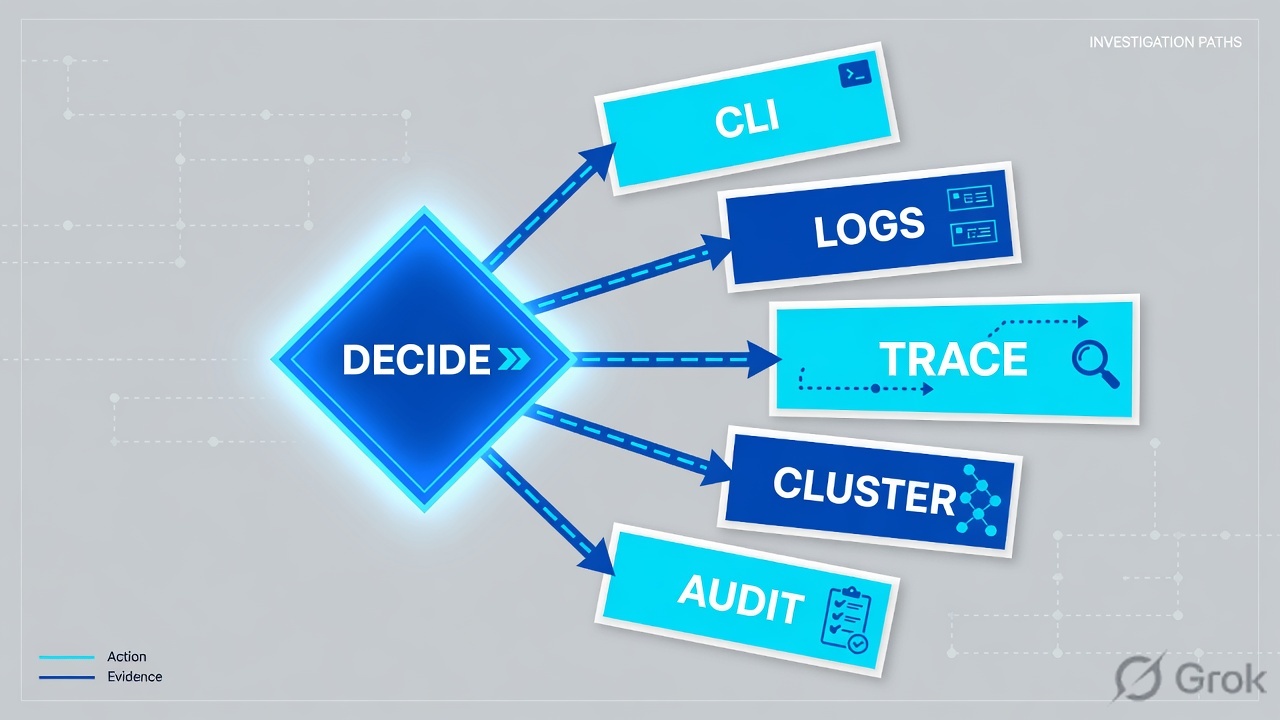
Read the diamond first. “Why didn’t it block?” never starts in RTR. A dark Last Seen never starts in Prevention policies. A blocked demo is often policy success.
4. How to choose — first tool + proof field
Print this next to the Falcon console. If you cannot recite the proof field, you are not ready to contain or change a slider.
| If the ticket says… | First tool (official path) | Proof field | Do not open first |
|---|---|---|---|
| Laptop / hotel / “is Falcon even working?” | Host setup and management → Host management | Last Seen (UTC) + Reduced Functionality Mode + Sensor version + containment status |
A new custom IOA, or RTR |
| “Why didn’t it block?” after an IOA / ML detection | Host card → assigned policy, or Endpoint security → Configure → Prevention policies | Policy name + the relevant slider set to Detect (not Prevent) | Tenant-wide prevent-off |
| Credential Access / LSASS / user still working | Activity → Detections, then Detection details → Process Tree | tactic + technique + severity + parent → child command line |
The filename argument in Slack |
| Need a running PID, file hash, or memory on a live host | Host page → Real Time Response (after Last Seen is seconds) | Session established + command output (ps, ls, get, filehash) |
RTR on a host Last Seen hours ago |
| Red team / VIP: “Falcon broke the demo” | Prevention policies assigned to that host group | Policy name + Prevent slider that matched + scoped host-group exception | Global ML / Prevent disable |
Falcon menu chrome moves by cloud and build. CrowdStrike documents Host setup and management, Host management, Activity / Detections, Process Tree, Real Time Response, and Prevention policies. Some tenants show the same detection object as an alert in Next-Gen SIEM. Confirm the click-path on falcon.crowdstrike.com/documentation for your CID. The proof fields — last_seen, reduced_functionality_mode, tactic, technique, severity, status, containment status — are the Hosts / Alerts / Detects API names.
5. Runbook Side A → B → C
Side A proves the sensor is on the wire. Side B proves what Falcon saw and whether policy was allowed to block. Side C proves live response. On a messy Sev-2, do them in this order until a field lights up.
Side A — Host management (sensor status)
-
Open Host management, not Detections
Path: Host setup and management → Host management. Search hostname. If two rows appear, you have two AIDs — sort by
Last Seenand work the live one. Source: CrowdStrike Hosts API (hostname,device_id,last_seen); console path documented under Host Setup and Management. -
Read the four sensor columns that close “is Falcon working?”
Last Seen— most recent connection to Falcon (UTC).Sensor version(agent_version).Reduced Functionality Mode—yes/no. Containmentstatus—normal,containment_pending,contained, orlift_containment_pending. Source: Hosts API filter fields. -
If Last Seen is hours, stop. This is a sensor ticket
Do not start RTR. Do not contain (you will sit on
containment_pending). Do not call it a miss. Check Inactive sensors, filters to the cloud, installation token, and whether a leftover AID is the row you opened. Then come back. -
If RFM = yes, the sensor is not fully functioning
RFM means the sensor has reduced capability. Empty or thin detections on that host are expected. Quote RFM. Fix the sensor condition documented for your OS / kernel — do not hunt a Prevention miss.
Host setup and management / Host management
Host management
| Hostname | AID (lab) | Last Seen | RFM | Status | Sensor version |
|---|---|---|---|---|---|
| FIN-LPTP-04 | a1b2c3d4e5f67890 | 22s ago | no | normal | 7.24.19106.0 |
| FIN-LPTP-04 | 09aa11bb22cc33dd | 12 days ago | no | normal | 7.18.17210.0 |
Source: CrowdStrike developer — Hosts API (last_seen, reduced_functionality_mode, status, agent_version, device_id); Host Setup and Management console path. Two AIDs, one hostname — work the 22s row. Lab identities only. Training mock · not live.
Side B — Detection, process tree, Prevention policy
-
Open the detection, not Slack’s filename
Path: Activity → Detections (or the alert object in Next-Gen SIEM). Filter hostname + the UTC window on the ticket. Official Alerts fields:
tactic,technique,tactic_id,technique_id,severity,status,assigned_to_name,created_timestamp. Source: CrowdStrike Alerts API. -
Read tactic / technique / severity / status
Those four close “what did Falcon think this was?” A Critical Credential Access / T1003 detection is not a hash debate. Assign it. Do not leave
status= new while you argue the filename. -
Open Process Tree before you type RTR
Detection details → Process Tree. Quote parent process, child, and command line. Official EDR visibility includes process executions and process-level network activity. The tree is historical telemetry. RTR is live. Do not skip the tree to go collect a file you already have in the graph.
-
If the ticket is “why didn’t it block?”, open the assigned Prevention policy
Path: host card → Prevention policy, or Endpoint security → Configure → Prevention policies. Read the slider that covers this IOA / malware / exploit class. Detect means the product did what that host group is configured to do. Promote to Prevent under change control — do not call it a miss and do not disable the tenant.
Activity / Detections / DET-1042
Detection details
| Role | Process | Command line (lab) | PID |
|---|---|---|---|
| Parent | WINWORD.EXE | winword.exe /n invoice.docx | 4412 |
| Child | powershell.exe | powershell.exe -enc JABzA… | 5088 |
| Child | rundll32.exe | rundll32.exe comsvcs.dll MiniDump | 6120 |
Source: CrowdStrike Alerts API (tactic, technique, severity, status); EDR process-execution visibility; Hosts contain action. Lab command lines only. Training mock · not live.
Path:            Activity → Detections  (or Next-Gen SIEM alert)
Quote:           tactic + technique + severity + status
Then:            Detection details → Process Tree  (parent → child → command line)
If “no block”:   Endpoint security → Configure → Prevention policies
Quote:           policy name + Detect vs Prevent slider for that IOA class
If empty queue:  Host management Last Seen / RFM first
Endpoint security / Configure / Prevention policies / Finance-Workstation-Detect
Prevention policy
Slider that covers this IOA: Detect — not Prevent
Product did what this host group is configured to do.
Promote slider under change control. Do not disable the CID.
Source: Falcon documentation portal — Prevention policies assigned through host groups; Detect vs Prevent is the block decision. Confirm slider labels on your build. Lab policy name only. Training mock · not live.
Side C — Real Time Response + contain
-
Contain a live Credential Access host before you collect souvenirs
Official EDR name is network containment. Hosts API action:
contain/lift_containment. Status becomescontainment_pendingthencontained. A contained host can still talk to the Falcon cloud; the state persists across reboot. Falcon’s word is contain, not isolate. Source: CrowdStrike EDR (network containment); Hosts PerformActionV2. -
Start RTR only after Last Seen is seconds
Host page → Real Time Response. Official: you must initialise a session before any command. Sessions expire after five minutes unless refreshed (
RTR_PulseSession/ batch refresh). A dark host can queue (persist_all) — that is not a collected file. -
Use the documented command that answers the ticket
Read-only / responder commands CrowdStrike documents include
ps,ls,cat,get,filehash,netstat,kill. Quote the command and the output. RTR is change control — you need the role and, in most shops, a change number beforekill/rm/runscript.
Host management / FIN-LPTP-04 / Real Time Response
Real Time Response
> ps
5088 powershell.exe parent=4412
6120 rundll32.exe parent=5088
> get C:\Users\priya\AppData\Local\Temp\inv.ps1
get: queued · sha256=lab-only
Source: CrowdStrike developer — Real Time Response (init session, refresh / 5-minute expiry, ps, get, filehash). Do this after Last Seen is live. Training mock · not live.
- Side A: Host management
Last Seenis seconds on the AID you named; RFM = no; you stated which AID if the hostname duplicated. - Side B: Detection quotes
tactic+technique+severity+status; process tree names parent → child; “no block” quotes the Detect slider on the assigned Prevention policy. - Side C: containment
status=containedand Last Seen still increments; RTR session output is pasted, or you documented why RTR was not started.
6. Five tickets as full stories
These five land every quarter. Memorise first tool + proof field. Times and identities below are lab-only.
| Ticket | Symptom | First tool | Proof field |
|---|---|---|---|
| CS-ED-01 | WFH laptop: “Falcon is down, icon looks installed” | Host management | Last Seen + RFM + Sensor version — or the 12-day leftover AID |
| CS-ED-02 | IOA fired; process still running; “why didn’t it block?” | Prevention policy assigned | Policy name + slider = Detect (not Prevent) |
| CS-ED-03 | Credential Access / T1003; user still on the laptop | Detections → Process Tree | tactic + technique + parent → child, then contain |
| CS-ED-04 | Need the script on disk / running PID | Real Time Response | Session established + ps / get output |
| CS-ED-05 | Red team: “Falcon broke the demo” | Prevention policy assigned | Prevent slider that matched + scoped host-group exception |
CS-ED-01 — Prove the sensor (Host management)
01:42 · P2. Priya on a hotel network. Phone photo of a Falcon tray icon. L1 already drafted “Falcon missed the malware.” Detections for her hostname are empty.
First tool: Host setup and management → Host management. Search FIN-LPTP-04.
If Last Seen is hours / RFM = yes: quote that pair. Empty Detections is expected. Next check is sensor — cloud connectivity, installation token, kernel / RFM condition, leftover AID — not a new custom IOA.
If Last Seen is seconds and RFM = no: the sensor is talking. Now you are allowed to open Detections for that AID and UTC window. A tray icon is not Last Seen.
Two rows, one hostname. The 12-day AID is leftover. Containing it does not touch the laptop on the desk. Sort Last Seen. Hide the stale AID after change control.
CS-ED-02 — Prove why it did not block (Prevention policy)
02:05 · P2. An IOA fired. The process is still running. Someone typed “Falcon failed” in the channel and wants Prevent off for Finance so they can work.
First tool: host card → assigned Prevention policy, or Endpoint security → Configure → Prevention policies. Confirm the host group that assigned it.
Proof field: policy name (lab: Finance-Workstation-Detect) and the IOA / malware slider set to Detect. That is the ticket. Falcon did what that group is configured to do. Contain if the tactic is real. Promote the slider under change control. Do not disable ML for the tenant.
I would not call this a miss. I would quote the Detect slider on the assigned policy, contain the live host if Credential Access is real, and open a change to move that one host group to Prevent.
CS-ED-03 — Prove the behaviour (Detection + process tree)
02:20 · P1. DET-1042. User still in Outlook. L1 wants to argue whether lsass.bin is the official name.
First tool: Activity → Detections → DET-1042. Then Detection details → Process Tree.
Proof field: tactic = Credential Access, technique = T1003, severity = Critical, status still new; tree shows WINWORD → powershell → rundll32 MiniDump. Last Seen 22s, containment normal. Contain first. Filename later. Reset credentials after the tree names the account.
Quote tactic + technique + the parent→child line. Network contain the live AID. Do not spend the bridge on the filename. Source: Alerts fields + EDR process visibility + Hosts contain.
CS-ED-04 — Prove the live host (RTR)
02:40 · P2. IR wants the script on disk. Someone already typed an RTR get against the 12-day AID.
First tool: Host management Last Seen on the AID you will session, then Host page → Real Time Response.
Proof field: session established + ps showing the PID + get / filehash of the path from the process tree. If Last Seen is hours, RTR will not collect — you may queue with persist, but that is not evidence in the ticket tonight.
RTR sessions expire after five minutes unless refreshed. kill / rm / runscript are Active Responder / Admin — change control, not a habit. Do not RTR a contained-pending dark host and claim you collected.
CS-ED-05 — Prove the block was policy (Prevention policy)
03:00 · P3. Red team says Falcon broke the demo. Prevention policy on that host group is Aggressive / Prevent. L1 wants ML off until Monday.
First tool: Endpoint security → Configure → Prevention policies for the demo host group.
Proof field: policy name + the Prevent slider that matched the demo tool. A blocked demo can be policy success. Scope a time-boxed host-group exception or IOA exclusion with an owner and an end time. Keep Prevent on for everyone else.
I would not disable Prevent for the tenant. I would paste the policy name, the slider, and the exception object + owner + expiry. Then re-read Detections on the demo host after the exception.
7. Traps + close-the-ticket proof
| You see | Weak close | Strong close |
|---|---|---|
| Empty Detections | “Falcon missed it” | Host management Last Seen + RFM first |
| Tray icon on a phone photo | “Falcon is working” | You only proved a bitmap. Quote Last Seen on that AID |
| IOA + process still running | “Falcon failed” | Assigned Prevention policy slider = Detect |
| Two AIDs, one hostname | Contain both / RTR the old one | Sort Last Seen; work the live AID |
| Last Seen 14 hours | Start RTR / contain | Sensor ticket. RTR will not collect. Status may stick containment_pending |
| RFM = yes | New custom IOA | Quote RFM; fix the sensor condition |
| Blocked demo, Prevent on | Disable ML for the tenant | Scoped host-group exception + owner + end time |
| Filename in Slack | Bridge starts on lsass.bin | Tactic + process tree, then contain |
- UTC window written next to the tool you opened.
- Sensor proved:
Last Seen+ RFM + Sensor version on the AID you named. - One behaviour quoted: Detection
tactic/technique/severity/status, or one process-tree parent→child, or one RTR command output, or one Prevention Detect/Prevent slider. - If contained:
status=containedand Last Seen still incrementing. - If exception: host group, owner, expiry. No tenant-wide prevent-off.
- RTR only with a live sensor and, for responder commands, a change number.
I name the question, then the first tool, then one official field. Host management proves the sensor. Detection proves the tactic. Process tree proves the chain. RTR proves the live host. Prevention policy proves whether Falcon was allowed to block. I contain a live host. I do not start with “Falcon missed it.” Factory model: last-seen is the first Falcon sentence.
Knowledge check
Six night-shift judgments. Each maps to a first tool or a proof field. Check answers, then Reset if you picked the wrong surface.
Sources
- CrowdStrike developer — Hosts API (
last_seen,reduced_functionality_mode,status= normal / containment_pending / contained / lift_containment_pending,agent_version,device_id; actionscontain,lift_containment,hide_host) - CrowdStrike developer — Alerts API (
tactic,technique,tactic_id,technique_id,severity,status,assigned_to_name,created_timestamp) - CrowdStrike developer — Detects API (detection state and assignee updates)
- CrowdStrike developer — Real Time Response (init session, refresh, 5-minute expiry,
ps,ls,get,filehash,kill) - CrowdStrike developer — Real Time Response Admin
- CrowdStrike developer — Automate response (RTR sessions, scripts, audit)
- CrowdStrike — What is EDR? (network containment; Real Time Response; process executions)
- CrowdStrike — How to network contain an infected system
- CrowdStrike — Indicators of Attack (IOA)
- CrowdStrike — IOA vs IOC
- CrowdStrike tech-hub — Installing Falcon Sensor for Linux (Host Setup and Management; Host management)
- Falcon documentation portal (confirm current console paths and Prevention policy assignment on your build)
- CrowdStrike support portal
Related: Blog 1 · Last-seen is the first Falcon sentence · CrowdStrike Falcon hub · Dummy lab