The ticket
Priya on 10.20.30.80 cannot open HR. The night engineer rebooted “the firewall.” SmartConsole still cannot connect. Policy last installed yesterday. The gateway is forwarding traffic from last night’s policy — it does not need SmartConsole to stay up.
If you treat Check Point like one box, you will reboot the wrong machine and miss SIC, FWM, or a dead management disk.
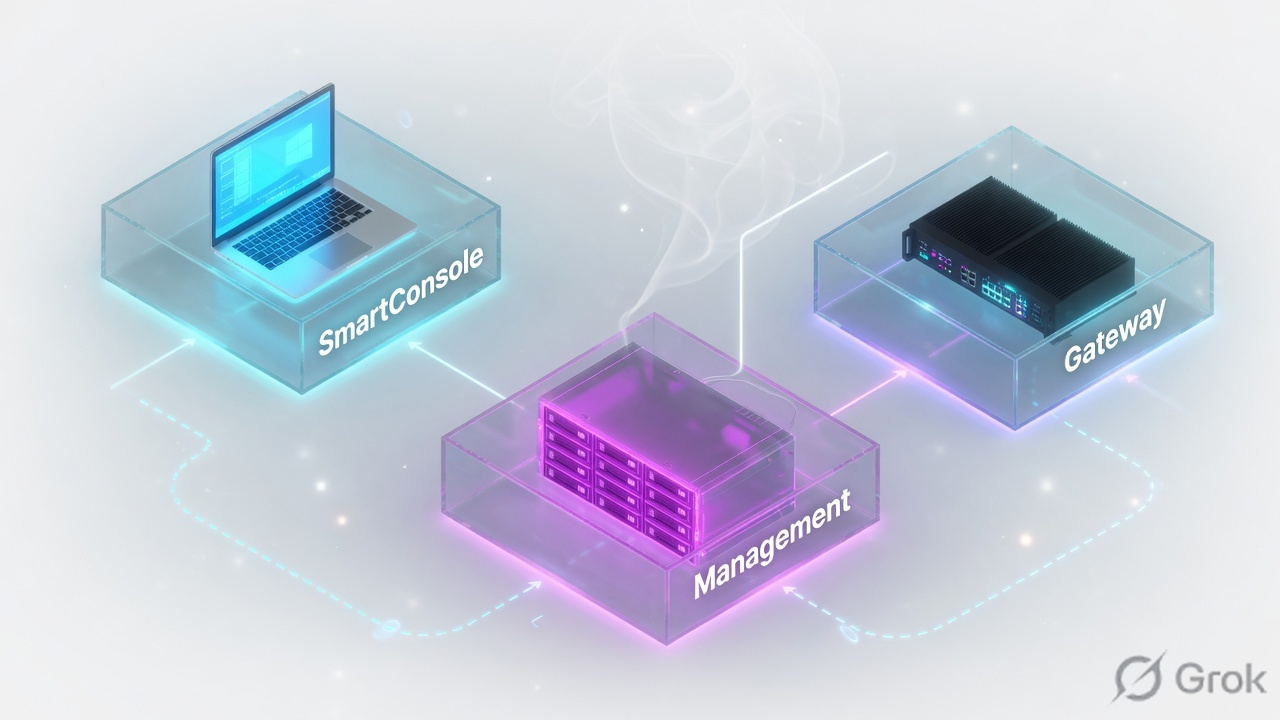
SmartConsole is the admin client. Security Management Server (SMS) stores objects, policies, logs, and SIC certificates. Security Gateway inspects packets and enforces the last successfully installed policy. Traffic does not flow through SmartConsole.
SMS sms-lab 10.10.10.5 · cluster VIP 10.10.10.1 (cp-gw-01 10.10.10.2 / cp-gw-02 10.10.10.3) · external 203.0.113.25 · internal LAN 10.20.30.0/24 · HR PC 10.20.30.80 TECHCLICK\priya.hr · HR app 10.20.30.41 hr.techclick-lab.in. Not a live customer.
Three boxes
SmartConsole is a Windows (or portable) GUI. It publishes your session to the SMS. It does not inspect packets. Close it and users still work.
Security Management Server is the brain: object database, Access Control / NAT / Threat Prevention / HTTPS Inspection policy, logs (when logs go to SMS), and the SIC Certificate Authority for your gateways.
Security Gateway (Quantum, Gaia OS) is the muscle: INSPECT, SecureXL, CoreXL, ClusterXL, VPN, NAT. After Install Policy succeeds, the gateway keeps that policy even if SMS is down.
SIC is the SMS–gateway arrow. Users never sit on that arrow.
SmartConsole edits. SMS stores and installs. Gateway enforces. Rebooting “the firewall” is not a diagnosis.
Standalone vs Distributed
| Design | What it is | Use when | Main risk |
|---|---|---|---|
| Standalone | SMS + Gateway on one Gaia box | Lab, tiny site, CCSA first install | Reboot for Gaia/SMS takes the data plane with it |
| Distributed | SMS on 10.10.10.5, cluster on 10.10.10.1 | Any production | SIC / routing between SMS and members |
| Multi-Domain (MDS) | Many domains on one manager | MSSP / large enterprise | Wrong domain, wrong policy package |
Check Point installation guides treat Standalone as one machine that is both management and gateway. Distributed is the default you will see at work.
Gateway object · General Properties
How you see it
Side A — admin PC
Launch SmartConsole → connect to
10.10.10.5asadmin. If this fails, the data plane can still be healthy.Side B — SMS
Expert:
cpwd_admin list. You wantFWM,CPD,FWDin stateE(executing).Side C — gateway
fw statshows the installed policy name and install time. That is what users feel — not your unpublished SmartConsole session.
# On sms-lab
cpwd_admin list | egrep 'FWM|CPD|FWD'
# APP        PID    STAT
# FWM        4122   E
# CPD        3901   E

# On cp-gw-01
fw stat
HOST     POLICY     DATE
localhost Standard  18Aug2026 09:12:04
Four architecture failures
1 · SmartConsole down, users fine
You cannot open SmartConsole. Priya still works. Do not reboot the cluster. Fix SMS process, license, or the admin PC route to 10.10.10.5.
2 · SMS down, old policy still live
Gateway keeps the last installed policy. New publishes cannot install. Users keep yesterday’s allow/deny. Prove with fw stat date.
3 · Rebooted the gateway because “management is slow”
FWM high CPU on SMS is not a ClusterXL problem. Rebooting members drops sessions for a GUI lag.
4 · Standalone lab thinking in production
On Standalone, cpstop stops inspection. On Distributed, cpstop on SMS does not. Know which box you typed on.
Do not cpstop; cpstart on both members because SmartConsole froze. Check SMS first.
How to prove it
1) You named which of the three boxes is sick. 2) fw stat on the VIP’s active member shows the expected policy. 3) SmartConsole reaches SMS or you have a documented SMS outage that does not require a gateway reboot. 4) One HR browse works.
Traps
| Symptom | Likely box | First proof | Dangerous wrong fix |
|---|---|---|---|
| Cannot open SmartConsole | SMS or admin PC | cpwd_admin list on 10.10.10.5 | Reboot cluster |
| Policy install failed, users ok | SIC / SMS lock | Lesson 3 and 15 | Factory reset Gaia |
| Users down, SmartConsole ok | Gateway / ClusterXL / policy | fw stat, cphaprob state | Reinstall SmartConsole |
| Logs empty | Log server / logging blade | Lesson 10 | Publish again blindly |
Knowledge check
Judgment items. One best answer. Reasons send you back to the matching section.
Check Point class series: Architecture · Gaia first day · SIC reset · Objects + first match · Policy layers · Hide vs Static NAT · Identity Awareness · HTTPS Inspection · Threat Prevention · Find the drop · fw monitor · SecureXL · ClusterXL · VPN Community · Policy install lock · vs PA vs Forti · CCSA / CCSE interview
Sources
- Check Point R81 Installation and Upgrade Guide — Standalone vs Distributed, gateway vs management roles. Installing a Standalone.
- R81 Quantum Security Gateway Administration Guide — SmartConsole as the GUI that manages policies; gateway enforces.
- R81 CLI Reference —
cpwd_admin list,fw stat.
Related: Check Point evidence desk · session factory · next lesson in the series above.