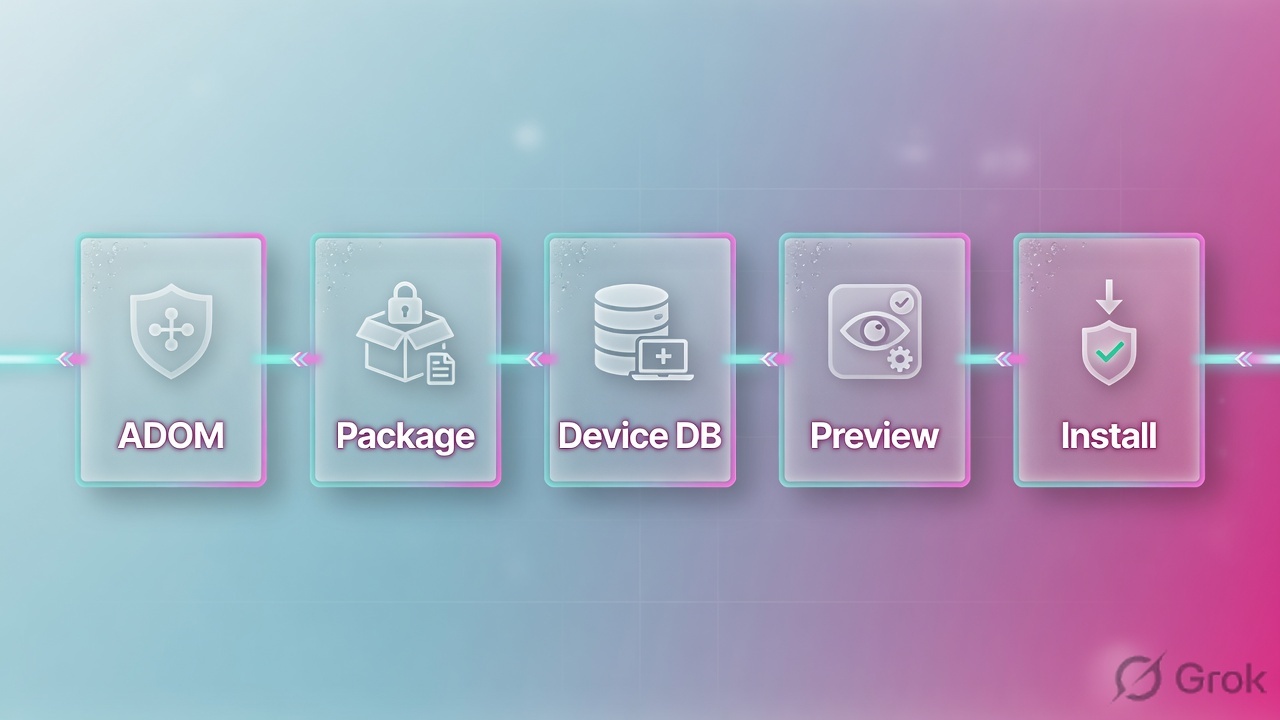
I am in ADOM PROD-IN on FortiManager 192.0.2.10. Policy lives in package pkg_prod_in. Device-specific config lives in the device database for FGT-IN-01. Install copies ADOM objects into that device DB, diffs the live FortiGate, and pushes the delta. I do not click Install until Install Preview and Policy Package Diff match the ticket, and I create an ADOM revision first. FortiManager does not forward the user’s packet.
1. Ticket hook — Install without preview
Night shift. Checkout VIP on FGT-IN-02 (192.0.2.22) is gone. Last Task Monitor row is Install Policy Package & Device Settings for pkg_prod_in, ADOM PROD-IN. A junior “only added one firewall policy” on FGT-IN-01. They skipped Install Preview. The package is assigned to both firewalls. A shared address addr_hq_web was edited in the ADOM object database. No ADOM revision was created.
That is the interview. FortiManager is the writer, not the forwarder. A package install is a fleet change. Preview is the evidence. Revision is the rollback. Editing a shared object without Where Used is how one site’s fix becomes two sites’ outage.
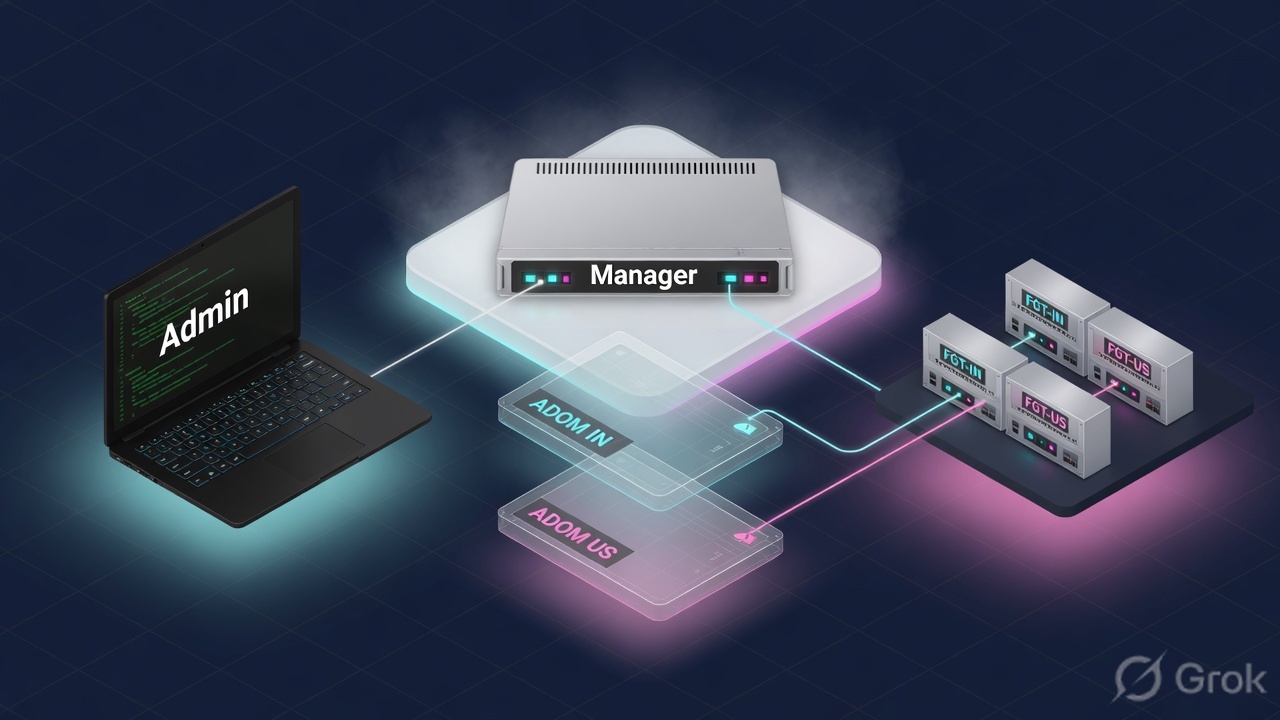
ADOM — administrative domain; devices, packages, and objects are scoped here. Lab: PROD-IN vs PROD-US. Policy package — firewall / NAT / security-profile policy set assigned to installation targets; lab pkg_prod_in. Device database — full per-FortiGate config on FortiManager (interfaces, routing, system). Install — copy ADOM objects into the device DB, diff the live FortiGate, push the delta. Install Preview — CLI-style diff you read before Install. Policy Package Diff — package vs what is on the device. ADOM revision — snapshot of packages, objects, VPN console in that ADOM. Retrieve — FortiGate config → device DB. Import — device-DB policies → ADOM package. Auto-Update — FortiGate sends a local change into the device DB (default on). Workspace / Workflow — lock (or approve) so two admins do not collide.
2. Mental model: two databases, one ADOM
Interviewers mix FortiManager with “the firewall.” A FortiGate permits or denies the session. FortiManager stores two different configs and only the FortiGate enforces after Install succeeds. Empty Task Monitor plus a drop is a FortiGate / FortiAnalyzer ticket, not an ADOM ticket.
What FortiManager owns
ADOM membership, policy packages, shared objects, provisioning templates, the device database copy, Install Wizard, ADOM revisions, workspace locks. Central policy is a draft until Install finishes.
What the engineer owns
Which ADOM they are in, which package is assigned to which device, whether Preview matched the ticket, whether a shared object is referenced elsewhere, and which revision they can restore — before anyone clicks Install.
Lab tree you should be able to draw cold:
- FortiManager
fmg-lab—192.0.2.10. - ADOM
PROD-IN— devicesFGT-IN-01(192.0.2.21) andFGT-IN-02(192.0.2.22). - Policy package
pkg_prod_in— installation targets: both FortiGates, VDOMroot. - Shared address
addr_hq_web— ADOM object, referenced by more than one policy in the package. - ADOM
PROD-US— different fence. Objects do not leak here unless they live in the Global Database.
3. Install order on FortiManager
Flowchart first. Recite this order; do not skip Preview.
ADOM first. Package is a draft in the ADOM database until Install copies it into the device DB and the live FortiGate accepts the delta. Preview is not optional.
Modified is your uncommitted work. Out of Sync is theirs. Auto-Update updates the device database and leaves the policy package behind until you Import or overwrite with Install.
4. How to choose status, operation, revision
Three tables. Interviewers mix them. Keep the arrows separate: FMG→FGT, FGT→device DB, device DB→package.
Policy package status vs config status
| Modified | Out of Sync | Synchronized / Imported | |
|---|---|---|---|
| Where the change happened | Policies or objects edited on FortiManager | Policies or objects edited on the managed FortiGate | Package and device agree (Imported = pulled in, not yet the same as installed forever) |
| Next move if FMG is SoT | Install Preview → Create ADOM Revision → Install | Preview, then Install to overwrite the local FortiGate change | Nothing to push. Prove with diagnose dvm device list |
| Next move if FGT change was intended | Do not Install yet — you will clobber your own ADOM edit | Retrieve (if needed) → Import Policy → then Install to clear flags | — |
| Interview trap | “Yellow means the FortiGate is down” | “Out of Sync means retrieve and we are done” — package can still be stale | “Green means the last ticket is in the running policy” — check revision + Task Monitor |
Retrieve vs Import vs Install vs Auto-Update
| Operation | Arrow | Choose when |
|---|---|---|
| Install / Re-install | ADOM objects → device DB → live FortiGate | FortiManager is source of truth. Always Preview first. |
| Retrieve | Live FortiGate → device database | You need the running config in Device Manager (interfaces, routing, local edits). |
| Import Policy | Device DB policies → ADOM policy package | You want those FortiGate policies as the package. After first import, keep editing in Policy & Objects. |
| Auto-Update | Unsolicited FortiGate → device DB (default enabled) | Local GUI change lands in device DB. It is not Import. Package status can still be Out of Sync / Unknown. |
ADOM revision vs device revision history
| ADOM revision | Device revision history | |
|---|---|---|
| Where | Policy & Objects → ADOM Revisions (also a checkbox on Install Wizard) | Device Manager → device database → configuration revision history |
| What it stores | Policy packages, objects, VPN console in that ADOM | That FortiGate’s device-database config file |
| Restore puts back | Packages / objects / VPN console — not interfaces, routes, HA | Device settings for that unit — not the ADOM object database |
| Interview trap | “Restore ADOM revision and the VIP interface comes back” | “Device revision rewinds every package in the ADOM” |
5. Do: preview, revision, then Install
Side A is scope. Side B is the Install Wizard. Side C is proof. One primary source per block.
-
Side A — lock the ADOM and the blast radius
Confirm the GUI ADOM is
PROD-IN, notrootand notPROD-US. List installation targets onpkg_prod_in. Run Where Used on any object you touched (addr_hq_web). If two admins might edit, lock the ADOM or the package (Workspace) or open a Workflow session. Source: FortiManager Admin Guide — ADOMs / Workspace. -
Side B — Install Wizard, Preview, revision, Install
Device Manager → Device & Groups → Install Wizard → Install Policy Package & Device Settings. Select
pkg_prod_in. Tick Create ADOM Revision and name it from the change ticket. Open Install Preview (download the text) and Policy Package Diff. If the diff shows a VIP/interface you did not ticket, stop. Then Install or Schedule Install. Source: Admin Guide — Installing policy packages and device settings. -
Side C — prove sync, then prove the packet
Task Monitor must finish without validation errors. Device Manager: Config Status Synchronized, Policy Package Status Synchronized. CLI:
diagnose dvm device list—conf: in sync,pkg:[installed]pkg_prod_in. Then the original business test on the FortiGate (policy hit / FortiAnalyzer), not a green FMG icon. Source: Admin Guide — Checking device configuration status; Viewing policy package status.
ADOM: PROD-IN · Device & Groups · Install Wizard
Install Policy Package & Device Settings
Field names from the 7.6/8.0 Install Wizard. Preview and Diff are optional in the GUI and mandatory in production. Create ADOM Revision is a checkbox on this same page — use it.
diagnose dvm device list
# expect FGT-IN-01 / ADOM PROD-IN
# STATUS: dev-db: not modified; conf: in sync; cond: OK; dm: installed; conn: up
# vdom: root  pkg:[installed]pkg_prod_in
6. Runtime path after go-live
After Install, the FortiGate is the data path. FortiManager watches sync flags. A local FortiGate GUI edit triggers Auto-Update into the device database by default — the policy package can still show Out of Sync until you Import or overwrite with Install. Workspace lock is how two L2s do not silently merge objects. Global Database header/footer packages are the only intended leak across ADOMs.
- New policy edit in Policy & Objects → package status Modified → Preview → revision → Install → Task Monitor OK →
pkg:[installed]. - Local FortiGate edit → Auto-Update refreshes device DB → decide SoT → Import (keep it) or Install (clobber it).
- Bad package → Policy & Objects → ADOM Revisions → Restore (packages/objects/VPN console) → Preview → Install. Interfaces still wrong? Device revision history, not ADOM restore.
- User drop after a green Install → FortiGate policy lookup / FortiAnalyzer. FortiManager did not drop the SYN.

7. Eight interview scenarios
Q1 · Architecture — name the objects in order
Whiteboard. “Walk FortiManager from an admin click to a FortiGate that actually has the new firewall policy.” A junior draws User → FortiManager → App. What do you draw instead, and where is the decision enforced?
PROD-IN. Package pkg_prod_in is ADOM-database policy. Install copies it into the device DB for FGT-IN-01, diffs the live box, pushes the delta. The FortiGate forwards or drops the user packet. FortiManager does not sit on the SYN.Strong framing (say this)
ADOM scopes it. Package holds the policy. Device DB holds the box. Preview proves the delta. The FortiGate enforces. I quote Task Monitor and diagnose dvm device list, not the chassis LED.
Evidence to name
GUI ADOM selector; Policy & Objects → Policy Packages; Device Manager device DB; Install Preview; Task Monitor; diagnose dvm device list pkg:[installed]pkg_prod_in.
Q2 · Compare — policy package vs device database
You add a static route on FGT-IN-01 in Device Manager. A colleague adds a firewall policy in pkg_prod_in. Both click Install. Are those the same database, and what does FortiManager copy first?
Strong framing (say this)
Package is the ADOM’s policy. Device DB is the box file. Install merges ADOM objects into that file, then diffs the wire.
Evidence to name
Admin Guide — Sequence of operations for installation (ADOM Database vs Device Database); Install Wizard choice “Policy Package & Device Settings” vs “Device Settings only.”
Q3 · Scenario — Install without preview, second firewall dies
Ticket is “add one policy on FGT-IN-01.” Package pkg_prod_in is assigned to FGT-IN-01 and FGT-IN-02. Junior skips Install Preview and clicks Install. Checkout VIP on FGT-IN-02 disappears. First action — not a reboot, not “disable FortiManager.”
Strong framing (say this)
I will not Install a package until Preview lists only the ticketed devices and lines. Shared assignment is a design choice I name out loud.
Evidence to name
Policy package installation targets; Install Preview download; Policy Package Diff; Task Monitor; ADOM revision ID from the wizard checkbox.
Q4 · Evidence — Modified is not Out of Sync
Device Manager table: FGT-IN-01 policy package status is a yellow triangle, Config Status Synchronized. A junior says the FortiGate changed locally and wants Import Policy. Are they reading the right column?
Strong framing (say this)
I read Policy Package Status and Config Status as two questions: who edited policy, and does the device file match. I name both before I pick Import or Install.
Evidence to name
Device Manager → Device & Groups table (Policy Package Status); Dashboard → Configuration and Installation widget (Config Status: Synchronized / Out_of_sync / Unknown / Auto-update); diagnose dvm device list.
Q5 · Troubleshoot — local FortiGate VIP, Auto-Update lied
Night-shift added a VIP on the FortiGate GUI. FortiManager Config Status shows Auto-Update. Policy package is Out of Sync. Management wants FortiManager to remain source of truth. First check, then the operation that does not keep the VIP.
config system admin settings / set auto-update disable is a process choice, not an incident fix).Strong framing (say this)
Auto-Update is device DB. Import is the package. Install is the wire. I pick the arrow from who is allowed to win.
Evidence to name
Config Status Auto-update; Policy Package Status Out of Sync; Install Preview lines for config firewall vip; Admin Guide Operations (Install / Import / Retrieve / Auto-Update / Auto-Retrieve).
Q6 · Compare — ADOM revision vs device revision
After a bad object edit you restore yesterday’s ADOM revision. Policy package looks right. FGT-IN-01 still has the wrong static default route and a missing VLAN. Why did restore “not work,” and which store actually holds those lines?
Strong framing (say this)
ADOM revision = policy/objects/VPN console. Device revision = that box’s file. I create the ADOM revision on the Install Wizard checkbox so the restore exists before I need it.
Evidence to name
Policy & Objects → ADOM Revisions (ID, Name, Restore, CLI Diff vs current database); Install Wizard “Create ADOM Revision”; Device Manager configuration revision history.
Q7 · Unsafe shortcut — shared object without Where Used
Junior changes addr_hq_web from a host to a /24 “so checkout works on FGT-IN-01.” The object is used in pkg_prod_in and in a second package in ADOM PROD-IN. They Install only FGT-IN-01. What still breaks, and what does not leak to PROD-US?
PROD-IN that references addr_hq_web now has the /24 — including the package you did not open. The next Install to any assigned device publishes it. PROD-US does not see the object unless it lives in the Global Database (or someone cloned it). Fix: Where Used, clone a package-specific object, revert the shared one, Preview, Install.Strong framing (say this)
Where Used first. Clone if the exception is local. I do not edit a shared address to fix one VIP.
Evidence to name
Policy & Objects object Where Used; package assignment list; Global Database vs ADOM objects; Install Preview showing the /24 on the second package’s device.
Q8 · Scenario — “FortiManager is blocking checkout”
Helpdesk: users cannot reach checkout. “FortiManager is blocking us.” A junior wants to disable central management so the FortiGate is standalone. Another wants to restore the last ADOM revision immediately. First framing, then the first evidence.
FGT-IN-01, Preview/Diff of that job, current Policy Package Status. Then FortiGate policy lookup / FortiAnalyzer hit for the client. Unmanaging the device is an SoT split, not a fix. Restore only if Preview of the last install shows the bad delta and a revision exists.Strong framing (say this)
Manager plane vs data plane. I name the last install, the package, the device, then the FortiGate hit. I do not unmanage a firewall to restore checkout.
Evidence to name
Task Monitor; Install Preview archive; diagnose dvm device list; FortiGate policy hit / FAZ log; Architecture lesson: FGT forwards, FMG writes, FAZ remembers.
8. Traps and proof checklist
| Trap | What you see | Safer next step |
|---|---|---|
| Wrong ADOM | Package name looks right; device is not in the list | GUI ADOM selector → PROD-IN before any edit |
| Install without Preview | Second firewall loses a VIP that was never in the ticket | Install Preview + Policy Package Diff + per-device assignment |
| Modified read as Out of Sync | Junior Imports and wipes uncommitted ADOM work | Modified → Preview + Install. Out of Sync → decide SoT |
| Auto-Update treated as Import | Device DB has the VIP; package does not | Next Install clobbers it, or Import blesses it — pick on purpose |
| Shared object edit | One site’s /24 lands in every package in the ADOM | Where Used → clone → revert shared object |
| ADOM restore for a route | Package looks old; VLAN/default route still wrong | Device revision history, then Install device settings |
| No ADOM revision on Install | Bad push, nothing to Restore | Create ADOM Revision checkbox on the wizard, every time |
| “FMG is blocking me” | Helpdesk wants central management disabled | Last install + FortiGate/FAZ hit. FMG does not forward |
| Two admins, no Workspace | Silent object merge, Preview surprises | Lock ADOM / package (Workspace) or Workflow approval |
| Missing normalized interface map | Install validation fails after Import | Per-device or per-platform mapping before Install |
- Object tree spoken: FMG
192.0.2.10→ ADOMPROD-IN→ packagepkg_prod_in→ device DBFGT-IN-01/192.0.2.21. - Two databases named: ADOM (packages/objects) vs device DB (box file).
- Status named: Modified vs Out of Sync vs Auto-Update — and which operation follows.
- Install Preview + Policy Package Diff quoted; Create ADOM Revision ticked.
- Where Used named before a shared-object edit; ADOM restore scope named (not interfaces).
- CLI:
diagnose dvm device listwithconf: in syncandpkg:[installed]pkg_prod_in, then a FortiGate/FAZ retest.
Knowledge check
Six judgment items. Each maps to a promise bullet. Check answers, then reset and re-read the traps table if you miss any.
Sources
- Installing policy packages and device settings — Install Wizard, Create ADOM Revision, Install Preview, Policy Package Diff
- Sequence of operations for installation — ADOM Database vs Device Database, VDOM copy, then live diff
- FortiManager operations — Install, Re-install, Import, Retrieve, Auto-Update, Auto-Retrieve
- Viewing policy package status — Imported, Synchronized, Modified, Out of Sync, Unknown, Never Installed
- Checking device configuration status — Synchronized, Out_of_sync, Unknown, Auto-update
- ADOM revisions — packages, objects, VPN console; Restore; CLI Diff
- Import policy wizard — after first import, edit in Policy & Objects; normalized interface maps
Related: FortiManager policy package workflow · FortiGate / FortiManager / FortiAnalyzer · FortiGate policy first match · FortiGate interview · Interview hub