Start here · understand the lesson before the detail
What you are learning
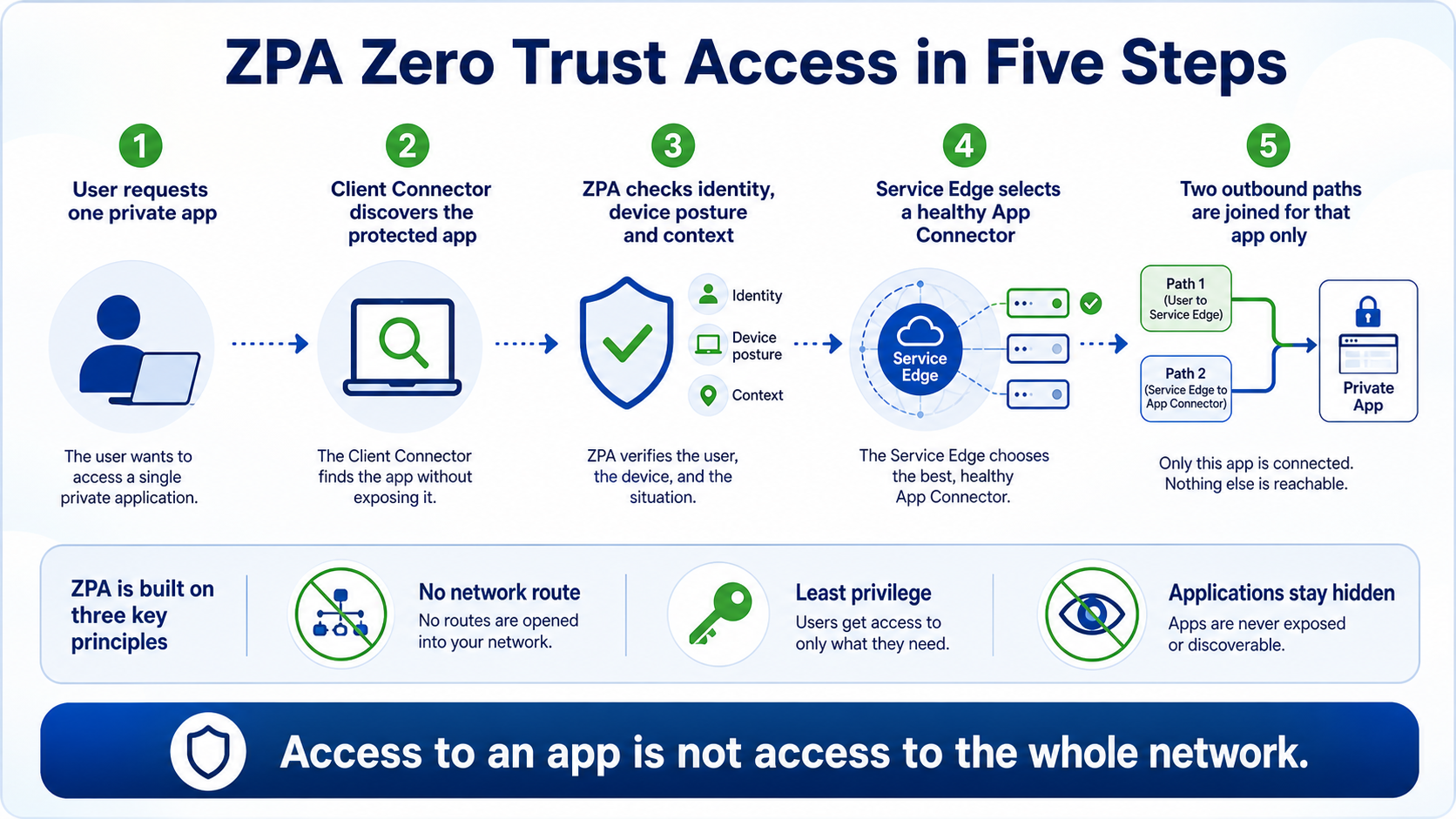
This lesson gives you the foundation for every other ZPA topic. ZPA is Zero Trust Network Access for private applications: it checks the user, device, context, requested app, and policy, then creates access to that app without placing the user on the private network.
In plain English
Think 'connect a person to an application,' not 'connect a laptop to a subnet.' Client Connector recognizes the protected app, ZPA evaluates identity and context, a Service Edge selects an eligible App Connector, and the two outbound paths are joined only for the allowed application.
Real example
A Finance user may reach payroll on TCP 443 from a compliant laptop. The same user cannot scan the payroll subnet, another department cannot use payroll, and the payroll server does not need an inbound internet-facing listener.
Follow this flow
- User requests a destination defined in an application segment.
- Client Connector discovers the protected app and reaches a Service Edge.
- ZPA evaluates identity, posture, context, app, and access policy.
- The Service Edge selects a healthy eligible App Connector.
- ZPA joins two outbound paths for that application and records the session.
Evidence to collect
- Requested application segment and port
- Authenticated user, device posture, and context
- Matched policy, action, and Service Edge
- Selected App Connector, app health, and session status
Common mistake to avoid
Do not describe ZPA as a hidden VPN or claim that 'zero trust' means trusting nothing forever. It means every requested application connection is evaluated with explicit identity, context, policy, and least privilege.
Current official source checkpoint
- What is ZPA?current official reference used for this beginner explanation
- Understanding ZPA architecturecurrent official reference used for this beginner explanation

Key terms before you continue
Most engineers think…
ZPA is just VPN in the cloud — a faster tunnel to the same office network.
Wrong. A VPN drops you onto the network; ZPA never gives you a network at all. It brokers you to one app after re-checking who you are and how healthy your device is — and the app itself is invisible to the internet. Get this one idea and connectors, segments and policy all click into place.
① Why the VPN broke — and what "zero trust" actually fixes
Picture a hotel. A VPN is the master key the front desk hands you: once you're in, you can walk every floor, try every door. ZTNA is a keycard cut for exactly one room — and it only works after the desk re-checks your ID, your booking, and that you look healthy. Zscaler Private Access (ZPA) is Zscaler's ZTNA service. That one swap — network key → one-app keycard — is the whole lesson.
Why does it matter in production? Because the VPN's master key is exactly what attackers want. Steal one user's VPN login and you don't get one app — you land on the LAN and can scan, enumerate and pivot across everything. Security people call this lateral movement, and it is how a single phished password becomes a company-wide incident.
Karthik at Flipkart faces this
Over a weekend, an attacker phished one developer's VPN credential and quietly scanned three internal subnets before anyone noticed. The security board now wants to know: would per-app access have stopped this?
The VPN placed the phished account on the network. From there, every reachable host was fair game — the credential was a master key, not a room key.
ZPA never extends a network. The same stolen credential would have reached only the one or two apps that user is explicitly authorised for — and only while their device still passed posture.
"Blast radius." ZPA doesn't make passwords un-stealable; it makes a stolen password open one door, not the building, and the apps are never published to the internet to begin with.
Prove it in the access log: a ZPA session shows exactly one authorised app per request — there is no "subnet" the session can wander into.
Here's the honest, interview-ready comparison — ZPA is not free magic, it has real trade-offs:
| Dimension | Traditional VPN | ZPA |
|---|---|---|
| Trust model | Implicit — once in, you're on the network | Zero trust — re-checked every request |
| Inbound ports | Gateway exposes UDP 500/4500 or TCP 443 — scannable | Zero — connectors dial out only; app is "dark" |
| Lateral movement | High — land on LAN, pivot freely | Near-zero — one app per session |
| Deep visibility | Firewall logs / NetFlow, free | Access logs free; end-to-end needs paid ZDX |
| Infra burden | Size concentrators, procurement | Cloud-native, but "connector sprawl" is real |
Three myths to flip before we go on
Tap each card — front is the myth most freshers carry, back is the correction.
No. A VPN gives you a network; ZPA gives you one app after re-verifying you. There is no subnet to roam.
The win is blast radius, not crypto. A stolen credential opens one door — and the app was never on the internet to attack.
No. ZPA requires a SAML IdP (Okta, Entra ID). It consumes your identity; it doesn't replace SSO.
Cloud-native ≠ effortless. You still run an App Connector pair in every site/VPC, patched and HA-paired — "appliance work in disguise".
Pause & Predict
If ZPA never puts you "on the network", what stops an attacker from just port-scanning the internal app directly? Type your guess.
② The cast — ZCC, App Connector, Service Edge & the Central Authority
Think of a gated society. A Swiggy rider reaching the gate can't just walk in. The guard phones the specific flat to confirm the resident is expecting this exact delivery, then escorts the rider to that one door. ZPA has the same cast: a guard (the Service Edge), the resident answering from inside (the App Connector), the visitor's phone (the ZCC agent on your laptop), and the society's record office that knows every rule (the Central Authority).
Who owns what — tap to check yourself
The #1 thing freshers get wrong is which box they deploy versus which Zscaler runs. Flip each card.
Lives on the user's device. Authenticates via SAML, checks posture, dials out to the broker. You deploy it to laptops/phones via MDM.
You deploy it — a Linux VM in each DC/VPC. Outbound-only TLS, proxies to the app. Run ≥2 per group for HA.
Zscaler-hosted broker. Stitches the two tunnels, enforces policy. Public = cloud/multi-tenant; Private = single-tenant in your site for data-residency.
Fully Zscaler-managed brain. Stores policy, issues the mTLS certs both tunnels use. You never touch it directly.
An Indian bank or government tenant that must keep traffic in-country will choose a Private Service Edge: it does the same stitching/enforcement as the public broker but runs inside the customer's own site (still software-managed by Zscaler). Use it for data-residency, latency or regulatory needs — otherwise the multi-tenant Public Service Edge is simpler and cheaper.
Sneha at Infosys faces this
Fresh L1 Sneha opens the ZPA admin console for the first time and freezes — she can't tell which component lives on the user's laptop, which sits in the data centre, and which is Zscaler's cloud.
All four names sound like "Zscaler things", so they blur together.
Laptop: ZCC. Your DC/VPC: App Connector (you deploy & patch it). Zscaler cloud: Service Edge + Central Authority (managed for you).
Ask "who patches it?" — if the answer is "me", it's ZCC or the App Connector. If "Zscaler", it's the Service Edge or CA.
③ How a request becomes a microtunnel
The dabbawala system explains the trick perfectly. The home cook and the office worker never share home addresses — both bring the tiffin out to a known junction, where a relay hands it over. ZPA is the same: your ZCC and the App Connector both dial out to the broker; the broker relays an authorised session between them. Neither side ever opens its door to a stranger.
Two tunnel types matter. A Z-Tunnel is the always-on outbound pipe each side keeps to the broker. An M-Tunnel (microtunnel) is the short-lived, per-app path the broker stitches together only after your Access Policy passes. No policy pass, no microtunnel.
▶ Watch a healthy ZPA session get brokered
Press Play for the healthy path, then Break it to see the most common failure (a firewall SSL-inspecting the connector's egress).
Your firewall team asks what inbound rule the App Connector needs so the Zscaler cloud can reach it. What do you tell them?
Pause & Predict
In the visualizer, which single stage decides whether the microtunnel is ever built? Type the stage number and why.
Rahul at TCS faces this
In a design review, Rahul is told to whiteboard exactly what happens between a user clicking an internal HR app and the packet reaching the server — without opening a single inbound firewall port.
ZCC dials out (Z-Tunnel) → Service Edge checks policy → stitches an M-Tunnel to the connector's outbound Z-Tunnel → connector proxies to HR app.
"Both tunnels are outbound, so the firewall only needs an egress allow to 443. There is nothing to open inbound."
On the connector: sudo zpa-connector troubleshoot connection shows the outbound tunnel state; a packet capture shows only egress 443 — no listener on the connector.
④ Build the app & gate it — Segments, Groups & Access Policy
In ZPA an app isn't "a server" — it's a small chain of objects, and every link must be intact or default-deny silently wins. Here's the chain and the exact admin path for each piece.
Now the actual console. This is the Add Application Segment form — recreated so you recognise the real screen.
Rahul created and enabled an App Segment, the connector is green, and an ALLOW rule references the Segment Group — but access fails with no error in the UI. What did he most likely forget?
Access Policy — default-deny, first-match
ZPA evaluates rules top-down, first match wins, and an implicit deny sits at the bottom. Each rule mixes conditions: SAML attributes, SCIM groups, posture, platform, country, client type. Put narrow DENY/exception rules above broad ALLOW rules.
Here's the Add Rule screen — and the one toggle that silently breaks SAML-based rules if it's off.
Sneha must let only the Finance SCIM group reach SAP on TCP 8443, and only from Windows devices with a compliant posture. Which rule does she build?
▶ Watch Access Policy evaluate, first match wins
A Finance user requests SAP. Play the healthy evaluation, then Break it to see the silent failure when "SAML Attributes for Policy" is off.
Priya at HDFC faces this
Priya publishes an internal payments dashboard, enables it, the connector is green — and it goes live for absolutely nobody. No error anywhere.
The new App Segment was never placed into a Segment Group, so the ALLOW rule (which targets the group) can't see it → default-deny.
Open the segment; check its Segment Group field is populated and the group shows the segment as a member.
Applications ▸ Application Segments ▸ (segment) ▸ Segment GroupAssign the segment to the Segment Group the rule references, then retest. Walk the whole chain in order if it still fails.
The segment now appears in the group's member list; the user's access log shows an ALLOW against the correct rule.
Pause & Predict
You place a broad ALLOW rule at order 1 and a narrow DENY for contractors at order 5. Contractors still get in. Why? Type your guess.
⑤ Browser Access — the contractor problem
Not everyone can install ZCC. A 3-month audit vendor on their own laptop won't (and shouldn't) put your agent on their machine. Browser Access solves this: the user hits a Zscaler-managed URL, gets redirected to your IdP for SAML login, and the Service Edge reverse-proxies them to one internal web app — still brokered, still policy-checked, still no inbound port. Perfect for contractors, partners, BYOD and kiosks.
The catch students miss: Browser Access is clientless, so there is no ZCC to report device health. That means you cannot attach a posture or trusted-network condition to a Browser Access rule — ZPA rejects it. And it's HTTP/HTTPS only; for RDP/SSH thick-client apps you still need ZCC (or PRA for HTML5 RDP/SSH).
Priya must give a 3-month contractor on an unmanaged BYOD laptop access to one internal web ticketing app — with no ZCC install allowed. What does she use?
An admin "hardens" a clientless contractor rule by adding a device-posture check. ZPA rejects it — and rightly so. Posture data is collected by ZCC; a clientless browser has no agent to report it. There is nothing to evaluate, so posture and trusted-network criteria are simply unsupported on Web Browser client-type rules. Gate clientless access with what you actually have: SAML/SCIM group membership and country. If you truly need posture, the user must install ZCC.
Rahul at TCS faces this
An external audit vendor needs 3-month access to one web ticketing tool, on their own laptops. Rahul tries to add a posture check "to be safe" and the rule won't save.
It's a Browser Access (Web Browser client-type) rule — clientless — so posture/trusted-network criteria aren't allowed.
Drop the posture condition; gate with SAML + SCIM group (the vendor's directory group) + Country. Time-box it by disabling the rule at contract end.
If they genuinely need RDP/SSH, that's not Browser Access at all — use ZCC, or PRA for HTML5 RDP/SSH.
⑥ When ZPA bites back — production gotchas & patching
ZPA "fails closed and quiet": when something's wrong you usually get nothing, not an error. Here are the real ones, straight from the community — learn the symptom, you'll fix it in minutes instead of hours.
Priya at HDFC faces this
The App Connector shows green/Connected in the portal, but users get "application unreachable" and the client spins forever. The Connection Status Log shows APP_NOT_REACHABLE.
Green only means the connector's tunnel to the Zscaler cloud is healthy — it says nothing about reaching the app server. Usual culprits: no route/firewall path from the connector to the app, an upstream firewall SSL-inspecting the connector's pinned-cert egress (silently dropped), or NTP drift (UDP 123 blocked) breaking mTLS.
Test reachability from the connector itself, independent of ZPA.
sudo zpa-connector troubleshoot connectionBypass SSL inspection for *.zscaler.net, *.zpath.net, *.zscloud.net; allow outbound UDP 123 for NTP; confirm a route to the app port.
sudo zpa-connector troubleshoot connection
dig +short hr.corp.internal
nc -vz 172.16.8.20 443
timedatectl status | grep -i 'synchronized'
[broker]  tunnel: UP   (edge: bom2-vse-01)   latency: 14ms
172.16.8.20
Connection to 172.16.8.20 443 port [tcp/https] succeeded!
System clock synchronized: yes
If the tunnel is UP but nc fails, the problem is connector→app reachability (route/firewall/SSL-inspection) — not ZPA. If the clock isn't synchronized, fix NTP first.
Karthik at Flipkart faces this
After adding a specific-FQDN segment for app1.corp:8443, port 8443 is completely dead and produces no ZPA log at all — while app1.corp:443 from the old *.corp wildcard still works.
ZCC matches the specific FQDN first and stops evaluating the wildcard for that host. Port 8443 only existed in the wildcard segment, so the client never sends it to ZPA — hence zero logs.
Add every required port (443 AND 8443) to the specific segment, or enable Multimatch so ZCC unions the port ranges. Use Applications ▸ Application Segments ▸ Test to see which segment wins for a host:port.
Sneha at Infosys faces this
Users loop endlessly on the Microsoft Entra login page (login.microsoftonline.com) and never authenticate — nobody can log in at all.
The IdP's public FQDN (or a broad *.microsoftonline.com wildcard) was accidentally swept into an App Segment. ZCC tries to route the public IdP through a private connector that can't reach it — and the user isn't authenticated yet, so they can't satisfy policy. A chicken-and-egg loop.
Remove all public IdP FQDNs from every App Segment; narrow the wildcard or add an explicit bypass for the IdP subdomains. Public IdP endpoints must never live inside a ZPA app segment.
Priya at HDFC faces this
An internal SSH box crawls even for LAN users who don't use ZPA; syslog shows a flood of TCP SYNs from the connector IPs on port 22. Disabling ZPA health checks instantly restores it.
With Health Reporting set to Continuous, every connector in a large/global group TCP-probes every app port on a cycle. For 20+ connectors hammering sshd at once, its short accept queue fills and real connections drop.
Set Health Reporting to None on latency-sensitive/single-threaded services (SSH, consoles, legacy mainframe); scope the Connector Group to connectors physically near the app; if you need checks, use On-Access, not Continuous.
Patch the client — it's the enforcement point
Disclosed 11 Nov 2025 (CVSS 5.2, Medium): a ZCC health-check port wasn't released after use, letting a local low-privileged user send traffic that bypasses ZCC's forwarding/inspection controls — i.e. escape the very enforcement ZPA relies on. In ZTNA the client is the trust boundary, so an agent bypass undermines the whole model even with a perfectly healthy broker. Fix: upgrade ZCC to 4.6.0.216+ (4.6.x) or 4.7.0.47+ (4.7.x), and keep agents on a managed auto-update channel.
Never trust "the connector is green" as proof a user can reach an app. Confirm it the right way: the user's access log shows an ALLOW against the expected rule and the expected App Segment, and the Connection Status Log shows the session reaching the app (not APP_NOT_REACHABLE). Green is tunnel health; the log is access truth.
🤖 Ask the AI Tutor
Tap any question — instant, scoped to this lesson. No login, no waiting.
Pre-curated from Zscaler docs + community Q&A, scoped to this lesson. For a live prod issue, paste your export into chat.techclick.in.
📝 Wrap-up assessment — six more
You've answered 4 inline. Six left. 70% (7 of 10) marks the lesson complete on your profile. Tap Submit all answers at the end.
🧠 In your own words
Type one line: why does an App Connector never need an inbound firewall rule? Then compare to the expert version.
🗣 Teach a friend
Best way to lock it in — explain it in one line to a teammate. Tap to generate a paste-ready summary.
📖 Glossary
- ZTNA
- Zero Trust Network Access — grant access to one specific app after verifying identity and device health, never the whole network.
- ZPA
- Zscaler Private Access — Zscaler's ZTNA service that brokers per-app access to private apps without a VPN.
- ZCC (Zscaler Client Connector)
- The agent on the user's device that authenticates via SAML, checks device posture, and dials out to the Service Edge.
- App Connector
- A lightweight Linux VM inside your private network that makes outbound-only TLS to the broker and proxies to the real app server.
- Service Edge
- The Zscaler broker that stitches the two tunnels and enforces Access Policy. Public = multi-tenant cloud; Private = single-tenant, customer-hosted.
- Central Authority (CA)
- The geo-distributed brain of the Zero Trust Exchange — stores policy and issues/validates the mTLS certificates. Fully Zscaler-managed.
- Z-Tunnel
- The persistent, certificate-pinned, mutually-authenticated TLS/DTLS tunnel each side holds outbound to the Service Edge.
- M-Tunnel (microtunnel)
- A per-session, per-app path the broker creates on demand by stitching the two Z-Tunnels — only after Access Policy passes.
- Application Segment
- The object that defines a private app by its domains/IPs and TCP/UDP port ranges, plus flags like Double Encryption.
- Segment Group
- A bundle of Application Segments that Access Policy rules actually target — you cannot point a rule at a bare segment.
- App Connector Group
- A group of two or more connectors for HA, scaling, geo-proximity and rolling updates. A connector belongs to exactly one group.
- Browser Access
- Clientless (no-ZCC) zero-trust access to HTTP/HTTPS apps via a reverse proxy at the Service Edge — for contractors/BYOD. No posture possible.
- SCIM
- System for Cross-domain Identity Management — auto-syncs users/groups from your IdP into ZPA so group membership can gate access.
- Double Encryption
- A per-segment option adding an inner TLS layer so even the Service Edge cannot read the payload. It is NOT two-factor authentication.
📚 Sources
- Zscaler Help — Understanding the ZPA Architecture (Central Authority, Service Edges, App Connector, ZCC, the inside-out M-Tunnel). help.zscaler.com/zpa
- Zscaler Help — Configuring Application Segments + About Browser Access (exact console fields; clientless reverse-proxy; posture unsupported). help.zscaler.com/zpa
- Zscaler Community — Connector health-probe causing servers to crash (the SSH SYN-flood gotcha and the Health Reporting fix). community.zscaler.com
- Practitioner reviews (ZPA vs VPN: connector sprawl, paid ZDX visibility, mobile-client instability, the ~256-rule cap). peerspot.com / r/Zscaler
- NVD — CVE-2025-54983, Zscaler Client Connector for Windows (health-check port not released → forwarding-control bypass; fixed 4.6.0.216+ / 4.7.0.47+). nvd.nist.gov
- Zscaler Cyber Academy — ZDTA (EDU-200) Digital Transformation Administrator blueprint (ZPA objectives: components, App Segments, first-match Access Policy, SAML/SCIM, Browser Access, PRA). zscaler.com
- Zscaler Help — About IdP Configuration + Access Policy (the per-IdP "SAML Attributes for Policy" gate; first-match, default-deny rule evaluation). help.zscaler.com/zpa
What's next?
You can now explain ZPA end-to-end. Next, go hands-on: deploy an App Connector, enrol it with a provisioning key, and reproduce the green-but-unreachable state in our live simulator.