Start here · understand the lesson before the detail
What you are learning
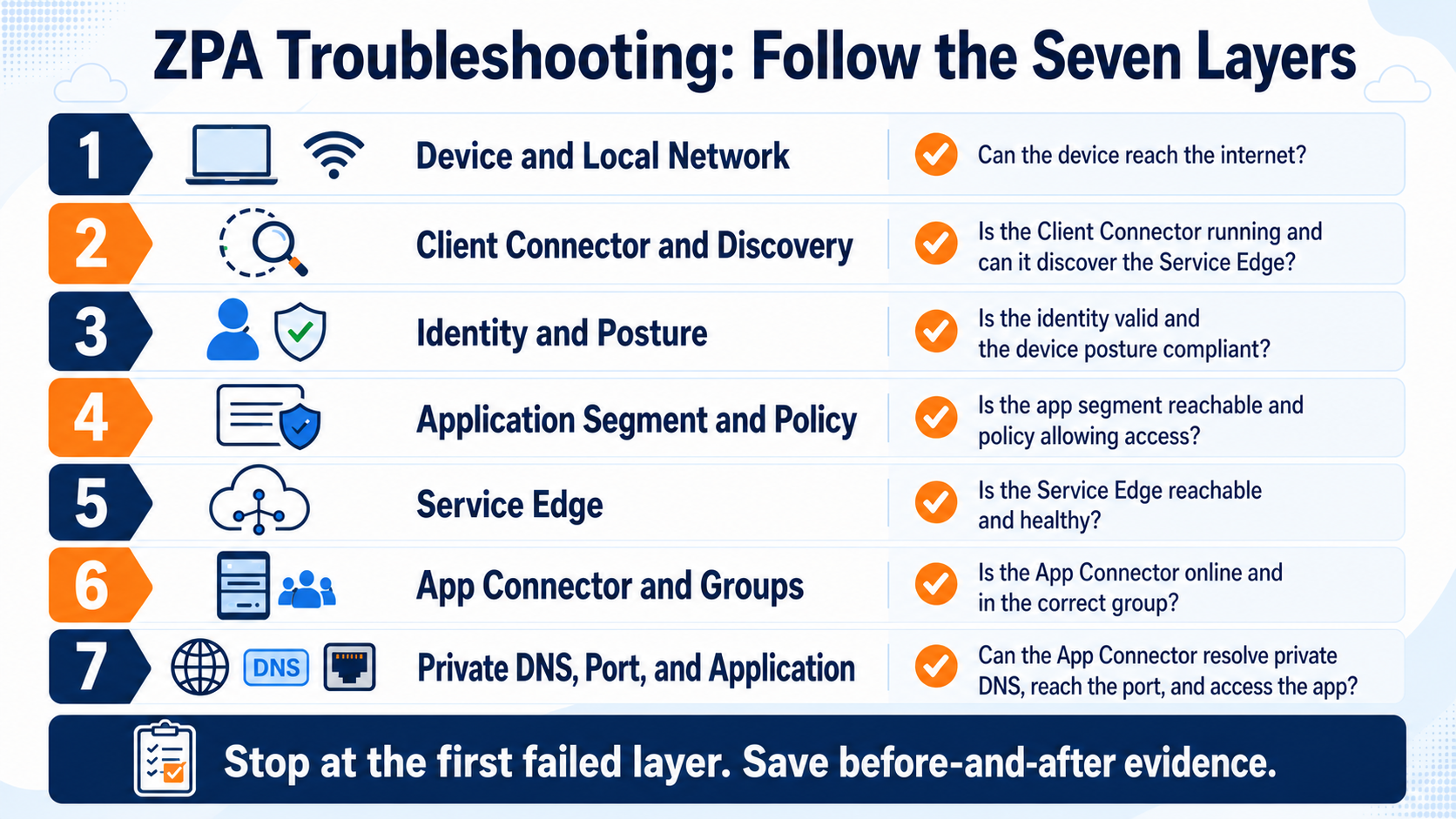
This lesson gives you a calm troubleshooting order for ZPA. Work from the user request through seven layers and stop at the first failed layer instead of changing policy, reinstalling Client Connector, or restarting App Connectors at random.
In plain English
A successful ZPA session needs a working device path, app discovery, valid identity and context, a matching policy, a reachable Service Edge, an eligible App Connector, and a healthy private application path. Evidence at each layer decides the next check.
Real example
If no ZPA session exists, start before policy: local network, Client Connector, and discovery. If the session says APP_NOT_REACHABLE, the request already passed several earlier layers, so focus on the selected connector’s private DNS, route, port, and server response.
Follow this flow
- Confirm the device, local network, and time of one failing request.
- Verify Client Connector state and discovery of the requested destination.
- Check identity, posture, application segment, and matched access policy.
- Read Service Edge, connector selection, group binding, and health evidence.
- From the App Connector path, test private DNS, route, port, app response, then retest.
Evidence to collect
- Exact error, timestamp, client state, and discovery result
- Identity, posture, matched app, rule, and action
- Service Edge, connector ID, status, group, and version
- Connector-side DNS/port result and before/after session
Common mistake to avoid
Do not bypass the application or widen policy before saving the failed evidence. Also do not test private DNS only from the user device; the App Connector’s network is the path that must reach the private server.
Current official source checkpoint
- Understanding application accesscurrent official reference used for this beginner explanation
- Troubleshooting App Connectorscurrent official reference used for this beginner explanation

Key terms before you continue
The lie every L1 believes about ZPA
Most engineers think a green App Connector means the app will work. Wrong. The connector going to a server is the last link in a five-link chain. Long before traffic ever reaches a connector, ZPA's brain — the Central Authority — has to find a matching app segment, evaluate access policy against your identity, and pick an eligible connector group. Break any of those and the connector stays green while the user stares at a spinner.
Here's the picture to hold in your head. ZPA is zero-trust, so the model is user → ZCC → Service Edge → policy → app segment → connector group → app. A failure at any step looks identical to the user: "it doesn't open." Your job is to know which step. That's the aha-moment of this whole lesson: "connector healthy" is data about ONE link, not the chain.
The five ZPA objects, in 30 seconds each
The FQDN(s) + port range that defines an app. If the user's hostname/port isn't here, ZPA never even tries. So what: wrong FQDN = instant no-match.
A bundle of app segments. Access policy targets the group, not the segment. So what: a segment with no group is invisible to group-based rules.
Tells ZPA which connector groups can reach the app. Usually "dynamic discovery". So what: wrong/empty server group = "no connector serving this segment".
The actual App Connectors (by location). At least one must be Connected. So what: green connector in the WRONG group still can't serve the app.
① Policy & Identity — the app the policy quietly denies
This bucket is where ~half of "connector is fine but app won't open" tickets actually live. ZPA access policy is top-down, first-match-wins, default block. If no rule matches, the user is denied with no obvious error.
▶ Watch a ZPA access decision (and where it can die)
Sneha at Infosys tries to open jira.corp.local. Press Play — each step lights up; red = a common kill point.
jira.corp.local + port 443?
group = Engineering evaluated
Connector field + Close status = eligibility rejected all.10.50.5.20:443. Page loads. ✅
"Access Denied" although a matching ALLOW rule exists
Symptom Sneha at Infosys can't open Jira; the access log names a different rule than the one you wrote.
Cause A broader rule (e.g. "Contractors → Deny") sits above your ALLOW rule. First-match-wins fired the wrong one.
Diagnose Policies → Access Control → Access Policy; then Analytics → Diagnostics User Activity — read the Policy field (the blocking rule name).
Fix Drag the specific ALLOW above the broad DENY. Order = priority.
Verify Re-run, confirm the Policy field now shows your ALLOW rule.
Username       : sneha.r@infosys.com
Host           : jira.corp.local
ConnectionStatus: Close
Policy         : "Block-Contractors-All"   <- WRONG rule won
ServerIP       : (empty)
ConnectionStatus: Open
Policy          : "Allow-Engineering-Jira"
ServerIP        : 10.50.5.20
ConnectionSetupTime: 41 ms
The Policy field in the User Activity log is empty (blank) and status is Close. Which rule blocked the user?
Group-based policy denies everyone right after SCIM go-live
Symptom Rahul at TCS enabled a group = Finance rule an hour ago; the whole Finance team is denied.
Cause SCIM group membership hasn't propagated. The IdP pushes on its own schedule; criteria can't match a group ZPA doesn't have yet.
Diagnose Administration → Identity Management → SCIM Attributes / Groups — is "Finance" populated with members?
Fix Wait for propagation — Zscaler recommends ≥48 hours (sometimes a week) before relying on SCIM-group policies. As a bridge, use a SAML attribute or temporary rule.
Verify Group shows members; a test user in Finance now matches the rule.
Policy criterion never matches — SAML attribute missing
Symptom A rule keyed on department = Networking matches nobody, even users who clearly are.
Cause The IdP isn't sending the department SAML attribute, or the name/case differs from what ZPA expects.
Diagnose Analytics → Diagnostics → User Status / Authentication — inspect the attributes ZPA actually received in the assertion.
Fix Add the attribute mapping in the IdP SAML app; match the exact attribute name configured under Administration → IdP Configuration.
Verify User Status diagnostics shows department=Networking; rule matches.
In ZPA, when no access-policy rule matches a user's request, what happens?
② Segment Mapping — the plumbing nobody double-checks
Even with perfect policy, traffic dies if the app segment → segment group → server group → connector group chain has a broken link. Think of it like a Swiggy order: the restaurant (app) can be open, but if the order isn't mapped to a delivery zone (server group) with an available rider (connector group), the food never arrives.
"No healthy App Connector serving this segment"
Symptom App times out; log shows empty Connector field and ConnectionStatus = Close.
Cause The server group attached to the segment points at a connector group where eligibility rejected all candidates (wrong location, disabled group, or no Connected connector).
Diagnose Infrastructure → App Connectors (status) + Resource Management → Server Groups (which connector group?). Empty Connector + Close = eligibility filtered everything, NOT a connector-to-app fault.
Fix Attach the correct connector group to the server group, or enable a connector in the right location.
Verify Log now shows a connector name + Open.
App segment created but invisible to policy
Symptom Priya at Wipro added a new app segment; her group-based ALLOW never fires for it.
Cause The segment isn't assigned to a segment group — and policy targets groups. Console shows an incomplete-configuration icon.
Diagnose Resource Management → Application Management → Application Segments — check the Segment Group column; confirm segment_group_id is non-empty via API.
Fix Assign the segment to the segment group the rule references.
Verify Incomplete icon clears; rule matches the segment.
One app breaks after a specific FQDN segment is added
Symptom app1.corp.local worked under *.corp.local; after adding a specific app1.corp.local segment for port 443, its 8443 admin port dies.
Cause A specific-FQDN segment carves out that host from the wildcard for ALL ports. The specific segment only lists 443, so 8443 has no home.
Diagnose Compare segments: exact hostname > wildcard in specificity. Port narrowness doesn't change specificity.
Fix Add all needed ports (443 + 8443) to the specific segment, OR enable Multimatch.
Verify Both ports resolve through ZPA again.
User Activity log shows an empty Connector field with ConnectionStatus = Close. What does this most precisely indicate?
App pings fine from the connector host, fails through ZPA
Symptom You SSH to the connector, curl 10.50.5.20:443 works — but users via ZPA time out.
Cause The connector can reach it, but the segment/server-group binding doesn't route that app through this connector group, or the app's port isn't in the segment.
Diagnose Confirm the FQDN+port are in the segment; confirm the server group dynamic-discovery includes this connector group. Check LSS ConnectionSetupTime.
Fix Bind the right connector group to the server group; add the missing port.
Verify LSS shows that connector serving the app with low setup time.
A user's app worked yesterday. Today you added a *.corp.local wildcard segment for a different team. Now their app1.corp.local:8443 app is broken — but app1.corp.local:443 still works. What changed?
app1.corp.local already had a specific segment listing only 443, that specific segment carves app1 out of the new wildcard for ALL ports. So 8443 has no home. Add 8443 to the specific segment, or enable Multimatch. The wildcard is a red herring.③ Browser Access & Certificates — the clientless path that trips on TLS
Browser Access lets a user reach a private web app with no agent, just HTTPS. The cost: you now own a TLS certificate chain, and certs are where this bucket bleeds.
Browser Access throws a cert / "not trusted" error
Symptom Contractor opens the BA URL, browser warns "certificate not trusted" or the upload failed.
Cause Incomplete chain, or you tried to upload a cert without first generating the CSR in the ZPA portal (so there's no matching private key).
Diagnose Administration → Certificate Management → Browser Access Certificates — check chain + key. The "no CSR" error means the portal has no matching key.
Fix Generate the CSR in ZPA, get it signed by a public CA, upload signed cert; OR upload the full cert + private key in one PEM. Include the full intermediate chain.
Verify BA URL loads with a green padlock; chain validates.
Wildcard cert works for one level, not the sub-domain
Symptom *.apps.corp.in cert works for hr.apps.corp.in but fails for v2.eu.apps.corp.in.
Cause A wildcard covers exactly one label. *.apps.corp.in ≠ *.eu.apps.corp.in.
Diagnose Compare the BA hostname depth against the cert's wildcard depth.
Fix Issue a cert covering the deeper level, or restructure BA hostnames to one wildcard level.
Verify Each BA hostname resolves with a matching SAN.
A native app uses certificate pinning. ZPA Diagnostics shows a clean Open status and normal ConnectionSetupTime, yet the app's own screen says "TLS handshake failed." Where is the failure?
Native app rejects ZPA even though Diagnostics is green
Symptom ZPA shows Open, normal setup time; the app itself errors on TLS.
Cause Certificate pinning — the client only trusts a specific server cert and rejects ZPA's Service Edge cert.
Diagnose Normal LSS setup time + no connector errors + app-side TLS failure = classic pinning signature.
Fix Disable pinning for the app (vendor permitting) or bypass ZPA for that destination.
Verify App connects; ZPA log unchanged.
Double-encrypted segment fails the connector's cert check
Symptom Segment marked Double Encryption stops connecting; App Connector logs show TLS handshake errors.
Cause Double Encryption requires the connector to verify the ZPA Service Edge cert; a mismatch or trust gap breaks the inner tunnel.
Diagnose Connector log TLS handshake errors; LSS DoubleEncryption field confirms the mode.
Fix Ensure connector trusts the Service Edge cert; if not required, disable Double Encryption on the segment.
Verify Handshake errors clear; segment connects.
Aditya needs to publish portal.apps.corp.in and billing.apps.corp.in via Browser Access with one wildcard cert. Which SAN actually covers both?
apps.corp.in, so *.apps.corp.in covers them. A wildcard matches exactly one level — that's why a deeper host like v2.eu.apps.corp.in would NOT be covered and needs its own cert.④ Steering & Diagnostics — when ZPA and ZIA both want the same domain
ZCC runs ZPA and ZIA on the same laptop. If both could claim a domain, one wins — and the wrong winner makes the app "disappear". This bucket also covers SIPA and how to actually read Diagnostics.
Internal app intermittently routes to ZIA instead of ZPA
Symptom auth.corp.local sometimes loads, sometimes gives an internet-proxy error; auth loops appear.
Cause The IdP/app domain overlaps what ZIA also handles, so ZCC's domain claim is ambiguous — interception loops.
Diagnose Check ZCC App Profile / Forwarding Profile + ZIA URL handling; confirm the FQDN is firmly inside a ZPA app segment.
Fix Make ZPA authoritative for the private FQDN (precise segment) and add a ZIA bypass for it so ZIA doesn't fight for it.
Verify Diagnostics consistently shows the FQDN handled by ZPA.
App needs the client's real source IP, but sees a Zscaler IP
Symptom A geo/IP-allowlisted SaaS rejects users; the app sees a Zscaler egress IP, not the expected corporate IP.
Cause Source IP Anchoring isn't fully wired across ZPA and ZIA, or the bypass field is wrong.
Diagnose ZPA segment must have Source IP Anchor on and Bypass = Use Client Forwarding Policy; access policy Client Type = ZIA Service Edge; ZIA Forwarding Control → Forwarding Control Policy method = ZPA via a ZPA Gateway bound to that server group.
Fix Set the missing "Use Client Forwarding Policy" bypass; align segment-group names across ZPA/ZIA; activate both consoles.
Verify App sees the anchored IP; SIPA path shows in logs.
SIPA fails silently when the segment-group names don't match across ZPA and ZIA, or when changes aren't activated in both consoles. The config "looks right" in each portal — but the rules never join. Always activate both, and copy the group name verbatim.
You don't know which step failed — use Diagnostics to trace it
Symptom "It just doesn't work" and you have no lead.
Cause Unknown — that's the point of the tool.
Diagnose Analytics → Diagnostics → User Activity (per-request ConnectionStatus, Policy, Connector, ServerIP, timing) and User Status / Authentication (SAML/SCIM received). Admin console keeps ~14 days; longer needs LSS to a SIEM.
Fix Let the field that's wrong point you to the bucket: empty Policy → missing ALLOW; empty Connector → mapping; high ConnectionSetupTime → connector-to-server.
Verify After the fix, the same User Activity row reads Open with a named connector.
index=zpa sourcetype=zpa_user_activity
  Username="aditya.k@wipro.com" Host="auth.corp.local"
| table LogTimestamp, ConnectionStatus, Policy,
        Connector, ServerIP, ConnectionSetupTime, DoubleEncryption
ConnectionStatus  : Open
Policy            : Allow-Corp-Auth
Connector         : connector-mumbai-01
ServerIP          : 10.50.5.30
ConnectionSetupTime: 38 ms
DoubleEncryption  : false
Empty Policy + Close → missing ALLOW or identity miss (Bucket 1). Empty Connector + Close → server-group / connector-group mapping (Bucket 2). Open but high ConnectionSetupTime → connector-to-server reachability. Open + app-side TLS fail → cert pinning (Bucket 3).
An internal app keeps bouncing between working and an "internet proxy" error, with occasional auth loops. The FQDN is in a ZPA app segment. Most likely root cause?
Top symptoms → first portal check (the cheat in flip form)
First check: Diagnostics → User Activity Policy field. Named rule = order issue. Empty = missing ALLOW / identity. So what: never guess, read the field.
First check: Connector field. Empty = mapping (Bucket 2). Named + high setup time = connector-to-server. So what: splits two very different fixes.
First check: Certificate Management chain + wildcard depth. App-side TLS fail with green ZPA = pinning. So what: separates BA cert vs pinned app.
First check: forwarding profile + is FQDN in a ZPA segment? Add a ZIA bypass for private FQDNs. So what: stops ZPA/ZIA tug-of-war.
One-glance cheat-sheet — symptom → first portal check
🤖 Ask the AI Tutor
Tap any question — instant context-aware answer scoped to this lesson. No login, no waiting.
Pre-curated from Zscaler ZPA help docs + community Q&A. For live prod issues, paste your Diagnostics → User Activity row into chat.techclick.in.
📝 Wrap-up — six more
You've answered 4 inline. Six left. 70% (7 of 10) total marks the lesson complete on your profile. Tap Submit all answers at the end.
✍️ Explain it back (2 lines)
In your own words: why does a green App Connector NOT prove the app will open? Type it, then reveal the expert version.
🧑🏫 Teach a friend
Tap to generate a one-liner you can paste to a teammate who's stuck.
📩 Quiz me again later
Opt in and we'll send 3 micro-questions on this lesson at Day 1, Day 7, and Day 30 — spaced recall locks it in.
Glossary — the words this lesson used
- App Segment — the FQDN(s) + port range that defines a private app to ZPA.
- Segment Group — a bundle of app segments; access policy targets the group.
- Server Group — maps a segment to the connector group(s) that can reach it.
- Connector Group — the App Connectors (by location) that serve apps; ≥1 must be Connected.
- Central Authority — ZPA's cloud brain: authenticates users and evaluates policy.
- SCIM — protocol the IdP uses to push users/groups into ZPA (propagates on a schedule).
- Browser Access (BA) — clientless HTTPS access to a private web app; needs a TLS cert.
- Double Encryption — second TLS tunnel connector↔Service Edge so even Zscaler can't inspect.
- SIPA — Source IP Anchoring: routes ZPA traffic via ZIA so the app sees the anchored source IP.
- Multimatch — lets a request match multiple overlapping segments instead of only the most specific.
📚 Sources
- Zscaler Help — Configuring Access Policies & About Segment Groups / Configuring Application Segments. help.zscaler.com/zpa
- Zscaler Help — ZPA App Connector Troubleshooting Runbook & Accessing User Activity / User Status Diagnostics. help.zscaler.com/zpa
- Zscaler Help — Enabling SCIM for Identity Management, Browser Access, Certificate Management (Browser Access web-server certs). help.zscaler.com/zpa
- Zscaler Help (ZIA) — About / Configuring Source IP Anchoring (SIPA) using ZPA, Forwarding Control. help.zscaler.com/zia
- Zscaler Community — ZPA application-segment config for Browser Access with SIPA enabled; practitioner ZPA troubleshooting decision-tree notes (GitHub-hosted field references, 2025).
- Zscaler Academy — ZDTA (Digital Transformation Administrator) certification blueprint — Identity, Connectivity, Access Control services.
What's next?
You've mastered the ZPA service. Next, go one layer down into the App Connector itself — enrollment, DNS, version drift, and the on-host logs that explain connector-to-server failures.
— Techclick Team