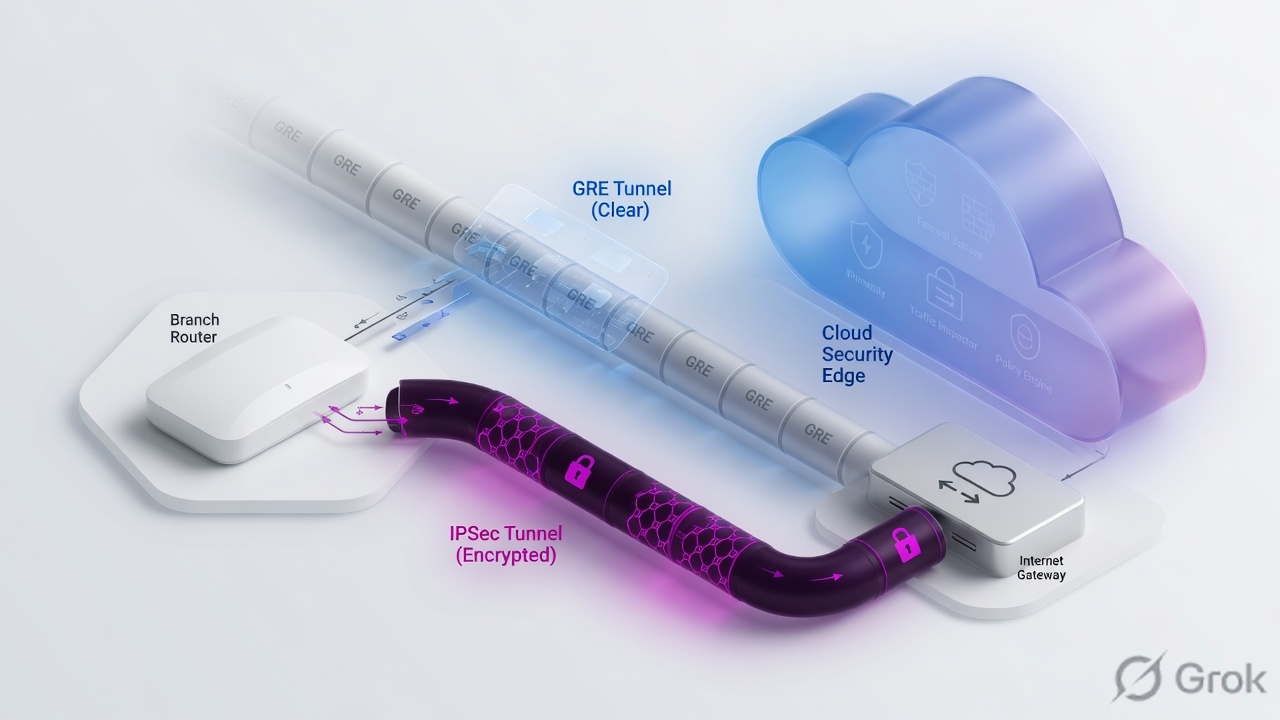
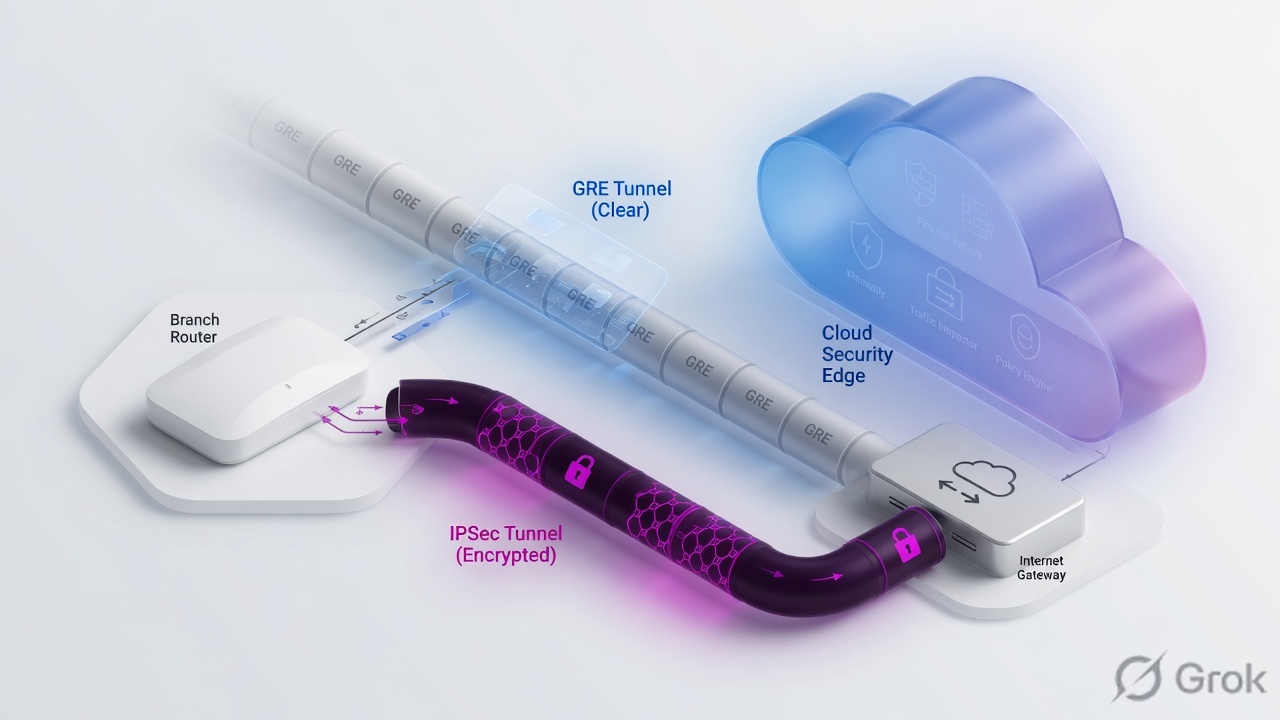
GRE and IPSec both forward branch internet into a ZIA Public Service Edge. Prefer GRE when protocol 47 is allowed and you want simple encap plus internal-IP visibility. Prefer IKEv2 + PSK when the path must be encrypted or GRE is blocked. Always build primary + secondary to two data centers, bind a Location (GRE static IP and/or VPN credentials), Activate, then prove health in Logs → Insights → Internet & SaaS – Tunnel Insights and the Location name in web logs. Start MTU 1400 / MSS 1360.
Why tunnels matter
ZIA is not sitting in the branch. To inspect office traffic when Client Connector is not on every device, you forward packets to a Public Service Edge. GRE and IPSec are the classic site-level methods. They are not ZPA app access.
If the tunnel is wrong you get silent bypass (no policy), a green VPN with the wrong Location (wrong policy stack), or SaaS that hangs on large objects (MTU black hole). Location-only policy is one door for everyone on that path. After the site is mapped, authentication still decides who is on the wire.
What the tunnel does
Carries internet-bound packets from your edge to a Public Service Edge. Policy and logs start there — not on the router.
What the Location does
Names the site. Binds the GRE static IP and/or VPN credentials so ZIA can apply location policy and write the Location field in web logs.
Mental model — three objects
Memorize three parts before you open the Admin Console. Most “tunnel is up but internet is broken” tickets skip part 2.
- Edge device — router or firewall that builds GRE (protocol 47) or IPSec (ESP) and steers internet traffic with PBR.
- ZIA cloud objects — a Static IP plus GRE tunnel, and/or VPN credentials, both bound to a Location. Nothing is live until you Activate.
- Service Edge path — primary VIP/DC and secondary VIP/DC. Keepalives, IPSLA, RPM, ICMP, or DPD must move traffic when the primary dies.
Read left → right. Policy does not start until the packet hits the Public Service Edge and maps to a Location.
Tunnel is transport. Location plus credentials is the identity of the site. Policy still decides allow or block after the packet lands on a Service Edge.
GRE vs IPSec — how to choose
Encryption need is the clean first fork. Then check whether the transit path allows GRE protocol 47, and whether the edge box can fail over cleanly.
Diamond first. Then confirm the edge can detect failure (GRE keepalives / IPSLA / RPM, or IPSec DPD).
| Question | Prefer GRE | Prefer IPSec IKEv2 |
|---|---|---|
| Encryption on the wire to ZIA? | Not required. GRE is encapsulation (protocol 47). | Yes — IKE + ESP. Help recommends IKEv2. |
| Transit / ACL reality | GRE is allowed inbound if the firewall filters it. | GRE is blocked, or policy demands IPSec only. |
| Internal IP visibility | Preferred: GRE from an internal router, PBR before NAT, then sublocations. | Same goal — do not hide every client behind one PAT if you need subnet policy. |
| Documented throughput (Help) | Up to 1 Gbps per GRE tunnel when internal IPs are not behind NAT. | 400 Mbps per public source IP. More traffic → more source IPs, or NAT-T + source-port randomization with IKEv2. |
| Cloud objects | Static IP → Add GRE Tunnel → Location Public IP Addresses. | Add VPN Credential → Location VPN Credentials. |
| HA | Both: primary + secondary to two different data centers. A second peer in the same DC is not failover. | |
Static IP is the public tunnel source ZIA already knows. Primary / Secondary Data Center VIP are the public destinations of the two GRE tunnels. VPN credentials identify the IPSec peer (Authentication Type FQDN, IP, or XAUTH). Location is the site object policy and logs use. Activate publishes the change. Tunnel Insights is where health is proven.
GRE runbook
Primary source: Zscaler Help Configuring GRE Tunnels and Self-Provisioning of GRE Tunnels (Help Portal export, 01 Aug 2026).
Guidelines before CLI
- Two GRE tunnels → two Public Service Edges in different data centers. If the primary path dies, the router must change the routing table so the secondary is used.
- PBR so only internet-bound traffic enters the tunnel. Match source/destination/protocol; action is the tunnel nexthop.
- Enable GRE keepalives on both tunnels. If the platform has no GRE keepalives, use ICMP probes. Cisco: IPSLA. Juniper: RPM.
- Most routers apply PBR before NAT, so ZIA still sees internal client IPs. If NAT runs first, consider disabling it or you lose logging granularity. Use sublocations for internal networks inside the GRE.
- If inbound ACLs exist, allow GRE protocol 47.
Side A — Provision GRE on ZIA
-
Add GRE Tunnel (self-provision)
Path:
Infrastructure → Locations → Static IPs & GRE Tunnel → GRE Tunnels → Add GRE Tunnel. The Add GRE Tunnel Configuration wizard opens. -
Source IP tab
Static IP Address: pick one available static IP. One static IP maps to one GRE tunnel config. You cannot change it later on an edit. A static IP already mapped to a Location does not appear in the list. Optional Description.
-
Data Center tab
Domestic Preference: enable only if you must prefer DCs in the country of the IP origin even when they are farther. Primary Data Center VIP and Secondary Data Center VIP: each list shows the five geographically closest active DCs; one is auto-selected. Help’s rule: the two VIP destinations must not be the same data center. DCs flagged Do Not Provision (DNP) on
config.zscaler.comdo not appear. If the org uses Private Service Edges, those VIPs list first. -
Internal IP Range tab
Is Unnumbered IP: enable only if you do not need an internal address on each side. Otherwise Select Internal GRE IP Range from the default pool of 10 ranges, or search other RFC1918 space. Help’s support-provisioned example assigns a /29 that you split into two /30s: first host = your router, second host = the Service Edge, then repeat on the backup tunnel.
-
Review → Save → Activate
The Review tab is the last chance to edit. Save is not enough. Activate the change.
Infrastructure → Locations → Static IPs & GRE Tunnel → GRE Tunnels → Add GRE Tunnel
Add GRE Tunnel Configuration
Help: primary and secondary VIP destinations must not point to the same data center. DNP DCs on config.zscaler.com are hidden. Values are RFC 5737 training placeholders — never invent a live VIP.
Click next: Internal IP Range → pick a range (or Unnumbered) → Review → Save → Activate. Then bind this static IP on the Location. Source: Self-Provisioning of GRE Tunnels.
Open a ticket with the public IP of the tunnel source and the physical location of the router. Zscaler assigns inner VIPs from a non-routable pool it manages. Help’s published example shape (not your tenant): Tunnel Source IP 192.0.2.2, Internal Range 172.18.58.120–127, Primary Destination 216.66.5.49 with inner 172.18.58.121/30 + 172.18.58.122/30, Secondary Destination 199.169.149.79 with inner 172.18.58.125/30 + 172.18.58.126/30.
Side B — Location object
-
Add Location
Path in current Help:
Infrastructure → Locations → Location Management → Legacy Locations → Add Location(the GRE article also writesInfrastructure → Locations → Legacy Locations). UI may say Legacy Locations. -
General fields
Name, Country, optional City/State/Province, Time Zone. Time-based policy uses this timezone — a 08:00–17:00 Cloud App Control rule fires in local hours per Location.
-
Bind the GRE source
Help labels this list Public IP Addresses on the GRE article and Static IP Addresses and GRE Tunnels on Configuring Locations. Choose the public tunnel-source IP you provisioned. The same static IP is the public source for both GRE tunnels.
-
Save and Activate
Location binding that is not Activated is the classic “tunnel green, logs show unknown location” ticket.
Infrastructure → Locations → Location Management → Legacy Locations → Add Location
Add Location
Click next: Save, then Activate. Confirm the same Name later in web logs. Source: Configuring Locations + Configuring GRE Tunnels step 3.
Side C — Router / firewall
-
Preferred topology
Help prefers two GRE tunnels from an internal router behind the firewall so ZIA sees internal IPs. Source the GRE from a loopback that holds the public static IP; allow protocol 47 on the firewall. If that is not feasible, GRE from the border router and disable NAT so internal IPs remain visible.
-
Primary and secondary GRE
Primary: source = your public static IP, destination = Primary Data Center VIP, tunnel IPs = first /30. Secondary: same source, destination = Secondary Data Center VIP, second /30. Enable keepalives (or ICMP / IPSLA / RPM) on both.
-
PBR and NAT order
Match internet-bound traffic → nexthop through GRE. Track the primary; if it is down, use the secondary. Do not send private WAN into ZIA. Keep PBR before NAT unless you deliberately want one PAT address.
Tunnel source public IP:        _______________
Primary Data Center VIP:        _______________
Secondary Data Center VIP:      _______________
Internal GRE /30 primary:       router ____ / PSE ____
Internal GRE /30 backup:        router ____ / PSE ____
Location Name:                  _______________
Activated?:                     yes / no
Vendor samples on Help: GRE Configuration Example: Cisco 881 ISR, GRE Configuration Example: Juniper SRX.
IPSec runbook
Primary source: Zscaler Help Understanding IPSec VPNs, Configuring an IPSec VPN Tunnel, Adding VPN Credentials.
Help recommends IKEv2 (faster, simpler, fixes IKEv1 issues). New tenants cannot establish IKEv1 tunnels to Internet & SaaS unless Support enables it. Design new builds on IKEv2.
Side A — VPN credentials and Location
-
Collect peers first
For each tunnel you need: IP address or hostname of the local gateway, the shared secret, and the IP addresses or hostnames of the Public Service Edges. Plan two VPNs to two different Service Edges.
-
Add VPN Credential
Path:
Infrastructure → Locations → VPN Credentials → Add VPN Credential.Choose Authentication Type used to identify the peer: FQDN, IP, or XAUTH. For FQDN, User ID is the FQDN (Help: up to 256 characters). Enter New Pre-Shared Key and optional Comments (CSV import limit is 10,240 characters). For Authentication Type IP, the static IP must already be known to Zscaler — submit it to Support first if it is not. You need the FQDN (or IP) and PSK later when you link the Location and when you build IKE on the edge.
-
Link credentials to a Location
On Add/Edit Location, use the VPN Credentials control. Without this link the IKE SA can still come up while traffic misses location policy. Save and Activate.
Infrastructure → Locations → VPN Credentials → Add VPN Credential
Add VPN Credential
CSV PSK Type values are UFQDN, IP, XAUTH. Bulk import: same page → Sample Import CSV file / Import VPN Credentials (up to 3,000 rows). You can delete an existing XAUTH row via CSV but cannot add a new XAUTH that way.
Click next: open the Location → attach this credential under VPN Credentials → Save → Activate. Then build IKEv2 on the edge with the same User ID and PSK. Source: Adding VPN Credentials.
Side B — Edge VPN (generic, then vendor guide)
-
Local ID rule (Help)
If the VPN credential is an FQDN, the peer’s local ID can be a private IP. Otherwise local ID should be the public IP that was provisioned as the static IP / IP-type credential. Private local ID against a public-IP credential → negotiation fails.
-
IKEv2 Phase 1 / Phase 2
Match a supported proposal. Help bolds recommended values in the IKEv2 table. Phase 1 authentication is Pre-Shared Key. Phase 2: ESP, Tunnel Mode. SA lifetime context: Phase 1 24 Hours, Phase 2 8 Hours, unlimited lifebytes. Help recommends disabling PFS for Phase 2. AES-GCM needs the matching subscription; without it Help recommends NULL encryption on the child SA.
-
NAT-T and DPD
NAT-T is integrated in IKEv2 when the initiator is behind NAT. NAT keepalive interval in the table: 20 seconds. Enable DPD. Help recommends a 10–20 second DPD interval with at least 3 retries (the supported-parameter table also lists DPD Timeout Interval 20 seconds and DPD Maximum Retries 5). Zscaler does not treat ongoing data as proof the peer is alive. If the device only supports on-demand DPD, allowlist Zscaler IPs so Zscaler-initiated DPD is not dropped.
-
Selectors, MTU, MSS
Route-based or policy-based VPN as the platform allows. Steer internet-bound traffic only. Help’s starting values: tunnel MTU 1400 bytes, MSS 1360 bytes (or measure your optimal MTU — see Determining the Optimal MTU for GRE or IPSec Tunnels).
Verified IKEv2 vendors (Help list)
Cisco ASA, Cisco ISR, Juniper SRX, Juniper SSG, FortiGate FortiOS, Palo Alto Networks PAN-OS, SonicWall TZ. Use the matching Zscaler IPSec configuration guide for CLI — do not copy another vendor’s transform set.
More than 400 Mbps
Help: IPSec is limited to 400 Mbps per public source IP. Add tunnels on different public sources, or multiple IKEv2 tunnels on the same source with NAT-T and source-port randomization. Example given: 800 Mbps → two primary + two backup tunnels.
IKE:                          IKEv2
Authentication Type:          FQDN  (or IP if Support already has the static IP)
User ID / FQDN:               _______________
Local ID rule:                FQDN cred → private IP OK | IP cred → that public IP
Primary PSE peer:             _______________
Secondary PSE peer:           _______________
Location Name:                _______________
MTU / MSS start:              1400 / 1360
DPD:                          10–20s, ≥3 retries
Tunnel Insights both peers:   UP?
Prove it is up
A green crypto SA is not the close. You need health on both peers, the correct Location on a test transaction, and a failover you actually ran.
Runtime path. Close the ticket only after the Location name appears on a real transaction.
- Primary and secondary show healthy in
Logs → Insights → Internet & SaaS – Tunnel Insights(Help wording). Some tenants surface this under Analytics; the log path is the one in the GRE and IPSec articles. - Test user hits a unique URL. Web logs show Location = your site Name (example:
BR-Mumbai-LAB). - Internal client IP is visible when you designed PBR-before-NAT (or the expected sublocation hit).
- Failover test: shut or fail the primary. Traffic moves to the secondary. No black hole. Restore and confirm it prefers primary again.
- A large HTTPS download finishes. If small pages work and large objects stall, clamp MSS ~1360 and set tunnel MTU ~1400, then retest.
GRE:   tunnel interface up · keepalive / IPSLA / RPM tracking the primary
       ping <Primary Data Center VIP> source <GRE source>
IPSec: IKEv2 SA READY · child SA up · DPD succeeding
Both:  PBR hit counts incrementing on internet traffic only
ZIA:   Tunnel Insights both peers Up · web log Location = site Name
Classic fails
| Symptom | Likely cause | First check |
|---|---|---|
| GRE never comes up | Protocol 47 blocked; wrong public source; VIP not provisioned; DNP DC | ACL for GRE; Static IP + GRE object; Primary/Secondary VIP; config.zscaler.com |
| IPSec Phase 1 fails | PSK / local ID mismatch; IKEv1 on a new tenant; proposal mismatch | Authentication Type vs local ID rule; force IKEv2; align Help-supported algorithms |
| Tunnel up, no / wrong Location | Location not linked, or change not Activated | Public IP / VPN Credentials bind + Activate; web-log Location field |
| SaaS hangs; small pages work | MTU black hole | Start at MTU 1400 / MSS 1360; retest a large download |
| Failover never happens | No keepalive / IPSLA / RPM / DPD; both VIPs in one DC | Detection timers; Secondary Data Center VIP is a different DC |
| One public IP for every user; sublocation policy misses | NAT before the tunnel | Reorder NAT after PBR, or accept one address and drop subnet identity |
| Need more than 400 Mbps on IPSec | Hitting the documented per-source-IP limit | More public sources, or IKEv2 NAT-T + source-port randomization |
Shipping one tunnel “for the pilot” and promising HA later. When that DC or path dies, the branch loses inspected internet with no practiced failover. Help’s design is two tunnels, two data centers, on day one.
“For ZIA site forwarding I pick GRE when we want simple encap and internal-IP visibility, IPSec IKEv2 when crypto is required or GRE is blocked; always dual-DC tunnels, a Location bind plus Activate, MTU 1400 / MSS 1360, and Tunnel Insights before production.”
Knowledge check
Six judgment questions. Map each miss to the runbook or traps section, then retry.
Sources
- Zscaler Help — Configuring GRE Tunnels (dual DC, PBR, keepalives / IPSLA / RPM, protocol 47, Location bind, /29 split, Tunnel Insights)
- Zscaler Help — About GRE Tunnels / Self-Provisioning of GRE Tunnels (Add GRE Tunnel tabs: Static IP Address, Domestic Preference, Primary/Secondary Data Center VIP, Is Unnumbered IP, Select Internal GRE IP Range)
- Zscaler Help — Best Practices for Deploying GRE Tunnels (1 Gbps per GRE tunnel when internal IPs are not behind NAT)
- Zscaler Help — Configuring Locations (Legacy Locations, Static IP Addresses and GRE Tunnels, VPN Credentials)
- Zscaler Help — Understanding IPSec VPNs (IKEv2 table, NULL vs AES-GCM, local ID rule, DPD, NAT-T, MTU 1400 / MSS 1360)
- Zscaler Help — Configuring an IPSec VPN Tunnel (400 Mbps per public source IP, dual peers, IPv6 selectors note)
- Zscaler Help — Adding VPN Credentials (Authentication Type, User ID, New Pre-Shared Key)
- Zscaler Help — About VPN Credentials (FQDN, XAUTH, or IP)
- Zscaler Help — Determining the Optimal MTU for GRE or IPSec Tunnels
- Local Help Portal PDF exports used for evidence:
Configuring_GRE_Tunnels.pdf,Understanding_IPSec_VPNs.pdf(01 Aug 2026)
Related: ZIA traffic flow · ZIA forwarding methods · ZIA authentication · Router GRE / IPSec lab simulator