Why this matters — the airport security gate model
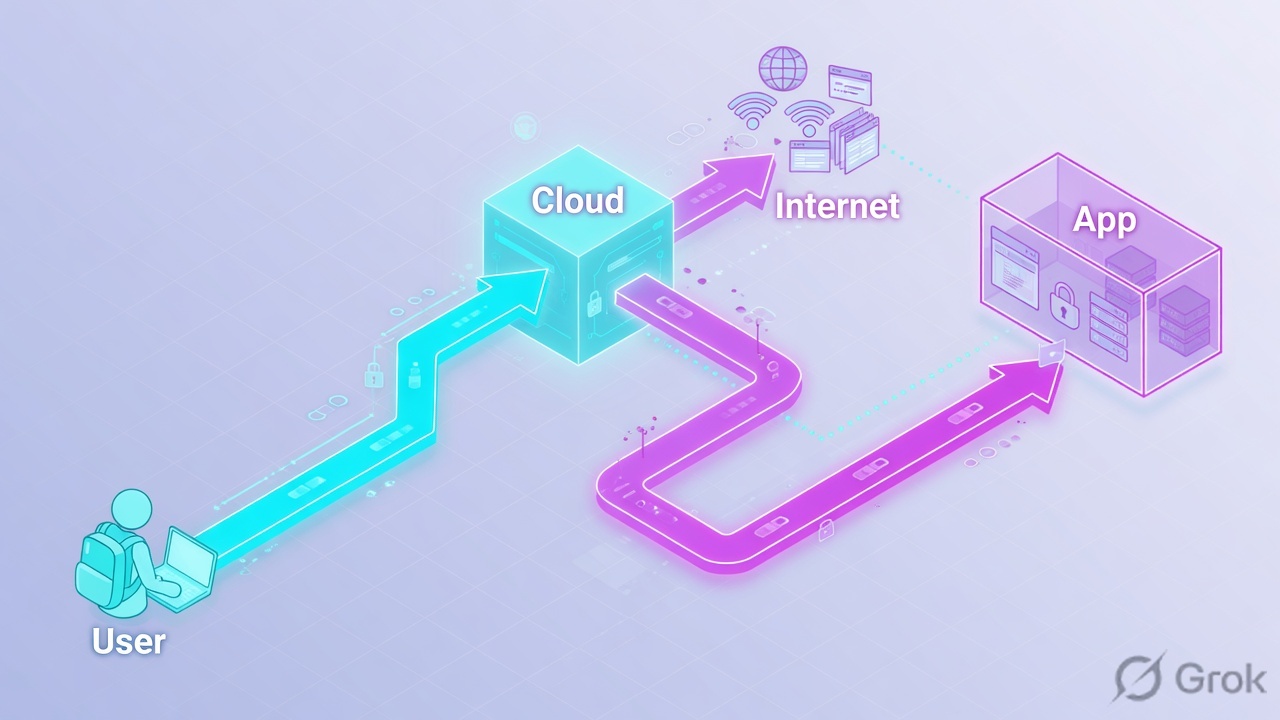
Think of an old-school corporate network as a building with one guarded gate. Once you are inside, you can wander anywhere. The Zscaler Zero Trust Exchange flips that. It is like an airport where every door checks your boarding pass again — your identity, your device, and where you are headed — before it opens. Nobody is trusted just for being on the LAN.
Interviewers probe this because most candidates can recite "zero trust" but freeze when asked how Zscaler actually enforces it without appliances or backhaul. They want to hear that it is an inline proxy in the cloud that brokers each connection — not a firewall rule on a box in your data centre.
Sneha is interviewing for a SASE role. The panel asks: "A user in your Mumbai office opens Salesforce. Walk me through the path the packet takes with Zscaler in front." She knows the GUI but blanks on the flow — does it hairpin to the data centre first? Through which Service Edge?
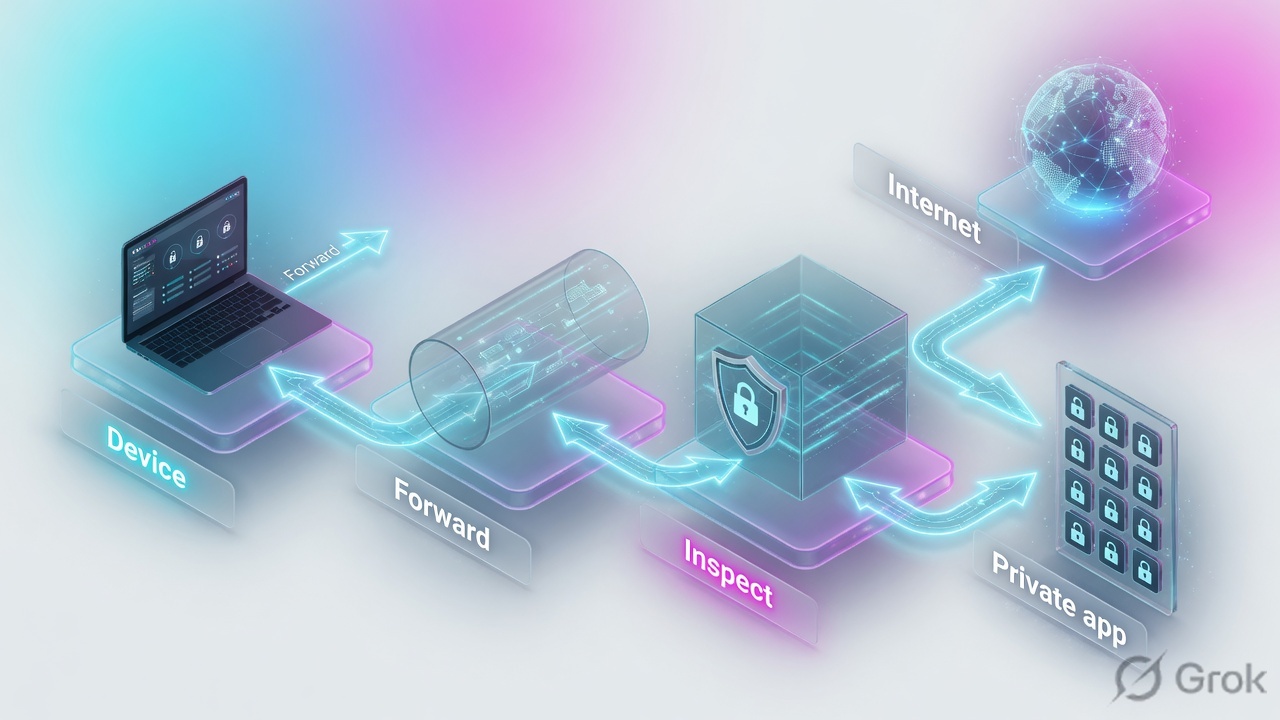
The fix is a clean mental model: traffic leaves the laptop, the Client Connector forwards it to the nearest ZIA Public Service Edge, Zscaler inspects and applies policy, then sends it direct to Salesforce. No backhaul, no appliance. Learn the model and these questions stop being scary.
1. Zero Trust Exchange Architecture
This is where panels separate people who clicked through the GUI from people who understand the platform. Be ready to explain the broker model, the three services, and what a Service Edge actually does.
Q1 What is the Zscaler Zero Trust Exchange in one sentence?L1
The Zero Trust Exchange (ZTE) is Zscaler's cloud-delivered security platform that sits inline between users and the destinations they reach — the internet, SaaS, or private apps — and brokers every connection after checking identity, device, and policy.
It is not a single box or appliance. It is a global cloud of Service Edges running a proxy architecture. Users connect to the nearest edge, Zscaler applies policy, then forwards traffic on. The three core services that ride on top are ZIA (internet and SaaS), ZPA (private apps), and ZDX (digital experience monitoring).
Q2 Explain the difference between ZIA, ZPA, and ZDX.L1
ZIA — Zscaler Internet Access secures outbound traffic to the internet and SaaS. It does SSL inspection, URL filtering, Cloud Firewall, DLP, and sandboxing.
ZPA — Zscaler Private Access gives users access to internal/private applications without a VPN. It builds inside-out tunnels from App Connectors so there are no inbound ports.
ZDX — Zscaler Digital Experience monitors performance and user experience end to end — device, network, and application latency — so you can find where slowness lives.
A quick line for the panel: ZIA protects the way out, ZPA protects the way in, ZDX tells you why it is slow.
Q3 Why is Zscaler described as a proxy/broker and not a router or firewall appliance?L2
A router forwards packets based on destination; a firewall appliance inspects flows passing through a fixed choke point you own. Zscaler instead terminates the connection at a Service Edge, inspects it at the application layer, then opens a separate connection to the destination on the user's behalf.
That is proxy behaviour — two distinct TCP/TLS sessions, full visibility into the payload after decryption. For ZPA it is also a broker: the user never connects directly to the app, and the app never accepts inbound connections. The broker stitches together a user-side micro-tunnel and a connector-side micro-tunnel. No routes, no NAT rules, no appliance in your data centre path.
Q4 What is the Central Authority (CA) and what does it do?L2
The Central Authority is the brain of the Zscaler cloud. It is not in the data path. It holds configuration and policy, distributes that policy down to the Service Edges, manages the cloud's health, and coordinates which edge a user or connector should talk to.
When Karthik at an HCL site changes a URL filtering rule in the admin portal, the CA propagates it across the cloud so every Service Edge enforces it consistently. The CA also handles tasks like certificate distribution and tracking the live topology. Key interview point: the CA is the control plane; the Service Edges are the data plane. Traffic never flows through the CA.
Q5 What are Service Edges, and what is the difference between a Public, Private, and Virtual Service Edge?L2
A Service Edge (historically called a ZEN — Zscaler Enforcement Node) is where policy is enforced and traffic is inspected.
Public Service Edge: Zscaler-operated, in 150+ data centres worldwide. Most customers send traffic here — you pick the nearest one automatically.
Private Service Edge: the same software but deployed on hardware/VM inside the customer's own data centre, for cases needing local egress or data-residency control, still managed by Zscaler's CA.
Virtual Service Edge: a virtualised form factor of the Private Service Edge you run on your own hypervisor. All three enforce identical policy; the difference is purely where they physically run.
Q6 A user in Hyderabad and a user in London both browse to the same site. How does the cloud decide which data centre handles each, and why does this matter for performance?L3
Each user's Client Connector (or PAC/GRE/IPSec entry point) is steered to the nearest healthy Public Service Edge based on geographic proximity and edge health, largely via Zscaler's DNS-based and Anycast steering. The Hyderabad user lands on the Mumbai or Hyderabad edge; the London user lands on a UK edge.
This matters because it gives direct-to-cloud, local breakout instead of backhauling both users to one corporate data centre. Latency stays low and the user reaches the destination from a nearby egress. For a Bangalore ITES with global staff, this is the whole point — you delete MPLS hairpins. In the interview, tie it back to no backhaul: the architecture removes the trombone effect that hurt legacy proxy-on-a-stick designs.
Q7 What is source IP anchoring (SIPA) and when would you use it?L3
Source IP Anchoring (SIPA) lets you forward selected ZIA-inspected internet traffic out through a specific egress — typically via a ZPA App Connector in your data centre or cloud VPC — so the destination sees a known, stable source IP instead of a Zscaler cloud IP.
You use it when a SaaS or partner app enforces strict source-IP allowlisting and you cannot register all of Zscaler's egress ranges. Example: a Mumbai bank's payment partner only allows the bank's own data-centre public IP. With SIPA, the user's traffic is still inspected by ZIA, but the final hop egresses from the bank's IP via the connector. It bridges ZIA and ZPA — inspection from one, egress identity from the other.
Sneha, an L1 at a Pune BFSI, is asked to sketch the Zscaler Zero Trust Exchange on a whiteboard. Her panel wants the one component that never accepts inbound connections and instead dials outbound to the cloud broker to publish private apps. Which is it?
2. ZIA — Internet & SaaS Access
ZIA is the day-one workhorse. Expect deep questions on SSL inspection, policy order, and the four ways traffic gets into ZIA. Vague answers here sink the interview.
Q8 Why does ZIA need SSL/TLS inspection, and what actually happens during it?L2
Most web traffic is HTTPS, so without decryption ZIA would be blind to threats, data leaks, and the actual URLs inside an encrypted session. SSL inspection lets ZIA see and apply policy to that traffic.
Mechanically, ZIA does a man-in-the-middle: it terminates the user's TLS session by presenting a certificate signed by the Zscaler intermediate CA (which you push to endpoints as a trusted root), inspects the cleartext, then opens a fresh TLS session to the real server and validates that server's certificate. Two TLS sessions, one inspection point. The key prerequisite the panel wants: the Zscaler root CA must be trusted on every device, or browsers throw cert errors.
Q9 What is the difference between URL Filtering and Cloud App Control in ZIA?L2
URL Filtering works at the category/URL level — block or allow based on categories like Gambling, Malware, or a specific domain. It answers "can the user go to this site at all?"
Cloud App Control (Cloud Application policy) is finer. It understands SaaS apps and their actions — for example, allow a user to view a Google Drive file but block upload, or allow read-only access to a personal Gmail while blocking attachments. It answers "what can the user do inside this app?"
Real example: Priya at a Chennai ITES needs LinkedIn for recruiting but the firm blocks job-site postings. URL Filtering allows linkedin.com; Cloud App Control blocks the "post" action. They work together, not instead of each other.
Q10 What is the policy evaluation order in ZIA, and why does it trip people up?L3
ZIA evaluates layers in a defined order, roughly: SSL Inspection policy → Cloud Firewall → URL Filtering / Cloud App Control → File Type / DLP → Malware / Sandbox. Authentication and location identification happen first so the right policy set applies.
It trips people up because SSL inspection must succeed before content layers can do anything. If a site is in an SSL bypass (do-not-inspect) list, URL Filtering and DLP still apply at the connection level but cannot see inside the payload. Another gotcha: within each policy module, rules are processed top-down, first match wins, so a broad allow rule placed above a specific block rule silently lets traffic through. In the panel, stress order + first-match + the SSL-first dependency.
Q11 What does the ZIA Cloud Firewall do that URL filtering does not?L2
The Cloud Firewall handles non-web and all-port traffic — anything beyond HTTP/HTTPS. It applies stateful L3/L4 policy (and some L7 app awareness) to ports and protocols: think DNS, SSH, SMTP, FTP, or a custom TCP port to a partner.
URL Filtering only sees web traffic the proxy handles. The Cloud Firewall covers the rest, with rules based on source/destination, network service, and application. For a Pune BFSI forwarding all ports into ZIA via GRE, the Cloud Firewall is what controls whether a server can reach an external NTP source on UDP 123 or an outbound SSH on 22. There is also a DNS Control layer that filters and can redirect DNS.
Q12 How does ZIA Cloud Sandbox work, and what is the catch with inline blocking?L2
Cloud Sandbox detonates unknown or suspicious files in an isolated environment to see their behaviour — file writes, registry changes, callbacks — before deciding malicious or clean. It catches zero-day and evasive malware that signature scanning misses.
The catch: sandboxing takes time. By default ZIA can run in a mode where the first user to fetch an unknown file may get it while analysis happens, then a verdict is cached so everyone after is blocked. To stop the very first download, you enable "Block files sent for analysis" (AI Instant Verdict / quarantine) so the file is held until the sandbox returns a verdict. Trade-off: tighter security versus a short delay on first-seen files. Panels love this nuance.
Q13 What is a location and a sub-location in ZIA, and why do they matter for policy?L2
A location in ZIA maps to a physical site or its public egress IP/tunnel — for example the Wipro Bangalore campus sending traffic via GRE. It defines gateway options, bandwidth control, and which policies apply to traffic arriving from there.
A sub-location is a subnet carved out within a location so you can apply different policy to different internal networks behind the same egress. Example: the guest Wi-Fi (192.168.50.0/24) is a sub-location with stricter filtering and no DLP, while the corporate LAN (10.20.0.0/16) gets full policy. They matter because policy and bandwidth rules can be scoped by location/sub-location, letting one tunnel serve very different user groups.
Q14 Compare the four ways to forward traffic into ZIA. When would you choose each?L3
GRE tunnels: from your edge router/firewall to a ZIA Service Edge. Best for an office sending all traffic for many users; no per-user agent. No native encryption, so used over trusted links or with the path otherwise secured.
IPSec tunnels: like GRE but encrypted; capped around 200–400 Mbps per tunnel, so used for smaller sites or where the transit is untrusted.
PAC file: browser-level proxy steering for specific apps/users; quick, but only covers what the browser/PAC honours.
Client Connector (Z-App): the agent on the endpoint; best for roaming/remote users and granular per-user policy, follows the laptop everywhere. For a Hyderabad SOC, you would use GRE at HQ and Client Connector for the work-from-home analysts.
Rahul supports a Bangalore ITES. Users report that banking and a few pinned mobile-style desktop apps break only when full SSL inspection is on. His panel asks the cleanest fix that keeps inspection on everywhere else. What does he choose?
3. ZPA — Private Access & ZTNA
ZPA is the ZTNA story — replacing VPN with brokered, inside-out access to private apps. Panels will make you build the flow object by object and explain why there are no inbound firewall holes.
Q15 What is an App Connector in ZPA?L1
An App Connector is a lightweight software component (a VM or container) you deploy next to your private applications — in a data centre, a Bangalore AWS VPC, or an Azure subnet. It is the reach-in point to your internal apps.
Crucially, the App Connector makes only outbound connections to the Zscaler cloud — it dials out to the ZPA Service Edge / broker. It never listens for inbound connections, so you open no inbound firewall ports. When a user needs an internal app, the broker tells a healthy connector to reach that app locally and stitch the session. You deploy at least two per location for redundancy.
Q16 Walk me through the ZPA building blocks: Application Segment, Server Group, App Connector Group, and how they relate.L2
Application Segment: defines the apps you are publishing — FQDNs/IPs plus ports, e.g. hrportal.internal.tcs.com:443 and jira.internal.tcs.com:8443.
Server Group: the set of servers/connectors that can serve that segment. It links the segment to the connectors that can actually reach those servers.
App Connector Group: a logical grouping of App Connectors, usually per data centre or region, used for placement and load distribution.
Relationship: an Application Segment is associated with a Server Group, which is backed by App Connectors (organised into App Connector Groups). Then an Access Policy says which users/groups can reach which segment. Miss the Server Group link and the app is defined but unreachable.
Q17 How does ZPA give access with no inbound firewall ports? Explain the inside-out micro-tunnels.L2
Both ends dial outbound to the Zscaler broker (the ZPA Public Service Edge). The user's Client Connector opens a micro-tunnel out to the broker; each App Connector also keeps an outbound tunnel out to the broker. Neither side ever accepts an inbound connection.
When Aditya requests jira.internal.tcs.com, the broker matches policy, picks a healthy App Connector in the right group, and stitches the user-side and connector-side tunnels together. Traffic flows user → broker → connector → app, all over connections that were initiated from the inside. Because nothing listens on the public internet, the apps are invisible — you cannot scan or attack what does not answer inbound. That is the core ZTNA win over VPN.
Q18 What is ZPA Browser Access (clientless access) and when do you use it?L2
Browser Access publishes an internal web app through the browser with no Client Connector installed. The user hits a Zscaler-provided hostname over HTTPS, authenticates via your IdP, and the App Connector reaches the backend web app.
You use it for unmanaged devices and third parties — a contractor at a partner firm, or a Flipkart vendor who needs one internal web portal but cannot install your agent. It is limited to web (HTTP/HTTPS) apps because it relies on browser TLS. You provision a signing certificate so Zscaler can present a trusted cert for the published hostname. For full-port or non-web apps you still need the Client Connector.
Q19 Explain the double encryption / micro-tunnel security model in ZPA. Can Zscaler read the app traffic?L3
ZPA uses mutually authenticated TLS micro-tunnels from the client to the broker and from the connector to the broker. On top of the standard TLS, ZPA's design provides a double-encrypted path so that the Service Edge brokering the connection does not have visibility into the inner application payload — it forwards encrypted segments and cannot decrypt the app data itself.
So the honest interview answer: Zscaler brokers and routes the session and sees metadata, but the architecture is built so the broker is not a decryption point for private app data — unlike ZIA, which deliberately decrypts internet traffic. This matters for a Mumbai bank worried about a vendor seeing core-banking traffic: ZPA's model keeps the payload opaque to the broker.
Q20 What is ZPA App Discovery and how do health reporting and app reachability work?L3
App Discovery lets ZPA learn which internal apps users are actually trying to reach. You define a broad segment in discovery mode and ZPA logs the FQDNs/ports being requested, so you can build accurate Application Segments instead of guessing. Great when migrating off VPN and nobody has a clean app inventory.
Health reporting: each App Connector continuously reports its status and can probe whether it can reach the backend servers in its Server Group. ZPA tracks per-app reachability — "App Connector up but server unreachable" is a distinct state from "connector down." The broker uses this to steer users only to connectors that can actually serve the app, and the admin portal's Diagnostics / Health views surface exactly which leg is broken.
Q21 A team complains an internal app is slow only through ZPA, not on the old VPN. Where do you look first?L3
First isolate the leg. Use the ZPA Diagnostics and per-app logs to see broker selection — is the user being steered to a far App Connector (say a Singapore connector for a Pune app) instead of a local one? Wrong App Connector Group placement is the classic cause of added latency.
Next check connector load and health: an overloaded or under-scaled connector adds delay; ZPA recommends scaling out connectors in a group. Then layer in ZDX to split device vs network vs application time. Also confirm the user is not double-processing — e.g., ZPA traffic accidentally also going through ZIA. The honest framing for the panel: VPN gave a flat tunnel; ZPA adds a broker hop, so latency problems are almost always connector placement or scaling, not the app.
▶ Watch ZPA broker a private app — Rahul at Flipkart, working from home
You will watch Rahul reach the internal HR app hr.corp.internal with no VPN and no inbound port — six stages, from agent check-in to the app loading.
Zscaler Client Connector; it is authenticated to his Flipkart tenant and the ZPA service is enabled.
https://hr.corp.internal. The Client Connector recognises it as a defined ZPA application segment, not internet traffic.
ZPA Service Edge, which looks up the access policy for Rahul and this app segment.
App Connector inside the Flipkart data centre dials OUT to the Service Edge; the two halves stitch a per-app microtunnel.
hr.corp.internal loads — no VPN, no exposed network, no inbound firewall port.
Priya runs operations for a Mumbai bank. A new internal HR portal at 10.20.5.40:8443 is defined in an Application Segment, but users get app unreachable. The App Connector is healthy and other apps work. Which object is the most likely gap?
10.20.5.0/24, you get app unreachable even when the connector is up for other apps. b an expired SAML assertion blocks sign-in, not one app. c SSL inspection is a ZIA internet-path feature, not ZPA private-app reachability. d a GRE tunnel is ZIA forwarding and has no role in ZPA.Divya rolls out ZPA at a Hyderabad SOC. Sign-in via SAML works and ZCC shows connected, but a wildcard App Segment *.corp.local intermittently sends some users to the wrong internal server in another region. Predict the cause and the fix.
Z-Tunnel path that sessions now pin to the local connector group.4. Client Connector, Forwarding & Identity
This is the deployment reality: the agent, how it splits ZIA vs ZPA traffic, tunnel modes, and how identity flows in from your IdP. Expect SAML/SCIM and Z-Tunnel questions.
Q22 What is Zscaler Client Connector (Z-App) and what does it handle?L1
Zscaler Client Connector (formerly Z-App / Zscaler App) is the lightweight agent installed on Windows, macOS, Linux, iOS, and Android endpoints. It is the single client that handles both ZIA and ZPA on a device.
For ZIA, it forwards internet/SaaS traffic to the nearest Service Edge for inspection. For ZPA, it builds the outbound micro-tunnel to the broker for private app access. It also enforces the forwarding decision, runs posture checks, and authenticates the user via your IdP. One agent, one enrollment, both services — that consolidation is a common interview talking point versus stitching multiple agents together.
Q23 Explain the difference between the Forwarding Profile and the App Profile in Client Connector.L2
The Forwarding Profile decides how traffic is sent based on the network the device is on — on trusted corporate LAN, off-net at home, or behind a captive portal. It can say "tunnel everything," "tunnel ZPA only," "none," or use Z-Tunnel modes. Example: on the office LAN behind a GRE tunnel, the profile may set ZIA to none (the network already forwards) while still running ZPA.
The App Profile (App / ZIA / ZPA configuration profile) controls what the agent does — which PAC file, which app behaviour, hostname allow/exclude lists, partner settings, and posture. Simple split for the panel: Forwarding Profile = which path based on location; App Profile = agent behaviour and PAC. Getting the Forwarding Profile wrong is a top cause of "on the LAN it breaks" tickets.
Q24 What is a PAC file and how does Zscaler use it?L2
A PAC (Proxy Auto-Config) file is JavaScript with a FindProxyForURL(url, host) function that tells the browser/agent whether to send a request DIRECT or to a proxy. Zscaler uses PAC logic to decide which traffic goes to a ZIA Service Edge versus straight out.
With Client Connector, the agent applies a Zscaler-managed PAC so you can, for example, send all general web traffic to the proxy but go DIRECT to known internal ranges or to apps handled by ZPA. You can host a custom PAC and reference it in the App Profile. A frequent gotcha: a badly written PAC that proxies internal RFC1918 traffic breaks LAN access — always carve out 10.0.0.0/8, 172.16.0.0/12, 192.168.0.0/16 as DIRECT.
Q25 Compare Z-Tunnel 1.0 and Z-Tunnel 2.0. Why does it matter?L3
Z-Tunnel 1.0 forwards only web ports — TCP 80 and 443 — from the Client Connector to the ZIA Service Edge. Anything non-web (other TCP ports, UDP) is not carried in the tunnel, so the Cloud Firewall cannot see it.
Z-Tunnel 2.0 forwards all ports and protocols, TCP and UDP, using DTLS/TLS. This is what lets the ZIA Cloud Firewall and DNS Control actually inspect non-web traffic from roaming users — SSH, custom apps, QUIC, etc.
Why it matters: if a candidate says "we use Cloud Firewall for remote users" but the device is on Z-Tunnel 1.0, the firewall is blind to everything except 80/443. For full SSE coverage on endpoints you generally want Z-Tunnel 2.0. Mention DTLS as the transport and the all-ports difference and you have nailed it.
Q26 How do SAML and SCIM work together to bring identity into Zscaler from Okta or Azure AD?L2
SAML handles authentication at sign-in. When a user enrolls or a session needs auth, Zscaler redirects to the IdP (Okta / Microsoft Entra ID), the user authenticates, and the IdP returns a signed SAML assertion with the user identity and group claims. That is how Zscaler knows who the user is.
SCIM handles provisioning and group sync. The IdP pushes user and group objects to Zscaler over SCIM so policies can reference up-to-date groups (e.g., Finance-Mumbai) without manual import. Together: SCIM keeps the directory of users/groups current; SAML proves identity at login. You build access policy on SCIM-synced groups, and SAML enforces who that user really is each session. Many shops also pass group attributes in the SAML assertion as a fallback.
Q27 What is device posture / device trust in Zscaler, and how would you use it in a policy?L3
Posture profiles let Client Connector check the device's state before granting access — things like disk encryption on, a specific certificate present, antivirus running, OS version, domain-joined, or a registry/file check. Each posture check returns a pass/fail trust signal.
You then reference posture in ZPA Access Policy and ZIA rules. Example for a Pune BFSI: a contractor's laptop without disk encryption is allowed only the HR self-service portal via Browser Access, while a fully compliant corporate device that passes the encryption + certificate posture gets the core-banking app segment. Posture turns "who are you" into "who are you and is your device safe right now," which is the device half of zero trust. Combine with IdP group for a strong, contextual rule.
Karthik forwards a Wipro branch to ZIA over a single IPSec tunnel. As the office grows to ~600 users, throughput plateaus and users complain of slowness at peak hours even though the ISP link is far from full. Predict the cause and the one fix.
GRE tunnels (which carry far higher throughput per tunnel) to a primary and secondary ZIA Service Edge. Verify by checking the per-tunnel bandwidth in the ZIA Insights / VPN tunnel view and confirming aggregate throughput rises after the traffic spreads across tunnels.5. Troubleshooting & Ops
This is where the senior signal shows. Panels give you a broken symptom and watch you reason. Name the tool, isolate the leg, and give the fix — calmly.
Q28 A banking app and a dev tool break with certificate errors after SSL inspection is turned on. What is happening and how do you fix it?L3
Two separate causes. The cert errors on general sites usually mean the Zscaler root CA is not trusted on the device — push it via MDM/GPO to fix immediately.
The app that still breaks after the CA is trusted is almost certainly doing certificate pinning — it expects the real server's exact certificate and rejects Zscaler's re-signed one. You cannot MITM a pinned app; the fix is to add it to the SSL inspection bypass (do-not-decrypt) list by URL category or destination, so ZIA tunnels it without decrypting. For a Mumbai bank's payment SDK or a dev tool like a package manager, bypass is the correct, expected answer. Document the bypass so security knows that traffic is uninspected.
Q29 A user says one internal app is unreachable via ZPA while other apps work. How do you isolate it?L3
Other apps working means the user's tunnel to the broker, auth, and Client Connector are all fine — so the problem is scoped to that app. Check, in order: (1) Is the FQDN/port actually inside an Application Segment? A missing port (app on 8443 but segment lists 443) is the classic miss. (2) Is there an Access Policy rule allowing this user's group to that segment? (3) Is the segment tied to a Server Group backed by a connector that can reach the server?
Then use ZPA Diagnostics / app health to see if the App Connector reports the backend as reachable. If "connector up, server unreachable," it is a routing/firewall problem between the connector and the server, not Zscaler. This ordered isolation is exactly what a senior is expected to show.
Q30 An App Connector shows as down in the portal. What do you check, and why is deploying in pairs important?L2
Check, in order: (1) Is the connector VM/host up and the service running? (2) Can it make outbound 443 to the Zscaler cloud — a firewall change often silently blocks the connector's dial-out. (3) Is DNS and NTP working on the connector? Time skew breaks the TLS to the broker. (4) Does its enrollment certificate remain valid? (5) Check connector logs and the portal's health view for the specific error.
Deploying at least two connectors per location (in the same App Connector Group) matters because the broker load-balances and fails over between them. If a Chennai ITES runs a single connector and it dies, every private app at that site goes dark. With a pair, one going down is a non-event while you fix it — no user impact, no 2 a.m. outage call.
Q31 Remote users report random sites failing while office users are fine. How do PAC and forwarding issues explain this?L2
Office users come in via GRE/IPSec at the site, so their path is independent of the endpoint agent. Remote users rely on the Client Connector, Forwarding Profile, and PAC — so a fault there hits only them.
Likely causes: (1) the Forwarding Profile mis-detects the home network as "trusted" and sets ZIA to none, leaving traffic uninspected or misrouted; (2) a PAC file with a bad rule sends certain hostnames DIRECT (or to a dead proxy); (3) hostnames wrongly added to the bypass/exclude list; (4) a captive-portal detection loop on home Wi-Fi. Reproduce on a remote device, pull Client Connector logs and the active PAC, and test the failing URL against the PAC logic. The split between on-net and off-net behaviour is the clue that it is forwarding/PAC, not a cloud-wide outage.
Q32 Users complain Zscaler is making everything slow. What diagnostics do you run before blaming the cloud, and what is the usual real cause?L3
Start with the endpoint's own check page: zscaler.com/test (and the ip.zscaler.com / connectivity test) confirms the user is hitting a Service Edge and shows which one. If they are landing on a distant edge, steering or a forced location/sub-location config is the issue.
Then use ZDX (Digital Experience) to split the latency: device CPU/Wi-Fi vs ISP/last-mile vs the Zscaler hop vs the application. Most "Zscaler is slow" tickets turn out to be local Wi-Fi or a saturated home ISP, not the cloud — ZDX proves it with hard numbers. Also check for SSL bypass gaps (un-bypassed pinned apps retrying) and a missing local-breakout that backhauls traffic. As a last resort, packet captures and Client Connector logs. Lead with ZDX evidence, not assumptions — that is what a senior does in the panel.
Q33 Where do you actually pull logs and captures for a Zscaler issue, and what does each source tell you?L2
Build a habit of going leg by leg. On the endpoint, the Client Connector app has an Export Logs / packet-capture option and a notifications/status view that shows the tunnel state, the chosen Service Edge, and auth errors — start here for a single-user problem. In the cloud portal, ZIA Insights / Web and Firewall Logs show per-transaction allow/block, the matched policy, and the SSL action; this is where you prove a URL Filtering or DLP rule fired.
For private access, ZPA Diagnostics, the App Connector logs, and per-app health show broker selection and connector-to-server reachability. For experience-level latency you correlate with ZDX. Rule of thumb: endpoint logs for "only this user," ZIA logs for "site blocked/allowed," ZPA diagnostics for "private app broken," ZDX for "it is slow."
Zscaler rapid-recall cards — tap to flip
It connects OUT to the Service Edge on 443, so the data centre opens zero inbound ports. That outbound-only design is ZPA's core security win.
ZIA must decrypt TLS before URL, firewall or DLP engines can read the traffic. No decrypt means encrypted threats sail straight through.
The CA holds policy and config across the cloud but never touches your traffic. It is the control plane, not the data path — a common interview trap.
Destination decides the lane: public sites and SaaS go to ZIA as a proxy, internal apps go to ZPA as a broker. Same agent, same identity.
Both forward a whole site, not a user. GRE needs a static public IP and is higher throughput; IPSec is encrypted and survives a dynamic IP.
A user reaches the one app the policy allows, never the subnet. So a compromised laptop cannot scan or pivot across 10.20.0.0/16.
Aman at a Chennai ITES reports that one SaaS site loads but throws certificate errors only through Zscaler; direct internet at home is fine. ZCC is connected and other HTTPS sites work. Predict the cause and the fix.
Zscaler root CA was never deployed to this device's trust store, or the app pins its own cert and rejects any proxy. Fix: confirm the Zscaler root CA is installed in the OS/browser trust store via your endpoint tool; if the app is pinned, add a targeted do-not-decrypt SSL bypass for that URL. Verify by reloading the site and inspecting the served certificate chain — a trusted Zscaler-issued cert (or the original untouched cert for a bypassed app) means it is fixed.⚡ Zero Trust Exchange last-minute cheat-sheet
App Segment (FQDN:port) → Server Group → backed by App Connectors → Access Policy allows the user group. Both ends dial OUT — no inbound ports.zscaler.com/test to confirm the edge, then ZDX to split device vs ISP vs cloud vs app. Usually it is home Wi-Fi/ISP.Glossary — terms an interviewer will probe
- Zero Trust Exchange (ZTE)
- Zscaler's cloud platform that brokers every connection inline after checking identity, device, and policy.
- ZIA
- Zscaler Internet Access — secures and inspects outbound internet and SaaS traffic.
- ZPA
- Zscaler Private Access — VPN-less, brokered access to private apps (ZTNA).
- ZDX
- Zscaler Digital Experience — end-to-end performance and user-experience monitoring.
- Central Authority (CA)
- The cloud control plane that holds and distributes policy; never in the data path.
- Service Edge / ZEN
- The node that enforces policy and inspects traffic; Public, Private, or Virtual.
- App Connector
- Outbound-only software near private apps that dials out to the ZPA broker; no inbound ports.
- Application Segment
- ZPA object defining the FQDNs/IPs and ports of a published private app.
- Server Group
- Links an Application Segment to the connectors that can reach those servers.
- Client Connector (Z-App)
- The endpoint agent handling both ZIA and ZPA, plus posture and IdP auth.
- SSL Inspection
- MITM decryption using the Zscaler intermediate CA so content policy can see HTTPS traffic.
- PAC file
- Proxy Auto-Config JavaScript that decides DIRECT vs proxy per request.
- Z-Tunnel 2.0
- Endpoint tunnel carrying all ports/protocols over DTLS, enabling Cloud Firewall for roaming users.
- SIPA
- Source IP Anchoring — ZIA-inspected traffic egressing via a ZPA connector for a fixed source IP.
- Posture profile
- Device-trust checks (encryption, cert, AV, OS) used as conditions in access policy.
- Browser Access
- Agentless, clientless ZPA access to internal web apps for unmanaged or third-party users.
Ask the AI Tutor — six interviewer follow-ups
🤖 Ask the AI Tutor
Tap any question — instant context-aware answer. The follow-ups your panel lobs after a textbook answer.
Pre-curated from Zscaler docs + community threads. For deeper, live questions, ask at chat.techclick.in.
Lock it in — explain it in your own words
📝 Self-explain · 2 minutes
In two sentences, explain the difference between ZIA and ZPA, and say which one connects a user to a single internal app without giving them network access.
📩 Spaced recall · 7 days, 21 days
Forgetting curve says half of this leaves your head in 7 days. Opt in and we'll send 3 micro-Qs on day 7 and day 21.
📋 Final assessment — 10 questions, 70% to pass
1 Remember · 3 Apply · 4 Analyze · 2 Evaluate. Pass and the lesson stamps as complete on your profile.
In ZPA, which direction does an App Connector initiate its connection to the Zscaler broker, and on which port?
443 to the broker and never listen for inbound sessions, which is why ZPA opens zero inbound firewall ports. a 389 is LDAP, not the broker path. c UDP 500 is IKE for IPSec VPN, not ZPA. d GRE is a ZIA forwarding method, not how a connector reaches the broker.Aditya at a Chennai ITES must forward a large 800-user office to ZIA and needs the highest throughput per tunnel from the branch firewall. Which forwarding method fits best?
Neha must let only the Finance group reach an internal payroll app at 172.16.8.20:443 through ZPA, and nothing else on that subnet. Which configuration meets the requirement?
Karthik finds banking sites break for a Pune BFSI only when ZIA SSL inspection is on, while normal sites work. He must keep inspection on broadly. What is the correct step?
Sneha's Wipro branch forwards to ZIA over one IPSec tunnel. The ISP circuit shows plenty of headroom, yet throughput flat-lines near 230 Mbps at peak. What is the most likely root cause?
At a Hyderabad SOC, ZPA sign-in works and ZCC is connected, but one new HR portal returns app unreachable while other apps are fine and the App Connector is healthy. Which explanation best fits?
Priya's Mumbai bank users see one SaaS site throw certificate errors only through Zscaler; the tunnel is up and other HTTPS works. What should she investigate first?
Vikram sees a wildcard ZPA App Segment *.corp.local intermittently route some Chennai users to a server in another region. The connectors are healthy in both regions. What is the underlying issue?
A Bangalore ITES architect claims: Since ZIA already inspects all our internet traffic, we don't need ZPA — ZIA can reach our internal apps too. Divya must judge this for the panel. What is the best assessment?
For a Pune BFSI migrating ~15,000 VPN users to ZPA, a manager says: Cut everyone over in one weekend and switch off the legacy VPN immediately to save licences. Aditya must respond. Which judgement is soundest?
Sources cited inline (re-checked 2026-06)
- Zscaler Help — Zero Trust Exchange & ZIA documentation:
https://help.zscaler.com/zia - Zscaler Help — ZPA App Connectors, Application Segments, Access Policy:
https://help.zscaler.com/zpa - Zscaler Help — Client Connector forwarding profiles and Z-Tunnel modes:
https://help.zscaler.com/client-connector - Zscaler — Source IP Anchoring (SIPA) configuration guide:
https://help.zscaler.com/zia/source-ip-anchoring - Zscaler Digital Experience (ZDX) overview and diagnostics:
https://help.zscaler.com/zdx - Zscaler connectivity test tool reference:
https://ip.zscaler.comandhttps://www.zscaler.com/test - Zscaler Community — SSL inspection, certificate pinning, and bypass threads:
https://community.zscaler.com - r/zscaler — practitioner troubleshooting discussions on App Connector health and PAC issues:
https://www.reddit.com/r/zscaler
Next lesson · Zero Trust Exchange — designing ZPA Access Policy at scale
Move from definitions to design: building least-privilege Access Policy with SCIM groups and posture, sizing App Connector Groups per region, and rolling off legacy VPN without a flag day. We turn these answers into a real deployment plan.