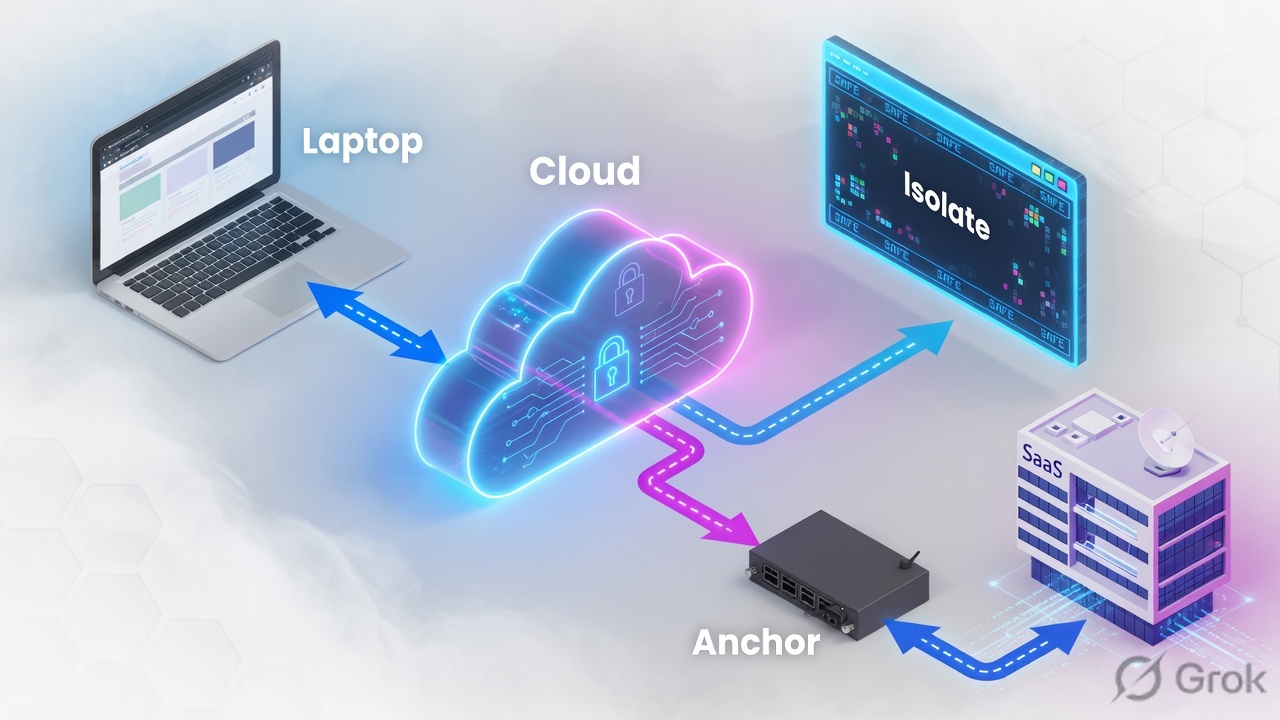
Inspect-in-PSE is the default: ZIA inspects at a Public Service Edge and the destination sees a Zscaler egress IP. Isolate (Zero Trust Browser / CBI) is a URL Filtering or Cloud App Control action — the request is redirected to an Isolation Profile URL, a remote browser fetches the page, and the user gets a rendered stream. Active content stays off the endpoint. SIPA does not skip ZIA. After inspection, Forwarding Control with Forwarding Method = ZPA sends the already-inspected session through a ZPA App Connector whose Source IP Anchor flag is on, so the destination sees your connector IP. CBI is a content / endpoint problem. SIPA is a source-IP problem. They compose; they do not replace each other.
1. Why two last hops exist
ZIA + ZPA already inspect, authenticate, and broker private apps. Production still hits two walls that “Allow at the Public Service Edge” cannot answer.
Wall 1 — the endpoint is untrusted. A contractor on a personal Mac must read Newly Registered Domains or Miscellaneous & Unknown. You do not own the laptop. Block kills the work. Allow puts active HTML and JavaScript on a device with no EDR. Isolate is the third verdict: yes, but rendered in a disposable remote browser.
Wall 2 — the destination trusts source IPs. Workday, a bank API, or Microsoft 365 Conditional Access will only accept logins from a short corporate allow-list. Default ZIA egress is a large, shared Public Service Edge pool. No SaaS admin will whitelist that. SIPA changes the last hop so the destination sees the App Connector IP you control.
CBI / Zero Trust Browser
Product name in current Help is Zero Trust Browser (formerly Isolation / Cloud Browser Isolation). Interviews still say CBI. The policy action is Isolate.
SIPA
Source IP Anchoring is a ZIA + ZPA feature. Help also files it under Customer-Managed Dedicated IP. The on-switch is the Source IP Anchor checkbox on an Application Segment.
2. Mental model — three paths, two problems
Pre-train these words before you open Admin.
- Inspect-in-PSE — user → Public Service Edge → destination. SSL Inspection, URL Filtering, DLP, Sandbox all run. Destination sees a Zscaler IP from the cloud’s published ranges.
- Isolate — URL Filtering (or Cloud App Control) matches, action is Isolate, an Isolation Profile is attached. Help: the HTTP/HTTPS request is redirected to the isolation profile URL. The remote browser fetches the origin. The user’s tab is a viewport.
- SIPA — same ZIA inspection first. Then Forwarding Control Forwarding Method = ZPA sends the session to a ZPA Gateway and a Source-IP-Anchored Application Segment. The App Connector egresses. Destination sees that connector’s IP.
Isolate answers “can active content touch this laptop?” SIPA answers “which source IP does the destination see?” Inspect-in-PSE is the default when both answers are already acceptable.
Read left → right. Inspection is not optional on SIPA. Isolate changes what the laptop receives. SIPA changes what the destination records as source.
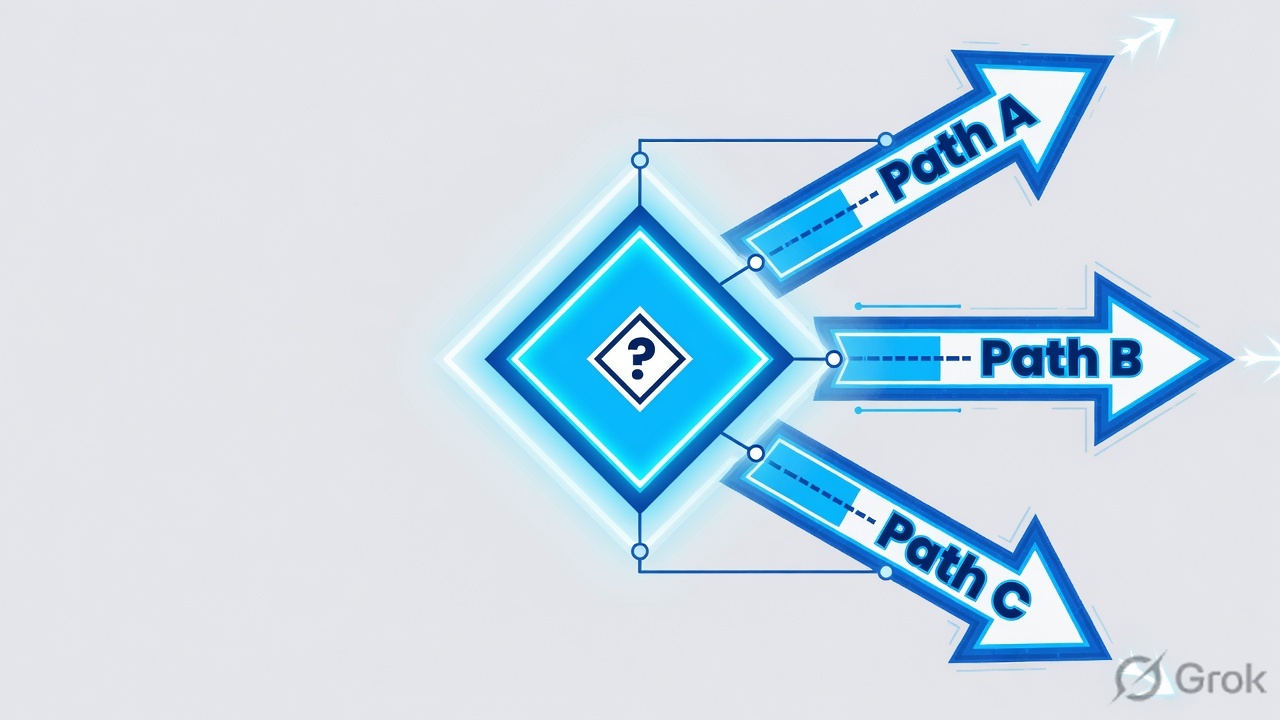
3. Decision flow — ask two questions
The flowchart is the lesson. Prose only names the diamonds.
Diamond = decision. If both diamonds are yes, stack Isolate and SIPA. Do not turn Isolate into a fake IP allow-list.
4. How to choose — Isolate vs SIPA vs inspect-in-PSE
Help names three different objects. Interviews fail when someone calls Dedicated Proxy “SIPA” or calls Isolate “a proxy.”
| Situation | Prefer | Last hop the destination / laptop sees | Do not use when |
|---|---|---|---|
| Risky or unknown web on a managed or unmanaged device; you need a third verdict between Allow and Block | Isolate (Zero Trust Browser / CBI). URL Filtering or Cloud App Control action Isolate + Isolation Profile. | Laptop sees a rendered isolation session. Origin HTML/JS stays in the remote browser. Destination still sees the isolation farm / Zscaler fetch, not “pixels as source IP.” | The app is sanctioned SaaS-of-record, banking OTP, Jira/Confluence multi-tab, Zoom/Teams/WebRTC, or an IdP login you have not exempted. Isolate is also a paid add-on — do not Isolate Social Media for the whole company. |
| Destination has a short IP allow-list, Conditional Access named locations, or a compliance rule that egress must be a customer-owned IP | SIPA. Application Segment with Source IP Anchor + ZIA Forwarding Control Forwarding Method = ZPA. | Destination sees the App Connector’s public IP (your NAT / EIP). ZIA still inspected the session. | You try to SIPA “all internet.” You define the segment as a raw IP when Help wants FQDN for that app type. You also enable Browser Access or Double Encryption on the same segment. |
| Normal internet. Destination accepts Zscaler IPs. Content is not so risky that you need a remote browser | Inspect-in-PSE. Default Allow / Caution / Block at the Public Service Edge. SSL Inspection + URL / Cloud App / DLP / Sandbox as usual. | Destination sees a Zscaler Public Service Edge IP from the published cloud ranges. | The SaaS admin already sent “give me your four corporate IPs,” or the device cannot be trusted with native active content. |
| Contractor on BYOD must use your Workday, and Workday only allows corporate IPs | Isolate + SIPA stacked. Isolate the user experience; SIPA the fetch toward Workday. | Laptop gets pixels. Workday sees the App Connector IP. | You pick only one tool and hope. Isolate does not create a stable corporate IP. SIPA does not air-gap the laptop. |
| You need a Zscaler-owned reserved egress IP, not a connector in your VPC | Dedicated IP (Forwarding Method that Help / Terraform call dedicated-IP / ENATDEDIP). Separate SKU. |
Destination sees a Zscaler-provisioned dedicated IP, not your App Connector. | You call this SIPA in an interview. SIPA’s last hop is the customer App Connector. |
Help’s M365 SIPA article: you typically only need to anchor the initial login hosts — login.microsoftonline.com, login.windows.net, login.microsoft.com. After the token is issued, bulk M365 traffic does not need the corporate IP. Keep the Application Segment that narrow or you pay latency on every SharePoint download.
5. Mini runbook — Side A destination, Side B product, Side C exemptions
Goal: one Isolation Profile + one Isolate rule for risky web, and one SIPA chain for a named SaaS. Source for Isolate: Help What Is Zero Trust Browser?, Creating Isolation Profiles for Internet & SaaS, Configuring Internet & SaaS for Zero Trust Browser, Configuring the URL Filtering Policy. Source for SIPA: Help Understanding Source IP Anchoring, Configuring Source IP Anchoring, Configuring Forwarding Policies for Source IP Anchoring using ZPA.
Side A — destination and connector first
-
Confirm the ticket is a source-IP problem
Ask the SaaS admin for the exact allow-list UI (Workday IP restriction, Microsoft Entra named location, bank API ACL). If they do not have one, you do not need SIPA.
-
Place App Connectors that already egress from the IPs you will publish
SIPA’s destination-visible IP is the App Connector’s egress (your NAT Gateway / EIP). Collect every connector in the group — primary and failover. The SaaS allow-list must include all of them.
-
Do not confuse three similarly named features
SIPA = Source IP Anchor + Forwarding Method ZPA. Dedicated IP = Zscaler-provisioned dedicated egress. Surrogate IP = map a private client IP to an authenticated user for policy. Only the first one answers “Workday must see 203.0.113.10.”
Side B — product: Isolate, then SIPA
Policies → Common Configuration → Resources → Browser Isolation Threat → Isolation Profiles → Add Isolation Profile
Add Isolation Profile
Help field names: Allow Copy & Paste From, Allow File Transfers From, Isolation Banner, Isolation Experience, Read-Only Mode, Persist Browser Isolation URL bar. Older tenants: Administration → Secure Browsing → Browser Isolation.
Next: attach this profile on a URL Filtering rule whose action is Isolate. Source: Creating Isolation Profiles for Internet & SaaS.
-
Create the Isolation Profile
Current Help path: Policies → Common Configuration → Resources → Browser Isolation Threat → Isolation Profiles → Add Isolation Profile. Set Allow Copy & Paste From and Allow File Transfers From to the tightest setting the use case still allows. Turn Read-Only Mode on when the user should only view. Isolation Banner tells the user they are isolated — use it when silent Isolate would confuse them.
-
Create the Isolate URL Filtering rule above conflicting Allow/Block
Path: Policy → URL & Cloud App Control → Add URL Filtering Rule. Action Isolate. Isolation Profile = the one you just saved. Typical categories: Newly Registered Domains, Miscellaneous & Unknown, suspected phishing. Help auto-creates a Miscellaneous & Unknown isolate rule and leaves it disabled — do not assume it is live. First-match wins: an Allow or Block above this rule means Insights will never show Isolate.
Policy → URL & Cloud App Control → Add URL Filtering Rule
Add URL Filtering Rule
Isolate appears only if Cloud Browser Isolation / Zero Trust Browser is entitled. Isolation Profile is required once Isolate is selected. Cloud App Control can Isolate the same way.
Next: activate, then browse a Misc & Unknown URL as the pilot user and confirm Web Insights Action = Isolate. Source: Configuring the URL Filtering Policy · Configuring Internet & SaaS for Zero Trust Browser.
-
SIPA Application Segment — Source IP Anchor on, Bypass = Use Client Forwarding Policy
In the ZPA Admin Portal create the Application Segment for the SaaS FQDNs. Enable Source IP Anchor. Set Bypass to Use Client Forwarding Policy. Do not also enable Browser Access, Double Encryption, or Multimatch Inclusive — Help treats those as mutually exclusive with SIPA.
-
Client Forwarding Policy + Access Policy (domain-based pattern)
Domain-based Help pattern: one Client Forwarding rule Bypass ZPA for the SIPA segment groups, client types except ZIA Service Edge. Second rule Forward to ZPA for client type ZIA Service Edge only. Access Policy: Allow Access for ZIA Service Edge to that segment. Do not add user / group / SAML / SCIM criteria on the ZPA Access Policy — ZPA sees the ZIA Service Edge as the client, not priya@example.com. Scope users on the ZIA Forwarding Control rule instead.
-
ZIA ZPA Gateway + Forwarding Control Method = ZPA
Create the named ZPA Gateway (Administration → ZPA Gateway). Then Policy → Forwarding Control → Add Rule: Forwarding Method = ZPA, Application Segment = the SIPA segment, Forward to ZPA Gateway = the gateway you just created. Match users/locations here.
-
DNS Control — ZPA Resolver order
Enable the preconfigured ZPA Resolver for Road Warrior and ZPA Resolver for Locations. Road Warrior must sit above Locations. If DNS for the SIPA FQDN leaves Zscaler (for example 8.8.8.8), the client never gets the ZPA synthetic IP and SIPA fails silently. Z-Tunnel 1.0 / PAC road warriors also need Administration → Advanced Settings → Enable Firewall for Z-Tunnel 1.0 and PAC Road Warriors.
Application Segments → Add Application Segment · then ZIA Policy → Forwarding Control
Application Segment · SIPA
Placeholder FQDN only. Help: enable Source IP Anchor and Use Client Forwarding Policy. Access Policy allows ZIA Service Edge — not a copy of your ZIA user list.
Next: enable both ZPA Resolver DNS rules, allow-list every App Connector egress IP on Workday, then prove the destination-seen IP. Source: Configuring Source IP Anchoring.
Side C — exemptions and file access
-
Do not Isolate the IdP, the SaaS of record, or real-time media
Leave Microsoft / Okta login hosts, Workday/Jira/ServiceNow of record, and Zoom/Teams/WebRTC on inspect-in-PSE (or SIPA if the destination requires it). Isolating an IdP can hairpin SAML the same way an un-exempted PAC does.
-
File access from an isolated page needs a URL Filtering exception
Help Transferring and Viewing Files in Isolation: to open files from an Internet & SaaS isolation profile you must configure a URL Filtering exception. Without it, users report “download does nothing.”
-
SIPA allow-list every connector IP, then stop
Publish primary and failover App Connector egress IPs to the SaaS admin. Do not SIPA the rest of the internet. Keep DNS for those FQDNs on Zscaler.
ip.zscaler.com shows a Public Service Edge IP for ordinary ZIA traffic. A SIPA’d destination is the only place that will record the App Connector IP. If you did not put that “what is my IP” host in the SIPA segment, the page will still show a Zscaler IP — and you will file a false incident.
6. Runtime path after go-live
Once both policies are active, a single user request takes one of these three wires. Isolation can sit in front of a SIPA fetch: the remote browser is the client that ZIA then forwards through the App Connector.
Path C never skips the Public Service Edge. If Isolate and SIPA are stacked, row B’s remote browser is the client that then walks row C toward the SaaS.
7. Traps + proof in logs
| Symptom | Likely cause | First check |
|---|---|---|
| Web Insights shows zero Isolate hits; users still get native pages | A higher URL Filtering or Cloud App rule already Allow / Block / Caution. Or the auto Misc & Unknown isolate rule is still disabled. | Analytics → Web Insights → Logs. Filter the URL. Read Policy / Action on the first match. Move Isolate above the conflicting rule. |
| User can see the isolated page but cannot download or preview a file | No URL Filtering exception for file access from isolation. | Help: Transferring and Viewing Files in Isolation. Add the exception, then retest with the same Isolation Profile. |
| OTP paste into an isolated bank login fails; user says “the bank is broken” | You Isolated a category that should have stayed inspect-in-PSE. Copy/paste is governed by Allow Copy & Paste From on the profile. | Remove banking / IdP from Isolate. Do not “fix” it by opening copy-out on a risky-web profile. |
| Workday / M365 CA blocks every user after a connector failover | SaaS allow-list has only the primary App Connector IP. | Compare the destination’s last-login IP to the full connector group. Add failover NAT/EIPs. This is not a ZIA URL issue. |
| ZIA Forwarding Control matches, ZPA still denies SIPA | Access Policy requires SAML user/group, or it does not allow client type ZIA Service Edge. Or Source IP Anchor is off. | ZPA Diagnostics + Access Policy. Strip user criteria. Allow ZIA Service Edge only. |
| Road warriors egress from the wrong IP; office users look fine | ZPA Resolver for Road Warrior disabled or sitting below Locations. Or client DNS bypasses Zscaler. | DNS Control rule order. Confirm the SIPA FQDN resolves through ZIA, not 8.8.8.8. |
- Isolate: Analytics → Insights → Web Insights Logs. Transaction for the pilot URL shows Action = Isolate, the URL Filtering rule name, the Isolation Profile, and the username. The user’s View Source is the isolation viewport, not the origin HTML.
- Inspect-in-PSE: same log view, Action is Allow / Block / Caution (not Isolate). Client IP / server-side source is a Zscaler Public Service Edge address.
- SIPA: ZIA log shows the Forwarding Control rule and Forwarding Method ZPA. ZPA Diagnostics shows the App Connector healthy. The SaaS admin’s last-login / named-location IP equals the connector NAT (example 203.0.113.10), not a Zscaler CENR address. A non-SIPA control user to the same app still shows a Zscaler IP.
- Stacked: Isolate log for the contractor tab and Workday last-login = connector IP on the same test.
Weak interview answer
“CBI is a proxy and SIPA is four dedicated Zscaler IPs.” That mixes Isolate with inspect, and SIPA with Dedicated IP.
Strong interview answer
“Isolate redirects to an Isolation Profile so active content never reaches the endpoint. SIPA inspects at the PSE then egresses from a Source-IP-Anchored App Connector. I prove Isolate with Action Isolate, and SIPA with the destination-seen IP.”
Knowledge check
Six judgment items. Pick one option each, then Check answers. Reasons point back to the section to re-read.
Sources
- What Is Zero Trust Browser? — Isolate redirect to the Isolation Profile URL.
- Creating Isolation Profiles for Internet & SaaS — Allow Copy & Paste From, Allow File Transfers From, banner / experience.
- Configuring Internet & SaaS for Zero Trust Browser — URL Filtering rule that forwards to isolation.
- Configuring the URL Filtering Policy — Action Isolate, Isolation Profile, Cloud Browser Isolation group.
- Understanding Isolation of Miscellaneous & Unknown Category in ZIA — auto-created, disabled-by-default isolate rule.
- Transferring and Viewing Files in Isolation — URL Filtering exception for files.
- Read-Only Mode in Isolation.
- Configuring Smart Browser Isolation Policy — separate AI/ML isolate policy.
- Understanding Source IP Anchoring.
- Configuring Source IP Anchoring — Source IP Anchor + Use Client Forwarding Policy.
- Configuring Forwarding Policies for Source IP Anchoring using ZPA — Forwarding Method = ZPA.
- Configuring Source IP Anchoring for Microsoft 365 Conditional Access — login-host scope.
- Understanding Source IP Anchoring Direct — DR variant; revert manually.
- Customer-Managed Dedicated IP (Source IP Anchoring) — Help category that houses SIPA.
- Web Insights Logs: Columns — Action and policy fields for proof.
Related: URL Filtering & Cloud App Control · SSL Inspection · ZPA App Connectors · ZPA policies & app segments · Logs & ZDX · Authentication — identity before policy