Start here · understand the lesson before the detail
What you are learning
This lesson explains two connected but different jobs: authentication proves who the user is, while deployment puts Client Connector and the correct profiles on the device.
In plain English
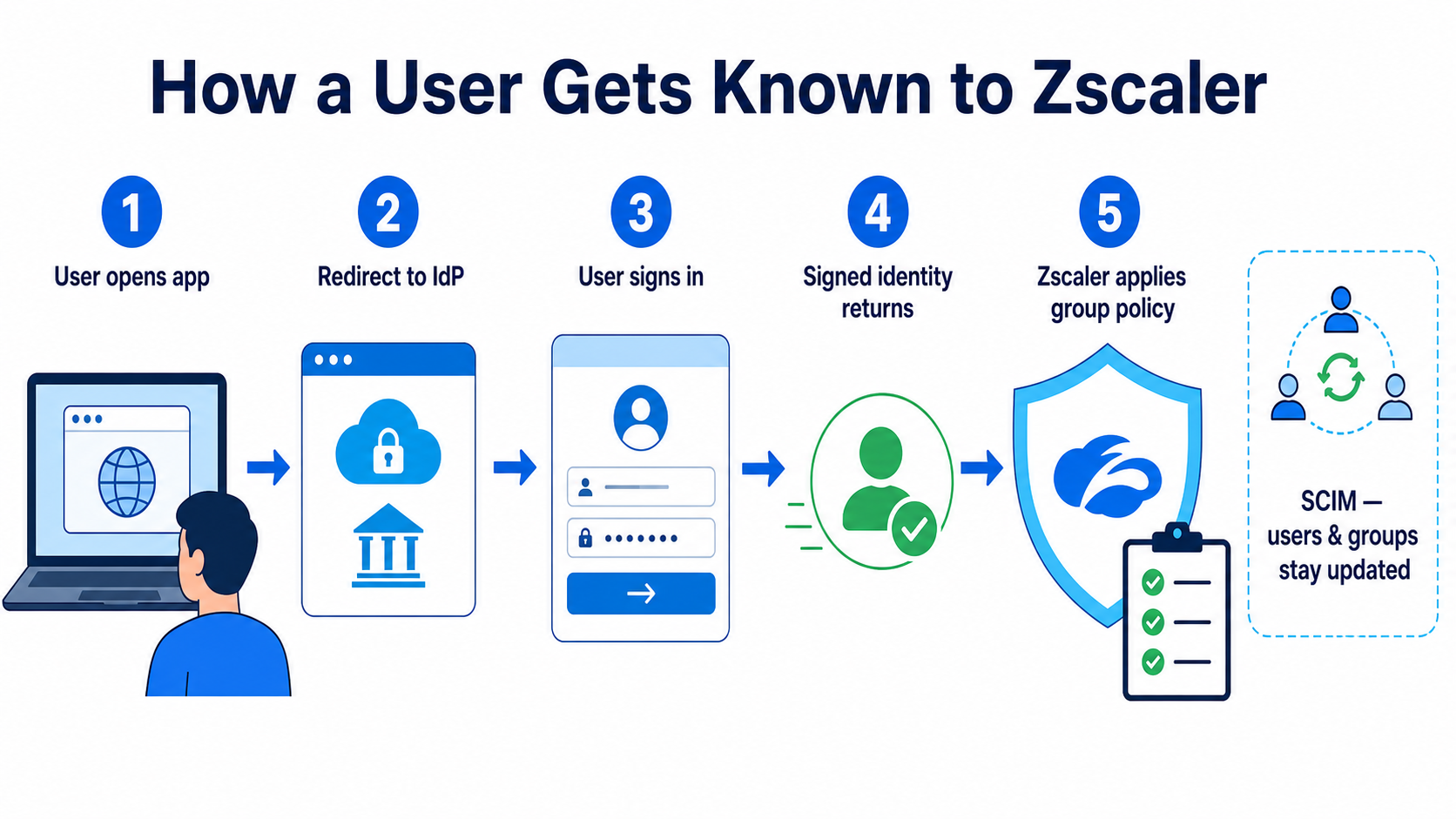
SAML lets Zscaler rely on an enterprise identity provider such as Microsoft Entra ID or Okta. SCIM keeps users and groups synchronised. Client Connector deployment then gives the endpoint the forwarding and posture profiles needed for traffic steering.
Real example
A user can sign in successfully but receives the wrong web policy. Authentication worked; the issue may be a missing group claim or stale SCIM membership. Reinstalling Client Connector would treat the wrong layer.
Follow this flow
- The user requests a Zscaler-protected service.
- Zscaler redirects the browser to the identity provider.
- The identity provider authenticates the user and signs an assertion.
- Zscaler validates the assertion and maps groups.
- Client Connector receives the appropriate app, forwarding, and posture profiles.
Evidence to collect
- SAML assertion issuer, audience, and signature
- User and group mapping in Zscaler
- SCIM provisioning status
- Client Connector profile assignment
Common mistake to avoid
Do not confuse authentication with provisioning. SAML proves identity during sign-in; SCIM creates, updates, and disables directory objects. JIT-only designs can leave stale accounts when employees leave.

Key terms before you continue
Pick where you want to start
Why this lesson matters
Without identity, ZIA can only apply Location policy — the lowest-resolution control. Identity unlocks per-user, per-group, per-department policy: "engineers can access GitHub, marketing can't access Reddit, the CFO bypasses bandwidth caps." Identity is also what lets ZPA replace VPN — every per-app access decision is keyed on the user's IdP identity + group membership, not on a network port.
Getting auth wrong has loud failure modes: users see the wrong policy (security incident), or they hit a SAML loop (helpdesk floods), or new joiners can't log in for days (HR escalates). Auth is the spine — get it right once, everything downstream gets easier.
Three authentication methods — quick compare
| Method | Who manages users | When to use | Downside |
|---|---|---|---|
| Hosted DB | Zscaler (local user store in the CA) | PoC, lab, very small orgs (<50 users) | Manual user mgmt — no SSO, no group sync. Doesn't scale. |
| SAML SSO | Your IdP (Azure AD / Okta / Ping / ADFS) | 99% of enterprises — the default | Initial setup is the trickiest 30 minutes of any rollout |
| Kerberos | Active Directory (on-prem) | Strictly on-prem Windows estates already AD-joined | Brittle behind proxies; cloud-IdP era killed Kerberos use |
If you're starting a fresh rollout in 2026, the answer is SAML. Hosted DB is for labs. Kerberos is legacy — don't introduce it now.
A 3000-user enterprise already runs Azure AD for everything else and wants SSO plus group-based policy. Which authentication method do you pick?
SAML — the assertion walkthrough
SAML feels mystical until you've walked one assertion. Then it's mechanical. Here's exactly what happens when a user types http://gateway.zscaler.net (the ZIA enforcement URL) into a fresh browser:
What's in a SAML assertion
The XML SAML Response payload is what makes auth actually mean something. Boiled down it carries:
- NameID — the user identifier (typically email, e.g.
ram.dixit@techclick.in) - Issuer — the IdP's URL (e.g.
https://sts.windows.net/<tenant-id>/) - AudienceRestriction — must match ZIA's EntityID, or ZIA rejects it
- NotBefore / NotOnOrAfter — assertion validity window (usually 5 min)
- AttributeStatement — the custom attributes you sent (groups, department, employee ID, etc.)
- Signature — X.509-signed by the IdP's private key
ZIA reads the AttributeStatement to map the user to groups / departments / policies. Get the attribute names wrong in the IdP config and group-based policies silently break.
▶ Watch one SAML login travel ZIA ↔ Azure AD
A user hits gateway.zscaler.net with a fresh browser. Press Play for the healthy SP-initiated flow, then Break it to see the Monday-morning cert-rotation SAML loop — and the fix.
gateway.zscaler.net. ZIA (the SP) has no session yet, so it must establish identity before any traffic is allowed.302 redirect carrying a SAML AuthnRequest (Issuer = ZIA EntityID, ACS = ZIA's URL) to login.microsoftonline.com.In the SP-initiated flow above, who actually signs the SAML assertion, and who validates the signature?
Configuring Azure AD as the ZIA IdP — step-by-step
1. Enterprise Applications → New Application → Browse the gallery
2. Search "Zscaler" → "Zscaler ZIA - Service Provider" template
3. Single sign-on → SAML
4. Basic SAML Configuration:
   Identifier (Entity ID):  https://login.zscaler.net  (or your cloud)
   Reply URL (ACS):         https://login.zscaler.net/sfc_sso
   Sign on URL:             https://login.zscaler.net

5. User Attributes & Claims:
   - emailaddress  →  user.mail
   - displayname   →  user.displayname
   - department    →  user.department
   - memberOf      →  user.assignedroles  (or send groups as user.groups)

6. SAML Signing Certificate → Download Federation Metadata XML

7. Users and groups → assign the AD groups that should get Zscaler

8. In ZIA Admin Portal:
   Administration → Authentication → SAML →
   Upload IdP Metadata XML → Auto-Provisioning ON
   → Save → Activate
Many engineers create separate Azure AD enterprise apps for ZIA and ZPA. You don't have to. The same SAML app can serve both — set up the ZIA SP first, then add ZPA's ACS URL as a second Reply URL in the same app. Users get one consent screen, one set of group assignments, one place to audit. Cleaner ops, simpler audit.
Modern path: use the Federation Metadata URL instead of uploading static XML. In Azure AD, the URL is https://login.microsoftonline.com/{tenant}/federationmetadata/2007-06/federationmetadata.xml (Okta and Ping have equivalent URLs). Paste that URL into ZIA's SAML config — ZIA polls it on a schedule and auto-rotates the IdP signing cert. Eliminates the "old cert in metadata → SAML loop on Monday morning" failure entirely, which is otherwise the #1 SAML incident pattern.
SCIM provisioning vs JIT — pick one
When a user appears in Azure AD, how do they appear in ZIA? Two answers:
- JIT (Just-In-Time) — the user is created in ZIA's internal DB the first time they log in via SAML. Group attributes from the assertion populate their ZIA profile.
- SCIM — Azure AD pushes user + group changes to ZIA in real time via SCIM 2.0 (System for Cross-domain Identity Management). Users exist in ZIA before they ever log in.
| Aspect | JIT | SCIM |
|---|---|---|
| Setup effort | Zero (just turn on Auto-Provisioning) | Configure SCIM endpoint + secret token in Azure AD |
| De-provisioning | Manual (user lingers in ZIA until you clean up) | Automatic — disable in IdP → disabled in ZIA in <1 min |
| Pre-creation | No — user must log in once first | Yes — onboard new joiners before day 1 |
| Group sync | Each login refreshes group membership from assertion | Real-time as soon as IdP group changes |
| Best for | Small orgs, fast PoC | Production at scale — pretty much mandatory >500 users |
SCIM is the production answer. JIT alone leaves dead accounts in your tenant when employees leave — both a security and licensing problem.
You're at 800 users today and expect 5000 within 18 months. Which provisioning model do you set up now, and why?
Auth Frequency (Administration → Authentication Settings → Authentication Frequency) controls how often a user re-authenticates: Daily / Weekly / Monthly / Per Session. Default is Monthly. This is the #1 cause of "I keep getting asked to log in" help-desk tickets — usually because someone bumped it to Daily or Per Session "for security" without thinking about the UX hit. Tune it deliberately: most enterprises live happily on Monthly with TOTP-backed SAML.
ZIdentity — the unified identity layer
ZIdentity is Zscaler's unified identity layer that sits between your IdP and all Zscaler products (ZIA, ZPA, ZDX, ZCC). As of late 2025 it's the default for new tenants and mandatory for new features like ZDX 2.0 and Branch Connector. Old SAML-per-app config still works for legacy tenants — but new builds should adopt ZIdentity from day 1. Without it, each product separately consumes the IdP (three SAML apps in Azure AD, three audit trails). With it, the IdP integrates once and ZIdentity brokers identity to every Zscaler product.
Practical reasons to enable ZIdentity:
- Single SAML setup in Azure AD instead of 2–3
- Unified group/role sync — one SCIM endpoint, not per-product
- Consistent posture context across ZIA and ZPA decisions
- Required for some newer Zscaler features (Branch Connector, ZCloud Connector with identity-aware rules)
ZCC enrollment — how the agent knows who you are
You can't have identity-bound forwarding (Lesson 3) without ZCC knowing who its user is. ZCC enrolment is what binds the local agent to a specific IdP identity. Two enrolment modes:
Mode A — Manual / user-driven
User downloads ZCC, opens it, types their email. ZCC redirects to your IdP login (SAML), user signs in, ZIdentity issues a long-lived enrolment token tied to that user. Token survives reboots, expires per policy (default 180 days; configurable 7–365 days in Administration → ZCC Portal → Enrollment).
Mode B — Auto-enrol via Intune / Jamf / SCCM (the production way)
Push ZCC via MDM with the enrolment payload baked in:
msiexec /i Zscaler-windows-3.x.msi /qn ^
  CLOUDNAME=zscalerthree.net ^
  POLICYTOKEN=<tenant-policy-token-from-ZCC-portal> ^
  USERDOMAIN=techclick.in ^
  HIDETRAY=0 ^
  STRICTENFORCEMENT=1 ^
  CLEANUNINSTALLPASSWORD=<long-random-string> ^
  LOGINPASSWORD=<uninstall-guard-password>
LOGINPASSWORD=<password> — uninstall guard, required in modern ZCC, prevents end-user uninstall via Add/Remove Programs even if the user is local admin. Pair with CLEANUNINSTALLPASSWORD for the silent MSI uninstall path.
On first launch, ZCC reads the embedded policy token, contacts ZCC Portal, and silently exchanges the token for a SAML-backed enrolment using the logged-in Azure AD user. No user input. Zero help-desk tickets if the MDM payload is correct.
The MSI parameter STRICTENFORCEMENT controls whether ZCC blocks all traffic until enrolment completes. Engineers leave it at 0 ("permissive") during testing and forget to flip it to 1 for production. Result: a savvy user kills the ZCC process and gets unfiltered internet. Always ship with STRICTENFORCEMENT=1 in production — combined with CLEANUNINSTALLPASSWORD so the agent can't be removed without your password.
The mass-deployment SVG — fleet rollout in 3 lanes
Real-world scenario — SAML loop after Azure AD config change
Monday morning. The Azure AD team rotates the SAML signing certificate as part of their quarterly rotation. By 10:00 AM the help desk is on fire: "I keep getting redirected to Microsoft login and back to ZIA forever — infinite loop."
Diagnostic path:
- Open one of the broken sessions in DevTools → Network. You see SAML POST → 302 → ZIA → redirect to IdP → POST → 302 → ZIA. Loop confirmed.
- Check the SAMLResponse from the IdP — copy from network tab, decode the Base64 payload at
samltool.com. - Notice the assertion is signed with a new cert (thumbprint changed). ZIA still has the old IdP cert in its metadata.
- Fix: ZIA Admin Portal → Administration → Authentication → SAML → upload fresh IdP Metadata XML → Activate.
- Validate one test user — login succeeds first try.
The full fix is <5 minutes once you've seen this pattern once. The lesson: when your IdP rotates certs, the SP must re-import metadata, full stop. Set a Slack/email alert from your IdP team when they rotate, and re-upload metadata the same day. (Even better: use the Federation Metadata URL — see the Pro Tip earlier — and ZIA auto-rotates.)
Exact error strings to grep for: in the IdP logs you'll typically see NotOnOrAfter condition violated (assertion came in after its expiry window) or NotBefore condition not yet met (SP clock is behind the IdP). Both point to clock skew or cert/metadata drift. Search those exact phrases in your SIEM during a SAML incident.
After IdP setup:
- Hit
https://ip.zscaler.comin a clean browser. The page now shows your authenticated email (e.g.Authenticated: ram@techclick.in). - In ZIA Insights → Web, filter by your user — your test traffic appears with your identity, not "Anonymous".
- Use samltool.io on captured SAML responses to validate signature, audience, and attribute values.
- IdP metadata not re-imported after cert rotation → SAML loop. Set a Slack alert when IdP rotates.
- Group attribute name mismatch — IdP sends
groups, ZIA expectsmemberOf. Group-based policies silently fail. Always test one user in a target group and verify Insights shows the right department. - JIT-only in a 2000-user org — leavers stay in ZIA forever. Add SCIM before you hit 500 users.
- STRICTENFORCEMENT=0 in prod — users can disable ZCC and escape. Always 1.
- Per-product IdP apps instead of one shared app — three audit trails, three places to mess up. Use one app for ZIA+ZPA or move to ZIdentity.
- Time skew between IdP and ZIA — assertions have a
NotBefore/NotOnOrAfterwindow (usually 5 min). If the SP's clock drifts more than that, assertions are rejected as expired. Both sides on NTP.
📌 Quick reference (memorise before Module 5)
- 3 auth methods: Hosted DB · SAML · Kerberos. Production answer in 2026 = SAML.
- SAML flow: User → ZIA → 302 to IdP → IdP login → signed SAMLResponse → POST to ZIA ACS → session created.
- Assertion fields that matter: NameID · Issuer · AudienceRestriction · NotBefore/NotOnOrAfter · AttributeStatement (groups/dept) · Signature.
- One Azure AD app for ZIA + ZPA — saves audit + group-mgmt overhead. ZIdentity makes it even cleaner.
- JIT vs SCIM: JIT = create on first login (small/PoC). SCIM = real-time bidirectional (production >500 users).
- ZIdentity = unified identity broker — one IdP integration for all Zscaler products.
- ZCC mass-deploy via Intune (Windows MSI), Jamf (mac PKG), SCCM, or MDM. Silent install with embedded policy token.
- Always production settings:
STRICTENFORCEMENT=1+CLEANUNINSTALLPASSWORDset. - SAML loop = re-import IdP metadata (cert rotation). 5-minute fix once you've seen it.
- NTP both sides — clock skew breaks assertions.
Set up SAML SSO for your tenant:
- In Azure AD: create an Enterprise Application from Zscaler ZIA template. Copy the Federation Metadata URL.
- In ZIA Admin → Authentication Settings → SAML: paste the metadata URL (not XML upload). Save.
- Provision a test user, assign to the Zscaler app in Azure.
- From a clean browser, navigate to
gateway.zscaler.net→ should redirect to Azure → return signed in. - Check ZCC Portal → Enrollment → see the user's enrolled device with cert valid 180 days.
🔑 Lock in the key terms — tap to flip
Browser-based SSO where the IdP (Azure AD / Okta / Ping) signs an assertion and the SP (ZIA) validates it with the IdP's metadata cert. The production auth method for 99% of enterprises.
System for Cross-domain Identity Management — the IdP pushes user and group changes to ZIA in near-real-time. Pre-creates joiners and auto-disables leavers. Mandatory past ~500 users.
Zscaler's unified identity broker between your IdP and every Zscaler product (ZIA, ZPA, ZDX, ZCC). One SAML integration instead of 2–3. Default for new tenants, required for newer features.
Binds the local Client Connector to one IdP identity. User-driven (type email → SAML login) or auto via MDM with an embedded policy token. Ship STRICTENFORCEMENT=1 + uninstall password in prod.
🤖 Ask the AI Tutor
Tap any question — instant, scoped to this lesson. The exact framing an interviewer wants to hear.
Pre-curated from Zscaler docs + interview Q&A, scoped to this lesson. For a live tenant issue, paste your decoded SAML response into chat.techclick.in.
📝 Check your understanding
10 scenario questions — interview + ZDTA exam depth. Pick one answer per question. You need 70% (7 of 10) to mark this lesson complete on your profile.
What's next — Lesson 5
Forwarding gets traffic in, auth identifies the user. Next: URL Filtering & Cloud App Control — the policies that actually shape what users can and can't do. URL categories, custom URLs, time quotas, sanctioned vs unsanctioned SaaS, and how ZIA evaluates rules in order.