The Central Authority (CA) is the control plane: policy, config, software, threat feeds. It is not on the live data path. The Public Service Edge (PSE) is the data plane: it identifies the Location or user, decrypts if SSL Inspection says so, runs Single-Scan, Multi-Action (SSMA), then opens its own connection to the destination. A compressed log copy leaves over TLS to a Log Router, then a Nanolog cluster. A subcloud is a named subset of PSEs — use it when residency says “only these edges.” Saved Admin changes stay PENDING until Activation → Activate.
1. Why the hop map matters
Lesson 1 placed Zscaler on the map. This page opens the box. Every “YouTube should be blocked” ticket is the same sentence: is the right activated policy on the Service Edge that actually received this user?
If you put the CA on the wire, you will reboot laptops while a staged URL rule sits unactivated. If you treat Nanolog as enforcement, you will chase a logging gap while the user is already on the internet. If you ignore Location, an ISP swap turns the branch into an unknown / Road Warrior source with the default bundle.
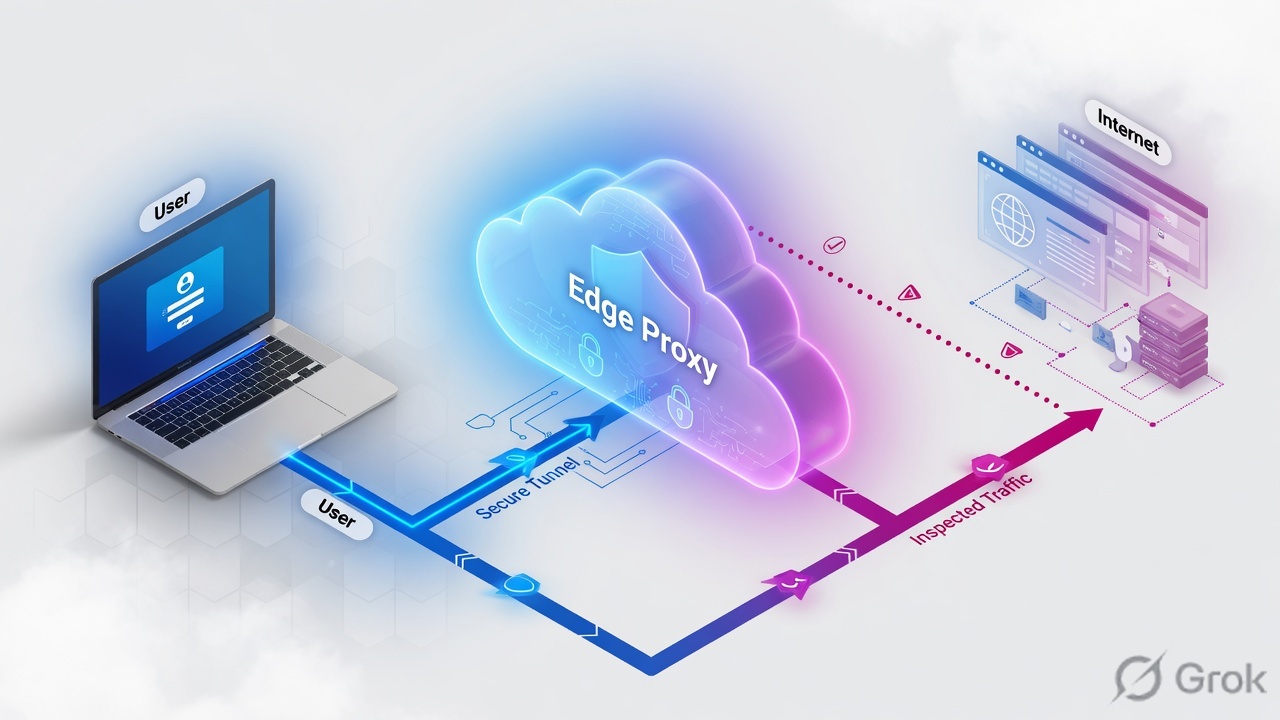
ZIA is a full proxy, not a router with an ACL. The client’s next hop is a Service Edge selected by forwarding + geo-IP (and any subcloud). The destination sees a Zscaler egress IP, not the laptop.
2. Mental model — three planes
Official Help names three cloud components: Central Authority, Public Service Edges for Internet & SaaS, and Nanolog clusters. Everything else either feeds those planes or constrains which edge you may land on.
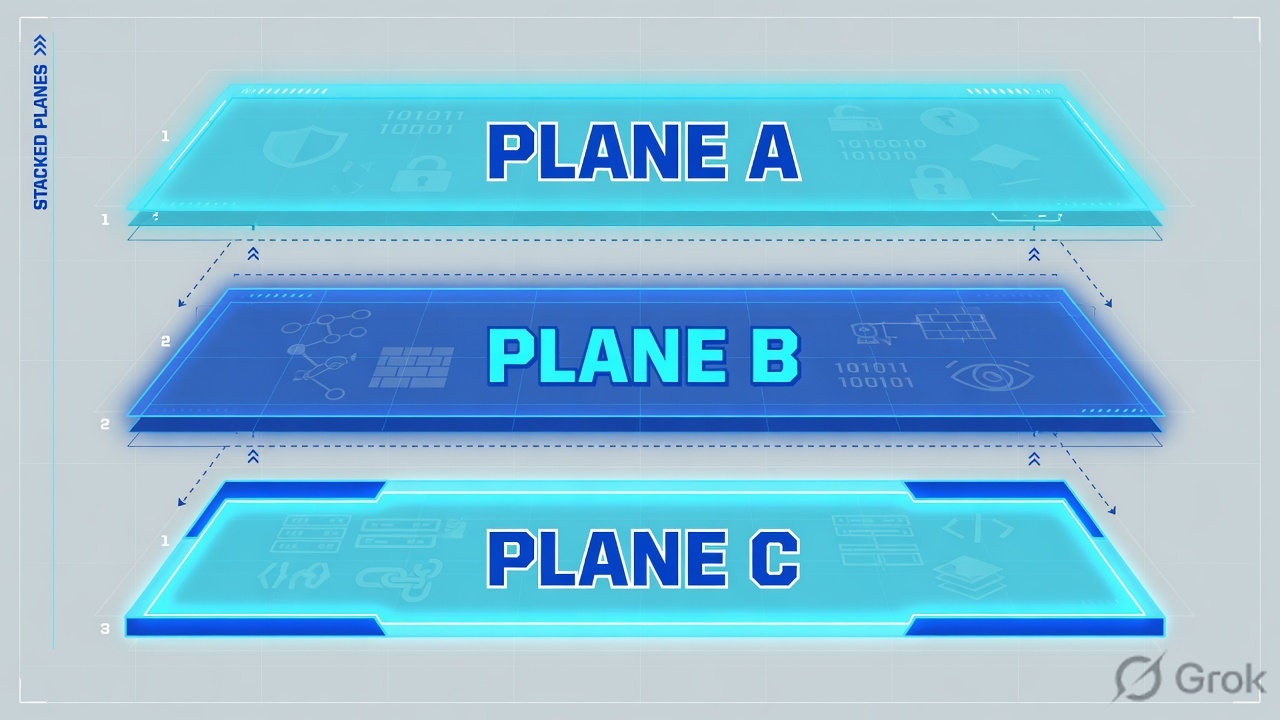
Central Authority — write plane
Brain and nervous system of the cloud. Holds policy, config, software updates, and threat intel. One active node plus two passive standbys in separate sites. Accepts Admin / API writes. Never inspects the user session.
Public Service Edge — run plane
Full-featured secure internet gateway in a Zscaler data center. Identifies Location or user, runs SSL Inspection + SSMA, egresses to the destination. Customer traffic stays on the edge — it is not forwarded to the CA or Nanolog. Nothing written to disk on the edge.
Nanolog — log plane
Stores compressed, tokenized transaction logs and serves Insights / reports. Topology mirrors the ZIA CA: one active + two standbys. NSS / Cloud NSS streams from here to your SIEM. A Nanolog outage does not stop enforcement.
Log Router + Feed Central
Log Routers take the TLS log export from the edge and land it on the Nanolog for that tenant’s geography. Feed Central is a separate Zscaler cloud: intel and URL classification → each cloud’s CA → every Service Edge. Classroom decks that say “SMC” for the reporting cluster map here — official Help name is Nanolog (store) and Log Router (hop).
Solid arrows = user session. Dashed arrows = control or log. If you draw the CA or Nanolog on the solid line, the interview is already lost.
The CA writes. The Public Service Edge runs. Nanolog records. A subcloud only changes which edges are legal — it does not inspect a packet.
Hard words before the hop list
| Term | Meaning on a ticket |
|---|---|
| Zscaler cloud | Your org is provisioned on one production cloud: zscaler.net, zscalerone.net, zscalertwo.net, zscalerthree.net, or zscloud.net. Admin is admin.<that-cloud>. There is no tenant-level failover to a different numbered cloud. |
| SSMA | Single-Scan, Multi-Action. Packets sit in shared memory on the PSE. Dedicated CPUs for URL, malware, DLP, firewall, IPS, CASB, sandbox run at once — not a chain of appliances. |
| Subcloud | A named subset of Public Service Edges. Constrains where ZCC / PAC / geo-IP may land (residency, a bad DC, a beta ring). PAC form: gateway.<subcloud>.<cloud>. |
| Location | Named source the PSE can match — typically a public IP, GRE/IPSec tunnel, or ZCC-enrolled roaming user. Wrong IP → unknown / Road Warrior policy. |
| Sub-Location | Internal IP (or XFF) range inside a Location, usually inside a GRE/IPSec tunnel. Guest Wi-Fi vs LAN behind one public IP. Ranges inside one Location must not overlap. |
| Activate | ZIA writes are staged (PENDING) until Activation → Activate (ACTIVE / INPROGRESS). ZPA has no equivalent step. |
| Log Router | Official hop from the Service Edge log export to the regional Nanolog. If a classroom slide says SMC for “the reporting cluster,” map it here + Nanolog — do not invent a fourth enforcement plane. |
| Feed Central | Separate Zscaler cloud. Threat intel and URL classes go Feed Central → CA → Service Edges. Stale feeds ≠ dropped sessions. |
| MCLS | Multi-Cluster Load Sharing. Several clusters can sit behind one VIP so Zscaler adds capacity without you rebuilding GRE. Published at config.zscaler.com/<cloud>/cenr. |
3. Every hop — flowchart first
Do not start the whiteboard in the Admin sidebar. Start with the click. The CA already pushed an activated policy bundle to the edges. The click only meets the edge that forwarding selected.
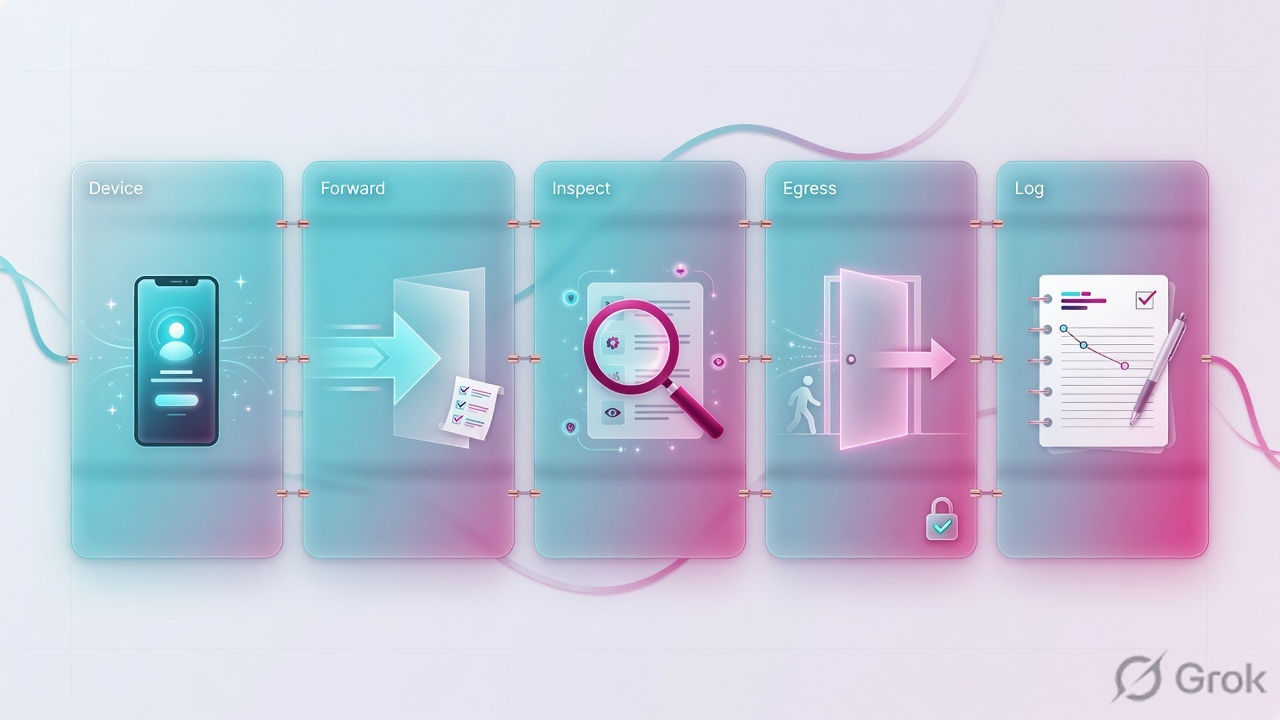
Diamond = decision. Wrong Location is decided at hop 4. Forgot-Activate dies at hop 6 with the old bundle. Nanolog never sits between 6 and 7.
On a managed laptop the usual hop list is:
- Device — Chrome (or any app) requests
github.com. - Forwarding — Zscaler Client Connector (Z-Tunnel 1.0 or 2.0), a PAC file, GRE, or IPSec sends the session toward ZIA. Lesson 3 is the method choice; this page only needs “traffic left the laptop toward a Service Edge.”
- Edge selection — advanced geo-IP aims at the nearest healthy Public Service Edge. A subcloud (if attached) shrinks that set. Private / Virtual Service Edges are the same software, different host.
- Identify — the PSE matches source IP / tunnel / ZCC enrollment to a Location or Sub-Location, then the user if authentication is required.
- SSL/TLS Inspection — if policy says inspect, the edge presents the Zscaler (or custom) intermediate CA and a short-lived server cert. Bypass still leaves metadata for later engines.
- SSMA — one parse, many engines, the activated policy bundle.
- Egress — on allow, the PSE opens its connection to the destination. The laptop never owns that socket.
- Log — a compressed, tokenized copy goes TLS to a Log Router, then Nanolog. Web Insights and NSS read Nanolog. This hop can lag or fail while the user is already reading the page.
Drawing Chrome → CA → GitHub or Chrome → Nanolog → PSE. The CA pushed earlier. Nanolog is a copy. Putting either inline is how juniors “reboot the CA” on a policy ticket.
4. How to choose the edge
Most tenants only ever use Public Service Edges. Reach for the other rows when residency, an air-gap, or a region with no nearby public DC is the actual constraint — not because “private sounds safer.”
| If this is true | Choose | Do not choose |
|---|---|---|
| Default internet / SaaS inspection. Users should follow geo-IP to the nearest Zscaler DC. | Public Service Edge — Zscaler-hosted, multi-tenant, same software everywhere. | A Private box “just in case.” Extra subscription, extra ops, no extra engines. |
| German (or other) traffic must be inspected only in a listed set of public DCs. Rest of the company can land anywhere. | Subcloud attached to that Location (or Department, if the tenant still offers it). Ask Zscaler to provision the subset if it is not already there. | A second tenant, or a Private Service Edge, unless the auditor forbids any public DC. |
| User traffic must not leave the building, but you still want ZIA engines and the same CA policy. | Private Service Edge — hardware form factor Zscaler uses in its own DCs, customer-hosted, single-tenant. Policy still comes from the CA. | Public PSE (leaves the premises). App Connector (that is ZPA). |
| Same local-inspection idea, but you want a VM in VMware / AWS / Azure / GCP. | Virtual Service Edge. Forward with GRE or ZCC. Official constraint: VSE does not terminate IPSec. | IPSec into that VSE. Build GRE or send users through Client Connector instead. |
| You need more GRE capacity on an existing VIP, not a new destination. | Stay on the VIP. MCLS lets Zscaler add clusters behind it. Check config.zscaler.com/<cloud>/cenr. | Rebuilding every GRE peer because “the DC is full.” |
| The whole numbered cloud is unreachable and you bought Business Continuity. | Business Continuity Cloud (Private Policy Cache + Private PAC). Supports Z-Tunnel 1.0, PAC, GRE. Z-Tunnel 2.0 is not supported in BC mode — clients fall back to 1.0. | Treating BC Cloud as “Z-Tunnel 2.0 continues.” That is a different outage story. |
Form factors and “traffic never leaves the Service Edge”: Understanding the Zscaler Cloud Architecture and Understanding Public Service Edges for Internet & SaaS. Subcloud: Understanding Subclouds. VSE / IPSec: Traffic Forwarding in ZIA reference architecture.
5. Runbook Side A → B → C
Architecture is useless if you cannot make the PSE name the branch. Side A is evidence. Side B is the object. Side C is Activate + proof. Primary source for the clicks: Configuring Locations and Configuring Sublocations.
Side A — identify the source (before you click Add)
-
Get the public IP the PSE will see
From a machine on the branch, open
https://ip.zscaler.com. Record Cloud, Service Edge, current Location, and the public IP. If Location already says the right name, stop — this is not a Location ticket. -
Decide how traffic arrives
GRE or IPSec: the Location binds to that tunnel (and you can carve Sub-Locations from inner IPs). PAC or explicit proxy: the public IP of the egress. ZCC roaming: there is no stable public IP — do not invent one; identity is the enrolled user, not a /32.
-
List the inner ranges that need different policy
Example: employees
192.168.0.0/16, guest Wi-Fi10.20.30.0/24, both behind203.0.113.10. That is one Location and two Sub-Locations — not two Locations with the same public IP.
Side B — ZIA objects (Location, then Sub-Location)
Official path (current Help): Infrastructure → Locations → Location Management → Legacy Locations → Add Location. Some tenants still show an older Administration tree. Trust the breadcrumb that ends in Add Location.
Infrastructure / Locations / Location Management / Legacy Locations / Add Location
Add Location
Next: Save, then do not close the laptop. The red badge on Activation is the real commit. Source: Configuring Locations. IP is RFC 5737 documentation space.
-
Add the Location
Name, country, time zone, IP addresses (or the GRE/IPSec binding). Turn Authentication Required on if this site must identify users. Turn X-Forwarded-For (XFF) Forwarding on if downstream apps or an on-prem proxy must still see the client IP. Attach a subcloud only if this site is not allowed to use the full public edge set.
-
Add Sub-Locations for inner ranges
Open the parent Location → Add Sub-Location. Give the guest SSID
10.20.30.0/24its own URL / bandwidth rules. Do not overlap ranges inside the same parent — Help forbids it. -
If this is an ISP swap, edit the existing Location
Do not create a second Location with the new /32. Edit IP Addresses on Pune-HQ (or Mumbai-HQ) to the new public IP. Two Locations with one public IP collide on PSE lookup.
Side C — Activate and prove
Activation / Activate pending configuration
Activate pending changes
Next: wait for status ACTIVE, then re-hit ip.zscaler.com from the branch. Source: Help Activation + partner guides “Go to Activation and click Activate.” Session-end can also auto-activate — do not rely on that in a change window.
-
Activation → Activate
API surface if you automate:
GET /statusthenPOST /status/activate. Enum you will see:ACTIVE/PENDING/INPROGRESS. Saving a Location is not the same as edges enforcing it. -
Prove on the user path
https://ip.zscaler.commust show the Location name you just saved, the expected cloud, and a Service Edge that is inside any attached subcloud. Then Analytics → Web Insights (some tenants still say Insights): filter user + last 15 minutes. You want Location, policy action, and a username if auth is on.
1. ip.zscaler.com
   Cloud:        zscalerthree.net          (example — use YOUR cloud)
   Location:     Mumbai-HQ                 (not Road Warrior / Unknown)
   Service Edge: a name inside the subcloud, if one is attached

2. Analytics → Web Insights
   User:         ada@example.com
   Location:     Mumbai-HQ
   URL:          github.com
   Action:       Allowed (or the rule you expected)
   SSL:          Inspected | Not Inspected — matches Policy → SSL/TLS Inspection

3. Internal app / SIEM (if XFF is on)
   X-Forwarded-For includes the client (e.g. 10.20.30.45), not only the PSE egress
6. Runtime after Activate
Once the Location is live, a weekday request does not walk the Admin tree. It walks the hop diagram. Keep this order in your head when the ticket says “it worked yesterday.”
- Forwarding still delivers the session to a Service Edge (ZCC connected, GRE up, PAC not bypassed).
- That edge is in the subcloud, if one is attached. A US user pinned to an EU-only subcloud will look “broken” even though ZIA is healthy.
- Source IP still matches the Location. Sunday ISP swaps fail here first.
- Activated policy is what SSMA evaluates — not the draft in your browser tab.
- SSL Inspection still trusts the intermediate CA on the device. A new laptop without the cert is an SSL ticket, not an architecture ticket.
- Nanolog / NSS can be minutes behind. Do not declare “ZIA dropped the session” because Insights is empty at T+30s.
Policy follows the user: if Ada leaves Mumbai-HQ and ZCC lands her on another Public Service Edge, that edge downloads the right bundle from the CA. You do not “steer her back to the Mumbai node” to make policy work.
7. Traps + proof

| Symptom | Likely miss | First proof |
|---|---|---|
| You saved a URL rule at 09:05. At 09:30 the old action still fires. | Change is still PENDING. You never clicked Activation → Activate. | Activation badge / GET /status. Then Insights after ACTIVE. |
ip.zscaler.com shows Location: Road Warrior after a circuit swap. | Location IP Addresses still has yesterday’s /32. PSE cannot match the source. | Compare the page’s public IP to the Location object. Edit, Activate, re-test. |
| Guest Wi-Fi and LAN get the same URL policy behind one public IP. | No Sub-Location (or overlapping inner ranges). You cannot create two Locations with that same public IP. | Sub-Location list on the parent. Test from each VLAN; Insights Location field must split. |
| German users land on a US Service Edge and the auditor is unhappy. | No subcloud, or the subcloud is attached to the wrong Location. | Edge name on ip.zscaler.com vs the subcloud’s allowed DC list (Help: Editing a Subcloud). |
| Internal Splunk shows one source IP — the PSE egress — for every employee. | XFF Forwarding off on the Location. NSS will not fix app logs that never received the header. | Enable XFF on the Location, Activate, confirm X-Forwarded-For on a test app. |
| Insights empty, users say “internet works.” | Log plane (Log Router / Nanolog / NSS), not the data plane. | ip.zscaler.com still shows an edge + Location. Fix logging separately. Do not reboot ZCC. |
| IPSec to a Virtual Service Edge never comes up. | Documented constraint: VSE does not terminate IPSec. | Rebuild as GRE or move those users to Client Connector. |
| BC event: Z-Tunnel 2.0 users fail open or look different. | Business Continuity Cloud supports Z-Tunnel 1.0, PAC, GRE — not 2.0. | Confirm BC design assumed a 1.0 fallback before the outage. |
- One branch user:
ip.zscaler.comLocation name matches the object you edited. - One guest-VLAN user: Insights shows the Sub-Location, not the parent only.
- Activation status is
ACTIVE, notPENDING. - If a subcloud is attached, the printed Service Edge is in that subset.
- Web Insights row exists for the test URL with the expected action and (if auth is on) a username.
- You did not put the CA or Nanolog on the live hop diagram when you explained it to the NOC.
Knowledge check
Six judgment items. Same tickets as the hop map. Check answers, read the reason, retry the weak ones.
Sources
- Understanding the Zscaler Cloud Architecture — CA, Public Service Edges, Nanolog, Feed Central, Log Routers, “traffic stays on the Service Edge.”
- Understanding Public Service Edges for Internet & SaaS — data-plane role, geo-IP, policy follows the user.
- Understanding Subclouds / About Subclouds — subset of PSEs, PAC
gateway.<subcloud>.<cloud>. - Configuring Locations — path Infrastructure → Locations → Location Management → Legacy Locations → Add Location; XFF.
- Configuring Sublocations / Understanding Sublocations — inner IPs in a tunnel; no overlap.
- ZIA Policy Leading Practices — SSMA, shared memory, parallel engines.
- Understanding Private Service Edge for Internet & SaaS and Private vs Virtual — hardware vs VM; VSE does not terminate IPSec.
- Understanding Zscaler Cloud Names — ZIA production clouds.
- Understanding Nanolog Streaming Service (NSS) — SIEM export from Nanolog.
- Understanding Multi-Cluster Load Sharing — VIP capacity,
config.zscaler.com/<cloud>/cenr. - Understanding Business Continuity Cloud Components — no Z-Tunnel 2.0 in BC mode.
- Choosing the CA Certificate for SSL/TLS Inspection — intermediate CA on the PSE.
- Activation: Help Activation API (
GET /status,POST /status/activate) and partner guides “Go to Activation and click Activate.”
Related: Batch 11 · Lesson 1 — foundation · Lesson 3 — traffic forwarding · Zscaler authentication · ZIA traffic flow · GRE & IPSec tunnels · ZPA architecture