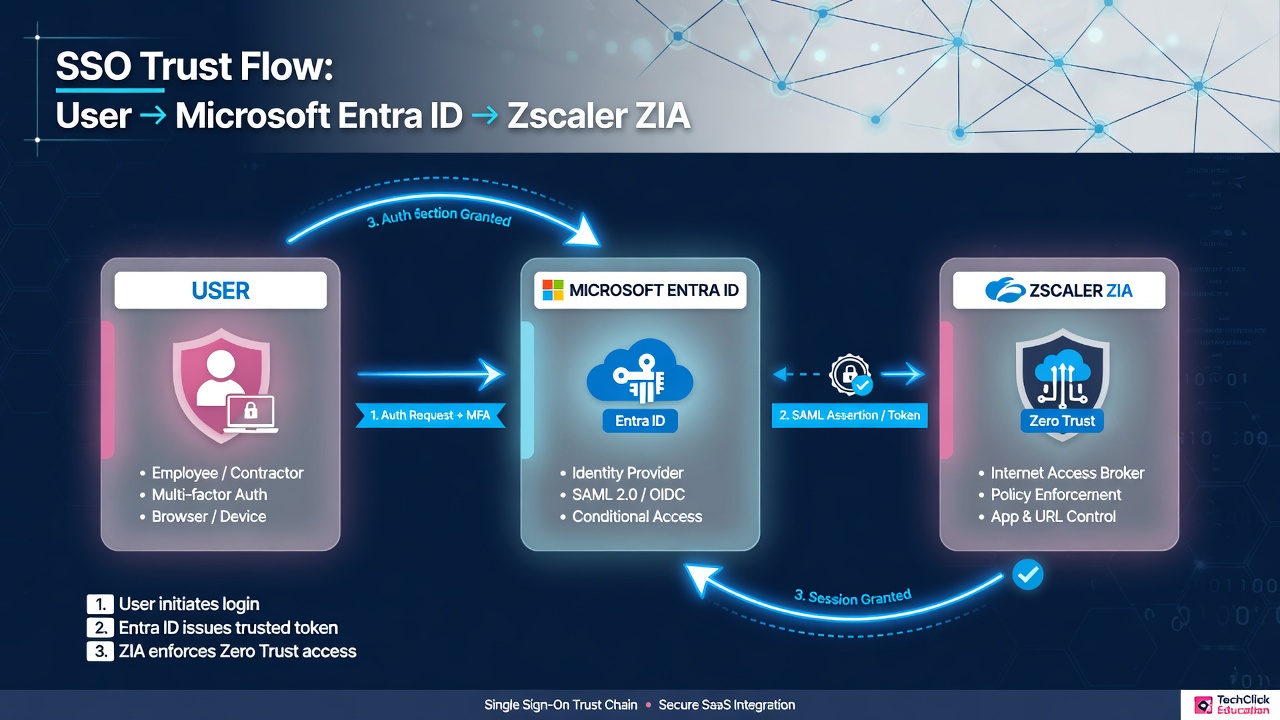
⚡ Quick answer (say this out loud)
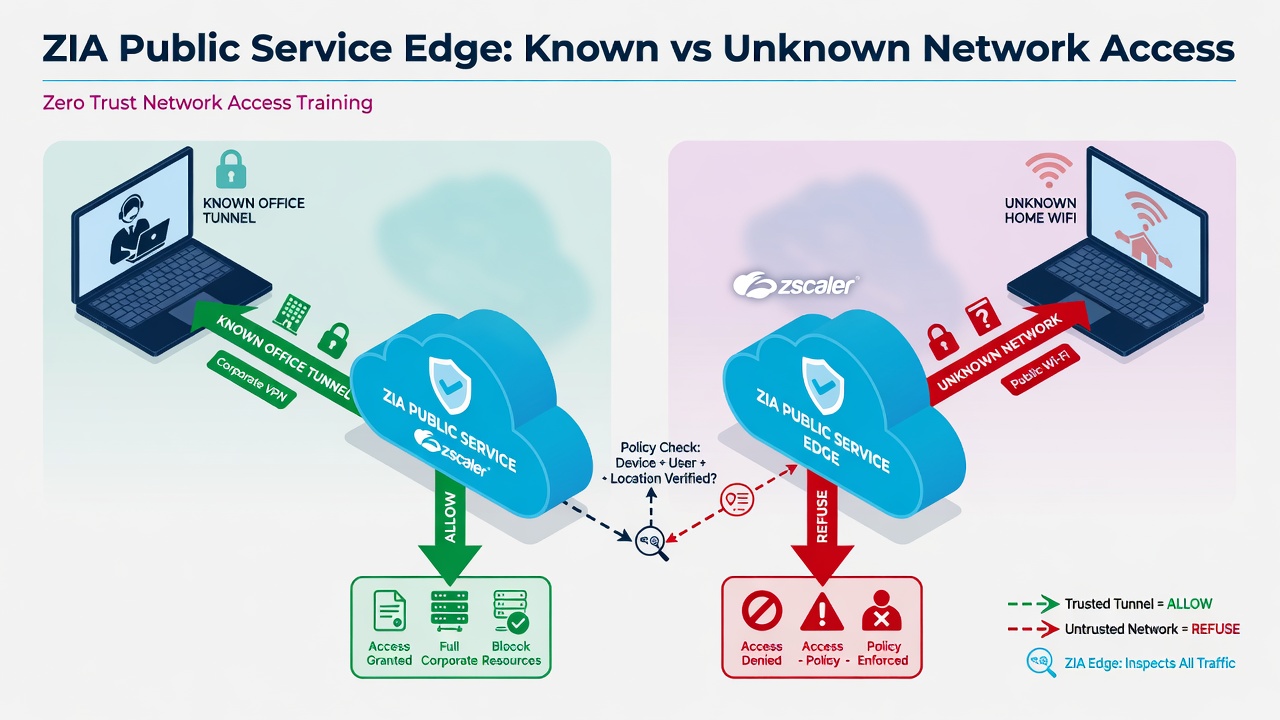
Zscaler authentication is two parts: first provision users (prefer SCIM from Entra), then authenticate with SAML when traffic hits a Public Service Edge. Known locations can fall back to location policy; unknown locations refuse if auth fails. For Azure: ZIA gallery app, Entity ID + ACS, PEM cert, Add IdP, SCIM Base URL + token, exempt Microsoft login hosts, assign users, prove with web logs that show the username.
1. Why identity matters
ZIA can block malware without knowing your name. It cannot fairly split Finance from Interns, write clean audit reports, or control SaaS by group unless the Public Service Edge knows who is on the wire.
Location-only policy is one door for everyone on a GRE/IPSec path — fast to deploy, blind in logs. User authentication is the production standard: email-format username on a registered domain, up to 128 groups, one department, secure cookie (or Kerberos ticket).
Auth frequency
Daily · Session · Custom (1–180 days) · Only once. Controls how often the cookie renews.
Force reauthentication
Invalidates cookies org-wide. Use after method changes or compromise — not at 10:00 Monday casually.
2. Mental model: provision → authenticate → policy
Most “SAML is broken” tickets are provisioning gaps. Memorize this order.
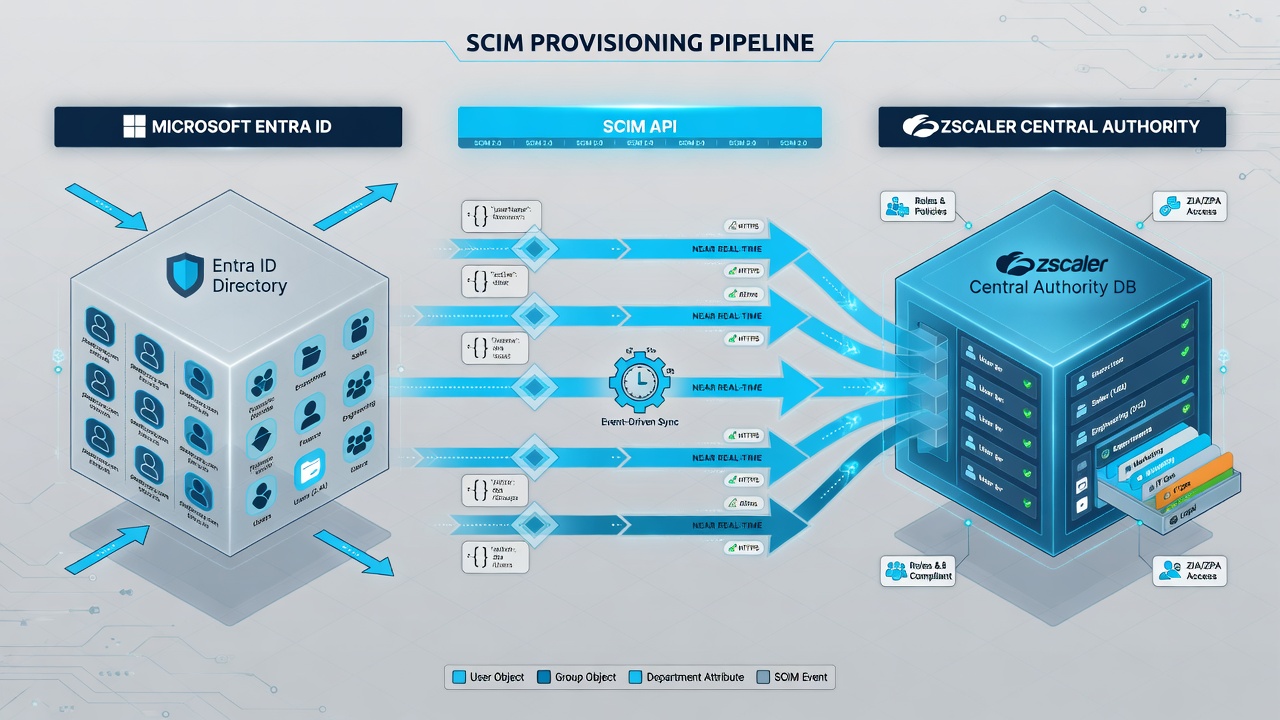
Entra login green, ZIA red? Open Administration → Users first. If the person is not provisioned, no SAML assertion can invent them (unless auto-provision is correctly enabled — SCIM is still preferred).
3. Decision flow at the Public Service Edge
Draw this on a whiteboard before you touch Admin Console.
4. How to choose methods
| Situation | Prefer | Notes |
|---|---|---|
| Normal enterprise with Entra/Okta | SCIM + SAML | Help Portal default modern design |
| Tiny lab / <~100 users | Hosted DB | CSV/manual; passwords in Zscaler |
| On-prem AD, no SAML yet | LDAP sync + BIND or ZAB | Passwords stay on-prem; ZAB if inbound blocked |
| Cookie-hostile apps | Kerberos | Needs PAC with FQDN; users pre-provisioned |
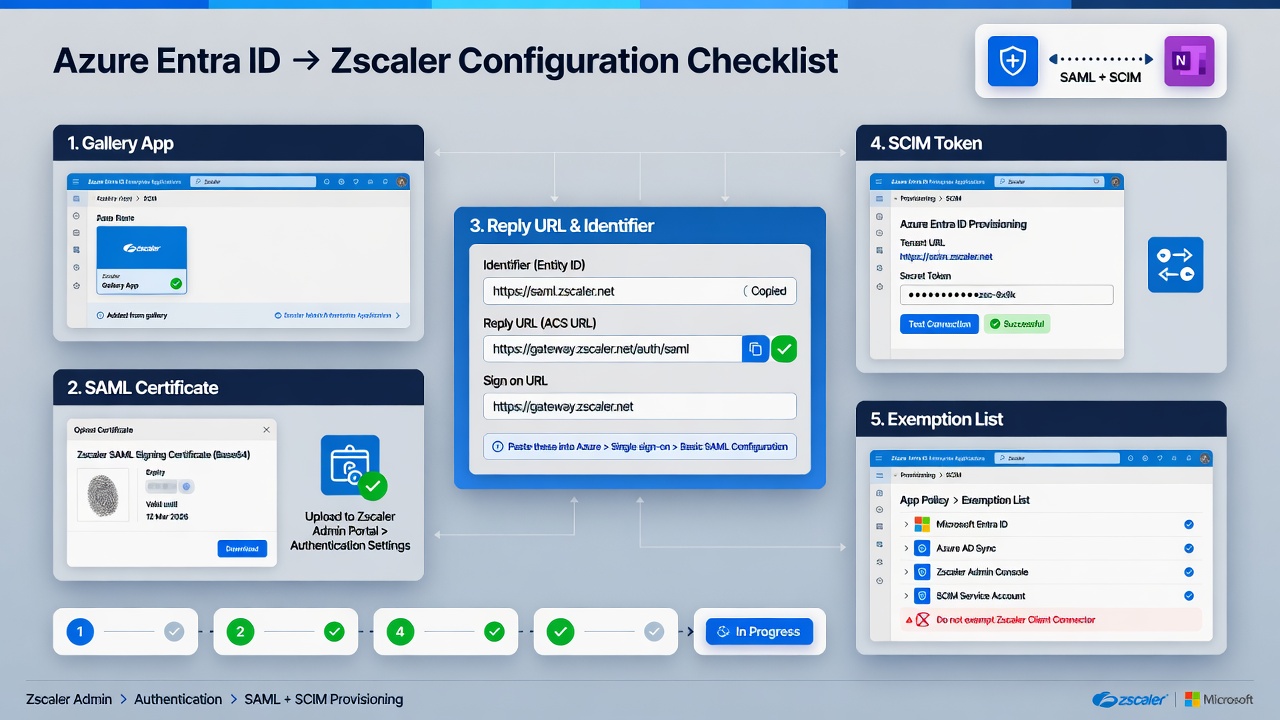
5. Entra ID onboarding runbook (production path)
Goal: Entra = IdP, Zscaler = SP, SCIM provisions, SAML authenticates.
Prerequisites
- Entra tenant (Premium recommended for SCIM/group features)
- Zscaler cloud name from your admin URL
- Admin on both sides
- Plan PAC/tunnel exemptions before forcing all web traffic through ZIA
Side A — Microsoft Entra admin center
Add Zscaler Internet Access from the gallery
Identity → Applications → Enterprise applications → New application. Search
zscaler internet access. Pick the app that matches your cloud name (example: ZSBeta app when admin is onadmin.zscalerbeta.net). Create it.Configure SAML
App → Single sign-on → SAML → Basic SAML Configuration:
- Identifier (Entity ID) — usually cloud name (e.g.
zscalerbeta.net). Multi-org same cloud → use org-specific entity ID from Zscaler IdP UI. - Reply URL (ACS) —
https://login.<ZscalerCloudName>:443/sfc_sso. Add IPv6 ACS if enabled:https://login6.<cloud>.net/sfc_sso. - Sign on URL — same as ACS. Relay State / Logout blank unless designed otherwise.
- Identifier (Entity ID) — usually cloud name (e.g.
Attributes & claims
- Group claim: Groups assigned to the application. Source = cloud display names, or
sAMAccountNamefor synced AD groups. - New claim: Name
Department(case sensitive), sourceuser.department. - NameID must map to the email-style username Zscaler expects.
- Group claim: Groups assigned to the application. Source = cloud display names, or
Certificate + Login URL
Download Certificate (Base64). Rename to a single-dot
.pem(exampleEntra.pem). Copy Login URL (optional seamless: append?whr=<domain>).
Side B — Zscaler Admin Console
Add IdP
Administration → Identity → Internet & SaaS → Internet Authentication Settings → Identity Providers → Add IdP.
- SAML Portal URL = Entra Login URL
- Login Name Attribute =
NameID - Upload
Entra.pem - Vendor = Microsoft Entra ID
- Map domains (and locations if this is not the only IdP)
Default Settings → Authentication Type = SAML
Set authentication frequency, Save & Activate.
Enable SCIM on that IdP
SCIM Provisioning = ON. SAML Auto-Provisioning = OFF when SCIM is used. Copy Base URL + Bearer Token. Save & Activate.
Side C — Entra provisioning + assign
Provisioning blade
Mode Automatic → paste Base URL + token → Test connection → Scope Sync only assigned users and groups → Status On → Save. Watch the first cycle.
Users and groups
Assign pilot groups to the enterprise app (required for group claims / meaningful SCIM scope).
- Wrong gallery cloud app
- Cert not single-dot
.pem - SCIM and SAML auto-provision both ON
- Nobody assigned to the app
- Department claim not exactly
Department
6. Runtime SAML + SCIM flows
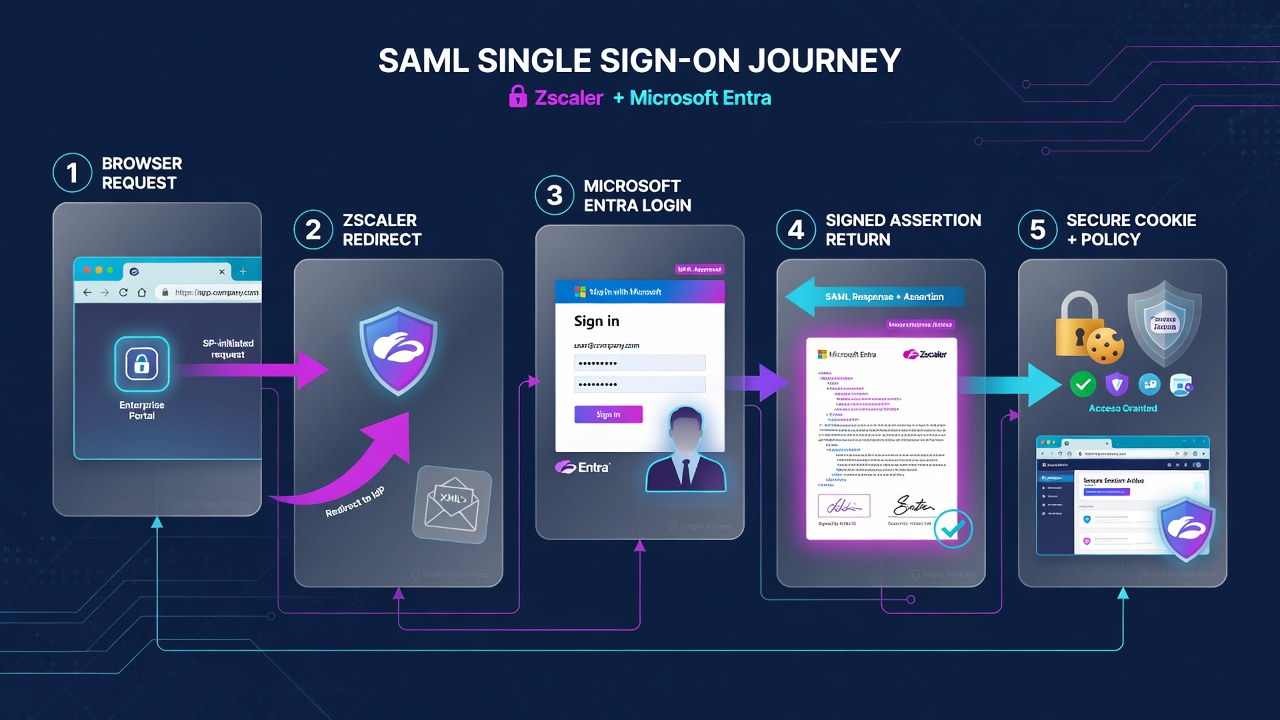
7. Exemptions, PAC, Surrogate IP, and proof
Unauthenticated browsers cannot complete SAML if Entra or ACS is forced through ZIA first.
Authentication Exemptions (known locations)
Policies → Common Configuration → Advanced → Advanced Settings → Authentication Exemptions — add at least:
login.windows.netlogin.microsoftonline.com.windowsazure.comaadcdn.msauth.netaadcdn.msftauth.net
Also exempt your cloud’s Zscaler login/ACS hosts.
if (shExpMatch(host, "login.windows.net") ||
    shExpMatch(host, "login.microsoftonline.com") ||
    shExpMatch(host, "*.windowsazure.com") ||
    shExpMatch(host, "aadcdn.msauth.net") ||
    shExpMatch(host, "aadcdn.msftauth.net"))
    return "DIRECT";
GRE/IPSec: send IdP destinations direct to internet at the edge router — do not hairpin SAML into the tunnel.
Surrogate IP: known location + XFF maps authenticated user to private IP for non-cookie/non-HTTP traffic. Optional enforce-for-known-browsers avoids multi-browser re-auth on one PC.
- Entra provisioning cycle healthy
- User visible in Zscaler Users with groups/department
- Pilot from known location: web log shows username
- Hotspot (unknown location) still completes SAML
- Allow/block matches user/group policy
- Entra sign-in log aligns with ZIA timestamps
| Symptom | Likely cause | First check |
|---|---|---|
| Redirect loop / blank auth | PAC/tunnel hairpin | Exemptions + DIRECT + ACS path |
| Entra OK, ZIA SAML error | PEM / NameID / Entity ID | Cert, NameID, cloud app match |
| Auth OK, wrong policy | Groups / SCIM lag | App assignment, SCIM logs, re-auth |
| Remote refused | Unknown loc + auth fail | Provisioned? Domain → IdP map? |
| Thick app ignores user policy | No Surrogate IP | Known loc + XFF + Surrogate IP |
Interview close: “Entra gallery ZIA app, SAML ACS and PEM trust, SCIM Base URL and bearer token, Microsoft login exemptions, pilot groups assigned, web logs prove the username.”
Quick check — 6 questions
Sources
- Zscaler Help — Configuring SAML / SAML & SCIM for Microsoft Entra ID
- Zscaler Help — Choosing Provisioning and Authentication Methods
- ZCCA-IA Authentication Student Guide 5.6
- Techclick Zscaler Authentication handout
Related: ZIA traffic flow · Zscaler interview hub